The offer came on a Friday afternoon. Technical Lead, Ecommerce Platform, Angular + .NET 10. By Monday morning I was in a room with a product owner, three backend developers who had never written a line of TypeScript, a mobile team building a companion app with the same .NET API, and a client who wanted the storefront live in four months.
That first week is what this series is about.
Not the polished version where everything is clean and every decision was obvious in hindsight. The real version — where you have to evaluate an entire stack quickly, make architectural bets with incomplete information, set up a team of people with different backgrounds to work on the same codebase, and somehow ship something good while you’re doing it.
This is the Angular Ecommerce Playbook — 11 parts covering everything from Angular 21 project structure to .NET 10 integration, from state management to CI/CD automation, from training .NET developers in Angular to the honest risk register you keep but never show to the client. By the end of the series, you’ll have the full technical picture for building a production ecommerce platform with the modern Angular + .NET 10 stack.
Part 1 is the foundation: understanding the stack, making the right architectural decisions early, and setting up your team to move fast without building the wrong thing.
The Stack in 2026
Before we write a single line of code, let’s be honest about what we’re working with.
Angular 21
Angular 21 is the best version of Angular that has ever existed. That’s not marketing — it reflects how much the framework has changed since Angular 2 through the lens of Signals, standalone components, and the new reactivity model. Angular 21 was released on November 20, 2025, following the same cadence as .NET 10 in the same month.
The features that matter for an ecommerce project:
Zoneless Change Detection — Default in Angular 21 Zone.js is gone. Angular 21 apps are generated without Zone.js by default. This isn’t experimental anymore — it graduated from developer preview in Angular 20.2 (August 2025) and became the default in Angular 21. The result: smaller bundles, faster change detection, and Angular DevTools that can actually show you which signal triggered a rerender.
Vitest as Default Test Runner Angular 21 ships with Vitest as the default test runner, replacing Karma/Jasmine. If you’ve been fighting Karma’s browser launcher and slow CI times, this is a genuine quality-of-life improvement. Tests run in Node via Vitest’s JSDOM environment, CI runs in seconds, not minutes.
Signals — Stable and Everywhere
The features that matter for an ecommerce project:
Signals (stable since Angular 17, mature in Angular 21)
The new default reactivity primitive. Replaces most RxJS usage for local and feature-level state. A signal() is synchronous, readable, writable, and computable. The framework knows exactly which components depend on which signals — no more ChangeDetectionStrategy.OnPush ceremony.
Signals — Stable and Everywhere
Signals became fully stable in Angular 20 (May 2025). By Angular 21, the full Signal API is stable: signal(), computed(), effect(), linkedSignal(), toSignal(), resource(). The Signal Forms API is still experimental in Angular 21, expected to stabilize in 2026.
// Angular 21 — this is the normal way to write state
import { signal, computed, resource } from '@angular/core';

const cartItems = signal<CartItem[]>([]);
const cartTotal = computed(() =>
  cartItems().reduce((sum, item) => sum + item.price * item.qty, 0)
);

// resource() for async data — stable in Angular 21
const products = resource({
  request: () => ({ category: selectedCategory() }),
  loader: ({ request }) => productService.getByCategory(request.category)
});

// Update triggers only what depends on cartItems
cartItems.update(items => [...items, newItem]);
Standalone components (default since Angular 19)
No more NgModule. Every component, directive, and pipe is standalone by default. This is significant for an ecommerce project because feature modules were the single biggest source of confusion for developers new to Angular.
Zoneless change detection (stable in Angular 21)
Angular no longer requires Zone.js to detect changes. With Signals-based reactivity and provideExperimentalZonelessChangeDetection(), the framework updates only what changed. For a product listing page with hundreds of items, this is a meaningful performance win.
Route-level rendering (Angular 21) Each route can independently choose between server-side rendering (SSR), static site generation (SSG), or client-side rendering (CSR). Your product detail page gets SSR for SEO. Your order management dashboard gets CSR because it’s behind auth and SEO doesn’t matter.
Angular Aria (Developer Preview in Angular 21) A new library of headless, accessible UI components. For ecommerce — where accessibility compliance (WCAG 2.2) is increasingly a legal requirement — Angular Aria provides accessible product cards, modals, and forms without fighting third-party component library accessibility bugs.
AI-First Tooling (Angular 21) Angular CLI 21 integrates with AI tools through an MCP (Model Context Protocol) server. This means GitHub Copilot can use the Angular MCP server for component generation with full context about your project’s structure. We’ll use this in Part 8.
.NET 10
The backend is .NET 10 with Clean Architecture. .NET 10 was released alongside Angular 21 in November 2025 and is an LTS release (support until November 2028). The latest patch is 10.0.3 (released February 10, 2026). The existing series on this blog covers the full architecture in detail. What matters for the Angular integration:
- Minimal APIs — lean endpoint definitions, no controller bloat
- OpenAPI 3.1 — built-in support (no Swashbuckle needed in .NET 10) means we auto-generate TypeScript API clients
- Problem Details (RFC 9457) — standardized error responses that Angular interceptors parse
- SignalR — for real-time inventory updates and order status push
- EF Core 10 — dynamic compiled queries,
LeftJoin/RightJoinLINQ operators, vector search - C# 14 — primary constructors,
fieldkeyword, extension members
GitHub Copilot
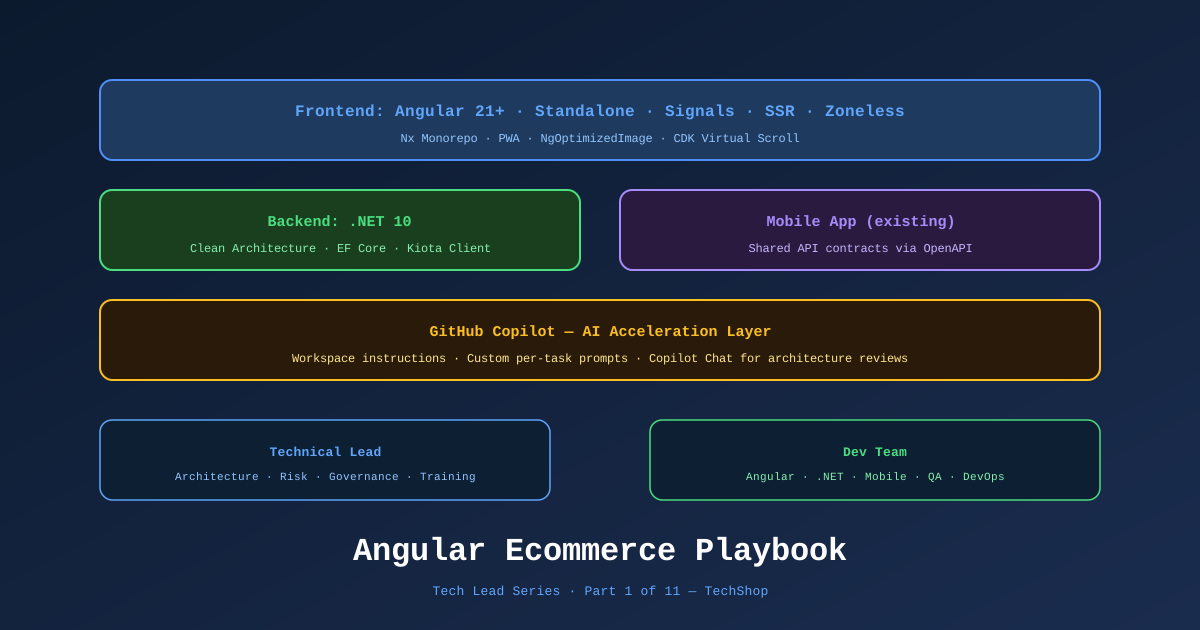
The client is using GitHub Copilot for the whole team — frontend, backend, and mobile. This is the right call for a team with mixed Angular experience. Part 8 dives deep into Copilot workflows, but the first-day setup matters: install the extension, configure workspace instructions, and give every developer the same .github/copilot-instructions.md file so Copilot generates code that fits your project’s patterns.
Architecture Diagram
You can open and edit the full interactive architecture diagram for this series:
📊 Download: TechShop Architecture Overview (draw.io)
Open it at app.diagrams.net or in the draw.io VS Code extension to get the fully editable diagram. Each post in this series includes its own draw.io diagram for that layer.
The Architecture Decision: Full Angular vs. Micro-Frontend vs. Hybrid
The first real decision a Tech Lead faces on a new Angular project isn’t which state management library to use. It’s the deployment model.
For an ecommerce platform, three options are on the table:
Option A: Full Angular SPA
One Angular application handles everything — storefront, product catalog, checkout, order management, admin portal. Simple deployment, one build pipeline, one codebase.
Option B: Angular Micro-Frontends
Multiple independent Angular applications composed at runtime using Module Federation (Webpack) or Native Federation (ESBuild). Each team owns a vertical slice.
Option C: Angular SSR Storefront + Angular SPA Admin
Two Angular applications sharing a component library. The public storefront gets SSR for Core Web Vitals and SEO. The B2B admin portal is a traditional SPA.
For most ecommerce projects with a team of 5-10 developers and a single domain, Option A is the right starting point. Here’s why micro-frontends are tempting but usually wrong:
- You need independent deployments per team. If one team deploys the checkout and another deploys the product catalog in the same sprint, the coordination overhead is lower than the micro-frontend infrastructure cost.
- Most ecommerce teams don’t hit the scale where micro-frontends pay off until they have 15+ developers.
- Shared state (cart, user session, search) becomes genuinely hard across micro-frontend boundaries.
We went with Option A with route-level SSR — a single Angular 21 application that uses Angular’s per-route rendering configuration. The product listing and product detail routes are server-rendered for SEO. The checkout and account routes are client-rendered for speed. Part 7 covers this in detail.
The Architecture Decision Record
Every significant decision gets an ADR. Not because we love documentation, but because when a new developer joins in month three and asks “why didn’t we use Module Federation?”, the answer is in the repo, not trapped in someone’s memory.
Here’s the ADR template we use:
# ADR-001: Single Angular Application with Route-Level SSR

**Date**: 2026-02-23
**Status**: Accepted
**Deciders**: Tech Lead, Product Owner

## Context
We need to decide the deployment model for the Angular frontend of the TechShop
ecommerce platform. The team has 6 developers (3 Angular, 3 .NET transitioning to Angular).
The platform serves both public shoppers (SEO-sensitive) and B2B admins (no SEO requirement).

## Decision
Single Angular 21 application with route-level SSR configuration:
- Public storefront routes: SSR mode
- Admin and account routes: CSR mode

## Consequences
**Positive:**
- Single deployment pipeline
- Shared state (cart, auth) without cross-app communication overhead
- Smaller operational surface area

**Negative:**
- All teams work in one repository — requires branch/PR discipline
- SSR adds Node.js server requirement (addressed by Azure Container Apps)

**Rejected alternatives:**
- Micro-frontends: premature for a 6-person team
- Pure SPA: unacceptable Core Web Vitals on product listing pages
File this in docs/adr/ADR-001-angular-deployment-model.md and link it from the README. When the client asks “why isn’t the admin dashboard server-rendered?”, you have an answer. When a new developer proposes switching to micro-frontends, they read the ADR first.
The .NET 10 + Angular Integration Model
The backend team owns the .NET 10 API. The frontend team consumes it. The key question: how does TypeScript know what the API returns?
The answer is OpenAPI code generation, and setting it up in week one saves weeks of debugging in month three.
Here’s the flow:
.NET 10 Minimal API
    ↓ generates
OpenAPI 3.1 spec (swagger.json)
    ↓ consumed by
Kiota (Microsoft's OpenAPI client generator)
    ↓ generates
TypeScript API client with full type safety
    ↓ used by
Angular services
We’ll cover the full setup in Part 4. For now, accept this as a principle: never write Angular service code that assumes what the API returns. Generate it. The moment you write a manual interface that drifts from the actual response, you’ve introduced a class of bugs that are invisible until runtime.
// ❌ Never do this — manually maintained, will drift
export interface Product {
  id: string;
  name: string;
  price: number;
  // ... does this match the API? You don't know.
}

// ✅ Do this — auto-generated from /swagger/v1/swagger.json
// Generated by Kiota — do not edit manually
import { Product } from '@api/models/product';
The Team Structure
Six developers. Three familiar with Angular, three coming from .NET. One mobile team sharing the .NET API. This is the specific team structure this series is written for.
The organizational model that worked:
| Role | Responsibility |
|---|---|
| Tech Lead (you) | Architecture, code review, unblocking, ADR decisions |
| Angular Dev 1 | Storefront features (product catalog, search) |
| Angular Dev 2 | Checkout, payments, order management |
| Angular Dev 3 | Admin portal, reporting |
| .NET Dev 1 | Domain + Application layer, MediatR handlers |
| .NET Dev 2 | Infrastructure (EF Core, repositories), DevOps |
| .NET Dev 3 | Auth, integrations (payment gateway, email) |
The three .NET developers will contribute Angular code within 4-6 weeks. Part 3 covers the training curriculum. The key insight: don’t assign .NET devs to Angular tasks in week one. Let them read code, ask questions, and pair with Angular devs for two weeks before taking their first Angular story independently.
GitHub Copilot: Day One Setup
With Copilot enabled for the team, the single most impactful first step is a shared instruction file. Without it, Copilot generates generic Angular code that doesn’t match your project’s patterns — NgModules when you’re standalone, class-based services when you’re using inject(), imperative RxJS when you’re using Signals.
Create .github/copilot-instructions.md in the repository root:
# GitHub Copilot Instructions — TechShop Angular + .NET 10

## Angular Frontend Rules
- Use standalone components (no NgModule)
- Use Angular Signals for state — avoid RxJS `BehaviorSubject` for new code
- Use `inject()` instead of constructor injection
- Use `@defer` for lazy loading template sections
- All HTTP calls go through generated Kiota API client, not raw HttpClient
- Prefix signals with the data they represent: `products = signal<Product[]>([])`
- Use `computed()` for derived state, never re-derive in template expressions

## .NET 10 Backend Rules
- Minimal APIs only — no controllers
- CQRS with MediatR: one command/query per file
- Use primary constructors in C# 13+
- Domain events for side effects — no direct service calls in handlers
- Problem Details (RFC 9457) for all error responses

## Testing Rules
- Angular: Jest + Angular Testing Library (no TestBed harness for simple components)
- .NET: xUnit + Testcontainers for integration tests
- E2E: Playwright, tests live in `/e2e` directory

## Naming Conventions
- Angular: kebab-case files, PascalCase classes, camelCase signals
- TypeScript interfaces: PascalCase, no `I` prefix
- API routes: `/api/v1/{resource}` plural

This project uses pnpm for package management.
The impact is immediate. Copilot suggestions align with your stack. .NET developers getting their first Copilot-assisted Angular task get suggestions that actually look like your codebase.
Honest Strengths and Weaknesses
A Tech Lead who only sells strengths is a liability. Here is the honest assessment of Angular 21 + .NET 10 for an ecommerce project.
Strengths
Type safety end-to-end
TypeScript on the frontend, C# on the backend, with generated API clients bridging them. If the backend changes a response type, the frontend build fails. This is the best kind of error — caught before deployment, not discovered by a customer.
Angular’s opinion on structure
Where React gives you maximum flexibility (and maximum opportunity to paint yourself into a corner), Angular gives you conventions. For a mixed-experience team, conventions are a productivity multiplier. Everyone writes components the same way. Code reviews catch logic issues, not structural debates.
Signals + Zoneless = serious performance
Angular 21 with zoneless change detection and Signals renders only what changed. On a product listing page with 48 items, adding one item to the cart used to trigger change detection on all 48 item components. With Signals, only the cart component rerenders.
Signals + OnPush pattern is the default, not the exception
.NET 10 Minimal APIs + OpenAPI
The backend + codegen story is mature. One dotnet run generates the TypeScript types your Angular app needs. New API endpoint? TypeScript client updates in CI. Wrong type? TypeScript compiler tells you before the PR merges.
Weaknesses
Angular’s learning curve is real
A .NET developer picking up Angular for the first time will struggle with: the module system (even standalone has mental overhead), RxJS (still required for HTTP), and the difference between Signals and Observables. Budget 4-6 weeks of mentorship, not 4-6 hours.
SSR complexity in Angular
Angular SSR has improved enormously, but it’s not Next.js. Hydration mismatches are harder to debug than in React. Platform-specific code (browser APIs like localStorage, window) needs careful isPlatformBrowser guards. Part 7 covers all the landmines.
Bundle size compared to lighter alternatives
An Angular 21 application with SSR and the standard ecommerce feature set ships around 180-250KB of JavaScript (gzipped). This is acceptable for an ecommerce site but not exceptional. Aggressive code splitting and lazy loading (Part 2) keeps it reasonable.
NgRx complexity
If you add NgRx before you need it, you’ll spend more time managing state machinery than shipping features. The right call for most ecommerce teams: start with Signals and injectable services, add NgRx Signals Store only when you have genuinely complex shared state that services can’t manage cleanly (Part 6).
The upgrade cadence
Angular ships a major version every 6 months. Angular 21 in February 2026 means Angular 22 in August 2026. The Angular team provides ng update migration schematic, which handles 90% of the work automatically. But for a business client, a major version bump every 6 months is a conversation you need to have. Plan for it in the project timeline.
The Risk Register
Keep this document. Share it with the client if relevant, but maintain it regardless. These are the risks for an Angular 21 + .NET 10 ecommerce build.
| Risk | Probability | Impact | Mitigation |
|---|---|---|---|
| .NET devs struggle with Angular → delayed stories | High | Medium | 4-week training curriculum before independent Angular work |
| Angular SSR hydration bugs block storefront launch | Medium | High | Build SSR-aware from day one; use TransferState for server data |
| Generated API client out of sync with actual API | Medium | High | Run codegen in CI as part of the build; fail build on diff |
| Angular version upgrade breaking changes | Low | Medium | Track Angular changelog; use ng update in a dedicated maintenance sprint |
| Performance regression as product catalog grows | Medium | Medium | Lighthouse CI in the pipeline; virtualize long lists from the start |
| Cart state lost on SSR page navigation | High | High | Centralize cart in a server-safe injectable service; teach team the rules |
What’s Next
We have the stack, the architectural decision, the team model, and the honest risk picture. Now we need to actually build it.
In Part 2, we set up the Angular 21 project from scratch — the folder structure, ESLint rules, the shared component library approach, and the Nx monorepo decision (with a clear argument for when you don’t actually need Nx). We’ll also wire up the Kiota client generator so every developer has live TypeScript types from day one.
The project we’ll build throughout this series is TechShop — a B2C + B2B ecommerce platform selling electronics. It’s complex enough to demonstrate every pattern in the series without being so domain-specific that the patterns don’t transfer to your project.
References
- Angular 21 Release Blog — angular.dev
- Angular 21 What’s New — InfoQ
- Zoneless Angular Stable — angular.dev
- Angular Signals API Reference — angular.dev
- .NET 10 Released — Microsoft
- .NET 10.0.3 Patch — Microsoft
- ASP.NET Core 10 — Built-in OpenAPI
- EF Core 10 What’s New
- GitHub Copilot Workspace Setup
- Kiota — Microsoft OpenAPI Client Generator
- Angular 2026 Roadmap — angular.dev
- Draw.io Diagram: Series Architecture Overview
This is Part 1 of 11 in the Angular Ecommerce Playbook series. The series follows the development of TechShop, a production Angular 21 + .NET 10 ecommerce platform, written from the perspective of a Technical Lead.
Series outline:
- Tech Lead’s First Week — Stack, decisions, ADRs, GitHub Copilot setup (this post)
- Angular 21 Project Setup — Clean Architecture on the frontend, Nx, ESLint
- Training .NET Devs in Angular — Core concepts, DI mapping, Signals vs. RxJS
- Angular + .NET 10 Integration — OpenAPI codegen, JWT auth, interceptors
- Ecommerce Domain Features — Product catalog, cart, orders, SignalR
- State Management — Signals vs. NgRx Signals vs. injectable services
- Angular SSR Storefront — Server-side rendering, hydration, route strategies
- GitHub Copilot Workflow — Prompting patterns, team acceleration
- Testing Strategy — Jest, Angular Testing Library, Playwright E2E
- CI/CD & Automation — GitHub Actions, Docker, Azure deployment
- Tech Lead Playbook — Risk register, governance, 90-day dev roadmap