The worst time to decide your Angular project structure is after you’ve written your first ten components. By then you have emotional attachment to the wrong decisions, and the refactoring cost is real. The best time is day one, before a single line of business logic exists.
This is Part 2 of the Angular Ecommerce Playbook. We’re building TechShop — a B2C + B2B ecommerce platform using Angular 21 and .NET 10. In Part 1 we made the architecture decisions. Now we set the project up correctly.
Everything we configure today — folder structure, linting, API client generation — is infrastructure that pays dividends for the next six months. Get it wrong now and you pay the tax in every sprint.
The Nx Decision
For an ecommerce project with 6+ developers, I recommend Nx for two reasons:
- Incremental builds and tests — Nx tracks which libraries have changed and runs only the affected tests. On a project with 30+ libraries, this cuts CI time from 12 minutes to 2 minutes.
- Enforced import boundaries — You can declare that
catalog/feature-product-listcan import fromshared/uiandshared/api-client, but not fromcart/data-access. Nx enforces this with lint rules. No more accidental cross-feature dependencies.
If your team is 3 people building a relatively simple storefront, a standard Angular workspace is fine. Nx adds tooling overhead that isn’t worth it below a certain threshold. The decision point: will you have more than 5 feature areas that share code? If yes, Nx.
For TechShop, we go with Nx.
# Requires Node 22+ (LTS as of Feb 2026)
npx create-nx-workspace@latest techshop \
  --preset=angular-monorepo \
  --appName=shell \
  --style=scss \
  --nxCloud=skip \
  --packageManager=pnpm
Why pnpm? Faster installs, strict peer dependency resolution, and disk-efficient. Angular 21 works perfectly with pnpm. The Nx team recommends it.
The Folder Structure
Angular 21 dropped NgModules as default. This changes how you think about structure. Without NgModules, the “module = folder” mental model breaks down. The right model now is feature = library (in Nx terms) or feature = folder (in standard Angular terms).
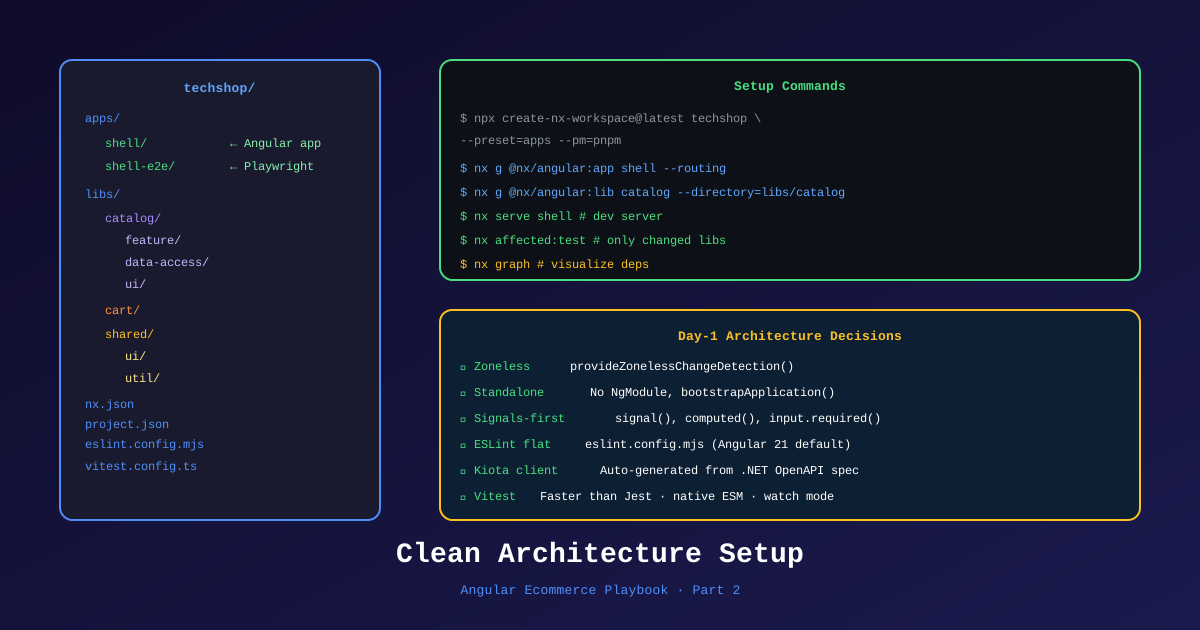
Here’s the structure we use for TechShop:
techshop/
├── apps/
│   ├── shell/                          # Angular 21 app shell
│   │   ├── src/
│   │   │   ├── app/
│   │   │   │   ├── app.config.ts       # Zoneless + providers
│   │   │   │   ├── app.routes.ts       # Lazy routes to feature libs
│   │   │   │   └── app.component.ts    # Root shell (header, footer)
│   │   │   └── main.ts
│   │   └── project.json
│   └── shell-e2e/                      # Playwright E2E tests
├── libs/
│   ├── catalog/
│   │   ├── feature-product-list/       # Product listing page
│   │   ├── feature-product-detail/     # Product detail + SSR
│   │   └── data-access/               # product signal store + API calls
│   ├── cart/
│   │   ├── feature-cart/              # Cart drawer component
│   │   ├── feature-checkout/          # Multi-step checkout
│   │   └── data-access/               # cart signal store
│   ├── orders/
│   │   ├── feature-order-list/
│   │   ├── feature-order-detail/
│   │   └── data-access/
│   ├── account/
│   │   ├── feature-profile/
│   │   ├── feature-address-book/
│   │   └── data-access/
│   └── shared/
│       ├── ui/                        # Button, Card, Modal, Table
│       ├── api-client/               # Kiota-generated — DO NOT EDIT
│       ├── auth/                      # JWT interceptor, auth guard, auth signal
│       └── util/                     # Pure functions, pipes, validators
├── .github/
│   ├── copilot-instructions.md
│   └── workflows/
├── eslint.config.mjs
├── nx.json
├── tsconfig.base.json
└── pnpm-lock.yaml
📊 Download: Project Structure Diagram (draw.io)
The Architecture Analogy
If you’re coming from .NET Clean Architecture (and three of our developers are), the mapping is:
| .NET Layer | Angular Equivalent |
|---|---|
| Domain | libs/*/data-access/ models (TypeScript interfaces) |
| Application | libs/*/data-access/ signal stores + services |
| Infrastructure | libs/shared/api-client/ (Kiota generated) |
| Presentation | libs/*/feature-*/ (components and routes) |
| Composition Root | apps/shell/ (app.config.ts) |
This is a useful mental model for the .NET developers transitioning to Angular. They already understand why you separate concerns. The folder structure just looks different.
Setting Up Angular 21
# Navigate into the generated workspace
cd techshop

# Generate the API client library (empty for now — we'll fill it in Part 4)
nx g @nx/angular:library shared-api-client \
  --directory=libs/shared/api-client \
  --standalone \
  --no-module

# Generate the shared UI library
nx g @nx/angular:library shared-ui \
  --directory=libs/shared/ui \
  --standalone

# Generate the first feature library
nx g @nx/angular:library catalog-feature-product-list \
  --directory=libs/catalog/feature-product-list \
  --standalone --routing
app.config.ts — Zoneless and Providers
Angular 21 generates zoneless apps by default. Here’s what our app.config.ts looks like:
// apps/shell/src/app/app.config.ts
import { ApplicationConfig, provideZonelessChangeDetection } from '@angular/core';
import { provideRouter, withComponentInputBinding, withViewTransitions } from '@angular/router';
import { provideHttpClient, withFetch, withInterceptors } from '@angular/common/http';
import { provideClientHydration, withEventReplay } from '@angular/platform-browser';
import { routes } from './app.routes';
import { authInterceptor } from '@techshop/shared/auth';
import { errorInterceptor } from '@techshop/shared/auth';

export const appConfig: ApplicationConfig = {
  providers: [
    provideZonelessChangeDetection(),           // Angular 21 default
    provideRouter(
      routes,
      withComponentInputBinding(),              // Route params as component inputs
      withViewTransitions()                     // Smooth SSR → CSR transitions
    ),
    provideHttpClient(
      withFetch(),                             // Fetch API instead of XHR
      withInterceptors([authInterceptor, errorInterceptor])
    ),
    provideClientHydration(withEventReplay()), // SSR hydration + event replay
  ],
};
withEventReplay()— This was experimental in Angular 19 and is stable in Angular 21. It captures user interactions (clicks, form input) that happen before hydration completes and replays them automatically. On a slow connection, the user clicking “Add to Cart” before hydration now works correctly.
app.routes.ts — Lazy Loading Every Feature
// apps/shell/src/app/app.routes.ts
import { Routes } from '@angular/router';
import { authGuard } from '@techshop/shared/auth';

export const routes: Routes = [
  {
    path: '',
    loadComponent: () =>
      import('@techshop/catalog/feature-product-list').then(m => m.ProductListComponent),
  },
  {
    path: 'products/:slug',
    loadComponent: () =>
      import('@techshop/catalog/feature-product-detail').then(m => m.ProductDetailComponent),
    // renderMode configured per-route in app.config.server.ts (Part 7)
  },
  {
    path: 'cart',
    loadComponent: () =>
      import('@techshop/cart/feature-cart').then(m => m.CartComponent),
  },
  {
    path: 'checkout',
    canActivate: [authGuard],
    loadChildren: () =>
      import('@techshop/cart/feature-checkout').then(m => m.checkoutRoutes),
  },
  {
    path: 'account',
    canActivate: [authGuard],
    loadChildren: () =>
      import('@techshop/account').then(m => m.accountRoutes),
  },
];
Every route is lazy-loaded. The shell bundle ships zero feature code. On a fast connection, the catalog loads before the user notices. On a slow connection, Angular’s @defer handles below-the-fold content.
ESLint Flat Config for Angular 21
Angular 21 uses ESLint’s new flat config format (eslint.config.mjs). Here’s a configuration that enforces Angular best practices and catches common mistakes:
// eslint.config.mjs
import angular from 'angular-eslint';
import tsEslint from 'typescript-eslint';
import nxPlugin from '@nx/eslint-plugin';

export default tsEslint.config(
  {
    files: ['**/*.ts'],
    extends: [
      ...tsEslint.configs.recommendedTypeChecked,
      ...angular.configs.tsRecommended,
    ],
    rules: {
      // Enforce Signal patterns
      '@angular-eslint/prefer-signals': 'error',
      // No NgModule allowed — this is an Angular 21 standalone project
      '@angular-eslint/no-pipe-impure': 'error',
      // Enforce OnPush (redundant with zoneless but good signal)
      '@angular-eslint/prefer-on-push-component-change-detection': 'warn',
      // Nx boundary enforcement
      '@nx/enforce-module-boundaries': ['error', {
        depConstraints: [
          {
            sourceTag: 'scope:feature',
            onlyDependOnLibsWithTags: ['scope:data-access', 'scope:ui', 'scope:util'],
          },
          {
            sourceTag: 'scope:data-access',
            onlyDependOnLibsWithTags: ['scope:util', 'scope:api-client'],
          },
          {
            // shared/api-client cannot depend on any other lib
            sourceTag: 'type:api-client',
            onlyDependOnLibsWithTags: [],
          },
        ],
      }],
    },
  },
  {
    files: ['**/*.html'],
    extends: [...angular.configs.templateRecommended],
    rules: {
      '@angular-eslint/template/prefer-control-flow': 'error',  // @if not *ngIf
    },
  }
);
The @nx/enforce-module-boundaries rule is the enforcement layer for our architecture. Feature libs can’t import from other feature libs. Data-access libs can’t import from UI libs. This is compile-time enforced architecture — the same principle as .NET’s separate project references.
Vitest Configuration
Angular 21 generates Vitest config by default. Here’s what our customized config looks like:
// vitest.config.ts (root — shared config)
import { defineConfig } from 'vitest/config';

export default defineConfig({
  test: {
    globals: true,
    environment: 'jsdom',
    setupFiles: ['src/test-setup.ts'],
    coverage: {
      reporter: ['text', 'lcov'],
      thresholds: {
        statements: 80,
        branches: 80,
      },
    },
  },
});
// src/test-setup.ts
import '@testing-library/jest-dom';
import { getTestBed } from '@angular/core/testing';
import {
BrowserDynamicTestingModule,
platformBrowserDynamicTesting,
} from '@angular/platform-browser-dynamic/testing';
getTestBed().initTestEnvironment(
BrowserDynamicTestingModule,
platformBrowserDynamicTesting(),
);Running tests: nx test catalog-feature-product-list. Running all affected tests: nx affected --target=test.
The Kiota API Client Setup
This is the step that saves weeks of debugging. We generate TypeScript types from the .NET 10 API’s OpenAPI 3.1 spec automatically.
# Install Kiota CLI
pnpm add -g @microsoft/kiota

# Generate client (run this every time the API changes)
kiota generate \
  --openapi http://localhost:5000/swagger/v1/swagger.json \
  --language typescript \
  --class-name TechShopApiClient \
  --output libs/shared/api-client/src/lib \
  --clean-output
The generated client lives in libs/shared/api-client. We tag this library in project.json with "type:api-client" so the ESLint boundary rule knows it’s special — nothing depends on it except data-access libraries.
The generated TechShopApiClient is injected via Angular’s DI:
// libs/shared/api-client/src/lib/api-client.provider.ts
import { Provider } from '@angular/core';
import { FetchRequestAdapter } from '@microsoft/kiota-http-fetchlibrary';
import { TechShopApiClient } from './generated/techShopApiClient';

export function provideApiClient(baseUrl: string): Provider[] {
  return [
    {
      provide: TechShopApiClient,
      useFactory: () => {
        const adapter = new FetchRequestAdapter(/* auth provider */);
        adapter.baseUrl = baseUrl;
        return new TechShopApiClient(adapter);
      },
    },
  ];
}
In app.config.ts:
providers: [
  provideApiClient(environment.apiBaseUrl),
  // ...rest of providers
]
In apps/shell/src/app/app.config.ts, you inject TechShopApiClient anywhere in the application. The .NET 10 API returns a Product type; the TypeScript client has the identical Product interface. They can’t drift — each CI run regenerates and type-checks.
Git Hooks and Commit Standards
pnpm add -D husky lint-staged @commitlint/config-conventional @commitlint/cli
npx husky init.husky/pre-commit:
#!/bin/sh
npx lint-staged.husky/commit-msg:
#!/bin/sh
npx commitlint --edit $1commitlint.config.js:
export default {
  extends: ['@commitlint/config-conventional'],
  rules: {
    'scope-enum': [2, 'always', [
      'catalog', 'cart', 'orders', 'account', 'shared', 'auth', 'shell', 'cicd', 'deps'
    ]],
  },
};
Now every commit message follows feat(catalog): add product filtering by price range. Conventional commits feed into automated changelogs and semantic versioning in CI.
What’s Next
We have the project scaffolded, the linting configured, the API client wired up, and the commit conventions in place. Three .NET developers are about to write their first Angular code.
That’s the topic of Part 3: training backend .NET developers in Angular 21. Not the official tutorial path — a specifically designed curriculum for people who already understand DI, interfaces, and clean separation of concerns, but who need to remap those mental models to Angular’s version of them.
References
- Nx Angular Monorepo Setup
- Angular 21 Zoneless — Official Docs
- Angular CLI 21 Generate Options
- ESLint Flat Config — angular-eslint
- Kiota TypeScript Generator
- Vitest in Angular 21
- Nx Module Boundary Rules
- Angular withEventReplay() — Event Replay
- Draw.io Diagram: Project Structure
This is Part 2 of 11 in the Angular Ecommerce Playbook. ← Part 1: Tech Lead’s First Week | Part 3: Training .NET Devs in Angular →
Series outline:
- Tech Lead’s First Week
- Angular 21 Project Setup (this post)
- Training .NET Devs in Angular
- Angular + .NET 10 Integration
- Ecommerce Domain Features
- State Management
- Angular SSR Storefront
- GitHub Copilot Workflow
- Testing Strategy
- CI/CD & Automation
- Tech Lead Playbook