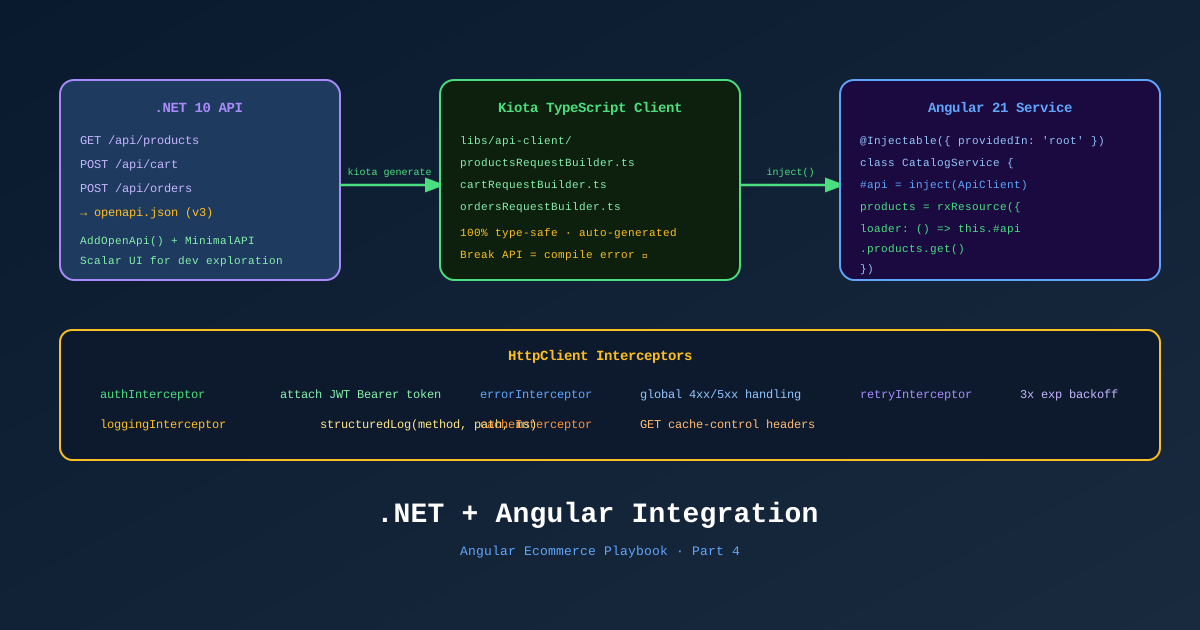
The Angular app and the .NET API are two separate processes. The only thing connecting them is an HTTP contract. Get that contract wrong — or let it drift — and you get runtime errors that don’t show up until a customer triggers that specific code path.
This is Part 4 of the Angular Ecommerce Playbook. We’re wiring TechShop’s Angular 21 frontend to its .NET 10 Minimal API backend with type safety enforced at every layer: OpenAPI codegen, JWT auth interceptors, Problem Details error handling, and SignalR for real-time inventory.
📊 Download: Angular ↔ .NET Integration Diagram (draw.io)
Step 1: .NET 10 Built-in OpenAPI
.NET 10 includes built-in OpenAPI document generation — no Swashbuckle required. In Program.cs:
// Program.cs — .NET 10
var builder = WebApplication.CreateBuilder(args);

builder.Services
    .AddApplication()
    .AddInfrastructure(builder.Configuration);

// Built-in OpenAPI — no Swashbuckle
builder.Services.AddOpenApi(options =>
{
    options.AddDocumentTransformer<BearerSecuritySchemeTransformer>();
});

var app = builder.Build();

if (app.Environment.IsDevelopment())
{
    app.MapOpenApi(); // Serves at /openapi/v1.json
}

app.MapProductEndpoints();
app.MapCartEndpoints();
app.MapOrderEndpoints();

app.Run();
In .NET 10, MapOpenApi() generates a full OpenAPI 3.1 document at /openapi/v1.json — no additional package needed. This is the document Kiota consumes.
Step 2: Kiota TypeScript Client Generation
Kiota is Microsoft’s first-party OpenAPI client generator. Unlike swagger-typescript-api or openapi-generator, Kiota generates a navigation-style client that mirrors the API’s URL structure:
# Install Kiota globally
pnpm add -g @microsoft/kiota

# Generate from the running .NET 10 API
kiota generate \
  --openapi http://localhost:5000/openapi/v1.json \
  --language typescript \
  --class-name TechShopApiClient \
  --namespace-name TechShop.Api \
  --output libs/shared/api-client/src/lib/generated \
  --clean-output \
  --exclude-backward-compatible

# Install Kiota runtime packages
pnpm add @microsoft/kiota-abstractions @microsoft/kiota-http-fetchlibrary \
  @microsoft/kiota-serialization-json
The generated client is a tree of request builders mirroring the API routes:
// Generated — do not edit manually
// libs/shared/api-client/src/lib/generated/techShopApiClient.ts
export class TechShopApiClient {
  get products(): ProductsRequestBuilder { ... }
  get cart(): CartRequestBuilder { ... }
  get orders(): OrdersRequestBuilder { ... }
  get auth(): AuthRequestBuilder { ... }
}

// Usage — type-safe navigation
const client = inject(TechShopApiClient);
const product = await client.products.bySlug('macbook-pro-16').get();
// product is typed as Product | undefined — from your .NET model
Automating Codegen in CI
The key discipline: run codegen in CI and fail if the generated files have changed without being committed.
# .github/workflows/api-codegen-check.yml
name: Check API Client is Up To Date
on: [pull_request]

jobs:
  check-codegen:
    runs-on: ubuntu-latest
    steps:
      - uses: actions/checkout@v4
      - name: Start .NET API
        run: dotnet run --project src/TechShop.Api &
        working-directory: ../techshop-api
      - name: Wait for API
        run: npx wait-on http://localhost:5000/openapi/v1.json
      - name: Regenerate client
        run: kiota generate --openapi http://localhost:5000/openapi/v1.json ...
      - name: Check for drift
        run: |
          git diff --exit-code libs/shared/api-client/src/lib/generated
          # If there's a diff, the API changed and codegen wasn't re-run
If a backend developer adds a field to a .NET model without running codegen, the TypeScript types will still be the old version. The CI check catches this before it merges.
Step 3: JWT Authentication
.NET 10 — Token Endpoint with Minimal API
// TechShop.Api/Endpoints/AuthEndpoints.cs
namespace TechShop.Api.Endpoints;

public static class AuthEndpoints
{
    public static void MapAuthEndpoints(this IEndpointRouteBuilder routes)
    {
        var group = routes.MapGroup("/api/auth").WithTags("Auth");

        group.MapPost("/token", async (
            LoginCommand command,
            ISender sender,
            CancellationToken ct) =>
        {
            var result = await sender.Send(command, ct);
            return Results.Ok(result);  // Returns TokenResponse
        });

        group.MapPost("/refresh", async (
            RefreshTokenCommand command,
            ISender sender,
            CancellationToken ct) =>
        {
            var result = await sender.Send(command, ct);
            return Results.Ok(result);
        });
    }
}
The TokenResponse .NET 10 record:
public sealed record TokenResponse(
    string AccessToken,
    string RefreshToken,
    DateTimeOffset ExpiresAt
);
Angular 21 — Auth Service with Signals
// libs/shared/auth/src/lib/auth.service.ts
import { Injectable, inject, signal, computed } from '@angular/core';
import { Router } from '@angular/router';
import { TechShopApiClient } from '@techshop/shared/api-client';

@Injectable({ providedIn: 'root' })
export class AuthService {
  private readonly api = inject(TechShopApiClient);
  private readonly router = inject(Router);

  // Auth state as signals — components react automatically
  private readonly _accessToken = signal<string | null>(
    localStorage.getItem('accessToken')
  );
  private readonly _refreshToken = signal<string | null>(
    localStorage.getItem('refreshToken')
  );
  private readonly _expiresAt = signal<Date | null>(
    this.parseStoredDate('expiresAt')
  );

  // Public computed signals — components read these
  readonly isAuthenticated = computed(() => {
    const token = this._accessToken();
    const expiry = this._expiresAt();
    return !!token && !!expiry && expiry > new Date();
  });

  readonly accessToken = this._accessToken.asReadonly();

  async login(email: string, password: string): Promise<void> {
    const response = await this.api.auth.token.post({
      email, password
    });

    if (response) {
      this.setTokens(response);
    }
  }

  async refreshTokens(): Promise<boolean> {
    const refresh = this._refreshToken();
    if (!refresh) return false;

    try {
      const response = await this.api.auth.refresh.post({ refreshToken: refresh });
      if (response) {
        this.setTokens(response);
        return true;
      }
    } catch {
      this.logout();
    }
    return false;
  }

  logout(): void {
    this._accessToken.set(null);
    this._refreshToken.set(null);
    this._expiresAt.set(null);
    localStorage.clear();
    this.router.navigate(['/login']);
  }

  private setTokens(response: TokenResponse): void {
    this._accessToken.set(response.accessToken);
    this._refreshToken.set(response.refreshToken);
    this._expiresAt.set(new Date(response.expiresAt));
    localStorage.setItem('accessToken', response.accessToken);
    localStorage.setItem('refreshToken', response.refreshToken);
    localStorage.setItem('expiresAt', response.expiresAt.toString());
  }

  private parseStoredDate(key: string): Date | null {
    const val = localStorage.getItem(key);
    return val ? new Date(val) : null;
  }
}
Angular 21 — HTTP Interceptors (Functional)
Angular 21 uses functional interceptors registered in provideHttpClient(withInterceptors([...])).
// libs/shared/auth/src/lib/auth.interceptor.ts
import { HttpInterceptorFn, HttpErrorResponse } from '@angular/common/http';
import { inject } from '@angular/core';
import { catchError, switchMap, throwError } from 'rxjs';
import { from } from 'rxjs';
import { AuthService } from './auth.service';

export const authInterceptor: HttpInterceptorFn = (req, next) => {
  const auth = inject(AuthService);
  const token = auth.accessToken();

  // Attach Bearer token to all API requests
  const authReq = token
    ? req.clone({ setHeaders: { Authorization: `Bearer ${token}` } })
    : req;

  return next(authReq).pipe(
    catchError((error: HttpErrorResponse) => {
      if (error.status === 401) {
        // Token expired — try to refresh
        return from(auth.refreshTokens()).pipe(
          switchMap(refreshed => {
            if (refreshed) {
              // Retry the original request with new token
              const newToken = auth.accessToken();
              const retryReq = req.clone({
                setHeaders: { Authorization: `Bearer ${newToken}` }
              });
              return next(retryReq);
            }
            // Refresh failed — let the error propagate (AuthService handles logout)
            return throwError(() => error);
          })
        );
      }
      return throwError(() => error);
    })
  );
};
Note on Kiota + interceptors: The Kiota
FetchRequestAdapteruses the Fetch API, not Angular’sHttpClient. This means Angular interceptors don’t automatically apply to Kiota requests. The solution is to use Angular’sHttpClient-based Kiota adapter or write a middleware for the Kiota adapter. Part 8 (Copilot) shows how Copilot can generate this boilerplate quickly.
Step 4: Problem Details Error Handling
.NET 10 uses Problem Details (RFC 9457) for all error responses. A 422 validation error looks like:
{
  "type": "https://tools.ietf.org/html/rfc9110#section-15.5.1",
  "title": "Validation Failed",
  "status": 422,
  "errors": {
    "email": ["Email is required"],
    "password": ["Password must be at least 8 characters"]
  }
}
Angular error interceptor that parses Problem Details:
// libs/shared/auth/src/lib/error.interceptor.ts
import { HttpInterceptorFn, HttpErrorResponse } from '@angular/common/http';
import { inject } from '@angular/core';
import { catchError, throwError } from 'rxjs';
import { NotificationService } from '@techshop/shared/ui';

export interface ProblemDetails {
  type: string;
  title: string;
  status: number;
  detail?: string;
  errors?: Record<string, string[]>;
}

export const errorInterceptor: HttpInterceptorFn = (req, next) => {
  const notifications = inject(NotificationService);

  return next(req).pipe(
    catchError((error: HttpErrorResponse) => {
      // Skip auth errors — auth interceptor handles those
      if (error.status === 401) return throwError(() => error);

      const problem = error.error as ProblemDetails;

      if (problem?.title) {
        if (problem.errors) {
          // Validation errors — let the form handle display
          // We re-throw with typed errors for form binding
          return throwError(() => ({
            ...error,
            validationErrors: problem.errors
          }));
        }
        notifications.error(problem.title, problem.detail);
      } else if (error.status === 0) {
        notifications.error('No connection', 'Check your internet connection');
      } else if (error.status >= 500) {
        notifications.error('Server error', 'Something went wrong. Please try again.');
      }

      return throwError(() => error);
    })
  );
};
CORS Configuration (.NET 10)
// Program.cs
builder.Services.AddCors(options =>
{
    options.AddPolicy("Angular", policy =>
    {
        policy
            .WithOrigins("http://localhost:4200", "https://techshop.com")
            .AllowAnyHeader()
            .AllowAnyMethod()
            .AllowCredentials(); // Required for SignalR
    });
});

app.UseCors("Angular");
Step 5: SignalR Real-Time Inventory
Long-lived ecommerce flows need real-time data. A product showing “In Stock” for two minutes while another user completes the same purchase is a bad customer experience. We use .NET 10 SignalR + Angular.
.NET 10 — SignalR Hub
// TechShop.Infrastructure/Realtime/InventoryHub.cs
namespace TechShop.Infrastructure.Realtime;

[Authorize]
public class InventoryHub : Hub
{
    public async Task JoinProductGroup(string productId)
    {
        await Groups.AddToGroupAsync(Context.ConnectionId, $"product-{productId}");
    }
}

// Notification service called from MediatR domain event handler
public class InventoryNotificationService(IHubContext<InventoryHub> hubContext)
{
    public async Task NotifyStockChange(string productId, int newStock)
    {
        await hubContext.Clients
            .Group($"product-{productId}")
            .SendAsync("InventoryUpdated", new { productId, stock: newStock });
    }
}
Angular 21 — SignalR Service
// libs/shared/realtime/src/lib/inventory-realtime.service.ts
import { Injectable, inject, OnDestroy } from '@angular/core';
import { HubConnectionBuilder, HubConnection, LogLevel } from '@microsoft/signalr';
import { Observable, Subject } from 'rxjs';
import { toSignal } from '@angular/core/rxjs-interop';
import { AuthService } from '@techshop/shared/auth';
import { environment } from '@techshop/shared/environment';

export interface InventoryUpdate {
  productId: string;
  stock: number;
}

@Injectable({ providedIn: 'root' })
export class InventoryRealtimeService implements OnDestroy {
  private readonly auth = inject(AuthService);
  private connection: HubConnection;
  private updates$ = new Subject<InventoryUpdate>();

  // Convert the Observable stream to a Signal for component consumption
  readonly latestUpdate = toSignal(this.updates$);

  constructor() {
    this.connection = new HubConnectionBuilder()
      .withUrl(`${environment.apiUrl}/hubs/inventory`, {
        accessTokenFactory: () => this.auth.accessToken() ?? '',
      })
      .withAutomaticReconnect()
      .configureLogging(LogLevel.Warning)
      .build();

    this.connection.on('InventoryUpdated', (update: InventoryUpdate) => {
      this.updates$.next(update);
    });

    this.connection.start().catch(err =>
      console.error('SignalR connection failed:', err)
    );
  }

  async joinProductGroup(productId: string): Promise<void> {
    await this.connection.invoke('JoinProductGroup', productId);
  }

  ngOnDestroy(): void {
    this.connection.stop();
  }
}
In the product detail component:
@Component({ /* ... */ })
export class ProductDetailComponent implements OnInit {
  private realtime = inject(InventoryRealtimeService);
  readonly product = input.required<Product>();

  // Real-time stock signal
  private readonly stockUpdate = this.realtime.latestUpdate;

  readonly displayedStock = computed(() => {
    const update = this.stockUpdate();
    if (update?.productId === this.product().id) {
      return update.stock;
    }
    return this.product().stockQty;
  });

  ngOnInit() {
    this.realtime.joinProductGroup(this.product().id);
  }
}
Dev Proxy Configuration
During development, the Angular dev server runs on localhost:4200 while the .NET API runs on localhost:5000. Configure the Angular proxy to avoid CORS issues in development:
// proxy.conf.json
{
  "/api": {
    "target": "http://localhost:5000",
    "secure": false,
    "changeOrigin": true,
    "logLevel": "info"
  },
  "/hubs": {
    "target": "http://localhost:5000",
    "secure": false,
    "ws": true,
    "changeOrigin": true
  }
}angular.json:
"serve": {
  "options": {
    "proxyConfig": "proxy.conf.json"
  }
}
Now http://localhost:4200/api/products proxies to http://localhost:5000/api/products. No CORS issues. No hardcoded ports in Angular code.
References
- .NET 10 Built-in OpenAPI — Microsoft Docs
- Kiota TypeScript — Quickstart
- Angular HTTP Interceptors (Functional)
- Problem Details RFC 9457
- SignalR .NET 10 — Microsoft Docs
- @microsoft/signalr npm package
- toSignal() — Angular RxJS Interop
- Angular Dev Proxy Configuration
- Draw.io Diagram: Angular ↔ .NET Integration
This is Part 4 of 11 in the Angular Ecommerce Playbook. ← Part 3: Training .NET Devs | Part 5: Ecommerce Domain →