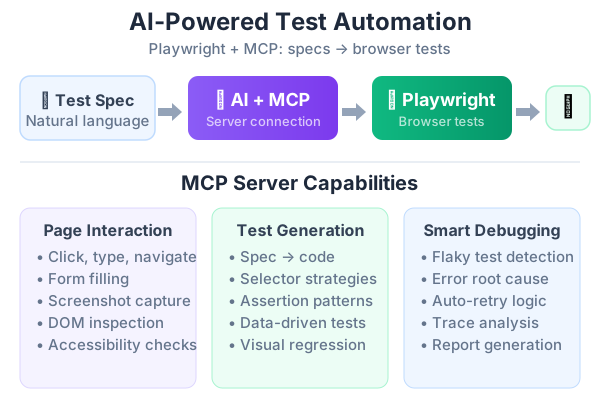
I manage a Next.js application with PostgreSQL, AI agents, vector search, and a knowledge base. The test coverage was embarrassing — a handful of unit tests written six months ago and manual QA that missed regressions every sprint. I had two options: spend weeks writing tests manually, or try something different.
I chose Playwright MCP with Claude Code. The AI writes tests by actually interacting with a live browser, exploring the app, and generating test code from what it finds. After three weeks of using this workflow in production, here’s what I learned — including the complete framework architecture, best practices, and the AI prompting patterns that actually work.
What Is Playwright MCP and Why It Matters
Playwright MCP is Microsoft’s official Model Context Protocol server that lets AI agents control a real browser. Unlike screenshot-based approaches, it uses Playwright’s accessibility tree — a structured representation of every element on the page. The AI reads this tree instead of parsing pixels, which makes interactions deterministic and token-efficient.
The key insight: the AI doesn’t guess at selectors. It navigates to your page, takes an accessibility snapshot, and uses element references from that snapshot to click, type, and assert. This produces tests with getByRole() and getByText() locators — exactly what Playwright best practices recommend.
From Manual QC to Automated Testing
Before diving into the technical setup, let me explain the transition from manual QA that most teams struggle with.
What manual QC looks like: A tester clicks through the app before each release, following a spreadsheet checklist. They open the login page, enter credentials, verify the dashboard loads, check that blog posts render, test the search feature. This takes 2-4 hours per release and catches obvious regressions — but misses edge cases every time.
Why the switch is hard: Manual QC testers know the app intimately. They know that the search bar sometimes fails on special characters, that the dashboard chart takes 3 seconds to load, that the mobile menu has a Z-index bug on iOS Safari. Translating that tribal knowledge into automated tests is the real challenge.
The bridge: Playwright MCP changes this equation. Instead of writing test code from scratch, you describe what the manual tester does in plain English, and the AI generates the code. The tester’s knowledge becomes prompts:
Navigate to the blog page. Filter by the "ai" tag.
Verify that only posts tagged with "ai" appear.
Then clear the filter and search for "playwright".
Verify results contain relevant posts.
Then test what happens when you search for a string with no results.
This lets manual QC team members contribute to automation without learning TypeScript — they define the test scenarios, the AI writes the code, and a developer reviews it.
The progression I recommend:
| Week | Focus | Automation Coverage |
|---|---|---|
| 1 | Smoke tests for login, homepage, critical paths | 5-10 tests |
| 2 | Core user flows (CRUD, search, navigation) | 20-30 tests |
| 3 | Edge cases, error states, mobile responsive | 40-50 tests |
| 4 | API tests, visual regression, performance | 60+ tests |
Setting Up Playwright MCP with Claude Code
The setup is one command:
claude mcp add playwright npx @playwright/mcp@latestFor project-level configuration that your team shares, create .mcp.json at the repo root:
{
  "mcpServers": {
    "playwright": {
      "command": "npx",
      "args": [
        "@playwright/mcp@latest",
        "--browser", "chrome",
        "--caps", "testing,tracing"
      ]
    }
  }
}
The --caps testing flag enables assertion tools like browser_verify_text_visible and browser_generate_locator. The --caps tracing flag lets you record Playwright traces for debugging.
Verify it’s running inside Claude Code:
/mcpYou should see playwright listed with 25+ available tools.
The Framework Architecture
A proper Playwright automation framework has four layers. Each layer has a single responsibility:
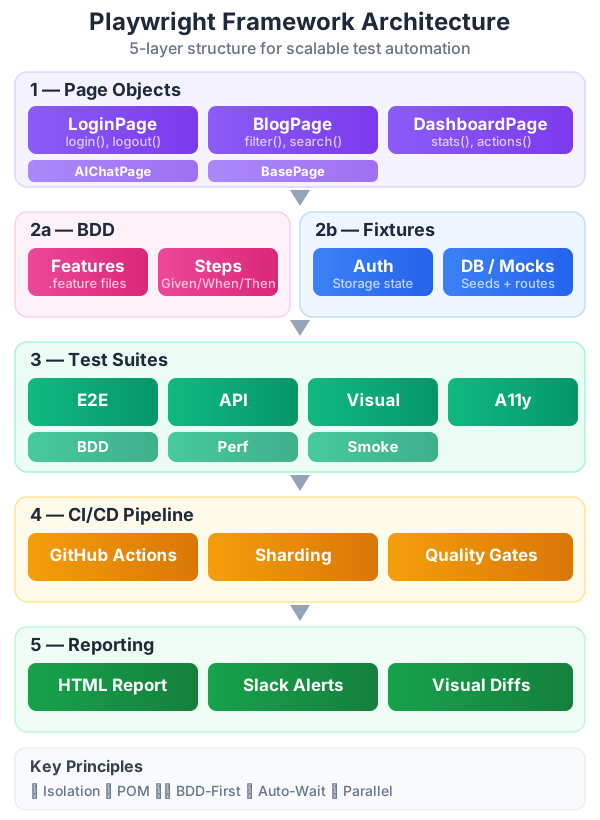
Here’s the folder structure:
tests/
├── pages/                  # Page Object Model classes
│   ├── LoginPage.ts
│   ├── BlogPage.ts
│   ├── DashboardPage.ts
│   └── AIChatPage.ts
├── fixtures/               # Custom test fixtures
│   ├── auth.fixture.ts     # Authenticated user state
│   ├── db.fixture.ts       # Database seeding
│   └── base.fixture.ts     # Extended test with all fixtures
├── e2e/                    # End-to-end user flows
│   ├── auth.spec.ts
│   ├── blog.spec.ts
│   ├── dashboard.spec.ts
│   └── ai-chat.spec.ts
├── api/                    # API endpoint tests
│   ├── rest.spec.ts
│   └── ai-endpoints.spec.ts
├── visual/                 # Visual regression tests
│   └── pages.visual.spec.ts
├── data/                   # Test data files
│   └── blog-posts.json
└── playwright.config.ts
The Playwright config separates concerns into projects:
import { defineConfig, devices } from '@playwright/test';

export default defineConfig({
  testDir: './tests',
  fullyParallel: true,
  forbidOnly: !!process.env.CI,
  retries: process.env.CI ? 2 : 0,
  workers: process.env.CI ? 1 : undefined,
  reporter: [
    ['html'],
    ['json', { outputFile: 'test-results.json' }],
  ],
  use: {
    baseURL: 'http://localhost:3000',
    trace: 'on-first-retry',
    video: 'retain-on-failure',
    screenshot: 'only-on-failure',
    actionTimeout: 10000,
  },
  projects: [
    { name: 'setup', testMatch: /auth\.fixture\.ts/ },
    {
      name: 'e2e',
      testMatch: 'e2e/**/*.spec.ts',
      dependencies: ['setup'],
      use: {
        ...devices['Desktop Chrome'],
        storageState: '.auth/user.json',
      },
    },
    {
      name: 'api',
      testMatch: 'api/**/*.spec.ts',
      use: { ...devices['Desktop Chrome'] },
    },
    {
      name: 'visual',
      testMatch: 'visual/**/*.spec.ts',
      use: { ...devices['Desktop Chrome'] },
    },
    {
      name: 'mobile',
      testMatch: 'e2e/**/*.spec.ts',
      dependencies: ['setup'],
      use: {
        ...devices['iPhone 15'],
        storageState: '.auth/user.json',
      },
    },
    {
      name: 'firefox',
      testMatch: 'e2e/**/*.spec.ts',
      dependencies: ['setup'],
      use: {
        ...devices['Desktop Firefox'],
        storageState: '.auth/user.json',
      },
    },
  ],
  webServer: {
    command: 'npm run dev',
    port: 3000,
    reuseExistingServer: !process.env.CI,
  },
});
Key configuration decisions:
fullyParallel: true— Tests within the same file run in parallel. This cuts execution time significantly but requires test isolation (more on this below).retries: process.env.CI ? 2 : 0— Retry in CI to handle transient failures, but never locally so you see the real failure.trace: 'on-first-retry'— Captures a Playwright trace when a test fails the first time. The trace shows every action, network request, and DOM snapshot — essential for debugging CI failures.video: 'retain-on-failure'— Records video but only saves it when the test fails. Saves storage.actionTimeout: 10000— 10-second timeout for individual actions. Prevents tests from hanging silently.
Page Object Model — The Foundation
The Page Object Model (POM) is the single most important pattern for maintainable tests. Every page in your app gets a class that encapsulates its selectors and actions:
// tests/pages/BlogPage.ts
import { type Page, type Locator, expect } from '@playwright/test';

export class BlogPage {
  readonly page: Page;
  readonly searchInput: Locator;
  readonly tagButtons: Locator;
  readonly postCards: Locator;
  readonly noResultsMessage: Locator;

  constructor(page: Page) {
    this.page = page;
    this.searchInput = page.getByPlaceholder('Search posts and projects...');
    this.tagButtons = page.getByRole('button').filter({ hasText: /^[a-z-]+$/ });
    this.postCards = page.locator('.card-link');
    this.noResultsMessage = page.getByText('No posts found');
  }

  async goto() {
    await this.page.goto('/blog');
  }

  async filterByTag(tagName: string) {
    await this.page.getByRole('button', { name: tagName }).click();
  }

  async searchFor(query: string) {
    await this.page.keyboard.press('Control+k');
    await this.searchInput.fill(query);
  }

  async getVisiblePostCount(): Promise<number> {
    return await this.postCards.count();
  }

  async clickFirstPost(): Promise<string> {
    const title = await this.postCards.first().textContent();
    await this.postCards.first().click();
    return title?.trim() ?? '';
  }
}
// tests/pages/DashboardPage.ts
import { type Page, type Locator } from '@playwright/test';
export class DashboardPage {
readonly page: Page;
readonly welcomeMessage: Locator;
readonly statCards: Locator;
readonly recentActivity: Locator;
constructor(page: Page) {
this.page = page;
this.welcomeMessage = page.getByRole('heading', { name: /welcome/i });
this.statCards = page.locator('[data-testid="stat-card"]');
this.recentActivity = page.locator('[data-testid="recent-activity"]');
}
async goto() {
await this.page.goto('/dashboard');
}
async getStatValues(): Promise<Record<string, string>> {
const stats: Record<string, string> = {};
for (const card of await this.statCards.all()) {
const label = await card.locator('.stat-label').textContent();
const value = await card.locator('.stat-value').textContent();
if (label && value) stats[label.trim()] = value.trim();
}
return stats;
}
}Why POM matters:
- When the UI changes, you update one file (the Page Object), not 20 test files.
- Tests read like business requirements, not CSS selectors:
blogPage.filterByTag('ai')is clearer thanpage.getByRole('button', { name: 'ai' }).click(). - Keep assertions in the test files, not in Page Objects. Page Objects should only encapsulate navigation and interaction — the test decides what to assert.
Custom Test Fixtures
Playwright’s fixture system lets you extend test with project-specific dependencies. Instead of repeating setup code in every test file:
// tests/fixtures/base.fixture.ts
import { test as base, expect } from '@playwright/test';
import { BlogPage } from '../pages/BlogPage';
import { DashboardPage } from '../pages/DashboardPage';

type MyFixtures = {
  blogPage: BlogPage;
  dashboardPage: DashboardPage;
  apiContext: any;
};

export const test = base.extend<MyFixtures>({
  blogPage: async ({ page }, use) => {
    const blogPage = new BlogPage(page);
    await use(blogPage);
  },

  dashboardPage: async ({ page }, use) => {
    const dashboardPage = new DashboardPage(page);
    await use(dashboardPage);
  },

  apiContext: async ({ playwright }, use) => {
    const context = await playwright.request.newContext({
      baseURL: 'http://localhost:3000',
    });
    await use(context);
    await context.dispose();
  },
});

export { expect };
Now tests import the custom test instead of the default:
// tests/e2e/blog.spec.ts
import { test, expect } from '../fixtures/base.fixture';

test.describe('Blog Page', () => {
  test.beforeEach(async ({ blogPage }) => {
    await blogPage.goto();
  });

  test('filters posts by tag', async ({ blogPage }) => {
    await blogPage.filterByTag('ai');
    const count = await blogPage.getVisiblePostCount();
    expect(count).toBeGreaterThan(0);
  });

  test('navigates to post detail', async ({ blogPage, page }) => {
    const title = await blogPage.clickFirstPost();
    await expect(page).toHaveURL(/\/blog\/.+/);
    await expect(page.locator('h1')).toContainText(title);
  });
});
Network Interception and API Mocking
One of Playwright’s most powerful features is page.route() — intercept any network request and return a mock response. This lets you test error states, slow networks, and edge cases without touching backend code:
test('shows error message when API fails', async ({ page }) => {
  // Mock the API to return a 500 error
  await page.route('**/api/posts', (route) => {
    route.fulfill({
      status: 500,
      contentType: 'application/json',
      body: JSON.stringify({ error: 'Internal Server Error' }),
    });
  });

  await page.goto('/blog');
  await expect(page.getByText(/something went wrong/i)).toBeVisible();
});

test('handles slow AI response gracefully', async ({ page }) => {
  // Simulate a 5-second delay on the AI endpoint
  await page.route('**/api/chat', async (route) => {
    await new Promise((resolve) => setTimeout(resolve, 5000));
    route.fulfill({
      status: 200,
      contentType: 'application/json',
      body: JSON.stringify({ answer: 'Delayed response' }),
    });
  });

  await page.goto('/chat');
  await page.getByPlaceholder('Ask a question...').fill('Hello');
  await page.getByRole('button', { name: 'Send' }).click();

  // Loading indicator should appear during the wait
  await expect(page.getByText(/thinking/i)).toBeVisible();
  // Response should eventually appear
  await expect(page.getByText('Delayed response')).toBeVisible({ timeout: 10000 });
});

test('displays empty state when no posts match', async ({ page }) => {
  await page.route('**/api/posts?tag=nonexistent*', (route) => {
    route.fulfill({
      status: 200,
      contentType: 'application/json',
      body: JSON.stringify({ posts: [] }),
    });
  });

  await page.goto('/blog?tag=nonexistent');
  await expect(page.getByText(/no posts found/i)).toBeVisible();
});
Data-Driven Testing
When you need to test the same flow with multiple inputs, use parameterized tests instead of copy-pasting:
const searchScenarios = [
  { query: 'playwright', expectResults: true, minCount: 1 },
  { query: 'architecture', expectResults: true, minCount: 2 },
  { query: 'xyznonexistent123', expectResults: false, minCount: 0 },
  { query: '', expectResults: true, minCount: 5 },
];

for (const scenario of searchScenarios) {
  test(`search: "${scenario.query}" → ${scenario.expectResults ? 'results' : 'empty'}`, async ({ blogPage }) => {
    await blogPage.goto();

    if (scenario.query) {
      await blogPage.searchFor(scenario.query);
    }

    if (scenario.expectResults) {
      const count = await blogPage.getVisiblePostCount();
      expect(count).toBeGreaterThanOrEqual(scenario.minCount);
    } else {
      await expect(blogPage.noResultsMessage).toBeVisible();
    }
  });
}
For larger datasets, load from JSON files:
import testData from '../data/blog-posts.json';

for (const post of testData.posts) {
  test(`blog post "${post.slug}" renders correctly`, async ({ page }) => {
    await page.goto(`/blog/${post.slug}`);
    await expect(page.locator('h1')).toContainText(post.title);
    await expect(page.locator('article')).toBeVisible();
  });
}
Auto-Waiting and Smart Assertions
One of the biggest sources of flaky tests is hard-coded waits. Playwright has auto-waiting built in — never use page.waitForTimeout() in tests. Instead, use auto-retrying assertions:
// ❌ Bad — hard-coded wait, flaky
await page.waitForTimeout(3000);
expect(await page.textContent('.result')).toBe('Success');

// ✅ Good — auto-retrying assertion, waits up to 5s by default
await expect(page.getByText('Success')).toBeVisible();

// ✅ Good — wait for URL change
await expect(page).toHaveURL(/\/dashboard/);

// ✅ Good — wait for title
await expect(page).toHaveTitle(/Dashboard/);

// ✅ Good — retry a custom assertion with toPass()
await expect(async () => {
  const count = await page.locator('.post-item').count();
  expect(count).toBeGreaterThan(0);
}).toPass({ timeout: 10000 });

// ✅ Good — wait for network idle after navigation
await page.goto('/blog');
await page.waitForLoadState('networkidle');
The rule: If you’re using waitForTimeout(), you probably need an expect() with auto-retry instead.
Test Isolation
Every test must run independently. No test should depend on another test’s state:
test.describe('Blog CRUD', () => {
  // Each test gets a fresh browser context — cookies, localStorage, etc. are clean
  test.beforeEach(async ({ page }) => {
    await page.goto('/blog');
  });

  test('displays blog list', async ({ page }) => {
    await expect(page.locator('.card-link')).not.toHaveCount(0);
  });

  // This test doesn't depend on the previous test's state
  test('tag filter is reset on page reload', async ({ page }) => {
    await page.getByRole('button', { name: 'ai' }).click();
    await page.reload();
    // All tags should be deselected after reload
    await expect(page.locator('.tag-active')).toHaveCount(0);
  });
});
Isolation checklist:
- ✅ Use
beforeEachfor navigation, notbeforeAll - ✅ Don’t share mutable state between tests
- ✅ Each test can run in any order and still pass
- ✅ Use
test.describe.configure({ mode: 'serial' })only when tests truly depend on each other (rare)
API Testing Without a Browser
Playwright’s request fixture lets you test API endpoints directly — no browser needed:
test.describe('API Endpoints', () => {
  test('GET /api/posts returns blog posts', async ({ request }) => {
    const response = await request.get('/api/posts');
    expect(response.ok()).toBeTruthy();

    const data = await response.json();
    expect(data.posts).toBeInstanceOf(Array);
    expect(data.posts.length).toBeGreaterThan(0);
    expect(data.posts[0]).toHaveProperty('title');
    expect(data.posts[0]).toHaveProperty('slug');
  });

  test('POST /api/chat returns AI response', async ({ request }) => {
    const response = await request.post('/api/chat', {
      data: { query: 'What is Playwright?' },
    });
    expect(response.ok()).toBeTruthy();

    const data = await response.json();
    expect(data.answer).toBeTruthy();
    expect(data.answer.length).toBeGreaterThan(10);
  });

  test('POST /api/chat rejects empty query', async ({ request }) => {
    const response = await request.post('/api/chat', {
      data: { query: '' },
    });
    expect(response.status()).toBe(400);
  });
});
API tests are fast (no browser overhead) and great for testing business logic without UI dependencies.
Debugging Workflow
When a test fails, Playwright gives you powerful debugging tools:
Playwright Inspector — Step through tests interactively:
npx playwright test --debugUI Mode — The best debugging experience. Run tests visually with time-travel:
npx playwright test --uiTrace Viewer — Replay a failed test step-by-step (especially useful for CI failures):
npx playwright show-trace trace.zipPause in code — Insert await page.pause() to freeze execution and inspect the page:
test('debug this flow', async ({ page }) => {
  await page.goto('/blog');
  await page.pause(); // Opens inspector — interact with the page manually
  await page.getByRole('button', { name: 'ai' }).click();
});
Copy as Prompt — Playwright’s HTML report lets you copy failure context in a format optimized for AI. Paste it to Claude and it fixes the test.
My debugging workflow:
- Run
--uimode locally to see the failure visually - If it only fails in CI, download the trace artifact and open in Trace Viewer
- For complex failures, paste the error into Claude with “fix this Playwright test”
Parallel Execution and Sharding
For large test suites, parallelism and sharding cut execution time dramatically:
// playwright.config.ts
export default defineConfig({
  fullyParallel: true,      // Tests in the same file run in parallel
  workers: process.env.CI
    ? 2                      // 2 workers in CI (resource-constrained)
    : undefined,             // Defaults to half CPU cores locally
});
CI sharding splits tests across multiple machines:
# .github/workflows/test.yml
strategy:
  matrix:
    shard: [1/4, 2/4, 3/4, 4/4]
steps:
  - run: npx playwright test --shard=${{ matrix.shard }}
This runs your test suite across 4 parallel CI jobs. A 20-minute suite becomes 5 minutes.
Tagging and Filtering
Tag your tests for selective execution:
test('critical: user can log in @smoke', async ({ page }) => {
  // ...
});

test('blog search returns results @regression', async ({ page }) => {
  // ...
});

test('edge case: special characters in search @edge', async ({ page }) => {
  // ...
});
Run specific tags:
npx playwright test --grep @smoke          # Only smoke tests
npx playwright test --grep @regression     # Only regression tests
npx playwright test --grep-invert @edge    # Everything except edge cases
In CI, run @smoke on every commit and @regression on PRs to main.
GitHub Actions CI/CD for Playwright
Here’s the production-ready CI workflow I use. It runs Playwright tests on every PR with caching, parallel execution, and artifact uploads:
# .github/workflows/playwright.yml
name: Playwright Tests

on:
  push:
    branches: [main]
  pull_request:
    branches: [main]

jobs:
  test:
    runs-on: ubuntu-latest
    strategy:
      fail-fast: false
      matrix:
        shard: [1/3, 2/3, 3/3]
    steps:
      - uses: actions/checkout@v4

      - uses: actions/setup-node@v4
        with:
          node-version: 20
          cache: 'npm'

      - run: npm ci

      - name: Cache Playwright browsers
        uses: actions/cache@v4
        with:
          path: ~/.cache/ms-playwright
          key: playwright-${{ hashFiles('package-lock.json') }}

      - run: npx playwright install --with-deps chromium

      - name: Run Playwright tests
        run: npx playwright test --shard=${{ matrix.shard }}
        env:
          CI: true

      - name: Upload test results
        if: ${{ !cancelled() }}
        uses: actions/upload-artifact@v4
        with:
          name: playwright-report-${{ strategy.job-index }}
          path: |
            playwright-report/
            test-results/
          retention-days: 14

  merge-reports:
    needs: test
    if: ${{ !cancelled() }}
    runs-on: ubuntu-latest
    steps:
      - uses: actions/checkout@v4
      - uses: actions/setup-node@v4
        with:
          node-version: 20
      - run: npm ci

      - name: Download all reports
        uses: actions/download-artifact@v4
        with:
          pattern: playwright-report-*
          merge-multiple: true
          path: all-reports/

      - name: Merge reports
        run: npx playwright merge-reports --reporter html all-reports/

      - name: Upload merged report
        uses: actions/upload-artifact@v4
        with:
          name: playwright-report-merged
          path: playwright-report/
          retention-days: 30
Key optimizations:
- Browser caching — Playwright browsers are cached between runs, saving 30-60 seconds
- Sharding — Tests split across 3 machines for faster execution
- Report merging — All shard reports combined into one HTML report
fail-fast: false— All shards run to completion even if one fails, so you see all failures at once
AI Prompting Best Practices for Test Generation
The quality of AI-generated tests depends entirely on how you prompt. Here are the patterns I’ve learned work best with Playwright MCP:
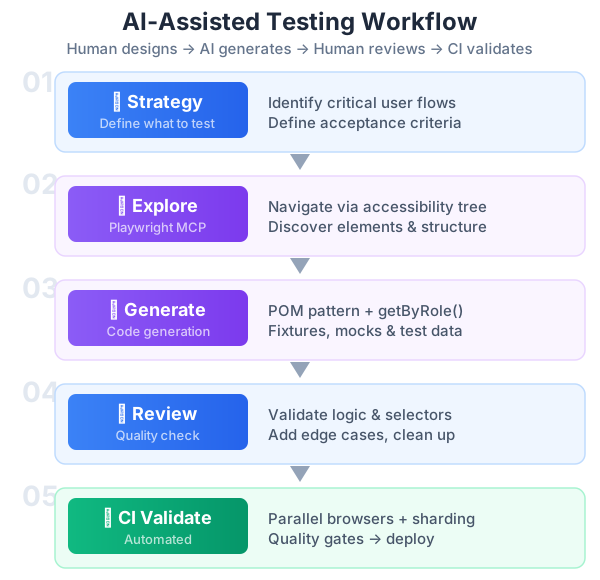
Pattern 1: Explore First, Generate Second
Use Playwright MCP to navigate to http://localhost:3000/blog.
Explore the page — click around, fill forms, test interactive elements.
DO NOT write test code yet. First understand what's on the page.
This forces the AI to interact with the live app before writing a single line. Without this step, it hallucinates selectors.
Pattern 2: Specify the Pattern You Want
Based on what you found on the blog page, write Playwright tests using
the Page Object Model pattern. Create a BlogPage class in tests/pages/BlogPage.ts
and tests in tests/e2e/blog.spec.ts.

Use getByRole() and getByText() locators — never CSS selectors.
Import { test, expect } from '../fixtures/base.fixture'.
Each test must be fully independent.
Without specifying the pattern, the AI writes inline tests with brittle selectors.
Pattern 3: Provide Context About Edge Cases
Also test these edge cases:
- What happens when the search query has special characters like <script>alert('xss')</script>?
- What happens when the API returns an empty result set?
- What does the page look like when there's a network error?
Use page.route() to mock the API for error scenarios.
Pattern 4: Iterate with Failure Context
When a test fails, use Playwright’s “Copy as Prompt” from the HTML report:
npx playwright test --project=e2e
npx playwright show-report
Click the failing test, copy the error context, and paste it back to Claude. It fixes the test with the exact failure information.
Pattern 5: Generate Data-Driven Tests
Generate a data-driven test for the blog search feature.
Test with these search terms: "playwright", "architecture", "ai", "", "xyznonexistent".
For each, verify:
- If results expected: at least 1 post appears
- If no results expected: "no posts found" message appears
Use a searchScenarios array and iterate with for...of.
Authentication Handling
For pages behind login, I use Playwright’s storage state pattern. Run setup once, reuse across tests:
// tests/fixtures/auth.fixture.ts
import { test as setup, expect } from '@playwright/test';

setup('authenticate', async ({ page }) => {
  await page.goto('/login');
  await page.getByLabel('Email').fill('test@example.com');
  await page.getByLabel('Password').fill('testpassword');
  await page.getByRole('button', { name: 'Sign in' }).click();
  await expect(page).toHaveURL('/dashboard');

  await page.context().storageState({ path: '.auth/user.json' });
});
Reference it in playwright.config.ts (shown in the config above) using dependencies: ['setup'] and storageState: '.auth/user.json'.
With Playwright MCP in headed mode, you can also log in manually — the browser window is visible, you interact with it directly, and cookies persist for the AI’s session.
BDD — Behavior-Driven Development with Playwright
BDD bridges the gap between manual QC and automation. Testers write human-readable feature files in Gherkin syntax, and developers wire them to Playwright steps. Install playwright-bdd:
npm install -D playwright-bdd @cucumber/cucumberCreate a feature file that any team member can read and write:
# tests/features/blog.feature
Feature: Blog Page

  Scenario: User filters blog posts by tag
    Given I am on the blog page
    When I click the "ai" tag filter
    Then I should see only posts tagged with "ai"
    And the post count should be greater than 0

  Scenario: User searches for a blog post
    Given I am on the blog page
    When I search for "playwright"
    Then I should see search results
    And the first result should contain "playwright" in the title

  Scenario: Empty search returns no results
    Given I am on the blog page
    When I search for "xyznonexistent123"
    Then I should see "No posts found" message

  Scenario Outline: Multiple tag filters work correctly
    Given I am on the blog page
    When I click the "<tag>" tag filter
    Then I should see at least <minPosts> posts

    Examples:
      | tag          | minPosts |
      | ai           | 3        |
      | testing      | 2        |
      | automation   | 1        |
Define step implementations using your Page Objects:
// tests/steps/blog.steps.ts
import { createBdd } from 'playwright-bdd';
import { test } from '../fixtures/base.fixture';
import { expect } from '@playwright/test';

const { Given, When, Then } = createBdd(test);

Given('I am on the blog page', async ({ blogPage }) => {
  await blogPage.goto();
});

When('I click the {string} tag filter', async ({ blogPage }, tagName: string) => {
  await blogPage.filterByTag(tagName);
});

When('I search for {string}', async ({ blogPage }, query: string) => {
  await blogPage.searchFor(query);
});

Then('I should see only posts tagged with {string}', async ({ page }, tag: string) => {
  const posts = page.locator('.card-link');
  for (const post of await posts.all()) {
    await expect(post).toContainText(tag, { ignoreCase: true });
  }
});

Then('the post count should be greater than {int}', async ({ blogPage }, count: number) => {
  const actual = await blogPage.getVisiblePostCount();
  expect(actual).toBeGreaterThan(count);
});

Then('I should see search results', async ({ blogPage }) => {
  const count = await blogPage.getVisiblePostCount();
  expect(count).toBeGreaterThan(0);
});

Then('the first result should contain {string} in the title', async ({ page }, text: string) => {
  await expect(page.locator('.card-link').first()).toContainText(text, { ignoreCase: true });
});

Then('I should see {string} message', async ({ page }, message: string) => {
  await expect(page.getByText(message)).toBeVisible();
});

Then('I should see at least {int} posts', async ({ blogPage }, minPosts: number) => {
  const count = await blogPage.getVisiblePostCount();
  expect(count).toBeGreaterThanOrEqual(minPosts);
});
Update playwright.config.ts to generate tests from features:
import { defineConfig } from '@playwright/test';
import { defineBddConfig } from 'playwright-bdd';

const testDir = defineBddConfig({
  features: 'tests/features/**/*.feature',
  steps: 'tests/steps/**/*.steps.ts',
});

export default defineConfig({
  testDir,
  // ... rest of your config
});
Run BDD tests like normal Playwright tests:
npx bddgen              # Generate test files from features
npx playwright test      # Run all tests including BDD
Why BDD works for the manual-to-auto transition:
- Manual QC testers write the Gherkin scenarios — no TypeScript needed
- Feature files serve as living documentation that stakeholders can read
- Step definitions reuse your Page Objects, keeping code DRY
- Each scenario is a test case that runs in CI automatically
Accessibility Testing
Playwright integrates with @axe-core/playwright for automated WCAG accessibility checks. Every page in your app should pass basic accessibility standards:
npm install -D @axe-core/playwright// tests/e2e/accessibility.spec.ts
import { test, expect } from '@playwright/test';
import AxeBuilder from '@axe-core/playwright';
const pages = [
{ name: 'Homepage', url: '/' },
{ name: 'Blog', url: '/blog' },
{ name: 'Projects', url: '/projects' },
{ name: 'About', url: '/about' },
];
for (const { name, url } of pages) {
test(`${name} has no accessibility violations`, async ({ page }) => {
await page.goto(url);
const results = await new AxeBuilder({ page })
.withTags(['wcag2a', 'wcag2aa', 'wcag21a', 'wcag21aa'])
.exclude('.third-party-widget') // Exclude elements you can't control
.analyze();
expect(results.violations).toEqual([]);
});
}
test('blog post page has correct heading hierarchy', async ({ page }) => {
await page.goto('/blog');
await page.locator('.card-link').first().click();
// Every page should have exactly one h1
await expect(page.locator('h1')).toHaveCount(1);
// Check heading hierarchy — no skipping levels (h1 → h3 without h2)
const results = await new AxeBuilder({ page })
.withRules(['heading-order'])
.analyze();
expect(results.violations).toEqual([]);
});
test('interactive elements are keyboard accessible', async ({ page }) => {
await page.goto('/blog');
// Tab through interactive elements
await page.keyboard.press('Tab');
const firstFocused = await page.evaluate(() => document.activeElement?.tagName);
expect(firstFocused).toBeTruthy();
// All interactive elements should have visible focus indicators
const results = await new AxeBuilder({ page })
.withRules(['focus-visible'])
.analyze();
expect(results.violations).toEqual([]);
});Tip: Run accessibility tests in CI and treat violations as test failures. This catches issues like missing alt text, poor color contrast, and unlabeled form fields early.
Visual Regression Testing
Playwright’s built-in toHaveScreenshot() captures and compares screenshots to catch unintended UI changes:
// tests/visual/pages.visual.spec.ts
import { test, expect } from '@playwright/test';

test('homepage visual regression', async ({ page }) => {
  await page.goto('/');
  await page.waitForLoadState('networkidle');

  await expect(page).toHaveScreenshot('homepage.png', {
    fullPage: true,
    maxDiffPixelRatio: 0.01, // Allow 1% pixel difference
  });
});

test('blog page visual regression', async ({ page }) => {
  await page.goto('/blog');

  // Mask dynamic content that changes between runs
  await expect(page).toHaveScreenshot('blog.png', {
    mask: [
      page.locator('.post-date'),      // Dates change
      page.locator('.reading-time'),    // May vary
    ],
    maxDiffPixels: 100,
  });
});

test('dark mode matches design', async ({ page }) => {
  await page.goto('/');
  // Toggle dark mode
  await page.getByRole('button', { name: /dark mode|theme/i }).click();

  await expect(page).toHaveScreenshot('homepage-dark.png', {
    fullPage: true,
  });
});
Key best practices:
- Generate baselines in CI, not locally — different OS renders fonts differently
- Use
maskfor dynamic content (timestamps, avatars, animations) - Set
maxDiffPixelRatiofor tolerance against anti-aliasing differences - Run
npx playwright test --update-snapshotswhen UI changes are intentional
Global Setup and Teardown
For expensive operations that shouldn’t repeat before every test (database seeding, creating test accounts, starting services), use global setup:
// global-setup.ts
import { chromium, FullConfig } from '@playwright/test';

async function globalSetup(config: FullConfig) {
  // Seed the database with test data
  const { execSync } = await import('child_process');
  execSync('npx prisma db seed', { stdio: 'inherit' });

  // Create a test user via API
  const browser = await chromium.launch();
  const context = await browser.newContext();
  const page = await context.newPage();

  await page.goto('http://localhost:3000/signup');
  await page.getByLabel('Email').fill('test@example.com');
  await page.getByLabel('Password').fill('testpassword');
  await page.getByRole('button', { name: 'Sign up' }).click();

  // Save auth state for all tests
  await page.context().storageState({ path: '.auth/user.json' });
  await browser.close();
}

export default globalSetup;
// global-teardown.ts
async function globalTeardown() {
// Clean up test data
const { execSync } = await import('child_process');
execSync('npx prisma migrate reset --force', { stdio: 'inherit' });
}
export default globalTeardown;Reference in config:
export default defineConfig({
  globalSetup: require.resolve('./global-setup'),
  globalTeardown: require.resolve('./global-teardown'),
  // ...
});
When to use global vs fixture setup:
| Scope | Use Case | Mechanism |
|---|---|---|
| Once per suite | DB seeding, user creation | globalSetup |
| Once per file | Shared auth context | beforeAll + storage state |
| Once per test | Page navigation, clean state | beforeEach + fixtures |
Custom Reporters
For team visibility into test results, add custom reporters that send notifications to Slack, Teams, or other channels:
// reporters/slack-reporter.ts
import type { Reporter, TestCase, TestResult, FullResult } from '@playwright/test/reporter';

class SlackReporter implements Reporter {
  private passed = 0;
  private failed = 0;
  private skipped = 0;

  onTestEnd(test: TestCase, result: TestResult) {
    if (result.status === 'passed') this.passed++;
    else if (result.status === 'failed') this.failed++;
    else if (result.status === 'skipped') this.skipped++;
  }

  async onEnd(result: FullResult) {
    if (!process.env.SLACK_WEBHOOK_URL) return;

    const emoji = this.failed > 0 ? '🔴' : '🟢';
    const status = this.failed > 0 ? 'FAILED' : 'PASSED';

    await fetch(process.env.SLACK_WEBHOOK_URL, {
      method: 'POST',
      headers: { 'Content-Type': 'application/json' },
      body: JSON.stringify({
        text: `${emoji} Playwright Tests ${status}\n` +
              `✅ Passed: ${this.passed} | ❌ Failed: ${this.failed} | ⏭️ Skipped: ${this.skipped}\n` +
              `⏱️ Duration: ${(result.duration / 1000).toFixed(1)}s`,
      }),
    });
  }
}

export default SlackReporter;
Add to your config alongside the HTML reporter:
export default defineConfig({
  reporter: [
    ['html'],
    ['json', { outputFile: 'test-results.json' }],
    ['./reporters/slack-reporter.ts'],
  ],
});
What Worked and What Didn’t
Worked well:
- Tests with
getByRole()andgetByText()locators generated from accessibility snapshots are remarkably stable - The explore-first-then-generate pattern produces accurate selectors 90% of the time
- Page Object Model tests generated by AI have the same quality as hand-written ones when you specify the pattern in the prompt
- Network mocking with
page.route()makes it easy to test edge cases the AI wouldn’t think of on its own - Iteration speed is fast — describe a test case in English, get working code in seconds
- The AI catches edge cases I wouldn’t think to test (empty states, boundary conditions)
Didn’t work well:
- Shadow DOM components (Web Components) aren’t fully exposed in the accessibility tree
- Dynamic content with animations causes timing issues — use auto-retrying assertions instead of
waitForTimeout() - Complex multi-step flows (OAuth redirects, payment forms) need human guidance
- The AI sometimes writes overly specific selectors that break on content changes — always review and simplify
Key lesson: Playwright MCP is not a replacement for test design thinking. It’s a code generation accelerator. You still need to decide what to test, design the framework architecture (POM, fixtures, data-driven patterns), and review the generated code. The AI handles the tedious part — writing selectors, setting up assertions, structuring test files. The human handles the strategic part — what to test, how to isolate, and when to mock.
What’s Next
This is Part 1 of a 4-part series on AI-powered quality engineering:
- Part 2: Testing AI agents, LLM outputs, and vector search accuracy with DeepEval and Ragas
- Part 3: CI/CD quality gates — GitHub Actions pipelines with performance budgets and automated quality checks
- Part 4: Visual regression testing, load testing AI endpoints, and the Tech Lead’s playbook for quality culture
In Part 2, I’ll tackle the hardest testing problem I’ve faced: how do you write assertions for an AI agent whose output is non-deterministic by design?