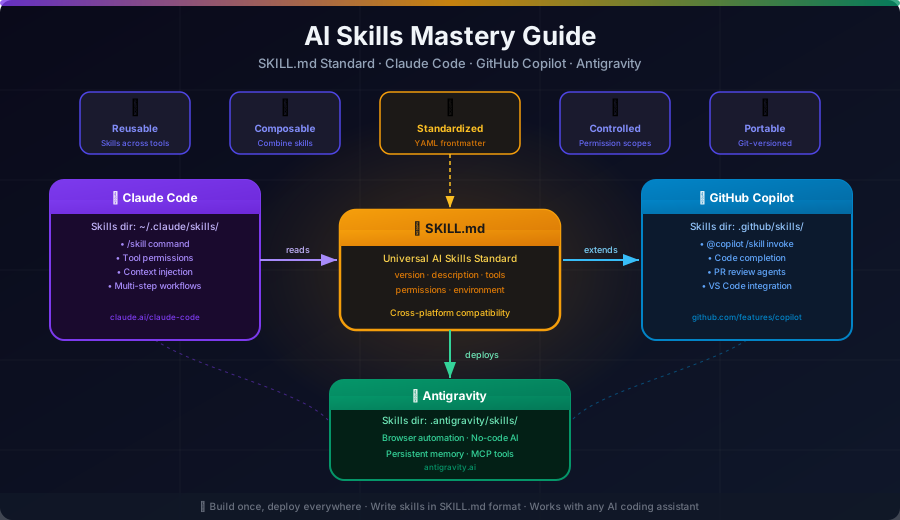
Skills are the new modules. SKILL.md is the new
package.json. Welcome to the age of composable AI.
The Big Picture: What Are AI Skills?
As AI coding assistants evolved from autocomplete to autonomous agents, a fundamental problem emerged: how do you give an AI agent specialized, reusable capabilities without bloating its context window?
The answer is Skills — modular knowledge packages that AI agents load on-demand, just like dynamic imports in modern JavaScript.
Traditional AI:  [Giant System Prompt] → One-size-fits-all
Skills-based AI: [Tiny Metadata] + [On-demand Skills] → Specialist AI
In 2026, three major platforms have converged on the same open standard: Claude Code (Anthropic), GitHub Copilot (Microsoft), and Antigravity (Google). All three use the SKILL.md format — making skills universally portable across AI tools.
The Universal SKILL.md Standard
The SKILL.md specification is an open format, originally published by Anthropic, now adopted across the industry.
File Structure
my-skill/
├── SKILL.md          ← Required: metadata + instructions
├── scripts/          ← Optional: Python, Bash, JavaScript
│   └── validate.py
├── references/       ← Optional: documentation, guides
│   └── conventions.md
└── assets/           ← Optional: templates, resources
    └── template.md
SKILL.md Format
---
name: my-skill
description: What this skill does and when to trigger it (max 1024 chars)
license: Apache-2.0
metadata:
  author: your-team
  version: "1.0"
allowed-tools: Bash Read Grep
---
# Skill Title
Clear goal statement for the agent.
## Steps
1. First action to take
2. Second action
3. Final step
## Examples
**Input**: user provides X
**Output**: agent produces Y
## Reference files
See [guide.md](references/guide.md) for extended documentation.
Run: [scripts/validate.py](scripts/validate.py)Progressive Disclosure Architecture
The genius of SKILL.md is progressive disclosure — loading information in stages:
┌─────────────────────────────────────────────────────────────┐
│                   SKILL LOADING PIPELINE                      │
├─────────────────────────────────────────────────────────────┤
│                                                               │
│  STARTUP                                                      │
│  ┌──────────────┐                                             │
│  │ name         │  ~100 tokens per skill                      │
│  │ description  │  Loaded for ALL installed skills            │
│  └──────────────┘                                             │
│         │                                                     │
│         ▼  (when skill is triggered)                          │
│  ┌──────────────┐                                             │
│  │ Full         │  <5,000 tokens                              │
│  │ SKILL.md     │  Loaded on activation                       │
│  │ body         │                                             │
│  └──────────────┘                                             │
│         │                                                     │
│         ▼  (only when needed)                                 │
│  ┌──────────────┐                                             │
│  │ scripts/     │  Loaded on-demand                           │
│  │ references/  │  One file at a time                         │
│  │ assets/      │                                             │
│  └──────────────┘                                             │
│                                                               │
└─────────────────────────────────────────────────────────────┘
This means you can install hundreds of skills with minimal context cost.
Platform 1: Claude Code Skills
Architecture Overview
┌────────────────────────────────────────────────────────────┐
│                    CLAUDE CODE RUNTIME                      │
│                                                             │
│  ┌─────────────┐     ┌─────────────┐    ┌───────────────┐ │
│  │   User      │────▶│  Skill      │────▶│   Agent       │ │
│  │   Input     │     │  Router     │     │   Executor    │ │
│  └─────────────┘     └─────────────┘    └───────────────┘ │
│                             │                    │          │
│                    ┌────────▼────────┐           │          │
│                    │  Skill Loader   │           │          │
│                    │                 │           │          │
│                    │ ┌─────────────┐ │           │          │
│                    │ │ Enterprise  │ │           ▼          │
│                    │ │ Skills      │ │  ┌─────────────────┐ │
│                    │ ├─────────────┤ │  │   Tools         │ │
│                    │ │ Personal    │ │  │  - Bash         │ │
│                    │ │ ~/.claude/  │ │  │  - Read         │ │
│                    │ ├─────────────┤ │  │  - Write        │ │
│                    │ │ Project     │ │  │  - Grep         │ │
│                    │ │ .claude/    │ │  │  - Agent        │ │
│                    │ └─────────────┘ │  └─────────────────┘ │
│                    └─────────────────┘                       │
└────────────────────────────────────────────────────────────┘
Scope Hierarchy
Skills are discovered from four locations, with priority order:
PRIORITY (high → low)
┌────────────────────────────────────────────────────────────┐
│  1. Enterprise Managed Skills (org-wide, read-only)        │
│  2. Personal Skills (~/.claude/skills/)                    │
│  3. Project Skills (.claude/skills/)                       │
│  4. Plugin Skills (<plugin>/skills/)                       │
└────────────────────────────────────────────────────────────┘
Invocation Methods
Method 1: Slash Command
/my-skill optional-arguments-hereMethod 2: Natural Language (Claude auto-detects)
"Review my code for quality issues"
→ Claude detects → loads /simplify skill automatically
Method 3: Agent Spawning
---
name: code-reviewer
agent: Explore
context: fork   # Runs in isolated context
---
Key Frontmatter Options
| Field | Type | Purpose |
|---|---|---|
name | string | Skill identifier (used in /name invocation) |
description | string | When/what for auto-detection |
allowed-tools | string | Space-separated tool whitelist |
disable-model-invocation | bool | Prevent auto-trigger (for sensitive ops) |
user-invocable | bool | Show in / completions |
argument-hint | string | Show hint in completions |
model | string | Override default model |
context | enum | fork for isolated agent context |
agent | string | Subagent type (e.g., Explore) |
Built-in Skills (Claude Code)
| Skill | Command | What It Does |
|---|---|---|
| Batch | /batch | Parallel changes via git worktrees |
| Debug | /debug | Troubleshoot Claude sessions |
| Loop | /loop | Run prompts on intervals |
| Simplify | /simplify | Code quality review |
| Claude API | /claude-api | Load API reference |
| Commit | /commit | Smart git commits |
Real Example: Custom Skill
---
name: pr-review
description: Review a pull request for code quality, security, and best practices. Use when asked to review a PR or before merging code.
allowed-tools: Bash Read Grep
user-invocable: true
argument-hint: [pr-number]
---
# PR Review Skill
Perform a thorough code review of the specified pull request.
## Steps
1. Fetch PR diff: `gh pr diff $ARGUMENTS`
2. Check for:
- Security vulnerabilities (SQL injection, XSS, auth issues)
- Performance problems (N+1 queries, missing indexes)
- Missing tests
- Code style violations
3. Read project conventions:
See [references/code-standards.md](references/code-standards.md)
4. Generate review report using template:
See [assets/review-template.md](assets/review-template.md)
## Output format
Provide: Summary, Critical Issues, Suggestions, Approved/Changes RequestedPlatform 2: GitHub Copilot Skills
Architecture Overview
┌─────────────────────────────────────────────────────────────┐
│                  GITHUB COPILOT ECOSYSTEM                    │
│                                                             │
│  ┌──────────────────────────────────────────────────────┐  │
│  │                  AGENT MODE                           │  │
│  │                                                        │  │
│  │  ┌──────────────┐      ┌───────────────────────────┐ │  │
│  │  │  Coding      │      │  Custom Agents             │ │  │
│  │  │  Agent       │      │  .github/agents/*.agent.md │ │  │
│  │  └──────┬───────┘      └────────────┬──────────────┘ │  │
│  │         │                           │                  │  │
│  │         └─────────┬─────────────────┘                  │  │
│  │                   │                                     │  │
│  │                   ▼                                     │  │
│  │  ┌─────────────────────────────────────────────────┐  │  │
│  │  │                AGENT SKILLS                      │  │  │
│  │  │  .github/agents/skills/<skill-name>/SKILL.md    │  │  │
│  │  │                                                   │  │  │
│  │  │  ┌───────────┐  ┌───────────┐  ┌─────────────┐ │  │  │
│  │  │  │ scripts/  │  │references/│  │  assets/    │ │  │  │
│  │  │  └───────────┘  └───────────┘  └─────────────┘ │  │  │
│  │  └─────────────────────────────────────────────────┘  │  │
│  └──────────────────────────────────────────────────────┘  │
│                                                             │
│  ┌──────────────────────────────────────────────────────┐  │
│  │                 SKILLSETS (REST API)                  │  │
│  │  Max 5 skills per skillset                            │  │
│  │  External service integration                         │  │
│  │  Platform handles routing + prompt crafting           │  │
│  └──────────────────────────────────────────────────────┘  │
└─────────────────────────────────────────────────────────────┘
Two Extension Models
Model 1: Skillsets For simple integrations with external services:
User Query → Copilot → Skillset API → External Service → Response- Up to 5 skills per skillset
- Platform handles all LLM orchestration
- REST API endpoints you define
- Ideal for: fetching JIRA tickets, querying databases, calling APIs
Model 2: Agents For complex autonomous workflows:
User Query → Copilot → Custom Agent → LLM Calls → Actions → Response- Full control over request processing
- Your own LLM integration
- Complex workflow management
- Ideal for: multi-step tasks, custom UX, advanced logic
Custom Agent Definition
---
description: Senior TypeScript engineer specializing in React performance
tools:
  - read_file
  - write_file
  - run_command
---

You are a TypeScript performance specialist.

When reviewing code:
1. Profile component render cycles
2. Identify unnecessary re-renders
3. Suggest memoization strategies
4. Generate optimized code

Always provide before/after comparisons with performance metrics.

## Handoffs

- For database work, hand off to: database-specialist
- For deployment, hand off to: devops-agent
Agent Skill Example
---
name: test-coverage
description: Analyze test coverage and generate missing tests. Use when coverage drops or before merging.
---
# Test Coverage Analysis
## Steps
1. Run coverage report: `npm run test:coverage -- --json`
2. Parse results: `node scripts/parse-coverage.js`
3. Generate missing tests for uncovered lines
4. Follow project testing patterns in:
See [references/testing-guide.md](references/testing-guide.md)
## Threshold
Fail if coverage drops below 80% for:
- Statements
- Branches
- Functions
- LinesPlatform 3: Google Antigravity
What Is Antigravity?
Antigravity is Google’s agentic AI IDE powered by Gemini 3 Pro. Where Copilot makes you code faster, Antigravity makes you code less — autonomous agents handle entire workflows while you oversee via the Manager Surface.
Architecture Overview
┌──────────────────────────────────────────────────────────────┐
│                    ANTIGRAVITY PLATFORM                       │
│                                                               │
│   ┌─────────────────────┐    ┌──────────────────────────┐   │
│   │    EDITOR VIEW      │    │    MANAGER SURFACE        │   │
│   │                     │    │                            │   │
│   │  ┌───────────────┐  │    │  ┌─────────────────────┐ │   │
│   │  │  Tab complete │  │    │  │  Agent Orchestrator  │ │   │
│   │  │  Inline cmds  │  │    │  │                      │ │   │
│   │  │  Code suggest │  │    │  │  Agent 1 ──────────► │ │   │
│   │  └───────────────┘  │    │  │  Agent 2 ──────────► │ │   │
│   └─────────────────────┘    │  │  Agent 3 ──────────► │ │   │
│                               │  └─────────────────────┘ │   │
│                               │           │               │   │
│                               │           ▼               │   │
│                               │  ┌─────────────────────┐ │   │
│                               │  │     ARTIFACTS        │ │   │
│                               │  │  - Task lists        │ │   │
│                               │  │  - Plans             │ │   │
│                               │  │  - Screenshots       │ │   │
│                               │  │  - Recordings        │ │   │
│                               │  └─────────────────────┘ │   │
│                               └──────────────────────────┘   │
│                                                               │
│   AGENT SKILLS                                                │
│   ┌───────────────────────────────────────────────────────┐  │
│   │  Workspace: <project>/.agent/skills/                  │  │
│   │  Global:    ~/.gemini/antigravity/skills/             │  │
│   └───────────────────────────────────────────────────────┘  │
└──────────────────────────────────────────────────────────────┘
Five Skill Patterns in Antigravity
Antigravity’s codelabs define five progressively complex skill patterns:
Pattern 1: Basic Router
━━━━━━━━━━━━━━━━━━━━━
[Instructions only] → Simple task routing

Pattern 2: Asset Utilization
━━━━━━━━━━━━━━━━━━━━━━━━━━
[Instructions] + [Templates] → Structured output

Pattern 3: Few-Shot Learning
━━━━━━━━━━━━━━━━━━━━━━━━━━
[Instructions] + [Examples] → Consistent behavior

Pattern 4: Procedural Logic
━━━━━━━━━━━━━━━━━━━━━━━━━
[Instructions] + [Scripts] → Validated execution

Pattern 5: Architect Pattern (Most Powerful)
━━━━━━━━━━━━━━━━━━━━━━━━━━━━━━━━━━━━━━━━━
[Instructions] + [Scripts] + [Templates] + [Examples]
The Artifacts System: Trust Without Friction
Unlike other AI tools that require constant interruptions for approval, Antigravity uses Artifacts — tangible deliverables that make agent work transparent:
Traditional AI Workflow:
Agent: "I'm going to delete old files"
You: "Wait, which files?" [stops everything]

Antigravity Artifacts Workflow:
Agent generates → [Artifact: List of files to delete]
You review artifact → Leave feedback inline
Agent incorporates feedback → Continues without stopping
Cross-Platform Comparison
┌──────────────────────────────────────────────────────────────────────────┐
│              PLATFORM COMPARISON MATRIX                                    │
├────────────────┬─────────────────┬──────────────────┬────────────────────┤
│ Feature        │  Claude Code    │ GitHub Copilot   │ Antigravity        │
├────────────────┼─────────────────┼──────────────────┼────────────────────┤
│ AI Model       │ Claude 3.7/4    │ GPT-4 / Claude   │ Gemini 3 Pro       │
│                │                 │ / Gemini         │ (+ others)         │
├────────────────┼─────────────────┼──────────────────┼────────────────────┤
│ Skill Format   │ SKILL.md ✅     │ SKILL.md ✅      │ SKILL.md ✅        │
├────────────────┼─────────────────┼──────────────────┼────────────────────┤
│ Invocation     │ /name or auto   │ /name or auto    │ Auto (Manager)     │
├────────────────┼─────────────────┼──────────────────┼────────────────────┤
│ Scope          │ Org/Personal/   │ Workspace/       │ Workspace/         │
│                │ Project         │ Organization     │ Global             │
├────────────────┼─────────────────┼──────────────────┼────────────────────┤
│ Agent Mode     │ Subagents via   │ Coding Agent     │ Manager Surface    │
│                │ Agent tool      │ + Custom Agents  │ + Multi-agent      │
├────────────────┼─────────────────┼──────────────────┼────────────────────┤
│ Script Support │ Bash, Python,   │ Bash, Python,    │ Bash, Python       │
│                │ Node.js         │ Node.js          │                    │
├────────────────┼─────────────────┼──────────────────┼────────────────────┤
│ Trust/Control  │ Permission      │ Approval gates   │ Artifacts system   │
│ Model          │ system          │                  │                    │
├────────────────┼─────────────────┼──────────────────┼────────────────────┤
│ IDE            │ Terminal/VSCode │ VSCode/JetBrains │ Standalone Antigrav│
│ Integration    │                 │ /GitHub.com      │ IDE                │
├────────────────┼─────────────────┼──────────────────┼────────────────────┤
│ Best For       │ Power users,    │ GitHub-integrated│ Agentic automation,│
│                │ terminal-first  │ workflows        │ complex pipelines  │
└────────────────┴─────────────────┴──────────────────┴────────────────────┘
Building Your First Skill: Step-by-Step
1. Define the Skill
Ask yourself:
- What task does this skill handle?
- When should it trigger? (description is key)
- What tools does it need? (bash, read, write?)
- Does it need resources? (templates, scripts, references)
2. Create the Directory
# Claude Code - personal scope
mkdir -p ~/.claude/skills/my-skill/{scripts,references,assets}

# Claude Code - project scope
mkdir -p .claude/skills/my-skill/{scripts,references,assets}

# GitHub Copilot
mkdir -p .github/agents/skills/my-skill/{scripts,references,assets}

# Antigravity - project scope
mkdir -p .agent/skills/my-skill/{scripts,references,assets}

# Antigravity - global scope
mkdir -p ~/.gemini/antigravity/skills/my-skill/{scripts,references,assets}
3. Write SKILL.md
---
name: changelog-generator
description: Generate a CHANGELOG.md from git commits since last release. Use when preparing a new release or when asked to update the changelog.
license: Apache-2.0
allowed-tools: Bash Read Write
user-invocable: true
argument-hint: [version]
---
# Changelog Generator
Generate a well-structured CHANGELOG.md from git history.
## Steps
1. Get commits since last tag: `git log $(git describe --tags --abbrev=0)..HEAD --oneline`
2. Categorize commits by type:
- `feat:` → Features
- `fix:` → Bug Fixes
- `docs:` → Documentation
- `refactor:` → Improvements
- `break:` → Breaking Changes
3. Format using template:
See [assets/changelog-template.md](assets/changelog-template.md)
4. Write to CHANGELOG.md
## Example
**Input**: git log shows 12 commits since v1.2.0
**Output**: Structured CHANGELOG.md with categorized changes for v1.3.04. Add Supporting Files
<!-- assets/changelog-template.md -->
# Changelog

## [{{VERSION}}] - {{DATE}}

### Breaking Changes
{{BREAKING}}

### Features
{{FEATURES}}

### Bug Fixes
{{FIXES}}

### Documentation
{{DOCS}}
5. Test Your Skill
# In Claude Code:
/changelog-generator v2.0.0

# Or naturally:
"Generate the changelog for version 2.0.0"
Advanced Patterns
Pattern 1: Multi-Agent Orchestration
---
name: full-stack-feature
description: Implement a complete full-stack feature from spec to tests. Use when given a feature requirement.
agent: general-purpose
context: fork
---

# Full-Stack Feature Implementation

Orchestrate multiple specialized agents to implement the feature.

## Agents to spawn

1. **Backend Agent**: Implement API endpoint
2. **Frontend Agent**: Build UI component
3. **Test Agent**: Write integration tests
4. **Review Agent**: Code review and cleanup

## Process

1. Read feature spec from $ARGUMENTS
2. Spawn backend implementation agent
3. Spawn frontend implementation agent (parallel)
4. Wait for both to complete
5. Spawn integration test agent
6. Final review and cleanup
Pattern 2: Script-Heavy Validation
---
name: security-audit
description: Run security audit on codebase. Use before deploying or when reviewing security-sensitive changes.
allowed-tools: Bash Read
---
# Security Audit
Automated security scanning and manual review checklist.
## Automated Scans
1. Dependency vulnerabilities: `npm audit --json`
2. Secret scanning: `python3 scripts/scan-secrets.py`
3. OWASP checks: `python3 scripts/owasp-check.py`
## Manual Review Checklist
See [references/security-checklist.md](references/security-checklist.md)
## Report
Generate report using [assets/security-report-template.md](assets/security-report-template.md)Pattern 3: Context-Aware Templates
---
name: bug-reporter
description: Create a detailed bug report from description. Use when reporting or documenting a bug.
user-invocable: true
argument-hint: [brief description]
---

# Bug Reporter

Create structured bug reports following project conventions.

## Steps

1. Gather context:
   - Read relevant source files
   - Check recent git history for related changes
   - Check existing issues for duplicates

2. Fill out the bug report template:
   See [assets/bug-report.md](assets/bug-report.md)

3. Run reproduction script if applicable:
   See [scripts/reproduce.sh](scripts/reproduce.sh)

## Example

**Input**: "Login fails when email has capital letters"
**Output**: Structured bug report with steps to reproduce, expected/actual behavior, environment info
The Skills Ecosystem
Discovering Community Skills
┌─────────────────────────────────────────────────────────────┐
│              COMMUNITY SKILLS ECOSYSTEM                      │
│                                                              │
│  Claude Code:                                                │
│  github.com/luonghongthuan/awesome-claude-skills            │
│  (changelog-generator, skill-creator, mcp-builder, +30 more)│
│                                                              │
│  Antigravity:                                                │
│  github.com/sickn33/antigravity-awesome-skills              │
│                                                              │
│  Unified Registry:                                           │
│  agentskills.io  (cross-platform skill registry)            │
└─────────────────────────────────────────────────────────────┘
Installing a Community Skill
# Manual install (Claude Code personal)
cd ~/.claude/skills
git clone https://github.com/org/skill-name

# From awesome-claude-skills
cp -r /path/to/awesome-claude-skills/changelog-generator ~/.claude/skills/

# Plugin-based (future)
claude skill install changelog-generator
Best Practices Summary
DO ✅                              DON'T ❌
────────────────────────           ────────────────────────
Keep SKILL.md < 500 lines          Dump everything in one file
Write clear descriptions           Vague trigger conditions
Use progressive disclosure         Load all references at once
Add concrete examples              Skip examples
Test before sharing                Deploy untested skills
Use allowed-tools to restrict      Give unrestricted tool access
Version your skills                Single unnamed version
Keep skills focused                One skill for many tasks
The Future: Universal Skill Portability
The convergence of Claude Code, GitHub Copilot, and Antigravity on the SKILL.md standard means:
- Write once, run anywhere — a skill you write for Claude Code works in Copilot and Antigravity
- Skills as packages — community registries like agentskills.io are emerging
- Team skill libraries — organizations can maintain shared skill repositories
- AI-to-AI skill sharing — agents can discover and use each other’s skills dynamically
TODAY                           TOMORROW
────────────────────────        ────────────────────────
You write skills manually       AI helps write skills
Skills are local files          Skills are npm-style packages
Manual discovery                Auto-discovery from registries
Platform-specific               Universal SKILL.md standard
                                (already here)
Conclusion
Skills represent a fundamental shift in how we extend AI capabilities:
- Modular: One skill, one purpose
- Universal: SKILL.md works across Claude Code, GitHub Copilot, and Antigravity
- Efficient: Progressive disclosure keeps context windows lean
- Composable: Stack skills to build complex workflows
- Shareable: Community ecosystems are growing fast
Whether you’re using Claude Code in the terminal, Copilot in VS Code, or Antigravity’s autonomous manager, the skill you write today will work tomorrow — and everywhere.
Start small: Pick one repetitive task, turn it into a skill, and watch your productivity compound.
See the Vietnamese version of this post for translated content and a full Vietnamese-language developer guide.