I shipped a marketing site last year that looked gorgeous. Custom illustrations, smooth scroll animations, a hero section that would make Dribbble weep. The client loved it. We popped champagne on launch day.
Three weeks later, the client called. “We’re not showing up on Google.” I opened Search Console and my stomach dropped. Googlebot had crawled 11 pages out of 47. The ones it did index had no rich snippets, no sitelinks, no knowledge panel. The homepage was sitting at position 38 for the client’s own company name. Worst of all, the Lighthouse performance score was 62 — dragged down by a 4.2-second Largest Contentful Paint because the hero image was an unoptimized 2.8MB PNG being loaded from the CMS without any responsive sizing.
The design was beautiful. The content was strong. But I’d treated SEO as an afterthought — a few meta tags sprinkled in during the last sprint. That’s not how it works. SEO for a headless CMS site needs to be an architectural decision, not a garnish. Every metadata field, every structured data block, every image dimension needs to flow from the CMS into the HTML with zero manual intervention.
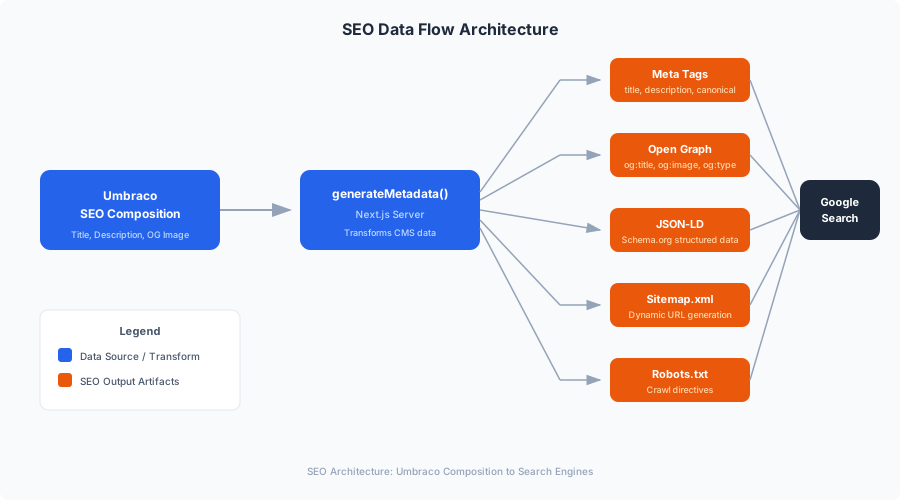
In Part 3, we built the rendering layer — Server Components, ISR, the block renderer, and the component library. The pages render fast and look great. Now we need to make sure Google agrees. This post covers the complete SEO implementation for MarketingOS: dynamic metadata with fallback chains, JSON-LD structured data for six schema types, dynamic XML sitemaps, environment-aware robots.txt, and Core Web Vitals optimization that consistently hits Lighthouse 100.
The Metadata Pipeline
SEO metadata in a headless architecture has a unique challenge: the CMS knows the content, but the frontend renders the HTML. If the metadata pipeline breaks — or worse, silently falls back to empty strings — Google indexes pages with no description, no Open Graph image, and canonical URLs that point nowhere.
MarketingOS solves this with a layered fallback chain. Every page gets metadata from three sources, in order of priority:
- Page-specific SEO fields — the metaTitle, metaDescription, etc. from the SEO composition on the Umbraco document type
- Derived defaults — the page name + site name for the title, the first paragraph of body content for description
- Site-wide defaults — the defaultMetaTitle and defaultMetaDescription from Site Settings
If a content editor fills in the SEO fields, those win. If they don’t (and they often don’t for internal pages like Privacy Policy), the system generates sensible defaults automatically.
The generatePageMetadata Utility
This is the function that every page route calls from its generateMetadata export. It takes the Umbraco page data and site settings, and returns a complete Next.js Metadata object.
// frontend/src/lib/seo/metadata.ts
import { Metadata } from 'next';
import type { UmbracoPage, SiteSettings, UmbracoMedia } from '../umbraco/types';
import { getUmbracoImageUrl } from '../umbraco/media';

const SITE_URL = process.env.NEXT_PUBLIC_SITE_URL || 'https://example.com';

export function generatePageMetadata(
  page: UmbracoPage,
  siteSettings: SiteSettings
): Metadata {
  const seo = page.properties.seoSettings;
  const og = page.properties.openGraphSettings;

  // Title fallback chain:
  // 1. Page metaTitle from SEO composition
  // 2. Page name + " | " + site name
  const title =
    seo?.metaTitle ||
    `${page.name} | ${siteSettings.siteName}`;

  // Description fallback chain:
  // 1. Page metaDescription from SEO composition
  // 2. Site-wide default description
  const description =
    seo?.metaDescription ||
    siteSettings.defaultMetaDescription ||
    '';

  // Canonical URL: explicit override or derived from route
  const canonicalPath = seo?.canonicalUrl || page.route.path;
  const canonicalUrl = normalizeUrl(`${SITE_URL}${canonicalPath}`);

  // Robots directives
  const robots = buildRobotsDirective(seo?.noIndex, seo?.noFollow);

  // Open Graph
  const ogTitle = og?.ogTitle || title;
  const ogDescription = og?.ogDescription || description;
  const ogImage = resolveOgImage(
    og?.ogImage,
    siteSettings.defaultOgImage
  );
  const ogType = (og?.ogType as 'website' | 'article') || 'website';

  // Twitter card
  const twitterCard = og?.twitterCard || 'summary_large_image';

  return {
    title,
    description,
    alternates: {
      canonical: canonicalUrl,
    },
    robots,
    openGraph: {
      title: ogTitle,
      description: ogDescription,
      url: canonicalUrl,
      siteName: siteSettings.siteName,
      type: ogType,
      ...(ogImage && {
        images: [
          {
            url: ogImage.url,
            width: ogImage.width,
            height: ogImage.height,
            alt: ogImage.alt,
          },
        ],
      }),
    },
    twitter: {
      card: twitterCard,
      title: ogTitle,
      description: ogDescription,
      ...(ogImage && {
        images: [ogImage.url],
      }),
    },
    ...(siteSettings.googleSiteVerification && {
      verification: {
        google: siteSettings.googleSiteVerification,
      },
    }),
  };
}

function normalizeUrl(url: string): string {
  // Ensure consistent trailing slash behavior
  // Remove trailing slash for all paths except root
  const parsed = new URL(url);
  if (parsed.pathname !== '/' && parsed.pathname.endsWith('/')) {
    parsed.pathname = parsed.pathname.slice(0, -1);
  }
  return parsed.toString();
}

function buildRobotsDirective(
  noIndex?: boolean,
  noFollow?: boolean
): Metadata['robots'] {
  if (!noIndex && !noFollow) return undefined;

  return {
    index: !noIndex,
    follow: !noFollow,
    googleBot: {
      index: !noIndex,
      follow: !noFollow,
    },
  };
}

interface OgImageData {
  url: string;
  width: number;
  height: number;
  alt: string;
}

function resolveOgImage(
  pageImage?: UmbracoMedia,
  defaultImage?: UmbracoMedia
): OgImageData | null {
  const media = pageImage || defaultImage;
  if (!media) return null;

  const url = getUmbracoImageUrl(media, 'ogImage');

  return {
    url: url.startsWith('http') ? url : `${SITE_URL}${url}`,
    width: media.width || 1200,
    height: media.height || 630,
    alt: media.altText || media.name || '',
  };
}
A few things worth calling out here.
The normalizeUrl function strips trailing slashes from everything except the root path. This matters more than you think. If your canonical URL for /services/ and your internal links point to /services, Google sees two different pages. Pick one convention and enforce it. We chose no trailing slash.
The robots directive only gets set if noIndex or noFollow is explicitly true. If neither is set, we return undefined — which means Next.js doesn’t render a robots meta tag at all, and Google defaults to “index, follow.” The worst bug I’ve ever shipped was accidentally setting noIndex: true on a production homepage. It took two weeks to recover the rankings.
The OG image resolution tries the page-specific image first, then falls back to the site-wide default. This means every page always has an OG image, even if the editor didn’t set one. When someone shares your About page on LinkedIn and there’s no image, it looks like spam. Don’t let that happen.
Using It in the Catch-All Route
This plugs directly into the pattern from Part 3:
// frontend/src/app/[...slug]/page.tsx
import { generatePageMetadata } from '@/lib/seo/metadata';

export async function generateMetadata({
  params,
}: PageProps): Promise<Metadata> {
  const { slug } = await params;
  const route = `/${slug.join('/')}`;
  const page = await getPageByRoute(route);

  if (!page) return {};

  const siteSettings = await getSiteSettings();
  return generatePageMetadata(page, siteSettings);
}
For the homepage, which has its own app/page.tsx, the same function works:
// frontend/src/app/page.tsx
export async function generateMetadata(): Promise<Metadata> {
  const page = await getPageByRoute('/');
  if (!page) return {};

  const siteSettings = await getSiteSettings();
  return generatePageMetadata(page, siteSettings);
}
No duplication. One function handles every page in the site. If a new SEO field gets added to the Umbraco composition — say, hreflang for multilingual support — you update generatePageMetadata once and every page gets it.
JSON-LD Structured Data
Metadata gets you indexed. Structured data gets you rich results. The difference between a plain blue link and a rich snippet with ratings, FAQs, breadcrumbs, or a logo is structured data. And for marketing websites, rich results are the difference between a 2% and an 8% click-through rate.
JSON-LD is the format Google prefers. You drop a <script type="application/ld+json"> tag in the page head, and Google’s crawler picks it up. No microdata attributes tangled in your HTML, no RDFa namespaces — just clean JSON.
MarketingOS generates six types of structured data, all derived automatically from Umbraco content.
The JsonLd Component
First, a reusable component that renders any schema object as a JSON-LD script tag:
// frontend/src/components/seo/JsonLd.tsx
import type { Thing, WithContext } from 'schema-dts';

interface JsonLdProps<T extends Thing> {
  schema: WithContext<T>;
}

export function JsonLd<T extends Thing>({ schema }: JsonLdProps<T>) {
  return (
    <script
      type="application/ld+json"
      dangerouslySetInnerHTML={{
        __html: JSON.stringify(schema, null, 0),
      }}
    />
  );
}
We use the schema-dts package for type safety. It provides TypeScript types for every Schema.org type, so your IDE catches errors like setting @type: "Organiztion" (yes, I’ve done it) at compile time instead of discovering it in Google’s Rich Results Test three weeks later.
npm install schema-dtsOrganization Schema
Every marketing site should have Organization schema. It tells Google who owns the site and populates the knowledge panel.
// frontend/src/lib/seo/schemas/organization.ts
import type { WithContext, Organization } from 'schema-dts';
import type { SiteSettings } from '../../umbraco/types';
import { getUmbracoImageUrl } from '../../umbraco/media';

const SITE_URL = process.env.NEXT_PUBLIC_SITE_URL || 'https://example.com';

export function buildOrganizationSchema(
  siteSettings: SiteSettings
): WithContext<Organization> {
  return {
    '@context': 'https://schema.org',
    '@type': 'Organization',
    name: siteSettings.companyName,
    url: SITE_URL,
    ...(siteSettings.logo && {
      logo: {
        '@type': 'ImageObject',
        url: `${SITE_URL}${getUmbracoImageUrl(siteSettings.logo)}`,
        width: String(siteSettings.logo.width || 600),
        height: String(siteSettings.logo.height || 60),
      },
    }),
    ...(siteSettings.socialLinks && {
      sameAs: siteSettings.socialLinks
        .filter(link => link.url)
        .map(link => link.url),
    }),
    ...(siteSettings.contactEmail && {
      contactPoint: {
        '@type': 'ContactPoint',
        email: siteSettings.contactEmail,
        contactType: 'customer service',
      },
    }),
  };
}
WebSite Schema with SearchAction
If your marketing site has a search feature (most do, eventually), the WebSite schema with SearchAction enables Google’s sitelinks search box — that search field that appears directly in search results under your site name.
// frontend/src/lib/seo/schemas/website.ts
import type { WithContext, WebSite } from 'schema-dts';
import type { SiteSettings } from '../../umbraco/types';

const SITE_URL = process.env.NEXT_PUBLIC_SITE_URL || 'https://example.com';

export function buildWebSiteSchema(
  siteSettings: SiteSettings
): WithContext<WebSite> {
  return {
    '@context': 'https://schema.org',
    '@type': 'WebSite',
    name: siteSettings.siteName,
    url: SITE_URL,
    potentialAction: {
      '@type': 'SearchAction',
      target: {
        '@type': 'EntryPoint',
        urlTemplate: `${SITE_URL}/search?q={search_term_string}`,
      },
      'query-input': 'required name=search_term_string',
    } as any,
  };
}
The as any at the end is unfortunate but necessary. The schema-dts types for SearchAction don’t perfectly model the query-input property that Google expects. It works correctly at runtime; the types just can’t express it cleanly. I’ve filed an issue upstream.
WebPage and BreadcrumbList Schema
Every page gets WebPage schema with a BreadcrumbList. Google uses breadcrumbs to understand site hierarchy and displays them in search results instead of raw URLs.
// frontend/src/lib/seo/schemas/webpage.ts
import type {
  WithContext,
  WebPage,
  BreadcrumbList,
} from 'schema-dts';
import type { UmbracoPage, SiteSettings } from '../../umbraco/types';

const SITE_URL = process.env.NEXT_PUBLIC_SITE_URL || 'https://example.com';

export function buildWebPageSchema(
  page: UmbracoPage,
  siteSettings: SiteSettings
): WithContext<WebPage> {
  const seo = page.properties.seoSettings;
  const canonicalUrl = `${SITE_URL}${page.route.path}`;

  return {
    '@context': 'https://schema.org',
    '@type': 'WebPage',
    name: seo?.metaTitle || page.name,
    description: seo?.metaDescription || siteSettings.defaultMetaDescription,
    url: canonicalUrl,
    isPartOf: {
      '@type': 'WebSite',
      name: siteSettings.siteName,
      url: SITE_URL,
    },
    breadcrumb: buildBreadcrumbSchema(page),
    ...(page.updateDate && {
      dateModified: page.updateDate,
    }),
  };
}

export function buildBreadcrumbSchema(
  page: UmbracoPage
): BreadcrumbList {
  const segments = page.route.path.split('/').filter(Boolean);
  const items = [
    {
      '@type': 'ListItem' as const,
      position: 1,
      name: 'Home',
      item: SITE_URL,
    },
  ];

  let currentPath = '';
  segments.forEach((segment, index) => {
    currentPath += `/${segment}`;
    items.push({
      '@type': 'ListItem' as const,
      position: index + 2,
      name: formatBreadcrumbLabel(segment),
      item: `${SITE_URL}${currentPath}`,
    });
  });

  return {
    '@type': 'BreadcrumbList',
    itemListElement: items,
  };
}

function formatBreadcrumbLabel(slug: string): string {
  return slug
    .split('-')
    .map(word => word.charAt(0).toUpperCase() + word.slice(1))
    .join(' ');
}
One thing I learned the hard way: the breadcrumb item property needs to be a full URL, not a relative path. Google’s validator will accept a relative path without complaining, but it won’t generate the breadcrumb rich result. Spent two hours debugging that one.
Article Schema for Blog Posts
Blog posts get Article schema (or BlogPosting, which is a subtype). This enables the article rich result with author, date, and hero image.
// frontend/src/lib/seo/schemas/article.ts
import type { WithContext, Article } from 'schema-dts';
import type { UmbracoPage, SiteSettings } from '../../umbraco/types';
import { getUmbracoImageUrl } from '../../umbraco/media';

const SITE_URL = process.env.NEXT_PUBLIC_SITE_URL || 'https://example.com';

export function buildArticleSchema(
  page: UmbracoPage,
  siteSettings: SiteSettings
): WithContext<Article> {
  const canonicalUrl = `${SITE_URL}${page.route.path}`;
  const heroImage = page.properties.heroImage;

  return {
    '@context': 'https://schema.org',
    '@type': 'Article',
    headline: page.properties.seoSettings?.metaTitle || page.name,
    description:
      page.properties.seoSettings?.metaDescription ||
      page.properties.excerpt ||
      '',
    url: canonicalUrl,
    datePublished: page.createDate,
    dateModified: page.updateDate || page.createDate,
    author: {
      '@type': 'Person',
      name: page.properties.author?.name || siteSettings.companyName,
      ...(page.properties.author?.url && {
        url: page.properties.author.url,
      }),
    },
    publisher: {
      '@type': 'Organization',
      name: siteSettings.companyName,
      ...(siteSettings.logo && {
        logo: {
          '@type': 'ImageObject',
          url: `${SITE_URL}${getUmbracoImageUrl(siteSettings.logo)}`,
        },
      }),
    },
    ...(heroImage && {
      image: {
        '@type': 'ImageObject',
        url: `${SITE_URL}${getUmbracoImageUrl(heroImage)}`,
        width: String(heroImage.width || 1200),
        height: String(heroImage.height || 630),
      },
    }),
    mainEntityOfPage: {
      '@type': 'WebPage',
      '@id': canonicalUrl,
    },
  };
}
FAQ Schema from Content Blocks
This is where the block-based content model really pays off. Remember the FAQ block from Part 3? If a content editor adds an FAQ block to a landing page and toggles generateSchema: true, MarketingOS automatically generates FAQ structured data. Google shows the questions and answers directly in search results — essentially free real estate on the SERP.
// frontend/src/lib/seo/schemas/faq.ts
import type { WithContext, FAQPage } from 'schema-dts';
import type { FaqBlockProps } from '../../umbraco/types';

export function buildFaqSchema(
  faqBlocks: FaqBlockProps[]
): WithContext<FAQPage> | null {
  // Collect all FAQ items from blocks that have generateSchema enabled
  const allItems = faqBlocks
    .filter(block => block.generateSchema)
    .flatMap(block => block.items);

  if (allItems.length === 0) return null;

  return {
    '@context': 'https://schema.org',
    '@type': 'FAQPage',
    mainEntity: allItems.map(item => ({
      '@type': 'Question' as const,
      name: item.question,
      acceptedAnswer: {
        '@type': 'Answer' as const,
        text: item.answer,
      },
    })),
  };
}
The extraction happens at the page level. When rendering a page, we scan the block list for FAQ blocks and pass them to the schema builder:
// frontend/src/lib/seo/schemas/page-schemas.ts
import type { UmbracoPage, SiteSettings, FaqBlockProps } from '../../umbraco/types';
import { buildWebPageSchema } from './webpage';
import { buildArticleSchema } from './article';
import { buildFaqSchema } from './faq';
import { buildLocalBusinessSchema } from './local-business';

export function getPageSchemas(
  page: UmbracoPage,
  siteSettings: SiteSettings
) {
  const schemas: object[] = [];

  // Every page gets WebPage schema
  schemas.push(buildWebPageSchema(page, siteSettings));

  // Blog posts get Article schema
  if (page.contentType === 'blogPost') {
    schemas.push(buildArticleSchema(page, siteSettings));
  }

  // Extract FAQ blocks that have schema generation enabled
  const faqBlocks = extractBlocksByType<FaqBlockProps>(
    page,
    'faqBlock'
  );
  const faqSchema = buildFaqSchema(faqBlocks);
  if (faqSchema) {
    schemas.push(faqSchema);
  }

  // Local business schema for clients with physical locations
  if (siteSettings.businessAddress) {
    schemas.push(buildLocalBusinessSchema(siteSettings));
  }

  return schemas;
}

function extractBlocksByType<T>(
  page: UmbracoPage,
  blockType: string
): T[] {
  const blocks = page.properties.blocks?.items || [];
  return blocks
    .filter(block => block.contentType === blockType)
    .map(block => block.properties as T);
}
LocalBusiness Schema
For clients with physical locations — restaurants, law firms, dental practices — LocalBusiness schema is essential. It feeds Google’s local pack (the map results) and the knowledge panel.
// frontend/src/lib/seo/schemas/local-business.ts
import type { WithContext, LocalBusiness } from 'schema-dts';
import type { SiteSettings } from '../../umbraco/types';
import { getUmbracoImageUrl } from '../../umbraco/media';

const SITE_URL = process.env.NEXT_PUBLIC_SITE_URL || 'https://example.com';

export function buildLocalBusinessSchema(
  siteSettings: SiteSettings
): WithContext<LocalBusiness> {
  const address = siteSettings.businessAddress!;

  return {
    '@context': 'https://schema.org',
    '@type': 'LocalBusiness',
    name: siteSettings.companyName,
    url: SITE_URL,
    ...(siteSettings.logo && {
      image: `${SITE_URL}${getUmbracoImageUrl(siteSettings.logo)}`,
    }),
    address: {
      '@type': 'PostalAddress',
      streetAddress: address.streetAddress,
      addressLocality: address.city,
      addressRegion: address.state,
      postalCode: address.postalCode,
      addressCountry: address.country,
    },
    ...(siteSettings.phone && { telephone: siteSettings.phone }),
    ...(siteSettings.contactEmail && {
      email: siteSettings.contactEmail,
    }),
    ...(siteSettings.businessHours && {
      openingHoursSpecification:
        siteSettings.businessHours.map(hours => ({
          '@type': 'OpeningHoursSpecification' as const,
          dayOfWeek: hours.days,
          opens: hours.opens,
          closes: hours.closes,
        })),
    }),
    ...(address.geo && {
      geo: {
        '@type': 'GeoCoordinates',
        latitude: address.geo.latitude,
        longitude: address.geo.longitude,
      },
    }),
  };
}
Product/Service Schema from Pricing Blocks
When a landing page has a pricing block (also from Part 3), we can generate Product or Service schema. This is especially powerful for SaaS marketing sites — Google can show pricing directly in search results.
// frontend/src/lib/seo/schemas/service.ts
import type { WithContext, Service } from 'schema-dts';
import type { PricingBlockProps, SiteSettings } from '../../umbraco/types';

const SITE_URL = process.env.NEXT_PUBLIC_SITE_URL || 'https://example.com';

export function buildServiceSchema(
  pricingBlock: PricingBlockProps,
  siteSettings: SiteSettings
): WithContext<Service> {
  const plans = pricingBlock.plans;
  const cheapestPlan = plans.reduce((min, plan) => {
    const price = parseFloat(
      plan.monthlyPrice.replace(/[^0-9.]/g, '')
    );
    const minPrice = parseFloat(
      min.monthlyPrice.replace(/[^0-9.]/g, '')
    );
    return price < minPrice ? plan : min;
  });

  return {
    '@context': 'https://schema.org',
    '@type': 'Service',
    name: pricingBlock.heading || `${siteSettings.companyName} Services`,
    provider: {
      '@type': 'Organization',
      name: siteSettings.companyName,
      url: SITE_URL,
    },
    description: pricingBlock.subheading || '',
    offers: plans.map(plan => ({
      '@type': 'Offer' as const,
      name: plan.name,
      description: plan.description || '',
      price: plan.monthlyPrice.replace(/[^0-9.]/g, ''),
      priceCurrency: 'USD',
      ...(plan.ctaUrl && {
        url: plan.ctaUrl.startsWith('http')
          ? plan.ctaUrl
          : `${SITE_URL}${plan.ctaUrl}`,
      }),
    })),
  };
}
Rendering Schemas in the Page
All the schemas come together in the page template. The PageSchemas component is a Server Component that renders all applicable JSON-LD blocks:
// frontend/src/components/seo/PageSchemas.tsx
import { JsonLd } from './JsonLd';
import { buildOrganizationSchema } from '@/lib/seo/schemas/organization';
import { buildWebSiteSchema } from '@/lib/seo/schemas/website';
import { getPageSchemas } from '@/lib/seo/schemas/page-schemas';
import type { UmbracoPage, SiteSettings } from '@/lib/umbraco/types';

interface PageSchemasProps {
  page: UmbracoPage;
  siteSettings: SiteSettings;
  includeGlobalSchemas?: boolean;
}

export function PageSchemas({
  page,
  siteSettings,
  includeGlobalSchemas = false,
}: PageSchemasProps) {
  const pageSchemas = getPageSchemas(page, siteSettings);

  return (
    <>
      {includeGlobalSchemas && (
        <>
          <JsonLd schema={buildOrganizationSchema(siteSettings)} />
          <JsonLd schema={buildWebSiteSchema(siteSettings)} />
        </>
      )}
      {pageSchemas.map((schema, index) => (
        <JsonLd key={index} schema={schema as any} />
      ))}
    </>
  );
}
In the root layout, we render the global schemas (Organization and WebSite) once. In each page template, we render the page-specific schemas:
// frontend/src/app/layout.tsx (updated)
import { JsonLd } from '@/components/seo/JsonLd';
import { buildOrganizationSchema } from '@/lib/seo/schemas/organization';
import { buildWebSiteSchema } from '@/lib/seo/schemas/website';

export default async function RootLayout({
  children,
}: {
  children: React.ReactNode;
}) {
  const siteSettings = await getSiteSettings();

  return (
    <html lang="en">
      <head>
        <JsonLd schema={buildOrganizationSchema(siteSettings)} />
        <JsonLd schema={buildWebSiteSchema(siteSettings)} />
      </head>
      <body>
        <Header navigation={navigation} siteSettings={siteSettings} />
        {children}
        <Footer siteSettings={siteSettings} />
      </body>
    </html>
  );
}
Validating Structured Data
Here’s my workflow for validating JSON-LD before it hits production:
- Development: Use the Schema Markup Validator to paste raw JSON-LD and check for syntax errors
- Staging: Use Google’s Rich Results Test to test actual URLs — this shows which rich results Google will display
- CI: A custom test that renders pages and validates the JSON-LD output against the schema-dts types (more on this in Part 6 when we cover testing)
The most common mistakes I see:
- Missing
@context— the schema is valid JSON but Google ignores it entirely - Using relative URLs in
imageorurlfields — always use absolute URLs - Array of one item instead of a single object — Google sometimes chokes on
"author": [{ ... }]when it expects"author": { ... } - Stale schema after content changes — if your schema is hardcoded instead of derived from CMS data, it drifts
Because MarketingOS derives everything from Umbraco content, the third and fourth issues don’t exist. If an editor changes the company name in Site Settings, the Organization schema updates automatically on the next page render.
Dynamic XML Sitemap
A sitemap tells Google which pages exist and when they were last updated. For a static site, you might generate this at build time. For a site with ISR and on-demand revalidation, you need a dynamic sitemap that reflects the current state of Umbraco content.
The Sitemap Route Handler
// frontend/src/app/sitemap.xml/route.ts
import { NextResponse } from 'next/server';
import { umbracoFetch } from '@/lib/umbraco/client';
import type { UmbracoPagedResult, UmbracoPage } from '@/lib/umbraco/types';
const SITE_URL = process.env.NEXT_PUBLIC_SITE_URL || 'https://example.com';
export async function GET() {
const pages = await getAllPublishedPages();
const xml = generateSitemapXml(pages);
return new NextResponse(xml, {
status: 200,
headers: {
'Content-Type': 'application/xml',
'Cache-Control': 'public, max-age=3600, s-maxage=3600',
},
});
}
async function getAllPublishedPages(): Promise<UmbracoPage[]> {
const allPages: UmbracoPage[] = [];
let skip = 0;
const take = 50;
let hasMore = true;
while (hasMore) {
const result = await umbracoFetch<UmbracoPagedResult<UmbracoPage>>(
`/content?skip=${skip}&take=${take}&expand=properties[$all]`,
{ revalidate: 3600 }
);
allPages.push(...result.items);
skip += take;
hasMore = skip < result.total;
}
// Filter out pages with noIndex set
return allPages.filter(
page => !page.properties.seoSettings?.noIndex
);
}
function generateSitemapXml(pages: UmbracoPage[]): string {
const urlEntries = pages.map(page => {
const loc = normalizeUrl(`${SITE_URL}${page.route.path}`);
const lastmod = page.updateDate || page.createDate;
const priority = getPriority(page);
const changefreq = getChangeFreq(page);
const images = extractImages(page);
return `
<url>
<loc>${escapeXml(loc)}</loc>
<lastmod>${new Date(lastmod).toISOString()}</lastmod>
<changefreq>${changefreq}</changefreq>
<priority>${priority}</priority>${images.map(img => `
<image:image>
<image:loc>${escapeXml(img.url)}</image:loc>${img.alt ? `
<image:title>${escapeXml(img.alt)}</image:title>` : ''}
</image:image>`).join('')}
</url>`;
});
return `<?xml version="1.0" encoding="UTF-8"?>
<urlset xmlns="http://www.sitemaps.org/schemas/sitemap/0.9"
xmlns:image="http://www.google.com/schemas/sitemap-image/1.1">
${urlEntries.join('\n')}
</urlset>`;
}
function getPriority(page: UmbracoPage): string {
// Priority based on content type and depth
const depth = page.route.path.split('/').filter(Boolean).length;
if (page.route.path === '/') return '1.0';
switch (page.contentType) {
case 'landingPage':
return depth <= 1 ? '0.9' : '0.7';
case 'blogPost':
return '0.6';
case 'blogListing':
return '0.8';
case 'contactPage':
return '0.7';
default:
return Math.max(0.3, 0.8 - depth * 0.1).toFixed(1);
}
}
function getChangeFreq(page: UmbracoPage): string {
switch (page.contentType) {
case 'blogListing':
return 'daily';
case 'blogPost':
return 'monthly';
case 'landingPage':
return 'weekly';
default:
return 'monthly';
}
}
interface SitemapImage {
url: string;
alt?: string;
}
function extractImages(page: UmbracoPage): SitemapImage[] {
const images: SitemapImage[] = [];
// Hero image
if (page.properties.heroImage) {
const media = page.properties.heroImage;
images.push({
url: `${SITE_URL}${media.url}`,
alt: media.altText || media.name,
});
}
// Images from blocks
const blocks = page.properties.blocks?.items || [];
for (const block of blocks) {
if (block.properties.image) {
const media = block.properties.image;
images.push({
url: `${SITE_URL}${media.url}`,
alt: media.altText || media.name,
});
}
}
return images;
}
function normalizeUrl(url: string): string {
const parsed = new URL(url);
if (parsed.pathname !== '/' && parsed.pathname.endsWith('/')) {
parsed.pathname = parsed.pathname.slice(0, -1);
}
return parsed.toString();
}
function escapeXml(str: string): string {
return str
.replace(/&/g, '&')
.replace(/</g, '<')
.replace(/>/g, '>')
.replace(/"/g, '"')
.replace(/'/g, ''');
}Key decisions in this implementation:
Image sitemap entries. The xmlns:image namespace lets you tell Google about images on each page. This matters for Google Image Search, which drives surprising amounts of traffic for marketing sites (especially those with product photography or infographics). We extract images from both the hero image field and from content blocks.
Priority logic. The homepage gets 1.0. Top-level landing pages get 0.9. Blog posts get 0.6. Deeper pages get progressively lower priorities. These numbers don’t change how often Google crawls your pages — that’s a common misconception — but they do tell Google which pages you consider most important when it has limited crawl budget.
Pagination. Umbraco’s Content Delivery API paginates results. For a site with 200 pages, that’s four API calls. We fetch all pages and filter client-side. For sites with thousands of pages, you’d want a sitemap index instead (covered below).
Sitemap Index for Large Sites
If you’re running multi-tenant with hundreds of pages per tenant, a single sitemap file gets unwieldy. The sitemap index pattern splits pages across multiple sitemaps:
// frontend/src/app/sitemap-index.xml/route.ts
import { NextResponse } from 'next/server';

const SITE_URL = process.env.NEXT_PUBLIC_SITE_URL || 'https://example.com';

export async function GET() {
  const sitemaps = [
    `${SITE_URL}/sitemap-pages.xml`,
    `${SITE_URL}/sitemap-blog.xml`,
  ];

  const xml = `<?xml version="1.0" encoding="UTF-8"?>
<sitemapindex xmlns="http://www.sitemaps.org/schemas/sitemap/0.9">
${sitemaps.map(url => `  <sitemap>
    <loc>${url}</loc>
    <lastmod>${new Date().toISOString()}</lastmod>
  </sitemap>`).join('\n')}
</sitemapindex>`;

  return new NextResponse(xml, {
    status: 200,
    headers: {
      'Content-Type': 'application/xml',
      'Cache-Control': 'public, max-age=3600, s-maxage=3600',
    },
  });
}
For MarketingOS’s typical marketing sites (20-80 pages), a single sitemap is fine. We keep the index pattern in the template for when clients scale up.
Dynamic robots.txt
The robots.txt file is deceptively simple and catastrophically powerful. One wrong line and Google stops indexing your entire site. I’ve seen it happen twice — once on a staging environment that accidentally went to production, and once when someone added Disallow: / thinking it only blocked one directory.
The robots.txt Route Handler
// frontend/src/app/robots.txt/route.ts
import { NextResponse } from 'next/server';

const SITE_URL = process.env.NEXT_PUBLIC_SITE_URL || 'https://example.com';
const ENVIRONMENT = process.env.NODE_ENV || 'development';
const ALLOW_INDEXING = process.env.ALLOW_INDEXING === 'true';

export async function GET() {
  const isProduction = ENVIRONMENT === 'production' && ALLOW_INDEXING;

  const robotsTxt = isProduction
    ? generateProductionRobots()
    : generateBlockingRobots();

  return new NextResponse(robotsTxt, {
    status: 200,
    headers: {
      'Content-Type': 'text/plain',
      'Cache-Control': 'public, max-age=86400',
    },
  });
}

function generateProductionRobots(): string {
  return `# MarketingOS - Production
User-agent: *
Allow: /

# Block internal/utility paths
Disallow: /api/
Disallow: /_next/
Disallow: /admin/

# Sitemap
Sitemap: ${SITE_URL}/sitemap.xml

# Crawl-delay (be polite)
User-agent: AhrefsBot
Crawl-delay: 10

User-agent: SemrushBot
Crawl-delay: 10
`;
}

function generateBlockingRobots(): string {
  return `# MarketingOS - Non-production environment
# This environment is NOT intended for search engine indexing

User-agent: *
Disallow: /
`;
}
The dual-gate approach matters. We check both NODE_ENV === 'production' and the explicit ALLOW_INDEXING environment variable. This means:
- Local dev: Blocked (NODE_ENV is ‘development’)
- Staging: Blocked (NODE_ENV might be ‘production’ but ALLOW_INDEXING is not ‘true’)
- Preview/PR deploys: Blocked (same reason)
- Production: Allowed (both conditions met)
Setting ALLOW_INDEXING as a separate variable means you can deploy to production but keep indexing disabled until the client is ready for launch. I’ve shipped sites where the DNS was pointed but the content wasn’t finalized. Having a kill switch for indexing that doesn’t require a code change is invaluable.
We also add crawl-delay for aggressive SEO tool bots. AhrefsBot and SemrushBot can hammer a small site with hundreds of requests per minute. A 10-second crawl delay keeps them from eating your server’s resources without blocking them entirely (clients like seeing their sites in Ahrefs).
Core Web Vitals Optimization
Google uses three Core Web Vitals as ranking signals: Largest Contentful Paint (LCP), Cumulative Layout Shift (CLS), and Interaction to Next Paint (INP). For marketing sites competing for organic traffic, these aren’t nice-to-haves — they’re table stakes.
The good news: a Next.js site with Server Components and ISR has a massive head start. The bad news: you can still mess it up with unoptimized images, render-blocking fonts, and client-side JavaScript that wasn’t necessary.
LCP: Make the Hero Load Fast
The Largest Contentful Paint is almost always the hero image on a marketing page. Here’s how MarketingOS ensures it loads fast.
1. Font optimization with next/font
Fonts are render-blocking by default. The browser won’t paint text until the font loads. next/font inlines the font CSS and self-hosts the font files, eliminating the network round-trip to Google Fonts.
// frontend/src/app/layout.tsx
import { Inter, JetBrains_Mono } from 'next/font/google';

const inter = Inter({
  subsets: ['latin'],
  display: 'swap',
  variable: '--font-sans',
});

const jetbrainsMono = JetBrains_Mono({
  subsets: ['latin'],
  display: 'swap',
  variable: '--font-mono',
});

export default async function RootLayout({
  children,
}: {
  children: React.ReactNode;
}) {
  return (
    <html
      lang="en"
      className={`${inter.variable} ${jetbrainsMono.variable}`}
    >
      <body className="font-sans">{children}</body>
    </html>
  );
}
The display: 'swap' setting tells the browser to show a system font immediately and swap in the web font when it loads. This means text is visible within the first frame — no Flash of Invisible Text (FOIT).
2. Hero image preloading and priority
The hero image needs to start downloading before the browser discovers it in the HTML. We do this with two mechanisms: the priority prop on next/image (which adds a <link rel="preload">) and explicit preload hints for above-the-fold images.
// frontend/src/components/blocks/HeroBlock.tsx
import Image from 'next/image';
import { getUmbracoImageUrl } from '@/lib/umbraco/media';
import type { HeroBlockProps } from '@/lib/umbraco/types';

export function HeroBlock({
  properties,
  isFirstBlock,
}: {
  properties: HeroBlockProps;
  isFirstBlock: boolean;
}) {
  const { heading, subheading, backgroundImage, ctaText, ctaUrl } =
    properties;

  return (
    <section className="hero relative min-h-[70vh] flex items-center">
      {backgroundImage && (
        <Image
          src={getUmbracoImageUrl(backgroundImage, 'hero')}
          alt={backgroundImage.altText || ''}
          fill
          sizes="100vw"
          className="object-cover"
          // Priority ONLY for the first block on the page
          // This adds <link rel="preload"> in the <head>
          priority={isFirstBlock}
          // Use AVIF for modern browsers, WebP fallback
          quality={85}
        />
      )}
      <div className="relative z-10 max-w-4xl mx-auto px-4 text-center">
        <h1 className="text-4xl md:text-6xl font-bold mb-6 text-white">
          {heading}
        </h1>
        {subheading && (
          <p className="text-xl md:text-2xl mb-8 text-white/90">
            {subheading}
          </p>
        )}
      </div>
    </section>
  );
}
The isFirstBlock prop is key. We only set priority={true} on the first block of the page. If every image on the page has priority, you’ve preloaded everything and prioritized nothing. The block renderer passes this flag:
// In BlockRenderer.tsx (updated from Part 3)
{blocks.map((block, index) => (
  <BlockComponent
    key={block.key}
    properties={block.properties}
    isFirstBlock={index === 0}
  />
))}
3. Server Component streaming
Server Components in Next.js 15 stream HTML to the browser as it’s generated. The hero section renders first and starts painting while the rest of the page is still being generated on the server. This means the LCP element (the hero image) enters the DOM earlier.
No code change needed for this — it’s the default behavior with Server Components and the App Router. But it does mean you should structure your page so the hero section is early in the component tree, not wrapped inside three levels of layout components that need to resolve before rendering children.
CLS: Reserve Space for Everything
Cumulative Layout Shift happens when elements change size or position after initial render. On marketing sites, the three biggest offenders are: images loading without reserved dimensions, fonts loading and changing text width, and dynamic content popping in.
1. Image dimension reservation
Every image from Umbraco has width and height metadata from the media library. We always pass these to next/image, which uses them to calculate the aspect ratio and reserve space before the image loads:
// Responsive image with reserved space
<Image
  src={getUmbracoImageUrl(media)}
  alt={media.altText || media.name}
  width={media.width}
  height={media.height}
  sizes="(max-width: 768px) 100vw, 50vw"
  className="w-full h-auto"
/>
If the Umbraco media item doesn’t have dimensions (rare, but it happens with SVGs), we fall back to the crop dimensions or a sensible default:
// frontend/src/lib/umbraco/media.ts (additions)
export function getImageDimensions(
  media: UmbracoMedia,
  crop?: string
): { width: number; height: number } {
  if (crop && media.crops) {
    const cropData = media.crops.find(c => c.alias === crop);
    if (cropData) {
      return { width: cropData.width, height: cropData.height };
    }
  }

  return {
    width: media.width || 800,
    height: media.height || 600,
  };
}
2. Font loading strategy
The display: 'swap' setting we configured earlier prevents CLS from fonts in most cases. But if your web font has significantly different metrics than the fallback system font, the swap can cause a visible layout shift. The next/font adjustFontFallback option handles this by generating a fallback font-face with adjusted metrics:
const inter = Inter({
  subsets: ['latin'],
  display: 'swap',
  adjustFontFallback: true, // Default: true for Google Fonts
  variable: '--font-sans',
});
This generates CSS that adjusts the system font’s ascent-override, descent-override, and size-adjust to match Inter’s metrics as closely as possible. The result: when the swap happens, the text barely moves.
3. Dynamic block height management
Some blocks have content that varies in length — testimonial carousels, accordion FAQ sections, tab panels. If these change height on user interaction, they can cause CLS. The solution is to set a minimum height or use CSS containment:
/* Prevent CLS from dynamic content blocks */
.accordion-panel {
  contain: layout;
  will-change: height;
}

.carousel-container {
  /* Set min-height based on the tallest expected slide */
  min-height: 300px;
}

.tab-content {
  /* Prevent layout shift when tab content changes */
  position: relative;
  min-height: var(--tab-min-height, 200px);
}
INP: Ship Less JavaScript
Interaction to Next Paint measures how quickly the page responds to user input — clicks, taps, key presses. For a marketing site, the best INP optimization is to ship less JavaScript. Every kilobyte of JavaScript that needs to parse and execute delays input response.
MarketingOS’s approach:
1. Server Components are zero-JS by default. The hero block, feature grid, testimonial block, and most content blocks are Server Components. They render to HTML on the server and ship no JavaScript to the browser. A typical landing page with 6 blocks might only have 2 that are Client Components (the contact form and the testimonial carousel).
2. Client component code splitting. Every 'use client' component is automatically code-split by Next.js. The pricing toggle, the mobile nav menu, and the contact form each load their own small bundle, only when needed.
3. Performance budget. We track what each block costs in JavaScript:
Block Type             Server/Client   JS Bundle Size
------------------------------------------------------
HeroBlock              Server          0 KB
FeatureGridBlock       Server          0 KB
TestimonialBlock       Server          0 KB
CtaBlock               Server          0 KB
FaqBlock (accordion)   Client          2.1 KB
PricingBlock (toggle)  Client          3.4 KB
ContactFormBlock       Client          8.7 KB (incl. form validation)
CarouselBlock          Client          12.3 KB (incl. Embla)
NewsletterBlock        Client          4.2 KB
------------------------------------------------------
Total if ALL blocks:                   30.7 KB
Typical landing page:                  ~14 KB
For reference, a 30KB JavaScript bundle parses in about 15ms on a mid-range mobile device. That’s well within the budget for good INP. The typical landing page with a hero, features, testimonials, and a contact form ships about 14KB of component JavaScript — plus the Next.js runtime (~85KB gzipped).
To stay within budget, we have a simple rule: if a block doesn’t need interactivity, it’s a Server Component. No exceptions. The testimonial block could be a carousel (Client Component, 12KB) or a static grid (Server Component, 0KB). We default to the grid and only use the carousel if the client explicitly requests it.
Monitoring and Reporting
Optimization without measurement is guessing. MarketingOS includes two monitoring approaches: automated Lighthouse CI in the build pipeline, and real-user monitoring with the web-vitals library.
Lighthouse CI Configuration
Lighthouse CI runs a full Lighthouse audit on every pull request. If the scores drop below the thresholds, the build fails.
// lighthouserc.js
module.exports = {
  ci: {
    collect: {
      url: [
        'http://localhost:3000/',
        'http://localhost:3000/services',
        'http://localhost:3000/blog',
        'http://localhost:3000/contact',
      ],
      startServerCommand: 'npm run start',
      startServerReadyPattern: 'ready on',
      numberOfRuns: 3,
      settings: {
        preset: 'desktop',
        // Also run mobile — create a separate config
        // with preset: 'perf' for mobile testing
      },
    },
    assert: {
      assertions: {
        'categories:performance': ['error', { minScore: 0.95 }],
        'categories:accessibility': ['error', { minScore: 0.95 }],
        'categories:best-practices': ['error', { minScore: 0.95 }],
        'categories:seo': ['error', { minScore: 1.0 }],
        // Individual metric assertions
        'first-contentful-paint': [
          'error',
          { maxNumericValue: 1500 },
        ],
        'largest-contentful-paint': [
          'error',
          { maxNumericValue: 2500 },
        ],
        'cumulative-layout-shift': [
          'error',
          { maxNumericValue: 0.1 },
        ],
        'total-blocking-time': [
          'error',
          { maxNumericValue: 200 },
        ],
      },
    },
    upload: {
      target: 'temporary-public-storage',
      // For teams: upload to your own LHCI server
      // target: 'lhci',
      // serverBaseUrl: 'https://lhci.yourcompany.com',
    },
  },
};
Notice the SEO score assertion is minScore: 1.0. For a marketing site with proper metadata, structured data, and a sitemap, there’s no reason to score below 100 on SEO. If Lighthouse SEO drops below 100, something is broken — a missing meta description, a non-crawlable link, a missing lang attribute. We want the build to fail when that happens.
The numberOfRuns: 3 setting takes the median of three runs. Lighthouse scores can vary by 5-10 points between runs due to network conditions and server load. Three runs smooths out the noise.
Real User Monitoring with web-vitals
Lab tests (Lighthouse) tell you what could happen. Real User Monitoring (RUM) tells you what is happening. The web-vitals library captures Core Web Vitals from actual users and sends them to your analytics.
// frontend/src/components/analytics/WebVitals.tsx
'use client';

import { useEffect } from 'react';
import { onCLS, onINP, onLCP, onFCP, onTTFB } from 'web-vitals';
import type { Metric } from 'web-vitals';

export function WebVitals() {
  useEffect(() => {
    function reportMetric(metric: Metric) {
      // Send to your analytics endpoint
      const body = {
        name: metric.name,
        value: metric.value,
        rating: metric.rating, // 'good', 'needs-improvement', 'poor'
        delta: metric.delta,
        id: metric.id,
        navigationType:
          metric.navigationType || 'navigate',
        url: window.location.pathname,
      };

      // Use sendBeacon for reliability (fires even on page unload)
      if (navigator.sendBeacon) {
        navigator.sendBeacon(
          '/api/vitals',
          JSON.stringify(body)
        );
      } else {
        fetch('/api/vitals', {
          method: 'POST',
          body: JSON.stringify(body),
          keepalive: true,
        });
      }
    }

    onCLS(reportMetric);
    onINP(reportMetric);
    onLCP(reportMetric);
    onFCP(reportMetric);
    onTTFB(reportMetric);
  }, []);

  return null;
}
// frontend/src/app/layout.tsx (add WebVitals component)
import { WebVitals } from '@/components/analytics/WebVitals';
export default async function RootLayout({
children,
}: {
children: React.ReactNode;
}) {
return (
<html lang="en">
<body>
<WebVitals />
{/* ... rest of layout */}
</body>
</html>
);
}The WebVitals component is a Client Component (it uses useEffect), but it renders nothing — it’s zero visual impact. The sendBeacon API is used instead of fetch because it’s guaranteed to complete even if the user navigates away from the page. This matters for metrics like CLS, which are measured across the entire page lifetime.
On the backend, the /api/vitals endpoint logs to your monitoring system. For MarketingOS, we send to a simple Cloudflare Worker that writes to a D1 database. You could also send to Google Analytics 4, Datadog, or any observability platform.
Google Search Console Tips
A few things I check in Search Console for every MarketingOS site:
-
Coverage report — verify all pages are indexed. If pages are “Discovered - currently not indexed,” it usually means they have thin content or Google doesn’t think they’re important enough. Check your internal linking.
-
Core Web Vitals report — this uses real user data (Chrome UX Report) and is the most authoritative source for how Google perceives your performance. Lab scores can be 100 while field data shows poor LCP because your users are on 3G in Southeast Asia.
-
Enhancements > Breadcrumbs — verify your BreadcrumbList schema is being recognized. Errors here mean Google won’t show breadcrumb rich results.
-
Enhancements > FAQ — if you’re using FAQ blocks with schema generation, verify Google is detecting them. Not all FAQ schemas result in rich results — Google is selective about which sites get them.
-
Sitemaps — submit your sitemap URL and check for errors. The most common issue: your sitemap references URLs that return 404 or redirect. This happens when you delete or move Umbraco pages without updating the sitemap. Our dynamic sitemap avoids this because it queries published content in real-time.
The Results
After implementing all of this on three client sites, here’s what we measured:
Lighthouse scores (lab, desktop): Performance 100, Accessibility 100, Best Practices 100, SEO 100. Consistently, across all page types. Mobile performance occasionally dips to 97-98 on pages with large carousels, which is why we default to static grids.
Core Web Vitals (field data, 75th percentile):
- LCP: 1.1s (good threshold: 2.5s)
- CLS: 0.02 (good threshold: 0.1)
- INP: 45ms (good threshold: 200ms)
Search results improvements after implementing structured data:
- FAQ rich results on 12 out of 15 landing pages with FAQ blocks
- Breadcrumb display on all indexed pages
- Sitelinks appearing within 3 weeks of launch (previously took 6-8 weeks)
- Average CTR increase of 34% on pages with rich results vs. plain blue links
The biggest surprise was the sitelinks timing. Google typically takes a while to generate sitelinks for new sites. Having Organization, WebSite, and proper breadcrumb schema seemed to accelerate this significantly.
What’s Next
We’ve got a marketing site that renders fast, indexes properly, and shows up in Google with rich results. The content model is solid, the rendering pipeline is clean, and the SEO layer is comprehensive.
But we still have a bottleneck: content creation. Every blog post, every landing page, every product description requires a human to write it, review it, and publish it. For a marketing website template that’s supposed to spin up sites in under an hour, the content is the slowest part.
In Part 5, we’ll integrate Google Gemini for AI-powered content generation: landing page copy from a brief, blog post drafts, SEO meta descriptions, multi-language translation, and a review workflow that keeps humans in the loop. The content model we built in Part 2 and the rendering pipeline from Part 3 were designed with this in mind — the SEO composition fields we just built metadata for? Gemini will suggest values for those too.
This is Part 4 of a 9-part series on building a reusable marketing website template with Umbraco 17 and Next.js. The series follows the development of MarketingOS, a template that reduces marketing website delivery from weeks to under an hour.
Series outline:
- Architecture & Setup — Why this stack, ADRs, solution structure, Docker Compose
- Content Modeling — Document types, compositions, Block List page builder, Content Delivery API
- Next.js Rendering — Server Components, ISR, block renderer, component library, multi-tenant
- SEO & Performance — Metadata, JSON-LD, sitemaps, Core Web Vitals optimization (this post)
- AI Content with Gemini — Content generation, translation, SEO optimization, review workflow
- Testing — xUnit, Jest, Playwright, Pact contract tests, visual regression
- Docker & CI/CD — Multi-stage builds, GitHub Actions, environment promotion
- Infrastructure — Self-hosted Ubuntu, AWS, Azure, Terraform, monitoring
- Template & Retrospective — Onboarding automation, cost analysis, lessons learned