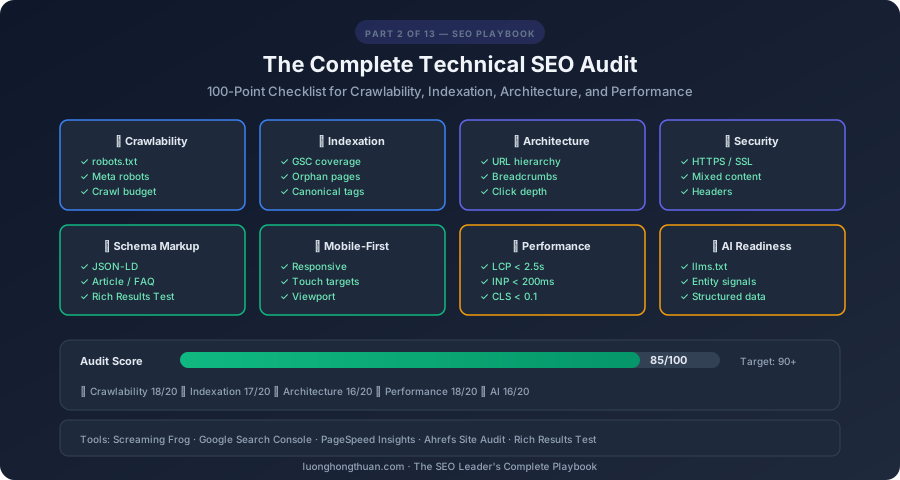
A technical SEO audit is the foundation of every successful SEO strategy. You can write the best content in the world, but if Google can’t crawl it, index it, or understand it — nobody will find it. This is the 100-point checklist I use when auditing any site, from startups to Fortune 500 companies.
This is Part 2 of the SEO Leader’s Complete Playbook — a 13-part series covering everything from technical foundations to AI-era strategies.
Why Technical SEO Matters More in 2026
Technical SEO has always been important, but in 2026 it’s critical for three additional reasons:
- AI crawlers need clean structure — ChatGPT, Perplexity, and Google’s AI Overviews rely on well-structured, crawlable content
- Core Web Vitals are a confirmed ranking factor — slow or unstable sites lose rankings (Google, 2021)
- Mobile-first indexing is universal — Google only uses your mobile version for ranking (Google Search Central)
The 100-Point Technical SEO Checklist
Section 1: Crawlability (15 Points)
Crawlability determines whether search engines can access your content.
robots.txt Configuration
- 1.
robots.txtexists at the root domain (/robots.txt) - 2. Critical pages are NOT blocked by
Disallowrules - 3. Sitemap URL is declared in
robots.txt:Sitemap: https://example.com/sitemap.xml - 4. Admin, staging, and internal pages ARE blocked appropriately
- 5. No accidental wildcard blocks (
Disallow: /) affecting important content
# Example robots.txt for 2026
User-agent: *
Allow: /
Disallow: /admin/
Disallow: /api/
Disallow: /staging/
Disallow: /tmp/

# AI crawlers
User-agent: GPTBot
Allow: /blog/
Allow: /guides/

# Sitemap
Sitemap: https://example.com/sitemap.xml
Crawl Budget Management
- 6. No infinite URL parameters generating duplicate crawlable pages
- 7. Faceted navigation uses
noindexor canonical tags to prevent bloat - 8. Internal search result pages are blocked from crawling
- 9. Pagination is implemented correctly (rel=“next”/“prev” or load-more)
- 10. No redirect chains or loops consuming crawl budget
Crawl Accessibility
- 11. Server response time is under 500ms (ideally under 200ms)
- 12. No 5xx server errors on important pages
- 13. All important content is in HTML (not behind JavaScript rendering)
- 14. No orphan pages (pages with no internal links pointing to them)
- 15. XML sitemap is valid and submitted to Google Search Console
Section 2: Indexation (15 Points)
Indexation ensures your pages actually appear in search results.
Index Coverage
- 16. Check GSC Coverage report — no unexpected “Excluded” pages
- 17. All important pages return HTTP 200 status
- 18. No unintentional
noindextags on important pages - 19.
site:yourdomain.comin Google returns expected number of results - 20. New content gets indexed within 48 hours (check GSC URL Inspection)
Canonical Tags
- 21. Every page has a self-referencing canonical tag
- 22. HTTPS pages canonicalize to HTTPS (not HTTP)
- 23. Trailing slash consistency —
/page/and/pagedon’t both exist - 24. No canonical tag conflicts (canonical points to a different URL than expected)
- 25. Paginated content uses proper canonical strategy
Duplicate Content
- 26. No duplicate title tags across pages
- 27. No duplicate meta descriptions across pages
- 28. URL parameters don’t create duplicate content (use GSC URL Parameters)
- 29. WWW and non-WWW versions redirect to one canonical version
- 30. HTTP redirects to HTTPS consistently
Section 3: Site Architecture (10 Points)
Good architecture helps both search engines and users navigate your site.
- 31. Critical pages are within 3 clicks from homepage
- 32. URL structure is logical and hierarchical:
/category/subcategory/page/ - 33. Breadcrumb navigation is implemented and uses BreadcrumbList schema
- 34. Navigation menu includes links to all major sections
- 35. Footer includes links to important pages (About, Contact, Sitemap)
- 36. HTML sitemap exists for users
- 37. 404 page is custom and helpful (includes search, navigation)
- 38. URL slugs are descriptive and keyword-rich (not
/page?id=12345) - 39. No more than 5 levels of directory depth for important content
- 40. Internal link anchor text is descriptive (not “click here”)
Section 4: HTTPS & Security (5 Points)
- 41. SSL certificate is valid and not expired
- 42. All HTTP URLs redirect to HTTPS (301 redirect)
- 43. No mixed content warnings (HTTP resources on HTTPS pages)
- 44. HSTS (HTTP Strict Transport Security) header is set
- 45. Security headers are configured (X-Frame-Options, CSP, etc.)
Section 5: Structured Data / Schema Markup (15 Points)
Structured data helps search engines and AI understand your content. This is one of the highest-impact technical SEO improvements you can make in 2026.
- 46. Organization/Person schema on homepage with logo, name, sameAs links
- 47. Article/BlogPosting schema on every blog post with author, date, publisher
- 48. BreadcrumbList schema matching visible breadcrumbs
- 49. FAQ schema on pages with frequently asked questions
- 50. HowTo schema on tutorial/guide pages
- 51. Product schema on product pages (if applicable) with price, availability
- 52. Review/AggregateRating schema on review pages
- 53. LocalBusiness schema (if applicable) with address, hours, phone
- 54. Sitelinks Search Box schema on homepage
- 55. No structured data errors in Google’s Rich Results Test
- 56. JSON-LD format used (preferred over Microdata or RDFa)
- 57. Author entity linked in BlogPosting schema
- 58. Image objects include proper URL, width, height
- 59. SoftwareApplication schema for app pages (if applicable)
- 60. Schema markup validated with Google’s Structured Data Testing Tool
{
  "@context": "https://schema.org",
  "@type": "BlogPosting",
  "headline": "SEO in the AI Era — What Changed and What You Must Do Now",
  "description": "Complete guide to SEO in 2026...",
  "datePublished": "2026-02-26",
  "dateModified": "2026-02-26",
  "author": {
    "@type": "Person",
    "name": "Luong Hong Thuan",
    "url": "https://luonghongthuan.com/about",
    "jobTitle": "Technical Lead",
    "sameAs": [
      "https://github.com/luonghongthuan",
      "https://linkedin.com/in/luonghongthuan"
    ]
  },
  "publisher": {
    "@type": "Organization",
    "name": "Luong Hong Thuan",
    "logo": {
      "@type": "ImageObject",
      "url": "https://luonghongthuan.com/logo.png"
    }
  },
  "mainEntityOfPage": {
    "@type": "WebPage",
    "@id": "https://luonghongthuan.com/blog/seo-fundamentals-ai-era-part1/"
  }
}
Section 6: Mobile Optimization (10 Points)
With mobile-first indexing, your mobile experience IS your SEO.
- 61. Site is responsive and works on all screen sizes
- 62. Mobile viewport meta tag is set correctly:
<meta name="viewport" content="width=device-width, initial-scale=1"> - 63. Touch targets are at least 48x48px with adequate spacing
- 64. No horizontal scrolling on mobile devices
- 65. Font size is at least 16px for body text on mobile
- 66. Mobile content matches desktop content (no hidden content on mobile)
- 67. Images are responsive with
srcsetandsizesattributes - 68. Pop-ups and interstitials don’t block content on mobile
- 69. Mobile page speed scores are “Good” in PageSpeed Insights
- 70. Mobile usability report in GSC shows zero issues
Section 7: XML Sitemaps (5 Points)
- 71. XML sitemap includes all important pages
- 72. Sitemap excludes noindex pages, redirects, and error pages
- 73. Sitemap is under 50MB and 50,000 URLs per file
- 74. Sitemap index used for large sites with multiple sitemaps
- 75. Sitemap is submitted via Google Search Console
Section 8: Performance & Core Web Vitals (10 Points)
Covered in depth in Part 5, but here’s the audit checklist:
- 76. LCP (Largest Contentful Paint) under 2.5 seconds
- 77. INP (Interaction to Next Paint) under 200 milliseconds
- 78. CLS (Cumulative Layout Shift) under 0.1
- 79. Images are compressed and in modern formats (WebP/AVIF)
- 80. CSS and JavaScript are minified
- 81. Render-blocking resources are eliminated or deferred
- 82. Browser caching headers are configured
- 83. GZIP or Brotli compression is enabled
- 84. CDN is configured for static assets
- 85. No layout shifts from dynamically loaded content or ads
Section 9: International SEO (5 Points)
If your site targets multiple languages or regions:
- 86.
hreflangtags are correctly implemented for each language/region - 87. Return hreflang links are reciprocal (page A → B and page B → A)
- 88. Content is properly localized (not just machine-translated)
- 89. Geo-targeting is configured in GSC (if using subdirectories)
- 90. Language-specific sitemaps are submitted
Section 10: AI Readiness (10 Points)
New in 2026 — ensuring your site is optimized for AI crawlers and AI-powered search:
- 91. Content is structured with clear Q&A patterns for AI extraction
- 92. Key pages have TL;DR or summary sections at the top
- 93. FAQ sections are present on high-value pages with FAQ schema
- 94.
llms.txtfile exists at root with AI-specific instructions - 95. Content uses natural language that AI models can parse (not keyword-stuffed)
- 96. Author entities are well-defined with consistent names across the web
- 97. Brand entity is established (linked organization across platforms)
- 98. Content includes citations and references (builds trust for AI models)
- 99. Content is chunked into clear, topic-focused sections with H2/H3 headers
- 100. AI crawler access is properly configured in robots.txt (GPTBot, ClaudeBot, etc.)
# llms.txt example
# This file helps AI systems understand your site

> Luong Hong Thuan's personal site — technical blog, project portfolio,
> and educational content about software engineering, AI, and test automation.

## Key Sections
- /blog/ — Technical articles on AI, testing, SEO, and development
- /projects/ — Portfolio of enterprise and open-source projects
- /about/ — Author bio and professional background

## Expertise Areas
- AI-assisted software development
- Test automation with Playwright
- .NET and TypeScript full-stack development
- Cloud architecture on Azure and AWS
How to Run This Audit
Tools You’ll Need
| Tool | Purpose | Cost |
|---|---|---|
| Google Search Console | Indexing, coverage, performance, Core Web Vitals | Free |
| Screaming Frog SEO Spider | Crawling, on-page analysis, broken links, redirects | Free (500 URLs) / £199/yr |
| Google PageSpeed Insights | Core Web Vitals and performance scoring | Free |
| Lighthouse | Comprehensive performance, accessibility, SEO audit | Free (Chrome DevTools) |
| Ahrefs Site Audit | Comprehensive SEO audit with prioritized issues | $99+/mo |
| Google Rich Results Test | Structured data validation | Free |
| Google Mobile-Friendly Test | Mobile usability check | Free |
Audit Process
- Crawl the site with Screaming Frog — export all URLs, status codes, titles, meta descriptions
- Check GSC Coverage — identify pages with indexing issues
- Run PageSpeed Insights — test 5-10 representative pages across the site
- Validate Schema — test every type of schema markup with Rich Results Test
- Review robots.txt and sitemap — ensure they’re correct and up-to-date
- Test mobile — use Chrome DevTools device mode on key pages
- Check security — verify HTTPS, active certificates, security headers
- AI readiness check — verify content structure, FAQ sections, llms.txt
Prioritization Framework
After scoring your 100 points, prioritize fixes using this framework:
| Priority | Impact | Examples |
|---|---|---|
| Critical | Blocks indexing or causes errors | noindex on important pages, 5xx errors, broken canonical |
| High | Significantly affects rankings | Missing schema, slow page speed, mobile issues |
| Medium | Moderate ranking impact | Missing alt text, thin meta descriptions, orphan pages |
| Low | Minor improvement | Missing breadcrumbs, suboptimal URL structure |
Hands-On: Run Your First Technical Audit
Here’s the 30-minute version you can do right now:
- Open Google Search Console → Coverage report → Note any errors
- Run your homepage in PageSpeed Insights → Note your Core Web Vitals scores
- Type
site:yourdomain.comin Google → Compare indexed pages vs expected - Open Chrome DevTools → Run Lighthouse audit on your homepage
- Check your
robots.txt→ Visityourdomain.com/robots.txtdirectly - Validate your schema → Paste your URL into Google’s Rich Results Test
- Test mobile → Open your site on your phone and note any issues
Score yourself against the 100-point checklist above and create a prioritized fix list.
Key Takeaways
- Technical SEO is the foundation — without it, great content can’t be found
- The 100-point checklist covers everything — crawlability, indexing, architecture, security, schema, mobile, performance, and AI readiness
- New in 2026: AI readiness — llms.txt, content structure for AI, and entity optimization
- Structured data is high-impact — JSON-LD schema helps both traditional search and AI
- Audit regularly — run this checklist quarterly to catch issues before they impact rankings
What’s Coming Next
In Part 3, we dive into On-Page SEO Mastery — from crafting click-worthy title tags to building topical authority through content optimization and internal linking. This is where your content starts winning rankings.
Full Series Navigation
- Part 1: SEO in the AI Era — What Changed, What Didn’t, and What You Must Do Now
- Part 2: The Complete Technical SEO Audit — A 100-Point Checklist (you are here)
- Part 3: On-Page SEO Mastery — From Title Tags to Topical Authority
- Part 4: Off-Page SEO & Link Building — The Authority Playbook
- Part 5: Core Web Vitals & PageSpeed — Getting a Perfect Score
- Part 6: Content Strategy for SEO — Topic Clusters, Pillar Pages, and Content That Ranks
- Part 7: Advanced Keyword Research — From Search Intent to Semantic Strategy
- Part 8: SEO for AI — How to Get Cited by ChatGPT, Google AI Overviews, and Perplexity
- Part 9: AI-Powered SEO Workflow — Tools, Automation, and Prompt Engineering
- Part 10: Local SEO & International SEO — Ranking Everywhere
- Part 11: SEO Analytics & Reporting — Measuring What Actually Matters
- Part 12: The Complete SEO Best Practices Checklist — Your Team’s Daily Reference
- Part 13: SEO in Action — Step-by-Step for luonghongthuan.com, inkviet.com & cublearn.app