I had the content model. I had the API. I had beautiful JSON responses with typed blocks. And my first attempt at rendering them was a 400-line page.tsx file with a giant switch statement, inline styles, and fetch calls scattered across three levels of component nesting.
It worked. It was also the kind of code that makes you close the laptop and go for a walk.
The rendering layer is where the architecture either pays off or falls apart. In Part 2, we designed the content model — document types, compositions, blocks, and the Content Delivery API. Now we need to turn that JSON into fast, accessible, SEO-friendly HTML. And we need to do it in a way that works for every client site built from the template.
This is where Next.js 15’s App Router shines. Server Components for zero-JS content rendering. ISR for content freshness without rebuilds. And a pattern I call the “Block Renderer” that maps Umbraco blocks to React components automatically.
The Catch-All Route
Every page in Umbraco has a route — /, /services, /about/team, /blog/my-first-post. Instead of creating a Next.js page for each Umbraco route, we use a single catch-all route that handles everything.
// frontend/src/app/[...slug]/page.tsx
import { notFound } from 'next/navigation';
import { Metadata } from 'next';
import { getPageByRoute, getAllRoutes } from '@/lib/umbraco/queries';
import { getSiteSettings } from '@/lib/umbraco/queries';
import { BlockRenderer } from '@/components/blocks/BlockRenderer';
import { generatePageMetadata } from '@/lib/seo/metadata';
import type { UmbracoPage } from '@/lib/umbraco/types';

interface PageProps {
  params: Promise<{ slug: string[] }>;
}

export async function generateStaticParams() {
  const routes = await getAllRoutes();

  return routes
    .filter(route => route !== '/') // Homepage handled by app/page.tsx
    .map(route => ({
      slug: route.split('/').filter(Boolean),
    }));
}

export async function generateMetadata({
  params,
}: PageProps): Promise<Metadata> {
  const { slug } = await params;
  const route = `/${slug.join('/')}`;
  const page = await getPageByRoute(route);

  if (!page) return {};

  const siteSettings = await getSiteSettings();
  return generatePageMetadata(page, siteSettings);
}

export default async function CmsPage({ params }: PageProps) {
  const { slug } = await params;
  const route = `/${slug.join('/')}`;
  const page = await getPageByRoute(route);

  if (!page) {
    notFound();
  }

  return <PageRenderer page={page} />;
}

function PageRenderer({ page }: { page: UmbracoPage }) {
  switch (page.contentType) {
    case 'landingPage':
      return <LandingPageTemplate page={page} />;
    case 'blogPost':
      return <BlogPostTemplate page={page} />;
    case 'contactPage':
      return <ContactPageTemplate page={page} />;
    default:
      return <GenericPageTemplate page={page} />;
  }
}

function LandingPageTemplate({ page }: { page: UmbracoPage }) {
  const blocks = page.properties.pageBlocks?.items ?? [];

  return (
    <main>
      {blocks.map((block, index) => (
        <BlockRenderer
          key={`${block.content.contentType}-${index}`}
          block={block.content}
        />
      ))}
    </main>
  );
}

function BlogPostTemplate({ page }: { page: UmbracoPage }) {
  const props = page.properties as Record<string, unknown>;

  return (
    <article className="blog-post">
      <header className="blog-post__header">
        <h1>{page.name}</h1>
        {props.excerpt && (
          <p className="blog-post__excerpt">{props.excerpt as string}</p>
        )}
        <time dateTime={page.createDate}>
          {new Date(page.createDate).toLocaleDateString('en-US', {
            year: 'numeric',
            month: 'long',
            day: 'numeric',
          })}
        </time>
      </header>
      <div
        className="blog-post__content prose"
        dangerouslySetInnerHTML={{
          __html: props.content as string,
        }}
      />
    </article>
  );
}

function ContactPageTemplate({ page }: { page: UmbracoPage }) {
  const props = page.properties as Record<string, unknown>;
  const blocks = (props.formBlocks as { items: Array<{ content: { contentType: string; properties: Record<string, unknown> } }> })?.items ?? [];

  return (
    <main>
      <section className="contact-intro">
        <h1>{props.introHeading as string}</h1>
        <div dangerouslySetInnerHTML={{ __html: props.introText as string }} />
      </section>
      {blocks.map((block, index) => (
        <BlockRenderer
          key={`${block.content.contentType}-${index}`}
          block={block.content}
        />
      ))}
    </main>
  );
}

function GenericPageTemplate({ page }: { page: UmbracoPage }) {
  const props = page.properties as Record<string, unknown>;
  const blocks = (props.pageBlocks as { items: Array<{ content: { contentType: string; properties: Record<string, unknown> } }> })?.items;

  return (
    <main>
      <h1>{page.name}</h1>
      {blocks?.map((block, index) => (
        <BlockRenderer
          key={`${block.content.contentType}-${index}`}
          block={block.content}
        />
      ))}
    </main>
  );
}
The generateStaticParams function queries Umbraco for all published page routes at build time, pre-rendering each as static HTML. When content changes, ISR handles revalidation.
Homepage Route
The homepage is handled separately because the catch-all route doesn’t match /:
// frontend/src/app/page.tsx
import { getHomePage, getSiteSettings } from '@/lib/umbraco/queries';
import { generatePageMetadata } from '@/lib/seo/metadata';
import { BlockRenderer } from '@/components/blocks/BlockRenderer';
import type { Metadata } from 'next';

export async function generateMetadata(): Promise<Metadata> {
  const [page, siteSettings] = await Promise.all([
    getHomePage(),
    getSiteSettings(),
  ]);

  if (!page) return {};
  return generatePageMetadata(page, siteSettings);
}

export default async function HomePage() {
  const page = await getHomePage();

  if (!page) {
    return <div>Site not configured. Please create content in Umbraco.</div>;
  }

  const blocks = page.properties.pageBlocks?.items ?? [];

  return (
    <main>
      {blocks.map((block, index) => (
        <BlockRenderer
          key={`${block.content.contentType}-${index}`}
          block={block.content}
        />
      ))}
    </main>
  );
}
ISR and On-Demand Revalidation
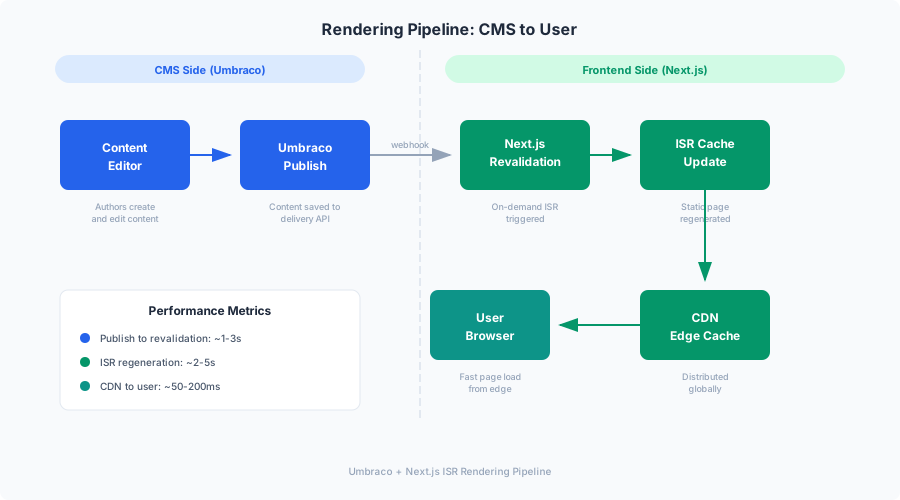
Static generation is great for performance, but marketing content changes frequently. ISR gives us the best of both worlds: static performance with dynamic freshness.
Time-Based Revalidation
Every fetch call in MarketingOS includes a revalidate option:
// In the Umbraco client (from Part 1)
const response = await fetch(url, {
  headers,
  next: { revalidate: preview ? 0 : 60 }, // Revalidate every 60 seconds
});
This means pages are cached for 60 seconds. After that, the next request triggers a background regeneration. Users always get a fast cached response while the new version builds in the background.
On-Demand Revalidation via Webhooks
Time-based revalidation has a gap — up to 60 seconds of stale content. For marketing sites where an editor just clicked “Publish” and wants to see the change immediately, we need on-demand revalidation.
Umbraco 17 supports webhooks that fire when content is published, unpublished, or deleted. We configure a webhook in Umbraco that calls our Next.js revalidation API:
// frontend/src/app/api/revalidate/route.ts
import { revalidatePath, revalidateTag } from 'next/cache';
import { NextRequest, NextResponse } from 'next/server';
import crypto from 'crypto';

const WEBHOOK_SECRET = process.env.UMBRACO_WEBHOOK_SECRET || '';

function verifySignature(payload: string, signature: string): boolean {
  const expected = crypto
    .createHmac('sha256', WEBHOOK_SECRET)
    .update(payload)
    .digest('hex');

  return crypto.timingSafeEqual(
    Buffer.from(signature),
    Buffer.from(expected)
  );
}

export async function POST(request: NextRequest) {
  const body = await request.text();
  const signature = request.headers.get('x-umbraco-signature') || '';

  // Verify webhook authenticity
  if (WEBHOOK_SECRET && !verifySignature(body, signature)) {
    return NextResponse.json(
      { error: 'Invalid signature' },
      { status: 401 }
    );
  }

  const payload = JSON.parse(body);

  try {
    // Revalidate the specific page path
    if (payload.route?.path) {
      revalidatePath(payload.route.path);
    }

    // Also revalidate the homepage (navigation might have changed)
    revalidatePath('/');

    // Revalidate tag-based caches
    revalidateTag('umbraco-content');

    // If site settings changed, revalidate everything
    if (payload.contentType === 'siteSettings') {
      revalidatePath('/', 'layout');
    }

    return NextResponse.json({
      revalidated: true,
      path: payload.route?.path,
      timestamp: Date.now(),
    });
  } catch (error) {
    return NextResponse.json(
      { error: 'Revalidation failed' },
      { status: 500 }
    );
  }
}
The HMAC signature verification is critical. Without it, anyone could trigger revalidation of your pages by hitting the API endpoint. The secret is shared between Umbraco’s webhook configuration and the Next.js environment variable.
Configuring the Umbraco Webhook
In the Umbraco 17 backoffice, navigate to Settings → Webhooks and create:
- URL:
https://your-nextjs-domain.com/api/revalidate - Events: Content Published, Content Unpublished, Content Deleted
- Headers:
x-umbraco-signature: {computed HMAC} - Content Types: All (or specific types you want to trigger revalidation)
The Block Renderer Pattern
This is the core of the rendering layer. The Block Renderer receives an Umbraco block (with a contentType and properties) and maps it to the correct React component.
// frontend/src/components/blocks/BlockRenderer.tsx
import type { BlockContent } from '@/lib/umbraco/types';
import { HeroBlock } from './HeroBlock';
import { FeatureGridBlock } from './FeatureGridBlock';
import { TestimonialBlock } from './TestimonialBlock';
import { CtaSectionBlock } from './CtaSectionBlock';
import { PricingBlock } from './PricingBlock';
import { FaqBlock } from './FaqBlock';
import { StatsBlock } from './StatsBlock';
import { ContactFormBlock } from './ContactFormBlock';

const BLOCK_COMPONENTS: Record<
  string,
  React.ComponentType<{ properties: Record<string, unknown> }>
> = {
  heroBlock: HeroBlock as React.ComponentType<{ properties: Record<string, unknown> }>,
  featureGridBlock: FeatureGridBlock as React.ComponentType<{ properties: Record<string, unknown> }>,
  testimonialBlock: TestimonialBlock as React.ComponentType<{ properties: Record<string, unknown> }>,
  ctaSectionBlock: CtaSectionBlock as React.ComponentType<{ properties: Record<string, unknown> }>,
  pricingBlock: PricingBlock as React.ComponentType<{ properties: Record<string, unknown> }>,
  faqBlock: FaqBlock as React.ComponentType<{ properties: Record<string, unknown> }>,
  statsBlock: StatsBlock as React.ComponentType<{ properties: Record<string, unknown> }>,
  contactFormBlock: ContactFormBlock as React.ComponentType<{ properties: Record<string, unknown> }>,
};

interface BlockRendererProps {
  block: BlockContent;
}

export function BlockRenderer({ block }: BlockRendererProps) {
  const Component = BLOCK_COMPONENTS[block.contentType];

  if (!Component) {
    if (process.env.NODE_ENV === 'development') {
      return (
        <div className="block-fallback">
          <p>Unknown block type: <code>{block.contentType}</code></p>
          <pre>{JSON.stringify(block.properties, null, 2)}</pre>
        </div>
      );
    }
    return null; // Silently skip unknown blocks in production
  }

  return <Component properties={block.properties} />;
}
The registry pattern (BLOCK_COMPONENTS map) means adding a new block type is a two-step process:
- Create the React component
- Add it to the registry
No switch statements, no if-else chains, no touching the parent component.
Marketing Block Components
Let’s build the actual React components. These are Server Components by default — no JavaScript shipped to the browser for static content.
Hero Block
// frontend/src/components/blocks/HeroBlock.tsx
import Image from 'next/image';
import { Container } from '@/components/ui/Container';
import { Button } from '@/components/ui/Button';
import { getUmbracoImageUrl } from '@/lib/umbraco/media';
import type { HeroBlockProps } from '@/lib/umbraco/types';

export function HeroBlock({ properties }: { properties: HeroBlockProps }) {
  const {
    heading,
    subheading,
    ctaText,
    ctaUrl,
    secondaryCtaText,
    secondaryCtaUrl,
    backgroundImage,
    overlayColor,
    overlayOpacity,
    alignment,
    height,
  } = properties;

  const heightClass = {
    full: 'min-h-screen',
    large: 'min-h-[80vh]',
    medium: 'min-h-[60vh]',
  }[height];

  const alignClass = {
    left: 'text-left items-start',
    center: 'text-center items-center',
    right: 'text-right items-end',
  }[alignment];

  return (
    <section className={`hero relative ${heightClass} flex items-center`}>
      {backgroundImage && (
        <Image
          src={getUmbracoImageUrl(backgroundImage, 'hero')}
          alt=""
          fill
          priority
          className="object-cover"
          sizes="100vw"
        />
      )}

      <div
        className="absolute inset-0"
        style={{
          backgroundColor: overlayColor,
          opacity: overlayOpacity / 100,
        }}
      />

      <Container className={`relative z-10 flex flex-col ${alignClass} py-20`}>
        <h1 className="text-4xl md:text-5xl lg:text-6xl font-bold text-white mb-6 max-w-4xl">
          {heading}
        </h1>

        {subheading && (
          <p className="text-lg md:text-xl text-white/90 mb-8 max-w-2xl">
            {subheading}
          </p>
        )}

        <div className="flex flex-wrap gap-4">
          {ctaText && ctaUrl && (
            <Button href={ctaUrl} variant="primary" size="lg">
              {ctaText}
            </Button>
          )}
          {secondaryCtaText && secondaryCtaUrl && (
            <Button href={secondaryCtaUrl} variant="outline" size="lg">
              {secondaryCtaText}
            </Button>
          )}
        </div>
      </Container>
    </section>
  );
}
The Hero Block uses next/image with priority for LCP optimization — the hero image is the largest contentful paint element on most marketing pages. The fill prop with object-cover ensures the image covers the entire hero section regardless of aspect ratio.
Feature Grid Block
// frontend/src/components/blocks/FeatureGridBlock.tsx
import { Container } from '@/components/ui/Container';
import { Section } from '@/components/ui/Section';
import { DynamicIcon } from '@/components/ui/DynamicIcon';
import type { FeatureGridBlockProps } from '@/lib/umbraco/types';

export function FeatureGridBlock({
  properties,
}: {
  properties: FeatureGridBlockProps;
}) {
  const { heading, subheading, features, columns, style } = properties;

  const gridCols = {
    2: 'grid-cols-1 md:grid-cols-2',
    3: 'grid-cols-1 md:grid-cols-2 lg:grid-cols-3',
    4: 'grid-cols-1 md:grid-cols-2 lg:grid-cols-4',
  }[columns];

  return (
    <Section>
      <Container>
        {heading && (
          <div className="text-center mb-12">
            <h2 className="text-3xl font-bold mb-4">{heading}</h2>
            {subheading && (
              <p className="text-lg text-muted max-w-2xl mx-auto">
                {subheading}
              </p>
            )}
          </div>
        )}

        <div className={`grid ${gridCols} gap-8`}>
          {features.map((feature, index) => (
            <FeatureCard key={index} feature={feature} style={style} />
          ))}
        </div>
      </Container>
    </Section>
  );
}

function FeatureCard({
  feature,
  style,
}: {
  feature: FeatureGridBlockProps['features'][0];
  style: FeatureGridBlockProps['style'];
}) {
  const content = (
    <>
      {feature.icon && (
        <div className="feature-icon mb-4">
          <DynamicIcon name={feature.icon} size={32} />
        </div>
      )}
      <h3 className="text-xl font-semibold mb-2">{feature.title}</h3>
      <p className="text-muted">{feature.description}</p>
      {feature.linkText && feature.linkUrl && (
        <a
          href={feature.linkUrl}
          className="inline-flex items-center mt-4 text-accent font-medium hover:underline"
        >
          {feature.linkText} →
        </a>
      )}
    </>
  );

  if (style === 'cards') {
    return (
      <div className="feature-card p-6 rounded-lg border bg-card shadow-sm hover:shadow-md transition-shadow">
        {content}
      </div>
    );
  }

  return <div className="feature-minimal p-4">{content}</div>;
}
FAQ Block
The FAQ Block is special because it’s both a UI component and an SEO component. When generateSchema is true, it outputs JSON-LD structured data alongside the visible content.
// frontend/src/components/blocks/FaqBlock.tsx
import { Container } from '@/components/ui/Container';
import { Section } from '@/components/ui/Section';
import { FaqAccordion } from './FaqAccordion';
import { JsonLd } from '@/components/seo/JsonLd';
import type { FaqBlockProps } from '@/lib/umbraco/types';

export function FaqBlock({ properties }: { properties: FaqBlockProps }) {
  const { heading, subheading, questions, generateSchema } = properties;

  const faqSchema = generateSchema
    ? {
        '@context': 'https://schema.org',
        '@type': 'FAQPage',
        mainEntity: questions.map(q => ({
          '@type': 'Question',
          name: q.question,
          acceptedAnswer: {
            '@type': 'Answer',
            text: q.answer.replace(/<[^>]*>/g, ''), // Strip HTML for schema
          },
        })),
      }
    : null;

  return (
    <Section>
      <Container className="max-w-3xl">
        {faqSchema && <JsonLd data={faqSchema} />}

        {heading && (
          <div className="text-center mb-12">
            <h2 className="text-3xl font-bold mb-4">{heading}</h2>
            {subheading && (
              <p className="text-lg text-muted">{subheading}</p>
            )}
          </div>
        )}

        <FaqAccordion questions={questions} />
      </Container>
    </Section>
  );
}
The FaqAccordion is a client component — it needs JavaScript for the expand/collapse interaction:
// frontend/src/components/blocks/FaqAccordion.tsx
'use client';

import { useState } from 'react';
import type { FaqItem } from '@/lib/umbraco/types';

export function FaqAccordion({ questions }: { questions: FaqItem[] }) {
  const [openIndex, setOpenIndex] = useState<number | null>(null);

  return (
    <div className="faq-accordion divide-y">
      {questions.map((item, index) => (
        <div key={index} className="py-4">
          <button
            className="w-full flex justify-between items-center text-left font-medium text-lg py-2"
            onClick={() =>
              setOpenIndex(openIndex === index ? null : index)
            }
            aria-expanded={openIndex === index}
          >
            <span>{item.question}</span>
            <span
              className={`transform transition-transform ${
                openIndex === index ? 'rotate-180' : ''
              }`}
            >
              ▼
            </span>
          </button>
          {openIndex === index && (
            <div
              className="pt-2 pb-4 text-muted prose"
              dangerouslySetInnerHTML={{ __html: item.answer }}
            />
          )}
        </div>
      ))}
    </div>
  );
}
Notice the pattern: the parent FaqBlock is a Server Component (no 'use client'). It handles the static content and SEO schema. The child FaqAccordion is a Client Component that handles the interactive accordion. This is the “island” pattern — most of the page is static HTML with zero JavaScript, and only the interactive bits hydrate.
CTA Section Block
// frontend/src/components/blocks/CtaSectionBlock.tsx
import Image from 'next/image';
import { Container } from '@/components/ui/Container';
import { Button } from '@/components/ui/Button';
import { getUmbracoImageUrl } from '@/lib/umbraco/media';
import type { CtaSectionBlockProps } from '@/lib/umbraco/types';

export function CtaSectionBlock({
  properties,
}: {
  properties: CtaSectionBlockProps;
}) {
  const {
    heading,
    description,
    ctaText,
    ctaUrl,
    secondaryCtaText,
    secondaryCtaUrl,
    backgroundColor,
    backgroundImage,
    style,
  } = properties;

  if (style === 'split-with-image' && backgroundImage) {
    return (
      <section className="cta-split">
        <Container>
          <div className="grid md:grid-cols-2 gap-12 items-center py-20">
            <div>
              <h2 className="text-3xl md:text-4xl font-bold mb-4">
                {heading}
              </h2>
              {description && (
                <p className="text-lg text-muted mb-8">{description}</p>
              )}
              <div className="flex flex-wrap gap-4">
                <Button href={ctaUrl} variant="primary" size="lg">
                  {ctaText}
                </Button>
                {secondaryCtaText && secondaryCtaUrl && (
                  <Button href={secondaryCtaUrl} variant="outline" size="lg">
                    {secondaryCtaText}
                  </Button>
                )}
              </div>
            </div>
            <div className="relative aspect-video rounded-lg overflow-hidden">
              <Image
                src={getUmbracoImageUrl(backgroundImage)}
                alt=""
                fill
                className="object-cover"
                sizes="(max-width: 768px) 100vw, 50vw"
              />
            </div>
          </div>
        </Container>
      </section>
    );
  }

  return (
    <section
      className="cta-centered relative py-20"
      style={{ backgroundColor: backgroundColor || undefined }}
    >
      {backgroundImage && (
        <Image
          src={getUmbracoImageUrl(backgroundImage)}
          alt=""
          fill
          className="object-cover opacity-20"
          sizes="100vw"
        />
      )}
      <Container className="relative z-10 text-center">
        <h2 className="text-3xl md:text-4xl font-bold mb-4">{heading}</h2>
        {description && (
          <p className="text-lg text-muted mb-8 max-w-2xl mx-auto">
            {description}
          </p>
        )}
        <div className="flex flex-wrap justify-center gap-4">
          <Button href={ctaUrl} variant="primary" size="lg">
            {ctaText}
          </Button>
          {secondaryCtaText && secondaryCtaUrl && (
            <Button href={secondaryCtaUrl} variant="outline" size="lg">
              {secondaryCtaText}
            </Button>
          )}
        </div>
      </Container>
    </section>
  );
}
Pricing Block
The Pricing Block includes a monthly/annual toggle — another client component island:
// frontend/src/components/blocks/PricingBlock.tsx
import { Container } from '@/components/ui/Container';
import { Section } from '@/components/ui/Section';
import { PricingCards } from './PricingCards';
import type { PricingBlockProps } from '@/lib/umbraco/types';

export function PricingBlock({ properties }: { properties: PricingBlockProps }) {
  const { heading, subheading, showToggle, plans } = properties;

  return (
    <Section>
      <Container>
        {heading && (
          <div className="text-center mb-12">
            <h2 className="text-3xl font-bold mb-4">{heading}</h2>
            {subheading && (
              <p className="text-lg text-muted max-w-2xl mx-auto">
                {subheading}
              </p>
            )}
          </div>
        )}

        <PricingCards plans={plans} showToggle={showToggle} />
      </Container>
    </Section>
  );
}
// frontend/src/components/blocks/PricingCards.tsx
'use client';
import { useState } from 'react';
import { Button } from '@/components/ui/Button';
import type { PricingPlan } from '@/lib/umbraco/types';
export function PricingCards({
plans,
showToggle,
}: {
plans: PricingPlan[];
showToggle: boolean;
}) {
const [isAnnual, setIsAnnual] = useState(false);
return (
<div>
{showToggle && (
<div className="flex justify-center mb-8">
<div className="flex items-center gap-3 bg-muted/20 rounded-full p-1">
<button
className={`px-4 py-2 rounded-full text-sm font-medium transition ${
!isAnnual ? 'bg-white shadow text-foreground' : 'text-muted'
}`}
onClick={() => setIsAnnual(false)}
>
Monthly
</button>
<button
className={`px-4 py-2 rounded-full text-sm font-medium transition ${
isAnnual ? 'bg-white shadow text-foreground' : 'text-muted'
}`}
onClick={() => setIsAnnual(true)}
>
Annual
</button>
</div>
</div>
)}
<div
className={`grid gap-8 ${
plans.length === 3
? 'grid-cols-1 md:grid-cols-3'
: 'grid-cols-1 md:grid-cols-2 lg:grid-cols-4'
}`}
>
{plans.map((plan, index) => (
<div
key={index}
className={`pricing-card rounded-xl p-8 ${
plan.highlighted
? 'border-2 border-accent shadow-lg relative'
: 'border shadow-sm'
}`}
>
{plan.badge && plan.highlighted && (
<span className="absolute -top-3 left-1/2 -translate-x-1/2 bg-accent text-white text-xs font-bold px-3 py-1 rounded-full">
{plan.badge}
</span>
)}
<h3 className="text-xl font-bold mb-2">{plan.name}</h3>
{plan.description && (
<p className="text-muted text-sm mb-4">{plan.description}</p>
)}
<div className="mb-6">
<span className="text-4xl font-bold">
{isAnnual && plan.annualPrice
? plan.annualPrice
: plan.monthlyPrice}
</span>
<span className="text-muted">
/{isAnnual ? 'mo (billed annually)' : 'month'}
</span>
</div>
<ul className="space-y-3 mb-8">
{plan.features.map((feature, i) => (
<li key={i} className="flex items-start gap-2">
<span className="text-green-500 mt-0.5">✓</span>
<span className="text-sm">{feature}</span>
</li>
))}
</ul>
<Button
href={plan.ctaUrl || '#'}
variant={plan.highlighted ? 'primary' : 'outline'}
className="w-full"
>
{plan.ctaText}
</Button>
</div>
))}
</div>
</div>
);
}Shared UI Components
The block components use shared UI primitives. These are small, focused components that enforce consistency:
// frontend/src/components/ui/Container.tsx
interface ContainerProps {
  children: React.ReactNode;
  className?: string;
}

export function Container({ children, className = '' }: ContainerProps) {
  return (
    <div className={`max-w-7xl mx-auto px-4 sm:px-6 lg:px-8 ${className}`}>
      {children}
    </div>
  );
}
// frontend/src/components/ui/Section.tsx
interface SectionProps {
children: React.ReactNode;
className?: string;
background?: 'default' | 'muted' | 'accent';
}
export function Section({
children,
className = '',
background = 'default',
}: SectionProps) {
const bgClass = {
default: '',
muted: 'bg-muted/10',
accent: 'bg-accent/5',
}[background];
return (
<section className={`py-16 md:py-24 ${bgClass} ${className}`}>
{children}
</section>
);
}// frontend/src/components/ui/Button.tsx
import Link from 'next/link';
interface ButtonProps {
children: React.ReactNode;
href?: string;
variant?: 'primary' | 'outline' | 'ghost';
size?: 'sm' | 'md' | 'lg';
className?: string;
type?: 'button' | 'submit';
onClick?: () => void;
}
export function Button({
children,
href,
variant = 'primary',
size = 'md',
className = '',
type = 'button',
onClick,
}: ButtonProps) {
const baseStyles =
'inline-flex items-center justify-center font-medium rounded-lg transition-colors';
const variantStyles = {
primary: 'bg-accent text-white hover:bg-accent/90',
outline: 'border-2 border-current hover:bg-accent/10',
ghost: 'hover:bg-muted/20',
}[variant];
const sizeStyles = {
sm: 'px-4 py-2 text-sm',
md: 'px-6 py-2.5 text-base',
lg: 'px-8 py-3 text-lg',
}[size];
const styles = `${baseStyles} ${variantStyles} ${sizeStyles} ${className}`;
if (href) {
const isExternal = href.startsWith('http');
if (isExternal) {
return (
<a href={href} className={styles} target="_blank" rel="noopener noreferrer">
{children}
</a>
);
}
return (
<Link href={href} className={styles}>
{children}
</Link>
);
}
return (
<button type={type} className={styles} onClick={onClick}>
{children}
</button>
);
}Layout: Header and Footer from Umbraco
The site navigation comes from Umbraco’s content tree. Pages with showInMainNav: true appear in the header; pages with showInFooterNav: true appear in the footer.
// frontend/src/lib/umbraco/queries.ts (additions)
export async function getNavigation(): Promise<NavigationItem[]> {
  const result = await umbracoFetch<UmbracoPagedResult<UmbracoPage>>(
    '/content?take=100',
    { revalidate: 300 } // Cache navigation for 5 minutes
  );

  return result.items
    .filter(page => page.properties.navigationSettings?.showInMainNav)
    .sort(
      (a, b) =>
        (a.properties.navigationSettings?.navOrder ?? 0) -
        (b.properties.navigationSettings?.navOrder ?? 0)
    )
    .map(page => ({
      label:
        page.properties.navigationSettings?.navLabel || page.name,
      path: page.route.path,
      icon: page.properties.navigationSettings?.navIcon || null,
    }));
}

export interface NavigationItem {
  label: string;
  path: string;
  icon: string | null;
}
// frontend/src/app/layout.tsx
import { getNavigation, getSiteSettings } from '@/lib/umbraco/queries';
import { Header } from '@/components/layout/Header';
import { Footer } from '@/components/layout/Footer';
import '@/styles/globals.css';
export default async function RootLayout({
children,
}: {
children: React.ReactNode;
}) {
const [navigation, siteSettings] = await Promise.all([
getNavigation(),
getSiteSettings(),
]);
return (
<html lang="en">
<body>
<Header navigation={navigation} siteSettings={siteSettings} />
{children}
<Footer siteSettings={siteSettings} />
</body>
</html>
);
}Multi-Tenant Theming
The power of a reusable template is serving multiple clients from one codebase. MarketingOS achieves this through:
- Environment-based tenant resolution — each deployment gets its own environment variables
- CSS custom properties — theme tokens that change per client
- Next.js middleware — domain-based tenant detection for shared deployments
Theme Configuration
Each client has a theme configuration that overrides CSS custom properties:
/* frontend/src/styles/globals.css */
:root {
  /* Default theme — overridden per tenant */
  --color-accent: #2563eb;
  --color-accent-hover: #1d4ed8;
  --color-text: #1a1a2e;
  --color-text-muted: #64748b;
  --color-bg: #ffffff;
  --color-bg-muted: #f8fafc;
  --color-border: #e2e8f0;
  --color-card: #ffffff;

  --font-sans: 'Inter', system-ui, sans-serif;
  --font-heading: 'Inter', system-ui, sans-serif;

  --radius: 0.5rem;
  --container-max: 1280px;
}

/* Dark mode */
[data-theme='dark'] {
  --color-text: #e2e8f0;
  --color-text-muted: #94a3b8;
  --color-bg: #0f172a;
  --color-bg-muted: #1e293b;
  --color-border: #334155;
  --color-card: #1e293b;
}
For multi-tenant deployments, the middleware injects tenant-specific styles:
// frontend/src/middleware.ts
import { NextResponse } from 'next/server';
import type { NextRequest } from 'next/server';

const TENANT_THEMES: Record<string, Record<string, string>> = {
  'client-a.com': {
    '--color-accent': '#e11d48',
    '--color-accent-hover': '#be123c',
    '--font-heading': "'Playfair Display', serif",
  },
  'client-b.com': {
    '--color-accent': '#059669',
    '--color-accent-hover': '#047857',
    '--font-heading': "'Poppins', sans-serif",
  },
};

export function middleware(request: NextRequest) {
  const hostname = request.headers.get('host') || '';
  const tenant = TENANT_THEMES[hostname];

  if (tenant) {
    const response = NextResponse.next();
    response.headers.set('x-tenant-theme', JSON.stringify(tenant));
    return response;
  }

  return NextResponse.next();
}

export const config = {
  matcher: '/((?!api|_next/static|_next/image|favicon.ico).*)',
};
In a production setup, tenant themes would come from the Umbraco Site Settings (fetched and cached) rather than a hardcoded map. We’ll revisit this in Part 9 when we build the onboarding automation.
Image Optimization Pipeline
Marketing websites are image-heavy. Every hero section, team photo, and product screenshot needs to load fast. Here’s the optimization pipeline:
// frontend/src/lib/umbraco/media.ts
import type { UmbracoMedia } from './types';

const UMBRACO_URL = process.env.UMBRACO_URL || '';

export function getUmbracoImageUrl(
  media: UmbracoMedia,
  crop?: string
): string {
  if (crop && media.crops) {
    const cropData = media.crops.find(c => c.alias === crop);
    if (cropData) {
      return `${UMBRACO_URL}${media.url}?rmode=crop&width=${cropData.width}&height=${cropData.height}&rxy=${media.focalPoint.left},${media.focalPoint.top}`;
    }
  }

  return `${UMBRACO_URL}${media.url}`;
}

export function getResponsiveSizes(context: 'hero' | 'card' | 'thumbnail'): string {
  switch (context) {
    case 'hero':
      return '100vw';
    case 'card':
      return '(max-width: 768px) 100vw, (max-width: 1024px) 50vw, 33vw';
    case 'thumbnail':
      return '(max-width: 640px) 50vw, 200px';
    default:
      return '100vw';
  }
}
Every next/image usage in the block components includes a sizes prop. This tells the browser how wide the image will be at each breakpoint, so it downloads the smallest sufficient size. Without it, the browser downloads the largest size — which for a hero image could be 1920px wide on a 375px phone screen.
What’s Next
We’ve built the complete rendering layer: a catch-all route that handles any Umbraco page, ISR with on-demand revalidation for instant content updates, a block renderer that maps Umbraco blocks to React components, and a set of marketing-ready block components that are server-rendered by default with client component islands for interactivity.
The pages render fast. The content updates quickly. The components look good. But are they findable?
In Part 4, we’ll build the SEO layer: dynamic metadata from Umbraco’s SEO composition via generateMetadata, JSON-LD structured data for Organization, Article, FAQ, and LocalBusiness schemas, dynamic XML sitemaps, optimized robots.txt, and Core Web Vitals tuning to hit Lighthouse 100. Marketing websites that nobody can find are just expensive internal tools.
This is Part 3 of a 9-part series on building a reusable marketing website template with Umbraco 17 and Next.js. The series follows the development of MarketingOS, a template that reduces marketing website delivery from weeks to under an hour.
Series outline:
- Architecture & Setup — Why this stack, ADRs, solution structure, Docker Compose
- Content Modeling — Document types, compositions, Block List page builder, Content Delivery API
- Next.js Rendering — Server Components, ISR, block renderer, component library, multi-tenant (this post)
- SEO & Performance — Metadata, JSON-LD, sitemaps, Core Web Vitals optimization
- AI Content with Gemini — Content generation, translation, SEO optimization, review workflow
- Testing — xUnit, Jest, Playwright, Pact contract tests, visual regression
- Docker & CI/CD — Multi-stage builds, GitHub Actions, environment promotion
- Infrastructure — Self-hosted Ubuntu, AWS, Azure, Terraform, monitoring
- Template & Retrospective — Onboarding automation, cost analysis, lessons learned