The most common failure mode on a migration project isn’t the data or the code — it’s the go-live.
Everything was working in staging. The team was confident. Then the slot swap happens, the DNS is updated, and within an hour the phone is ringing. An editor can’t find their content. A form isn’t sending. The home page loads but /about 404s. The search index was never rebuilt on the new instance.
These aren’t exotic failure modes. They’re the predictable result of not having a systematic testing approach that covers the gap between “it works on my machine” and “it works in production under real conditions.”
This final post covers the complete testing and go-live strategy we use for Umbraco migrations: the test categories, the specific tooling, the CI integration, the UAT framework, and the go-live runbook.
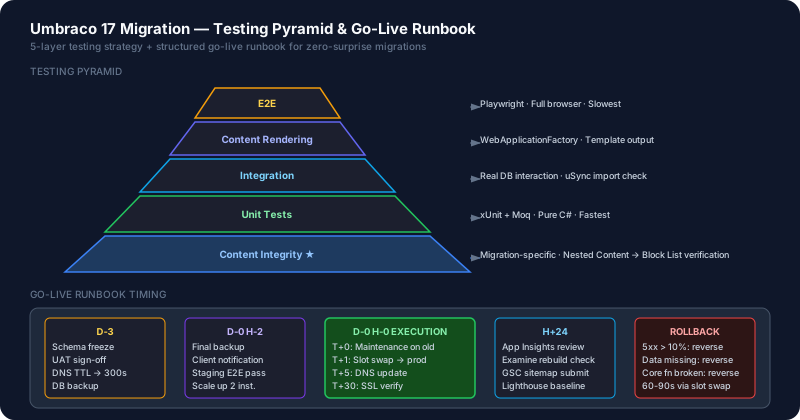
The Umbraco Testing Pyramid
Adapted for CMS migrations, the testing pyramid has four layers:
1. Unit Tests — Services, value converters, custom validators. Fast. No Umbraco runtime needed.
2. Integration Tests — Database interactions, uSync import correctness, query behavior with real database. Slow. Need a running database.
3. Content Rendering Tests — Template output correctness using Umbraco’s IUmbracoContextFactory. Medium speed. Need Umbraco runtime without full HTTP stack.
4. End-to-End Tests — Full browser tests against a running site using Playwright. Slow. Catch what all other tests miss.
In a migration project, you also need a fifth category that isn’t on the standard pyramid:
5. Content Integrity Tests — Automated checks that the migrated content is complete and correctly structured. Runs against the migrated database specifically. Catches uSync import failures, missing Block List conversions, broken media references.
Unit Tests
Use xUnit for all unit tests. The shared MarketingOS.Umbraco.Testing package provides mock builders.
// Tests/Unit/Services/ContactServiceTests.cs
public class ContactServiceTests
{
    private readonly IContactService _sut;
    private readonly Mock<IEmailSender> _emailMock;
    private readonly Mock<ICrmClient> _crmMock;

    public ContactServiceTests()
    {
        _emailMock = new Mock<IEmailSender>();
        _crmMock = new Mock<ICrmClient>();
        _sut = new ContactService(_emailMock.Object, _crmMock.Object);
    }

    [Fact]
    public async Task Submit_ValidForm_SendsEmailAndPushesToCrm()
    {
        // Arrange
        var form = new ContactFormModel
        {
            Name = "Test User",
            Email = "test@example.com",
            Message = "Hello"
        };

        _emailMock.Setup(x => x.SendAsync(It.IsAny<EmailMessage>()))
                  .ReturnsAsync(true);
        _crmMock.Setup(x => x.CreateContactAsync(It.IsAny<CrmContactDto>()))
                .ReturnsAsync("crm-id-123");

        // Act
        var result = await _sut.ProcessContactFormAsync(form);

        // Assert
        Assert.True(result.Success);
        _emailMock.Verify(x => x.SendAsync(It.Is<EmailMessage>(m =>
            m.To == "test@example.com")), Times.Once);
        _crmMock.Verify(x => x.CreateContactAsync(It.IsAny<CrmContactDto>()), Times.Once);
    }

    [Theory]
    [InlineData("", "test@example.com", "msg")]    // Empty name
    [InlineData("User", "", "msg")]                 // Empty email
    [InlineData("User", "not-an-email", "msg")]     // Invalid email
    public async Task Submit_InvalidForm_ThrowsValidationException(
        string name, string email, string message)
    {
        var form = new ContactFormModel { Name = name, Email = email, Message = message };
        await Assert.ThrowsAsync<ValidationException>(() =>
            _sut.ProcessContactFormAsync(form));
    }
}
Content Rendering Tests
Content rendering tests verify that your Razor templates produce correct output for given content structures. They use Umbraco’s WebApplicationFactory pattern to run the full Umbraco DI stack without needing a real SQL Server.
// Tests/Rendering/ArticlePageRenderingTests.cs
public class ArticlePageRenderingTests : IClassFixture<UmbracoTestFactory>
{
    private readonly UmbracoTestFactory _factory;

    public ArticlePageRenderingTests(UmbracoTestFactory factory)
    {
        _factory = factory;
    }

    [Fact]
    public async Task ArticlePage_WithTitle_RendersTitleInH1()
    {
        // Arrange
        var client = _factory.CreateClient();

        // Act — request against the test Umbraco instance with seeded content
        var response = await client.GetAsync("/articles/test-article");
        var html = await response.Content.ReadAsStringAsync();

        // Assert
        response.EnsureSuccessStatusCode();
        Assert.Contains("<h1>Test Article Title</h1>", html);
    }

    [Fact]
    public async Task ArticlePage_WithHeroBlock_RendersHeroSection()
    {
        var client = _factory.CreateClient();
        var response = await client.GetAsync("/articles/article-with-hero");
        var html = await response.Content.ReadAsStringAsync();

        Assert.Contains("class=\"hero-block\"", html);
        Assert.Contains("hero-headline-text", html);
    }
}
// Tests/Fixtures/UmbracoTestFactory.cs
public class UmbracoTestFactory : WebApplicationFactory<Program>
{
protected override void ConfigureWebHost(IWebHostBuilder builder)
{
builder.UseEnvironment("Testing");
builder.ConfigureServices(services =>
{
// Replace SQL with SQLite for testing
services.RemoveUmbracoDatabase();
services.AddUmbracoSqLiteDatabase();
});
}
}Content Integrity Tests (Migration-Specific)
These tests run against the migrated database to verify migration correctness. They’re run once after each migration step (uSync import, data migration) and shouldn’t be needed in ongoing CI beyond the migration project.
// Tests/Migration/ContentIntegrityTests.cs
public class ContentIntegrityTests : IClassFixture<MigratedDatabaseFixture>
{
    private readonly IContentService _contentService;
    private readonly IDataTypeService _dataTypeService;

    [Fact]
    public void AllNestedContentDocTypes_HaveBlockListEquivalent()
    {
        // All document types that previously used Nested Content
        // should now have Block List properties
        var contentTypes = _contentService.GetAllContentTypes();
        var nestedContentAliases = new[] { "contentBlocks", "pageBlocks", "highlights" };

        foreach (var alias in nestedContentAliases)
        {
            var typesWithProperty = contentTypes
                .Where(ct => ct.PropertyTypes.Any(p => p.Alias == alias))
                .ToList();

            foreach (var contentType in typesWithProperty)
            {
                var property = contentType.PropertyTypes.First(p => p.Alias == alias);
                var dataType = _dataTypeService.GetDataType(property.DataTypeId);

                Assert.Equal("Umbraco.BlockList", dataType?.EditorAlias);
            }
        }
    }

    [Fact]
    public void AllPublishedContent_MetaTitleIsNotEmpty()
    {
        // SEO composition: every page should have a meta title
        var publishedContent = _contentService
            .GetRootContent()
            .SelectManyDescendants(); // Extension method

        var missingMeta = publishedContent
            .Where(c => string.IsNullOrEmpty(c.GetValue<string>("metaTitle")))
            .Select(c => new { c.Id, c.Name, c.ContentType.Alias })
            .ToList();

        Assert.Empty(missingMeta);
    }

    [Fact]
    public void AllMediaItems_HaveAltText()
    {
        // Media content integrity
        var mediaService = /* inject */;
        var images = mediaService.GetRootMedia()
            .SelectManyDescendants()
            .Where(m => m.ContentType.Alias == "Image");

        var missingAlt = images
            .Where(m => string.IsNullOrEmpty(m.GetValue<string>("altText")))
            .ToList();

        // Log but don't fail — alt text may need editorial review
        if (missingAlt.Any())
        {
            Console.WriteLine($"WARNING: {missingAlt.Count} images missing alt text");
        }
    }
}
Playwright End-to-End Tests
E2E tests run against a fully deployed staging environment in CI after each deployment. They catch what unit and rendering tests can’t: JavaScript interactions, form submissions, navigation, load-time issues.
// e2e/tests/homepage.spec.ts
import { test, expect } from '@playwright/test';

test.describe('Homepage', () => {
  test('loads successfully with correct title', async ({ page }) => {
    await page.goto('/');
    await expect(page).toHaveTitle(/My Brand/);
    await expect(page.locator('h1')).toBeVisible();
  });

  test('navigation is functional', async ({ page }) => {
    await page.goto('/');
    await page.click('nav a[href="/about"]');
    await expect(page).toHaveURL(/\/about/);
    await expect(page.locator('h1')).toBeVisible();
  });

  test('contact form submits successfully', async ({ page }) => {
    await page.goto('/contact');
    await page.fill('#contact-name', 'Test User');
    await page.fill('#contact-email', 'test@example.com');
    await page.fill('#contact-message', 'This is a test message from Playwright.');
    await page.click('#contact-submit');
    await expect(page.locator('.success-message')).toBeVisible({ timeout: 10000 });
  });

  test('search returns relevant results', async ({ page }) => {
    await page.goto('/search?q=about');
    await expect(page.locator('.search-result')).toHaveCount({ min: 1 });
  });
});
# In GitHub Actions workflow — run after staging deploy
- name: Run Playwright E2E tests
run: npx playwright test
env:
BASE_URL: https://my-umbraco-site-staging.azurewebsites.net
- name: Upload Playwright report
uses: actions/upload-artifact@v4
if: failure()
with:
name: playwright-report
path: playwright-report/UAT Checklist
User Acceptance Testing with clients should be structured. Use this as your standard UAT checklist for Umbraco migrations:
Backoffice
- Login with client admin credentials
- Navigate content tree — all existing content is visible
- Open each page type in the editor — properties are visible and editable
- Add a new page of each type, publish, verify it appears on the frontend
- Edit an existing page’s Block List — add, reorder, and remove blocks
- Upload media — verify it appears in the media library and on the page
Frontend
- Homepage loads correctly
- Navigation links work (desktop + mobile hamburger)
- Every page type renders without errors (spot-check 3+ pages of each type)
- Forms: submit a contact form and verify notification email is received
- Search: perform a search and verify results load
- Multi-language: switch language and verify content is in the correct language
Performance & Technical
- Google Lighthouse: Mobile score > 80 (Performance)
- Core Web Vitals: LCP < 2.5s on 5 pages
- SSL certificate is valid and all pages load over HTTPS
- robots.txt and sitemap.xml are accessible and correct
- 404 page is customised and returns HTTP 404 status
- Forms: verify spam protection is active (reCAPTCHA or similar)
The Go-Live Runbook
A go-live runbook is a sequenced, timestamped checklist that the team runs through on migration day. No decisions should need to be made during go-live — all decisions were made in advance.
Pre-Go-Live (3 Days Before)
- Freeze schema changes in source Umbraco (no new doc types or data types)
- Export final uSync snapshot from source
- Perform final content migration from source to staging
- Run full Content Integrity test suite against staging database
- Run Playwright E2E test suite against staging
- Complete UAT sign-off with client (written approval)
- Backup: create Azure SQL database backup of staging
- Confirm DNS TTL is reduced to 300 seconds (5 min) — reduces DNS propagation time on go-live
Go-Live Day: H-2
- Final backup: export uSync from staging + Azure SQL backup
- Notify client: go-live window starts in 2 hours
- Confirm staging slot health: all tests passing
- Confirm Azure App Service scaling: at least 2 instances for go-live traffic
Go-Live Day: H-0 (Execution Window)
- T+0: Put maintenance page on old site (or reduce traffic via DNS for old hosting)
- T+1: Perform staging → production slot swap in Azure
- T+2: Verify production URL responds correctly (manual check)
- T+3: Run smoke test suite against production URL
- T+5: Update DNS A/CNAME records to Azure production IP/hostname
- T+10: Verify DNS propagation is occurring (use dnschecker.org)
- T+15: Test key pages and forms on production URL over new DNS
- T+30: Confirm SSL certificate is valid on production hostname
- T+40: Notify client: go-live complete
Post-Go-Live (First 24 Hours)
- Monitor Application Insights for errors and response time spikes
- Monitor Azure SQL DTU consumption — scale up if needed
- Check search engine indexing: submit sitemap.xml to Google Search Console
- Run Lighthouse against production URLs, document baseline scores
- Check Umbraco logs for any warning or error patterns
- Confirm Examine search index was rebuilt on production
Rollback Criteria
If any of the following occur within the first 2 hours, initiate rollback (reverse slot swap):
- Production site returns 5xx errors on more than 10% of requests
- Database migrations failed or data is missing
- A critical business function (forms, checkout, auth) is non-functional
- SSL certificate is invalid or HTTPS is broken
Rollback procedure:
# Reverse the slot swap — returns traffic to the previous production build
az webapp deployment slot swap \
  --name my-umbraco-site \
  --resource-group my-resource-group \
  --slot staging \
  --target-slot production
The previous production code is still in the staging slot. Reversal takes 60–90 seconds.
AI-Assisted Testing
Where AI adds value in testing:
Test case generation from code:
Here is my ContactService implementation. Generate a comprehensive xUnit test suite
covering all public methods. For each method:
1. Happy path test
2. Input validation tests (invalid / empty / edge cases)
3. Service dependency failure tests (mock email failure, CRM timeout)
Use Moq for mocking and FluentAssertions for assertions.

[paste ContactService.cs]
Playwright test generation from UAT checklist:
Convert this UAT checklist item into a Playwright test in TypeScript:

"Submit a contact form and verify notification email is received"

Assumptions:
- Contact form is at /contact
- Form has: #contact-name, #contact-email, #contact-message, #contact-submit
- On success, a .success-message element becomes visible
- Email verification is out of scope — just verify the success state
Go-live checklist review:
Review this go-live runbook for our Umbraco 17 migration to Azure App Service.
Identify any missing steps, sequencing issues, or rollback procedure gaps.
Suggest additions based on Umbraco-specific go-live risks.

[paste runbook]
Wrapping Up the Series
Eight posts. One migration system.
The Umbraco landscape has changed significantly: EOL pressure on v7, v8, and v10 is real, and v17 LTS on .NET 10 is a genuinely better platform. The migration work is substantial but tractable — especially with the AI-assisted workflow, structured assessment, and shared infrastructure patterns we’ve covered.
The key principles to carry forward:
1. Assessment before commitment. Use AI to inventory the current state before estimating. Surprises during execution are expensive.
2. Let uSync Migrations handle data. Manual Nested Content → Block List conversion at scale is a trap. Automate it.
3. ADRs prevent repeated debates. Every significant architectural decision during migration gets written down. The team knows where to look.
4. AI compresses boilerplate, human judgment shapes architecture. Use AI for conversion, generation, and review. Use human judgment for architecture decisions and quality sign-off.
5. Go-live is a procedure, not an event. The runbook exists so decisions are made before go-live, not during it.
Good luck with the migration.
This is Part 8 of 8 in the Umbraco AI-Powered Migration Playbook.
Full series: