
JOURNAL
The Multi-Agent Coding Grid: How I Use Claude as an Orchestrator with MiniMax and Kimi as Workers
A practical guide to running parallel AI coding agents using Claude as a manager, MiniMax and Kimi as workers, Linear as the task pool, and tmux as the control room. No frameworks — just shell scripts, lock files, and clear task specs.

On this page
The Problem: One Agent Is a Bottleneck
If you’re using a single AI coding assistant, you’re pair programming. That’s fine for exploration, debugging, and learning. But when you have 15 Linear tickets that need to ship by Friday, pair programming with one agent is a throughput ceiling.
The question isn’t whether AI can write code. It can. The question is: can you run a team of AI agents the same way you’d run a team of developers?
The answer is yes — and it’s simpler than you think.
The Architecture: Shell Scripts, Not Frameworks
Here’s what my setup looks like. No orchestration frameworks. No agent SDKs. Just shell scripts, tmux, and a project management tool.
Claude (Orchestrator/Reviewer)
├── Plans work
├── Writes task specs in Linear
├── Assigns tasks to workers
├── Reviews completed work
│
├── MiniMax (Lightweight Worker)
│   └── Small fixes, cleanup, docs, minor refactors
│
├── Kimi (Heavy-Duty Worker)
│   └── Deep refactors, implementation, debugging
│
├── Linear (Task Pool / Source of Truth)
│   └── Todo → In Progress → Done
│
├── tmux (Control Room)
│   └── One pane per agent, live output
│
└── .agent-locks/ (Duplicate Protection)
    └── One lock file per task
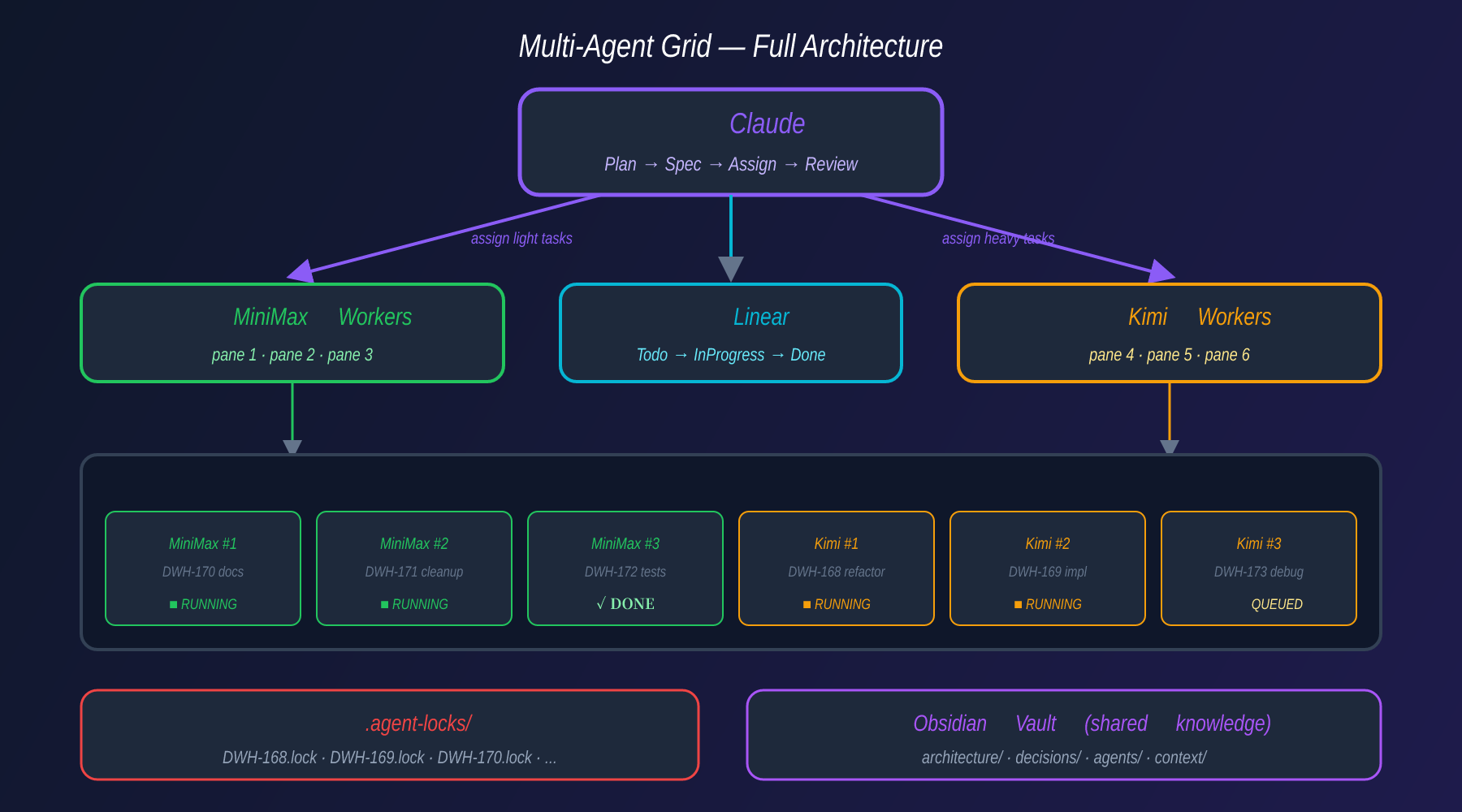
That’s it. Each component has exactly one job. Claude thinks. MiniMax and Kimi execute. Linear tracks state. tmux shows what’s happening. Lock files prevent collisions.
How It Works: The Two Scripts
The entire system runs on two shell scripts.
dwh-launch-grid.sh — The Grid Launcher
This is the control room setup script. It reads the current task queue, calculates a grid layout, and spins up one tmux pane per task. Here’s the full file structure it works with:
project-root/
│
├── dwh-launch-grid.sh        # ← YOU ARE HERE — grid launcher
├── dwh-auto-agent.sh         # agent loop (one per pane)
│
├── .env                      # API keys and model assignments
│   ├─ LINEAR_API_KEY
│   ├─ ANTHROPIC_API_KEY
│   ├─ MINIMAX_API_KEY
│   ├─ KIMI_API_KEY
│   ├─ LINEAR_TEAM_ID
│   ├─ WORKER_MINIMAX="minimax-text-01"
│   └─ WORKER_KIMI="moonshot-v1-32k"
│
├── .agent-locks/             # advisory lock files (auto-created at runtime)
│   ├─ DWH-168.lock
│   ├─ DWH-169.lock
│   └─ DWH-172.lock
│
├── logs/                     # per-pane execution logs (auto-created at runtime)
│   ├─ agent-pane-0.log
│   ├─ agent-pane-1.log
│   └─ agent-pane-2.log
│
├── vault/                    # Obsidian-style shared knowledge base
│   ├── architecture/
│   ├── decisions/
│   └── agents/task-log.md    # shared log that all agents write to
│
└── .grid-state               # runtime snapshot: active session, task count, start time
Here’s the full annotated script:
#!/usr/bin/env bash
# dwh-launch-grid.sh — Launch the multi-agent coding grid
set -euo pipefail

source .env

SESSION="dwh-grid"
LOCK_DIR=".agent-locks"
LOG_DIR="logs"
MAX_AGENTS=${MAX_AGENTS:-6}          # cap: never run more than 6 at once
LOCK_TTL_MINUTES=${LOCK_TTL_MINUTES:-60}

# ── 1. CLEANUP: remove stale locks and old logs ──────────────────────────────
mkdir -p "$LOCK_DIR" "$LOG_DIR"
find "$LOCK_DIR" -name "*.lock" -mmin +"$LOCK_TTL_MINUTES" -delete 2>/dev/null
find "$LOG_DIR"   -name "*.log"  -mtime +7 -delete 2>/dev/null
echo "[grid] Stale locks removed. Active locks: $(ls $LOCK_DIR | wc -l)"

# ── 2. QUERY LINEAR: count how many Todo tasks are available ──────────────────
TASK_COUNT=$(curl -sf -X POST https://api.linear.app/graphql \
  -H "Authorization: $LINEAR_API_KEY" \
  -H "Content-Type: application/json" \
  -d '{
    "query": "{ issues(filter: {
        state: { name: { eq: \"Todo\" } },
        team:  { id:   { eq: \"'"$LINEAR_TEAM_ID"'\" } }
      }) { nodes { id identifier title priority } } }"
  }' | jq '.data.issues.nodes | length')

echo "[grid] Tasks ready in Linear: $TASK_COUNT"

if [ "$TASK_COUNT" -eq 0 ]; then
  echo "[grid] Nothing to do. Exiting."
  exit 0
fi

# ── 3. CALCULATE GRID LAYOUT ─────────────────────────────────────────────────
PANES=$(( TASK_COUNT < MAX_AGENTS ? TASK_COUNT : MAX_AGENTS ))

# Aim for a roughly square grid (e.g., 6 panes → 2 rows × 3 cols)
COLS=$(echo "sqrt($PANES)" | bc)
[ "$COLS" -eq 0 ] && COLS=1
ROWS=$(( (PANES + COLS - 1) / COLS ))

echo "[grid] Launching ${PANES}-pane grid (${ROWS}r × ${COLS}c)"

# ── 4. CREATE TMUX SESSION ────────────────────────────────────────────────────
tmux kill-session -t "$SESSION" 2>/dev/null || true
tmux new-session -d -s "$SESSION" -x 220 -y 50

# ── 5. SPLIT PANES AND TILE ───────────────────────────────────────────────────
for ((i = 1; i < PANES; i++)); do
  if (( i % COLS == 0 )); then
    tmux split-window -t "$SESSION" -v   # start a new row
  else
    tmux split-window -t "$SESSION" -h   # extend current row
  fi
done
tmux select-layout -t "$SESSION" tiled

# ── 6. START ONE AGENT PER PANE ──────────────────────────────────────────────
for ((i = 0; i < PANES; i++)); do
  # Model assignment strategy:
  #   Panes 0–1 → MiniMax  (lightweight: docs, cleanup, small fixes)
  #   Panes 2+  → Kimi     (heavy: multi-file refactors, complex impl)
  if (( i < 2 )); then
    MODEL="$WORKER_MINIMAX"
    WORKER_NAME="minimax"
  else
    MODEL="$WORKER_KIMI"
    WORKER_NAME="kimi"
  fi

  LOG_FILE="$LOG_DIR/agent-pane-${i}.log"

  tmux select-pane -t "$SESSION:0.$i" -T "agent-${i}-${WORKER_NAME}"
  tmux send-keys -t "$SESSION:0.$i" \
    "AGENT_MODEL=$MODEL PANE_ID=$i bash dwh-auto-agent.sh 2>&1 | tee $LOG_FILE" Enter
done

# ── 7. PERSIST GRID STATE ─────────────────────────────────────────────────────
cat > .grid-state <<EOF
SESSION=$SESSION
PANES=$PANES
STARTED=$(date -u +"%Y-%m-%dT%H:%M:%SZ")
TASK_COUNT=$TASK_COUNT
EOF

echo "[grid] Grid is live. Attach with: tmux attach -t $SESSION"
tmux attach -t "$SESSION"
Key design decisions in the script:
| Decision | Reason |
|---|---|
MAX_AGENTS=6 cap |
Beyond 6 panes, tmux cells get too small to read and API rate limits become a bottleneck |
| Model by pane index | Panes 0–1 run MiniMax (fast/cheap), panes 2+ run Kimi (capable). Claude writes simpler tasks first in Linear so MiniMax always picks them up naturally |
tee $LOG_FILE |
Every pane’s stdout is shown live and written to logs/agent-pane-N.log — useful for post-mortem after the grid closes |
.grid-state file |
Lightweight snapshot recording when the grid started, how many panes, how many tasks queued. dwh-launch-grid.sh --status reads this to show current grid health |
| Kill session before creating | Prevents the common mistake of running the script twice — which creates two competing grids claiming the same Linear tasks |
set -euo pipefail |
Any unhandled error (bad API response, jq parse failure, tmux error) exits immediately rather than silently continuing in a broken state |
dwh-auto-agent.sh — The Agent Loop
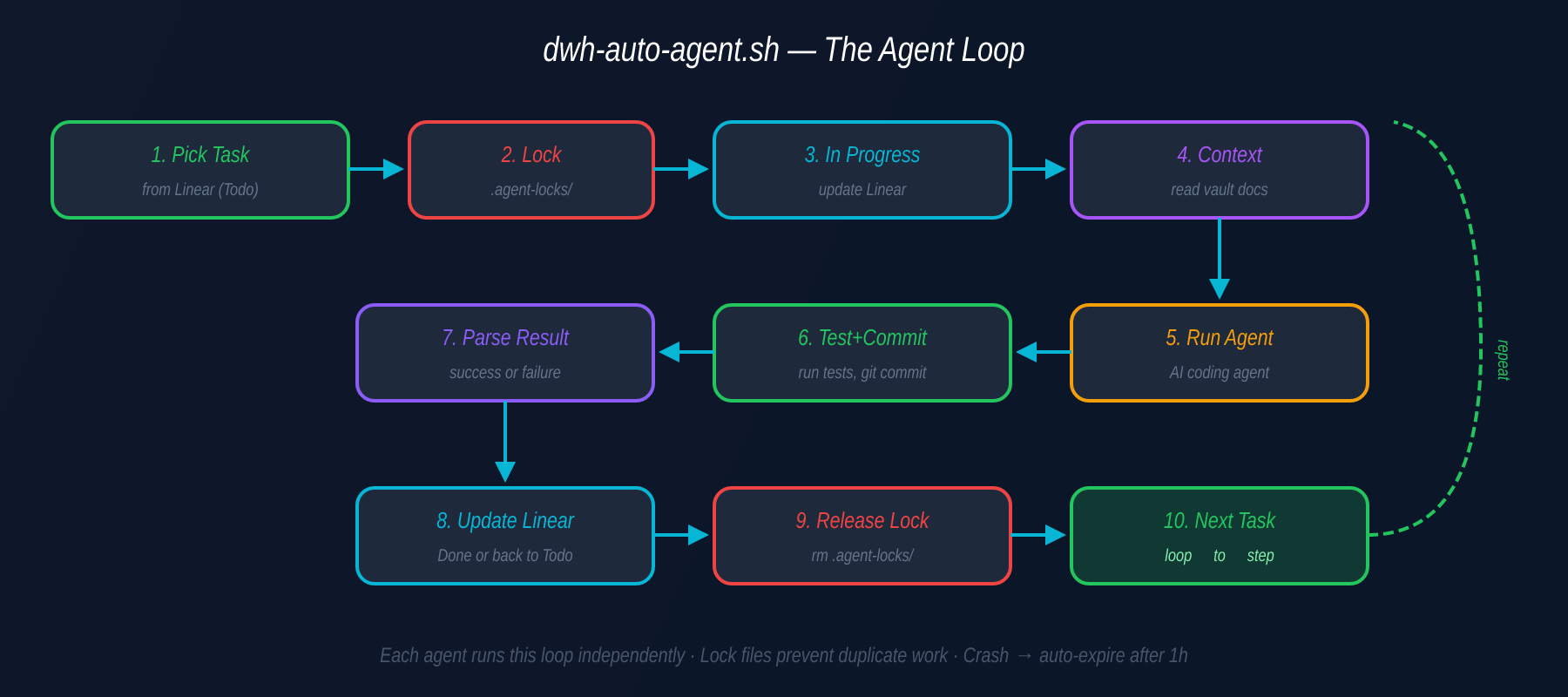
Each pane runs the same loop:
pick task from Linear
→ create lock file
→ move task to "In Progress"
→ collect context
→ run AI coding agent
→ test + commit
→ parse result
→ update Linear status
→ release lock
→ take next task
The beauty is that every agent runs the identical script. The differentiation happens at the task level — Claude assigns lighter tasks to MiniMax and heavier ones to Kimi based on complexity.
The Secret Sauce: Task Specification Quality
Here’s what most people get wrong about multi-agent setups: they focus on the model and ignore the task spec.
The models aren’t the bottleneck. The quality of the task brief is. Claude writes task specs that look like this:
## Task: DWH-168 — Refactor payment retry logic

**Goal**: Replace the hardcoded retry mechanism in `src/payments/retry.ts`
with exponential backoff using the existing `@utils/backoff` utility.

**Context**: The current retry logic uses a fixed 3-second delay, which
causes thundering herd problems under load (see incident INC-042).

**Constraints**:
- Must maintain backward compatibility with PaymentProcessor interface
- Max 5 retries, initial delay 500ms, max delay 30s
- Add jitter to prevent synchronized retries

**Files to check**:
- `src/payments/retry.ts` (primary)
- `src/payments/__tests__/retry.test.ts` (update tests)
- `src/utils/backoff.ts` (existing utility to use)

**What NOT to touch**:
- PaymentProcessor class
- Any database migrations
- The billing module

**Definition of Done**:
- [ ] All existing tests pass
- [ ] New tests for exponential backoff added
- [ ] No TypeScript errors
- [ ] Manual test: simulate 10 concurrent failures, verify no thundering herd
This is the difference between “fix the retry logic” and a brief that a junior developer — or a smaller AI model — can execute without guessing.
When the task spec is precise, even lightweight models become surprisingly effective. They don’t need to understand your entire architecture. They just need to execute a well-defined scope.
Why Lock Files Matter
The biggest practical problem with parallel agents isn’t model quality — it’s duplicate work. Without coordination, two agents will grab the same task, modify the same files, and create merge conflicts.
The solution is embarrassingly simple: lock files.
# When an agent grabs a task
touch .agent-locks/DWH-168.lock

# Other agents check before claiming
if [ -f .agent-locks/DWH-168.lock ]; then
    skip_task  # Take the next one
fi

# On completion or crash (auto-expire after 1 hour)
find .agent-locks -name "*.lock" -mmin +60 -delete
If an agent crashes mid-task, the lock expires after 1 hour and the task automatically moves from “In Progress” back to “Todo” in Linear. No manual intervention needed.
This is the same pattern that distributed systems have used for decades — advisory locks with TTL. It’s not glamorous, but it works at 2am when you’re not watching.
The Tiered Worker Model
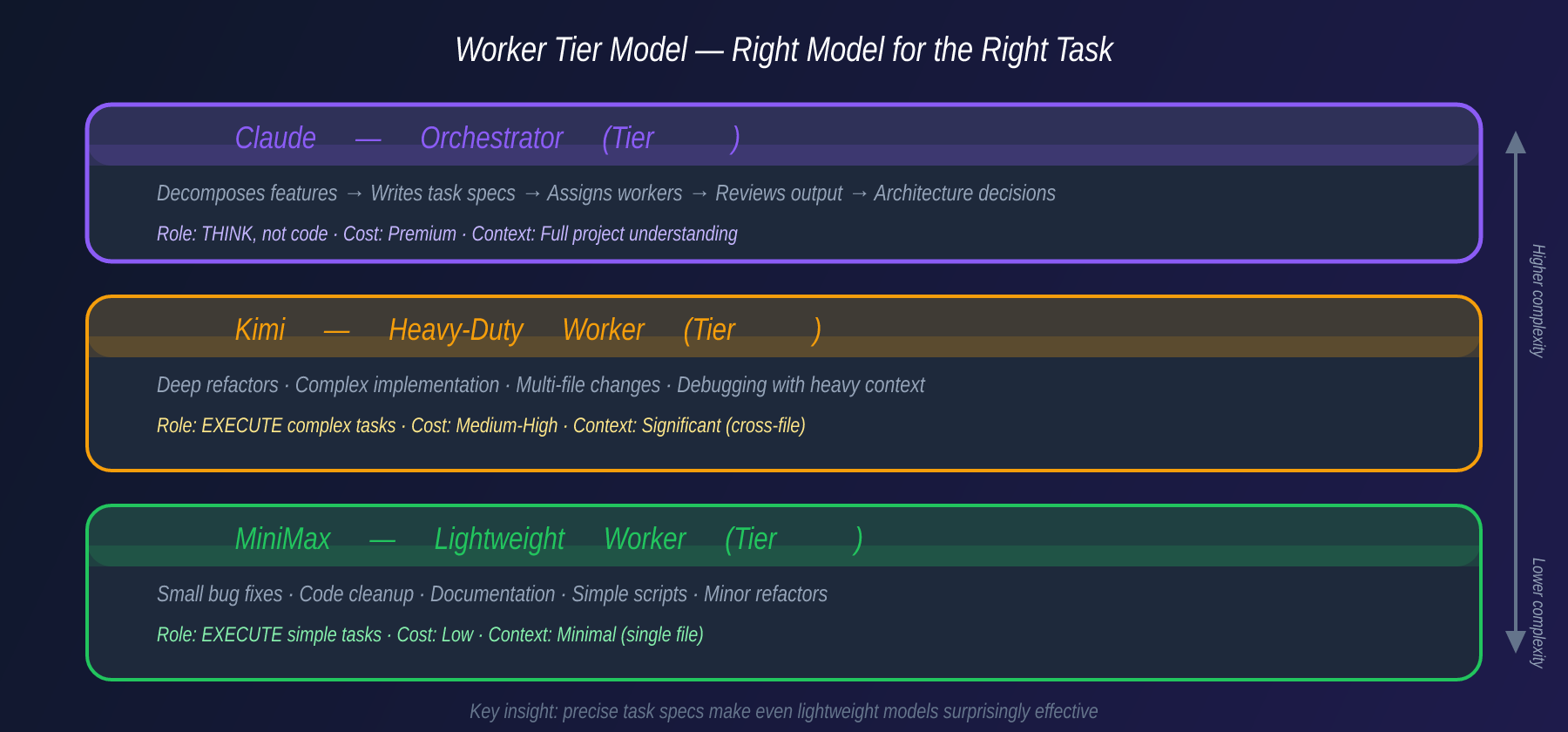
Not all tasks are equal, and not all models are equal. The key insight is matching task complexity to model capability:
MiniMax — The Lightweight Worker
MiniMax excels at:
- Small bug fixes (< 50 lines changed)
- Code cleanup and formatting
- Documentation updates
- Simple script generation
- Minor refactors with clear patterns
Cost: Low. Speed: Fast. Context needs: Minimal.
Kimi — The Heavy-Duty Worker
Kimi handles:
- Deep refactors across multiple files
- Complex implementation tasks
- Debugging with heavy context
- Architecture-level changes
- Tasks requiring cross-file understanding
Cost: Higher. Speed: Moderate. Context needs: Significant.
Claude — The Orchestrator
Claude doesn’t write production code in this setup. Claude:
- Decomposes features into atomic tasks
- Writes detailed task specifications
- Assigns tasks to the right worker
- Reviews completed work
- Makes architectural decisions
- Handles integration and conflict resolution
This tiered approach means you’re not burning expensive model tokens on documentation updates, and you’re not asking a lightweight model to refactor your authentication system.
The Knowledge Layer: Obsidian Vault as Context
One addition that significantly improved output quality: agents create and read documentation in an Obsidian Vault.
vault/
├── architecture/
│   ├── system-overview.md
│   ├── payment-flow.md
│   └── auth-design.md
├── decisions/
│   ├── ADR-001-database-choice.md
│   └── ADR-002-retry-strategy.md
├── agents/
│   ├── task-log.md
│   └── common-patterns.md
└── context/
    ├── api-contracts.md
    └── env-setup.md
Before executing a task, each agent reads the relevant vault docs. After completing a task, it updates the log. This creates a shared knowledge base that persists across sessions — solving the “context amnesia” problem that plagues single-agent workflows.
What This Looks Like in Practice
A typical cycle:
Claude plans: “We have 8 tickets for the payment module refactor. 3 are simple (docs, tests, cleanup), 3 are medium (individual function refactors), 2 are complex (cross-module integration).”
Claude assigns: MiniMax gets the 3 simple tasks. Kimi gets the 3 medium tasks. The 2 complex tasks are queued for Kimi after the first batch.
Grid launches: 6 tmux panes open. 6 agents start simultaneously.
Agents execute: Each agent picks its assigned task, creates a lock, does the work, runs tests, commits, updates Linear.
Claude reviews: Checks each PR. Approves clean ones, requests changes on others.
Cycle repeats: Unfinished tasks go back to the pool. New tasks get created if Claude spots issues during review.
Total wall-clock time for 8 tasks: ~45 minutes instead of ~4 hours sequentially.
The Numbers: What Parallel Execution Actually Saves
Based on my real usage over the past month:
| Metric | Sequential (1 agent) | Grid (3-6 agents) |
|---|---|---|
| Tasks per hour | 2-3 | 8-12 |
| Average task completion | 18 min | 20 min (same per task) |
| Wall-clock for 8 tasks | ~4 hours | ~45 min |
| Review pass rate (first try) | 70% | 82% (better specs!) |
| Merge conflicts | 0 | ~1 per 10 tasks |
The counter-intuitive finding: review pass rate is higher with the grid. Why? Because Claude writes better task specs when it knows a smaller model will execute them. The discipline of writing precise specs improves output quality more than model intelligence does.
What This Is NOT
Let me be clear about the limitations:
- Not a replacement for thinking. Claude still needs to make architectural decisions. The grid executes — it doesn’t architect.
- Not zero-maintenance. Lock files expire, agents crash, merge conflicts happen. You need monitoring.
- Not for every task. Exploratory work, debugging complex issues, and design decisions are still single-agent activities.
- Not cheap at scale. Running 6 agents in parallel eats API tokens fast. Budget accordingly.
- Not a framework. It’s shell scripts and conventions. That’s a feature, not a bug.
Getting Started: The Minimum Viable Grid
If you want to try this pattern, start small:
- Pick 3 independent tasks from your backlog
- Write clear task specs (goal, context, constraints, files, DoD)
- Open 3 tmux panes — one per task
- Run one agent per pane with the task spec as the prompt
- Review the output manually
That’s your first grid. No scripts needed. No lock files. Just parallel execution with clear specs.
Once you feel the throughput difference, you’ll want to automate it. That’s when you write the scripts.
The Bigger Picture: AI Team Management
What I’ve described isn’t really about AI models. It’s about project management applied to AI agents.
The same principles that make human dev teams effective apply to AI agent teams:
- Clear task decomposition beats vague instructions
- The right person (model) for the right job
- Coordination prevents duplicate work
- Review gates catch quality issues
- Documentation creates institutional knowledge
The agents are getting smarter every quarter. But the orchestration — the planning, decomposing, assigning, reviewing — that’s still a human skill. And right now, it’s the highest-leverage skill a Technical Lead can develop.
The future isn’t one AI that does everything. It’s a team of AIs, managed by a human who knows how to break down problems and hold agents accountable to clear specifications.
If you’re running a similar setup, I’d love to hear what works for you. The tooling is evolving fast — what matters is the pattern, not the specific tools.
Related reading
08 Oct 2026 · 4 min read
devops
Kubernetes Just Flipped a Default That Will Refuse to Boot Your Old Nodes
Kubelet's failCgroupV1 field defaulted to true in 1.35. A cgroup v1-only node won't start anymore unless you explicitly override it. Here's how to check today.
Read more08 Oct 2026 · 4 min read
ai-agents
Claude Haiku 5.5 and the Real Math Behind Cheap Model Routing
Haiku 5.5 is 75% cheaper and far sharper at agent tasks, but a token-efficiency tax means the real savings aren't the headline number.
Read more
07 Oct 2026 · 4 min read
ai
English Lesson — Tuesday Morning: Embeddings & Vector Search Vocabulary
Daily English practice for tech professionals: embed, vector database, and nearest neighbor search vocabulary with pronunciation and exercises.
Read more
Discussion
Comments are reviewed before publication. Your email is kept private.