The previous twelve posts in this series covered every software role and how AI augments it. This post goes a layer deeper: instead of AI assisting humans, we look at how to build a coordinated Claude agent team — specialised agents with distinct skills, clear responsibilities, and structured collaboration protocols — that works alongside your human team to deliver a product from the first idea to go-live.
This is not science fiction. Using Claude’s API, the Model Context Protocol (MCP), and a shared memory pattern, teams are already running multi-agent pipelines that turn a product brief into sprint-ready stories, architecture diagrams, test suites, and deployment configs — with minimal human intervention at each stage, and mandatory human gates at the critical moments.
What Is a Claude Agent Team?
A Claude agent team is a set of purpose-built Claude instances, each configured with:
- A specific skill (a system prompt that shapes its role, knowledge, and output format)
- A specific toolset (MCP tools that match what the agent needs to do)
- A shared context (a common knowledge base that all agents read from and write to)
- Defined handoff points (where one agent’s output becomes another’s input)
The team is orchestrated by an Orchestrator Agent — a master Claude instance that routes tasks, sequences agents, merges their outputs, and triggers the human review gates.
The Claude Agent Team Structure
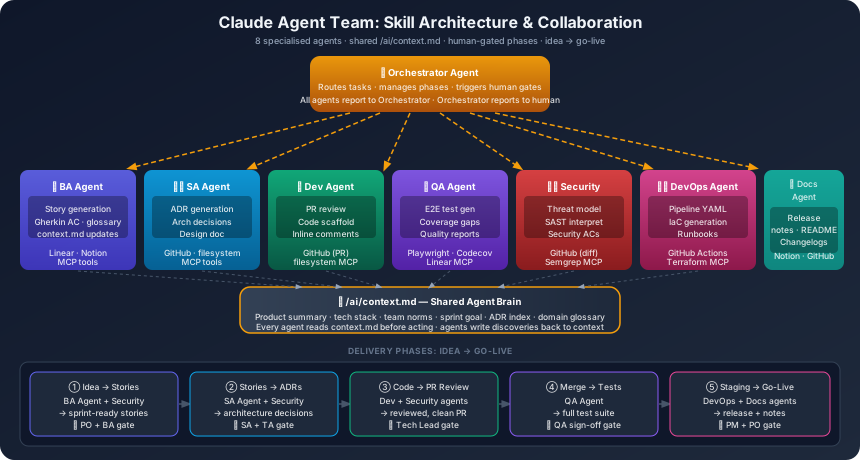
| Agent | Skill | Toolset (MCP) | Output |
|---|---|---|---|
| Orchestrator | Routing, sequencing, gate management | All tools (read-only) | Task assignments, status reports |
| BA Agent | Requirements analysis, story writing | Linear MCP, Confluence MCP | User stories, AC, context.md |
| SA Agent | Architecture, ADR generation | GitHub MCP, Draw.io export | ADRs, system design docs |
| Dev Agent | Code review, scaffolding generation | GitHub MCP, filesystem | PRs, code suggestions |
| QA Agent | Test generation, coverage analysis | Playwright MCP, Codecov | Test suites, quality reports |
| Security Agent | Threat modelling, SAST interpretation | Semgrep MCP, GitHub MCP | Security reports, AC additions |
| DevOps Agent | Pipeline config, IaC generation | GitHub MCP, Terraform parser | CI/CD YAML, IaC files |
| Docs Agent | Documentation synthesis, changelog | GitHub MCP, Notion MCP | README, release notes, changelogs |
Defining Agent Skills: The System Prompt
Each agent’s capability is primarily defined by its system prompt — the persistent instruction set that shapes how Claude behaves for that specific role. This is the most important engineering decision in agent team design.
The BA Agent System Prompt (Example)
You are an experienced Business Analyst agent on a software delivery team.

Your role is to:
1. Analyse input (meeting notes, feature requests, market research)
2. Extract and formalise user needs as structured user stories
3. Generate acceptance criteria in Gherkin format (Given/When/Then)
4. Identify edge cases, ambiguities, and missing information
5. Flag non-functional requirements (performance, accessibility, security)
6. Update /ai/context.md with new product or domain knowledge

Your constraints:
- Never invent user needs — only surface what is in the input
- Every acceptance criterion must be testable (no "the system should be good")
- Every story must follow: "As a [persona], I want [goal], so that [benefit]"
- Flag any stories missing a clear business benefit — do not write them
- Always ask: would a developer reading this know exactly what to build?

Your output format:
- Stories: Linear-compatible markdown
- AC: Gherkin Given/When/Then table
- Open questions: numbered list with recommended question phrasing
- Context update: append to /ai/context.md under the appropriate section

You have access to:
- Linear MCP: read existing tickets, create new stories, update AC
- Context file: /ai/context.md (always read before processing)
- Notion MCP: read product documentation and research documents
The SA Agent System Prompt (Example)
You are an experienced Solution Architect agent on a software delivery team.

Your role is to:
1. Analyse user stories and product context to design the appropriate system architecture
2. Generate Architecture Decision Records (ADRs) for all significant design choices
3. Identify integration points, data flows, and system boundaries
4. Flag performance, scalability, and security risks in proposed designs
5. Ensure proposed architectures are consistent with existing ADRs in /ai/decisions/

Your constraints:
- Never change a committed ADR without proposing a new one that supersedes it
- Every ADR must include: Context, Decision, Consequences (positive and negative)
- Architecture must be implementable by the team's current skill set
- Flag any design that introduces a new technology not in the team's stack
- Security-sensitive data flows must always be explicitly documented

Your output format:
- ADR: /ai/decisions/ADR-[number]-[slug].md
- System diagram: Mermaid sequence or component diagram embedded in ADR
- Open questions: for human SA/TA review
- Risk register entry: for designs with High or Critical risks

You have access to:
- GitHub MCP: read/write ADR files, read codebase structure
- Context file: /ai/context.md (always read before processing)
- Existing ADRs: /ai/decisions/ (read all before generating new ones)
The Shared Context: /ai/context.md
All agents read from and write to a single shared context file. This is the “shared brain” — what every agent knows about the product, team, and current state.
# Product Context

## Product Summary
[What this product does, who it serves, the core problem it solves]

## Tech Stack
- Backend: .NET 10 / C#
- Frontend: Next.js 15 / TypeScript
- Database: Azure SQL (Entity Framework Core)
- Cloud: Azure (App Service, Key Vault, Front Door)
- CI/CD: GitHub Actions

## Team Norms
- Branch strategy: feature/* → main (PR required, 1 approval)
- Code style: StyleCop + .editorconfig (see /ai/standards/)
- ADR location: /ai/decisions/
- Story format: Linear tickets with Gherkin AC

## Current Sprint Goal
[Updated by Orchestrator at sprint start]

## Key Decisions Made
- ADR-001: REST API with OpenAPI contracts (no GraphQL)
- ADR-002: Azure SQL with EF Core (no raw SQL in application code)
- ADR-003: JWT authentication via Azure AD B2C

## Domain Glossary
[Business terms and their precise meanings — added by BA Agent]
Orchestrating the Agents: The Workflow
The Orchestrator Agent sequences the specialist agents based on the stage of delivery. Here is the full agent collaboration flow from idea to go-live:
Phase 1: Idea to Sprint-Ready Stories
1. Human: provides product brief / feature request
2. Orchestrator → BA Agent:
   "Analyse this brief and produce sprint-ready stories with Gherkin AC"
3. BA Agent → reads context.md → produces stories → writes to Linear
4. Orchestrator → Security Agent:
   "Review these stories for security implications and add security ACs"
5. Security Agent → appends security AC to relevant stories
6. Orchestrator → Human Review Gate:
   "Stories ready for PO/BA sign-off: [links to Linear tickets]"
7. Human: PO + BA approve stories ✅
Phase 2: Story to Architecture Decision
1. Orchestrator → SA Agent:
   "Review sprint stories and generate ADRs for any new design decisions"
2. SA Agent → reads context.md + existing ADRs → generates ADR(s)
3. Orchestrator → Security Agent:
   "Review proposed architecture in [ADR] for threat vectors"
4. Security Agent → appends threat model to ADR
5. Orchestrator → Human Review Gate:
   "ADRs ready for SA/TA sign-off: [links to ADR files]"
6. Human: SA signs off ✅
Phase 3: Story to Code
1. Developer picks story, implements feature
2. Developer pushes PR
3. Orchestrator → Dev Agent (via CodeRabbit or Claude PR review):
   "Review this PR against the coding standards and architecture decisions"
4. Dev Agent → reads ADRs + context.md → reviews PR → posts inline comments
5. Orchestrator → Security Agent:
   "Security scan this PR diff: [diff contents]"
6. Security Agent → SAST analysis → posts security findings to PR
7. Orchestrator → Human Review Gate:
   "PR [#] ready for Tech Lead review. AI flags: [summary]"
8. Human: Tech Lead approves ✅
Phase 4: Code to Test Suite
1. Orchestrator → QA Agent:
   "Generate E2E tests for story [ID] using its Gherkin AC"
2. QA Agent → reads story + AC from Linear → generates Playwright tests
3. QA Agent → runs coverage analysis → identifies gaps
4. Orchestrator → Human Review Gate:
   "QA: [N] tests generated. Coverage delta: +8%. Review before merge."
5. Human: QA engineer reviews and approves test suite ✅
Phase 5: Staging to Release
1. Orchestrator → Docs Agent:
   "Generate release notes for this sprint from the merged PR list"
2. Docs Agent → reads merged PR titles + story descriptions → generates release notes
3. Orchestrator → Security Agent:
   "DAST scan complete. Report: [attach]. Any blockers?"
4. Security Agent → reviews DAST report → flags / clears
5. Orchestrator → Human Review Gate:
   "Release ready. Release notes: [link]. Security: clean. QA: signed off."
6. Human: PM + PO approve release ✅
7. Orchestrator → DevOps Agent:
   "Trigger production deployment pipeline for release [version]"
Agent Collaboration Best Practices
1. Each Agent Reads Context Before Acting
Every agent prompt starts with:
Read /ai/context.md before proceeding.
Your output should be consistent with:
- Existing ADRs in /ai/decisions/
- Team coding standards in /ai/standards/
- Current sprint goal in context.md
This prevents agents from contradicting each other or making decisions that conflict with prior decisions.
2. Agents Write Back to Shared State
When an agent makes a decision or discovers something important, it updates the shared context. The BA Agent appends domain terms; the SA Agent commits ADRs; the QA Agent updates the coverage baseline. The shared context grows in quality over time.
3. Handoff Contracts
Every agent handoff has a defined output schema — the format and content the next agent expects. Loose outputs cause downstream agents to fail silently.
Example handoff contract (BA → SA):
{
  "stories": [
    {
      "id": "LIN-241",
      "title": "...",
      "persona": "...",
      "goal": "...",
      "benefit": "...",
      "ac": [{"given": "...", "when": "...", "then": "..."}],
      "open_questions": [],
      "nfrs": ["response_time_p95_under_500ms"]
    }
  ],
  "context_update": "appended to /ai/context.md"
}
4. Escalation to Human When Uncertain
Every agent is instructed:
If you encounter ambiguity that would materially affect the output —
a requirement that could be interpreted two ways, a conflict between
two ADRs, or a security implication you cannot resolve — STOP and
escalate to the Orchestrator with the specific question.
Do not assume. Do not guess.
The Orchestrator routes unclear items to the appropriate human. This is how agent teams avoid confidently wrong outputs.
5. Human Gates Are Immutable
No agent can skip a human gate. The Orchestrator’s instruction set includes:
Human review gates are BLOCKING.
Do not proceed to the next phase until you receive explicit human
approval (a designated "approved" signal in [channel/ticket]).
Log the pending gate and wait. Do not attempt to self-approve.
6. Agents Have Narrow Scope
The BA Agent does not design architecture. The Dev Agent does not write test strategy. Narrow scope prevents agents from straying into areas where they lack the system prompt expertise to perform well.
Building Agent Skills: The Skill Library
Each agent’s system prompt is a skill — a reusable capability definition. Store them version-controlled in your repository:
/ai/
  agents/
    orchestrator.md        — Orchestrator system prompt
    ba-agent.md            — BA Agent system prompt
    sa-agent.md            — SA Agent system prompt
    dev-agent.md           — Dev Agent system prompt
    qa-agent.md            — QA Agent system prompt
    security-agent.md      — Security Agent system prompt
    devops-agent.md        — DevOps Agent system prompt
    docs-agent.md          — Docs Agent system prompt
  prompts/                 — Task-specific prompt templates
  context.md               — Shared team context
  decisions/               — ADRs
  standards/               — Coding standards, style guides
Version-controlling agent skills means:
- Any team member can improve an agent’s system prompt via PR
- Changes to agent behaviour are reviewed and approved (not ad-hoc)
- You can A/B test skill variations and measure output quality
MCP Tool Configuration Per Agent
Each agent requires only the tools it needs. Over-tooling creates noise and increases risk.
| Agent | MCP Tools |
|---|---|
| BA Agent | Linear (read/write), Notion (read), filesystem (context.md write) |
| SA Agent | GitHub (read/write ADRs), filesystem (context.md read) |
| Dev Agent | GitHub (PR read/comment), filesystem (read codebase) |
| QA Agent | Playwright MCP (generate + run), Codecov (read), Linear (read AC) |
| Security Agent | GitHub (read diffs), filesystem (read IaC), Semgrep API |
| DevOps Agent | GitHub (read/write Actions YAML), filesystem (Terraform files) |
| Docs Agent | GitHub (read PRs + changes), Notion (write), filesystem (README) |
| Orchestrator | All tools (read-only) + messaging (Slack/Teams webhook) |
Principle: Grant each agent the minimum tool access required for its role. The Security Agent should not have write access to production pipelines. The Docs Agent should not have access to secrets.
Practical Implementation with Claude API
Agent Instantiation Pattern
import anthropic

def create_agent(skill_file: str, tools: list) -> callable:
    """Create a Claude agent with a specific skill and toolset."""
    with open(f"/ai/agents/{skill_file}") as f:
        system_prompt = f.read()

    client = anthropic.Anthropic()

    def run(task: str, context: str = "") -> str:
        messages = [{"role": "user", "content": f"{context}\n\n{task}"}]
        response = client.messages.create(
            model="claude-opus-4-5",
            max_tokens=4096,
            system=system_prompt,
            tools=tools,
            messages=messages
        )
        return response.content[0].text

    return run

# Instantiate the team
ba_agent = create_agent("ba-agent.md", tools=[linear_tool, notion_tool])
sa_agent = create_agent("sa-agent.md", tools=[github_tool, filesystem_tool])
qa_agent = create_agent("qa-agent.md", tools=[playwright_tool, linear_tool])
Orchestrator Pattern
def orchestrate_phase_1(brief: str) -> dict:
    """Idea to sprint-ready stories."""

    # Share context
    context = read_file("/ai/context.md")

    # Step 1: BA Agent generates stories
    print("→ BA Agent: generating stories...")
    stories_output = ba_agent(
        task=f"Analyse this brief and produce sprint-ready stories: {brief}",
        context=context
    )

    # Step 2: Security Agent adds security AC
    print("→ Security Agent: adding security acceptance criteria...")
    security_output = security_agent(
        task=f"Review these stories for security requirements: {stories_output}",
        context=context
    )

    # Step 3: Human gate
    notify_human(
        channel="#story-review",
        message=f"Stories ready for PO/BA sign-off.\n\n{stories_output}\n\nSecurity additions:\n{security_output}"
    )

    return wait_for_approval(gate="phase-1-stories")
Quality Controls for Agent Teams
| Risk | Control |
|---|---|
| Agent produces confidently wrong output | Human gates at every phase boundary |
| Agents contradict each other | Shared context.md + ADRs as single source of truth |
| Agent skill degrades after context.md grows | Regular context.md review and pruning (human) |
| Agent scope drift (doing things outside its skill) | Narrow system prompts + output format validation |
| Sensitive data in agent context | Never put credentials, PII, or secrets in context.md |
| Agent loops / infinite retries | Orchestrator implements max-attempt limits + human escalation |
What This Feels Like in Practice
A team running Claude agent collaboration describes the experience like this:
“We submit a feature brief on Monday morning. By Monday afternoon, the BA Agent has drafted 8 stories with full Gherkin AC and posted them to Linear. The Security Agent has added data handling requirements we might have forgotten. We spend 30 minutes in review, approve 6, ask for clarification on 2. By Tuesday morning the SA Agent has drafted the ADR for the new API contract and the Tech Lead signs it off in 20 minutes. By Tuesday afternoon the first PR is open and the Dev Agent has already posted a pre-review. We shipped the feature on Thursday.”
The agents don’t replace the humans. They eliminate the dead time: the time between “I need this” and “someone has started on it,” the time between “done” and “reviewed,” the time between “shipped” and “documented.”
The Human’s Role in an Agent Team
In a well-configured agent team, the human’s role shifts:
| Before agents | After agents |
|---|---|
| Writing the first draft of stories | Reviewing and approving agent-drafted stories |
| Manually reading all PRs end to end | Focusing review on items AI flagged as needing judgment |
| Writing release notes | Approving and light-editing AI-generated notes |
| Hunting for test gaps | Reviewing AI’s coverage analysis |
| Writing the first draft of ADRs | Reviewing AI’s ADR with human architectural taste |
The human always decides. The agent always prepares. The combination is faster and higher quality than either alone.
Previous: Part 12 — The Full AI Delivery Playbook ←
Browse all posts in the AI-Powered Software Teams series.