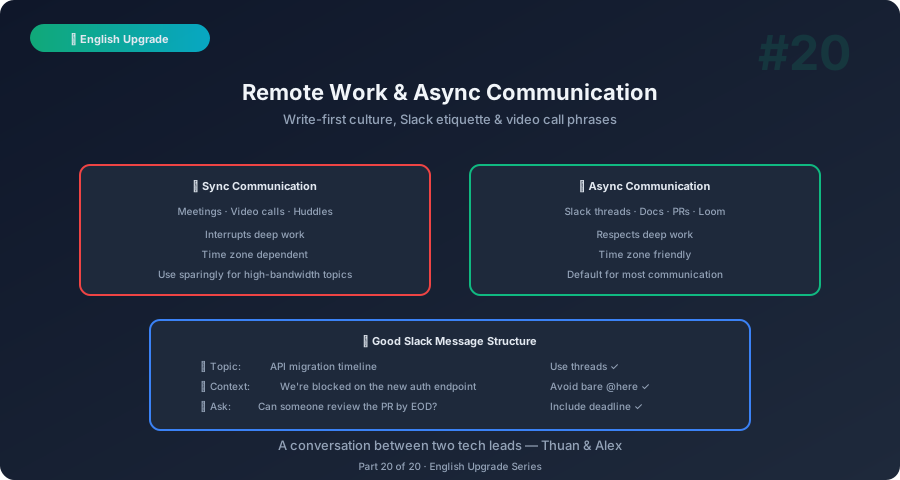
Thuan: Remote work should be easier for me — I can take my time writing instead of speaking live. But somehow I’m more misunderstood in async communication. My Slack messages start arguments. My emails get ignored. My documents nobody reads.
Alex: Async communication is harder than sync because you can’t course-correct in real time. If someone misreads your tone in a meeting, you see their face change and clarify immediately. In Slack, they stew for hours before responding with a passive-aggressive emoji.
Thuan: The 😐 emoji is the scariest thing in modern communication.
Alex: Let’s make sure you never cause one.
The Rules of Async Communication
Rule 1: Write Like a Headline, Not a Novel
| Verbose (Don’t) | Clear (Do) |
|---|---|
| “I wanted to reach out to you guys regarding the potential possibility that we might want to consider potentially refactoring the authentication module if everyone agrees and thinks it’s a good idea…" | "Proposal: Refactor the auth module. Reason: [X]. Impact: [Y]. Thoughts?” |
Principle: If someone has to read your message twice, it’s too long.
Rule 2: Front-Load the Important Part
| Buried Lead (Don’t) | Front-Loaded (Do) |
|---|---|
| “So I was looking through the logs and I noticed something interesting and then I checked the database and talked to DevOps and basically the API is down." | "🔴 API is down. Investigating. ETA: 30 min.” |
Rule 3: State What You Need
| No Action (Don’t) | Clear Action (Do) |
|---|---|
| “The deployment script has some issues" | "The deployment script has issues. @[Name], can you review by EOD?” |
Rule 4: Use Formatting
❌ Hey team quick update we finished the migration
and everything looks good but there's one issue with
the staging env that needs attention and also we
should discuss the testing plan for next week

✅ **Migration Update**
- ✅ Migration complete — all data verified
- ⚠️ Staging issue: [link] — @[Name] investigating
- 📅 Testing plan discussion: let's sync Thursday

Any blockers? Reply in thread.
Slack Communication Guide
Message Types and Formats
| Type | Format | Example |
|---|---|---|
| FYI | 📌 prefix, no action needed | ”📌 Deploy scheduled for 3 PM UTC. No action needed.” |
| Question | ❓ prefix, tag who can answer | ”❓ @backend-team: Is the /users endpoint cached?” |
| Request | 🙏 prefix, clear deadline | ”🙏 @[Name]: Can you review PR #234 by noon?” |
| Urgent | 🔴 prefix, immediate action | ”🔴 Production alert: Payment API returning 500s.” |
| Decision needed | 🗳️ prefix, options listed | ”🗳️ Should we use Redis or Memcached? React with 1️⃣ or 2️⃣.” |
| Celebration | 🎉 prefix, share credit | ”🎉 Shipped notifications! Props to @[Name] for the heavy lifting.” |
Slack Etiquette
| Do | Don’t |
|---|---|
| Use threads for discussions | Reply in the main channel for every response |
| @mention specific people | @here or @channel for non-urgent things |
| Set your status when unavailable | Disappear without notice |
| Use emoji reactions for acknowledgment | Leave messages unread and unacknowledged |
| Write complete questions (include context) | “Hey” → wait → “Can I ask you something?” → wait → actual question |
The “Hey” Problem
Thuan: What do you mean by the “Hey” problem?
Alex: This happens constantly:
❌ 9:00 AM: “Hey” ❌ 9:01 AM: “Are you free?” ❌ 9:05 AM: “I have a question about the deploy” ❌ 9:07 AM: “So basically the staging config is different from production…”
The recipient sees “Hey” at 9 AM and waits 7 minutes for the actual question. Instead:
✅ 9:00 AM: “Hey! Quick question: is the staging config for Redis supposed to differ from production? I see
maxmemory=512mbon staging vsmaxmemory=2gbon prod. [link to config]”
One message. Complete context. They can answer immediately or when they have time.
Async Standups
Thuan: We switched to async standups since we’re distributed. How do I make them work?
Alex: Async standups fail when people write novels. Use this format:
Async Standup Template
**Yesterday:** Completed PR #234 (search pagination)
**Today:** Starting notification service integration
**Blockers:** Waiting on API keys from [client] — @[PM] can you follow up?
Async Standup Tips
| Tip | Why |
|---|---|
| Post at the same time daily | Builds a habit others can rely on |
| Keep it under 4 lines | Nobody reads paragraphs |
| Tag blockers | Makes them visible to managers |
| Link PRs/tickets | Lets people click for details |
| Read teammates’ updates | Shows respect and catches dependencies |
RFC and Proposal Writing
Thuan: For bigger decisions, we use RFCs (Request for Comments). How do I write one in English?
Alex: RFCs are the ultimate async decision-making tool. Here’s the template:
RFC Template
# RFC: [Title]

**Author:** [Name]
**Date:** [Date]
**Status:** [Draft / Open for Comments / Accepted / Rejected]
**Decision Deadline:** [Date]

## Summary
[One paragraph: what you're proposing and why]

## Problem
[What problem exists? Why does it need solving now?]

## Proposal
[Your proposed solution in detail]

## Alternatives Considered
[Other approaches and why you rejected them]

## Trade-offs
[What you're gaining and what you're giving up]

## Open Questions
[Things you're unsure about — invite input]

## Decision
[To be filled after discussion period]
RFC Writing Tips
| Tip | Example |
|---|---|
| Be opinionated | ”I recommend Option A because…” not “Here are three options, what do you think?” |
| Show your work | Include data, benchmarks, diagrams |
| Set a deadline | ”Please add comments by March 15. Decision: March 17.” |
| Invite specific reviewers | ”@[Name], I’d especially value your input on the database section.” |
Running a Distributed Team
Daily Communication Rhythm
| Time | Activity | Format |
|---|---|---|
| Start of day | Async standup + read others’ updates | Slack/Teams |
| As needed | Questions and discussions | Threads |
| Weekly | Team sync (30 min video) | Zoom/Meet |
| Bi-weekly | 1-on-1s | Video call |
| End of week | Week in review post | Slack/email |
Phrases for Remote Leadership
| Situation | Phrase |
|---|---|
| Setting expectations | ”Our communication norms: async by default, sync when needed. Response SLA: within [X] hours during work hours.” |
| Encouraging participation | ”I notice this discussion is dominated by a few voices. [Name] and [Name], I’d love to hear your thoughts.” |
| Building connection | ”Let’s do a virtual coffee chat this week — no work talk. 15 minutes, cameras on.” |
| Recognizing timezone effort | ”I appreciate you joining this meeting early/late. Let’s rotate meeting times so it’s fair.” |
| Unblocking | ”I see you’ve been waiting on [thing]. Let me escalate and get you an answer today.” |
Meeting vs. Async Decision Guide
| Use a Meeting When… | Use Async When… |
|---|---|
| Brainstorming new ideas | Sharing status updates |
| Resolving conflict | Making well-defined decisions |
| Sensitive feedback | Reviewing documents or proposals |
| Tight deadline decision | Non-urgent questions |
| Team bonding | FYI announcements |
Working Across Time Zones
The Overlap Window
“Our team spans UTC+7 to UTC-5. Our overlap window is 8-10 AM UTC+7 (9-11 PM UTC-5). Let’s protect this window for sync conversations.”
Timezone Phrases
| Situation | Phrase |
|---|---|
| Scheduling | ”What time works for you? I’m in UTC+7. I can do 7 AM - 4 PM your time.” |
| Async handoff | ”I’m signing off for the day. Here’s where things stand: [summary]. Pick it up when you’re online.” |
| Respect | ”I’ll avoid messaging you outside your working hours unless it’s urgent.” |
| Morning catch-up | ”Good morning. I see 4 messages from overnight. Let me catch up and respond by 10 AM.” |
10-Minute Self-Practice
The Slack Rewrite (5 min)
- Open your last 5 Slack messages
- For each, ask: “Is the ask clear? Is the context sufficient?”
- Rewrite the weakest one using the formatting rules
- Apply the fix to your next real message
The RFC Practice (5 min)
- Think of a technical decision your team needs to make
- Write a 1-page RFC using the template (Summary, Problem, Proposal, Alternatives)
- Share it with one colleague and ask for feedback
Series Wrap-Up
Thuan: Twenty posts. We covered… everything?
Alex: Let’s look at the map:
| Post | Skill |
|---|---|
| 1-4 | Scrum ceremonies: emails, standups, planning, refinement |
| 5-6 | Sprint demos and retros |
| 7-9 | Cross-role debates: BA, QC, PM |
| 10 | Code review communication |
| 11-12 | Stakeholders and client meetings |
| 13-14 | Onboarding and incidents |
| 15-16 | Career English and self-study |
| 17-18 | 1-on-1s and cross-cultural skills |
| 19-20 | Hiring and remote/async work |
Thuan: That’s the complete tech lead communication toolkit.
Alex: And remember — these posts are your phrase bank. Bookmark them, copy the tables, and use them in your real work. English improves through use, not study. Every email, every standup, every PR comment is practice. You’ve got this. ☕
This is Part 20 — the final post of the English Upgrade series. Start from the beginning with Part 1: Emails.
The complete series pairs with English for Tech Leads (learning roadmap) and Tech Coffee Break (technical conversations). Together, they form a complete professional development path for non-native English-speaking tech leads.