Thuan: Two things I do all the time but never learned proper English for: demoing features to the team, and onboarding new developers.
Alex: Both are about knowledge transfer — taking what’s in your head and putting it into someone else’s head. English is just the delivery mechanism. Let’s make it efficient.
Part A: Feature Demos (Internal)
Alex: Internal demos are different from client demos. You can be more technical, more casual, and more honest about what’s not perfect yet.
The 3-Minute Feature Demo Template
“What” — What did we build? “Why” — What problem does it solve? “Show” — Live walkthrough “Gotchas” — Known limitations
Example: Demoing a New Notification System
“What: We built a notification service that supports email, push, and in-app notifications.
Why: Users were missing important order updates because we only had email. Push and in-app cover more touchpoints.
Show: Let me trigger a test notification… Here’s the email… and the push notification on mobile… and the in-app bell icon updates in real-time. Watch the counter increment.
Gotchas: Right now, users can’t customize their preferences — that’s coming in Sprint 16. And push notifications on iOS need a 5-second delay due to APNs throttling.”
Demo Phrases for Internal Audiences
| Moment | Phrase |
|---|---|
| Starting | ”Quick demo of what we shipped this sprint.” |
| Showing technical depth | ”If you look at the logs, you can see the message queue processing in real-time.” |
| Admitting imperfection | ”This isn’t perfect yet — there’s a known edge case with [X].” |
| Inviting feedback | ”Does this flow make sense to you? Anything we should change before release?” |
| Ending | ”That’s it. Questions? Drop any follow-ups in the channel.” |
Feature Handoff to QA
When handing a feature to QA for testing:
“Hey [QA Name], [Feature] is ready for testing.
What changed: [Brief summary] How to test: [Steps or test scenarios] Known issues: [Any expected behavior that might look like a bug] Test environment: [URL or config] Contact me if: [When they should reach out vs. figure it out themselves]“
Part B: Team Onboarding
Thuan: When a new developer joins, I never know what to say first. I just dump Confluence links and hope they figure it out.
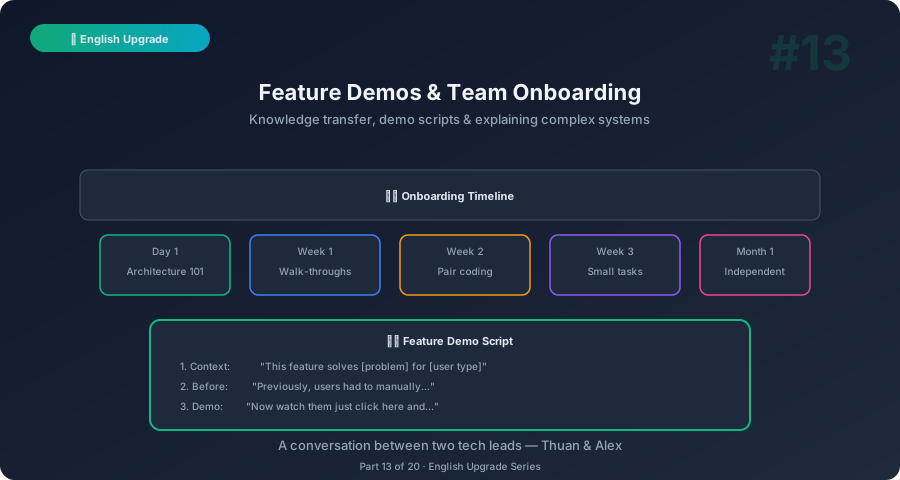
Alex: Onboarding is a tech lead’s most underrated responsibility. Good onboarding means the new person is productive in 2 weeks. Bad onboarding means 2 months. Here’s a structured approach.
The First-Day Welcome
| Moment | What to Say |
|---|---|
| Greeting | ”Welcome to the team! I’m Thuan, the tech lead. I’ll be your main point of contact this first week.” |
| Setting expectations | ”Don’t worry about being productive right away. The first week is about learning our codebase and process.” |
| Giving permission to ask | ”Ask any question, no matter how basic. There are no stupid questions — our codebase has some unusual decisions that aren’t obvious.” |
| Assigning a buddy | ”[Name] will be your onboarding buddy. They’ll pair with you and answer day-to-day questions.” |
The First-Week Overview
| Day | Focus | What You Say |
|---|---|---|
| Day 1 | Environment setup | ”Today’s goal: get your dev environment running. Here’s the setup guide. Ping [buddy] if you get stuck.” |
| Day 2 | Architecture overview | ”Let me walk you through our architecture. We have [X] services that communicate via [Y].” |
| Day 3 | Codebase tour | ”Let me show you the main modules. Start with [X] — that’s where 80% of our work happens.” |
| Day 4 | First small task | ”Here’s a starter ticket. It’s a [small bug/docs update]. The goal is to go through our full workflow: branch, PR, review, deploy.” |
| Day 5 | Coffee chat / Q&A | ”How’s the first week going? Any questions about the code or the team? What feels unclear?” |
Architecture Overview Script
“Our system has three main parts:
- Frontend — React app, deployed on [X]. This is what users see.
- API Layer — Node.js/Express services. This handles all business logic.
- Database — PostgreSQL for core data, Redis for caching.
A typical request flows like this: user clicks → frontend sends API call → API processes it → reads/writes to the database → returns response.
We deploy using [CI/CD tool]. PRs trigger automated tests. Once merged to main, it auto-deploys to staging. Production deploys are manual — we do them [schedule].”
Common Onboarding Phrases
| Situation | Phrase |
|---|---|
| Explaining a weird codebase decision | ”This looks unusual, but here’s why: [historical reason]. We’d do it differently today.” |
| Sharing tribal knowledge | ”One thing you won’t find in docs: [important tip]. It’ll save you hours.” |
| Giving feedback on first PR | ”Great first PR! A few suggestions: [feedback]. Don’t worry — everyone’s first PR here gets a lot of comments.” |
| Progress check | ”How are you feeling about the codebase? What areas feel most unclear?” |
| Boosting confidence | ”You’re picking this up quickly. Your questions show you’re understanding the architecture.” |
The 30-60-90 Day Check-In
| Milestone | Conversation |
|---|---|
| 30 days | ”How’s it going? Do you feel comfortable with the codebase? Any process improvements you’ve noticed?“ |
| 60 days | ”You’ve contributed a lot already. What skills would you like to develop? Any areas where you want more ownership?“ |
| 90 days | ”You’re fully onboarded now. Let’s talk about your goals for the next quarter. What excites you?” |
Handling Onboarding Challenges
New Dev Is Stuck and Won’t Ask for Help
“I noticed your ticket hasn’t moved in a few days. That’s totally normal — the codebase can be tricky. Want to pair on it for 30 minutes? Sometimes it’s faster to work through it together.”
New Dev Makes a Big Mistake
“No worries — that’s exactly what code reviews are for. The important thing is that we caught it before production. Here’s what happened and how to avoid it next time: [explanation].”
New Dev Is Overwhelmed
“It’s a lot to absorb. Here’s what I’d focus on this week: just [one specific area]. Ignore everything else for now. You’ll learn the rest naturally over time.”
New Dev From a Different Tech Stack
“Your [previous stack] experience is valuable — a lot of the concepts transfer. The main differences you’ll notice are: [2-3 key differences]. I’d suggest starting with [specific resource].“
10-Minute Self-Practice
The Demo Prep (5 min)
- Pick a feature you recently built
- Write the 4-part structure: What / Why / Show / Gotchas
- Practice narrating it aloud in under 3 minutes
- Bonus: record yourself and watch for filler words
The Onboarding Script (5 min)
- Write a 2-minute “architecture overview” for your current project
- Use the template: “[X] services, [Y] communication, [Z] database”
- Imagine explaining it to someone who’s never seen your code
- Practice saying it aloud — aim for clear and slow
What’s Next
Demos, handoffs, and onboarding — all covered. Next post: Incidents and Post-Mortems — high-pressure communication where every word counts.
This is Part 13 of the English Upgrade series. Pairs with English Upgrade #5: Sprint Review for broader demo skills.
Related: Tech Coffee Break #1: Microservices — architecture knowledge is what you’re transferring during onboarding.