Thuan: Demo day stresses me out more than any production incident. At least with incidents, I can fix them in code. Demos require me to talk — in front of people — in English — while clicking through a UI that might break.
Alex: And if the demo freezes, everyone watches you panic in a second language?
Thuan: Yes. That exact nightmare.
Alex: Good news: demos are the most scriptable type of communication. Unlike standups or planning, you know exactly what you’re going to show. The words can be prepared in advance. Let’s build your demo toolkit.
The Demo Script Framework
Alex: Every feature demo follows the same structure:
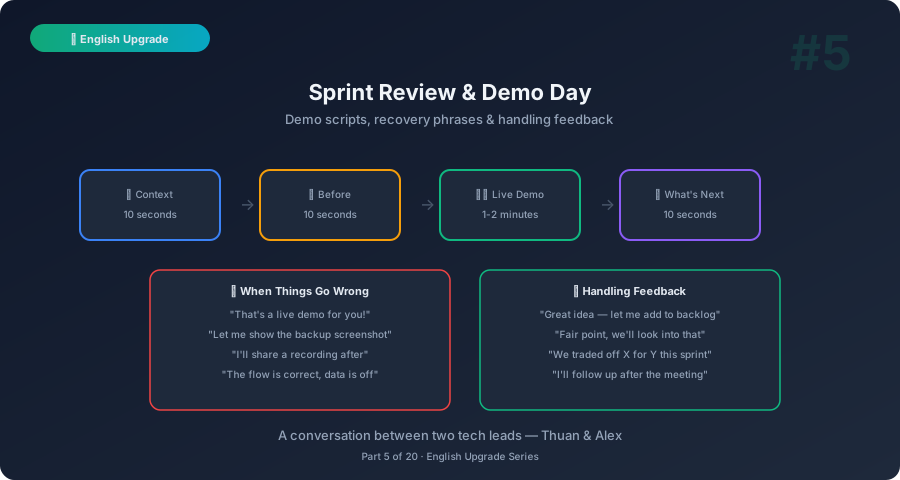
1. Context (10 sec) → Why does this feature exist? 2. Before (10 sec) → What was the old experience? 3. Live Demo (1-2 min) → Show the new feature 4. Highlight (10 sec) → What’s technically interesting? 5. What’s Next (10 sec) → What’s coming in the next sprint?
Total: under 3 minutes per feature. That’s your target.
Example Demo Script
Here’s how you’d demo a new search feature:
Context: “We heard from users that finding orders was painful — they had to scroll through pages. So this sprint we built a search feature.”
Before: “Previously, users had to browse page by page. For someone with 500 orders, that’s not great.”
Live Demo: “Now, let me show you. I’ll type ‘invoice’ in the search bar… and here are all orders containing ‘invoice’ — results appear in under half a second. I can also filter by date range, like this…”
Highlight: “Under the hood, we’re using Elasticsearch with fuzzy matching, so even typos return results.”
What’s Next: “Next sprint, we’ll add saved searches and export to CSV.”
Thuan: That’s much better than what I usually do, which is: “Okay so… now I’m going to show the search… let me click here… wait, let me reload…”
Phrases for Every Demo Moment
Opening Your Demo
| Situation | Phrase |
|---|---|
| Starting | ”Let me walk you through what we built this sprint.” |
| Setting context | ”The problem we were solving: [X].” |
| Multiple features | ”We’ll cover three features today: [X], [Y], and [Z].” |
During the Live Demo
| Situation | Phrase |
|---|---|
| Narrating actions | ”Now I’ll click on [X]… and you can see [Y] appears.” |
| Highlighting a detail | ”Notice how [X] updates in real-time.” |
| Pointing out improvements | ”This used to take 10 seconds. Now it’s instant.” |
| Showing data | ”In this example, we’re using test data with 10,000 records.” |
When Things Go Wrong
| Disaster | Recovery Phrase |
|---|---|
| Page won’t load | ”Looks like the environment is slow — let me show you the screenshot backup.” |
| Wrong data shows up | ”The test data looks a bit off — but the flow is correct. Let me walk through it.” |
| Feature doesn’t work | ”This worked in our staging environment. Let me check after the meeting and share a recording.” |
| Forgot what to click | ”Let me step back and… right, I need to go here first.” |
| Complete crash | ”Well, that’s a live demo for you! We have screenshots as backup — let me share those.” |
Thuan: “That’s a live demo for you” — that’s actually a common phrase in English?
Alex: Yes, and everyone laughs because everyone has experienced a demo crash. Saying it confidently makes you look experienced, not incompetent.
Handling Stakeholder Feedback
Thuan: After the demo, stakeholders always have opinions. Some are useful. Some are… not. How do I handle that?
Alex: Here’s your toolkit:
Receiving Good Feedback
- “Thank you — the team worked hard on this.”
- “Glad that came through. [Name] was the lead on this feature.”
Receiving Feature Requests Mid-Demo
- “Great idea. Let me add that to the backlog and we’ll prioritize it.”
- “That’s interesting — we discussed something similar. Let me capture it and follow up with you.”
- “We thought about that too. We decided to ship the basic version first and iterate.”
Receiving Criticism
- “Fair point. We’ll look into that.”
- “That’s good feedback. Can you elaborate so I can capture it accurately?”
- “You’re right — we traded off [X] for [Y] this sprint. We can revisit in the next one.”
When Someone Asks “Why Didn’t You…”
- “We considered that approach. The trade-off was [X], so we went with [Y] instead.”
- “Good question. We scoped it out for this sprint to hit the deadline, but it’s planned for the next one.”
- “That’s actually a bigger effort than it looks — it touches [X, Y, Z]. We’ll need a spike first.”
The Secret Weapon: “I’ll Follow Up”
Alex: When you don’t know the answer:
“Good question — I don’t have the exact answer right now. Let me follow up after the meeting.”
Never try to guess or make up an answer during a demo. “I’ll follow up” is perfectly professional and shows maturity.
The Sprint Review vs Demo
Thuan: Are sprint review and demo the same thing?
Alex: Not exactly. The demo shows the features. The sprint review is broader:
| Sprint Review Component | Your Role |
|---|---|
| Sprint goal | ”Our goal this sprint was [X]. Here’s how we did.” |
| What was completed | ”We completed 8 of 10 stories — 28 out of 32 points.” |
| What wasn’t completed | ”Two stories carried over: [X] because [reason].” |
| Demos | Show each completed feature |
| Metrics | ”Our sprint velocity was [X]. Slightly above average.” |
| Risks / Issues | ”One issue to flag: [X] may impact next sprint.” |
| Next sprint preview | ”Next sprint focuses on [theme].” |
Sprint Review Opening Script
“Good afternoon everyone. Quick summary of Sprint 14. Our goal was to complete the notification module. We delivered 8 of 10 stories — the two remaining ones will carry over. Let me show you what we built.”
Sprint Review Closing Script
“That’s what we shipped this sprint. Two open items for next sprint. Any questions before we wrap up?… Great. Thanks everyone.”
Client Rehearsal — The Secret Practice Round
Thuan: My company does a rehearsal before client demos. How do I handle that?
Alex: Client rehearsals are gold for English practice. Here’s the flow:
Rehearsal Phrases
| Phase | Phrase |
|---|---|
| Setting up | ”Let me do a dry run before the client call.” |
| Asking for feedback | ”How was my pacing? Too fast? Too much detail?” |
| Time check | ”How long was that? I’m targeting 3 minutes per feature.” |
| Script adjustment | ”I think I should cut the technical detail for clients. They care more about the business impact.” |
| Practicing Q&A | ”What questions do you think the client will ask?” |
| Nervous | ”I’m going to rehearse this one more time. Bear with me.” |
Thuan: So rehearsal is actually where I practice my English, not just the demo?
Alex: Both. Every rehearsal is English practice in disguise. Two birds, one stone.
10-Minute Self-Practice
The Solo Demo (Before Demo Day)
- Pick one feature you’ll demo
- Write 3-4 sentences following the framework (Context → Before → Demo → What’s Next)
- Open the feature in staging
- Narrate while clicking through — time yourself (target: 2 minutes)
- Record on your phone and watch it back
- Cut any sentence that starts with “So…” or “Basically…”
The Screen Recording Practice
- Use any screen recorder (OBS, Loom, or even Teams)
- Demo a feature from your current sprint to an empty room
- Watch the recording. Ask yourself:
- Did I narrate what I was clicking?
- Did I explain why this matters?
- Did I say “um” more than twice?
Thuan: If I do this before every sprint review, I’ll be polished in a few sprints.
Alex: Exactly. Repetition with self-review is how athletes train. No reason software engineers can’t do the same.
What’s Next
You can now demo with confidence. Next post: Retros and Team Productivity Talks — how to give feedback, suggest improvements, and talk about team performance in professional English.
This is Part 5 of the English Upgrade series — practical Business English for busy tech leads. Pairs with English for Tech Leads Part 5: Presentations for broader presentation skills.
Related: English Upgrade #3: Sprint Planning — what you plan is what you demo.