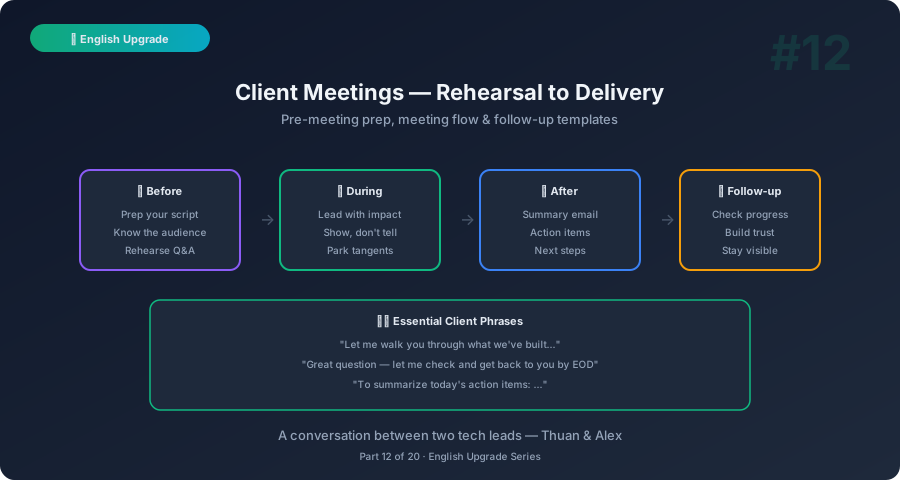
Thuan: Internal meetings are one thing. Client meetings are a completely different level of stress. One wrong word and it becomes a “deliverable” or an “expectation.”
Alex: You’re right — client meetings have higher stakes because every statement can become a commitment. But with the right preparation and phrases, you can be confident, professional, and protect your team at the same time.
Types of Client Meetings
Alex: Let’s break down the common client meeting types and what each requires:
| Meeting Type | Your Role | Key English Skill |
|---|---|---|
| Technical Design | Present architecture decisions | Explaining trade-offs |
| Feature Demo | Show completed work | Narrating user flow |
| Sprint Update | Report progress | Status and risk communication |
| Kick-off / Onboarding | Introduce team and process | Setting expectations |
| Go-Live Planning | Coordinate release | Confidence and contingency |
| Problem/Escalation | Address issues | Blameless communication |
Technical Design With Client
Thuan: This is the scariest one. The client asks questions I haven’t prepared for.
Alex: Here’s the framework:
Presenting a Technical Approach
Step 1: State the problem “The core challenge is [X]. Let me walk you through our proposed approach.”
Step 2: Present the solution (high level) “We recommend [approach]. Here’s why: [2-3 benefits].”
Step 3: Acknowledge alternatives “We also considered [alternative]. We chose [approach] because [reason].”
Step 4: Next steps “Next step: we’ll build a proof of concept by [date] so we can validate this approach.”
Handling Client Questions You Can’t Answer
| Situation | Phrase |
|---|---|
| Need to research | ”Great question. I don’t have the exact answer right now. Let me research and get back to you by [date].” |
| Need team input | ”That’s a good point. Let me consult with the team and we’ll include our recommendation in the follow-up.” |
| Out of scope | ”That’s an important consideration, but it’s outside the scope of our current discussion. Let’s capture it and discuss separately.” |
| Don’t understand | ”Could you rephrase that? I want to make sure I address your exact concern.” |
Phrases for Technical Discussions
| Situation | Phrase |
|---|---|
| Recommending | ”Based on our analysis, we’d recommend [X] because [reasons].” |
| Comparing options | ”Option A gives us [benefit] but costs [trade-off]. Option B is [different trade-off]. Our recommendation is A.” |
| Setting expectations | ”This approach involves some trade-offs. Let me explain what those are.” |
| Handling pushback | ”I understand the concern. Let me address that: [explanation].” |
| Deferring to data | ”Rather than deciding now, let’s do a spike — a short investigation — and come back with data.” |
Client Rehearsal — The Pre-Game
Thuan: My team does rehearsals before client calls. What should I focus on?
Alex: Rehearsal is where you practice your English under simulated pressure. Here’s the checklist:
Rehearsal Checklist
| Item | What to Practice |
|---|---|
| Opening | ”Thanks for joining. Today we’ll cover [agenda].” Practice this until it’s automatic. |
| Demo flow | Click through the entire demo while narrating. Time it. |
| Transitions | ”Now let me show you [next feature].” Smooth transitions prevent dead air. |
| Anticipated questions | List 5 questions the client might ask. Prepare answers. |
| Recovery phrases | Practice: “Let me check that and follow up.” |
| Closing | ”Thank you for your time. We’ll send the follow-up by [date].” |
Rehearsal Phrases for the Internal Team
| Situation | Phrase |
|---|---|
| Starting | ”Let’s do a dry run. I’ll present as if the client is here.” |
| Asking feedback | ”Was that clear? Did I go too deep technically?” |
| Adjusting | ”I should simplify the architecture slide. Clients don’t need the DB schema.” |
| Timing | ”That was 25 minutes. We need to cut to under 20.” |
| Preparing for Q&A | ”What hard questions do you think they’ll ask?” |
| Assigning roles | ”[Name], you’re the backup if they ask about [topic]. I’ll handle [other topic].” |
During the Client Meeting
Opening
- “Good morning, everyone. Thanks for joining.”
- “Before we start, here’s today’s agenda: [X, Y, Z]. If that works for everyone, let’s begin.”
- “Just a quick intro for anyone new: I’m Thuan, the technical lead for this project.”
Managing the Flow
- “Let me share my screen.”
- “Can everyone see the screen? Great.”
- “I’ll pause here for questions before we move to the next topic.”
- “We have about 10 minutes left. Let me cover the key remaining items.”
Handling Scope Requests From Clients
This is critical — clients often ask for more during meetings:
| Client Says | Your Response |
|---|---|
| ”Can you also add X?" | "That’s a great idea. Let me capture it and we’ll evaluate the effort. It may extend the timeline — I’ll confirm by [date]." |
| "How hard would it be to change Y?" | "It depends on [factors]. Let me assess and include it in our next status update." |
| "We need this by [aggressive date]" | "I want to give you a realistic timeline. Let me review with the team and come back with options." |
| "Why can’t you just…?" | "I understand the expectation. There are some technical considerations. Let me explain: [brief explanation]. We want to do this right.” |
Golden Rule: Never commit to scope or timelines in a live client meeting. Always say “let me confirm and come back to you.”
Thuan: Why is that so important?
Alex: Because in client meetings, everything you say becomes a commitment. If you say “sure, we can do that by Friday” and then discover it’s a 2-week effort, you’ve created a trust problem. It’s always better to under-promise and over-deliver.
Closing
- “Thank you for your time today.”
- “To summarize: we covered [X, Y, Z]. Action items: [list].”
- “We’ll send the meeting notes and follow-up by end of day.”
- “Any final questions before we wrap up?”
The Follow-Up Email
After every client meeting, send a follow-up:
Subject: Meeting Follow-Up — [Meeting Topic] — [Date]

Hi [Client Name],

Thank you for today's meeting. Here's a summary:

**Discussed:**
- [Topic 1]: [Key decisions/outcomes]
- [Topic 2]: [Key decisions/outcomes]

**Action Items:**
- [Our team]: [Action] — by [date]
- [Client team]: [Action] — by [date]

**Next Meeting:** [Date and time]

Please let us know if we missed anything or if you
have additional questions.

Best regards,
Thuan
Thuan: This email also protects us — whatever was discussed is now documented.
Alex: Exactly. In consulting and outsourcing, the follow-up email is the contract. Everything agreed upon should be in writing.
Go-Live Meeting Communication
Thuan: Go-live meetings are particularly stressful. The client is anxious, the team is anxious, and everything has to go right.
Alex: Here are the key phrases:
Pre-Go-Live
- “Our go-live plan includes the following steps: [list]. Estimated duration: [time].”
- “We have a rollback plan in case anything goes wrong. Here’s what that looks like.”
- “The team will be on standby for [X hours] after deployment to monitor.”
During Go-Live
- “We’ve started the deployment. Status: on track.”
- “Step 3 of 7 complete. No issues so far.”
- “We’ve hit a minor issue with [X]. The team is investigating. ETA for resolution: [time].”
- “Deployment complete. Running post-deployment checks now.”
Post-Go-Live
- “Everything is live and running smoothly. No issues detected.”
- “We found one minor issue: [X]. It doesn’t affect users. We’ll patch it tomorrow.”
- “Go-live successful! Thank you for your patience. The team will continue monitoring for the next 24 hours.”
10-Minute Self-Practice
The Client Meeting Prep (5 min before any client call)
- Write the opening sentence: “Thanks for joining. Today we’ll cover…”
- List 3 questions the client might ask
- For each, write a one-line answer
- Practice your opening aloud — aim for calm and confident
The Follow-Up Drill (5 min after any meeting)
- Write the follow-up email using the template
- List: discussed, decisions, action items, next steps
- Send within 2 hours of the meeting
What’s Next
Client meetings mastered. Next post: Feature Demos and Team Onboarding — how to demo new features with confidence and onboard new team members effectively in English.
This is Part 12 of the English Upgrade series. Pairs with English for Tech Leads Part 11: Client Interviews & Bidding for broader client communication.
Related: English Upgrade #5: Sprint Review — internal demos build the skills you need for client demos.