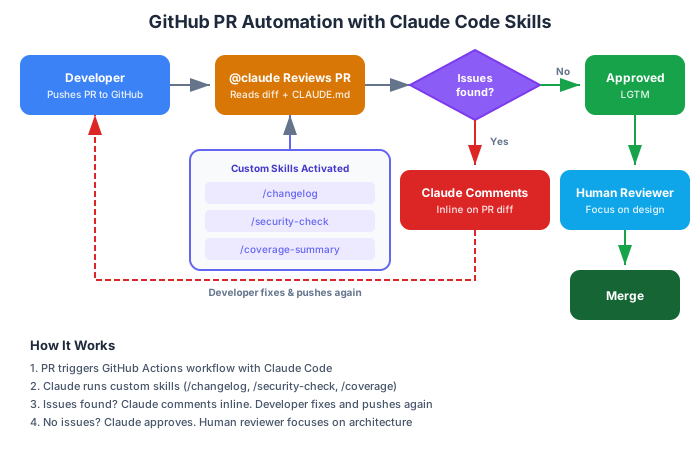
Our team had a ritual. Every pull request needed three things before a human reviewer would look at it: a changelog entry describing what changed, a security checklist confirming no new attack vectors, and a test coverage summary showing which paths were tested. The ritual was important — it caught real issues. But it was also tedious. Each developer spent 15-20 minutes per PR filling out these checklists manually.
I wrote three custom Claude Code skills in an afternoon. One generates a changelog entry by reading the git diff. One runs a security audit against the OWASP top 10 patterns. One analyzes test files and maps coverage to the changed code paths. Now, when a developer opens a PR, they type /changelog, /security-check, and /coverage-summary. Three prompts, three minutes, done.
That’s 2 hours per developer per week saved across a team of six. Not through some complex CI/CD pipeline — through three markdown files in a .claude/skills/ directory.
In Part 3, we connected Claude Code to external tools via MCP. Now we’ll teach it your team’s specific playbook.
What Are Skills?
Skills are reusable prompt templates that extend Claude Code’s capabilities. Think of them as recipes — predefined instructions that Claude follows when you invoke them.
Each skill is a folder containing a SKILL.md file:
.claude/skills/
├── changelog/
│   └── SKILL.md
├── security-check/
│   └── SKILL.md
└── tdd-scaffold/
    └── SKILL.md
The SKILL.md file has two parts: YAML frontmatter that controls how the skill is invoked, and markdown content with the actual instructions.
Here’s the simplest possible skill:
---
name: hello
description: Greet the developer
---

Say hello to the developer and tell them a programming joke.
That’s it. A name, a description, and instructions. You invoke it with /hello in Claude Code. But obviously, we want to do more interesting things.
Writing Your First Real Skill
Let’s build the changelog generator I mentioned. This skill reads the git diff, understands what changed, and generates a formatted changelog entry.
---
name: changelog
description: Generate a changelog entry from the current git diff
---

## Instructions

Read the current git diff (staged and unstaged changes) and generate
a changelog entry following the Keep a Changelog format.

## Steps

1. Run `git diff` and `git diff --staged` to see all changes
2. Analyze the changes and categorize them:
   - **Added**: New features or files
   - **Changed**: Modifications to existing functionality
   - **Fixed**: Bug fixes
   - **Removed**: Deleted features or files
   - **Security**: Security-related changes
3. Write a concise, human-readable description for each change
4. Format the output as a markdown changelog section:
[Unreleased]
Added
- Description of new feature
Changed
- Description of modification
Fixed
- Description of bug fix
## Rules

- Focus on what changed from the user's perspective, not implementation details
- Each entry should be one line, starting with a verb
- Group related changes into a single entry
- Skip trivial changes (whitespace, import reordering)
- If there's a CHANGELOG.md file in the project, match its existing style
Save this as .claude/skills/changelog/SKILL.md and you can invoke it with /changelog in any conversation. Claude reads the diff, categorizes the changes, and produces a formatted entry ready to paste into your changelog.
Anatomy of SKILL.md
The frontmatter supports these fields:
---
name: skill-name          # Required: how you invoke it (/skill-name)
description: What it does  # Required: shown in skill discovery
---
The markdown body is your prompt. Structure it however makes sense for the task — I use ## Instructions, ## Steps, and ## Rules sections because Claude responds well to clear structure.
Supporting Files
Skills can include supporting files alongside SKILL.md:
.claude/skills/api-scaffold/
├── SKILL.md
├── templates/
│   ├── controller.template.ts
│   ├── service.template.ts
│   └── test.template.ts
└── examples/
    └── user-endpoint.md
Reference these files in your SKILL.md instructions:
## Instructions

When scaffolding a new API endpoint, use the templates in this
skill's `templates/` directory as starting points. Read
`examples/user-endpoint.md` for a reference implementation.
This is powerful for team standardization. Your templates live alongside the skill, version-controlled, and always available.
Three Skills Every Team Should Have
1. Security Review Skill
---
name: security-check
description: Audit current changes for common security vulnerabilities
---

## Instructions

Review all staged and unstaged changes for security vulnerabilities.
Focus on the OWASP Top 10 categories relevant to this codebase.

## Checks

1. **Injection** — Look for unsanitized user input in:
   - SQL queries (string concatenation instead of parameterized queries)
   - Shell commands (child_process, exec, system calls)
   - Template rendering (unescaped HTML output)

2. **Authentication & Session** — Check for:
   - Hardcoded credentials, API keys, or secrets
   - Missing authentication on new endpoints
   - Insecure session configuration

3. **Sensitive Data** — Verify:
   - No secrets in code (API keys, passwords, tokens)
   - Proper handling of PII (logging, error messages)
   - Secure defaults for new configuration

4. **Access Control** — Confirm:
   - Authorization checks on new endpoints
   - Proper role-based access where applicable
   - No privilege escalation paths

5. **Dependencies** — Flag:
   - New dependencies without security review
   - Known vulnerable versions (check against CVE databases)

## Output Format

For each finding, report:
- **Severity**: Critical / High / Medium / Low
- **Location**: File and line number
- **Issue**: What's wrong
- **Fix**: How to resolve it

If no issues found, confirm the changes pass the security review
with a brief summary of what was checked.
This isn’t a replacement for a proper SAST tool — it’s a fast, contextual first pass that catches the obvious issues before human review.
2. TDD Scaffolding Skill
---
name: tdd-scaffold
description: Generate test files first, then implement to pass them
---

## Instructions

Follow Test-Driven Development:

1. **Ask** the developer to describe the feature they want to build
2. **Read** existing test files in the project to understand:
   - Testing framework (Jest, Vitest, xUnit, pytest, etc.)
   - Test file naming conventions
   - Helper utilities and fixtures
   - Assertion patterns
3. **Write tests first** covering:
   - Happy path (expected behavior)
   - Edge cases (empty input, null, boundaries)
   - Error cases (invalid input, failure scenarios)
4. **Run the tests** to confirm they fail (red phase)
5. **Implement** the minimum code to make all tests pass (green phase)
6. **Refactor** if needed while keeping tests green

## Rules

- Never write implementation before tests
- Each test should test one behavior
- Use descriptive test names: "should return empty array when no items match filter"
- Match the project's existing test patterns exactly
- Keep tests independent — no shared mutable state between tests
This skill enforces TDD discipline. Instead of Claude jumping straight to implementation, it writes failing tests first and then implements to pass them.
3. PR Description Skill
---
name: pr-description
description: Generate a pull request description from the current branch
---

## Instructions

Generate a comprehensive PR description by analyzing all commits
on the current branch since it diverged from the main branch.

## Steps

1. Run `git log main..HEAD --oneline` to see all commits
2. Run `git diff main...HEAD` to see the full diff
3. Analyze the changes and write a PR description with:

## Output Format

```markdown
## Summary
[2-3 sentences explaining what this PR does and why]

## Changes
- [Bulleted list of specific changes]

## Testing
- [ ] [Checklist of testing steps a reviewer should follow]

## Notes
[Any context the reviewer needs — design decisions,
tradeoffs, follow-up work needed]
Rules
- Focus on the “why” not just the “what”
- Keep the summary under 3 sentences
- Testing steps should be actionable and specific
- Mention any breaking changes prominently
- Link to related issues if commit messages reference them
## Community and Official Skill Repos

You don't have to write everything from scratch. There's a growing ecosystem of pre-built skills.

### Official: anthropics/skills

Anthropic maintains a [skills repository](https://github.com/anthropics/skills) with reference implementations:

- **Playwright Testing** — Browser automation for testing web applications
- **MCP Server Generation** — Scaffold new MCP servers from specifications
- **Creative Applications** — Art, music, and design generation skills

These are well-documented and follow best practices. Good starting point for understanding skill patterns.

### Community Collections

- **[travisvn/awesome-claude-skills](https://github.com/travisvn/awesome-claude-skills)** — Curated list with examples across categories
- **[karanb192/awesome-claude-skills](https://github.com/karanb192/awesome-claude-skills)** — 50+ verified skills for TDD, debugging, git workflows, document processing
- **[alirezarezvani/claude-code-skill-factory](https://github.com/alirezarezvani/claude-code-skill-factory)** — Generate skill templates automatically
- **[hesreallyhim/awesome-claude-code](https://github.com/hesreallyhim/awesome-claude-code)** — Comprehensive guide covering skills, hooks, agents, and application templates

### Installing Community Skills

To use a community skill, clone or copy it into your `.claude/skills/` directory:

```bash
# Copy a single skill
cp -r path/to/community-skill .claude/skills/

# Or clone an entire collection and pick what you need
git clone https://github.com/travisvn/awesome-claude-skills /tmp/skills
cp -r /tmp/skills/changelog .claude/skills/Important: Always review community skills before using them. Skills have access to your tools — a malicious skill could read sensitive files or execute harmful commands. Read the SKILL.md before trusting it.
GitHub Integration Deep Dive
Skills make Claude smarter about your project. GitHub integration makes it smarter about your workflow.
@claude in Pull Requests
You can trigger Claude Code analysis directly from GitHub by mentioning @claude in PR comments. When configured, Claude reads the PR diff, applies your project’s CLAUDE.md guidelines, and responds with analysis.
@claude Review this PR. Focus on:
1. Performance implications of the new database queries
2. Whether the error handling matches our existing patterns
3. Any missing test coverage
Claude reads the diff, references your CLAUDE.md conventions, and posts a structured review as a PR comment. It highlights potential issues, suggests improvements, and confirms what looks good.
Setting Up GitHub Actions Integration
For automated PR reviews on every push, add Claude Code to your GitHub Actions workflow:
name: Claude Code Review
on:
  pull_request:
    types: [opened, synchronize]

jobs:
  review:
    runs-on: ubuntu-latest
    permissions:
      contents: read
      pull-requests: write
    steps:
      - uses: actions/checkout@v4
        with:
          fetch-depth: 0

      - name: Install Claude Code
        run: npm install -g @anthropic-ai/claude-code

      - name: Run Claude Review
        env:
          ANTHROPIC_API_KEY: ${{ secrets.ANTHROPIC_API_KEY }}
        run: |
          claude -p "Review the changes in this PR. Check for:
          1. Bugs and edge cases
          2. Security vulnerabilities
          3. Consistency with project conventions in CLAUDE.md
          4. Missing test coverage
          Post a summary as a PR comment." \
          --allowedTools "bash,read,glob,grep"
This runs Claude Code on every PR, automatically. It reads your CLAUDE.md, analyzes the diff, and posts findings as a comment. Your human reviewers start with Claude’s analysis already done.
What Claude Catches That Humans Miss
From three months of automated PR reviews, here are the most common findings:
- Unchecked null/undefined values — Claude traces data flow and identifies paths where a value could be null but isn’t checked
- Inconsistent error handling — One endpoint returns
{ error: "..." }while another throws an exception. Claude notices the pattern mismatch - Missing edge cases — New validation that handles
""(empty string) but notnullorundefined - Stale dependencies — Import from a module that was refactored but the import path wasn’t updated
- Security blind spots — User input reaching a database query without sanitization, even through multiple function calls
Claude doesn’t replace human review. It handles the mechanical checks so humans can focus on architecture, design decisions, and business logic.
Hooks — Running Code Before and After Claude Actions
Hooks are shell commands that run automatically in response to Claude Code events. They’re like git hooks but for AI actions.
Post-Edit Hook: Auto-Format
Run your formatter after every file edit:
// .claude/settings.json
{
  "hooks": {
    "postEditFile": {
      "command": "npx prettier --write {{filePath}}",
      "description": "Format file after Claude edits it"
    }
  }
}
Every time Claude modifies a file, Prettier runs automatically. No more “fix formatting” follow-up prompts.
Pre-Commit Hook: Validate Before Committing
Run checks before Claude creates a commit:
{
  "hooks": {
    "preCommit": {
      "command": "npm run lint && npm run typecheck",
      "description": "Lint and type-check before committing"
    }
  }
}
If the lint or type-check fails, the commit is blocked. Claude sees the error output and can fix the issues before trying again.
Custom Validation Hook
Run project-specific checks after edits:
{
  "hooks": {
    "postEditFile": {
      "command": "node scripts/validate-imports.js {{filePath}}",
      "description": "Verify import conventions"
    }
  }
}
This is how you enforce conventions that Claude might not know about — custom import ordering, banned dependencies, required file headers.
Team Workflow Patterns
Skills, GitHub integration, and hooks come together in team workflows. Here are three patterns that worked for my team.
Pattern 1: Claude as First Reviewer
Every PR gets an automated Claude review before any human looks at it.
Setup:
- GitHub Actions workflow triggers Claude on PR creation
- Claude reads the diff + CLAUDE.md +
.claude/rules/code-review.md - Claude posts a structured review comment
- Human reviewer starts with Claude’s analysis already done
Result: Human reviewers spend 60% less time on mechanical checks. They focus on architecture and business logic instead of “you forgot to handle the null case on line 47.”
Pattern 2: Shared Skill Library
The team maintains a set of standard skills in the repository:
.claude/skills/
├── changelog/SKILL.md          # PM-maintained
├── security-check/SKILL.md     # Security lead-maintained
├── tdd-scaffold/SKILL.md       # QA lead-maintained
├── pr-description/SKILL.md     # Tech lead-maintained
├── api-scaffold/SKILL.md       # Backend lead-maintained
│   └── templates/
└── component-scaffold/SKILL.md # Frontend lead-maintained
    └── templates/
Each skill has an owner who maintains it. The skills are version-controlled and reviewed like any other code. When conventions change, the skill owner updates the SKILL.md and everyone gets the update on their next git pull.
Pattern 3: Onboarding Accelerator
New team members use Claude Code to explore and learn the codebase:
I just joined this project. Walk me through:
1. The high-level architecture (read CLAUDE.md)
2. How a request flows from the API to the database
3. Where the business logic lives
4. How tests are structured
5. The deployment pipeline
Combined with a well-written CLAUDE.md and clear project structure, this gives new developers a guided tour of the codebase. What used to take two weeks of reading code and asking questions now takes two days of exploring with Claude.
The .claude/ Directory — Full Picture
Here’s what a mature team’s .claude/ directory looks like:
.claude/
├── settings.json              # Shared project settings
├── settings.local.json        # Personal settings (gitignored)
├── rules/
│   ├── testing.md             # Testing conventions
│   ├── security.md            # Security requirements
│   ├── api-design.md          # REST API guidelines
│   └── code-review.md         # Review checklist
└── skills/
    ├── changelog/
    │   └── SKILL.md
    ├── security-check/
    │   └── SKILL.md
    ├── tdd-scaffold/
    │   └── SKILL.md
    ├── pr-description/
    │   └── SKILL.md
    └── api-scaffold/
        ├── SKILL.md
        └── templates/
            ├── controller.template.ts
            └── service.template.ts
Version control: Everything in .claude/ is git-tracked except settings.local.json. Skills and rules are code-reviewed like any other project artifact.
What’s Next
In Part 5, we’ll cover the advanced patterns that separate casual users from power users — the plan-before-code workflow, subagents for parallel tasks, context management strategies, common anti-patterns, and honest lessons from six months of daily production use.
This is Part 4 of a 5-part series on mastering Claude Code. Read the companion post on AI coding tools for broader context on AI-assisted development.
Series outline:
- CLAUDE.md & Project Setup — Installation, CLAUDE.md anatomy, memory architecture (Part 1)
- VS Code Integration — Extension setup, inline diffs, @-mentions, daily habits (Part 2)
- MCP Servers — Configuration, top servers by category, the 2-3 server rule (Part 3)
- Skills & GitHub — Custom skills, GitHub PR automation, team workflows (this post)
- Advanced Patterns — Plan-before-code, subagents, debugging, 6-month lessons (Part 5)