I had 40 API endpoints to migrate from Express to Hono. The endpoints were straightforward — mostly CRUD operations with some middleware for authentication and logging. Claude Code knows both frameworks well. Easy job, right?
First attempt: I opened Claude Code and typed “Migrate all API endpoints from Express to Hono. Here’s the project structure…” Claude started rewriting everything in one massive session. By endpoint 15, it was forgetting the patterns it had established for endpoints 1-5. The middleware was inconsistent. The error handling differed between routes. Some endpoints used the new Hono context API correctly, others mixed in Express patterns. I spent more time fixing Claude’s output than it would have taken to do the migration myself.
Second attempt: I used the plan-before-code pattern. I asked Claude to read every endpoint first. Then propose a migration strategy. Then I approved the strategy. Then I had it migrate 5 endpoints at a time, running tests after each batch, compacting context between batches. Clean migration, one afternoon, zero inconsistencies.
The tools were identical. The workflow made the difference.
This is Part 5 — the final installment of this series. In Part 1 we configured CLAUDE.md, in Part 2 we built a VS Code workflow, in Part 3 we connected MCP servers, in Part 4 we automated GitHub with skills. Now we’ll cover the patterns that tie everything together.
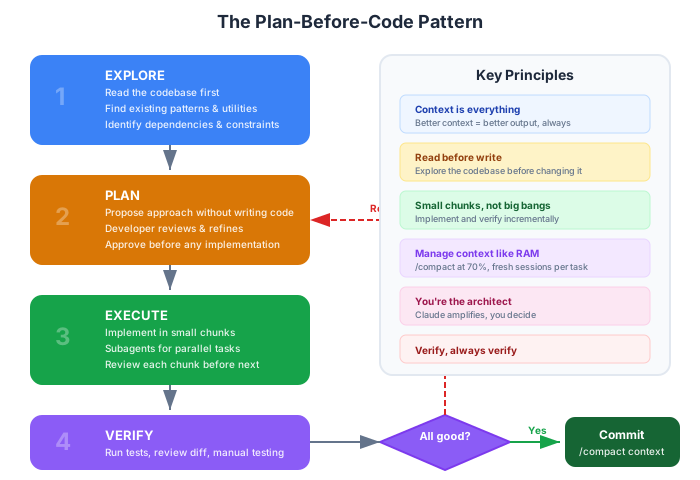
The Plan-Before-Code Pattern
This is the single highest-ROI habit I’ve developed. Before Claude writes a single line of code, we go through four steps.
Step 1: Explore
Ask Claude to read the codebase first. Not implement. Not plan. Just read.
I need to add user authentication to this API. Before doing anything,
read the following:
1. The existing route handlers in src/routes/
2. The middleware pipeline in src/middleware/
3. The database models in src/models/
4. The existing test patterns in tests/

Tell me what patterns you observe. Don't suggest changes yet.
This does two things: it loads relevant context into Claude’s working memory, and it surfaces patterns you might have forgotten about. Claude often finds existing utilities or conventions that change the implementation approach.
Step 2: Plan
Now ask Claude to propose an approach — without writing code.
Based on what you've read, propose an approach for adding JWT
authentication. Include:
1. Which files need to change
2. What new files to create
3. The order of changes (what depends on what)
4. Which existing patterns to follow
5. Any concerns or tradeoffs

Don't write code yet. Just the plan.
Review the plan. Push back on anything that doesn’t feel right. Ask “why” when a decision seems unusual. This is where you catch architectural mistakes — before they’re embedded in 20 files of generated code.
Step 3: Execute
Once you approve the plan, let Claude implement it. But not all at once.
Good plan. Let's start with step 1: create the JWT utility
module following the pattern from src/utils/. Write the code
and the tests.
Break execution into chunks. Each chunk should be small enough to review meaningfully. For the auth example: first the JWT utility, then the middleware, then updating routes, then integration tests. Each chunk gets reviewed before moving to the next.
Step 4: Verify
After each chunk, verify before moving on.
Run the tests for the auth module. Also run the full test suite
to check for regressions.
If tests fail, fix before proceeding. If the approach needs adjustment, update the plan. This prevents the “cascade of errors” problem where a bad decision in step 1 propagates through steps 2-10 and everything needs to be redone.
Why Skipping Steps Always Costs More
When you skip straight to “write the code,” Claude has to simultaneously:
- Understand the existing codebase (Step 1)
- Design an approach (Step 2)
- Implement it (Step 3)
- Hope it works (Step 4?)
That’s too many cognitive tasks at once, even for a powerful model. The output is inconsistent, the architecture is ad-hoc, and you spend more time on review and correction than you saved on planning.
The 4-step pattern takes 20% more time upfront and saves 50% on rework.
Subagents and Background Tasks
When Claude Code encounters a task that can be parallelized, it can spawn subagents — child processes that work on independent subtasks simultaneously.
When Subagents Activate
Subagents are triggered by tasks with clear parallel decomposition:
Update all 12 test files in tests/integration/ to use the new
database fixture format. Each file is independent.
Claude recognizes that these files can be updated independently and spawns subagents to work on them in parallel. Instead of updating files sequentially (12 files x 30 seconds = 6 minutes), subagents work concurrently (~2 minutes total).
Prompts That Trigger Subagent Behavior
Not all prompts spawn subagents. Here’s what works:
Good — clear parallel structure:
For each component in src/components/, add TypeScript prop
interfaces. The components are independent of each other.
Good — explicit batch instruction:
Update these 5 files to use the new import path:
- src/routes/users.ts
- src/routes/products.ts
- src/routes/orders.ts
- src/routes/auth.ts
- src/routes/admin.ts
Won’t parallelize — sequential dependency:
Refactor the auth module, then update all routes to use the
new auth API, then update the tests.
This has dependencies: routes depend on the new auth API, tests depend on the new routes. Claude handles this sequentially, which is correct.
Monitoring Subagent Progress
When subagents are running, Claude shows their progress in the conversation. You can see which files are being processed, which are complete, and whether any encountered errors.
Important limitation: Subagents share the filesystem but not conversation context. Subagent A doesn’t know what Subagent B decided about naming conventions. This is why the explore-and-plan steps matter — by the time you reach execution, the decisions are already made and each subagent follows the same plan.
Context Management Mastery
The context window is finite. Treat it like RAM — allocate deliberately, free regularly, and don’t let it fill up with garbage.
The /compact Command
/compact summarizes the current conversation and frees context space. Use it:
- After completing a feature: the implementation details are in your files now, not needed in conversation memory
- Before switching to a related but different task: keep the project context, discard the implementation details
- When Claude starts repeating itself: a sign that context is getting noisy
What /compact preserves:
- Key decisions and their rationale
- Files that were modified
- The current task state
What it discards:
- Intermediate reasoning steps
- Tool call details (file reads, terminal outputs)
- Exploratory conversations that didn’t lead anywhere
# Good time to compact
> /compact
# Claude summarizes: "Added JWT auth middleware to 4 routes,
# created token utility in src/utils/jwt.ts, all tests passing.
# Next: add refresh token support."
The /clear Command
/clear is a nuclear reset. Use it when:
- Switching to a completely unrelated task
- The conversation has gone off-track and you want to start fresh
- Debugging context is polluting your feature work
Don’t use /clear when:
- You’re about to continue the same task (use
/compactinstead) - You have important decisions in the conversation that aren’t documented elsewhere
The Fresh Session Pattern
My most effective pattern: one session per task.
- Open a new tab/terminal for each distinct piece of work
- Keep sessions focused and short-lived
- When a session’s job is done, close it
This prevents the most common context problem: a session that started as “add a login form” gradually accumulated debugging context, test-fixing context, CSS-tweaking context, and deployment-troubleshooting context until Claude has no idea what the current priority is.
Fresh sessions start with clean context. Claude reads your CLAUDE.md, focuses on the new task, and operates at peak effectiveness.
The 70% Rule
I watch the context usage indicator. When it approaches 70% capacity:
- Compact if continuing the same task
- New session if switching tasks
- Never wait until 100% — Claude’s response quality degrades before the hard limit
Think of it like disk space. You don’t wait until your drive is 100% full to clean up. The same principle applies to context windows.
Debugging with Claude Code
Claude Code is surprisingly good at debugging — when you give it the right information.
The “Describe Symptoms, Not Solutions” Approach
Bad prompt:
The useEffect hook is causing an infinite loop.
Fix the dependency array.
You’ve already diagnosed the problem and prescribed a solution. But what if the real issue isn’t the dependency array? What if it’s a missing memoization, or a state update that triggers a re-render, or a parent component that remounts unnecessarily?
Good prompt:
This component re-renders continuously when I open the dashboard.
The browser tab becomes unresponsive after about 5 seconds.
Here's the component: @src/components/Dashboard.tsx
Here's the parent: @src/pages/dashboard.tsx
What's causing the infinite re-renders?
Describe the symptom. Provide the context. Let Claude diagnose.
The Iterative Debugging Loop
Complex bugs rarely yield to a single prompt. The effective pattern is a loop:
- Describe the symptom with relevant context (error messages, file references, what you’ve tried)
- Claude suggests a diagnosis and fix
- You test the suggestion
- Report back with what happened
- Iterate until fixed
> The API returns 500 on POST /api/users. Error log shows
> "Cannot read properties of undefined (reading 'email')".
> @src/routes/users.ts @src/middleware/validation.ts

Claude: "The validation middleware expects req.body.email but
the body parser middleware runs after validation. Move the body
parser before the validation middleware in your pipeline."

> I moved it. The 500 is gone but now I get a 400 with
> "Invalid email format" even with a valid email.

Claude: "The validation schema uses a strict email regex that
rejects emails with + aliases. Here's the updated pattern..."
Each round gives Claude more information. By round 3, it usually has enough context to solve even complex, multi-layered bugs.
Where Claude Excels at Debugging
- Stack traces: Claude reads stack traces fluently and traces the error to the root cause
- Type errors: TypeScript errors with complex generics — Claude resolves them quickly
- Logic bugs: Given test input and expected vs actual output, Claude traces the logic path
- Configuration issues: Build errors, webpack/vite config problems, environment mismatches
Where Claude Struggles
- Race conditions: Timing-dependent bugs are hard without runtime observation
- Environment-specific issues: “Works on my machine” problems need system-level context Claude doesn’t have
- Performance issues: Claude can suggest optimizations but can’t profile your running application
- Intermittent failures: Bugs that only appear under load or specific timing
For these categories, Claude is still useful as a rubber duck — explaining your observations and getting structured thinking in return — but don’t expect a one-shot fix.
Anti-Patterns — What Wastes Your Time
Six months of daily use taught me what not to do.
Anti-Pattern 1: The “Do Everything” Prompt
# Bad
Refactor the entire authentication system, add OAuth support,
update all tests, and deploy to staging.
This is four distinct tasks mashed into one prompt. Claude will attempt all of them, do none of them well, and you’ll spend hours untangling the output.
Fix: One task per session. Break large work into chunks. Use the plan-before-code pattern.
Anti-Pattern 2: Trust Without Verify
Accepting every change Claude suggests without reading it. Auto-accept mode running on business logic. Committing without running tests.
Claude is good. Claude is not infallible. It generates plausible code that sometimes has subtle bugs — off-by-one errors, missing edge cases, incorrect assumptions about your data.
Fix: Review every change to business logic. Run tests after every significant edit. Use auto-accept only for boilerplate.
Anti-Pattern 3: Context Hoarding
Never using /compact. Never starting fresh sessions. One conversation that grows for hours until Claude is working with degraded context.
Fix: The 70% rule. Compact after milestones. Fresh sessions for fresh tasks.
Anti-Pattern 4: Wrong Tool for the Job
Using Claude Code to:
- Write emails (use a word processor)
- Make architectural decisions you haven’t thought through (think first, then validate with Claude)
- Replace understanding (Claude explains; you should still understand the code you ship)
Fix: Claude is a power tool, not a replacement for judgment. Use it to amplify your thinking, not substitute for it.
Anti-Pattern 5: Prompt and Pray
# Bad
Fix the bug.
No context. No symptoms. No file references. Claude has to guess what bug, where, and what “fixed” means.
Fix: Always provide context. The prompt format that works: symptom + location + expected behavior + actual behavior.
Honest Lessons from Six Months
Let me be direct about what Claude Code changed and what it didn’t.
What Got Faster
Boilerplate and scaffolding: 70% faster. Creating test files, configuration, repetitive CRUD operations, component templates — these are tasks where Claude excels because the patterns are well-defined and the creativity required is low.
Debugging known error types: 40% faster. Stack traces, type errors, configuration issues — anything with a clear error message and a defined solution space.
Code review preparation: 60% faster. The automated PR review catches mechanical issues, leaving humans to focus on design and architecture.
Exploring unfamiliar codebases: 50% faster. Asking Claude to explain a new codebase, trace request flows, and identify patterns is dramatically faster than reading code file by file.
Documentation writing: 50% faster. README files, API docs, inline comments for complex logic — Claude drafts, I edit.
What Didn’t Get Faster
Architecture decisions: 0% faster. Claude can validate an approach and identify tradeoffs, but the creative act of designing a system’s architecture still requires human judgment, experience, and understanding of the business domain.
Novel problem-solving: Maybe 10% faster. Problems that don’t have established patterns — custom algorithms, unique business rules, creative technical solutions — still require deep thinking. Claude helps with implementation once the approach is clear, but the approach itself comes from you.
Team communication: 0% faster. Code reviews, design discussions, mentoring, and alignment meetings are human activities. Claude can prepare materials for these conversations, but the conversations themselves are irreplaceable.
The Learning Curve
- Week 1: Frustrating. Prompts were too vague, context was wrong, output was generic. I almost dismissed it as “fancy autocomplete.”
- Week 2: Started writing CLAUDE.md. Immediately better results. The connection between context and quality became obvious.
- Month 1: Developed the explore-plan-execute-verify pattern. Productivity genuinely improved for routine tasks.
- Month 2: Added MCP servers and skills. Workflow became integrated rather than isolated prompts.
- Month 3: Started using subagents and parallel sessions. Large-scale tasks became manageable.
- Month 6: Claude Code is as natural as git or VS Code. Not thinking about the tool, just using it.
The investment to reach competence was about 2 weeks. The investment to reach proficiency was about 2 months. That’s comparable to learning any other development tool — and the daily return compounds.
What I’d Tell Past Me
-
Write the CLAUDE.md first. Before your first prompt. Before exploring features. The 15-minute setup in Part 1 is the highest-ROI action in this entire series.
-
Plan before code, always. The explore-plan-execute-verify cycle prevents 80% of the rework that makes AI-assisted development feel slower than manual coding.
-
Stay in charge. Claude is the most capable pair programmer you’ve ever worked with. But you’re still the architect, the reviewer, and the one who ships. Use it as an amplifier, not a replacement.
-
Keep learning the tool. New features ship regularly — skills, improved MCP servers, better context management. The developers who get the most from Claude Code are the ones who spend 15 minutes a week reading changelogs and trying new features.
-
Share with your team. A well-configured CLAUDE.md, three custom skills, and an automated PR review saved our team 12+ hours per week. The ROI scales with team size.
Series Recap
We’ve covered the complete Claude Code workflow from installation to advanced production patterns:
- Part 1: CLAUDE.md & Project Setup — Teaching Claude about your codebase with CLAUDE.md, the /init command, and memory architecture
- Part 2: VS Code Integration — Extension setup, @-mentions, inline diffs, and daily workflow habits
- Part 3: MCP Servers — Connecting to GitHub, Playwright, databases, and the “2-3 servers per project” rule
- Part 4: Skills & GitHub — Custom skills, automated PR reviews, hooks, and team workflow patterns
- Part 5: Advanced Patterns — Plan-before-code, subagents, context management, debugging, and real-world lessons
The common thread across all five parts: context is everything. CLAUDE.md gives project context. @-mentions give file context. MCP servers give tool context. Skills give workflow context. The plan-before-code pattern gives task context. Every improvement in your Claude Code experience comes down to giving better context.
Start with 15 minutes on CLAUDE.md. Build from there. The ROI compounds every day.
This is Part 5 of a 5-part series on mastering Claude Code. Read the companion post on AI coding tools for broader context on AI-assisted development.
Series outline:
- CLAUDE.md & Project Setup — Installation, CLAUDE.md anatomy, memory architecture (Part 1)
- VS Code Integration — Extension setup, inline diffs, @-mentions, daily habits (Part 2)
- MCP Servers — Configuration, top servers by category, the 2-3 server rule (Part 3)
- Skills & GitHub — Custom skills, GitHub PR automation, team workflows (Part 4)
- Advanced Patterns — Plan-before-code, subagents, debugging, 6-month lessons (this post)