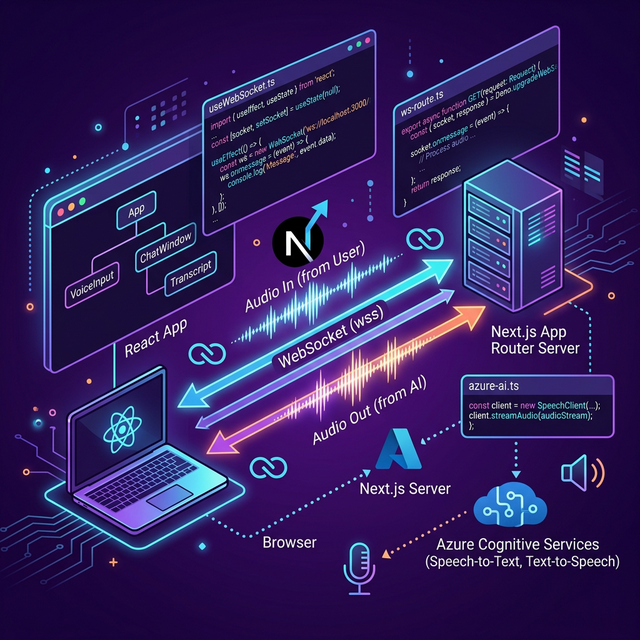
The WebSocket integration layer is where most developers spend the most time debugging. The Azure Voice Live protocol is well-documented but has several non-obvious subtleties: audio must be sent as raw PCM frames in specific chunk sizes, audio playback timing is critical to avoid glitches, and the server-side proxy must handle backpressure correctly.
This part gives you the full, working code — with every design decision explained.
Overview of the Integration
Browser                     Next.js Server              Azure
───────                     ──────────────              ─────
useVoiceLive hook
  │
  ├── MediaRecorder ──────▶ /api/voice WebSocket ──▶ Azure Voice Live
  │   (mic audio)            (proxy + auth)           (GPT-4o Realtime)
  │
  └── Web Audio API ◀────── /api/voice WebSocket ◀── Azure Voice Live
      (plays audio)          (relays audio frames)    (AI voice output)
Part A: The Server-Side Proxy
The proxy authenticates with Azure and relays audio frames. It must be fast — any processing delay adds perceived latency.
Create src/lib/voice-proxy.ts:
import WebSocket from 'ws';
import { IncomingMessage } from 'http';
import { env } from './config';
import type { SessionConfig } from './voice-live-protocol';

export function handleVoiceProxy(
  clientWs: WebSocket,
  request: IncomingMessage,
): void {
  // Build Azure Voice Live WebSocket URL
  const baseUrl = env.AZURE_OPENAI_ENDPOINT
    .replace('https://', 'wss://')
    .replace(/\/$/, '');

  const azureUrl = `${baseUrl}/openai/realtime` +
    `?api-version=${env.AZURE_OPENAI_API_VERSION}` +
    `&deployment=${env.AZURE_OPENAI_DEPLOYMENT}`;

  // Connect to Azure
  const azureWs = new WebSocket(azureUrl, {
    headers: { 'api-key': env.AZURE_OPENAI_API_KEY },
  });

  let sessionReady = false;
  const pendingMessages: string[] = [];

  // --- Azure → Client relay ---
  azureWs.on('open', () => {
    sessionReady = true;
    // Flush any messages the client sent before Azure connected
    for (const msg of pendingMessages) {
      azureWs.send(msg);
    }
    pendingMessages.length = 0;
  });

  azureWs.on('message', (data) => {
    // Relay Azure messages to the browser client
    if (clientWs.readyState === WebSocket.OPEN) {
      clientWs.send(data);
    }
  });

  azureWs.on('error', (err) => {
    console.error('[VoiceProxy] Azure WS error:', err.message);
    if (clientWs.readyState === WebSocket.OPEN) {
      clientWs.send(JSON.stringify({
        type: 'error',
        error: { type: 'proxy_error', message: err.message },
      }));
    }
  });

  azureWs.on('close', (code, reason) => {
    console.log(`[VoiceProxy] Azure WS closed: ${code}`);
    if (clientWs.readyState === WebSocket.OPEN) {
      clientWs.close(code, reason);
    }
  });

  // --- Client → Azure relay ---
  clientWs.on('message', (data) => {
    const raw = data.toString();
    if (sessionReady && azureWs.readyState === WebSocket.OPEN) {
      azureWs.send(raw);
    } else {
      pendingMessages.push(raw);
    }
  });

  clientWs.on('close', () => {
    if (azureWs.readyState === WebSocket.OPEN) {
      azureWs.close();
    }
  });

  clientWs.on('error', (err) => {
    console.error('[VoiceProxy] Client WS error:', err.message);
    if (azureWs.readyState === WebSocket.OPEN) {
      azureWs.close();
    }
  });
}
Part B: Audio Utilities
Create src/lib/audio.ts:
// Converts raw PCM Int16Array to Base64 for Azure API
export function pcmToBase64(pcmBuffer: ArrayBuffer): string {
  const bytes = new Uint8Array(pcmBuffer);
  let binary = '';
  for (let i = 0; i < bytes.byteLength; i++) {
    binary += String.fromCharCode(bytes[i]);
  }
  return btoa(binary);
}

// Converts Base64 from Azure API back to Float32 for Web Audio
export function base64ToPcmFloat32(b64: string): Float32Array {
  const binary = atob(b64);
  const bytes = new Uint8Array(binary.length);
  for (let i = 0; i < binary.length; i++) {
    bytes[i] = binary.charCodeAt(i);
  }
  // Azure returns PCM16 — convert to Float32 for Web Audio API
  const int16 = new Int16Array(bytes.buffer);
  const float32 = new Float32Array(int16.length);
  for (let i = 0; i < int16.length; i++) {
    float32[i] = int16[i] / 32768.0;
  }
  return float32;
}

// AudioWorklet processor script (inline as string for dynamic loading)
export const AUDIO_WORKLET_PROCESSOR = `
class PCMPlayerProcessor extends AudioWorkletProcessor {
  constructor() {
    super();
    this.buffer = [];
    this.port.onmessage = (e) => {
      this.buffer.push(...e.data);
    };
  }

  process(inputs, outputs) {
    const output = outputs[0][0];
    for (let i = 0; i < output.length; i++) {
      output[i] = this.buffer.length > 0 ? this.buffer.shift() : 0;
    }
    return true;
  }
}
registerProcessor('pcm-player', PCMPlayerProcessor);
`;
Part C: The useVoiceLive Hook
This is the heart of the integration. Create src/hooks/useVoiceLive.ts:
import { useCallback, useEffect, useRef, useState } from 'react';
import { pcmToBase64, base64ToPcmFloat32, AUDIO_WORKLET_PROCESSOR } from '@/lib/audio';
import type { SessionConfig, ServerMessage } from '@/lib/voice-live-protocol';

export type VoiceStatus = 'idle' | 'connecting' | 'ready' | 'speaking' | 'listening' | 'error';

interface UseVoiceLiveOptions {
  systemPrompt: string;
  voice?: string;
  onTranscript?: (text: string, role: 'user' | 'assistant') => void;
  onStatusChange?: (status: VoiceStatus) => void;
}

export function useVoiceLive({
  systemPrompt,
  voice = 'alloy',
  onTranscript,
  onStatusChange,
}: UseVoiceLiveOptions) {
  const [status, setStatus] = useState<VoiceStatus>('idle');
  const wsRef = useRef<WebSocket | null>(null);
  const audioContextRef = useRef<AudioContext | null>(null);
  const workletNodeRef = useRef<AudioWorkletNode | null>(null);
  const mediaStreamRef = useRef<MediaStream | null>(null);
  const processorRef = useRef<ScriptProcessorNode | null>(null);

  const updateStatus = useCallback((s: VoiceStatus) => {
    setStatus(s);
    onStatusChange?.(s);
  }, [onStatusChange]);

  // Initialize Web Audio context and worklet
  const initAudio = useCallback(async () => {
    const ctx = new AudioContext({ sampleRate: 24000 });

    // Load inline worklet processor
    const blob = new Blob([AUDIO_WORKLET_PROCESSOR], { type: 'application/javascript' });
    const url = URL.createObjectURL(blob);
    await ctx.audioWorklet.addModule(url);
    URL.revokeObjectURL(url);

    const workletNode = new AudioWorkletNode(ctx, 'pcm-player');
    workletNode.connect(ctx.destination);

    audioContextRef.current = ctx;
    workletNodeRef.current = workletNode;
  }, []);

  // Play a PCM audio delta from Azure
  const playAudioDelta = useCallback((base64Delta: string) => {
    if (!workletNodeRef.current) return;
    const float32 = base64ToPcmFloat32(base64Delta);
    workletNodeRef.current.port.postMessage(Array.from(float32));
  }, []);

  // Connect to the voice proxy
  const connect = useCallback(async () => {
    if (status !== 'idle') return;
    updateStatus('connecting');

    try {
      await initAudio();

      // Get microphone access
      const stream = await navigator.mediaDevices.getUserMedia({
        audio: {
          channelCount: 1,
          sampleRate: 24000,
          echoCancellation: true,
          noiseSuppression: true,
          autoGainControl: true,
        },
      });
      mediaStreamRef.current = stream;

      // Connect WebSocket to proxy
      const protocol = window.location.protocol === 'https:' ? 'wss:' : 'ws:';
      const ws = new WebSocket(`${protocol}//${window.location.host}/api/voice`);
      wsRef.current = ws;

      ws.onopen = () => {
        // Configure the Voice Live session
        const sessionConfig: SessionConfig = {
          type: 'session.update',
          session: {
            modalities: ['text', 'audio'],
            instructions: systemPrompt,
            voice: voice as any,
            input_audio_format: 'pcm16',
            output_audio_format: 'pcm16',
            input_audio_transcription: { model: 'whisper-1' },
            turn_detection: {
              type: 'server_vad',
              threshold: 0.5,
              prefix_padding_ms: 300,
              silence_duration_ms: 500,
            },
          },
        };
        ws.send(JSON.stringify(sessionConfig));
      };

      ws.onmessage = (event) => {
        const msg: ServerMessage = JSON.parse(event.data);
        handleServerMessage(msg);
      };

      ws.onerror = () => updateStatus('error');
      ws.onclose = () => {
        if (status !== 'idle') updateStatus('idle');
      };

      // Start capturing microphone audio
      startMicCapture(stream, ws);

    } catch (err) {
      console.error('[useVoiceLive] Connection failed:', err);
      updateStatus('error');
    }
  }, [status, systemPrompt, voice, initAudio, updateStatus]);

  const handleServerMessage = useCallback((msg: ServerMessage) => {
    switch (msg.type) {
      case 'session.created':
      case 'session.updated':
        updateStatus('ready');
        break;

      case 'input_audio_buffer.speech_started':
        updateStatus('speaking');
        break;

      case 'input_audio_buffer.speech_stopped':
        updateStatus('listening');
        break;

      case 'response.audio.delta':
        playAudioDelta(msg.delta);
        break;

      case 'response.audio.done':
        updateStatus('ready');
        break;

      case 'response.text.delta':
        onTranscript?.(msg.delta, 'assistant');
        break;

      case 'error':
        console.error('[VoiceLive] Azure error:', msg.error);
        updateStatus('error');
        break;
    }
  }, [updateStatus, playAudioDelta, onTranscript]);

  // Capture mic audio and send to Azure via proxy
  const startMicCapture = useCallback((
    stream: MediaStream,
    ws: WebSocket,
  ) => {
    const ctx = audioContextRef.current!;
    const source = ctx.createMediaStreamSource(stream);

    // Use ScriptProcessorNode for raw PCM access
    // (AudioWorklet would be more modern but less compatible)
    const processor = ctx.createScriptProcessor(4096, 1, 1);
    processorRef.current = processor;

    processor.onaudioprocess = (e) => {
      if (ws.readyState !== WebSocket.OPEN) return;

      const float32 = e.inputBuffer.getChannelData(0);

      // Convert Float32 to Int16 PCM
      const int16 = new Int16Array(float32.length);
      for (let i = 0; i < float32.length; i++) {
        int16[i] = Math.max(-32768, Math.min(32767, float32[i] * 32768));
      }

      const base64 = pcmToBase64(int16.buffer);
      ws.send(JSON.stringify({
        type: 'input_audio_buffer.append',
        audio: base64,
      }));
    };

    source.connect(processor);
    processor.connect(ctx.destination);
  }, []);

  // Disconnect and clean up
  const disconnect = useCallback(() => {
    processorRef.current?.disconnect();
    mediaStreamRef.current?.getTracks().forEach(t => t.stop());
    wsRef.current?.close();
    audioContextRef.current?.close();

    wsRef.current = null;
    audioContextRef.current = null;
    workletNodeRef.current = null;
    mediaStreamRef.current = null;
    processorRef.current = null;

    updateStatus('idle');
  }, [updateStatus]);

  // Clean up on unmount
  useEffect(() => {
    return () => { disconnect(); };
  }, [disconnect]);

  return { status, connect, disconnect };
}
Part D: The Voice Indicator Component
Create src/components/VoiceIndicator.tsx:
import { VoiceStatus } from '@/hooks/useVoiceLive';

const statusConfig: Record<VoiceStatus, { label: string; color: string; pulse: boolean }> = {
  idle:       { label: 'Click to start',     color: 'bg-gray-400',  pulse: false },
  connecting: { label: 'Connecting...',       color: 'bg-yellow-400', pulse: true },
  ready:      { label: 'Listening...',        color: 'bg-green-400', pulse: false },
  speaking:   { label: 'You are speaking',   color: 'bg-blue-500',  pulse: true },
  listening:  { label: 'AI is responding',   color: 'bg-purple-500', pulse: true },
  error:      { label: 'Connection error',   color: 'bg-red-500',   pulse: false },
};

export function VoiceIndicator({ status }: { status: VoiceStatus }) {
  const { label, color, pulse } = statusConfig[status];

  return (
    <div className="flex items-center gap-3">
      <div className={`relative w-4 h-4 rounded-full ${color}`}>
        {pulse && (
          <div className={`absolute inset-0 rounded-full ${color} animate-ping opacity-75`} />
        )}
      </div>
      <span className="text-sm text-gray-600">{label}</span>
    </div>
  );
}
Part E: The Interview UI
Create src/components/InterviewSession.tsx:
'use client';

import { useState, useCallback } from 'react';
import { useVoiceLive, VoiceStatus } from '@/hooks/useVoiceLive';
import { VoiceIndicator } from './VoiceIndicator';

const INTERVIEW_PROMPT = `You are an experienced technical interviewer at a top software company.
Your role is to conduct a realistic technical interview for a senior software engineer position.
Ask one question at a time. After the candidate answers, provide brief feedback and move to the next question.
Be conversational, professional, and encouraging. Start by greeting the candidate and asking them to brief introduce themselves.`;

interface Message {
  role: 'user' | 'assistant';
  text: string;
}

export function InterviewSession() {
  const [messages, setMessages] = useState<Message[]>([]);

  const handleTranscript = useCallback((text: string, role: 'user' | 'assistant') => {
    setMessages(prev => {
      const last = prev[prev.length - 1];
      if (last?.role === role) {
        return [...prev.slice(0, -1), { role, text: last.text + text }];
      }
      return [...prev, { role, text }];
    });
  }, []);

  const { status, connect, disconnect } = useVoiceLive({
    systemPrompt: INTERVIEW_PROMPT,
    voice: 'alloy',
    onTranscript: handleTranscript,
  });

  const isActive = status !== 'idle' && status !== 'error';

  return (
    <div className="flex flex-col h-screen max-w-2xl mx-auto p-6">
      <h1 className="text-2xl font-bold mb-6">AI Interview Session</h1>

      {/* Transcript */}
      <div className="flex-1 overflow-y-auto space-y-4 mb-6 p-4 bg-gray-50 rounded-xl">
        {messages.length === 0 && (
          <p className="text-gray-400 text-center mt-10">
            Press Start to begin your interview
          </p>
        )}
        {messages.map((msg, i) => (
          <div key={i} className={`flex ${msg.role === 'user' ? 'justify-end' : 'justify-start'}`}>
            <div className={`max-w-xs rounded-2xl px-4 py-2 text-sm ${
              msg.role === 'user'
                ? 'bg-blue-500 text-white'
                : 'bg-white border border-gray-200 text-gray-800'
            }`}>
              {msg.text}
            </div>
          </div>
        ))}
      </div>

      {/* Controls */}
      <div className="flex items-center justify-between">
        <VoiceIndicator status={status} />

        <button
          onClick={isActive ? disconnect : connect}
          className={`px-6 py-3 rounded-full font-medium transition-all ${
            isActive
              ? 'bg-red-500 hover:bg-red-600 text-white'
              : 'bg-blue-500 hover:bg-blue-600 text-white'
          }`}
        >
          {isActive ? 'End Interview' : 'Start Interview'}
        </button>
      </div>
    </div>
  );
}
Wire it up in src/app/page.tsx:
import { InterviewSession } from '@/components/InterviewSession';

export default function Home() {
  return <InterviewSession />;
}
Testing Your Integration
Run the dev server:
npm run devNavigate to http://localhost:3000. Click Start Interview, allow microphone access, and you should:
- See the indicator turn green (“Listening…”)
- Hear the AI greet you within 200ms of the connection being established
- Be able to speak and have the AI respond naturally
Common Issues at This Stage
| Symptom | Likely Cause | Fix |
|---|---|---|
| No audio output | AudioContext blocked | Add a user gesture before connect() (button click) |
| Microphone echo | echoCancellation: false | Enable in getUserMedia() constraints |
| WebSocket 404 | server.js not used | Run npm run dev which uses node server.js |
| Audio choppy | Processor buffer too small | Increase from 4096 to 8192 (adds 170ms latency) |
Next: Part 4 — Minimizing Latency: Architecture Patterns & Tuning →
← Part 2 — Setup & Configuration | This is Part 3 of the Azure Voice Live series.