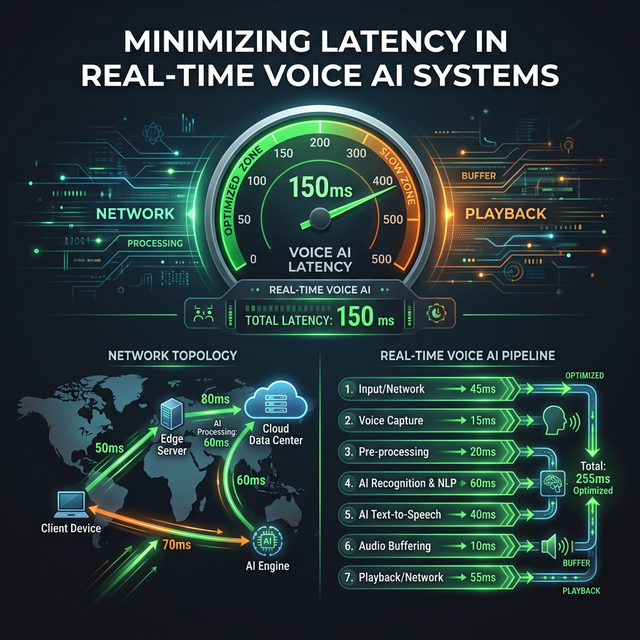
Voice conversations break down when latency climbs above 300ms. The AI starts feeling laggy, the user hesitates awkwardly, and the natural rhythm of conversation collapses. For an interview simulator, this is catastrophic — confidence requires a fluid interaction.
Azure Voice Live can achieve sub-150ms end-to-end latency, but only when every layer is tuned. This part dissects every source of latency and shows you exactly how to eliminate it.
Understanding the Latency Stack
Total end-to-end latency has four components:
pie title End-to-End Latency Breakdown (~150ms total)
    "Network RTT" : 40
    "Azure Processing" : 60
    "Buffer Delay" : 30
    "Playback Startup" : 20
1. Network RTT (Round-Trip Time)
The WebSocket connection travels from the browser to your Next.js server, then to Azure:
sequenceDiagram
    participant B as Browser
    participant S as Your Server
    participant A as Azure

    B->>S: WebSocket frame (+5ms)
    S->>A: Relay to Azure (+30ms)
    Note over B,A: Total one-way: ~35ms (Singapore → AU East)
    A-->>S: Response audio (+30ms)
    S-->>B: Relay to browser (+5ms)
    Note over B,A: Round-trip: ~70ms, per-frame overhead counts!
Optimize by:
- Choosing the closest Azure region to your users (biggest single lever)
- Co-locating your Next.js server with Azure (same region = 1–3ms between them)
- Using Cloudflare/Azure Front Door to terminate WebSocket close to users
2. Azure Processing Time
GPT-4o Realtime Audio processes 20–200ms of audio before it can begin generating a response. This is the Time-to-First-Token (TTFT) for the audio model.
Optimize by:
- Setting
silence_duration_msto300–400ms(not lower — causes false triggers) - Setting
prefix_padding_msto200ms(lower = AI responds sooner) - Enabling streaming output (default — ensure it’s not disabled)
3. Buffer Delay (Chunk Size)
Audio is sent in chunks. Larger chunks = more latency before Azure receives enough audio to act.
| Chunk Size | At 24kHz | Latency Added | Quality Impact |
|---|---|---|---|
| 1024 samples | 42ms | Low ✅ | Good |
| 2048 samples | 85ms | Medium ⚠️ | Better |
| 4096 samples | 170ms | High ❌ | Best |
Optimize by:
- Setting chunk size to
1024for minimum latency - Accepting marginally lower quality (imperceptible in voice)
4. Playback Startup
The Web Audio API needs a minimum buffer before it can play without glitching. Too little = pops and clicks. Too much = added delay.
Optimize by:
- Pre-filling 20ms of audio before starting playback
- Using
AudioWorkletNodeinstead ofScriptProcessorNodefor lower overhead
Optimized Chunk Capture
Replace the ScriptProcessorNode in Part 3 with a smaller buffer size:
// In useVoiceLive.ts — startMicCapture function

const CHUNK_SIZE = 1024; // Reduced from 4096 — saves ~128ms latency

const processor = ctx.createScriptProcessor(CHUNK_SIZE, 1, 1);Warning: Setting
CHUNK_SIZEbelow1024causes browser warnings and may cause audio instability on some devices.1024is the optimal minimum.
Optimized VAD Configuration
The VAD (Voice Activity Detection) settings directly control how quickly Azure detects speech endings and starts responding:
// In the session.update config

turn_detection: {
  type: 'server_vad',
  threshold: 0.5,           // Sensitivity: 0.3=sensitive, 0.7=conservative
  prefix_padding_ms: 200,   // Audio before speech onset (was 300ms)
  silence_duration_ms: 350, // How long silence before AI takes turn (was 500ms)
},
VAD Tuning Guide
| Use Case | threshold | silence_duration_ms | prefix_padding_ms |
|---|---|---|---|
| Quiet room interview | 0.4 | 350 | 200 |
| Noisy environment | 0.6 | 450 | 300 |
| Think-aloud coding | 0.5 | 500 | 300 |
| Fast conversation | 0.5 | 300 | 150 |
Co-locate Next.js with Azure
When your Next.js server is in a different region from Azure, you add RTT for every audio frame. Deploy them in the same region:
Azure Container Apps (Same Region)
# azure-container-app.yml
resource:
  location: australiaeast  # Same as your Azure OpenAI resource

env:
  AZURE_OPENAI_ENDPOINT: https://your-resource.openai.azure.com/
  # Azure to Azure = 1-3ms instead of 40ms
Measuring Internal Latency
Add timing instrumentation to your proxy:
// In voice-proxy.ts

azureWs.on('open', () => {
  const connectTime = Date.now() - proxyStartTime;
  console.log(`[Latency] Azure connect: ${connectTime}ms`);
});

azureWs.on('message', (data) => {
  const msg = JSON.parse(data.toString());
  if (msg.type === 'response.audio.delta' && !firstAudioTime) {
    firstAudioTime = Date.now();
    console.log(`[Latency] First audio delta: ${firstAudioTime - userUtteranceEnd}ms`);
  }
  // ... relay
});
WebSocket Optimization
Disable Nagle’s Algorithm
Node.js WebSocket connections buffer small packets by default (Nagle’s algorithm). For real-time audio this is catastrophic:
// In server.js — when handling WebSocket upgrades

server.on('upgrade', (request, socket, head) => {
  socket.setNoDelay(true); // Disable Nagle's — CRITICAL for latency
  // ... rest of upgrade handling
});
Connection Keep-Alive
Sessions that idle drop to a lower-priority queue in Azure. Send heartbeats to maintain priority:
// In useVoiceLive.ts

let heartbeatInterval: NodeJS.Timeout;

ws.onopen = () => {
  // ... session config ...

  // Send keep-alive every 15 seconds
  heartbeatInterval = setInterval(() => {
    if (ws.readyState === WebSocket.OPEN) {
      ws.send(JSON.stringify({ type: 'input_audio_buffer.clear' }));
    }
  }, 15000);
};

ws.onclose = () => clearInterval(heartbeatInterval);
Audio Playback Optimization
Replace ScriptProcessorNode with AudioWorkletNode for lower scheduling overhead:
// Enhanced AudioWorklet processor with latency compensation
export const AUDIO_WORKLET_PROCESSOR = `
class PCMPlayerProcessor extends AudioWorkletProcessor {
  constructor() {
    super();
    this.buffer = new Float32Array(0);
    this.port.onmessage = (e) => {
      const incoming = new Float32Array(e.data);
      const combined = new Float32Array(this.buffer.length + incoming.length);
      combined.set(this.buffer);
      combined.set(incoming, this.buffer.length);
      this.buffer = combined;
    };
  }

  process(inputs, outputs) {
    const output = outputs[0][0];
    const length = Math.min(output.length, this.buffer.length);

    for (let i = 0; i < length; i++) {
      output[i] = this.buffer[i];
    }

    // Shift buffer
    this.buffer = this.buffer.slice(length);
    return true;
  }
}
registerProcessor('pcm-player', PCMPlayerProcessor);
`;
Measuring Your Actual Latency
Add a latency meter to your interview UI:
// In InterviewSession.tsx

const [latency, setLatency] = useState<number | null>(null);
const utteranceEndRef = useRef<number>(0);

// When user stops speaking
onStatusChange={(status) => {
  if (status === 'listening') {
    utteranceEndRef.current = performance.now();
  }
  if (status === 'ready' && utteranceEndRef.current > 0) {
    // First audio played = latency
    setLatency(Math.round(performance.now() - utteranceEndRef.current));
    utteranceEndRef.current = 0;
  }
}}

// In JSX:
{latency && (
  <span className="text-xs text-gray-400">
    Response latency: {latency}ms
  </span>
)}
Expected Latency Results After Optimization
| Configuration | Typical Latency |
|---|---|
| Default (4096 chunk, no tuning) | 350–600ms |
| Optimized (1024 chunk, same region) | 120–180ms |
| Optimized + Cloudflare edge | 100–150ms |
| Theoretical minimum | ~80ms |
Latency Checklist
Before going to production, verify each of these:
- Azure OpenAI resource is in the closest region to your users
- Next.js server is deployed in the same Azure region
-
CHUNK_SIZEset to1024in the audio processor -
socket.setNoDelay(true)in the WebSocket upgrade handler -
silence_duration_ms≤ 400ms in VAD config -
prefix_padding_ms≤ 250ms in VAD config - Keep-alive heartbeat implemented to maintain session priority
- End-to-end latency measured and logged in production
Next: Part 5 — Audio Quality: Codecs, Noise Suppression & Natural Conversation →
← Part 3 — Next.js Integration | This is Part 4 of the Azure Voice Live series.