
JOURNAL
AWS Full-Stack Mastery: Frontend with Amplify, CloudFront & S3 (Part 3 of 10)
Part 3 of 10 — Deploy Next.js with SSR on AWS Amplify Gen 2, serve static assets from S3 with CloudFront CDN, configure custom domains with ACM certificates, and implement cache invalidation strategies.
On this page
Our Kids Learn frontend is a Next.js 14 application with server-side rendering for dynamic learning content, static generation for marketing pages, and client-side interactivity for lessons. It needs to load fast — children don’t wait. A 3-second load time means a 4-year-old has already wandered off to watch Bluey.
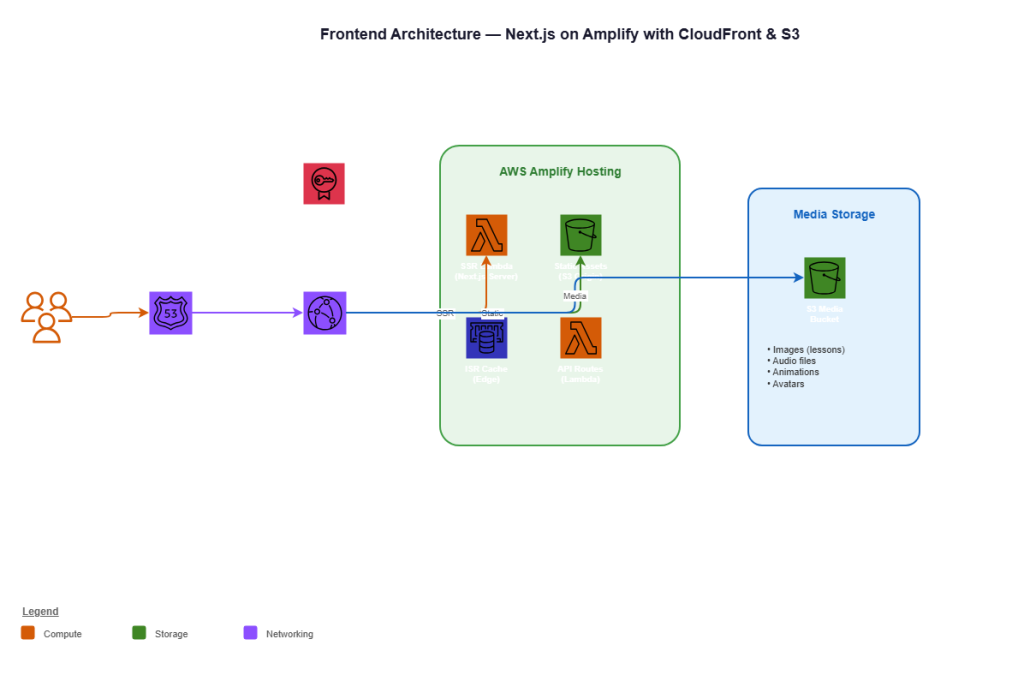
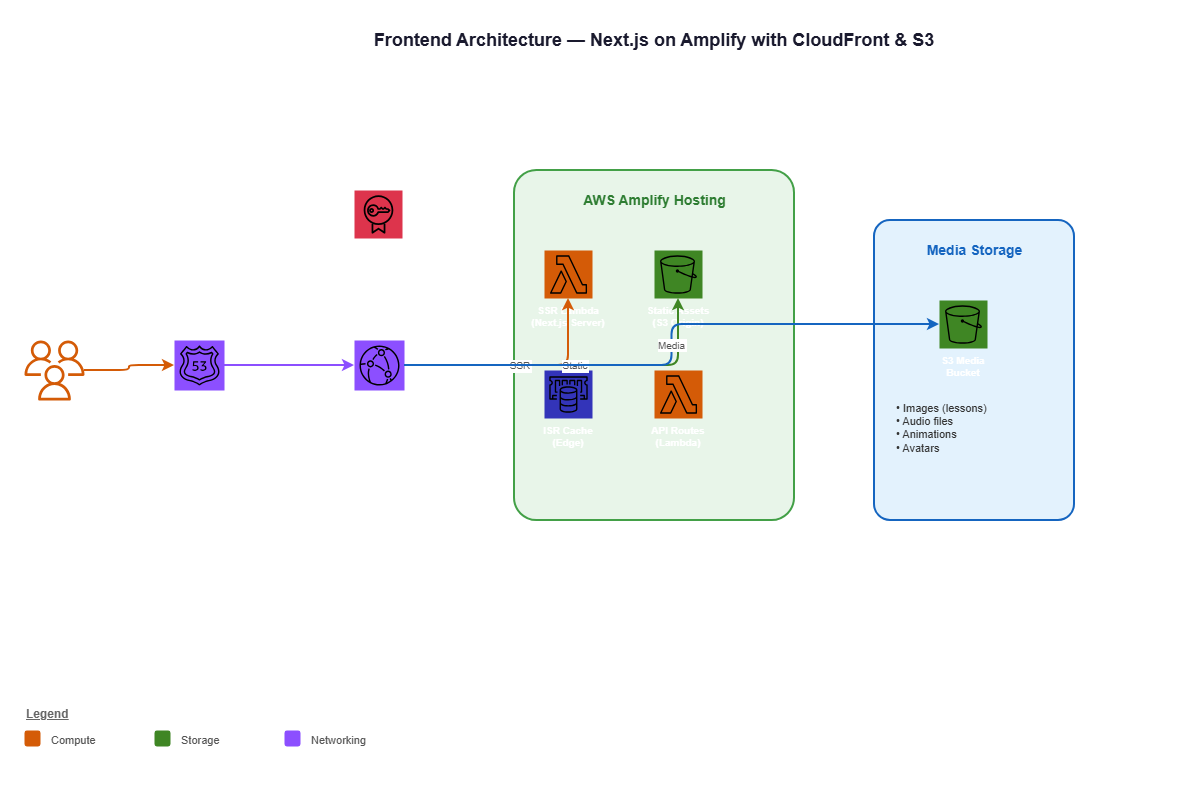
In this part, we deploy the frontend with three AWS services working in concert: Amplify Hosting runs our Next.js application with full SSR support, S3 stores our media assets (lesson images, audio files, celebration animations), and CloudFront serves everything from 600+ edge locations worldwide.
This is Part 3 of the AWS Full-Stack Mastery series. We’re building on the CDK infrastructure from Part 2.
Understanding Amplify Gen 2
AWS Amplify has two generations. Gen 1 is configuration-driven — you define resources in amplify/ config files that get mapped to CloudFormation behind the scenes. Gen 2, launched in late 2024, is code-driven — you define everything in TypeScript using CDK under the hood.
We use Amplify Gen 2 for the frontend hosting because it handles the hard parts of deploying Next.js on AWS:
- SSR functions automatically deploy as Lambda functions behind CloudFront
- Static pages pre-render at build time and serve from S3
- API routes deploy as Lambda functions
- Image optimization works out of the box with the Next.js
<Image>component - Incremental Static Regeneration (ISR) caches pre-rendered pages at the edge
Amplify vs. Self-Hosting Next.js
Could we deploy Next.js on ECS Fargate or a standalone Lambda? Yes. But we’d need to handle:
- CloudFront distribution configuration for SSR vs. static routing
- Lambda function packaging for the SSR handler
- S3 bucket configuration for static assets with proper cache headers
- Build pipeline for Next.js output
- Cache invalidation on deployment
- Custom domain and certificate management
Amplify handles all of this automatically. Our team focuses on building lesson experiences, not infrastructure plumbing.
Setting Up Amplify Gen 2 in CDK
The Amplify Stack
// lib/stacks/frontend-stack.ts
import * as cdk from 'aws-cdk-lib';
import * as amplify from '@aws-cdk/aws-amplify-alpha';
import * as codebuild from 'aws-cdk-lib/aws-codebuild';
import * as s3 from 'aws-cdk-lib/aws-s3';
import * as cloudfront from 'aws-cdk-lib/aws-cloudfront';
import * as origins from 'aws-cdk-lib/aws-cloudfront-origins';
import * as acm from 'aws-cdk-lib/aws-certificatemanager';
import * as route53 from 'aws-cdk-lib/aws-route53';
import * as route53targets from 'aws-cdk-lib/aws-route53-targets';
import * as iam from 'aws-cdk-lib/aws-iam';
import { Construct } from 'constructs';
import { EnvironmentConfig } from '../config/environments';

export interface FrontendStackProps extends cdk.StackProps {
  config: EnvironmentConfig;
}

export class FrontendStack extends cdk.Stack {
  public readonly amplifyApp: amplify.App;
  public readonly mediaBucket: s3.Bucket;
  public readonly mediaDistribution: cloudfront.Distribution;

  constructor(scope: Construct, id: string, props: FrontendStackProps) {
    super(scope, id, props);

    const { config } = props;

    // =========================================
    // Amplify Hosting — Next.js Application
    // =========================================
    this.amplifyApp = new amplify.App(this, 'KidsLearnApp', {
      appName: `kidslearn-${config.envName}`,

      sourceCodeProvider: new amplify.GitHubSourceCodeProvider({
        owner: 'kidslearn',
        repository: 'web-app',
        oauthToken: cdk.SecretValue.secretsManager('github-token'),
      }),

      // Build settings for Next.js
      buildSpec: codebuild.BuildSpec.fromObjectToYaml({
        version: 1,
        applications: [
          {
            frontend: {
              phases: {
                preBuild: {
                  commands: [
                    'npm ci --cache .npm --prefer-offline',
                  ],
                },
                build: {
                  commands: [
                    'npm run build',
                  ],
                },
              },
              artifacts: {
                baseDirectory: '.next',
                files: ['**/*'],
              },
              cache: {
                paths: [
                  '.npm/**/*',
                  'node_modules/**/*',
                  '.next/cache/**/*',
                ],
              },
            },
          },
        ],
      }),

      // Environment variables
      environmentVariables: {
        NEXT_PUBLIC_API_URL: `https://api.${config.envName === 'production'
          ? '' : config.envName + '.'}kidslearn.app`,
        NEXT_PUBLIC_MEDIA_URL: `https://media.${config.envName === 'production'
          ? '' : config.envName + '.'}kidslearn.app`,
        NEXT_PUBLIC_ENV: config.envName,
        AMPLIFY_MONOREPO_APP_ROOT: '.',
      },

      // Enable SSR for Next.js
      platform: amplify.Platform.WEB_COMPUTE,
    });

    // Branch configuration
    const mainBranch = this.amplifyApp.addBranch('main', {
      autoBuild: config.envName !== 'production', // Auto-build in dev/staging
      stage: config.envName === 'production' ? 'PRODUCTION' : 'DEVELOPMENT',
      performanceMode: config.envName === 'production',
    });

    // Custom domain for production
    if (config.envName === 'production') {
      const domain = this.amplifyApp.addDomain('kidslearn.app', {
        enableAutoSubdomain: false,
      });
      domain.mapRoot(mainBranch);
      domain.mapSubDomain(mainBranch, 'www');
    }

    // =========================================
    // S3 — Media Assets Bucket
    // =========================================
    this.mediaBucket = new s3.Bucket(this, 'MediaBucket', {
      bucketName: `kidslearn-media-${config.envName}-${this.account}`,

      // Security
      blockPublicAccess: s3.BlockPublicAccess.BLOCK_ALL,
      encryption: s3.BucketEncryption.S3_MANAGED,
      enforceSSL: true,

      // Versioning for rollback capability
      versioned: true,

      // Lifecycle rules
      lifecycleRules: [
        {
          id: 'IntelligentTiering',
          enabled: true,
          transitions: [
            {
              storageClass: s3.StorageClass.INTELLIGENT_TIERING,
              transitionAfter: cdk.Duration.days(30),
            },
          ],
        },
        {
          id: 'CleanupOldVersions',
          enabled: true,
          noncurrentVersionExpiration: cdk.Duration.days(90),
        },
      ],

      // CORS for client-side uploads
      cors: [
        {
          allowedMethods: [s3.HttpMethods.GET, s3.HttpMethods.PUT],
          allowedOrigins: [
            `https://${config.envName === 'production'
              ? '' : config.envName + '.'}kidslearn.app`,
          ],
          allowedHeaders: ['*'],
          maxAge: 3600,
        },
      ],

      removalPolicy: config.enableDeletionProtection
        ? cdk.RemovalPolicy.RETAIN
        : cdk.RemovalPolicy.DESTROY,
      autoDeleteObjects: !config.enableDeletionProtection,
    });

    // =========================================
    // CloudFront — Media CDN
    // =========================================

    // Origin Access Control for S3
    const oac = new cloudfront.S3OriginAccessControl(this, 'MediaOAC', {
      signing: cloudfront.Signing.SIGV4_ALWAYS,
    });

    this.mediaDistribution = new cloudfront.Distribution(this, 'MediaCDN', {
      comment: `Kids Learn Media CDN (${config.envName})`,

      defaultBehavior: {
        origin: origins.S3BucketOrigin.withOriginAccessControl(this.mediaBucket, {
          originAccessControl: oac,
        }),
        viewerProtocolPolicy: cloudfront.ViewerProtocolPolicy.REDIRECT_TO_HTTPS,
        cachePolicy: cloudfront.CachePolicy.CACHING_OPTIMIZED,
        responseHeadersPolicy: cloudfront.ResponseHeadersPolicy.CORS_ALLOW_ALL_ORIGINS_WITH_PREFLIGHT,
        compress: true,
      },

      // Cache behavior for different asset types
      additionalBehaviors: {
        '/images/*': {
          origin: origins.S3BucketOrigin.withOriginAccessControl(this.mediaBucket, {
            originAccessControl: oac,
          }),
          viewerProtocolPolicy: cloudfront.ViewerProtocolPolicy.REDIRECT_TO_HTTPS,
          cachePolicy: new cloudfront.CachePolicy(this, 'ImageCachePolicy', {
            cachePolicyName: `kidslearn-images-${config.envName}`,
            defaultTtl: cdk.Duration.days(30),
            maxTtl: cdk.Duration.days(365),
            minTtl: cdk.Duration.days(1),
            enableAcceptEncodingGzip: true,
            enableAcceptEncodingBrotli: true,
          }),
          compress: true,
        },
        '/audio/*': {
          origin: origins.S3BucketOrigin.withOriginAccessControl(this.mediaBucket, {
            originAccessControl: oac,
          }),
          viewerProtocolPolicy: cloudfront.ViewerProtocolPolicy.REDIRECT_TO_HTTPS,
          cachePolicy: new cloudfront.CachePolicy(this, 'AudioCachePolicy', {
            cachePolicyName: `kidslearn-audio-${config.envName}`,
            defaultTtl: cdk.Duration.days(90),
            maxTtl: cdk.Duration.days(365),
            minTtl: cdk.Duration.days(7),
          }),
          compress: true,
        },
      },

      // Error pages
      errorResponses: [
        {
          httpStatus: 404,
          responseHttpStatus: 404,
          responsePagePath: '/404.html',
          ttl: cdk.Duration.minutes(5),
        },
        {
          httpStatus: 403,
          responseHttpStatus: 404,
          responsePagePath: '/404.html',
          ttl: cdk.Duration.minutes(5),
        },
      ],

      // Security
      minimumProtocolVersion: cloudfront.SecurityPolicyProtocol.TLS_V1_2_2021,
      httpVersion: cloudfront.HttpVersion.HTTP2_AND_3,

      // Price class — use all edge locations for global audience
      priceClass: config.envName === 'production'
        ? cloudfront.PriceClass.PRICE_CLASS_ALL
        : cloudfront.PriceClass.PRICE_CLASS_100,
    });

    // =========================================
    // Tags
    // =========================================
    cdk.Tags.of(this).add('Project', 'KidsLearn');
    cdk.Tags.of(this).add('Environment', config.envName);
    cdk.Tags.of(this).add('Stack', 'Frontend');

    // =========================================
    // Outputs
    // =========================================
    new cdk.CfnOutput(this, 'AmplifyAppId', {
      value: this.amplifyApp.appId,
      description: 'Amplify Application ID',
    });

    new cdk.CfnOutput(this, 'MediaBucketName', {
      value: this.mediaBucket.bucketName,
      description: 'Media assets S3 bucket',
    });

    new cdk.CfnOutput(this, 'MediaCDNUrl', {
      value: `https://${this.mediaDistribution.distributionDomainName}`,
      description: 'Media CDN distribution URL',
    });
  }
}
Next.js Configuration for Amplify
next.config.js
// next.config.js
/** @type {import('next').NextConfig} */
const nextConfig = {
  // Output mode for Amplify SSR
  output: 'standalone',

  // Image optimization
  images: {
    remotePatterns: [
      {
        protocol: 'https',
        hostname: 'media.kidslearn.app',
        pathname: '/images/**',
      },
    ],
    formats: ['image/avif', 'image/webp'],
    minimumCacheTTL: 60 * 60 * 24 * 30, // 30 days
  },

  // Headers for security and caching
  async headers() {
    return [
      {
        source: '/(.*)',
        headers: [
          {
            key: 'X-Content-Type-Options',
            value: 'nosniff',
          },
          {
            key: 'X-Frame-Options',
            value: 'DENY',
          },
          {
            key: 'X-XSS-Protection',
            value: '1; mode=block',
          },
          {
            key: 'Referrer-Policy',
            value: 'strict-origin-when-cross-origin',
          },
          {
            key: 'Permissions-Policy',
            value: 'camera=(), microphone=(self), geolocation=()',
          },
        ],
      },
      {
        // Cache static assets aggressively
        source: '/_next/static/(.*)',
        headers: [
          {
            key: 'Cache-Control',
            value: 'public, max-age=31536000, immutable',
          },
        ],
      },
      {
        // Cache images
        source: '/images/(.*)',
        headers: [
          {
            key: 'Cache-Control',
            value: 'public, max-age=2592000, stale-while-revalidate=86400',
          },
        ],
      },
    ];
  },

  // Redirect www to root
  async redirects() {
    return [
      {
        source: '/:path*',
        has: [{ type: 'host', value: 'www.kidslearn.app' }],
        destination: 'https://kidslearn.app/:path*',
        permanent: true,
      },
    ];
  },
};

module.exports = nextConfig;
Amplify Configuration File
# amplify.yml — Amplify build configuration
version: 1
applications:
  - frontend:
      phases:
        preBuild:
          commands:
            - npm ci --cache .npm --prefer-offline
        build:
          commands:
            - env | grep -e NEXT_PUBLIC_ >> .env.production
            - npm run build
      artifacts:
        baseDirectory: .next
        files:
          - '**/*'
      cache:
        paths:
          - .npm/**/*
          - node_modules/**/*
          - .next/cache/**/*
    appRoot: .
Performance Optimization
Image Optimization Pipeline
Kids Learn serves thousands of lesson images. We need them fast and efficient.
// src/lib/media.ts — Media asset helper
const MEDIA_CDN_URL = process.env.NEXT_PUBLIC_MEDIA_URL;

interface ImageOptions {
  width?: number;
  height?: number;
  quality?: number;
  format?: 'webp' | 'avif' | 'png';
}

export function getMediaUrl(
  path: string,
  options: ImageOptions = {}
): string {
  const params = new URLSearchParams();

  if (options.width) params.set('w', String(options.width));
  if (options.height) params.set('h', String(options.height));
  if (options.quality) params.set('q', String(options.quality));
  if (options.format) params.set('f', options.format);

  const queryString = params.toString();
  return `${MEDIA_CDN_URL}/${path}${queryString ? `?${queryString}` : ''}`;
}

// Usage in components
// <Image src={getMediaUrl('lessons/math/addition-1.png', { width: 600, format: 'webp' })} />
Cache Invalidation Strategy
When we deploy new content, we need CloudFront to start serving the updated version:
// lib/constructs/cache-invalidation.ts
import * as cdk from 'aws-cdk-lib';
import * as lambda from 'aws-cdk-lib/aws-lambda';
import * as cloudfront from 'aws-cdk-lib/aws-cloudfront';
import * as s3 from 'aws-cdk-lib/aws-s3';
import * as s3n from 'aws-cdk-lib/aws-s3-notifications';
import { Construct } from 'constructs';

export interface CacheInvalidationProps {
  distribution: cloudfront.Distribution;
  bucket: s3.Bucket;
  paths: string[];
}

export class CacheInvalidation extends Construct {
  constructor(scope: Construct, id: string, props: CacheInvalidationProps) {
    super(scope, id);

    const invalidationFn = new lambda.Function(this, 'InvalidationFn', {
      runtime: lambda.Runtime.NODEJS_20_X,
      handler: 'index.handler',
      code: lambda.Code.fromInline(`
        const { CloudFrontClient, CreateInvalidationCommand } =
          require('@aws-sdk/client-cloudfront');

        const cf = new CloudFrontClient({});

        exports.handler = async (event) => {
          const distributionId = process.env.DISTRIBUTION_ID;
          const paths = JSON.parse(process.env.INVALIDATION_PATHS);

          const command = new CreateInvalidationCommand({
            DistributionId: distributionId,
            InvalidationBatch: {
              CallerReference: Date.now().toString(),
              Paths: {
                Quantity: paths.length,
                Items: paths,
              },
            },
          });

          await cf.send(command);
          console.log('Cache invalidated for paths:', paths);
        };
      `),
      environment: {
        DISTRIBUTION_ID: props.distribution.distributionId,
        INVALIDATION_PATHS: JSON.stringify(props.paths),
      },
      timeout: cdk.Duration.seconds(30),
    });

    // Grant CloudFront invalidation permissions
    props.distribution.grant(invalidationFn, 'cloudfront:CreateInvalidation');

    // Trigger on S3 object uploads
    props.bucket.addEventNotification(
      s3.EventType.OBJECT_CREATED,
      new s3n.LambdaDestination(invalidationFn),
    );
  }
}
Pre-rendering Lesson Pages
For lessons that don’t change frequently, we pre-render at build time:
// src/app/lessons/[subject]/[lessonId]/page.tsx
import { Metadata } from 'next';

// Generate static pages for all published lessons
export async function generateStaticParams() {
  const lessons = await fetch(`${process.env.API_URL}/lessons/published`, {
    next: { revalidate: 3600 }, // Revalidate every hour
  }).then(res => res.json());

  return lessons.map((lesson: { subject: string; id: string }) => ({
    subject: lesson.subject,
    lessonId: lesson.id,
  }));
}

// ISR: revalidate every 30 minutes
export const revalidate = 1800;

export async function generateMetadata(
  { params }: { params: { subject: string; lessonId: string } }
): Promise<Metadata> {
  const lesson = await getLesson(params.subject, params.lessonId);

  return {
    title: `${lesson.title} | Kids Learn`,
    description: lesson.description,
    openGraph: {
      title: lesson.title,
      description: lesson.description,
      images: [lesson.thumbnailUrl],
    },
  };
}

async function getLesson(subject: string, lessonId: string) {
  const res = await fetch(
    `${process.env.API_URL}/lessons/${subject}/${lessonId}`,
    { next: { revalidate: 1800 } }
  );
  return res.json();
}

export default async function LessonPage(
  { params }: { params: { subject: string; lessonId: string } }
) {
  const lesson = await getLesson(params.subject, params.lessonId);

  return (
    <main className="lesson-container">
      <h1>{lesson.title}</h1>
      {/* Lesson content rendered here */}
    </main>
  );
}
Uploading Media Assets
We use presigned URLs to let the admin dashboard upload media directly to S3 without routing through our servers:
// src/lambda/media/presigned-url.ts
import { S3Client, PutObjectCommand } from '@aws-sdk/client-s3';
import { getSignedUrl } from '@aws-sdk/s3-request-presigner';
import { APIGatewayProxyHandler } from 'aws-lambda';

const s3 = new S3Client({});

export const handler: APIGatewayProxyHandler = async (event) => {
  const body = JSON.parse(event.body || '{}');
  const { fileName, contentType, folder } = body;

  // Validate content type
  const allowedTypes = [
    'image/png', 'image/jpeg', 'image/webp', 'image/svg+xml',
    'audio/mpeg', 'audio/wav', 'audio/ogg',
    'video/mp4', 'video/webm',
  ];

  if (!allowedTypes.includes(contentType)) {
    return {
      statusCode: 400,
      body: JSON.stringify({ error: 'Unsupported content type' }),
    };
  }

  // Generate unique key
  const key = `${folder}/${Date.now()}-${fileName}`;

  const command = new PutObjectCommand({
    Bucket: process.env.MEDIA_BUCKET!,
    Key: key,
    ContentType: contentType,
    // Set cache headers at upload time
    CacheControl: 'public, max-age=2592000',
    // Server-side encryption
    ServerSideEncryption: 'AES256',
  });

  const url = await getSignedUrl(s3, command, { expiresIn: 300 });

  return {
    statusCode: 200,
    headers: {
      'Access-Control-Allow-Origin': process.env.ALLOWED_ORIGIN!,
    },
    body: JSON.stringify({
      uploadUrl: url,
      key,
      cdnUrl: `${process.env.MEDIA_CDN_URL}/${key}`,
    }),
  };
};
Custom Domain Setup
Route 53 + ACM Certificate
// lib/constructs/custom-domain.ts
import * as cdk from 'aws-cdk-lib';
import * as route53 from 'aws-cdk-lib/aws-route53';
import * as acm from 'aws-cdk-lib/aws-certificatemanager';
import * as route53targets from 'aws-cdk-lib/aws-route53-targets';
import * as cloudfront from 'aws-cdk-lib/aws-cloudfront';
import { Construct } from 'constructs';

export interface CustomDomainProps {
  domainName: string;
  subdomain: string;
  distribution: cloudfront.Distribution;
}

export class CustomDomain extends Construct {
  public readonly certificate: acm.Certificate;

  constructor(scope: Construct, id: string, props: CustomDomainProps) {
    super(scope, id);

    const fqdn = `${props.subdomain}.${props.domainName}`;

    // Look up existing hosted zone
    const hostedZone = route53.HostedZone.fromLookup(this, 'Zone', {
      domainName: props.domainName,
    });

    // SSL certificate (must be in us-east-1 for CloudFront)
    this.certificate = new acm.Certificate(this, 'Certificate', {
      domainName: fqdn,
      validation: acm.CertificateValidation.fromDns(hostedZone),
    });

    // DNS record pointing to CloudFront
    new route53.ARecord(this, 'AliasRecord', {
      zone: hostedZone,
      recordName: props.subdomain,
      target: route53.RecordTarget.fromAlias(
        new route53targets.CloudFrontTarget(props.distribution)
      ),
    });
  }
}
The Bottom Line
The frontend deployment stack gives Kids Learn:
- Sub-second page loads — static pages served from CloudFront edge locations
- Dynamic SSR — personalized lesson content rendered on demand via Lambda
- Global media delivery — images and audio served from the nearest edge location
- Zero-downtime deployments — Git push triggers automatic build and deploy
- Cost efficiency — pay only for compute time and data transfer
In Part 4, we build the backend — API Gateway routing requests to Lambda functions for fast operations, and ECS Fargate for the long-running adaptive learning engine.
See you in Part 4.
This is Part 3 of a 10-part series: AWS Full-Stack Mastery for Technical Leads.
Series outline:
- Why AWS & Getting Started — Decision framework, Well-Architected, account setup (Part 1)
- Infrastructure as Code (CDK) — CDK v2, constructs, multi-stack, VPC design (Part 2)
- Frontend (Amplify + CloudFront) — Next.js SSR, S3, CDN, custom domains (this post)
- Backend (API Gateway + Lambda + Fargate) — REST APIs, serverless compute, containers (Part 4)
- Database (Aurora + DynamoDB + ElastiCache) — PostgreSQL, NoSQL, caching (Part 5)
- AI/ML (Bedrock + SageMaker) — Content generation, custom models, RAG (Part 6)
- DevOps (CodePipeline + CodeBuild) — CI/CD, Docker, blue/green deploys (Part 7)
- Security (IAM + Cognito + WAF) — Least privilege, auth, COPPA compliance (Part 8)
- Observability (CloudWatch + X-Ray) — Metrics, tracing, cost management (Part 9)
- Production (Multi-Region + DR) — Scaling, disaster recovery, load testing (Part 10)
References
- AWS Amplify Gen 2 Documentation — Official guide for Amplify Gen 2 with Next.js support.
- Next.js on AWS Amplify — Specific documentation for deploying Next.js applications on Amplify.
- CloudFront Developer Guide — CDN configuration, caching, and distribution management.
- S3 Origin Access Control — Securing S3 origins with OAC.
- CloudFront Cache Policies — Managing cache behavior for different content types.
- ACM Certificate Management — SSL/TLS certificate provisioning and auto-renewal.
- Next.js Image Optimization — Built-in image optimization with the Image component.
- S3 Intelligent Tiering — Automatic storage class optimization.
- CloudFront Functions vs. Lambda@Edge — Choosing the right edge compute option.
- Amplify Build Settings — Customizing the Amplify build pipeline.
Related reading

25 Sep 2026 · 4 min read
ai
CloudWatch Omni: AWS Finally Admits Your Agents Live on Three Clouds
AWS shipped CloudWatch Omni on September 23 — OpenTelemetry-based, natural-language queries, and eval-driven tracing for LangGraph, CrewAI, and Strands out of the box. Here's what it actually replaces and where it still falls short.
Read more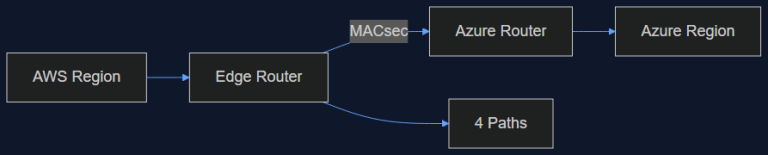
16 Sep 2026 · 4 min read
ai-infrastructure
AWS Just Opened a Private Pipe Straight Into Azure. Here's Why an AI Team Should Care
AWS Interconnect – multicloud with Azure went into preview in August, capped at 1 Gbps and four regions. That's not enough bandwidth for training, but it's exactly enough to fix the multi-vendor inference problem we've been duct-taping for a year.
Read more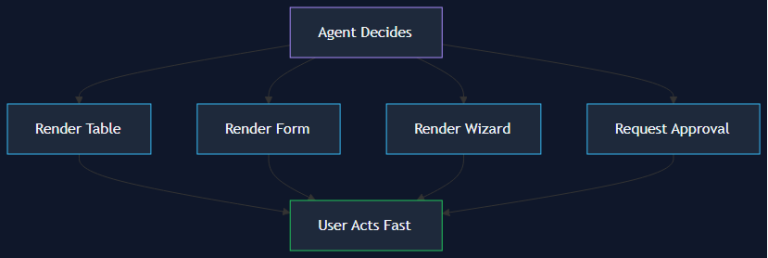
10 Sep 2026 · 6 min read
agentic coding
Beyond the Chatbox: Why Your Next Agent Feature Shouldn't Be a Text Stream
Design agency Wavespace's 'Beyond the Chatbox' framework reframes agent UX around generative UI — tables, forms, and wizards the agent renders on demand instead of a wall of text. A technical lead's breakdown of the pattern, the implementation stack, and a real case study showing 38% faster task completion.
Read more
Discussion
Comments are reviewed before publication. Your email is kept private.