
JOURNAL
AWS Full-Stack Mastery: Database with Aurora, DynamoDB & ElastiCache (Part 5 of 10)
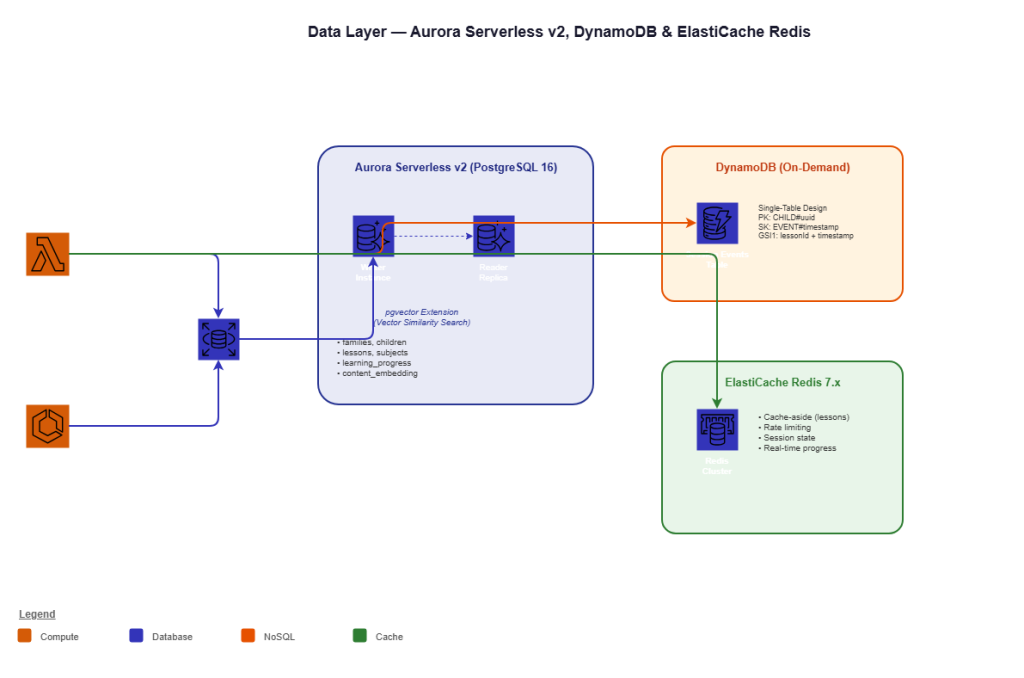
Part 5 of 10 — Aurora Serverless v2 with pgvector for vector search, DynamoDB for session events, ElastiCache Redis for caching, RDS Proxy for connection pooling, and data modeling patterns for educational SaaS.
On this page
The data layer of Kids Learn has three distinct access patterns. The first is relational — users belong to families, families have subscriptions, children have learning progress across subjects, and lessons are structured in a curriculum. This needs ACID transactions, complex joins, and foreign key constraints. The second pattern is vector similarity search — when the adaptive engine selects the next lesson, it searches for curriculum content closest to a child’s current knowledge state in embedding space. The third pattern is high-velocity event streaming — every button tap, every answer submission, every time a child pauses during a lesson generates an event that feeds our analytics pipeline.
One database cannot optimally serve all three patterns. That’s why Kids Learn uses three: Aurora Serverless v2 (PostgreSQL 16 with pgvector) for relational data and vector search, DynamoDB for session events, and ElastiCache Redis for caching and real-time state.
This is Part 5 of the AWS Full-Stack Mastery series. The CDK configuration for these databases was introduced in Part 2. Here, we go deep on data modeling, migrations, query patterns, and operational practices.
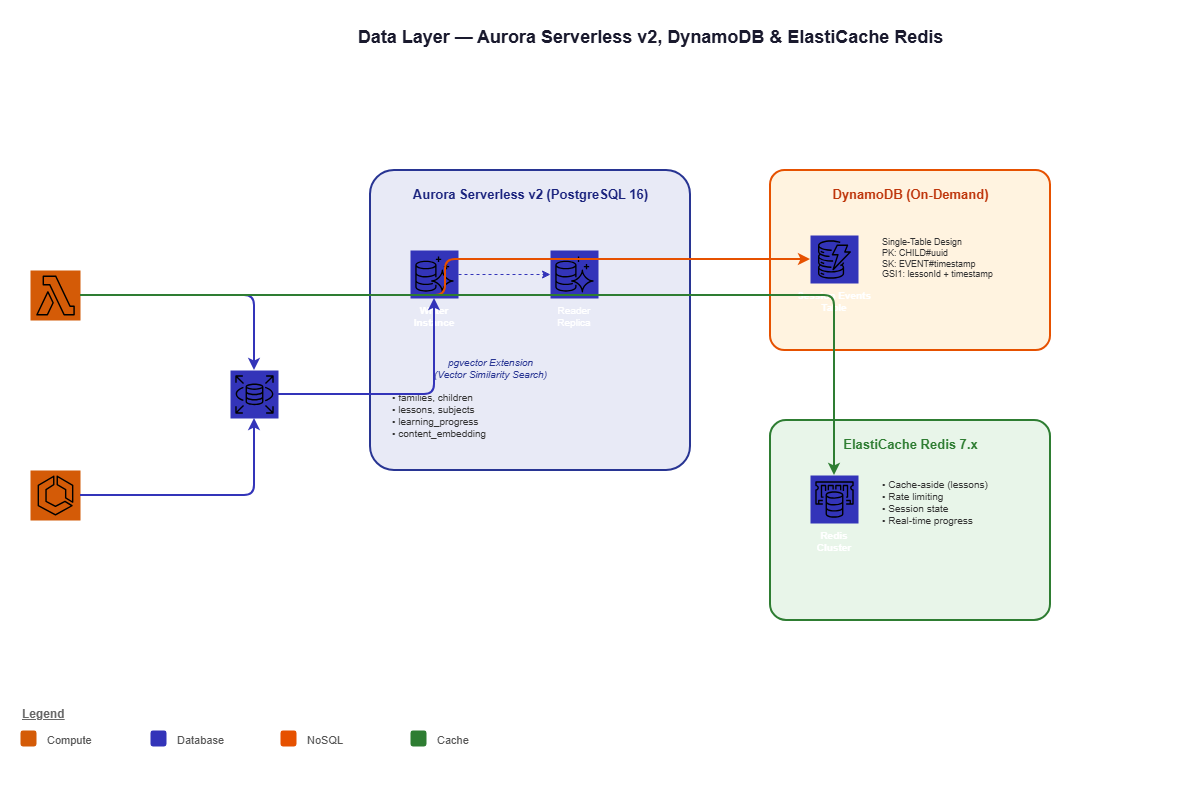
Aurora Serverless v2 — The Relational Backbone
Why Aurora Serverless v2 Over Standard RDS
Standard RDS PostgreSQL requires choosing an instance type and paying 24/7 whether you’re serving 1 request or 10,000. Kids Learn has a highly variable traffic pattern:
Usage pattern (school days):
06:00 - 08:00  │ █░░░░░░░░░ Low — early morning prep
08:00 - 09:00  │ ████░░░░░░ Ramp — students arriving
09:00 - 12:00  │ █████████░ Peak — active lessons
12:00 - 13:00  │ ████░░░░░░ Medium — lunch break
13:00 - 15:00  │ ████████░░ High — afternoon lessons
15:00 - 18:00  │ ██░░░░░░░░ Low — after school
18:00 - 21:00  │ ████░░░░░░ Medium — homework time
21:00 - 06:00  │ ░░░░░░░░░░ Minimal — near-zero traffic
Aurora Serverless v2 scales from 0.5 ACU to our configured maximum automatically, in half-ACU increments. Each ACU provides approximately 2 GiB of memory and corresponding compute. The cost difference is dramatic:
- Standard RDS db.r6g.xlarge: ~$400/month (running 24/7 at fixed capacity)
- Aurora Serverless v2: ~$75-150/month (scales with actual demand)
Database Schema Design
-- migrations/001_initial_schema.sql

-- Enable pgvector extension
CREATE EXTENSION IF NOT EXISTS vector;
CREATE EXTENSION IF NOT EXISTS pg_trgm; -- For text search

-- =========================================
-- Core Tables
-- =========================================

CREATE TABLE families (
  id UUID PRIMARY KEY DEFAULT gen_random_uuid(),
  email VARCHAR(255) UNIQUE NOT NULL,
  name VARCHAR(255) NOT NULL,
  subscription_tier VARCHAR(50) DEFAULT 'free',
  subscription_expires_at TIMESTAMPTZ,

  -- COPPA consent tracking
  coppa_consent_given BOOLEAN DEFAULT FALSE,
  coppa_consent_date TIMESTAMPTZ,
  coppa_consent_method VARCHAR(50), -- 'credit_card_verification', 'signed_form'

  created_at TIMESTAMPTZ DEFAULT NOW(),
  updated_at TIMESTAMPTZ DEFAULT NOW()
);

CREATE TABLE children (
  id UUID PRIMARY KEY DEFAULT gen_random_uuid(),
  family_id UUID NOT NULL REFERENCES families(id) ON DELETE CASCADE,
  display_name VARCHAR(100) NOT NULL,
  age_group VARCHAR(20) NOT NULL, -- '4-5', '6-7', '8-9', '10-12'
  avatar_id VARCHAR(50),

  -- No PII stored for children under COPPA
  -- Display name is chosen by parent, not the child's real name

  created_at TIMESTAMPTZ DEFAULT NOW(),
  updated_at TIMESTAMPTZ DEFAULT NOW()
);

CREATE INDEX idx_children_family ON children(family_id);

CREATE TABLE subjects (
  id VARCHAR(50) PRIMARY KEY,  -- 'math', 'reading', 'science'
  name VARCHAR(100) NOT NULL,
  description TEXT,
  icon_url VARCHAR(500),
  display_order INTEGER DEFAULT 0
);

CREATE TABLE lessons (
  id UUID PRIMARY KEY DEFAULT gen_random_uuid(),
  subject_id VARCHAR(50) NOT NULL REFERENCES subjects(id),
  title VARCHAR(255) NOT NULL,
  description TEXT,
  difficulty_level INTEGER NOT NULL, -- 1-10
  age_group VARCHAR(20) NOT NULL,
  content JSONB NOT NULL, -- Lesson content structure

  -- Vector embedding for curriculum alignment
  content_embedding VECTOR(1536),

  -- Metadata
  estimated_duration_minutes INTEGER DEFAULT 10,
  is_published BOOLEAN DEFAULT FALSE,
  published_at TIMESTAMPTZ,

  created_at TIMESTAMPTZ DEFAULT NOW(),
  updated_at TIMESTAMPTZ DEFAULT NOW()
);

CREATE INDEX idx_lessons_subject ON lessons(subject_id);
CREATE INDEX idx_lessons_difficulty ON lessons(difficulty_level, age_group);
CREATE INDEX idx_lessons_published ON lessons(is_published, published_at);

-- HNSW index for vector similarity search
CREATE INDEX idx_lessons_embedding ON lessons
  USING hnsw (content_embedding vector_cosine_ops)
  WITH (m = 16, ef_construction = 64);

-- =========================================
-- Learning Progress
-- =========================================

CREATE TABLE learning_progress (
  id UUID PRIMARY KEY DEFAULT gen_random_uuid(),
  child_id UUID NOT NULL REFERENCES children(id) ON DELETE CASCADE,
  lesson_id UUID NOT NULL REFERENCES lessons(id),

  -- Progress tracking
  status VARCHAR(20) DEFAULT 'not_started', -- 'not_started', 'in_progress', 'completed'
  score DECIMAL(5,2), -- 0.00 to 100.00
  attempts INTEGER DEFAULT 0,
  time_spent_seconds INTEGER DEFAULT 0,

  -- Adaptive learning features
  mastery_level DECIMAL(3,2) DEFAULT 0.00, -- 0.00 to 1.00
  knowledge_state VECTOR(1536), -- Child's current knowledge embedding

  started_at TIMESTAMPTZ,
  completed_at TIMESTAMPTZ,

  created_at TIMESTAMPTZ DEFAULT NOW(),
  updated_at TIMESTAMPTZ DEFAULT NOW(),

  UNIQUE(child_id, lesson_id)
);

CREATE INDEX idx_progress_child ON learning_progress(child_id, status);
CREATE INDEX idx_progress_lesson ON learning_progress(lesson_id);
CREATE INDEX idx_progress_knowledge ON learning_progress
  USING hnsw (knowledge_state vector_cosine_ops)
  WITH (m = 16, ef_construction = 64);
Vector Similarity Search
The adaptive learning engine uses pgvector to find lessons that best match a child’s current knowledge state:
// src/fargate/adaptive-engine/src/services/lesson-recommender.ts
import { Pool } from 'pg';

interface LessonRecommendation {
  id: string;
  title: string;
  subject: string;
  difficulty: number;
  similarity: number;
}

export async function recommendNextLessons(
  pool: Pool,
  childId: string,
  limit: number = 5
): Promise<LessonRecommendation[]> {
  // Get the child's current knowledge state
  const knowledgeResult = await pool.query(
    `SELECT knowledge_state
     FROM learning_progress
     WHERE child_id = $1
     AND knowledge_state IS NOT NULL
     ORDER BY updated_at DESC
     LIMIT 1`,
    [childId]
  );

  if (knowledgeResult.rows.length === 0) {
    // New child — return beginner lessons
    return getBeginnerLessons(pool, childId, limit);
  }

  const knowledgeState = knowledgeResult.rows[0].knowledge_state;

  // Find lessons closest to the child's knowledge state
  // that they haven't completed yet
  const result = await pool.query(
    `SELECT
       l.id,
       l.title,
       l.subject_id as subject,
       l.difficulty_level as difficulty,
       1 - (l.content_embedding <=> $1::vector) as similarity
     FROM lessons l
     LEFT JOIN learning_progress lp
       ON lp.lesson_id = l.id AND lp.child_id = $2
     WHERE l.is_published = true
       AND (lp.status IS NULL OR lp.status != 'completed')
       AND l.content_embedding IS NOT NULL
     ORDER BY l.content_embedding <=> $1::vector
     LIMIT $3`,
    [knowledgeState, childId, limit]
  );

  return result.rows;
}
Running Migrations
We use node-pg-migrate for database migrations, triggered during deployment:
// scripts/run-migrations.ts
import { SecretsManagerClient, GetSecretValueCommand } from '@aws-sdk/client-secrets-manager';
import runner from 'node-pg-migrate';

async function migrate() {
  const client = new SecretsManagerClient({});
  const response = await client.send(
    new GetSecretValueCommand({ SecretId: process.env.DB_SECRET_ARN })
  );

  const credentials = JSON.parse(response.SecretString!);

  await runner({
    databaseUrl: `postgresql://${credentials.username}:${credentials.password}@${credentials.host}:${credentials.port}/${credentials.dbname}`,
    migrationsTable: 'pgmigrations',
    dir: 'migrations',
    direction: 'up',
    singleTransaction: true,
    log: console.log,
  });

  console.log('Migrations completed successfully');
}

migrate().catch(console.error);
DynamoDB — Session Events at Scale
Table Design — Single-Table Pattern
┌──────────────────────────────────────────────────────────────────┐
│ Partition Key (PK)  │ Sort Key (SK)               │ Attributes  │
├──────────────────────────────────────────────────────────────────┤
│ CHILD#uuid          │ EVENT#2026-02-18T09:15:30Z  │ eventType,  │
│                     │                             │ lessonId,   │
│                     │                             │ action,     │
│                     │                             │ metadata,   │
│                     │                             │ ttl         │
├──────────────────────────────────────────────────────────────────┤
│ GSI1: lessonId (PK) │ timestamp (SK)              │ All         │
│ GSI2: eventType(PK) │ timestamp (SK)              │ Keys only   │
└──────────────────────────────────────────────────────────────────┘
Writing Session Events
// src/lambda/progress/events.ts
import { DynamoDBClient, PutItemCommand } from '@aws-sdk/client-dynamodb';
import { marshall } from '@aws-sdk/util-dynamodb';

const dynamodb = new DynamoDBClient({});

interface SessionEvent {
  childId: string;
  lessonId: string;
  eventType: 'lesson_start' | 'answer_submit' | 'hint_request' |
             'lesson_complete' | 'pause' | 'resume';
  metadata?: Record<string, unknown>;
}

export async function recordSessionEvent(event: SessionEvent): Promise<void> {
  const timestamp = new Date().toISOString();
  const ttl = Math.floor(Date.now() / 1000) + (90 * 24 * 60 * 60); // 90 days

  const item = {
    childId: event.childId,
    timestamp,
    lessonId: event.lessonId,
    eventType: event.eventType,
    metadata: event.metadata || {},
    ttl,
  };

  await dynamodb.send(new PutItemCommand({
    TableName: process.env.SESSION_TABLE!,
    Item: marshall(item),
  }));
}
ElastiCache Redis — Caching Strategy
Cache Patterns
We use three caching patterns across Kids Learn:
1. Cache-aside for lesson content:
// src/lambda/lessons/cache.ts
import { createClient } from 'redis';

let redis: ReturnType<typeof createClient> | null = null;

async function getRedis() {
  if (redis && redis.isReady) return redis;

  redis = createClient({
    url: `rediss://${process.env.REDIS_ENDPOINT}:${process.env.REDIS_PORT}`,
    socket: {
      tls: true,
      connectTimeout: 5000,
    },
  });

  redis.on('error', (err) => console.error('Redis error:', err));
  await redis.connect();
  return redis;
}

export async function getCachedLesson(lessonId: string) {
  try {
    const client = await getRedis();
    const cached = await client.get(`lesson:${lessonId}`);
    return cached ? JSON.parse(cached) : null;
  } catch {
    return null; // Cache miss on error — fall through to DB
  }
}

export async function cacheLesson(lessonId: string, data: unknown, ttlSeconds: number) {
  try {
    const client = await getRedis();
    await client.setEx(`lesson:${lessonId}`, ttlSeconds, JSON.stringify(data));
  } catch {
    // Cache write failures are non-critical
  }
}
2. Rate limiting for API abuse prevention:
export async function checkRateLimit(
  userId: string,
  limit: number = 100,
  windowSeconds: number = 60
): Promise<boolean> {
  const client = await getRedis();
  const key = `ratelimit:${userId}:${Math.floor(Date.now() / 1000 / windowSeconds)}`;

  const count = await client.incr(key);
  if (count === 1) {
    await client.expire(key, windowSeconds);
  }

  return count <= limit;
}
3. Session state for real-time lesson interactions:
export async function updateLessonState(
  childId: string,
  lessonId: string,
  state: Record<string, unknown>
): Promise<void> {
  const client = await getRedis();
  const key = `session:${childId}:${lessonId}`;

  await client.hSet(key, Object.entries(state).map(([k, v]) => ({
    [k]: JSON.stringify(v),
  })).reduce((a, b) => ({ ...a, ...b }), {}));

  // Session state expires after 2 hours of inactivity
  await client.expire(key, 7200);
}
RDS Proxy — Connection Pooling for Lambda
Lambda functions create new database connections on each cold start. With 100 concurrent Lambda invocations, that’s 100 database connections — potentially exhausting Aurora’s connection pool. RDS Proxy sits between Lambda and Aurora, maintaining a pool of warm connections:
Without RDS Proxy:
Lambda invocation 1 → New connection → Aurora (1 of 100 max)
Lambda invocation 2 → New connection → Aurora (2 of 100 max)
...
Lambda invocation 101 → CONNECTION REFUSED

With RDS Proxy:
Lambda invocation 1 → RDS Proxy → Reuses connection → Aurora (3 of 100 max)
Lambda invocation 2 → RDS Proxy → Reuses connection → Aurora (3 of 100 max)
...
Lambda invocation 101 → RDS Proxy → Queues → Aurora (3 of 100 max)
The CDK configuration from Part 2 already includes RDS Proxy. In our Lambda functions, we connect through the proxy endpoint instead of directly to Aurora.
The Bottom Line
The tri-database architecture gives Kids Learn exactly the right tool for each access pattern:
- Aurora Serverless v2 handles relational queries and vector search in a single transactional system
- DynamoDB ingests millions of session events with consistent single-digit latency
- ElastiCache Redis provides sub-millisecond caching for the hot path
In Part 6, we integrate AI/ML services — Bedrock for content generation, SageMaker for custom models, and Personalize for learning path recommendations.
See you in Part 6.
This is Part 5 of a 10-part series: AWS Full-Stack Mastery for Technical Leads.
Series outline:
- Why AWS & Getting Started (Part 1)
- Infrastructure as Code (CDK) (Part 2)
- Frontend (Amplify + CloudFront) (Part 3)
- Backend (API Gateway + Lambda + Fargate) (Part 4)
- Database (Aurora + DynamoDB + ElastiCache) (this post)
- AI/ML (Bedrock + SageMaker) (Part 6)
- DevOps (CodePipeline + CodeBuild) (Part 7)
- Security (IAM + Cognito + WAF) (Part 8)
- Observability (CloudWatch + X-Ray) (Part 9)
- Production (Multi-Region + DR) (Part 10)
References
- Aurora Serverless v2 Documentation — Auto-scaling PostgreSQL for variable workloads.
- pgvector on Aurora — Vector similarity search with PostgreSQL.
- DynamoDB Best Practices — Table design and query optimization.
- ElastiCache for Redis — Caching strategies and configuration.
- RDS Proxy Developer Guide — Connection pooling for serverless applications.
- DynamoDB Single-Table Design — Advanced table design patterns by Alex DeBrie.
- Aurora PostgreSQL pg_trgm — Full-text search with trigrams.
- ElastiCache Caching Strategies — Cache-aside, write-through, and write-behind patterns.
- node-pg-migrate — PostgreSQL migration tool for Node.js.
- DynamoDB On-Demand Pricing — Pay-per-request pricing model.
Related reading

25 Sep 2026 · 4 min read
ai
CloudWatch Omni: AWS Finally Admits Your Agents Live on Three Clouds
AWS shipped CloudWatch Omni on September 23 — OpenTelemetry-based, natural-language queries, and eval-driven tracing for LangGraph, CrewAI, and Strands out of the box. Here's what it actually replaces and where it still falls short.
Read more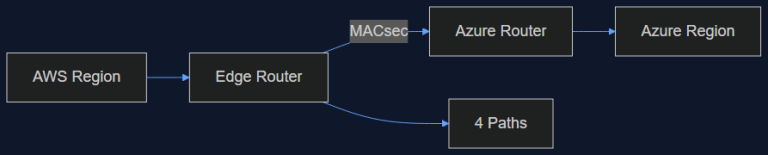
16 Sep 2026 · 4 min read
ai-infrastructure
AWS Just Opened a Private Pipe Straight Into Azure. Here's Why an AI Team Should Care
AWS Interconnect – multicloud with Azure went into preview in August, capped at 1 Gbps and four regions. That's not enough bandwidth for training, but it's exactly enough to fix the multi-vendor inference problem we've been duct-taping for a year.
Read more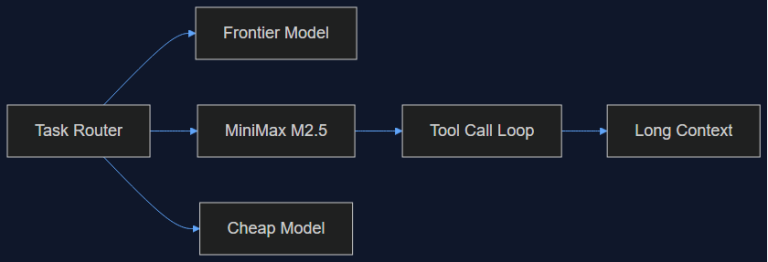
30 Aug 2026 · 4 min read
agents
MiniMax M2.5 on Bedrock: What 'Agent-Native' Actually Means in Practice
AWS now offers MiniMax's agent-tuned MoE models through Bedrock. A hands-on look at what agent-native training changes versus a general-purpose model, and where it fits in a tiered-routing setup.
Read more
Discussion
Comments are reviewed before publication. Your email is kept private.