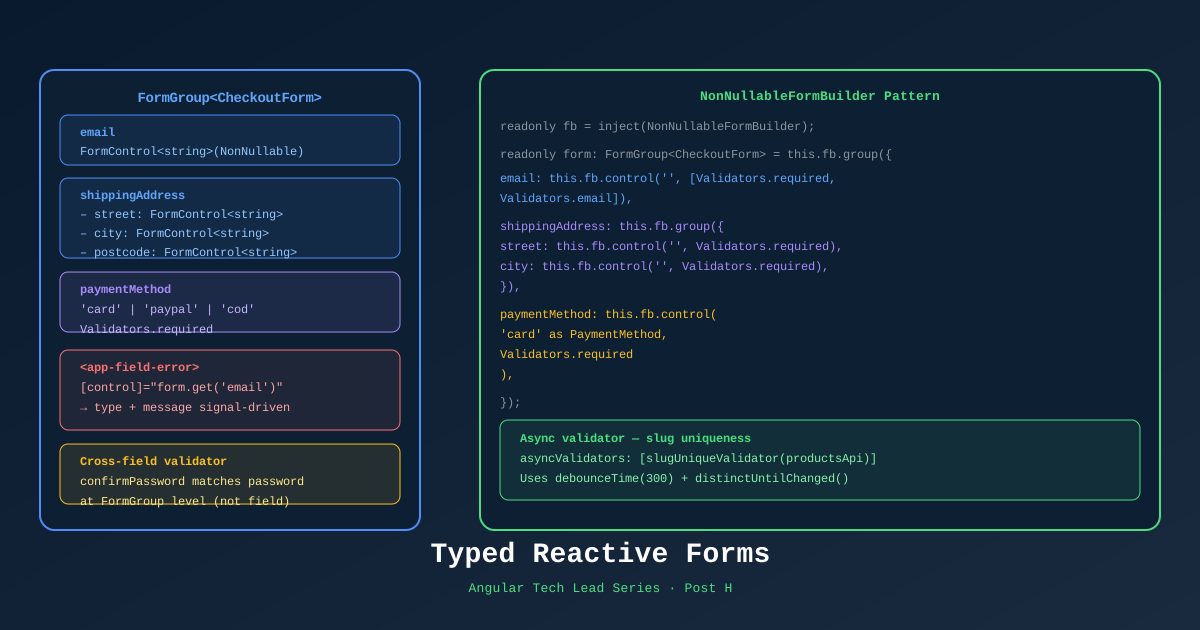
Typed reactive forms were introduced in Angular 14 and most developers know they exist. Far fewer use them correctly. In an ecommerce context — checkout forms, address forms, payment flows — untyped forms are a runtime error waiting to happen.
This post covers the typed forms patterns that make checkout safe, testable, and maintainable.
Why Untyped Forms Are a Problem
// ❌ Old-style untyped form
const form = new FormGroup({
  email: new FormControl(''),
  address: new FormGroup({
    street: new FormControl(''),
    city: new FormControl(''),
  })
});

// TypeScript says this is fine — but it returns string | null
const email = form.value.email;         // type: string | null | undefined
const street = form.value.address?.street; // type: string | null | undefined

// This compiles with no error but will crash at runtime
const length = form.value.email.length; // ❌ possibly null!
Typed FormGroup<T> Pattern
import { FormControl, FormGroup, Validators } from '@angular/forms';

// Define the form shape as an interface
interface ShippingFormControls {
  fullName:    FormControl<string>;
  street:      FormControl<string>;
  city:        FormControl<string>;
  country:     FormControl<string>;
  postalCode:  FormControl<string>;
  saveAddress: FormControl<boolean>;
}

// FormGroup with full type parameter
type ShippingForm = FormGroup<ShippingFormControls>;@Component({...})
export class ShippingStepComponent {
private fb = inject(NonNullableFormBuilder);
// nonNullable ensures .value is always string, never string | null
shippingForm: ShippingForm = this.fb.group({
fullName: ['', [Validators.required, Validators.minLength(3)]],
street: ['', Validators.required],
city: ['', Validators.required],
country: ['SA', Validators.required],
postalCode: ['', [Validators.required, Validators.pattern(/^\d{5}$/)]],
saveAddress: [false],
});
// Fully typed — TypeScript knows this is string, not string | null
get fullName(): string {
return this.shippingForm.controls.fullName.value; // ← type: string ✅
}
}NonNullableFormBuilder — The Default Choice
// ❌ FormBuilder — values are string | null
const fb = inject(FormBuilder);
const form = fb.group({ name: [''] });
form.value.name // type: string | null

// ✅ NonNullableFormBuilder — values are always the declared type
const fb = inject(NonNullableFormBuilder);
const form = fb.group({ name: [''] });
form.value.name // type: string
Use NonNullableFormBuilder for all forms in TechShop. The only time you want nullable is when a field is truly optional AND you need to distinguish between “not filled” and “empty string” — rare in practice.
Cross-Field Validators
// Validator function — receives the FormGroup, returns ValidationErrors | null
function passwordMatchValidator(group: AbstractControl): ValidationErrors | null {
  const password = group.get('password')?.value;
  const confirm = group.get('confirmPassword')?.value;

  return password === confirm ? null : { passwordMismatch: true };
}

// Apply at group level, not control level
this.fb.group({
  password:        ['', [Validators.required, Validators.minLength(8)]],
  confirmPassword: ['', Validators.required],
}, { validators: passwordMatchValidator });
Template to show the error:
@if (passwordForm.hasError('passwordMismatch') && passwordForm.touched) {
  <span class="error">Passwords do not match</span>
}
Date Range Validator (for promotions)
function dateRangeValidator(group: AbstractControl): ValidationErrors | null {
  const start = group.get('startDate')?.value as Date;
  const end = group.get('endDate')?.value as Date;

  if (!start || !end) return null;
  return start < end ? null : { invalidRange: { start, end } };
}
Async Validators — Slug Uniqueness Check
// Async validator — returns Observable<ValidationErrors | null>
function slugUniqueValidator(api: ProductsService): AsyncValidatorFn {
  return (control: AbstractControl): Observable<ValidationErrors | null> => {
    return timer(400).pipe(  // Debounce: wait 400ms before calling API
      switchMap(() =>
        api.checkSlugAvailability(control.value as string).pipe(
          map(isAvailable => isAvailable ? null : { slugTaken: true }),
          catchError(() => of(null))  // Network error → don't block form
        )
      )
    );
  };
}

// Usage
this.fb.group({
  slug: ['', {
    validators: [Validators.required, Validators.pattern(/^[a-z0-9-]+$/)],
    asyncValidators: [slugUniqueValidator(inject(ProductsService))],
    updateOn: 'blur'  // Only validate when user leaves the field
  }]
});
Multi-Step Checkout with Signals
The checkout wizard needs to track: current step, which steps are complete, and data from each step.
// libs/checkout/data-access/src/lib/checkout.store.ts
@Injectable({ providedIn: 'root' })
export class CheckoutStore {
  // State
  private _currentStep = signal<CheckoutStep>('shipping');
  private _shippingData = signal<ShippingData | null>(null);
  private _paymentData = signal<PaymentData | null>(null);

  // Selectors (public readonly)
  currentStep = this._currentStep.asReadonly();
  shippingData = this._shippingData.asReadonly();
  paymentData = this._paymentData.asReadonly();

  completedSteps = computed<CheckoutStep[]>(() => {
    const steps: CheckoutStep[] = [];
    if (this._shippingData()) steps.push('shipping');
    if (this._paymentData()) steps.push('payment');
    return steps;
  });

  canProceedToPayment = computed(() => this._shippingData() !== null);
  canProceedToReview = computed(() =>
    this._shippingData() !== null && this._paymentData() !== null
  );

  // Actions
  submitShipping(data: ShippingData) {
    this._shippingData.set(data);
    this._currentStep.set('payment');
  }

  submitPayment(data: PaymentData) {
    this._paymentData.set(data);
    this._currentStep.set('review');
  }

  goBack() {
    const prev: Record<CheckoutStep, CheckoutStep> = {
      payment: 'shipping',
      review: 'payment',
      shipping: 'shipping',
    };
    this._currentStep.update(current => prev[current]);
  }

  reset() {
    this._currentStep.set('shipping');
    this._shippingData.set(null);
    this._paymentData.set(null);
  }
}

type CheckoutStep = 'shipping' | 'payment' | 'review';
Checkout page:
<!-- checkout.component.html -->
@switch (store.currentStep()) {
  @case ('shipping') {
    <app-shipping-step (completed)="store.submitShipping($event)" />
  }
  @case ('payment') {
    <app-payment-step
      (completed)="store.submitPayment($event)"
      (back)="store.goBack()" />
  }
  @case ('review') {
    <app-order-review
      [shipping]="store.shippingData()!"
      [payment]="store.paymentData()!"
      (back)="store.goBack()"
      (confirm)="placeOrder()" />
  }
}

<app-checkout-progress
  [currentStep]="store.currentStep()"
  [completedSteps]="store.completedSteps()" />
Displaying Validation Errors Consistently
Create a shared utility component for error messages:
// libs/shared/ui/src/lib/form-error/form-error.component.ts
@Component({
  selector: 'app-form-error',
  changeDetection: ChangeDetectionStrategy.OnPush,
  template: `
    @if (control().invalid && (control().dirty || control().touched)) {
      @if (control().hasError('required')) {
        <span class="error">This field is required</span>
      }
      @if (control().hasError('minlength')) {
        <span class="error">
          Minimum {{ control().getError('minlength').requiredLength }} characters
        </span>
      }
      @if (control().hasError('pattern')) {
        <span class="error">{{ patternMessage() }}</span>
      }
      @if (control().hasError('slugTaken')) {
        <span class="error">This URL slug is already taken</span>
      }
    }
  `
})
export class FormErrorComponent {
  control = input.required<AbstractControl>();
  patternMessage = input('Invalid format');
}
Usage:
<input type="text" [formControl]="shippingForm.controls.fullName" />
<app-form-error [control]="shippingForm.controls.fullName" />
References
- Angular Typed Forms — angular.dev
- Reactive Forms Guide — angular.dev
- NonNullableFormBuilder — API
- AsyncValidatorFn — API
- AbstractControl — API
Part of the Angular Tech Lead Series — Back to main series overview