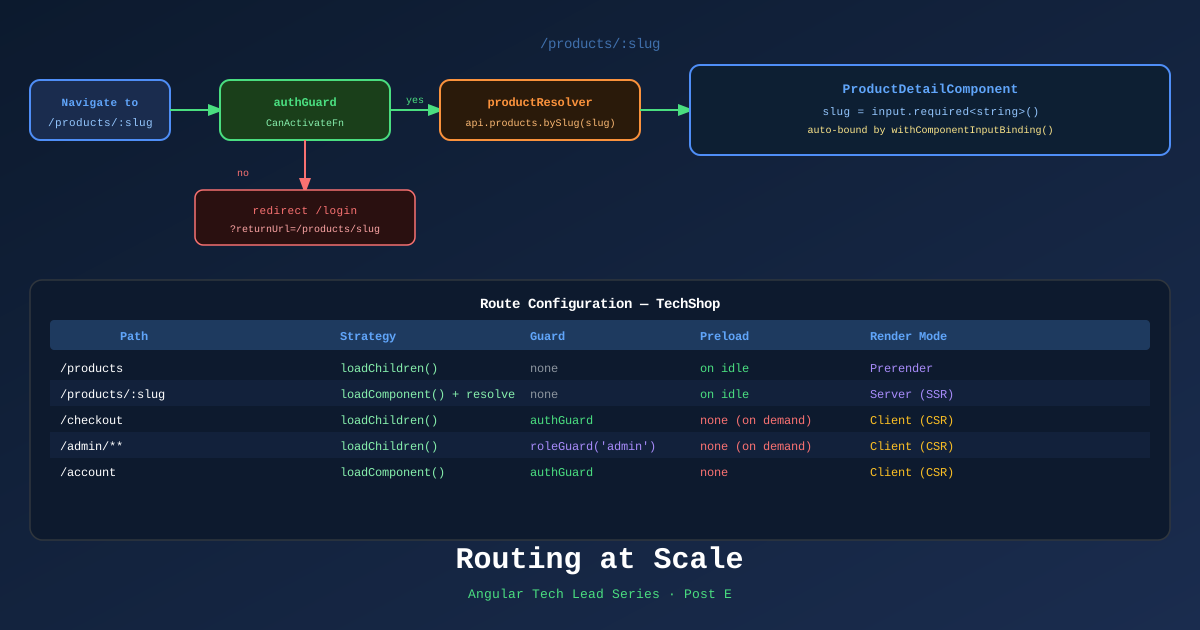
Routing is where Angular’s architecture becomes visible to the user. A badly structured router makes the user wait, see flashes of empty content, or land on a 404 instead of being redirected correctly. A well-structured router is invisible — it just works.
This post covers the routing patterns needed for a production ecommerce application: functional guards, resolvers, type-safe navigation, and preloading strategies.
Functional Guards — The Modern Pattern
Angular’s route guards are now functional — no class, no implements CanActivate, just a typed function.
Auth Guard with returnUrl redirect
// libs/auth/util/src/lib/auth.guard.ts
import { inject } from '@angular/core';
import { CanActivateFn, Router } from '@angular/router';
import { AuthService } from '@techshop/auth/data-access';

export const authGuard: CanActivateFn = (route, state) => {
  const auth = inject(AuthService);
  const router = inject(Router);

  if (auth.isAuthenticated()) {
    return true;
  }

  // Preserve the intended URL so login can redirect back
  return router.createUrlTree(['/login'], {
    queryParams: { returnUrl: state.url }
  });
};
Use in routes:
// checkout.routes.ts
export const checkoutRoutes: Routes = [
  {
    path: '',
    canActivate: [authGuard],
    children: [
      { path: 'shipping', component: ShippingStepComponent },
      { path: 'payment', component: PaymentStepComponent },
      { path: 'review', component: OrderReviewComponent },
      { path: '', redirectTo: 'shipping', pathMatch: 'full' },
    ]
  }
];
Login component handling returnUrl:
@Component({...})
export class LoginComponent {
  private router = inject(Router);
  private route = inject(ActivatedRoute);

  async onLogin() {
    await inject(AuthService).login(this.form.value);

    // Navigate back to the originally intended page
    const returnUrl = this.route.snapshot.queryParams['returnUrl'] ?? '/account';
    this.router.navigateByUrl(returnUrl);
  }
}
Role Guard (Tech Lead, Admin)
export const roleGuard = (requiredRole: string): CanActivateFn => {
  return () => {
    const auth = inject(AuthService);
    const router = inject(Router);

    if (auth.hasRole(requiredRole)) return true;
    return router.createUrlTree(['/forbidden']);
  };
};

// Usage
{ path: 'admin', canActivate: [roleGuard('admin')], component: AdminComponent }
Route Resolvers — Preload Data Before Component Mounts
Without resolvers, components must handle their own loading states. With resolvers, data is available as soon as the component mounts — much cleaner for SSR.
// libs/catalog/data-access/src/lib/product.resolver.ts
import { inject } from '@angular/core';
import { ResolveFn, Router } from '@angular/router';
import { TechShopApiClient } from '@techshop/shared/api-client';

export const productResolver: ResolveFn<Product> = async (route) => {
  const api = inject(TechShopApiClient);
  const router = inject(Router);
  const slug = route.paramMap.get('slug')!;

  try {
    return await api.products.bySlug(slug).get();
  } catch {
    // Product not found → redirect to 404
    await router.navigate(['/not-found']);
    return null!;
  }
};
Route configuration:
{
  path: 'products/:slug',
  component: ProductDetailComponent,
  resolve: { product: productResolver },
  data: { renderMode: RenderMode.Server } // SSR this route
}
Component reads from resolved data:
@Component({...})
export class ProductDetailComponent {
  private route = inject(ActivatedRoute);

  // Resolved data is available immediately on init — no loading state needed
  product = toSignal(
    this.route.data.pipe(map(data => data['product'] as Product)),
    { requireSync: true }
  );
}
Type-Safe Navigation with withComponentInputBinding()
Angular’s withComponentInputBinding() binds route params, query params, and resolved data directly to component @Input() (or Signal input()).
// app.config.ts
export const appConfig: ApplicationConfig = {
  providers: [
    provideRouter(appRoutes, withComponentInputBinding()), // Enable binding
  ]
};
Component now receives route params as inputs automatically:
@Component({...})
export class ProductDetailComponent {
  // :slug param bound automatically from route URL
  slug = input.required<string>();

  // ?ref= query param bound automatically
  ref = input<string>('');

  // Resolved data bound by key name
  product = input.required<Product>();
}
No ActivatedRoute.snapshot.params['slug'] anywhere. The component is testable with just its inputs.
Lazy-Loaded Routes at Scale
// app.routes.ts
export const appRoutes: Routes = [
  {
    path: '',
    loadComponent: () =>
      import('@techshop/home/feature-homepage').then(m => m.HomepageComponent),
  },
  {
    path: 'products',
    loadChildren: () =>
      import('@techshop/catalog/feature-product-list').then(m => m.catalogRoutes),
  },
  {
    path: 'products/:slug',
    loadComponent: () =>
      import('@techshop/catalog/feature-product-detail').then(m => m.ProductDetailComponent),
    resolve: { product: productResolver },
    data: { renderMode: RenderMode.Server }
  },
  {
    path: 'cart',
    loadComponent: () =>
      import('@techshop/cart/feature-cart').then(m => m.CartComponent),
    data: { renderMode: RenderMode.Client }  // cart is session-specific, no SSR
  },
  {
    path: 'checkout',
    canActivate: [authGuard],
    loadChildren: () =>
      import('@techshop/checkout/feature-checkout').then(m => m.checkoutRoutes),
    data: { renderMode: RenderMode.Client }
  },
  {
    path: 'account',
    canActivate: [authGuard],
    loadChildren: () =>
      import('@techshop/account/feature-account').then(m => m.accountRoutes),
    data: { renderMode: RenderMode.Client }
  },
  {
    path: '**',
    loadComponent: () =>
      import('@techshop/shared/ui').then(m => m.NotFoundComponent),
    data: { renderMode: RenderMode.Prerender }
  }
];
Preloading Strategies
By default, lazy routes are loaded only when the user navigates to them. Preloading strategies load them in the background while the user is on other pages.
// Custom preloading — preload routes tagged for preloading
import { PreloadingStrategy, Route } from '@angular/router';

export class SelectivePreloadingStrategy implements PreloadingStrategy {
  preload(route: Route, load: () => Observable<unknown>): Observable<unknown> {
    // Only preload routes explicitly marked
    return route.data?.['preload'] ? load() : EMPTY;
  }
}

// Usage in provider
provideRouter(
  appRoutes,
  withPreloading(SelectivePreloadingStrategy),
  withComponentInputBinding()
)
Mark high-traffic routes for preloading:
{
  path: 'products',
  loadChildren: () => import('./catalog.routes'),
  data: { preload: true }  // preloaded immediately after shell loads
}
TechShop preloading decisions:
/products→ preload immediately (most users go here)/products/:slug→ preload on hover (IntersectionObserver on product cards)/checkout→ load on demand (auth-required)/account→ load on demand (auth-required)
References
- Angular Router — angular.dev
- Functional Route Guards — angular.dev
- Route Resolvers — angular.dev
- withComponentInputBinding — API
- Preloading Strategies — angular.dev
Part of the Angular Tech Lead Series — Back to main series overview