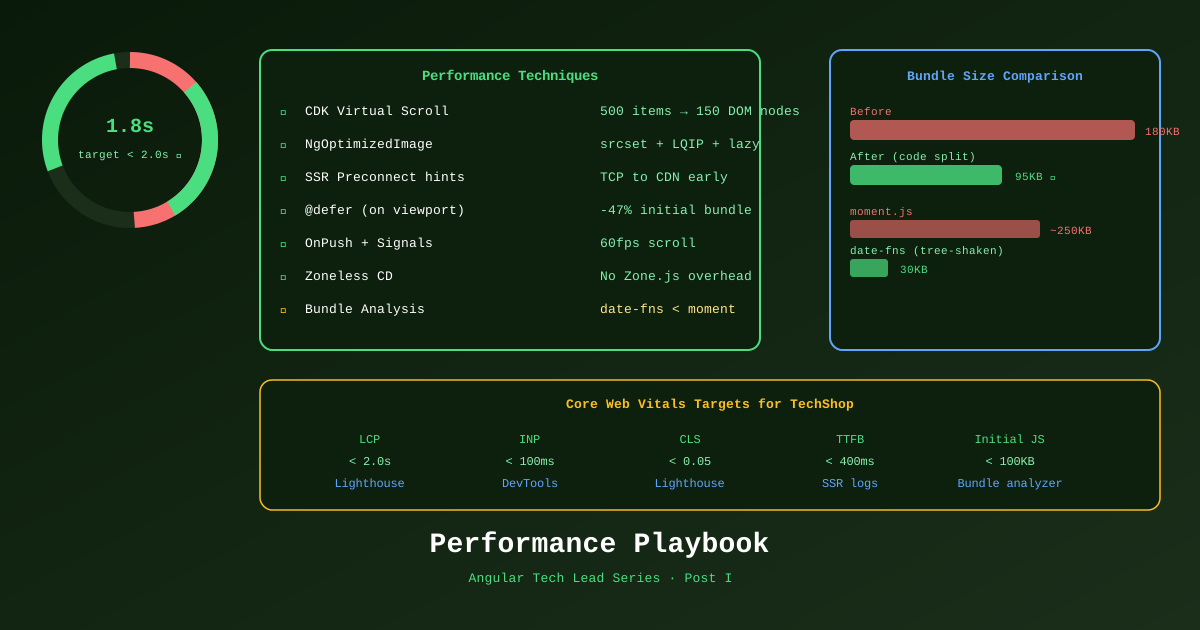
Performance in ecommerce is direct revenue. A 100ms improvement in page load time can increase conversion by 1%. At scale, that’s significant. Angular gives you all the tools — the challenge is knowing which one to use and when.
Virtual Scrolling for Large Product Grids
A product catalog with 500+ items rendered all at once creates thousands of DOM nodes. The browser must lay out, paint, and maintain every single one — even those off-screen.
CDK Virtual Scrolling renders only the items visible in the viewport, destroying and creating DOM nodes as the user scrolls.
Installation
pnpm add @angular/cdkFixed-height virtual scroll (uniform items)
import { CdkVirtualScrollViewport, CdkFixedSizeVirtualScroll, CdkVirtualForOf } from '@angular/cdk/scrolling';

@Component({
  selector: 'app-product-list',
  standalone: true,
  changeDetection: ChangeDetectionStrategy.OnPush,
  imports: [CdkVirtualScrollViewport, CdkFixedSizeVirtualScroll, CdkVirtualForOf, ProductCardComponent],
  template: `
    <cdk-virtual-scroll-viewport
      [itemSize]="320"
      class="product-viewport"
      [minBufferPx]="640"
      [maxBufferPx]="960">

      <div class="product-grid">
        <app-product-card
          *cdkVirtualFor="let product of products(); trackBy: trackById"
          [product]="product" />
      </div>
    </cdk-virtual-scroll-viewport>
  `,
  styles: [`
    .product-viewport {
      height: calc(100vh - 120px); /* Full viewport minus header */
      width: 100%;
    }
  `]
})
export class ProductListComponent {
  products = input.required<Product[]>();
  trackById = (_: number, p: Product) => p.id;
}
Performance comparison:
| Approach | DOM nodes (500 products) | Memory | Scroll FPS |
|---|---|---|---|
| *ngFor / @for | 500 × ~15 elements = 7,500 | ~120MB | 20–40fps |
| CDK Virtual Scroll | ~10 × ~15 elements = 150 | ~8MB | 60fps |
Variable-height virtual scroll (product cards with different heights)
import { CdkAutoSizeVirtualScroll } from '@angular/cdk-experimental/scrolling';
// Note: experimental — test thoroughly

<cdk-virtual-scroll-viewport autosize class="product-viewport">
  <app-product-card *cdkVirtualFor="let p of products(); trackBy: p.id" [product]="p" />
</cdk-virtual-scroll-viewport>
NgOptimizedImage — Every Product Image
NgOptimizedImage is Angular’s built-in directive for image optimization. It enforces best practices automatically:
- Generates
srcsetfor responsive images - Adds
loading="lazy"by default (oreager+fetchpriority="high"for LCP images) - Warns if the intrinsic dimensions are wrong
- Supports LQIP (Low Quality Image Placeholder) blur-up
import { NgOptimizedImage } from '@angular/common';

@Component({
  imports: [NgOptimizedImage],
  template: `
    <!-- Hero/primary image — above fold, load immediately, high priority -->
    <img
      [ngSrc]="product().imageUrl"
      [alt]="product().name"
      width="600"
      height="600"
      priority
      placeholder />

    <!-- Thumbnail in list — below fold, lazy load with blur placeholder -->
    <img
      [ngSrc]="product().thumbnailUrl"
      [alt]="product().name"
      width="300"
      height="300"
      placeholder
      [placeholderConfig]="{ threshold: 40 }" />
  `
})
export class ProductImageComponent {}
Fill mode for banners and hero sections
<!-- Container controls the size, image fills it -->
<div class="hero-banner" style="position: relative; height: 400px;">
  <img
    ngSrc="/images/hero-banner.jpg"
    fill
    alt="Summer Sale"
    priority />
</div>
Image CDN loader (Azure CDN / Cloudflare Images)
// Custom loader for Azure Static Web Apps CDN
const azureLoader: ImageLoader = (config: ImageLoaderConfig) => {
  const { src, width, loaderParams } = config;
  return `https://cdn.techshop.com/${src}?w=${width}&f=webp&q=${loaderParams?.['quality'] ?? 80}`;
};

// app.config.ts
provideImageKitLoader('https://cdn.techshop.com')
// or custom:
{ provide: IMAGE_LOADER, useValue: azureLoader }
Preconnect and Resource Hints from SSR
Angular SSR can inject performance hints into the <head> before the HTML reaches the browser.
// server.ts
app.use((req, res, next) => {
  // Preconnect — establish TCP connection early
  res.setHeader('Link', [
    // Image CDN — most pages will need it
    '<https://cdn.techshop.com>; rel=preconnect',
    // Font provider
    '<https://fonts.gstatic.com>; rel=preconnect; crossorigin',
    // API — preconnect so first API call is fast
    '<https://api.techshop.com>; rel=preconnect',
  ].join(', '));

  next();
});
For product pages, add prefetch for related API data:
// In SSR render context, inject Link headers for data-driven hints
if (req.url.startsWith('/products/')) {
  const slug = req.url.split('/products/')[1];
  res.setHeader('Link', [
    `</api/products/${slug}/recommendations>; rel=prefetch`,
    `</api/products/${slug}/reviews>; rel=prefetch`,
  ].join(', '));
}
Bundle Analysis
# Build with stats JSON
pnpm nx build shell --configuration=production --stats-json

# Analyze the output (opens in browser)
npx webpack-bundle-analyzer dist/apps/shell/browser/stats.json

# Quick CLI summary without browser
pnpm nx build shell --bundle-size
What to look for in the bundle:
| Finding | Action |
|---|---|
moment.js > 200KB | Replace with date-fns (tree-shakable) |
lodash > 70KB | Import individual functions: import debounce from 'lodash-es/debounce' |
Large @defer chunk > 50KB | Split into smaller components |
| Duplicate dependencies | Check peerDependencies conflicts |
rxjs operators not tree-shaken | Ensure named imports: import { map } from 'rxjs/operators' |
INP Optimization — Interaction to Next Paint
LCP and CLS are usually solved by SSR + NgOptimizedImage. INP (the newest Core Web Vital) requires different treatment — it measures how fast the browser responds to clicks.
// Heavy computation — blocks the main thread
onFilterChange(filter: Filter) {
  // ❌ Synchronously processing 500 products
  this.filteredProducts.set(
    this.allProducts().filter(p => matches(p, filter)) // blocks for 80ms
  );
}

// ✅ Defer heavy computation to next animation frame
onFilterChange(filter: Filter) {
  // Updates signal immediately (non-blocking) for UI feedback
  this.filterSignal.set(filter);

  // Computation scheduled in idle time
  // (or use Web Workers for true parallelism)
}

// ✅ Even better — computed() is lazy and doesn't block the event loop
filteredProducts = computed(() => {
  return this.allProducts().filter(p => matches(p, this.filterSignal()));
});
Performance Targets for TechShop
| Metric | Target | Tool |
|---|---|---|
| LCP (product page) | < 2.0s | Lighthouse, CrUX |
| INP | < 100ms | Chrome DevTools |
| CLS | < 0.05 | Lighthouse |
| Home page JS (initial) | < 100KB | webpack-bundle-analyzer |
| Product page JS (initial) | < 120KB | webpack-bundle-analyzer |
| Time to First Byte (SSR) | < 400ms | Server logs, Lighthouse |
References
- CDK Virtual Scrolling — angular.dev
- NgOptimizedImage — angular.dev
- Core Web Vitals — web.dev
- INP Optimization — web.dev
- Angular Performance Guide — angular.dev
Part of the Angular Tech Lead Series — Back to main series overview