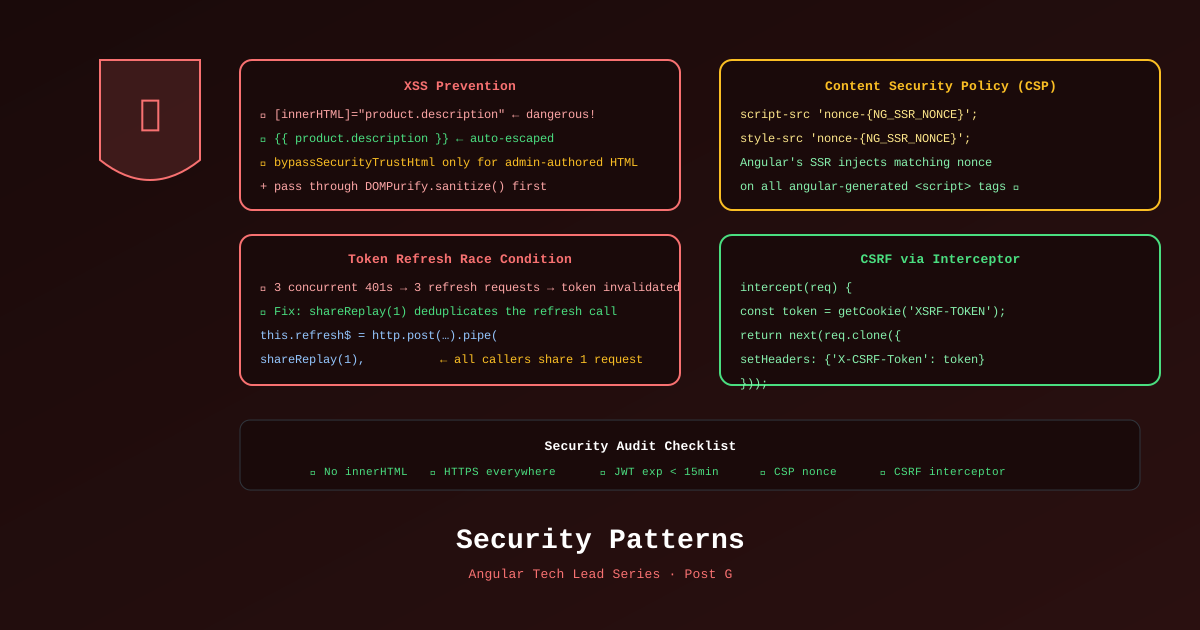
Security bugs in ecommerce are not just technical failures — they’re customer trust failures. An XSS attack on a checkout page or a leaked JWT token can end a product. Angular provides excellent security defaults, but defaults only protect you when you understand what they do and where they stop.
How Angular’s Security Model Works
Angular automatically escapes all interpolated values in templates. This is the first line of XSS defense.
<!-- ✅ Angular escapes this — safe even if name contains <script> -->
<p>{{ user.displayName }}</p>

<!-- ✅ Property binding also escapes -->
<img [alt]="product.name" />
What Angular does NOT protect:
<!-- ❌ innerHTML bypasses Angular's sanitizer -->
<div [innerHTML]="untrustedHtml"></div>

<!-- ❌ URL binding can execute javascript: URLs -->
<a [href]="untrustedUrl">Click</a>
Safe Patterns for CMS Content
Many ecommerce sites display CMS-sourced HTML (product descriptions, promotional banners). This is the most common XSS attack vector.
@Component({...})
export class ProductDescriptionComponent {
  private sanitizer = inject(DomSanitizer);
  product = input.required<Product>();

  // ✅ Sanitize before binding
  safeDescription = computed(() =>
    this.sanitizer.sanitize(SecurityContext.HTML, this.product().descriptionHtml) ?? ''
  );
}<div [innerHTML]="safeDescription()"></div>DomSanitizer.sanitize() is different from bypassSecurityTrustHtml():
sanitize()— strips dangerous HTML (removes<script>,onclick,javascript:)bypassSecurityTrustHtml()— trusts the HTML completely, bypasses all checks
Rule: Use sanitize(). Never use bypassSecurityTrustHtml() on content from an external or user-controlled source.
The Token Refresh Race Condition
The most common JWT security bug in Angular SPAs: the user’s token expires during an active session, triggering multiple simultaneous 401 errors — each trying to independently refresh the token.
The bug:
Request A → 401 Unauthorized
Request B → 401 Unauthorized   ← same time
Request C → 401 Unauthorized   ← same time

Request A calls /auth/refresh → gets new token
Request B calls /auth/refresh → uses the SAME refresh token (already used!) → 401 again
Request C calls /auth/refresh → same problem → logs user out
The fix — singleton refresh with shareReplay(1):
// libs/auth/data-access/src/lib/token-refresh.interceptor.ts
import { inject } from '@angular/core';
import {
  HttpInterceptorFn, HttpRequest, HttpHandlerFn, HttpErrorResponse
} from '@angular/common/http';
import { Observable, throwError, BehaviorSubject, EMPTY } from 'rxjs';
import {
  catchError, switchMap, filter, take, shareReplay, finalize
} from 'rxjs/operators';

let refreshInProgress$: Observable<string> | null = null;

export const tokenRefreshInterceptor: HttpInterceptorFn = (req, next) => {
  const auth = inject(AuthService);

  return next(req).pipe(
    catchError((error: HttpErrorResponse) => {
      // Only handle 401s and only if we have a refresh token
      if (error.status !== 401 || !auth.hasRefreshToken()) {
        return throwError(() => error);
      }

      // If a refresh is already in progress, queue onto it
      if (!refreshInProgress$) {
        refreshInProgress$ = auth.refreshToken().pipe(
          shareReplay(1),             // All waiting requests share the SAME refresh call
          finalize(() => {
            refreshInProgress$ = null;  // Reset when done (success or failure)
          })
        );
      }

      // Retry the original request once the refresh completes
      return refreshInProgress$.pipe(
        switchMap(newToken => {
          return next(addToken(req, newToken));
        }),
        catchError(() => {
          // Refresh failed — log out the user
          auth.logout();
          return EMPTY;
        })
      );
    })
  );
};

function addToken(req: HttpRequest<unknown>, token: string) {
  return req.clone({
    setHeaders: { Authorization: `Bearer ${token}` }
  });
}
The key: shareReplay(1) ensures that even if 5 concurrent requests all hit 401 at the same time, only one refresh call is made. All 5 share the result of that single call.
Content Security Policy with Angular SSR
CSP prevents XSS by specifying which resources the browser is allowed to load. Angular SSR can inject CSP headers on every server response.
// server.ts — Express server with CSP headers
app.use((req, res, next) => {
  // Generate a nonce per request (required for Angular's inline scripts)
  const nonce = crypto.randomBytes(16).toString('base64');
  res.locals['nonce'] = nonce;

  res.setHeader('Content-Security-Policy', [
    `default-src 'self'`,
    `script-src 'self' 'nonce-${nonce}'`,   // Angular needs nonce for hydration scripts
    `style-src 'self' 'unsafe-inline'`,      // Angular component styles need this
    `img-src 'self' data: https://cdn.techshop.com`,
    `connect-src 'self' https://api.techshop.com wss://api.techshop.com`,
    `font-src 'self' https://fonts.gstatic.com`,
    `frame-ancestors 'none'`,               // Prevent clickjacking
    `form-action 'self'`,
  ].join('; '));

  next();
});
Angular SSR automatically respects the nonce for its hydration bootstrap scripts when configured with:
// app.config.server.ts
provideServerRendering({ nonce: () => res.locals['nonce'] })
CSRF Protection
For forms that mutate state (add to cart, checkout, profile update), protect against Cross-Site Request Forgery:
// Functional interceptor — adds XSRF token to all mutation requests
export const csrfInterceptor: HttpInterceptorFn = (req, next) => {
  const isMutation = ['POST', 'PUT', 'PATCH', 'DELETE'].includes(req.method);
  if (!isMutation) return next(req);

  const token = document.cookie
    .split('; ')
    .find(row => row.startsWith('XSRF-TOKEN='))
    ?.split('=')[1];

  if (token) {
    return next(req.clone({
      setHeaders: { 'X-XSRF-TOKEN': token }
    }));
  }
  return next(req);
};
.NET 10 API enabling XSRF:
// Program.cs
builder.Services.AddAntiforgery(options => {
    options.HeaderName = "X-XSRF-TOKEN";
    options.Cookie.Name = "XSRF-TOKEN";
    options.Cookie.SameSite = SameSiteMode.Strict;
    options.Cookie.SecurePolicy = CookieSecurePolicy.Always;
});
Registering All Security Interceptors
// app.config.ts
export const appConfig: ApplicationConfig = {
  providers: [
    provideHttpClient(
      withInterceptors([
        tokenRefreshInterceptor,   // Handles 401s + refresh
        csrfInterceptor,           // Adds XSRF token to mutations
        // retryInterceptor,       // Retry on network errors (Part 10)
      ])
    ),
  ]
};
Quick Security Audit Checklist
Run this checklist before every production deployment:
| Check | How to verify |
|---|---|
No bypassSecurityTrustHtml() on external content | grep -r "bypassSecurityTrustHtml" libs/ |
No [innerHTML] without sanitize() | ESLint @angular-eslint/template/no-unsafe-inner-html |
All tokens stored in httpOnly cookies, not localStorage | Dev tools → Application → Cookies |
| CSP headers present on all responses | Lighthouse → Security audit |
HTTPS everywhere (including WebSocket wss://) | Check connect-src in CSP |
Token refresh interceptor using shareReplay(1) | Code review this file specifically |
| Refresh tokens have appropriate expiry | Check JWT payload .exp claim |
References
- Angular Security Guide — angular.dev
- DomSanitizer API — angular.dev
- Angular HTTP Security — angular.dev
- Content Security Policy — MDN
- OWASP Angular Security Cheat Sheet
Part of the Angular Tech Lead Series — Back to main series overview