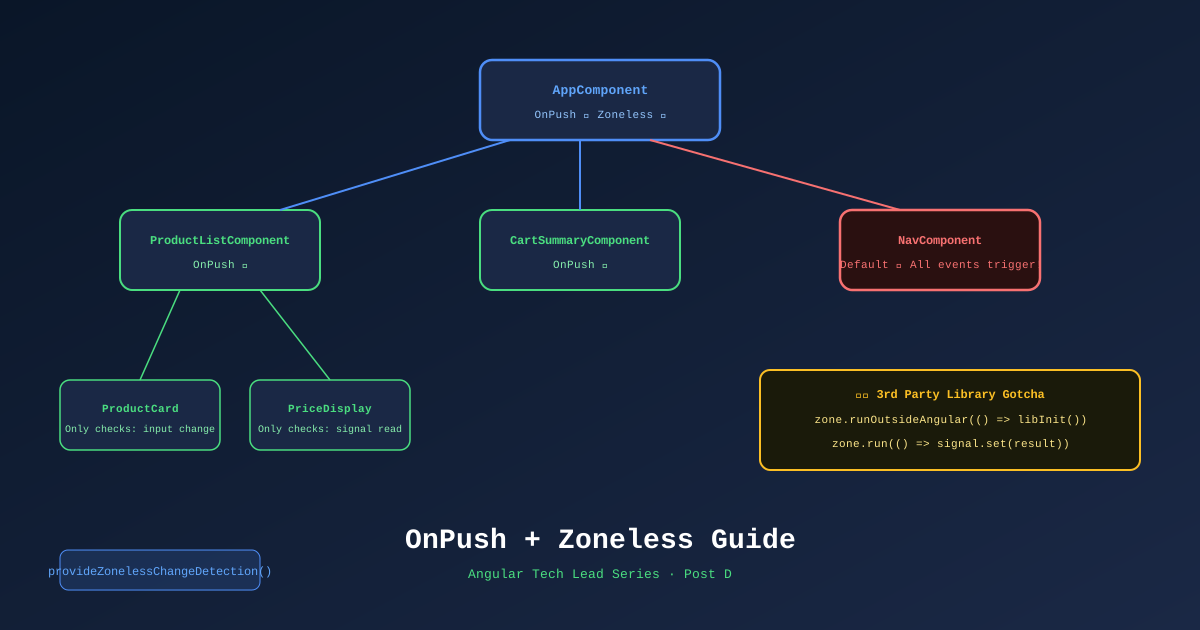
Change detection is the mechanism Angular uses to synchronize your component state with the DOM. Get it wrong and your UI is sluggish. Get it right and your ecommerce product grid handles thousands of interactions per second without a frame drop.
Angular 21 defaults to zoneless change detection — but understanding why and how is the difference between accidentally re-introducing Zone.js behavior and deliberately exploiting the performance model.
What Zone.js Did (and Why We Don’t Need It)
Zone.js intercepted every async operation — setTimeout, fetch, event listeners, Promises — and triggered Angular’s change detection after each one. This worked because Angular didn’t have to track what changed; it just checked everything after anything happened.
The performance cost: on a complex page with 50 components, every button click, every completed HTTP request, every timer tick caused Angular to walk the entire component tree checking for changes.
Zoneless Angular + Signals flips this model:
- Components declare exactly which signals they read
- Angular only re-renders a component when a signal it reads changes
- No global dirty-check sweep
The OnPush Contract
ChangeDetectionStrategy.OnPush tells Angular: “Only check this component when one of these conditions is true:”
- An
@Input()reference changes (new object reference, not mutation) - A Signal read inside this component fires a notification
- An async pipe receives a new value
.markForCheck()is manually called
Every rule under OnPush is deterministic. You know exactly when the component will update.
@Component({
  selector: 'app-product-card',
  changeDetection: ChangeDetectionStrategy.OnPush,
  template: `
    <img [ngSrc]="product().imageUrl" width="300" height="300" />
    <h2>{{ product().name }}</h2>
    <p>{{ product().price | currency }}</p>
    <span [class.in-stock]="product().isInStock">
      {{ product().isInStock ? 'In Stock' : 'Out of Stock' }}
    </span>
  `
})
export class ProductCardComponent {
  product = input.required<Product>(); // Signal input — triggers OnPush correctly
}
OnPush Gotcha: Object Mutation
The most common OnPush mistake is mutating an object without creating a new reference.
// ❌ WRONG — OnPush won't detect this
this.product.inventory.count--; // mutated in place, same reference

// ✅ CORRECT — new reference triggers OnPush
this.product = {
  ...this.product,
  inventory: { ...this.product.inventory, count: this.product.inventory.count - 1 }
};

// ✅ BETTER — use Signals, mutation tracking is automatic
this.productSignal.update(p => ({
  ...p,
  inventory: { ...p.inventory, count: p.inventory.count - 1 }
}));
Zoneless: How it Works
In app.config.ts:
export const appConfig: ApplicationConfig = {
  providers: [
    provideZonelessChangeDetection(), // Angular 21 — default
    // NOT provideZoneChangeDetection() — that's the old zone mode
  ]
};
With zoneless, Angular schedules change detection when:
- A Signal value changes
- An async pipe emits
ChangeDetectorRef.markForCheck()is calledApplicationRef.tick()is called
Nothing else. A setTimeout completing doesn’t trigger CD. A fetch() completing doesn’t trigger CD. Only tracked Signal changes do.
The Third-Party Library Gotcha
Some npm packages assume Zone.js exists. When they complete async operations, they expect Zone.js to trigger Angular’s CD. Without Zone.js, the UI doesn’t update.
Symptoms:
- Map, chart, or date picker from an npm package updates data but the Angular template doesn’t re-render
- No errors in console, just stale UI
Fix: NgZone.runOutsideAngular() + manual markForCheck
@Component({
  selector: 'app-product-map',
  changeDetection: ChangeDetectionStrategy.OnPush,
  template: `<div #mapContainer></div>`
})
export class ProductMapComponent implements AfterViewInit {
  @ViewChild('mapContainer') mapContainer!: ElementRef;

  private zone = inject(NgZone);
  private cdr = inject(ChangeDetectorRef);
  private mapLocation = signal<MapLocation | null>(null);

  ngAfterViewInit() {
    // Run map initialization OUTSIDE Angular zone
    // (prevents zone.js calls from the library triggering CD)
    this.zone.runOutsideAngular(() => {
      const map = new ThirdPartyMap(this.mapContainer.nativeElement);

      // When the map is ready, RUN INSIDE zone to trigger CD
      map.onReady(() => {
        this.zone.run(() => {
          this.mapLocation.set(map.getCenter());
          // Signal update now triggers Angular's Signals-based CD ✅
        });
      });
    });
  }
}
Alternative: if the library supports promises/callbacks:
// Wrap any third-party callback in zone.run() to trigger CD
externalService.onUpdate((data) => {
  this.zone.run(() => {
    this.mySignal.set(data);
  });
});
Profiling with Angular DevTools
Install the Angular DevTools Chrome Extension.
What to look for:
- Open DevTools → Angular tab → Profiler
- Click Record, interact with your page, click Stop
- Look for components that have a high check count relative to their purpose
A ProductCardComponent in a list of 50 items should have a check count that increases by 1 per product change. If it’s firing 50 times on a single filter change, OnPush is not applied or signals aren’t being used.
Signal graph view: DevTools shows which signals each component reads, and which components update when each signal changes.
The Complete Setup: What Every New Component Needs
// Template for every new TechShop Angular component
import { Component, ChangeDetectionStrategy, inject, input, output, computed } from '@angular/core';

@Component({
  selector: 'app-[name]',
  standalone: true,
  imports: [/* only what this component needs */],
  changeDetection: ChangeDetectionStrategy.OnPush, // ← required
  template: ``,
})
export class [Name]Component {
  // Signal inputs (prefer over @Input)
  // prop = input<T>();
  // prop = input.required<T>();

  // Signal outputs (prefer over @Output)
  // somethingHappened = output<T>();

  // Services via inject() (never constructor)
  // private service = inject(SomeService);

  // Derived state (never use effect() for this)
  // computedValue = computed(() => this.prop() * 2);
}
Add this as a VS Code snippet or Copilot workspace instruction so developers never create a component without OnPush.
References
- Angular Change Detection — angular.dev
- Zoneless Change Detection — angular.dev
- Angular DevTools — Chrome Web Store
- provideZonelessChangeDetection — API
- ChangeDetectionStrategy — API
Part of the Angular Tech Lead Series — Back to main series overview