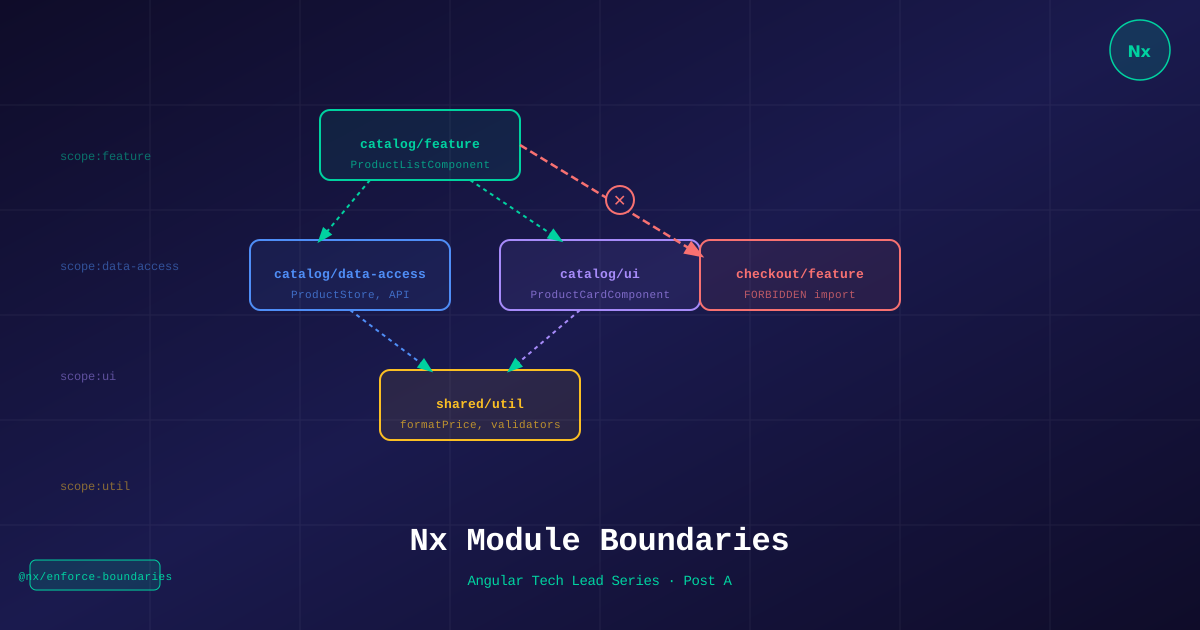
The number one cause of architecture decay in Angular monorepos isn’t bad engineers. It’s the absence of enforced boundaries. Without them, it’s only a matter of time before libs/checkout imports from libs/catalog, libs/catalog imports from libs/cart, and every team is blocked waiting on every other team.
Module boundaries are not suggestions. They are architectural law — enforced by your linter, not your code review process.
What Nx Module Boundaries Are
Nx’s @nx/enforce-module-boundaries ESLint rule analyzes import statements across your monorepo and fails the lint check when a library imports from a library it shouldn’t.
The rule is configuration-driven. You declare which libraries can import from which, using tags you assign to each library.
The Tag Strategy for TechShop
Tags come in two flavors — scope (what kind of library it is) and domain (which business area it belongs to).
// project.json for libs/catalog/feature-product-list
{
  "tags": ["scope:feature", "domain:catalog"]
}
// project.json for libs/catalog/data-access
{
"tags": ["scope:data-access", "domain:catalog"]
}// project.json for libs/shared/ui
{
"tags": ["scope:ui", "domain:shared"]
}Full tag taxonomy for TechShop:
| Tag | Meaning |
|---|---|
scope:feature | Route-level page components |
scope:data-access | Services, stores, API calls |
scope:ui | Presentational components only |
scope:util | Pure functions, pipes, validators |
domain:catalog | Product catalog business context |
domain:cart | Shopping cart business context |
domain:checkout | Checkout and payment |
domain:orders | Order management |
domain:shared | Cross-domain utilities |
The Boundary Rules
// eslint.config.mjs (flat config)
{
  "rules": {
    "@nx/enforce-module-boundaries": ["error", {
      "enforceBuildableLibDependency": true,
      "allow": [],
      "depConstraints": [
        // Scope rules — what each scope can import
        {
          "sourceTag": "scope:feature",
          "onlyDependOnLibsWithTags": [
            "scope:data-access",
            "scope:ui",
            "scope:util"
          ]
        },
        {
          "sourceTag": "scope:data-access",
          "onlyDependOnLibsWithTags": ["scope:util", "scope:data-access"]
        },
        {
          "sourceTag": "scope:ui",
          "onlyDependOnLibsWithTags": ["scope:ui", "scope:util"]
        },
        {
          "sourceTag": "scope:util",
          "onlyDependOnLibsWithTags": ["scope:util"]
        },

        // Domain rules — domains can only use shared, not each other
        {
          "sourceTag": "domain:catalog",
          "onlyDependOnLibsWithTags": ["domain:catalog", "domain:shared"]
        },
        {
          "sourceTag": "domain:cart",
          "onlyDependOnLibsWithTags": ["domain:cart", "domain:shared"]
        },
        {
          "sourceTag": "domain:checkout",
          "onlyDependOnLibsWithTags": [
            "domain:checkout",
            "domain:shared",
            "domain:cart"  // checkout CAN read cart, but cart cannot read checkout
          ]
        },
        {
          "sourceTag": "domain:orders",
          "onlyDependOnLibsWithTags": ["domain:orders", "domain:shared"]
        }
      ]
    }]
  }
}
What the Rules Prevent
❌ This import now fails at lint:
// libs/catalog/feature-product-list/src/lib/product-list.component.ts

// Feature importing from another feature
import { CheckoutStepComponent } from '@techshop/checkout/feature-step'; // ❌

// Data-access importing from a feature
import { ProductListComponent } from '@techshop/catalog/feature-product-list'; // ❌

// Different domain importing without permission
import { CartService } from '@techshop/cart/data-access'; // ❌ (catalog cannot use cart)
✅ These imports pass:
// Feature importing from data-access (same domain)
import { ProductStore } from '@techshop/catalog/data-access'; // ✅

// Feature importing from shared UI
import { ButtonComponent } from '@techshop/shared/ui'; // ✅

// Feature importing shared util
import { formatPrice } from '@techshop/shared/util-format'; // ✅
Visualizing the Graph
# Show the full dependency graph in-browser
npx nx graph

# Show what is affected by a change to cart/data-access
npx nx affected:graph --base=main
The graph makes it immediately obvious when rules are working. You see clean layers and isolated domains. When rules are broken, you see cross-domain arrows that shouldn’t exist.
Adding a New Library Correctly
# Generate with tags at creation time
npx nx g @nx/angular:library feature-order-history \
  --directory=libs/orders \
  --tags="scope:feature,domain:orders" \
  --standalone \
  --routing
CI Enforcement
# .github/workflows/pr.yml
- name: Lint (boundary check)
  run: pnpm nx affected --target=lint --base=$NX_BASE --head=$NX_HEAD
The lint step runs on every PR. A boundary violation is a build failure. No exceptions.
Common Boundary Violations and Fixes
Problem: Checkout needs to know the cart total.
Wrong fix: Import CartService from domain:cart into domain:checkout.
Right fix: Create libs/shared/util-cart-summary tagged domain:shared with a CartSummary interface. Cart writes to it, Checkout reads from it.
libs/
  shared/
    util-cart-summary/       ← domain:shared, scope:util
      cart-summary.model.ts  ← CartSummary interface
  cart/
    data-access/             ← writes CartSummary to signal
  checkout/
data-access/ ← reads CartSummary (shared domain allowed)Problem: Two features both need the same product card component.
Wrong fix: Import from each other.
Right fix: Move ProductCardComponent to libs/catalog/ui-product-card tagged scope:ui. Both features import from there.
The Tech Lead Responsibility
Boundaries are easy to add at the start. They’re expensive to retrofit after a year of violations. Your job as Tech Lead:
- Set the tag strategy before day 1 of feature work
- Add the
depConstraintsbefore the first PR - Make
linta required CI check that cannot be bypassed - Review
nx graphmonthly — spot new cross-domain edges before they harden
The rule: if you can’t explain why two libraries should communicate without looking at the code, the boundary rule is wrong, not the linter.
References
- Nx Module Boundaries — nx.dev
- Nx Tags & Constraints
- nx graph — Visualization
- @nx/enforce-module-boundaries ESLint rule
- Nx Monorepo Patterns
Part of the Angular Tech Lead Series — Back to main series overview