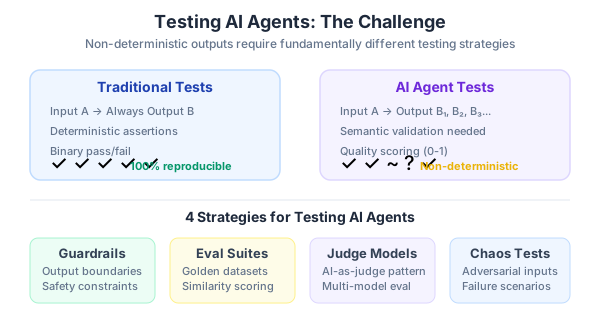
Here’s the problem: my application has an AI chat agent that answers user questions using a RAG pipeline — it retrieves context from a PostgreSQL-backed vector database, feeds it to an LLM, and generates a response. How do you write tests for something whose output is non-deterministic by design?
You can’t assert expect(response).toBe("The return policy is 30 days") because the LLM might phrase it differently every time. Traditional testing doesn’t work here. After months of trial and error, I found the right tools and patterns. This is Part 2 of my series on AI-powered quality engineering.
The Three Layers You Need to Test
An AI application has distinct layers, each requiring different testing strategies:
- Retrieval layer — Does the vector search return the right documents?
- Generation layer — Does the LLM produce faithful, relevant responses?
- Data layer — Is the database schema correct? Do migrations work?
Testing them independently reveals exactly where failures occur. A wrong answer might be a retrieval problem (wrong docs fetched), not a generation problem (LLM hallucinating).
Testing LLM Outputs with DeepEval
DeepEval is a Python framework that provides pytest-style assertions for LLM outputs. Think of it as “pytest for LLMs.” Install it:
pip install deepevalThe core concept is a LLMTestCase with metrics. Here’s how I test my customer support agent:
from deepeval import assert_test
from deepeval.metrics import (
    HallucinationMetric,
    AnswerRelevancyMetric,
    FaithfulnessMetric,
)
from deepeval.test_case import LLMTestCase

def test_agent_no_hallucination():
    test_case = LLMTestCase(
        input="What is the refund policy?",
        actual_output="You can get a full refund within 30 days of purchase.",
        retrieval_context=[
            "All customers are eligible for a 30-day full refund at no extra cost."
        ],
    )

    hallucination = HallucinationMetric(threshold=0.5)
    faithfulness = FaithfulnessMetric(threshold=0.7)
    relevancy = AnswerRelevancyMetric(threshold=0.7)

    assert_test(test_case, [hallucination, faithfulness, relevancy])
This test passes if the response is faithful to the provided context (doesn’t make things up), relevant to the question, and below the hallucination threshold.
Running tests with parallel execution:
deepeval test run tests/test_ai_quality.py -n 4Testing Multiple Scenarios with Datasets
For production, I build evaluation datasets — a set of question-answer pairs with expected retrieval contexts:
import pytest
from deepeval import assert_test
from deepeval.dataset import EvaluationDataset
from deepeval.metrics import GEval
from deepeval.test_case import LLMTestCase, LLMTestCaseParams

# Custom correctness metric
correctness = GEval(
    name="Correctness",
    criteria="Determine if the actual output is factually correct based on the expected output.",
    evaluation_params=[
        LLMTestCaseParams.ACTUAL_OUTPUT,
        LLMTestCaseParams.EXPECTED_OUTPUT,
    ],
    threshold=0.5,
)

# Build test cases from your golden dataset
test_cases = [
    LLMTestCase(
        input="What programming languages do you support?",
        actual_output=my_agent.invoke("What programming languages do you support?"),
        expected_output="We support Python, TypeScript, and Go.",
    ),
    LLMTestCase(
        input="How do I reset my password?",
        actual_output=my_agent.invoke("How do I reset my password?"),
        expected_output="Click 'Forgot Password' on the login page and follow the email instructions.",
    ),
]

dataset = EvaluationDataset(test_cases=test_cases)

@pytest.mark.parametrize("test_case", dataset)
def test_agent_correctness(test_case: LLMTestCase):
    assert_test(test_case, [correctness])
DeepEval provides 50+ metrics including ToxicityMetric, BiasMetric, and ContextualPrecisionMetric. For my use case, these four matter most: hallucination, faithfulness, relevancy, and correctness.
Testing RAG Retrieval Quality with Ragas
Ragas is specifically designed for evaluating RAG pipelines. While DeepEval tests the final answer, Ragas tests whether the retrieval step fetched the right documents.
pip install ragasThe key metrics for retrieval:
from ragas import evaluate
from ragas.metrics import (
    Faithfulness,
    ResponseRelevancy,
    LLMContextPrecisionWithReference,
    LLMContextRecall,
)
from datasets import Dataset

# Your test dataset
eval_data = Dataset.from_dict({
    "question": [
        "What is the pricing for the Pro plan?",
        "How do I integrate with Slack?",
    ],
    "answer": [
        my_rag.query("What is the pricing for the Pro plan?"),
        my_rag.query("How do I integrate with Slack?"),
    ],
    "contexts": [
        my_rag.retrieve("What is the pricing for the Pro plan?"),
        my_rag.retrieve("How do I integrate with Slack?"),
    ],
    "ground_truth": [
        "The Pro plan costs $49/month per user with unlimited projects.",
        "Go to Settings > Integrations > Slack and click Connect.",
    ],
})

result = evaluate(
    eval_data,
    metrics=[
        Faithfulness(),
        ResponseRelevancy(),
        LLMContextPrecisionWithReference(),
        LLMContextRecall(),
    ],
)

df = result.to_pandas()
print(df)
What each metric tells you:
| Metric | Question It Answers | Target |
|---|---|---|
| Faithfulness | Is the answer supported by the retrieved context? | > 0.85 |
| Response Relevancy | Does the answer address the question? | > 0.80 |
| Context Precision | Are the retrieved docs actually relevant? | > 0.75 |
| Context Recall | Did retrieval find all necessary information? | > 0.75 |
When context recall is low but faithfulness is high, your retrieval is the bottleneck — the LLM is doing fine with what it gets, but it’s not getting the right documents.
Vector Search Quality Metrics
Beyond Ragas, I track classical information retrieval metrics for the vector search itself. These tell you whether your embeddings and index configuration are working:
import numpy as np

def precision_at_k(retrieved: list[str], relevant: set[str], k: int) -> float:
    """What fraction of top-k results are relevant?"""
    top_k = retrieved[:k]
    return len(set(top_k) & relevant) / k

def recall_at_k(retrieved: list[str], relevant: set[str], k: int) -> float:
    """What fraction of all relevant docs appear in top-k?"""
    top_k = retrieved[:k]
    return len(set(top_k) & relevant) / len(relevant)

def mrr(retrieved: list[str], relevant: set[str]) -> float:
    """How high is the first relevant result ranked?"""
    for i, doc_id in enumerate(retrieved):
        if doc_id in relevant:
            return 1.0 / (i + 1)
    return 0.0
I run these against a golden evaluation set — 50 queries with human-labeled relevant documents. If Precision@5 drops below 0.7 after an embedding model change, I know something broke.
Practical signals from these metrics:
- Low Recall@K despite relevant content in the database → your embedding model is poor for this domain
- Low Precision@K → your index is returning noise, tune HNSW
ef_searchparameter - Low MRR → relevant docs exist but are ranked too low, consider adding a reranker
Database Testing with Testcontainers
For the PostgreSQL layer (with pgvector for embeddings), I use Testcontainers to spin up a real Postgres instance in Docker for each test run:
npm install --save-dev testcontainers @testcontainers/postgresql pgimport {
PostgreSqlContainer,
StartedPostgreSqlContainer,
} from '@testcontainers/postgresql';
import { Client } from 'pg';
describe('Database Integration', () => {
let container: StartedPostgreSqlContainer;
let client: Client;
beforeAll(async () => {
container = await new PostgreSqlContainer('pgvector/pgvector:pg16')
.withDatabase('testdb')
.withUsername('test')
.withPassword('test')
.start();
client = new Client({
connectionString: container.getConnectionUri(),
});
await client.connect();
// Run your migrations
await client.query('CREATE EXTENSION IF NOT EXISTS vector');
await client.query(`
CREATE TABLE documents (
id SERIAL PRIMARY KEY,
content TEXT NOT NULL,
embedding vector(1536),
metadata JSONB DEFAULT '{}'
)
`);
}, 60000);
afterAll(async () => {
await client.end();
await container.stop();
});
beforeEach(async () => {
await client.query('DELETE FROM documents');
});
test('stores and retrieves embeddings', async () => {
const embedding = Array(1536).fill(0).map(() => Math.random());
const vectorStr = `[${embedding.join(',')}]`;
await client.query(
'INSERT INTO documents (content, embedding) VALUES ($1, $2::vector)',
['Test document', vectorStr]
);
const result = await client.query(`
SELECT content, 1 - (embedding <=> $1::vector) as similarity
FROM documents
ORDER BY embedding <=> $1::vector
LIMIT 5
`, [vectorStr]);
expect(result.rows).toHaveLength(1);
expect(result.rows[0].similarity).toBeCloseTo(1.0, 5);
});
test('enforces unique constraints', async () => {
await client.query(
"INSERT INTO documents (content, metadata) VALUES ($1, $2)",
['Doc 1', '{"source": "test"}']
);
const result = await client.query(
"SELECT * FROM documents WHERE metadata->>'source' = 'test'"
);
expect(result.rows).toHaveLength(1);
});
});Key benefits over mocking: you test against real PostgreSQL with real pgvector, real SQL, and real constraint enforcement. Testcontainers handles cleanup — each test run gets a fresh database.
Migration Testing
I also test that migrations apply cleanly:
test('migrations apply on empty database', async () => {
  const container = await new PostgreSqlContainer('pgvector/pgvector:pg16')
    .start();

  // This should not throw
  await runMigrations(container.getConnectionUri());

  const client = new Client({
    connectionString: container.getConnectionUri(),
  });
  await client.connect();

  const tables = await client.query(`
    SELECT table_name FROM information_schema.tables
    WHERE table_schema = 'public'
    ORDER BY table_name
  `);

  expect(tables.rows.map(r => r.table_name)).toContain('documents');
  expect(tables.rows.map(r => r.table_name)).toContain('users');

  await client.end();
  await container.stop();
}, 60000);
The Combined Testing Strategy
Here’s how all three layers fit together in practice:
| Layer | Tool | What You Catch |
|---|---|---|
| Database | Testcontainers + pgvector | Schema errors, migration failures, query bugs |
| Retrieval | Ragas + custom IR metrics | Wrong documents fetched, poor embedding quality |
| Generation | DeepEval | Hallucinations, irrelevant answers, unfaithful responses |
| End-to-End | Playwright | UI broken, API integration failures, user flow regressions |
Test the layers independently first. When all layers pass individually but E2E fails, the bug is in the glue code — the API route that connects retrieval to generation, or the frontend that renders the response.
Series Navigation
- Part 1: Setting up Playwright MCP and building the automation framework
- Part 2: Testing AI agents, LLM outputs, and vector search accuracy (you are here)
- Part 3: CI/CD quality gates — GitHub Actions pipelines with performance budgets
- Part 4: The Tech Lead’s playbook for quality culture
In Part 3, I’ll show the CI/CD pipeline that runs all of this automatically on every PR — GitHub Actions with quality gates for test coverage, performance budgets, AI response quality checks, and visual regression tests. If any gate fails, the PR can’t merge.