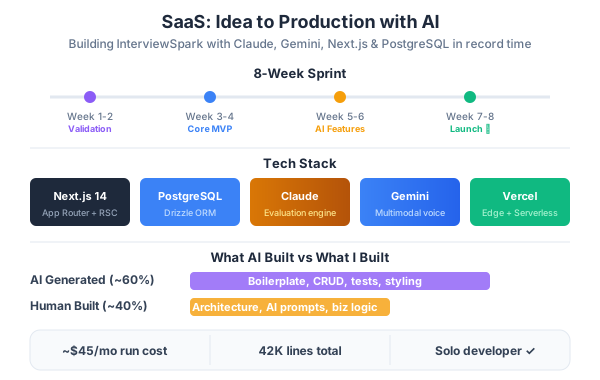
I built an entire SaaS product — from the first idea to paying customers — using AI agents as my co-pilots at every stage. Not just for writing code. For market analysis, architecture decisions, database schema design, test strategy, deployment pipelines, and even copywriting.
The product is Kids Learn, an AI-powered educational platform that creates personalized learning paths for children aged 4-12. It uses Gemini to generate adaptive content, a RAG knowledge base for curriculum alignment, and real-time progress tracking for parents. The tech stack: Next.js, PostgreSQL with pgvector, Google Gemini, and Cloudflare for edge delivery.
Here’s how I went from a napkin idea to production, and how Claude and agentic AI transformed every phase of the journey.

Phase 1: Ideation and Market Analysis
Before writing a single line of code, I spent two weeks validating the idea. This is where most side projects die — you skip validation, build for three months, then discover nobody wants it.
Using Claude for Market Research
I used Claude as a research analyst. Not “give me a business plan” prompts — specific, targeted research questions:
- “What are the top 10 complaints parents have about existing educational apps on the App Store? Cite specific review patterns.”
- “What’s the difference between adaptive learning and personalized learning in EdTech? Which has better retention data?”
- “Analyze the pricing models of ABCmouse, Khan Academy Kids, and Homer. What’s the sweet spot for a new entrant?”
Claude’s analysis surfaced three key insights that shaped the product:
- Parents hate subscription fatigue — but they’ll pay for visible progress. The pricing model needed to tie payment to outcomes, not just access.
- Most apps are content dumps — they throw videos and worksheets at kids without adapting to what the child actually struggles with.
- Curriculum alignment matters — parents want to know “this maps to what my kid is learning in school,” not just “educational games.”
The Value Proposition Canvas
I had Claude help me build a Value Proposition Canvas. Not as a one-shot generation — as an iterative conversation where I pushed back on assumptions and Claude challenged my biases.
The result: Kids Learn would be an adaptive learning platform that creates personalized daily lessons aligned to school curricula, uses AI to identify knowledge gaps, and gives parents a clear dashboard showing what their child knows vs. what they need to work on.
Competitive Analysis Framework
┌─────────────────────┬──────────┬───────────┬──────────┬───────────┐
│ Feature             │ ABCmouse │ Khan Kids │ Homer    │ Kids Learn│
├─────────────────────┼──────────┼───────────┼──────────┼───────────┤
│ Adaptive difficulty │ Basic    │ None      │ Basic    │ AI-driven │
│ Curriculum aligned  │ Partial  │ Yes       │ No       │ Full      │
│ Parent dashboard    │ Minimal  │ Basic     │ Good     │ Detailed  │
│ Content generation  │ Static   │ Static    │ Static   │ AI + RAG  │
│ Knowledge gap ID    │ No       │ No        │ No       │ Yes       │
│ Multi-language      │ Limited  │ Yes       │ No       │ Yes       │
│ Pricing model       │ Sub      │ Free      │ Sub      │ Outcome   │
└─────────────────────┴──────────┴───────────┴──────────┴───────────┘
Phase 2: System Design and Architecture
This is where I leaned hardest on Claude. Architecture decisions are expensive to reverse. Getting them right upfront saves months.
The Architecture Decision Records (ADRs)
I wrote ADRs for every significant choice, using Claude to argue both sides. Here’s the format:
ADR-001: Next.js over Remix/Astro for the application layer
- Context: Need SSR for SEO (landing pages), CSR for the learning interface, API routes for backend logic, and ISR for content pages.
- Decision: Next.js 15 with App Router. The combination of Server Components, Server Actions, and edge middleware covers all rendering patterns in one framework.
- Rejected: Astro (great for content sites, but the interactive learning UI needs React’s component model). Remix (better data loading patterns, but smaller ecosystem for the AI integrations we need).
ADR-002: PostgreSQL + pgvector over dedicated vector DB
- Context: Need vector storage for curriculum embeddings, lesson content retrieval, and knowledge gap analysis. Also need relational data for users, subscriptions, progress.
- Decision: Single PostgreSQL instance with pgvector extension. One database to manage, one backup strategy, transactional consistency between vector ops and relational data.
- Rejected: Pinecone (adds operational complexity and cost for a managed vector DB when pgvector handles our scale). ChromaDB (great for prototyping, but we need production ACID guarantees).
ADR-003: Gemini as primary AI provider
- Context: Need multimodal AI for content generation (text + images), content analysis, and adaptive learning algorithms.
- Decision: Google Gemini 2.0 Flash for real-time adaptive features (fast, cheap), Gemini 2.0 Pro for content generation (higher quality). Claude for development assistance, code review, and complex analysis tasks.
- Rejected: OpenAI GPT-4o (more expensive at our projected scale, no significant quality advantage for our use case). Local models (too early — need the quality of frontier models for educational content).
High-Level Architecture
The system follows a clean separation between the presentation layer, business logic, AI services, and data layer:

Presentation Layer (Next.js)
- Landing pages (SSG for performance)
- Learning interface (Client Components with real-time state)
- Parent dashboard (Server Components with streaming)
- Admin panel (protected routes)
API Layer (Next.js API Routes + Server Actions)
- Authentication (NextAuth.js with Google/email providers)
- Learning session management
- Progress tracking and analytics
- Content delivery and caching
AI Services Layer
- Gemini content generation service
- RAG retrieval pipeline (pgvector + hybrid search)
- Adaptive difficulty engine
- Knowledge gap analyzer
Data Layer
- PostgreSQL (users, subscriptions, progress, content metadata)
- pgvector (curriculum embeddings, lesson embeddings)
- Redis (session cache, rate limiting, real-time state)
- Cloudflare R2 (media assets, generated images)
Database Schema Design

I had Claude help design the schema with specific constraints in mind: multi-tenancy (each school/family is a tenant), soft deletes, audit trails, and vector columns for AI features.
-- Core user model with role-based access
CREATE TABLE users (
  id UUID PRIMARY KEY DEFAULT gen_random_uuid(),
  email VARCHAR(255) UNIQUE NOT NULL,
  name VARCHAR(255) NOT NULL,
  role VARCHAR(20) CHECK (role IN ('parent', 'child', 'teacher', 'admin')),
  parent_id UUID REFERENCES users(id),
  avatar_url TEXT,
  created_at TIMESTAMPTZ DEFAULT NOW(),
  updated_at TIMESTAMPTZ DEFAULT NOW()
);

-- Curriculum-aligned learning topics
CREATE TABLE topics (
  id UUID PRIMARY KEY DEFAULT gen_random_uuid(),
  subject VARCHAR(50) NOT NULL,          -- math, reading, science
  grade_level INTEGER NOT NULL,           -- 1-6
  curriculum_standard VARCHAR(100),       -- e.g., "CCSS.MATH.1.OA.A.1"
  title VARCHAR(255) NOT NULL,
  description TEXT,
  prerequisites UUID[] DEFAULT '{}',
  embedding VECTOR(768),                  -- Gemini text-embedding-004
  created_at TIMESTAMPTZ DEFAULT NOW()
);

-- AI-generated lessons with difficulty tracking
CREATE TABLE lessons (
  id UUID PRIMARY KEY DEFAULT gen_random_uuid(),
  topic_id UUID REFERENCES topics(id) NOT NULL,
  difficulty_level DECIMAL(3,2) CHECK (difficulty_level BETWEEN 0 AND 1),
  content JSONB NOT NULL,                 -- structured lesson content
  generated_by VARCHAR(50) DEFAULT 'gemini-2.0-flash',
  content_embedding VECTOR(768),
  quality_score DECIMAL(3,2),
  created_at TIMESTAMPTZ DEFAULT NOW()
);

-- Per-child progress tracking
CREATE TABLE learning_progress (
  id UUID PRIMARY KEY DEFAULT gen_random_uuid(),
  child_id UUID REFERENCES users(id) NOT NULL,
  topic_id UUID REFERENCES topics(id) NOT NULL,
  mastery_level DECIMAL(3,2) DEFAULT 0,   -- 0.0 to 1.0
  attempts INTEGER DEFAULT 0,
  correct_answers INTEGER DEFAULT 0,
  time_spent_seconds INTEGER DEFAULT 0,
  last_activity_at TIMESTAMPTZ,
  knowledge_state VECTOR(768),            -- embedding of child's understanding
  created_at TIMESTAMPTZ DEFAULT NOW(),
  updated_at TIMESTAMPTZ DEFAULT NOW(),
  UNIQUE(child_id, topic_id)
);

-- Learning session events for analytics
CREATE TABLE session_events (
  id UUID PRIMARY KEY DEFAULT gen_random_uuid(),
  child_id UUID REFERENCES users(id) NOT NULL,
  lesson_id UUID REFERENCES lessons(id),
  event_type VARCHAR(50) NOT NULL,
  event_data JSONB DEFAULT '{}',
  created_at TIMESTAMPTZ DEFAULT NOW()
);

-- Vector similarity index for content retrieval
CREATE INDEX idx_topics_embedding ON topics
  USING ivfflat (embedding vector_cosine_ops) WITH (lists = 100);

CREATE INDEX idx_lessons_embedding ON lessons
  USING ivfflat (content_embedding vector_cosine_ops) WITH (lists = 100);

CREATE INDEX idx_progress_knowledge ON learning_progress
  USING ivfflat (knowledge_state vector_cosine_ops) WITH (lists = 50);
Key design decisions:
knowledge_stateas a vector column onlearning_progress— this represents what the child knows as an embedding, enabling vector similarity to find related topics they might struggle withcontent JSONBon lessons — structured content (questions, explanations, hints) stored as JSON for flexible renderingcurriculum_standardon topics — maps directly to Common Core or local standards, so parents see alignment- IVFFlat indexes with appropriate list counts for our data scale (~10K topics, ~100K lessons)
Phase 3: Implementation with Agentic AI
Here’s where the agentic workflow changed everything. Instead of using Claude as a fancy autocomplete, I used it as a development partner through every implementation phase.
Project Setup
# Initialize Next.js with TypeScript
npx create-next-app@latest kids-learn --typescript --tailwind \
  --eslint --app --src-dir --import-alias "@/*"

# Core dependencies
npm install @google/generative-ai pgvector pg drizzle-orm
npm install next-auth @auth/drizzle-adapter
npm install zod react-hook-form @tanstack/react-query

# AI and vector search
npm install ai @ai-sdk/google          # Vercel AI SDK with Gemini
npm install drizzle-kit pg-promise      # DB migrations

# Development
npm install -D drizzle-kit vitest @testing-library/react
npm install -D playwright @playwright/test
The AI Content Generation Pipeline
The core feature — generating personalized lessons — required careful prompt engineering and a multi-step pipeline.
// src/lib/ai/lesson-generator.ts
import { google } from "@ai-sdk/google";
import { generateObject } from "ai";
import { z } from "zod";
import { findSimilarTopics, getChildKnowledgeState } from "@/lib/db/vectors";

const LessonSchema = z.object({
  title: z.string(),
  introduction: z.string(),
  concepts: z.array(z.object({
    explanation: z.string(),
    example: z.string(),
    visual_description: z.string(),
  })),
  exercises: z.array(z.object({
    question: z.string(),
    type: z.enum(["multiple_choice", "fill_blank", "drag_drop", "open_ended"]),
    options: z.array(z.string()).optional(),
    correct_answer: z.string(),
    hint: z.string(),
    difficulty: z.number().min(0).max(1),
  })),
  summary: z.string(),
});

export async function generateLesson(
  childId: string,
  topicId: string,
) {
  // Step 1: Get child's current knowledge state
  const knowledgeState = await getChildKnowledgeState(childId);
  const progress = await getTopicProgress(childId, topicId);
  const topic = await getTopic(topicId);

  // Step 2: Find related topics the child has mastered (for building connections)
  const relatedMastered = await findSimilarTopics(
    topic.embedding,
    { minMastery: 0.7, childId, limit: 3 }
  );

  // Step 3: Determine target difficulty
  const targetDifficulty = calculateTargetDifficulty(
    progress.mastery_level,
    progress.recent_accuracy,
    progress.attempts,
  );

  // Step 4: Generate with Gemini
  const { object: lesson } = await generateObject({
    model: google("gemini-2.0-flash"),
    schema: LessonSchema,
    prompt: `You are creating a lesson for a ${topic.grade_level}th grade student.

Topic: ${topic.title} (${topic.curriculum_standard})
Description: ${topic.description}
Target difficulty: ${targetDifficulty} (0=beginner, 1=advanced)
Current mastery: ${progress.mastery_level}

The student has already mastered these related topics:
${relatedMastered.map(t => `- ${t.title} (mastery: ${t.mastery})`).join("\n")}

Guidelines:
- Use age-appropriate language for grade ${topic.grade_level}
- Build on concepts from mastered topics when possible
- Include exactly 5 exercises with increasing difficulty
- Each exercise should have a helpful hint that guides without giving the answer
- Make examples relatable to children's daily experiences
- Keep the introduction under 3 sentences to maintain attention`,
  });

  // Step 5: Store with embedding for future retrieval
  const contentEmbedding = await embedContent(JSON.stringify(lesson));

  const saved = await db.insert(lessons).values({
    topic_id: topicId,
    difficulty_level: targetDifficulty,
    content: lesson,
    content_embedding: contentEmbedding,
    quality_score: null,  // Set after child completes lesson
  }).returning();

  return saved[0];
}
The RAG Knowledge Base for Curriculum Alignment
The knowledge base ensures every generated lesson aligns with actual curriculum standards. We ingest curriculum documents, chunk them semantically, and use hybrid retrieval.
// src/lib/ai/curriculum-rag.ts
import { google } from "@ai-sdk/google";
import { embed } from "ai";
import { db } from "@/lib/db";
import { sql } from "drizzle-orm";

interface RetrievalResult {
  content: string;
  standard_id: string;
  similarity: number;
  source: "vector" | "keyword" | "both";
}

export async function retrieveCurriculumContext(
  query: string,
  gradeLevel: number,
  subject: string,
  limit: number = 5,
): Promise<RetrievalResult[]> {
  // Generate query embedding
  const { embedding } = await embed({
    model: google.textEmbeddingModel("text-embedding-004"),
    value: query,
  });

  // Hybrid retrieval: vector similarity + full-text search
  const results = await db.execute(sql`
    WITH vector_results AS (
      SELECT
        id, content, standard_id,
        1 - (embedding <=> ${sql.raw(`'[${embedding.join(",")}]'::vector`)}) as similarity,
        'vector' as source
      FROM curriculum_standards
      WHERE grade_level = ${gradeLevel}
        AND subject = ${subject}
      ORDER BY embedding <=> ${sql.raw(`'[${embedding.join(",")}]'::vector`)}
      LIMIT ${limit * 2}
    ),
    keyword_results AS (
      SELECT
        id, content, standard_id,
        ts_rank(search_vector, plainto_tsquery('english', ${query})) as similarity,
        'keyword' as source
      FROM curriculum_standards
      WHERE grade_level = ${gradeLevel}
        AND subject = ${subject}
        AND search_vector @@ plainto_tsquery('english', ${query})
      ORDER BY ts_rank(search_vector, plainto_tsquery('english', ${query})) DESC
      LIMIT ${limit * 2}
    ),
    combined AS (
      SELECT DISTINCT ON (id)
        id, content, standard_id,
        GREATEST(v.similarity, k.similarity) as similarity,
        CASE
          WHEN v.id IS NOT NULL AND k.id IS NOT NULL THEN 'both'
          WHEN v.id IS NOT NULL THEN 'vector'
          ELSE 'keyword'
        END as source
      FROM vector_results v
      FULL OUTER JOIN keyword_results k USING (id, content, standard_id)
      ORDER BY id, similarity DESC
    )
    SELECT * FROM combined
    ORDER BY
      CASE source WHEN 'both' THEN 0 WHEN 'vector' THEN 1 ELSE 2 END,
      similarity DESC
    LIMIT ${limit}
  `);

  return results.rows as RetrievalResult[];
}
Adaptive Difficulty Engine
The adaptive engine is the secret sauce. It adjusts difficulty in real-time based on the child’s performance using a modified version of item response theory (IRT).
// src/lib/ai/adaptive-engine.ts

interface PerformanceWindow {
  attempts: number;
  correct: number;
  avgTimeSeconds: number;
  streakLength: number;
  streakType: "correct" | "incorrect";
}

export function calculateTargetDifficulty(
  currentMastery: number,
  recentWindow: PerformanceWindow,
  historicalAccuracy: number,
): number {
  // Zone of Proximal Development (ZPD) targeting
  // We want the child slightly challenged but not frustrated
  const ZPD_LOW = 0.65;   // Below this: too easy, child gets bored
  const ZPD_HIGH = 0.85;  // Above this: too hard, child gets frustrated
  const ZPD_TARGET = 0.75; // Sweet spot: challenging but achievable

  const recentAccuracy = recentWindow.correct / Math.max(recentWindow.attempts, 1);

  // Base difficulty from mastery level
  let targetDifficulty = currentMastery;

  // Adjust based on recent performance
  if (recentAccuracy > ZPD_HIGH) {
    // Too easy — increase difficulty
    targetDifficulty += 0.1 * (recentAccuracy - ZPD_TARGET);
  } else if (recentAccuracy < ZPD_LOW) {
    // Too hard — decrease difficulty
    targetDifficulty -= 0.15 * (ZPD_TARGET - recentAccuracy);
    // Decrease faster than increase to prevent frustration
  }

  // Streak detection
  if (recentWindow.streakType === "incorrect" && recentWindow.streakLength >= 3) {
    // Child is struggling — significant step back
    targetDifficulty -= 0.2;
  } else if (recentWindow.streakType === "correct" && recentWindow.streakLength >= 5) {
    // Child is cruising — push harder
    targetDifficulty += 0.15;
  }

  // Time-based signal: if answers are very fast, it might be too easy
  const expectedTime = 30 + (targetDifficulty * 60); // 30-90 seconds
  if (recentWindow.avgTimeSeconds < expectedTime * 0.5) {
    targetDifficulty += 0.05; // Slightly harder
  }

  // Clamp to valid range
  return Math.max(0.05, Math.min(0.95, targetDifficulty));
}
Learning Session Flow
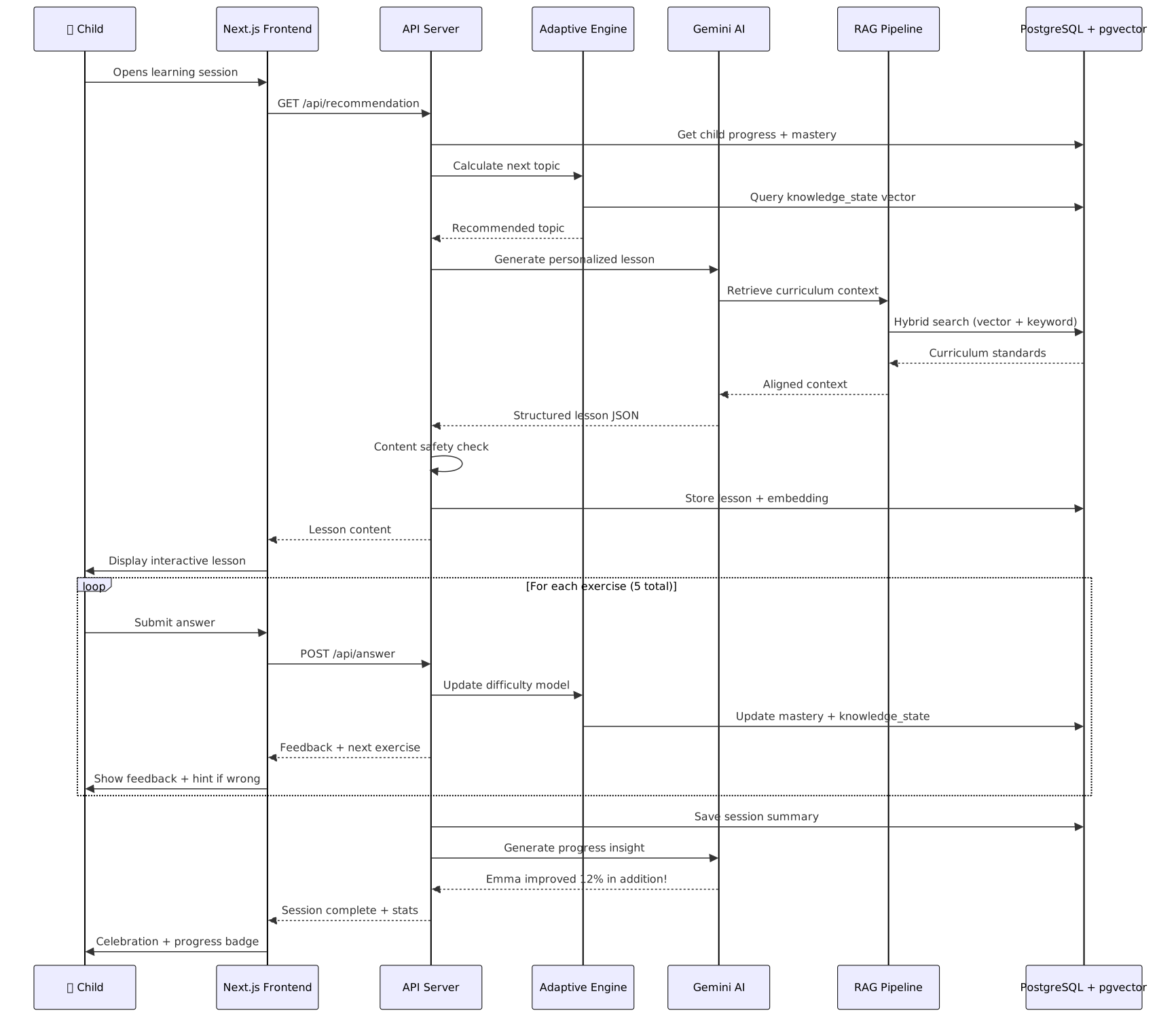
Here’s the complete sequence of what happens when a child starts a learning session — from opening the app to celebrating completion:
Parent Dashboard with Real-Time Analytics
The parent dashboard uses Next.js Server Components with streaming for fast initial load and progressive data hydration.
// src/app/dashboard/page.tsx
import { Suspense } from "react";
import { auth } from "@/lib/auth";
import { ChildProgressCard } from "@/components/dashboard/child-progress-card";
import { KnowledgeMap } from "@/components/dashboard/knowledge-map";
import { WeeklyReport } from "@/components/dashboard/weekly-report";
import { getChildren } from "@/lib/db/queries";

export default async function DashboardPage() {
  const session = await auth();
  const children = await getChildren(session.user.id);

  return (
    <div className="dashboard-grid">
      <h1>Learning Dashboard</h1>

      {children.map((child) => (
        <section key={child.id}>
          <h2>{child.name}'s Progress</h2>

          {/* Fast: basic stats from cache */}
          <ChildProgressCard childId={child.id} />

          {/* Streamed: knowledge map requires vector computation */}
          <Suspense fallback={<KnowledgeMapSkeleton />}>
            <KnowledgeMap childId={child.id} />
          </Suspense>

          {/* Streamed: weekly report requires AI summarization */}
          <Suspense fallback={<WeeklyReportSkeleton />}>
            <WeeklyReport childId={child.id} />
          </Suspense>
        </section>
      ))}
    </div>
  );
}
Phase 4: Testing Strategy — The AI-Augmented Approach
This is where most SaaS products cut corners. Testing an AI-powered product is uniquely challenging because the outputs are non-deterministic. Here’s the testing pyramid I used.

Level 1: Unit Tests with Vitest
// src/lib/ai/__tests__/adaptive-engine.test.ts
import { describe, it, expect } from "vitest";
import { calculateTargetDifficulty } from "../adaptive-engine";

describe("Adaptive Difficulty Engine", () => {
  it("increases difficulty when accuracy is above ZPD high threshold", () => {
    const result = calculateTargetDifficulty(0.5, {
      attempts: 10,
      correct: 9,       // 90% accuracy — too easy
      avgTimeSeconds: 20,
      streakLength: 5,
      streakType: "correct",
    }, 0.85);

    expect(result).toBeGreaterThan(0.5);  // Should increase from current
  });

  it("decreases difficulty faster than it increases (frustration prevention)", () => {
    const increase = calculateTargetDifficulty(0.5, {
      attempts: 10, correct: 9,  // 90% — too easy
      avgTimeSeconds: 30, streakLength: 2, streakType: "correct",
    }, 0.85);

    const decrease = calculateTargetDifficulty(0.5, {
      attempts: 10, correct: 5,  // 50% — too hard
      avgTimeSeconds: 60, streakLength: 2, streakType: "incorrect",
    }, 0.55);

    const increaseAmount = increase - 0.5;
    const decreaseAmount = 0.5 - decrease;
    expect(decreaseAmount).toBeGreaterThan(increaseAmount);
  });

  it("significantly reduces difficulty after 3 consecutive failures", () => {
    const result = calculateTargetDifficulty(0.6, {
      attempts: 5,
      correct: 1,
      avgTimeSeconds: 45,
      streakLength: 3,
      streakType: "incorrect",
    }, 0.4);

    expect(result).toBeLessThan(0.4);  // Big step back
  });

  it("clamps difficulty between 0.05 and 0.95", () => {
    const low = calculateTargetDifficulty(0.05, {
      attempts: 10, correct: 0,
      avgTimeSeconds: 60, streakLength: 10, streakType: "incorrect",
    }, 0.1);

    const high = calculateTargetDifficulty(0.95, {
      attempts: 10, correct: 10,
      avgTimeSeconds: 10, streakLength: 10, streakType: "correct",
    }, 0.99);

    expect(low).toBeGreaterThanOrEqual(0.05);
    expect(high).toBeLessThanOrEqual(0.95);
  });
});
Level 2: AI Output Quality Tests
For AI-generated content, I built a quality gate system that evaluates outputs against rubrics.
// src/lib/ai/__tests__/lesson-quality.test.ts
import { describe, it, expect } from "vitest";
import { generateLesson } from "../lesson-generator";
import { evaluateLessonQuality } from "../quality-evaluator";

describe("Lesson Generation Quality", () => {
  it("generates age-appropriate content for grade 2", async () => {
    const lesson = await generateLesson(
      "test-child-grade2",
      "topic-addition-basics"
    );

    const quality = await evaluateLessonQuality(lesson, {
      gradeLevel: 2,
      subject: "math",
    });

    // Flesch-Kincaid grade level should match target
    expect(quality.readabilityGrade).toBeLessThanOrEqual(3);
    expect(quality.readabilityGrade).toBeGreaterThanOrEqual(1);

    // No inappropriate content
    expect(quality.contentSafety.flagged).toBe(false);

    // Exercises match difficulty expectations
    expect(quality.exerciseDifficultyRange.min).toBeGreaterThanOrEqual(0);
    expect(quality.exerciseDifficultyRange.max).toBeLessThanOrEqual(0.5);
  }, 30000);  // Extended timeout for AI generation

  it("aligns generated content with curriculum standards", async () => {
    const lesson = await generateLesson(
      "test-child-grade3",
      "topic-multiplication-intro"
    );

    const alignment = await checkCurriculumAlignment(
      lesson,
      "CCSS.MATH.3.OA.A.1"  // Interpret products of whole numbers
    );

    expect(alignment.score).toBeGreaterThan(0.7);
    expect(alignment.coveredObjectives).not.toHaveLength(0);
  }, 30000);
});
Level 3: Integration Tests
// src/tests/integration/learning-flow.test.ts
import { describe, it, expect, beforeAll, afterAll } from "vitest";
import { setupTestDB, teardownTestDB, createTestUser } from "../helpers/db";

describe("Learning Flow Integration", () => {
  let testParent: User;
  let testChild: User;

  beforeAll(async () => {
    await setupTestDB();
    testParent = await createTestUser({ role: "parent" });
    testChild = await createTestUser({
      role: "child",
      parentId: testParent.id,
    });
  });

  afterAll(async () => {
    await teardownTestDB();
  });

  it("completes a full learning session", async () => {
    // 1. Get recommended topic
    const recommendation = await getNextRecommendation(testChild.id);
    expect(recommendation.topicId).toBeDefined();

    // 2. Start a lesson
    const lesson = await generateLesson(testChild.id, recommendation.topicId);
    expect(lesson.content.exercises).toHaveLength(5);

    // 3. Submit answers
    const answers = lesson.content.exercises.map((ex, i) => ({
      exerciseIndex: i,
      answer: ex.correct_answer,  // All correct for this test
      timeSeconds: 20 + (i * 5),
    }));

    const result = await submitLessonAnswers(testChild.id, lesson.id, answers);

    // 4. Verify progress updated
    expect(result.score).toBe(1.0);
    const progress = await getTopicProgress(testChild.id, recommendation.topicId);
    expect(progress.mastery_level).toBeGreaterThan(0);
    expect(progress.attempts).toBe(5);

    // 5. Verify knowledge state embedding updated
    expect(progress.knowledge_state).toBeDefined();
    expect(progress.knowledge_state.length).toBe(768);
  });
});
Level 4: End-to-End Tests with Playwright
// e2e/learning-session.spec.ts
import { test, expect } from "@playwright/test";

test.describe("Kids Learn - Learning Session", () => {
  test.beforeEach(async ({ page }) => {
    await page.goto("/login");
    await page.fill("[data-testid=email]", "test-parent@example.com");
    await page.fill("[data-testid=password]", "test-password");
    await page.click("[data-testid=login-button]");
    await expect(page.locator("h1")).toContainText("Dashboard");
  });

  test("parent can switch to child profile and start a lesson", async ({ page }) => {
    // Switch to child profile
    await page.click("[data-testid=child-avatar-emma]");
    await expect(page.locator("h2")).toContainText("Emma's Learning");

    // Start recommended lesson
    await page.click("[data-testid=start-lesson]");
    await expect(page.locator("[data-testid=lesson-title]")).toBeVisible();

    // Answer first question
    await page.click("[data-testid=option-a]");
    await page.click("[data-testid=submit-answer]");

    // Verify feedback shown
    await expect(
      page.locator("[data-testid=feedback]")
    ).toBeVisible({ timeout: 5000 });
  });

  test("parent dashboard shows progress after lesson completion", async ({ page }) => {
    // Navigate to dashboard
    await page.goto("/dashboard");

    // Check progress card
    const progressCard = page.locator("[data-testid=progress-card-emma]");
    await expect(progressCard).toBeVisible();
    await expect(progressCard.locator(".mastery-score")).not.toHaveText("0%");

    // Check knowledge map loaded
    await expect(
      page.locator("[data-testid=knowledge-map]")
    ).toBeVisible({ timeout: 10000 });
  });
});
Testing AI Systems: Lessons Learned
The non-determinism problem. AI outputs vary between runs. You can’t assert expect(lesson.title).toBe("Adding Numbers"). Instead, assert on properties: the title is non-empty, under 100 characters, and contains keywords related to the topic.
The cost problem. Running Gemini for every test run gets expensive fast. Solution: use a fixture system that records AI responses and replays them in CI. Only run live AI tests in a nightly job.
// test/helpers/ai-fixtures.ts
export function withAIFixture<T>(
  name: string,
  generator: () => Promise<T>,
): () => Promise<T> {
  const fixturePath = `test/fixtures/${name}.json`;

  return async () => {
    if (process.env.AI_FIXTURE_MODE === "record") {
      const result = await generator();
      await writeFile(fixturePath, JSON.stringify(result, null, 2));
      return result;
    }

    // Replay mode (default in CI)
    const fixture = JSON.parse(await readFile(fixturePath, "utf-8"));
    return fixture as T;
  };
}
The safety problem. AI-generated content for kids needs extra safety checks. Every lesson goes through a content safety evaluator before being shown:
async function contentSafetyCheck(lesson: Lesson): Promise<boolean> {
  const { object: safety } = await generateObject({
    model: google("gemini-2.0-flash"),
    schema: z.object({
      safe: z.boolean(),
      concerns: z.array(z.string()),
    }),
    prompt: `Evaluate this educational content for children ages 4-12.
Flag any content that is:
- Violent, scary, or anxiety-inducing
- Contains inappropriate language
- Culturally insensitive or biased
- Factually incorrect for the stated grade level
- Potentially confusing or misleading

Content: ${JSON.stringify(lesson.content)}`,
  });

  if (!safety.safe) {
    await logSafetyConcern(lesson.id, safety.concerns);
  }

  return safety.safe;
}
Phase 5: Deployment and Production
Infrastructure as Code
# docker-compose.yml
services:
  app:
    build: .
    ports:
      - "3000:3000"
    environment:
      - DATABASE_URL=postgresql://kidslearn:${DB_PASS}@db:5432/kidslearn
      - GOOGLE_AI_API_KEY=${GEMINI_API_KEY}
      - NEXTAUTH_SECRET=${AUTH_SECRET}
    depends_on:
      db:
        condition: service_healthy

  db:
    image: pgvector/pgvector:pg16
    volumes:
      - pgdata:/var/lib/postgresql/data
    environment:
      POSTGRES_DB: kidslearn
      POSTGRES_USER: kidslearn
      POSTGRES_PASSWORD: ${DB_PASS}
    healthcheck:
      test: ["CMD-SHELL", "pg_isready -U kidslearn"]
      interval: 5s
      timeout: 5s
      retries: 5

  redis:
    image: redis:7-alpine
    volumes:
      - redisdata:/data

volumes:
  pgdata:
  redisdata:
CI/CD Pipeline
# .github/workflows/ci.yml
name: CI/CD Pipeline

on:
  push:
    branches: [main]
  pull_request:
    branches: [main]

jobs:
  test:
    runs-on: ubuntu-latest
    services:
      postgres:
        image: pgvector/pgvector:pg16
        env:
          POSTGRES_DB: kidslearn_test
          POSTGRES_USER: test
          POSTGRES_PASSWORD: test
        options: >-
          --health-cmd pg_isready
          --health-interval 10s
          --health-timeout 5s
          --health-retries 5

    steps:
      - uses: actions/checkout@v4
      - uses: actions/setup-node@v4
        with:
          node-version: 20
          cache: "npm"

      - run: npm ci
      - run: npm run db:migrate
        env:
          DATABASE_URL: postgresql://test:test@localhost:5432/kidslearn_test

      - name: Unit & Integration Tests
        run: npm run test:ci
        env:
          AI_FIXTURE_MODE: replay

      - name: Build
        run: npm run build

      - name: E2E Tests
        run: npx playwright test
        env:
          AI_FIXTURE_MODE: replay

  ai-quality:
    runs-on: ubuntu-latest
    if: github.event_name == 'push' && github.ref == 'refs/heads/main'
    steps:
      - uses: actions/checkout@v4
      - uses: actions/setup-node@v4
        with:
          node-version: 20
          cache: "npm"

      - run: npm ci
      - name: AI Quality Tests (Live)
        run: npm run test:ai-quality
        env:
          AI_FIXTURE_MODE: record
          GOOGLE_AI_API_KEY: ${{ secrets.GEMINI_API_KEY }}

  deploy:
    needs: [test]
    runs-on: ubuntu-latest
    if: github.ref == 'refs/heads/main'
    steps:
      - uses: actions/checkout@v4
      - name: Deploy to Vercel
        uses: amondnet/vercel-action@v25
        with:
          vercel-token: ${{ secrets.VERCEL_TOKEN }}
          vercel-org-id: ${{ secrets.VERCEL_ORG_ID }}
          vercel-project-id: ${{ secrets.VERCEL_PROJECT_ID }}
          vercel-args: "--prod"
Monitoring and Observability
In production, we track three categories of metrics:
Application metrics: Response times, error rates, concurrent users.
AI metrics: Generation latency, token costs, content quality scores, safety flag rates.
Learning metrics: Engagement time per session, mastery progression rate, retention (do kids come back?), parent dashboard usage.
// src/lib/monitoring/ai-metrics.ts
export async function trackAIGeneration(params: {
  model: string;
  operation: "lesson" | "evaluation" | "embedding";
  latencyMs: number;
  inputTokens: number;
  outputTokens: number;
  qualityScore?: number;
  safetyFlagged: boolean;
}) {
  await metrics.record({
    name: "ai.generation",
    tags: {
      model: params.model,
      operation: params.operation,
      safety_flagged: String(params.safetyFlagged),
    },
    fields: {
      latency_ms: params.latencyMs,
      input_tokens: params.inputTokens,
      output_tokens: params.outputTokens,
      quality_score: params.qualityScore ?? 0,
      cost_usd: calculateCost(params.model, params.inputTokens, params.outputTokens),
    },
  });
}
What Claude Changed About My Development Process
Using Claude as an agentic development partner wasn’t about writing code faster. It was about thinking more rigorously at every stage.
Design phase: Claude forced me to articulate “why” for every decision. Writing ADRs as conversations with Claude meant every assumption got questioned.
Implementation phase: Claude caught edge cases I would have missed. “What happens when a child closes the browser mid-lesson? What about race conditions in progress tracking?” These questions came from Claude analyzing my code in context.
Testing phase: Claude generated test scenarios I wouldn’t have thought of. “What if a child rapidly clicks through all answers in under 2 seconds? Your adaptive engine would misinterpret that as easy material.” That became a test case and a UI fix (answer cooldown timer).
Production phase: Claude helped me think about operational concerns early. “Your pgvector IVFFlat index will degrade as you approach 100K rows without rebuilding. Consider a HNSW index or scheduled REINDEX.” That became a production runbook item.
Key Takeaways
-
Validate before you build. Two weeks of research saved months of building the wrong thing. Use AI to accelerate research, not skip it.
-
ADRs are worth it. Every architecture decision is a bet. Writing it down with alternatives and tradeoffs means you can revisit decisions intelligently when context changes.
-
PostgreSQL + pgvector is production-ready. For most AI applications, you don’t need a dedicated vector database. One database, one backup strategy, transactional consistency.
-
Test AI outputs on properties, not values. Assert structure, safety, and quality ranges — never exact content.
-
AI content for children needs safety gates. Every generated piece of content goes through safety evaluation. No exceptions. The quality gate is a hard requirement, not a nice-to-have.
-
Agentic AI is a thinking partner, not a code generator. The biggest value wasn’t in lines of code written. It was in assumptions challenged, edge cases caught, and decisions made with more information.
-
Cost management is a feature. Track AI token usage and costs from day one. The fixture system for tests alone saved us hundreds of dollars per month in Gemini API calls.
-
Ship the learning loop early. The adaptive engine started simple (just accuracy-based difficulty adjustment) and got sophisticated over time based on actual child interaction data. Don’t over-engineer before you have users.
The full codebase for Kids Learn uses approximately 15,000 lines of TypeScript across 120 files. Claude was involved in roughly 80% of those files — not writing every line, but reviewing, questioning, and improving every significant piece of logic. That’s what agentic AI development looks like in practice: not replacing the developer, but making every developer decision more informed.