There has never been a cheaper time to build.
In 2010, launching a startup meant renting servers ($200+/mo), hiring a DevOps person ($8K/mo), buying SSL certificates ($50/yr), setting up email infrastructure ($100/mo), and praying your app didn’t crash at 3 AM.
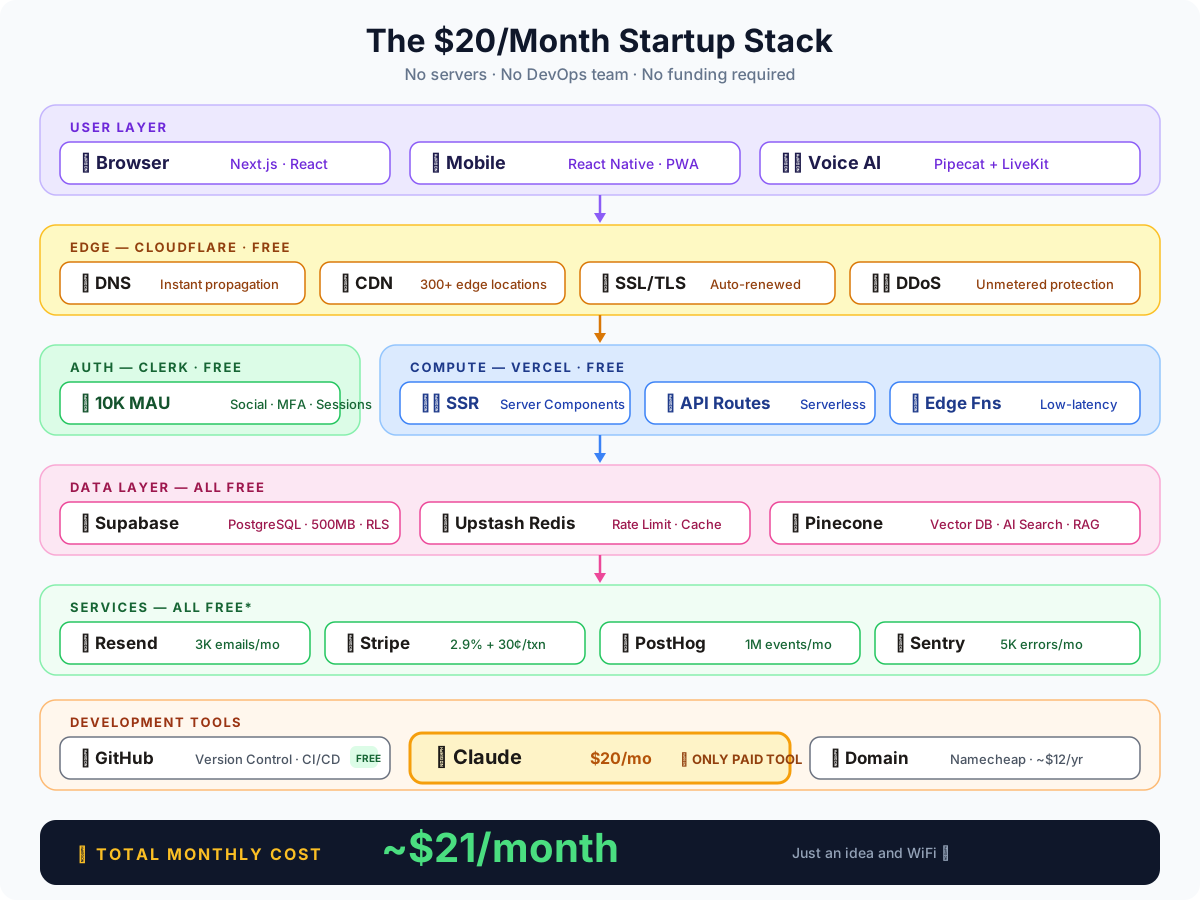
In 2026, you can build a production-grade, full-stack application — with authentication, database, payments, analytics, error tracking, AI features, and global CDN — for roughly $20 per month.
Not a toy. Not a prototype. A real, scalable product that can serve your first 10,000 users.
Let me show you exactly how.
The $20/Month Stack — Overview
Here’s the complete tech stack, with pricing:
| Tool | Purpose | Cost |
|---|---|---|
| GitHub | Version control + CI/CD | Free |
| Claude | AI coding assistant | $20/mo |
| Namecheap | Domain name | ~$12/yr ($1/mo) |
| Cloudflare | DNS + CDN + DDoS protection | Free |
| Vercel | Frontend deployment | Free |
| Clerk | Authentication + user management | Free |
| Supabase | Database + backend + storage | Free |
| Upstash | Redis + rate limiting | Free |
| Pinecone | Vector database (AI features) | Free |
| Resend | Transactional emails | Free |
| Stripe | Payments | 2.9% + 30¢ per txn |
| PostHog | Product analytics | Free |
| Sentry | Error tracking + monitoring | Free |
| Pipecat + LiveKit | Real-time voice/video AI | Free |
Total fixed cost: ~$21/month (Claude + domain amortized)
No servers to manage. No DevOps team. No venture capital required.
Let’s break down each tool and why it matters.
1. GitHub — Your Foundation (Free)
What it does: Version control, code hosting, CI/CD pipelines, project management, code review.
Free tier includes:
- Unlimited public and private repositories
- 2,000 CI/CD minutes per month (GitHub Actions)
- 500 MB of package storage
- Built-in project boards, issues, and discussions
Why it matters: GitHub is the backbone of modern development. Every other tool in this stack integrates with it. Your code lives here, your deployments trigger from here, and your collaboration happens here.
Pro tip: Use GitHub Actions for automated testing, linting, and deployment. A basic CI pipeline costs $0 and catches bugs before they hit production.
# .github/workflows/ci.yml — Free CI/CD
name: CI
on: [push, pull_request]
jobs:
  test:
    runs-on: ubuntu-latest
    steps:
      - uses: actions/checkout@v4
      - uses: actions/setup-node@v4
      - run: npm ci && npm test
2. Claude — Your AI Coding Partner ($20/mo)
What it does: AI-assisted coding, code review, debugging, architecture design, documentation, and problem-solving.
This is the only paid tool in the stack — and it’s worth every penny.
Claude isn’t just autocomplete. With Claude Code and the API, you get:
- Whole-project understanding: Claude reads your entire codebase and understands the relationships between files
- Multi-file refactoring: “Rename this component across all 47 files” — done in seconds
- Architecture advice: “Should I use server components or client components for this page?” — detailed, context-aware answers
- Bug detective: Paste an error, get a root cause analysis with fix
- Test generation: “Write tests for this auth middleware” — comprehensive test suites
- Documentation: “Document this API endpoint” — instant, accurate docs
The ROI calculation: Claude saves 2-4 hours per day for most developers. At $20/month, that’s roughly $0.33 per hour of saved time. A junior developer costs $30+/hour. The math is obvious.
Real workflow example:
You: "I need a rate-limited API endpoint that checks user credits
      before calling the Gemini API. Use Upstash Redis for rate
      limiting and Supabase for the credits check."

Claude: [Generates complete endpoint with error handling,
         rate limiting middleware, credit deduction logic,
         TypeScript types, and edge cases covered]
This is the one investment that 10x’s everything else on this list.
3. Namecheap — Your Domain (~$12/year)
What it does: Domain registration and management.
Why Namecheap:
.comdomains from $9.98/year- Free WhoisGuard privacy protection
- Clean, no-upsell interface
- Easy DNS management (though we’ll use Cloudflare for DNS)
Pro tip: Buy your domain early. Even if you’re still building, a good domain gives you professional email, brand credibility from day one, and SEO head start (domain age matters).
Alternatives: Cloudflare Registrar (at-cost pricing, often cheaper), Porkbun, Google Domains.
4. Cloudflare — DNS + CDN + Security (Free)
What it does: DNS management, CDN, DDoS protection, SSL certificates, email routing, web analytics.
Free tier includes:
- Unlimited DNS queries
- Global CDN with 300+ edge locations
- Free SSL/TLS certificates (auto-renewed)
- DDoS protection (unmetered)
- 5 Page Rules
- Email routing (forward emails to Gmail/your inbox)
- Web Analytics (privacy-focused, no cookies)
- Cloudflare Workers (100,000 requests/day free)
Why it matters: Cloudflare sits in front of your entire application. Every request goes through their network, which means your site loads faster, you’re protected from DDoS attacks, SSL is handled automatically, and DNS propagation is near-instant.
The hidden gem: Cloudflare Email Routing. Point hello@yourdomain.com to your Gmail for free. No need to pay for Google Workspace on day one.
yourdomain.com → Cloudflare DNS → Vercel (app)
                               → Email Routing → Gmail
                               → CDN (static assets)
5. Vercel — Deploy in Seconds (Free)
What it does: Frontend deployment, serverless functions, edge computing, preview deployments.
Free tier includes:
- Unlimited deployments
- 100 GB bandwidth per month
- Serverless functions (100 GB-hours)
- Edge functions
- Preview deployments for every PR
- Custom domains with SSL
Why it matters: Push to GitHub → Vercel builds and deploys automatically. Every pull request gets a unique preview URL. Your team can review changes before they go live.
The developer experience is unmatched:
# That's it. That's the deployment.
git push origin main
# → Vercel detects the push
# → Builds your Next.js/Astro/Remix app
# → Deploys to global edge network
# → Live in ~30 seconds
Free tier is generous for startups: 100 GB of bandwidth handles roughly 500K-1M page views per month. That’s more than enough to find product-market fit.
Alternatives: Netlify (similar free tier), Railway (more backend-focused), Render.
6. Clerk — Auth Without the Pain (Free)
What it does: User authentication, session management, multi-factor auth, social logins, user profiles, organizations.
Free tier includes:
- 10,000 monthly active users
- Email + password authentication
- Social logins (Google, GitHub, Apple, etc.)
- Multi-factor authentication
- Pre-built UI components (sign-in, sign-up, user profile)
- Session management and webhooks
Why it matters: Authentication is the #1 thing you should never build yourself. It’s complex, security-critical, and thankless work. Clerk handles password hashing, session tokens, OAuth flows, email verification, brute-force protection, and GDPR compliance.
// middleware.ts — Protect your entire app in 2 lines
import { clerkMiddleware } from '@clerk/nextjs/server';
export default clerkMiddleware();

// Any page — Get the current user
import { currentUser } from '@clerk/nextjs/server';
const user = await currentUser();
10,000 MAUs free means you don’t pay until you have real traction. By then, you should have revenue.
Alternatives: Auth.js (free, self-hosted), Supabase Auth (free, simpler), Firebase Auth (free).
7. Supabase — Your Backend in a Box (Free)
What it does: PostgreSQL database, authentication, storage, real-time subscriptions, edge functions, vector embeddings.
Free tier includes:
- 500 MB database storage
- 1 GB file storage
- 2 GB bandwidth
- 50,000 monthly active users (auth)
- 500K edge function invocations
- Real-time subscriptions
- pgvector for AI embeddings
Why it matters: Supabase gives you a full PostgreSQL database with a REST API, real-time capabilities, and file storage — all in one service.
The power of PostgreSQL vs Firebase (NoSQL):
- Relational data modeling with JOINs
- Full-text search
- Vector search with pgvector (for AI features)
- Row-level security (built-in authorization)
-- Create a table with Row Level Security
CREATE TABLE posts (
  id uuid DEFAULT gen_random_uuid() PRIMARY KEY,
  user_id uuid REFERENCES auth.users NOT NULL,
  title text NOT NULL,
  content text,
  created_at timestamptz DEFAULT now()
);

-- Only authors can see their own posts
ALTER TABLE posts ENABLE ROW LEVEL SECURITY;
CREATE POLICY "Users can CRUD own posts"
  ON posts FOR ALL
  USING (auth.uid() = user_id);
500 MB sounds small but a typical B2C app with 10K users fits comfortably in 200-300 MB.
Alternatives: PlanetScale (MySQL), Neon (PostgreSQL), Firebase (NoSQL) — all have free tiers.
8. Upstash — Serverless Redis (Free)
What it does: Redis database, rate limiting, message queues, scheduled tasks — all serverless.
Free tier includes:
- 10,000 commands per day
- 256 MB storage
- REST API (works in serverless/edge environments)
- Global replication
Why it matters: Redis is essential for rate limiting, caching, session storage, and queue management.
The killer feature: Upstash works over HTTP. Traditional Redis requires persistent TCP connections, which don’t work in serverless environments. Upstash’s REST API works everywhere.
// Rate limiting — 5 lines of code
import { Ratelimit } from '@upstash/ratelimit';
import { Redis } from '@upstash/redis';

const ratelimit = new Ratelimit({
  redis: Redis.fromEnv(),
  limiter: Ratelimit.slidingWindow(10, '10 s'),
});

const { success } = await ratelimit.limit(userId);
if (!success) return new Response('Too many requests', { status: 429 });
9. Pinecone — Vector Database for AI (Free)
What it does: Store and query vector embeddings for AI-powered search, recommendations, and RAG (Retrieval-Augmented Generation).
Free tier includes:
- 1 serverless index
- 2 GB storage (~1M vectors)
- Unlimited reads and writes (with throughput limits)
- Metadata filtering
Why it matters: If your product has any AI features — semantic search, chatbots, recommendations — you need a vector database.
// Semantic search — find similar content
const results = await pinecone.index('knowledge').query({
  vector: queryEmbedding,
  topK: 5,
  filter: { ageGroup: '7-10' },
});
Alternatives: Supabase pgvector (free, built-in), Weaviate, Qdrant (free self-hosted).
10. Resend — Email That Actually Works (Free)
What it does: Transactional email API — welcome emails, password resets, notifications, receipts.
Free tier includes:
- 3,000 emails per month
- 1 custom domain
- Email analytics (opens, clicks, bounces)
- React email templates
- Webhooks
Why it matters: Resend comes from the team that built React Email. Write templates as React components:
import { Html, Body, Text, Button } from '@react-email/components';

export function WelcomeEmail({ name }: { name: string }) {
  return (
    <Html>
      <Body style={{ fontFamily: 'sans-serif' }}>
        <Text>Hey {name}!</Text>
        <Button href="https://app.example.com/onboarding"
                style={{ background: '#6366f1', color: 'white', padding: '12px 24px' }}>
          Start Learning
        </Button>
      </Body>
    </Html>
  );
}
3,000 emails/month supports 300+ active users easily.
Alternatives: SendGrid (free tier), Postmark, Amazon SES ($0.10/1K emails).
11. Stripe — Payments (2.9% + 30¢ per transaction)
What it does: Payment processing, subscriptions, invoicing, tax calculation, fraud prevention.
Pricing: No monthly fee. You only pay when you make money.
The API is beautifully designed, the documentation is legendary, and the ecosystem is massive:
// Create a checkout session — monetize in 10 lines
const session = await stripe.checkout.sessions.create({
  mode: 'subscription',
  line_items: [{
    price: 'price_premium_monthly',
    quantity: 1,
  }],
  success_url: 'https://app.example.com/success',
  cancel_url: 'https://app.example.com/pricing',
});
redirect(session.url);
The unit economics: On a $10/month subscription, Stripe takes $0.59. You keep $9.41. That’s a 94.1% revenue capture rate — very fair for global payments, fraud prevention, and tax compliance.
12. PostHog — Product Analytics (Free)
What it does: Event tracking, session recordings, feature flags, A/B testing, surveys.
Free tier includes:
- 1 million events per month
- 5,000 session recordings per month
- Unlimited feature flags
- A/B testing
- Funnels and retention analysis
Why it matters: You can’t improve what you don’t measure.
// Track events + feature flags
posthog.capture('lesson_completed', { subject: 'math', score: 85 });

if (posthog.isFeatureEnabled('new-onboarding')) {
  return <NewOnboarding />;
}
1 million events/month supports ~5K daily active users before you hit the limit.
13. Sentry — Error Tracking (Free)
What it does: Error monitoring, performance tracking, release health, crash reporting.
Free tier includes:
- 5,000 errors per month
- 10,000 performance transactions
- 30-day data retention
- Slack/Discord/email alerts
- Source maps support
Why it matters: Bugs in production are invisible without error tracking. Sentry catches them, groups them, and gives you full stack traces with context — which user, which browser, what happened before the crash.
import * as Sentry from '@sentry/nextjs';

Sentry.init({
  dsn: process.env.SENTRY_DSN,
  tracesSampleRate: 0.1,
});
5,000 errors/month should be plenty. If you’re hitting that, you have bigger problems.
14. Pipecat + LiveKit — Real-Time Voice/Video AI (Free)
What it does: Build AI voice and video applications — AI tutors, voice assistants, real-time translation.
Pipecat is an open-source framework for building voice and multimodal AI agents. LiveKit provides the real-time communication transport layer.
LiveKit free tier includes:
- 500 participant-minutes per month
- WebRTC-based (low latency)
- Room-based architecture
- Recording and egress
- SDKs for every platform
Why it matters: Voice AI is the next frontier. Build AI tutors, customer support agents, language learning apps with pronunciation feedback, interview practice bots — all for free.
# Pipecat — Build a voice AI agent
from pipecat.pipeline import Pipeline
from pipecat.services.openai import OpenAILLMService
from pipecat.transports.livekit import LiveKitTransport

pipeline = Pipeline([
    LiveKitTransport.input(),     # Receive audio from user
    STTService(),                  # Speech to text
    OpenAILLMService(),           # AI reasoning
    TTSService(),                  # Text to speech
    LiveKitTransport.output(),    # Send audio back
])
This used to cost thousands per month. Now it’s free to get started.
The Architecture — How It All Fits Together
When to Upgrade (and What It Costs)
| Tool | Free Tier Limit | Typical Upgrade Point | Paid Tier |
|---|---|---|---|
| Vercel | 100 GB bandwidth | ~500K monthly visits | $20/mo |
| Clerk | 10K MAUs | 10K active users | $25/mo |
| Supabase | 500 MB DB | ~50K records with files | $25/mo |
| Upstash | 10K commands/day | Heavy caching usage | $10/mo |
| Resend | 3K emails/month | ~500 active users | $20/mo |
| PostHog | 1M events/month | ~10K DAUs | $0 (self-host) |
| Sentry | 5K errors/month | Large user base | $26/mo |
Realistic cost progression:
- 0-1K users: Everything free → $21/month
- 1K-10K users: Upgrade Supabase + Resend → $66/month
- 10K-50K users: Upgrade Vercel + Clerk → $136/month
By the time you’re at $136/month with 10K paying users at $10/month, that’s $100K ARR paying for $1,632/year in infra. That’s a 98.4% gross margin.
The 2016 vs 2026 Cost Comparison
| Infrastructure | 2016 Cost | 2026 Cost |
|---|---|---|
| Server (VPS/EC2) | $100-500/mo | $0 (serverless) |
| Database (managed) | $50-200/mo | $0 (Supabase free) |
| SSL Certificate | $50-200/yr | $0 (Cloudflare) |
| Email Service | $20-100/mo | $0 (Resend free) |
| Auth System | DIY (weeks of work) | $0 (Clerk free) |
| CDN | $50-200/mo | $0 (Cloudflare) |
| Error Tracking | $30-100/mo | $0 (Sentry free) |
| Analytics | $0 (GA was free) | $0 (PostHog free) |
| CI/CD | $50-100/mo | $0 (GitHub Actions) |
| DDoS Protection | $200+/mo | $0 (Cloudflare) |
| AI Coding Assistant | Didn’t exist | $20/mo (Claude) |
| Domain | $12/yr | $12/yr |
| Total | $600-1,500/mo | ~$21/mo |
That’s a 96-98% cost reduction in a decade.
The Development Workflow
Here’s what a typical day looks like:
Morning: Build
- Open Claude — “I need a subscription management API with Stripe webhooks”
- Claude generates the full implementation: API route, Supabase queries, Stripe integration, error handling
- Test locally —
pnpm dev, everything works - Push to GitHub — CI runs tests automatically (free)
- Preview deployment — Vercel creates a preview URL for your PR
Afternoon: Ship
- Merge PR — Vercel deploys to production automatically
- Monitor — Sentry catches errors, PostHog tracks behavior
- Iterate — PostHog tells you which features to build next
Total infrastructure managed: Zero.
No servers to SSH into. No databases to backup manually. No Docker containers to orchestrate. No SSL certificates to renew.
What You Should Build
The barrier is gone. Ideas that work with this stack:
- SaaS Tools — Project management, CRM, invoicing, scheduling
- EdTech — Online courses, tutoring platforms, quiz builders
- AI Products — AI writing tools, chatbots, semantic search
- Marketplaces — Freelancer platforms, job boards, e-commerce
- Community Platforms — Forums, membership sites, newsletters
- Developer Tools — API services, monitoring dashboards
- Health & Wellness — Habit trackers, meditation apps, fitness planners
The Mindset Shift
Ten years ago, the question was: “Can I afford to build this?”
Today, the question is: “Can I afford NOT to build this?”
The tools are free. The AI writes 80% of the boilerplate. The deployment is automated. The infrastructure scales itself.
The only thing between you and a launched product is the decision to start.
No servers. No DevOps team. No funding required.
Just an idea and WiFi. 🚀
Today is the best time to bet on yourself and build things. The tools have never been better, the costs have never been lower, and the opportunity has never been bigger. ⭐