The developer’s inner loop — the cycle of understanding a task, writing code, testing it, reviewing it, and shipping it — is where AI has the most direct and transformative impact. Developers who work in an AI-augmented workflow consistently report cutting their time on mechanical tasks (boilerplate, tests, documentation) by 40–70%, freeing time for design thinking, problem-solving, and code review quality.
But AI also introduces new risks in the developer’s workflow: code that looks correct but isn’t, tests that pass but don’t test the right thing, and documentation that reads clearly but describes the wrong behaviour. Understanding exactly where to trust AI and where to verify is the core developer skill of the AI era.
The Developer’s Inner Loop (Without AI)
A typical ticket-to-PR cycle for a mid-complexity feature:
- Understand the ticket (30–60 min): Read the story, ask clarifying questions, understand the acceptance criteria
- Plan the implementation (30–60 min): Trace through the codebase, identify the change scope, and identify edge cases
- Write the code (2–4 hours): Implement the feature
- Write tests (1–2 hours): Unit, integration, and end-to-end tests
- Write documentation (30–60 min): Update relevant docs, inline comments
- Self-review (30–60 min): Read through the diff before opening the PR
- PR + review cycle (variable): Open the PR, address review feedback
Total: 6–10 hours for a medium-complexity feature.
The AI-Augmented Developer Inner Loop
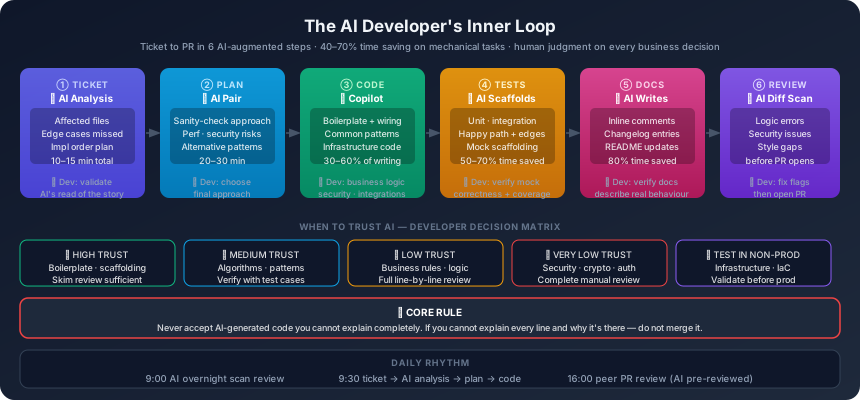
Step 1: Ticket Analysis (AI-assisted — 10–15 min)
Before opening the IDE, the developer prompts AI with the full story context and shared product brief. AI:
- Summarises the acceptance criteria in implementation terms
- Identifies which parts of the codebase will be affected
- Flags potential edge cases not mentioned in the story
- Suggests a high-level implementation plan
Prompt example:
Context: [/ai/context.md]
Story: [paste full user story + AC]
Codebase summary: [paste relevant file tree or describe architecture]

Analyse this story and provide:
1. Which existing files/classes need to change
2. Which new files/classes need to be created
3. Edge cases not covered by the acceptance criteria
4. Potential gotchas or known patterns to follow from the codebase
5. A suggested implementation order (step by step)
Step 2: Implementation Planning (AI-pair — 20–30 min)
Before writing code, the developer and AI pair on the plan — treating Claude or Copilot as a senior engineer to sanity-check the approach.
Prompt example:
I'm planning to implement [feature] using this approach:
[describe planned approach]

Does this approach:
- Fit the existing architecture patterns for this project?
- Handle all the edge cases I identified?
- Have any performance risks I should be aware of?
- Introduce any security concerns?

Suggest any alternative approaches worth considering.
Step 3: Code Generation (AI-pair — 30–60% of writing time)
Copilot handles:
- Boilerplate (controller scaffolding, service layer wiring, DTO mapping)
- Common patterns (error handling, logging, async/await patterns)
- Infrastructure code (DI registration, configuration binding)
Developers handle:
- Business logic (the actual rules, not just the structure)
- Integration with external systems (understanding the contract)
- Error handling strategy (what does “fail gracefully” mean here?)
- Security-sensitive code (always review AI-generated auth/crypto code line by line)
Critical rule: Never accept AI-generated code that you cannot explain completely. If you cannot explain what every line does and why, do not merge it.
Step 4: Test Writing (AI-accelerated — 50–70% time saving)
AI is highly effective at generating test scaffolding. The developer reviews for:
- Coverage of business logic (not just happy path)
- Edge cases that actually matter (not exhaustive but meaningful)
- Test names that communicate intent (not just “test_function_does_thing”)
- Mocking correctness (AI sometimes mocks things that should interact with real implementations)
Prompt example:
Write unit tests for this function:
[paste function]

Tests should cover:
- Happy path with valid input
- Null/empty input handling
- Boundary conditions: [list relevant boundaries]
- Error scenarios: [list relevant errors]

Use [xUnit/Jest/Vitest] with [Moq/Sinon] for mocking.
Test name format: [MethodName_Condition_ExpectedResult]
Step 5: Documentation (AI-first — 80% time saving)
AI writes the first draft of:
- XML/JSDoc inline comments on public interfaces
- Changelog entries for the sprint
- README updates for new features
- OpenAPI spec for new endpoints
Developer reviews for accuracy — AI often documents what a function looks like, not what it actually does. Edge cases in documentation almost always require human correction.
Step 6: AI Self-Review (before PR)
Before opening the PR, run a final AI review pass on the diff:
Prompt example:
Review this diff as a senior engineer:
[paste git diff]

Check for:
1. Any logic errors or missing error handling
2. Code that looks correct but may have subtle bugs
3. Missing test coverage for the changed code
4. Any security concerns (injection, hardcoded values, unsafe operations)
5. Style inconsistencies with the surrounding code
This catches issues AI-generated code introduces that Copilot’s inline suggestions missed.
The Human-Irreplaceable Developer Work
Understanding the problem: AI can analyse a ticket but cannot truly understand what the feature is for. A developer who understands the business context makes different implementation decisions — simpler, more appropriate, more evolutionarily stable — than one following a mechanical specification.
Debugging complex issues: When something goes wrong in a way that isn’t captured by any test — a race condition, a memory leak, an emergent behaviour from the interaction of many systems — experienced developers use intuition and creative investigation. AI can assist with diagnosis but cannot replace the mental model of the system a good developer carries.
Reviewing AI output critically: The most important developer skill in the AI era is the ability to look at syntactically correct, plausible-sounding code and spot the subtle error. This requires understanding, not just pattern matching.
Code that has to be right: Security-sensitive code, cryptographic operations, and financial calculations require line-by-line human review. No AI-generated implementation of these should be shipped without complete human understanding.
The AI Developer’s Daily Rhythm
| Time | Activity |
|---|---|
| 09:00 | Check AI’s overnight analysis: test failures, flaky tests, PR review summary |
| 09:20 | Standup — AI pre-summarises your WIP status from the board |
| 09:30 | Pick next ticket, run AI ticket analysis (10 min) |
| 09:45 | Pair with AI on implementation plan (20 min) |
| 10:05 | Code: Copilot suggestions inline, Claude for complex logic conversations |
| 12:00 | AI generates test scaffolding; dev refines and fills gaps |
| 14:00 | AI generates docs; dev reviews for accuracy |
| 14:30 | AI self-review of diff (10 min); dev addresses flags |
| 15:00 | PR opened; CodeRabbit review begins automatically |
| 15:30 | Address CodeRabbit minor flags |
| 16:00 | Review other team PRs (AI pre-reviewed; dev focuses on judgment calls) |
Tools for the AI Developer
| Tool | Use case |
|---|---|
| GitHub Copilot | Inline code completion, boilerplate, tests |
| Claude Code / Claude | Complex logic discussion, architecture questions, code review |
| CodeRabbit | Automated PR pre-review (see Tech Lead post) |
| Cursor IDE | AI-first editor with whole-codebase context |
| Codeium / Supermaven | Alternative to Copilot for code completion |
| Warp terminal | AI-assisted shell commands and debugging |
The “When to Trust AI” Decision Matrix
| Code type | AI trust level | Required human action |
|---|---|---|
| Boilerplate / scaffolding | High | Skim review |
| Algorithm logic | Medium | Verify with test cases |
| Business rules | Low | Full line-by-line review |
| Security / crypto | Very low | Complete manual review + second opinion |
| External integrations | Medium | Contract verification required |
| Infrastructure code | Medium | Test in non-prod first |
Previous: Part 5 — The AI Tech Lead ←
Next: Part 7 — The AI Quality Engineer →
This is Part 6 of the AI-Powered Software Teams series.