“We’re going faster.”
That’s what every team says when they adopt AI tools. And it’s usually true — until someone asks: “Faster than what? How fast? By how much?”
When our boss asked those questions at the three-month checkpoint, I was glad we had data. Not because the data was perfect (it wasn’t), but because having any structured measurement was infinitely better than “it feels faster.”
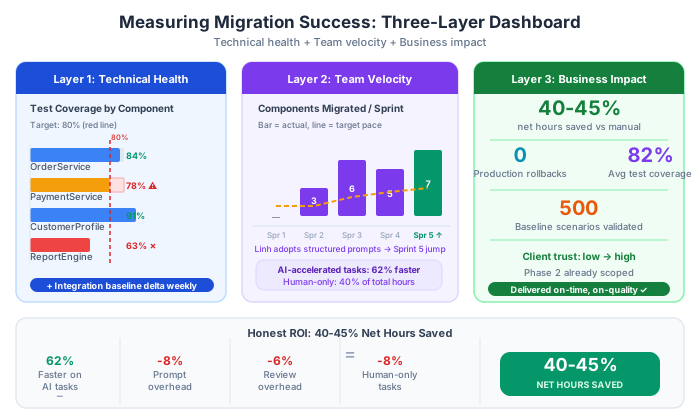
This post covers how to measure AI-assisted migration effectiveness at three levels: technical, team velocity, and business. Different audiences need different numbers, and serving the wrong metrics to the wrong audience is one of the most common failures in AI adoption programs.
Why Measurement Matters Specifically in Migration
In new feature development, the output is obvious: features shipped. In migration work, the output is more subtle: the system does the same thing it did before, but in a new framework. That’s hard to quantify.
The measurement problem has a second dimension: migration work has a large assessment and planning phase (our 40%) that produces documents and decisions, not code. If you measure lines of code migrated per sprint, the first sprint will look slow because it’s mostly planning. The fourth sprint will look fast. Your boss will think the team was slacking in sprint 1 and then suddenly got serious in sprint 4. That’s the wrong conclusion.
The right measurement framework tracks progress across all phases, not just execution velocity.
The Three-Layer Dashboard
We maintained a simple shared document (Google Slides, updated weekly) with three sections:
Layer 1: Technical Health (for the development team)
These are the metrics developers track for themselves. They indicate whether the migration is being done correctly.
Test coverage percentage (by component):
| Component | Coverage Before | Coverage Now | Target |
|---|---|---|---|
| OrderService | 12% | 84% | 80% ✅ |
| PaymentProcessor | 0% | 78% | 80% 🔄 |
| CustomerProfile | 34% | 91% | 80% ✅ |
| ReportEngine | 0% | 63% | 80% 🔄 |
This table updates every sprint. At a glance, anyone can see where coverage is healthy and where it needs attention.
Integration baseline match rate:
We ran our 500-scenario integration baseline weekly during migration:
Week 3: 492/500 matching (98.4%) — 8 regressions found, 6 fixed
Week 4: 498/500 matching (99.6%) — 2 intentional changes (verified with client)
Week 5: 500/500 matching (100%) ✅
When this number drops, something broke. When it stays at 100%, the migration is behaviorally correct.
Build and test time (performance indicator):
Legacy build time:      4m 32s
Migrated build time:    1m 48s  (-60%, expected: .NET 10 builds faster)

Legacy test suite time: 8m 14s (when tests existed)
Migrated test suite:    3m 21s (-59%)
Faster builds and tests compound over time. A team that gets feedback in 2 minutes instead of 8 minutes will iterate faster for the rest of the project.
API response time (performance regression guard):
Run a performance benchmark after each major component migration:
OrderService.GetOrderById()
  Legacy (framework 4.6): avg 47ms, p99: 134ms
  Migrated (.NET 10):     avg 18ms, p99: 52ms
  Result: 61.7% faster ✅ (expected: .NET 10 has significant runtime improvements)
If a specific endpoint gets slower after migration, it’s usually a sign of an incorrect async pattern or a missing caching layer. Catching this early is much cheaper than discovering it after full deployment.
Layer 2: Team Velocity (for the tech lead + project manager)
Components migrated per sprint:
| Sprint | Planned | Actual | Notes |
|---|---|---|---|
| 1 (Assessment) | N/A | 5 components assessed | Planning sprint |
| 2 | 4 | 3 | Underestimated PaymentProcessor complexity |
| 3 | 4 | 6 | Found rhythm with AI workflow |
| 4 | 5 | 5 | On track |
| 5 | 6 | 7 | Linh’s AI workflow fully effective |
The trend matters more than any single sprint. We saw the velocity increase as the team’s AI workflow matured — particularly visible when Linh became confident with structured prompts (sprint 5).
Human vs AI time allocation (tracked informally, 15-minute estimates at end of day):
| Task Category | Human Hours | AI-Assisted Hours | Notes |
|---|---|---|---|
| Assessment / planning | 90% human | 10% AI | AI used for code analysis |
| Project file conversion | 5% human | 95% AI | Almost fully automated |
| API/System.Web migration | 40% human | 60% AI | AI does pattern, human verifies |
| Hidden logic resolution | 100% human | 0% AI | Cannot delegate |
| Test generation | 20% human | 80% AI | Human checks business rule tests |
| PR review | 100% human | 0% AI | Never skip this |
This allocation table helps set realistic expectations. When we told the boss “we use AI to go faster,” he imagined 90% AI. The reality was more nuanced. This table let us have an honest conversation about where AI helps most and where it doesn’t help at all.
Estimated hours saved per sprint (the metric the boss actually cares about):
We estimated what each migration task would have taken without AI, then compared to actual hours:
Sprint 3 example:
- 6 repositories migrated
- Estimated without AI: 4 hours each = 24 hours total
- Actual with AI workflow: 1.5 hours each = 9 hours total
- Saved: ~15 hours (62% reduction for this category)

Sprint 3 assessment/planning work:
- Estimated without AI: 12 hours
- Actual with AI: 10 hours (17% reduction — AI helps less here)

Sprint 3 PR review (non-negotiable):
- Estimated without AI: 8 hours
- Actual with AI: 9 hours (1 hour extra — reviewing AI output takes slightly longer)
The honest conclusion: AI saved us roughly 40-45% of total estimated hours when averaged across all task categories. Not 70% (the marketing number). Not 10% (the skeptic estimate). About 40-45% over the course of the project, concentrated in the execution phase tasks.
That 40-45% on a project of our size translated to approximately 120 hours of saved tech lead + developer time. At a blended rate, that’s a meaningful cost reduction the boss was happy to see documented.
Layer 3: Business Impact (for the boss and client)
These metrics live in a one-page summary sent every two weeks. Plain language. No technical detail.
Progress summary:
Migration Progress: 63% complete (19/30 modules migrated)

Quality gate: PASSING
- Test coverage: 82% average (target: 80%) ✅
- Zero production incidents since partial go-live (8 weeks ago)
- Feature flag rollout: 45% of traffic on new system

Schedule: ON TRACK
- Current velocity: 4.7 modules/sprint
- Projected completion: March 14

Cost to date: [X] hours (Y% of budget)
Projected cost at completion: [Z] hours (within budget)

Risk items:
- PaymentProcessor module: contains external Stripe v2 integration
  (upgrade to v12 required). Scoping next sprint.
- 3 hidden logic items pending client confirmation (scheduled for
  Friday's review call)
This summary answers the only three questions the boss and client actually care about:
- Are we on track?
- Is quality where it needs to be?
- Are there surprises I need to know about?
The Hidden Costs of AI — Measuring Honestly
Part of credible measurement is being honest about the costs that offset the savings.
Prompt engineering overhead: Writing effective prompts, refining AI Context Documents, and debugging bad AI output is real work. We estimated this at 8-12% of total AI-assisted task time. It’s worth it, but it’s not free.
Review overhead: AI-generated code takes longer to review than code written by a teammate you know well. You’re reading code without the author’s intent available — just the output. We found AI-generated PRs took about 20% longer to review than equivalent human-written PRs.
False confidence risk: This is the hardest to measure, but potentially the costliest. Twice we caught cases where AI produced plausible-looking migration output that was subtly wrong in a way our integration baseline tests eventually caught. If we hadn’t had the integration baseline, those bugs might have shipped. The cost of not having that safety net is impossible to quantify — but it’s real.
The honest ROI calculation for our project:
Time savings from AI: ~120 hours
Overhead costs:
  - Prompt engineering: ~18 hours
  - Extended review time: ~14 hours
  - AI output debugging: ~8 hours
  - AI Champion training investment (first 4 weeks): ~20 hours

Net time saved: ~60 hours
Net cost reduction at blended rate: significant
The 60 net hours is less glamorous than “AI saved us 120 hours.” But it’s honest. And honest numbers build trust with your boss in a way that optimistic numbers never do.
When the Data Looks Bad
At one point in our project, our velocity metric dropped sharply — from 6 components one sprint to 2 components the next. The boss noticed.
The explanation: we hit the PaymentProcessor module, which had 3 stored procedure calls, COM interop for a legacy payment provider, and 8 “UNVERIFIED” entries in the Hidden Logic Register. This was always going to be slow. We knew it was coming. We just hadn’t communicated it proactively.
The lesson: Use your measurement data to get ahead of bad news, not explain it after the fact. When you know a high-complexity component is coming, pre-announce it:
“Next sprint’s velocity will be lower than usual — we’re hitting the PaymentProcessor module which we flagged as high-risk in assessment. We’ve allocated extra time for client domain review and have a plan for the COM interop dependency. We expect to be back to normal velocity in Sprint N+2.”
That message produces: “Thanks for the heads-up.” The alternative — letting velocity drop without explanation — produces: “Why is the team so much slower? Are the AI tools not working anymore?”
Same information. Completely different conversation.
This is Part 6 of a 7-part series: The AI-Powered Migration Playbook.
Series outline: