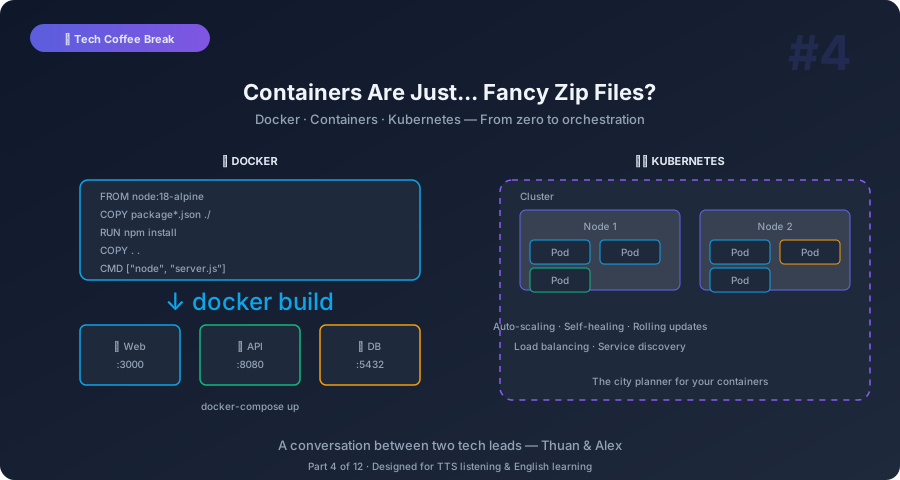
Thuan: Alex, I need to confess something. I’ve been using Docker for three years. I type docker compose up every morning. But if someone asked me to explain what Docker actually does… I’m not sure I could give a clear answer.
Alex: You’re not alone. Most developers use Docker the way most people drive a car. They know how to start it and where the gas pedal is, but they couldn’t explain how the engine works. And that’s mostly fine! But understanding the “why” helps you make better decisions.
Thuan: So give me the “why.” What problem does Docker solve?
Alex: One problem. The most annoying problem in software history: “It works on my machine.”
Thuan: Oh no. I’ve said that. I’ve been on both sides of that conversation.
Alex: Everyone has. Here’s what’s actually happening. Your machine has Python 3.11, specific libraries, certain environment variables, a particular operating system version. Your colleague has Python 3.9, different library versions, different OS. The production server has yet another configuration. Same code, three different environments, three different behaviors.
Thuan: So Docker solves this by packaging the environment with the code?
Alex: Exactly. Think of it like this. Normally, you ship your code and say, “Install it and it should work.” That’s like shipping someone a recipe and saying, “Cook this and it should taste the same.” But they have a different oven, different ingredients, different altitude. Of course it tastes different.
Docker Images: Ship the Whole Kitchen
Alex: Docker takes a different approach. Instead of shipping the recipe, you ship the entire kitchen. The oven, the ingredients, the pots, the spices — everything. You package it all into something called a Docker image. When someone runs that image, they get an identical kitchen, regardless of whether they’re in Vietnam, the US, or on a cloud server.
Thuan: But that sounds huge. Shipping an entire kitchen?
Alex: Here’s the clever part. You’re not actually shipping a full operating system or a literal kitchen. Docker images use layers. The base might be a slim Linux installation — 50 megabytes. Then you add Python — another layer. Then your app dependencies — another layer. Then your actual code — a tiny layer on top.
Thuan: And those layers are shared?
Alex: Yes! If you have ten applications that all use the same base Linux image, Docker stores that base layer once. Each app only adds its own unique layers on top. It’s space-efficient.
Thuan: OK, so an image is the package. What’s a container?
Alex: A container is a running instance of an image. If the image is the blueprint for a house, the container is an actual house built from that blueprint. You can build many houses from the same blueprint. Each one is independent — you can paint the walls differently, move furniture around — but they all started from the same design.
Thuan: How is that different from a virtual machine? VMs also isolate environments.
Alex: Great question. A virtual machine ships the entire house including the land and the foundation. It includes a full operating system — Windows, Linux, whatever — with its own kernel, its own drivers, its own everything. That’s heavy. A VM might be 2 gigabytes and take a minute to start.
A container shares the host’s operating system kernel. It only includes the application and its dependencies. A container might be 100 megabytes and start in one second. Think of VMs as separate buildings on separate plots of land. Containers are like apartments in the same building — they share the structure but each apartment is isolated.
Thuan: That apartment analogy is perfect. Separate spaces, shared infrastructure.
Why Everyone Uses It
Thuan: So why has Docker become basically mandatory? It seems like every job posting requires it.
Alex: Three reasons. First, consistency. Developer machines, staging servers, and production all run the same container. “Works on my machine” becomes “works everywhere.”
Second, speed. Containers start in seconds. Spinning up a new development environment means running one command instead of spending a day installing dependencies. When I join a new project, I clone the repo, run docker compose up, and I’m developing within five minutes.
Thuan: That’s true. I remember spending two days setting up a Java project once. Maven versions, JDK versions, database connections…
Alex: Third reason: isolation. If your app needs Python 3.11 and another app needs Python 3.8, no problem. They each run in their own container with their own Python. No conflicts. It’s like each apartment has its own kitchen — one can cook Indian food, the other Italian, and the smells don’t mix.
Docker Compose: The Apartment Building Manager
Thuan: What about Docker Compose? I use it every day but I’ve never really thought about what it does differently.
Alex: Docker runs one container. Docker Compose runs multiple containers together. Most real applications aren’t just one thing. You have a web server, a database, maybe a cache, maybe a message queue. Each one runs in its own container.
Thuan: So Docker Compose is like the building manager who coordinates all the apartments?
Alex: Exactly. The docker-compose.yml file says: “I need one web server container, one PostgreSQL container, one Redis container. The web server can talk to the database. Redis is on this port.” One command — docker compose up — and everything starts together, configured and connected.
Thuan: I use that every day. But I’ve heard people say Docker Compose is only for development, not production. Why?
Alex: Because Docker Compose runs everything on one machine. For development, that’s fine. But in production, you want your containers spread across multiple machines for reliability and scale. If the machine dies, everything dies. That’s where Kubernetes comes in.
Kubernetes: Managing a City of Containers
Thuan: OK, let’s talk about Kubernetes. Because honestly, every time I look at Kubernetes documentation, my brain shuts down.
Alex: Fair. Kubernetes — people call it K8s because nobody wants to type Kubernetes more than once — is complex. But the idea is simple. Let me extend our analogy.
Docker Compose is a building manager managing one building. Kubernetes is the city planner managing an entire city of buildings. It decides: where to build new apartments, how many buildings to put in each neighborhood, what to do when a building has a fire, and how to route traffic through the city.
Thuan: So if I have, say, 50 copies of my web server container running across 20 machines — Kubernetes manages all of that?
Alex: Yes. Here’s what K8s handles for you:
Scheduling. You say, “I need 10 copies of my web server.” K8s figures out which machines have available CPU and memory and places the containers there. You don’t pick the machines — K8s does.
Self-healing. If a container crashes, K8s automatically starts a new one. If a machine dies, K8s reschedules all its containers onto other machines. You told K8s “I need 10 copies” and K8s makes sure there are always 10 copies, no matter what.
Thuan: That’s the self-healing part? It maintains the desired state?
Alex: Exactly. You declare what you want — “10 replicas of my web server, 3 replicas of my database” — and K8s continuously works to make reality match your declaration. That’s called declarative configuration. You describe the destination, K8s figures out how to get there.
Scaling. Traffic spikes at 9 AM? K8s can automatically add more container copies. Traffic drops at midnight? K8s removes the extra copies to save resources. This is called horizontal pod autoscaling.
Rolling updates. You deploy a new version? K8s doesn’t kill all old containers and start new ones — that would cause downtime. It gradually replaces old containers with new ones, a few at a time. If the new version is broken, K8s can automatically roll back.
Do You Actually Need Kubernetes?
Thuan: This all sounds powerful. But do I need it? My company has maybe 10 services.
Alex: Here’s my honest answer: probably not. Kubernetes has a steep learning curve and significant operational overhead. You need to learn pods, deployments, services, ingresses, config maps, secrets, namespaces, persistent volumes… it’s a lot.
Thuan: When does it make sense?
Alex: I’d say Kubernetes makes sense when:
You have more than 20 services and managing them individually is painful. You need auto-scaling because your traffic is unpredictable. You have multiple teams deploying independently and you need a standard platform. Or you’re running on a cloud provider that offers managed Kubernetes — like AWS EKS, Google GKE, or Azure AKS — so you don’t have to manage the cluster itself.
Thuan: And if I don’t meet those criteria?
Alex: Use simpler alternatives. Docker Compose for development. A simple cloud service like AWS ECS, Google Cloud Run, or even Railway or Fly.io for production. These give you container hosting without the Kubernetes complexity. You define your containers, they handle the rest.
Thuan: That’s refreshing to hear. I felt like I was falling behind because I hadn’t mastered Kubernetes.
Alex: You’re not falling behind. You’re being practical. The right tool depends on the problem size. Using Kubernetes for a small app is like hiring a city planner to manage your apartment.
The Dockerfile: Your Recipe
Thuan: Let’s get practical for a second. Can you show me what a Dockerfile looks like in simple terms?
Alex: Sure. A Dockerfile is a list of instructions for building an image. Think of it as a recipe card. Here’s one for a simple Node.js application:
FROM node:20-slim
WORKDIR /app
COPY package*.json ./
RUN npm install
COPY . .
EXPOSE 3000
CMD ["node", "server.js"]
Line by line: Start with a kitchen that already has Node.js installed. Set up your workspace. Copy the ingredient list and get the ingredients. Copy your recipe. Open the serving window. Start cooking.
Thuan: That’s it? That’s actually readable.
Alex: Most Dockerfiles are this simple. They get more complex for optimized production builds — multi-stage builds, security hardening — but the concept is always the same. Start from a base, add your stuff, define how to run it.
Key Takeaways You Can Explain to Anyone
Thuan: Takeaway time. Explain containers to someone who’s never heard of them.
Alex:
-
Docker packages your app with its environment — so it works the same everywhere. Think: shipping the whole kitchen, not just the recipe.
-
A container is lighter than a VM. VMs are separate houses. Containers are apartments in the same building. Shared foundation, isolated spaces.
-
Docker Compose manages multiple containers on one machine. Great for development. Define your app, database, and cache in one file.
-
Kubernetes manages containers across many machines. It handles scheduling, scaling, self-healing, and updates. It’s the city planner for your containers.
-
You probably don’t need Kubernetes yet. If you have fewer than 20 services, simpler tools like Cloud Run or ECS will save you months of learning and operational pain.
Thuan: The best summary I’ve heard: Docker is the answer to “it works on my machine.” Kubernetes is the answer to “it works on my machine, but we have a thousand machines.”
Alex: Perfect. Next week — AI. Everyone’s talking about it, but I want to make sure we actually understand what’s happening under the hood.
Thuan: Finally! “AI is just math and guessing, right?”
Alex: Close enough. Bring your biggest coffee.
This is Part 4 of the Tech Coffee Break series — casual conversations about real tech concepts, designed for listening and learning.