Thuan: Alex, I want to talk about something that most developers hate. Deployments.
Alex: Oh, the Friday afternoon deployment. The most dangerous tradition in software engineering.
Thuan: I’ve lived that nightmare. We deployed on a Friday at 4 PM. By 6 PM, the payment system was broken. I spent the entire weekend fixing it. My wife still brings it up.
Alex: And that’s exactly why CI/CD exists. Not the tools, not the pipeline — the idea. The idea that deploying should be boring. Routine. Something that happens multiple times a day without anyone breaking a sweat.
Thuan: That sounds like a fantasy. But explain it to me like I’ve never heard the term before.
CI: Continuous Integration — Stop Hoarding Code
Alex: Let’s start with CI — Continuous Integration. Here’s the problem it solves. Imagine five developers on a team. Each one works on their own branch for two weeks. No one shares code. After two weeks, everyone tries to merge their code together.
Thuan: Merge hell.
Alex: Exactly. Everyone’s code has diverged. Developer A renamed a function that Developer B was using. Developer C changed a database table that Developer D depends on. It takes another two weeks just to resolve the conflicts.
Thuan: I’ve been through that. We called it “integration week.” Everyone dreaded it.
Alex: CI says: don’t hoard code. Integrate frequently. Every developer merges their changes into the main branch multiple times per day. Small, incremental changes instead of massive two-week branches.
Thuan: But won’t frequent merges break things?
Alex: That’s where the “continuous” part comes in. Every time someone pushes code, an automated pipeline runs. It builds the code. It runs the tests. If anything fails, the developer knows immediately — within minutes, not weeks.
Thuan: So CI is really two things: frequent merging plus automated testing?
Alex: Exactly. The combination is the magic. Frequent merging without automated tests is reckless. Automated tests without frequent merging is pointless. Together, they give you confidence that the code works at all times.
CD: Continuous Deployment — Ship Without Fear
Thuan: And CD? I’ve seen it defined as both “Continuous Delivery” and “Continuous Deployment.” What’s the difference?
Alex: Continuous Delivery means your code is always in a deployable state. After CI passes, the code could be deployed at any time. But a human still presses the button. Someone reviews the changes and says, “OK, let’s ship it.”
Continuous Deployment goes further. After CI passes, the code is automatically deployed to production. No human in the loop. Every successful build goes live.
Thuan: That sounds terrifying.
Alex: It’s terrifying if you don’t have good tests, monitoring, and rollback capability. It’s liberating if you do. Companies like Netflix and Amazon deploy thousands of times per day using continuous deployment. Each change is tiny — a few lines of code. If something breaks, they know exactly which change caused it because it just happened.
Thuan: So the key insight is: smaller, more frequent deployments are safer than big, infrequent ones?
Alex: Counter-intuitive but absolutely true. Think about it. If you deploy 1,000 lines of code and something breaks, you need to search through 1,000 lines to find the bug. If you deploy 10 lines and something breaks, there are only 10 lines to check. The problem is obvious.
The Pipeline: From Code to Production
Thuan: Walk me through a typical CI/CD pipeline. Step by step.
Alex: OK, here’s a simple but effective pipeline:
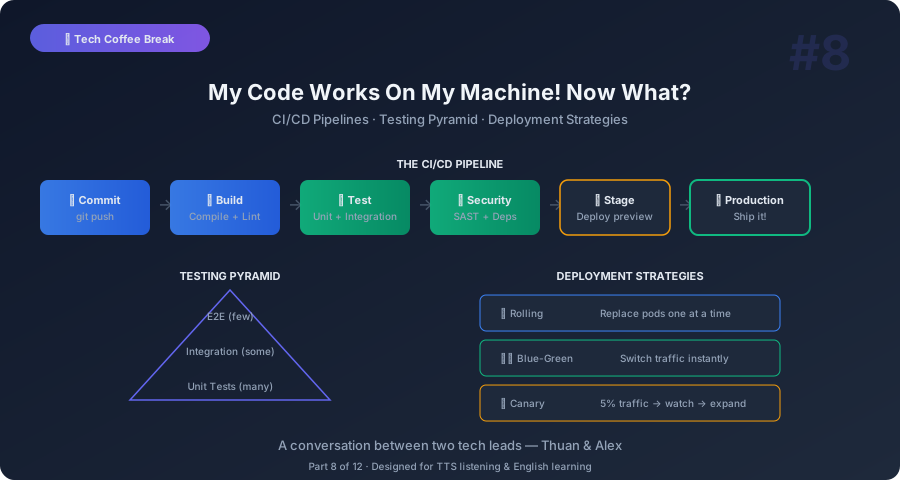
Step 1: Code push. A developer pushes code to a Git branch and opens a pull request.
Step 2: Build. The CI server checks out the code and compiles it. If it doesn’t compile, stop immediately. Something is fundamentally broken.
Step 3: Unit tests. Run the fast tests that check individual functions and modules. These should run in under a minute. If any fail, stop.
Step 4: Integration tests. Run tests that check how components work together. Database queries, API calls, service interactions. These take longer — maybe 5 to 10 minutes.
Step 5: Code quality checks. Run linters, type checkers, security scanners. Catch code style issues, potential bugs, and known vulnerabilities. This runs in parallel with tests to save time.
Step 6: Approval. A teammate reviews the pull request. They look at the code, check the test results, and approve or request changes.
Step 7: Merge. The code is merged into the main branch. This triggers the CD part.
Step 8: Deploy to staging. The code is automatically deployed to a staging environment — a copy of production. Smoke tests run to verify basic functionality.
Step 9: Deploy to production. If staging looks good, deploy to production. This might be automatic or manual, depending on your risk tolerance.
Thuan: That’s a lot of steps.
Alex: It sounds like a lot, but most of it is automated. The developer’s experience is: push code, wait 5 minutes for green checkmarks, get a review, merge. The pipeline does the rest.
Testing Strategy: The Testing Pyramid
Thuan: You mentioned different types of tests. How do I know what to test and how much?
Alex: The testing pyramid. Think of it like this.
At the bottom, the widest part: unit tests. Lots of them. Fast, cheap, isolated. Test individual functions. “Does this function calculate tax correctly?” You might have thousands of unit tests. They run in seconds.
In the middle: integration tests. Fewer, slower. Test how components work together. “Does the order service correctly write to the database and send an email?” You might have hundreds. They take minutes.
At the top, the narrowest part: end-to-end tests. Very few, very slow. Test the entire user flow. “Can a user sign up, add items to cart, and complete checkout?” You might have dozens. They take many minutes or even hours.
Thuan: Why the pyramid shape? Why not test everything end-to-end?
Alex: Because end-to-end tests are slow, flaky, and expensive. They depend on browsers, networks, external services. A test might fail because the network was slow, not because the code is broken. That’s called a flaky test — and flaky tests erode trust. If your tests fail randomly, your team starts ignoring them. And then the tests are useless.
Thuan: I’ve been through that. We had a test suite that failed 30% of the time for no real reason. Nobody trusted it, so nobody ran it.
Alex: And then bugs slipped through, and people said “see, testing doesn’t work.” But testing does work — you just had bad tests. The pyramid keeps the foundation strong with fast, reliable unit tests.
Deployment Strategies: Going Live Without Going Down
Thuan: Let’s talk about deployment. Even with a great pipeline, actually putting new code in production is scary. How do big companies do it safely?
Alex: Several strategies. Let me give you the three most common.
Blue-Green deployment. You have two identical production environments. Blue is the current live version. Green is the new version. You deploy the new code to Green. You test it. When you’re confident, you switch traffic from Blue to Green. If Green breaks, you switch back to Blue instantly. Total downtime: zero.
Thuan: That sounds expensive. Two full production environments?
Alex: It is. But for critical systems, the cost of downtime is higher than the cost of an extra environment. And with cloud computing, you can spin up the Green environment only when deploying, then shut it down after the switch.
Canary deployment. Named after the “canary in the coal mine.” You deploy the new version but only route 5% of traffic to it. If those users have a good experience — no errors, normal latency — you gradually increase: 10%, 25%, 50%, 100%. If something goes wrong at any step, you pull back to 0%.
Thuan: That’s clever. You test on real users but limit the blast radius.
Alex: Exactly. Netflix uses this heavily. They call it “one person, then one percent, then ten percent, then everyone.”
Rolling deployment. If you have 10 servers, you update them one at a time. Server 1 gets the new version. While it starts up, servers 2 through 10 handle all traffic. Once server 1 is healthy, server 2 gets updated. And so on. At any point, most servers are running the stable version.
Feature Flags: Deploy Without Releasing
Thuan: There’s another concept I keep hearing about — feature flags.
Alex: Feature flags are brilliant. The idea is: separate deployment from release. You deploy new code to production, but the new feature is turned off behind a flag. Nobody sees it. It’s there, in the code, but invisible.
Thuan: So you can deploy anytime without worrying about incomplete features?
Alex: Exactly. Imagine you’re building a new search feature. It’s 70% done. With feature flags, you can deploy that code to production today. The flag is off — users see the old search. Your team can test the new search in production by turning the flag on for themselves. When it’s ready, you flip the flag for all users. No deployment needed.
Thuan: And if the new search has problems?
Alex: Flip the flag off. Instantly. No rollback, no redeployment. The code is still there, but the feature is hidden. Fix the bug at your own pace, test again, and flip the flag back on when ready.
Thuan: How do you implement feature flags? Is it complicated?
Alex: It can be as simple as a database table: feature name, enabled true/false. Or you can use services like LaunchDarkly, Unleash, or even environment variables. For small teams, a simple config file works. For larger teams, a feature flag management platform gives you percentage rollouts, user targeting, and analytics.
The Tools: What to Actually Use
Thuan: What tools do teams typically use for CI/CD?
Alex: Here’s the landscape:
GitHub Actions is the most popular for teams using GitHub. It’s integrated into the repository, so you configure pipelines in YAML files right next to your code. Free for public repositories, generous free tier for private ones.
GitLab CI/CD is similar but for GitLab users. Tightly integrated, powerful, and GitLab’s CI is actually considered more mature than GitHub’s in some areas.
Jenkins is the old reliable. Open-source, infinitely configurable, runs anywhere. But it’s complex to set up and maintain. Like a custom-built car — powerful but requires constant tinkering.
CircleCI, Travis CI, Buildkite — hosted CI services. You connect your repository, define your pipeline, and they run it. Less control but less maintenance.
Thuan: What do you recommend for a small team?
Alex: GitHub Actions. No contest. You’re probably already using GitHub. The setup is a YAML file in your repository. Most common pipelines — build, test, deploy — have ready-made templates. You can go from zero to a working pipeline in an afternoon.
Key Takeaways You Can Explain to Anyone
Thuan: Takeaway time. CI/CD in five points.
Alex:
-
CI means integrating code frequently with automated tests. Small, frequent merges catch problems when they’re small and easy to fix.
-
CD means code is always ready to deploy. Whether a human presses the button or it’s fully automated, the goal is the same: shipping shouldn’t be scary.
-
Smaller deployments are safer. Deploy 10 lines and finding bugs is trivial. Deploy 10,000 lines and you’re searching for a needle in a haystack.
-
The testing pyramid keeps you sane. Many fast unit tests at the bottom. Few slow end-to-end tests at the top. Don’t invert this.
-
Feature flags separate deployment from release. Deploy code anytime, release features when they’re ready. Instant rollback without redeployment.
Thuan: My favorite insight: “deploying should be boring.” When deployment is exciting, something is wrong.
Alex: Exactly. If your team celebrates a successful deployment, it means deployments are rare and risky. In a healthy CI/CD culture, deployments happen so often that nobody even notices.
Thuan: Next topic — security. Because I just read about another data breach and I’m paranoid now.
Alex: Good. A little paranoia keeps your systems secure.
This is Part 8 of the Tech Coffee Break series — casual conversations about real tech concepts, designed for listening and learning.