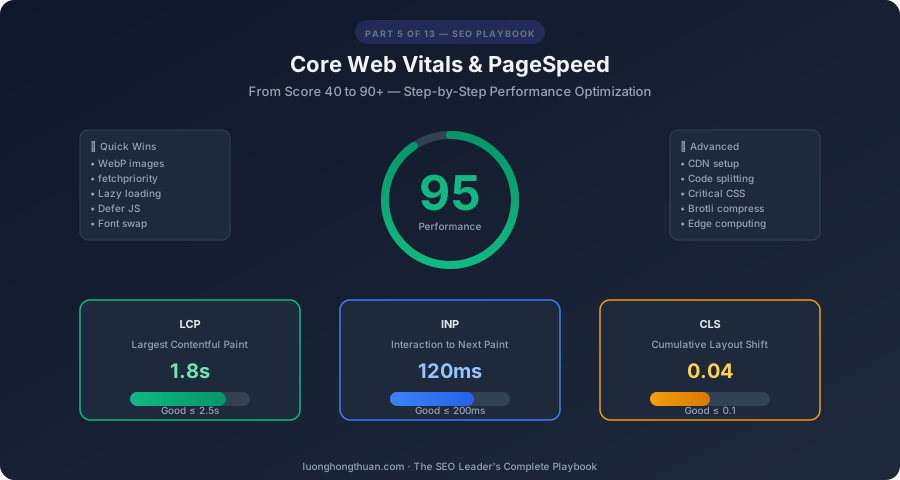
Page speed is no longer optional — it’s a confirmed Google ranking factor and directly impacts user experience, conversion rates, and AI crawlability. A one-second delay in page load time can reduce conversions by 7% (Portent, 2022). In this guide, I’ll show you exactly how to optimize every Core Web Vital and take your PageSpeed score from average to excellent.
This is Part 5 of the SEO Leader’s Complete Playbook — a 13-part series for SEO teams who want measurable results.
Understanding Core Web Vitals in 2026
Core Web Vitals are three specific metrics that Google uses as a ranking factor. Each measures a different aspect of user experience:
| Metric | Full Name | Measures | Good | Needs Improvement | Poor |
|---|---|---|---|---|---|
| LCP | Largest Contentful Paint | Loading speed | ≤ 2.5s | 2.5s–4.0s | > 4.0s |
| INP | Interaction to Next Paint | Interactivity | ≤ 200ms | 200ms–500ms | > 500ms |
| CLS | Cumulative Layout Shift | Visual stability | ≤ 0.1 | 0.1–0.25 | > 0.25 |
How to Measure
| Tool | Data Type | Best For |
|---|---|---|
| PageSpeed Insights | Lab + Field (CrUX) | Quick check, real-user data |
| Lighthouse | Lab only | Detailed diagnostic audit |
| Chrome UX Report (CrUX) | Field data | Real-user performance at scale |
| WebPageTest | Lab data | Deep waterfall analysis, filmstrip |
| Web Vitals Extension | Real-time | Debugging during development |
| Google Search Console | Field data | site-wide CWV status |
LCP Optimization: Make Your Page Load Fast
LCP measures when the largest content element becomes visible. Here’s every technique for improving it.
1. Optimize Server Response Time (TTFB)
Time to First Byte should be under 200ms:
- Use a CDN — serve content from edge locations near users
- Enable HTTP/3 — faster connection establishment than HTTP/2
- Server-side caching — cache rendered HTML at the edge
- Optimize database queries — reduce backend processing time
- Use Cloudflare Workers or Vercel Edge Functions for edge computing
# Cloudflare caching headers example
Cache-Control: public, max-age=31536000, immutable  # Static assets
Cache-Control: public, max-age=3600, s-maxage=86400 # HTML pages
2. Optimize LCP Image
The LCP element is often a hero image. Optimize it aggressively:
<!-- Hero image optimization -->
<img
  src="/images/hero.webp"
  alt="Descriptive alt text"
  width="1200"
  height="630"
  loading="eager"
  fetchpriority="high"
  decoding="async"
>

<!-- Preload the LCP image in <head> -->
<link rel="preload" as="image" href="/images/hero.webp" fetchpriority="high">
Key LCP image techniques:
fetchpriority="high"— tells browser to prioritize this imageloading="eager"— don’t lazy-load the LCP image- Preload in
<head>— start loading before HTML parser reaches the image tag - Use WebP/AVIF — 25-50% smaller than JPEG at same quality
- Right-size images — don’t serve 4000px images to 375px mobile screens
3. Responsive Images with srcset
<img
  src="/images/hero-800.webp"
  srcset="
    /images/hero-400.webp 400w,
    /images/hero-800.webp 800w,
    /images/hero-1200.webp 1200w,
    /images/hero-1600.webp 1600w
  "
  sizes="(max-width: 800px) 100vw, 1200px"
  width="1200"
  height="630"
  alt="Core Web Vitals optimization dashboard"
  loading="eager"
  fetchpriority="high"
>
4. Eliminate Render-Blocking Resources
Resources that block rendering delay LCP:
<!-- ❌ Render-blocking CSS -->
<link rel="stylesheet" href="/styles/all.css">

<!-- ✅ Critical CSS inlined + async loading -->
<style>
  /* Critical above-the-fold styles inlined here */
  body { margin: 0; font-family: system-ui; }
  .hero { width: 100%; height: auto; }
</style>
<link rel="stylesheet" href="/styles/all.css" media="print" onload="this.media='all'">

<!-- ❌ Render-blocking JavaScript -->
<script src="/js/app.js"></script>

<!-- ✅ Deferred JavaScript -->
<script src="/js/app.js" defer></script>
5. Font Optimization
Web fonts can delay LCP if not optimized:
/* Use font-display: swap to show fallback immediately */
@font-face {
  font-family: 'Inter';
  src: url('/fonts/inter.woff2') format('woff2');
  font-display: swap;
  font-weight: 400;
}
<!-- Preload critical fonts -->
<link rel="preload" as="font" type="font/woff2" href="/fonts/inter.woff2" crossorigin>INP Optimization: Make Your Page Responsive
INP (Interaction to Next Paint) replaced FID in 2024. It measures the delay between a user interaction (click, tap, key press) and the next visual update.
1. Break Up Long Tasks
JavaScript tasks longer than 50ms block the main thread:
// ❌ One long task blocking the main thread
function processAllItems(items) {
  items.forEach(item => {
    heavyComputation(item); // Blocks main thread
  });
}

// ✅ Break into smaller chunks using scheduler API
async function processAllItems(items) {
  for (const item of items) {
    heavyComputation(item);
    // Yield to the main thread between items
    await scheduler.yield();
  }
}

// Alternative: Use requestIdleCallback
function processInChunks(items, index = 0) {
  const chunkSize = 5;
  const end = Math.min(index + chunkSize, items.length);

  for (let i = index; i < end; i++) {
    heavyComputation(items[i]);
  }

  if (end < items.length) {
    requestIdleCallback(() => processInChunks(items, end));
  }
}
2. Reduce Third-Party Impact
Third-party scripts (analytics, ads, chat widgets) are INP killers:
<!-- ❌ Loading everything upfront -->
<script src="https://analytics.example.com/tracker.js"></script>
<script src="https://chat.example.com/widget.js"></script>

<!-- ✅ Defer non-critical third-party scripts -->
<script>
  // Load analytics after page is interactive
  window.addEventListener('load', () => {
    const script = document.createElement('script');
    script.src = 'https://analytics.example.com/tracker.js';
    document.body.appendChild(script);
  });
</script>
3. Use Web Workers for Heavy Computation
// Move heavy computation off the main thread
const worker = new Worker('/js/data-processor.js');

worker.postMessage({ data: largeDataset });
worker.onmessage = (event) => {
  updateUI(event.data.result);
};
4. Optimize Event Handlers
// ❌ Heavy work in click handler
button.addEventListener('click', () => {
  processData();      // 200ms
  updateDatabase();   // 300ms
  renderResults();    // 100ms
  // Total: 600ms — terrible INP
});

// ✅ Show immediate feedback, defer heavy work
button.addEventListener('click', () => {
  showLoadingState();  // Immediate visual feedback

  requestAnimationFrame(() => {
    processData();
    updateDatabase();
    renderResults();
    hideLoadingState();
  });
});
CLS Optimization: Stop Layout Shifts
CLS measures how much the page layout shifts unexpectedly. Nothing frustrates users more than clicking a button that moved right as they clicked.
1. Always Set Explicit Dimensions
<!-- ❌ No dimensions — causes CLS when image loads -->
<img src="/photo.webp" alt="Team photo">

<!-- ✅ Explicit dimensions prevent CLS -->
<img src="/photo.webp" alt="Team photo" width="800" height="600">

<!-- ✅ Modern CSS approach with aspect-ratio -->
<style>
  .hero-image {
    aspect-ratio: 16 / 9;
    width: 100%;
    height: auto;
  }
</style>
<img src="/photo.webp" alt="Team photo" class="hero-image">
2. Font Loading Without Shifts
/* Use font-display: swap + size-adjust for minimal CLS */
@font-face {
  font-family: 'Inter';
  src: url('/fonts/inter.woff2') format('woff2');
  font-display: swap;
  size-adjust: 100%;
  ascent-override: 90%;
  descent-override: 20%;
  line-gap-override: 0%;
}
3. Reserve Space for Dynamic Content
/* Reserve space for ads */
.ad-slot {
  min-height: 250px;
  background: #f0f0f0;
}

/* Reserve space for lazy-loaded elements */
.lazy-section {
  min-height: 400px;
  contain: layout;
}
4. Avoid Injecting Content Above Existing Content
// ❌ Inserting a banner above existing content
const banner = document.createElement('div');
banner.textContent = 'Special offer!';
document.body.prepend(banner); // Pushes everything down!

// ✅ Use a reserved slot or overlay
const bannerSlot = document.getElementById('banner-slot');
bannerSlot.textContent = 'Special offer!'; // Slot already reserved
Image Optimization Deep-Dive
Images are typically the heaviest assets on a page. Optimizing them has the biggest impact on performance.
Format Comparison
| Format | Compression | Transparency | Animation | Browser Support | Best For |
|---|---|---|---|---|---|
| AVIF | Best (~50% smaller than JPEG) | Yes | Yes | Chrome, Firefox, Safari 16+ | Best quality at smallest size |
| WebP | Great (~25-35% smaller than JPEG) | Yes | Yes | 97%+ global support | Default modern format |
| JPEG | Good | No | No | 100% | Fallback for old browsers |
| PNG | Poor for photos | Yes | No | 100% | Logos, screenshots, diagrams |
| SVG | N/A (vector) | Yes | Yes | 100% | Icons, illustrations, diagrams |
The Picture Element for Progressive Enhancement
<picture>
  <source srcset="/images/hero.avif" type="image/avif">
  <source srcset="/images/hero.webp" type="image/webp">
  <img src="/images/hero.jpg" alt="Hero image" width="1200" height="630"
       loading="eager" fetchpriority="high">
</picture>
Lazy Loading Strategy
<!-- Above the fold: eager load -->
<img src="/hero.webp" loading="eager" fetchpriority="high" ...>

<!-- Below the fold: lazy load -->
<img src="/feature-1.webp" loading="lazy" ...>
<img src="/feature-2.webp" loading="lazy" ...>
<img src="/testimonial.webp" loading="lazy" ...>
CSS Optimization
Remove Unused CSS
Use Chrome DevTools Coverage tab to identify unused CSS:
- Open DevTools → Coverage tab
- Click record and interact with the page
- Look for CSS files with high unused percentage
- Use tools like PurgeCSS to remove unused rules
Minification
# Using csso for CSS minification
npx csso input.css --output output.min.css

# Using terser for JavaScript minification
npx terser input.js --compress --mangle --output output.min.js
Critical CSS
Extract and inline CSS needed for above-the-fold content:
# Using critical to extract critical CSS
npx critical index.html --base ./ --inline
JavaScript Optimization
Code Splitting
// ❌ Loading everything upfront
import { Chart } from 'chart.js';
import { DataTable } from 'datatables';
import { Editor } from 'quill';

// ✅ Dynamic imports — load only when needed
const chartContainer = document.getElementById('chart');
if (chartContainer) {
  const { Chart } = await import('chart.js');
  new Chart(chartContainer, config);
}
Tree Shaking
// ❌ Importing entire library
import _ from 'lodash'; // 71KB minified

// ✅ Import only what you need
import debounce from 'lodash/debounce'; // ~1KB
Module/Nomodule Pattern
<!-- Modern browsers get ES modules (smaller, faster) -->
<script type="module" src="/js/app.modern.js"></script>

<!-- Legacy browsers get transpiled bundle -->
<script nomodule src="/js/app.legacy.js"></script>
Server-Side Optimization
CDN Configuration
| Provider | Key Feature | Best For |
|---|---|---|
| Cloudflare | Free tier, Workers, edge caching | Most sites |
| Vercel | Edge functions, automatic optimization | Next.js apps |
| AWS CloudFront | Lambda@Edge, S3 origin | Enterprise AWS |
| Fastly | Instant purge, VCL config | High-traffic sites |
Caching Strategy
# Static assets — cache forever (fingerprinted filenames)
/assets/css/app.a1b2c3.css        Cache-Control: public, max-age=31536000, immutable
/assets/js/app.d4e5f6.js          Cache-Control: public, max-age=31536000, immutable
/images/hero.a7b8c9.webp          Cache-Control: public, max-age=31536000, immutable

# HTML pages — short cache, revalidate
/index.html                        Cache-Control: public, max-age=3600, s-maxage=86400
/blog/seo-guide/                   Cache-Control: public, max-age=3600, s-maxage=86400

# API responses — no cache or short cache
/api/data                          Cache-Control: no-cache, no-store
Compression
# Enable Brotli compression (20-26% better than Gzip)
# Cloudflare: enabled by default
# Nginx:
brotli on;
brotli_comp_level 6;
brotli_types text/html text/css application/javascript application/json;

# Apache:
AddOutputFilterByType BROTLI_COMPRESS text/html text/css application/javascript
Hands-On: Score 40 → 90+ Step-by-Step
Here’s the exact prioritized process I follow when optimizing a slow site:
Step 1: Diagnose (10 minutes)
- Run PageSpeed Insights on your homepage, a blog post, and a product/key page
- Note the LCP, INP, and CLS scores
- Read the “Opportunities” and “Diagnostics” sections
- Screenshot before scores for comparison
Step 2: Quick Wins (30 minutes)
- Convert images to WebP — immediate LCP improvement
- Add
widthandheightto all images — fixes CLS - Add
loading="lazy"to below-fold images — reduces initial page weight - Add
fetchpriority="high"to hero image — improves LCP - Add
deferto non-critical scripts — reduces main thread blocking
Step 3: Medium Impact (2 hours)
- Inline critical CSS — eliminates render-blocking CSS
- Preload hero image and critical fonts — faster LCP
- Enable browser caching headers — faster repeat visits
- Remove unused CSS/JS — smaller page weight
- Optimize web fonts with
font-display: swap
Step 4: High Impact (4 hours)
- Set up a CDN (Cloudflare free tier works great) — reduced TTFB globally
- Implement responsive images with
srcset— right-sized images for every device - Code-split JavaScript — load only what’s needed
- Defer third-party scripts — analytics, chat, social after page load
- Enable Brotli compression — 20%+ smaller transfer sizes
Step 5: Verify (15 minutes)
- Re-run PageSpeed Insights on the same pages
- Compare before and after scores
- Check GSC Core Web Vitals report for field data improvement (takes 28 days)
Key Takeaways
- LCP, INP, and CLS are the three metrics that matter — focus all optimization on these
- Images are the biggest opportunity — WebP/AVIF, responsive srcset, lazy loading, and fetchpriority
- JavaScript is the biggest problem — defer, code-split, and minimize third-party scripts
- Quick wins get you 80% of the way — hero image optimization, lazy loading, and caching
- Monitor continuously — Core Web Vitals fluctuate; set up alerting
- Field data matters most — lab scores are a guide, CrUX data determines your ranking impact
What’s Coming Next
In Part 6, we dive into Content Strategy for SEO — how to build topic clusters, create pillar pages, develop content calendars, and create the kind of comprehensive content that dominates search results.
Full Series Navigation
- Part 1: SEO in the AI Era — What Changed, What Didn’t, and What You Must Do Now
- Part 2: The Complete Technical SEO Audit — A 100-Point Checklist
- Part 3: On-Page SEO Mastery — From Title Tags to Topical Authority
- Part 4: Off-Page SEO & Link Building — The Authority Playbook
- Part 5: Core Web Vitals & PageSpeed — Getting a Perfect Score (you are here)
- Part 6: Content Strategy for SEO — Topic Clusters, Pillar Pages, and Content That Ranks
- Part 7: Advanced Keyword Research — From Search Intent to Semantic Strategy
- Part 8: SEO for AI — How to Get Cited by ChatGPT, Google AI Overviews, and Perplexity
- Part 9: AI-Powered SEO Workflow — Tools, Automation, and Prompt Engineering
- Part 10: Local SEO & International SEO — Ranking Everywhere
- Part 11: SEO Analytics & Reporting — Measuring What Actually Matters
- Part 12: The Complete SEO Best Practices Checklist — Your Team’s Daily Reference
- Part 13: SEO in Action — Step-by-Step for luonghongthuan.com, inkviet.com & cublearn.app