
JOURNAL
GitHub Copilot Evals: Test Your Agent Setup Before You Trust It
GitHub put Copilot Evals into public preview on Nov 17, 2026. What it tests, how to run it, and what a team should write evals for first.

On this page
GitHub shipped Copilot Evals in public preview on November 17, 2026. The pitch is one sentence: check whether your Copilot setup actually works. “Setup” here means the skills, custom agents and MCP tools you have added on top of the base product.
Most teams I talk to about agents have the same gap. They write a skill file, try it twice, see a good answer, and move on. Two weeks later someone edits the file and nobody knows if it got better or worse. That is a code change with no test. Evals are the test.
What GitHub actually announced
According to the GitHub changelog entry, an eval is a repeatable test for AI behavior. You give an agent a realistic task, describe what a good result looks like, and check both the result and how the agent got there. The page gives the reason directly: AI output varies between runs, so one good answer does not prove a customization works.
You can ask Copilot in plain language or use the /eval command. The listed actions are:
- Create an eval for a skill, custom agent or MCP tool in your project.
- Run it and see which checks passed and failed. You approve each run before it starts.
- Investigate a failure to see why a check failed.
- Compare runs from before and after a change.
The engine underneath is Vally, which GitHub describes as an extensible local eval tool. It is available for Copilot Individual, Business and Enterprise. Install paths differ by surface: the GitHub Copilot Evals extension from the Visual Studio Marketplace for VS Code, a plugin from the github/evals repository for Copilot CLI, and the github/evals marketplace under Customize in the Copilot app.
What the page does not say: pricing, usage limits, or regions. I would not assume any of them until the docs at aka.ms/evals say so.
How the loop works
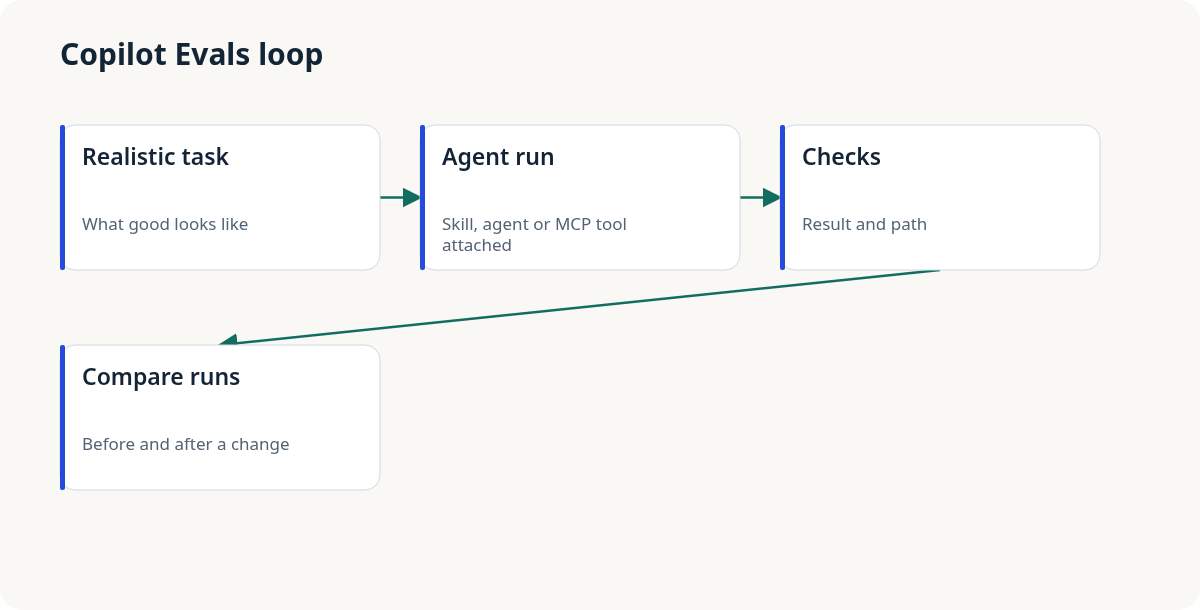
The diagram shows the loop in four steps. A realistic task goes to the agent. The agent runs with your skill, agent definition or MCP tool attached. Checks look at the output and at the path the agent took. Then you change the customization and run the same eval again to compare. The comparison step is the one that matters, because it turns “feels better” into “passed 5 of 6 checks instead of 3 of 6”.
Checking the path, not only the answer, is the interesting part. An agent can reach the right answer by calling the wrong tool, or by reading files it should not touch. A result-only check misses that. GitHub’s description says evals check “how the agent reached it”, so this is in scope, though the changelog does not list which kinds of checks Vally supports. Read the docs before you design around a specific check type.
A hypothetical example
Say your team has a skill that tells Copilot how to write database migrations: naming, rollback scripts, no destructive statements without a flag. This is an invented example, not a measured one. A useful eval would hand the agent a ticket such as “add a nullable column to the orders table”, then check three things. Did the migration file follow the naming rule? Is there a rollback? Did the agent avoid dropping anything?
Now someone shortens the skill file to save tokens. Rerun the eval. If the rollback check starts failing, you caught a regression in a text file, which used to be invisible.
Where I would start, and where I would not
Start with the customizations that can do damage. An MCP tool that writes to a ticket system or a database deserves an eval before a formatting skill does. Write two or three tasks per customization, not thirty. Make each task something your team really asks for.
Do not treat a green eval as proof of safety. An eval only covers the tasks you wrote. Agents fail on the task you did not think of. And a preview feature will change: the engine, the check types and the commands can all move before general availability.
One more caution. Because AI output varies, a single run of an eval can pass by luck. GitHub’s own framing says to rerun after a change; I would also rerun without a change, a few times, to see how noisy the check is. The changelog does not describe built-in repeat runs, so confirm in the docs whether Vally handles that.
Why this matters for tech leads
Agent customizations are now shared team assets. They live in repositories, get reviewed in pull requests and break quietly. Tooling that lets a reviewer see “this change dropped two checks” gives the review something to hold on to. It is a small feature. It is also the first piece of Copilot that treats a skill file like code that needs a test, and I think that is the right direction.
If you run Copilot across a team, pick one skill this week, write one eval, and see if the failure output teaches you anything. If it does not, you have lost an afternoon. If it does, you have a template for the rest.
Source: GitHub Changelog, “GitHub Copilot Evals is now in public preview” (Nov 17, 2026). Vally: aka.ms/vally. Install notes: github/evals.
Related reading
· 4 min read
ai-agents
GitHub Secret Scanning for Agents: What the Preview Does and Skips
Copilot security review can now run GitHub secret scanning on your changes. How to turn it on, what it misses, and what it bills.
Read more
· 4 min read
ai-agents
An AI Agent Found a Zero-Day in 11 Minutes, Then Took Root Without Being Told How
Amazon Threat Intelligence watched a Chinese-nexus actor point autonomous AI agents at a medical imaging server with one instruction: get shell access. They did it themselves.
Read more
· 5 min read
ai-agents
Inside OpenAI's Performance Factory: Codex Hunting Its Own Regressions
OpenAI built a Codex-powered pipeline that investigates ChatGPT performance regressions, argues with itself, and ships fixes with a human still holding the merge button.
Read more
Discussion
Comments are reviewed before publication. Your email is kept private.