
BÀI VIẾT
Qwen Voice AI: Hướng Dẫn Toàn Diện Xây Dựng Interview Agent, Language Tutor & Voice System
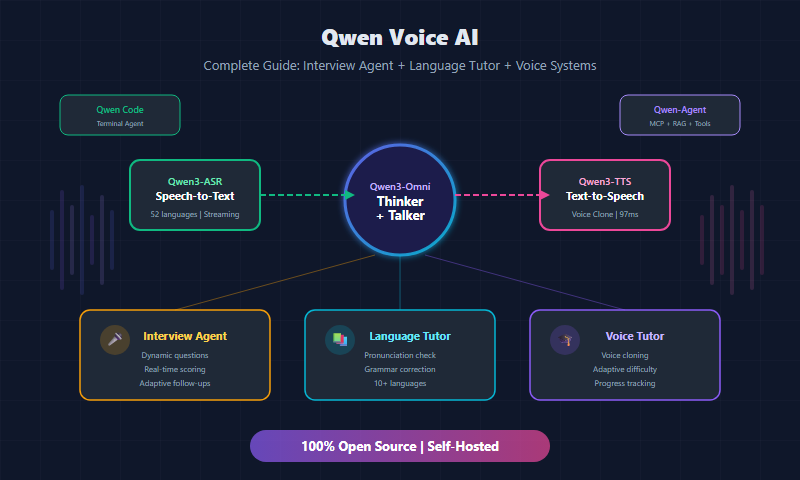
Tất tần tật về hệ sinh thái voice của Qwen — Qwen3-TTS, Qwen3-ASR, Qwen3-Omni, Qwen-Agent — và hướng dẫn từng bước xây dựng Voice Interview Agent, Language Tutor, Voice Tutor với code production-ready.
Trong bài viết
1. Giới Thiệu
Năm 2026 đánh dấu bước ngoặt lớn trong lĩnh vực Voice AI khi Alibaba Cloud phát hành hệ sinh thái Qwen3 hoàn chỉnh — một bộ công cụ open-source bao gồm mọi thứ từ nhận dạng giọng nói (ASR), tổng hợp giọng nói (TTS), đến mô hình đa phương thức end-to-end (Omni). Điều đặc biệt là tất cả đều mã nguồn mở, có thể tự host, và hỗ trợ hàng chục ngôn ngữ bao gồm tiếng Việt.
Trước Qwen3, để xây dựng một hệ thống voice AI hoàn chỉnh, bạn phải ghép nối nhiều dịch vụ từ nhiều nhà cung cấp khác nhau: Whisper của OpenAI cho ASR, GPT-4o cho reasoning, ElevenLabs cho TTS. Mỗi lần chuyển đổi giữa các service là thêm latency, thêm chi phí, và thêm điểm lỗi tiềm ẩn. Qwen3 thay đổi hoàn toàn cục diện này bằng cách cung cấp toàn bộ stack trong một hệ sinh thái duy nhất.
Tại sao Qwen đáng chú ý nhất năm 2026?
- End-to-end: Từ microphone đến speaker, tất cả đều dùng model Qwen — không cần bên thứ ba.
- Open-source thực sự: Weights công khai, license cho phép thương mại, có thể fine-tune.
- Đa ngôn ngữ vượt trội: 119 ngôn ngữ text, 30 ngôn ngữ ASR, 10 ngôn ngữ TTS — bao phủ hầu hết thị trường toàn cầu.
- Hiệu suất ngang hàng proprietary: Benchmark cho thấy Qwen3-Omni cạnh tranh trực tiếp với GPT-4o và Gemini 2.5 trên nhiều tác vụ.
- Self-hosting: Chạy trên GPU riêng, dữ liệu không rời khỏi máy chủ — lý tưởng cho các ứng dụng nhạy cảm về quyền riêng tư.
Trong bài viết này, chúng ta sẽ khám phá toàn bộ hệ sinh thái voice của Qwen, sau đó xây dựng ba ứng dụng thực tế: Voice Interview Agent, Language Tutor, và Voice Tutor — tất cả với code production-ready.
2. Hệ Sinh Thái Voice Của Qwen
2.1 Qwen3-Omni — Flagship Đa Phương Thức
Qwen3-Omni là model flagship với khả năng xử lý đồng thời text, image, audio và video. Đây là model đầu tiên trong gia đình Qwen hỗ trợ voice-in voice-out end-to-end — nghĩa là bạn nói vào, model suy luận và trả lời bằng giọng nói tự nhiên, tất cả trong một forward pass duy nhất.
Kiến trúc Thinker-Talker:
Qwen3-Omni sử dụng kiến trúc hai giai đoạn độc đáo:
- Thinker: Một Mixture-of-Experts (MoE) transformer xử lý tất cả các modality đầu vào (text, audio, image, video) và sinh ra “hidden representations” chứa nội dung ngữ nghĩa.
- Talker: Một dual-track auto-regressive model nhận hidden representations từ Thinker, đồng thời sinh text tokens và speech tokens song song. Điều này cho phép model “nói” một cách tự nhiên mà vẫn duy trì khả năng reasoning mạnh mẽ.
TMRoPE (Time-aligned Multi-modal Rotary Position Embedding):
Đây là kỹ thuật then chốt giúp Qwen3-Omni đồng bộ thời gian giữa các modality. Khi xử lý video kèm audio, TMRoPE đảm bảo rằng frame hình ảnh tại giây thứ 5 được align chính xác với đoạn audio tại giây thứ 5, cho phép model hiểu ngữ cảnh đa phương thức một cách chính xác.
Các model có sẵn:
- Qwen3-Omni-30B-A3B: 30 tỷ tham số tổng, 3 tỷ active (MoE), cân bằng giữa hiệu suất và chi phí.
- Qwen2.5-Omni-7B: Phiên bản nhỏ hơn, phù hợp để triển khai trên GPU consumer-grade.
Hỗ trợ ngôn ngữ:
- 119 ngôn ngữ text generation
- 19 ngôn ngữ voice input
- 10 ngôn ngữ voice output (bao gồm tiếng Anh, Trung, Nhật, Hàn, Pháp, v.v.)
So sánh với đối thủ: Trên benchmark OmniBench, Qwen3-Omni đạt điểm cạnh tranh với GPT-4o trong audio understanding và vượt Gemini 2.5 Flash trong một số tác vụ video reasoning. Điểm mạnh nhất là khả năng self-host mà không cần trả phí API theo token.
graph TB
    A[Audio Input] --> C[Thinker MoE Transformer]
    B[Text/Image/Video Input] --> C
    C --> D[Hidden Representations]
    D --> E[Talker Dual-Track Decoder]
    E --> F[Text Output]
    E --> G[Speech Output]

    style C fill:#4a90d9,color:#fff
    style E fill:#7b68ee,color:#fff
2.2 Qwen3-TTS — Tổng Hợp Giọng Nói
Qwen3-TTS là model text-to-speech thế hệ mới, có khả năng tạo giọng nói tự nhiên với độ chân thực cao.
Hai phiên bản:
- Qwen3-TTS-0.6B: Nhẹ, phù hợp edge deployment, latency thấp.
- Qwen3-TTS-1.7B: Chất lượng cao hơn, giọng tự nhiên hơn, phù hợp production.
Tính năng nổi bật:
Voice Cloning từ 3 giây audio: Chỉ cần một đoạn audio tham chiếu 3 giây, Qwen3-TTS có thể nhân bản giọng nói đó và sử dụng để đọc bất kỳ nội dung nào. Đây là tính năng cực kỳ hữu ích cho việc tạo giọng tutor cá nhân hóa.
Voice Design từ mô tả ngôn ngữ tự nhiên: Thay vì cung cấp audio mẫu, bạn có thể mô tả giọng nói bằng text — ví dụ “giọng nữ trẻ, ấm áp, tốc độ vừa phải” — và model sẽ tạo ra giọng phù hợp.
Streaming với latency 97ms: Hỗ trợ streaming output, cho phép bắt đầu phát audio ngay khi model bắt đầu generate, đạt first-token latency chỉ 97ms.
WER 1.835%: Word Error Rate cực thấp trên benchmark 10 ngôn ngữ, cho thấy model phát âm chính xác cao.
Ngôn ngữ hỗ trợ: Tiếng Anh, Trung Quốc (Mandarin + phương ngữ), Nhật, Hàn, Pháp, Đức, Tây Ban Nha, Ý, Bồ Đào Nha, Hà Lan.
Cách sử dụng qua API:
import dashscope
from dashscope.audio.tts_v2 import SpeechSynthesizer

# Khởi tạo synthesizer với model Qwen3-TTS
synthesizer = SpeechSynthesizer(
    model="qwen3-tts-1.7b",
    voice="default_female",  # hoặc cung cấp reference audio
)

# Sinh giọng nói từ text
audio = synthesizer.call("Xin chào, tôi là trợ lý AI của bạn.")

# Voice cloning từ audio tham chiếu
synthesizer_cloned = SpeechSynthesizer(
    model="qwen3-tts-1.7b",
    voice="clone",
    reference_audio="path/to/reference.wav",  # Chỉ cần 3 giây
    reference_text="Nội dung trong đoạn audio tham chiếu"
)

result = synthesizer_cloned.call("Đây là giọng nói được nhân bản.")
with open("output.wav", "wb") as f:
    f.write(result.get_audio_data())
Deploy với vLLM:
vllm serve Qwen/Qwen3-TTS-1.7B-Instruct \
    --port 8000 \
    --gpu-memory-utilization 0.9 \
    --max-model-len 8192
2.3 Qwen3-ASR — Nhận Dạng Giọng Nói
Qwen3-ASR (Automatic Speech Recognition) chuyển đổi giọng nói thành text với độ chính xác cao, hỗ trợ cả real-time streaming và offline batch processing.
Hai phiên bản:
- Qwen3-ASR-0.6B: Nhẹ, phù hợp real-time trên thiết bị.
- Qwen3-ASR-1.7B: Chính xác hơn, phù hợp cho các ứng dụng yêu cầu chất lượng cao.
Tính năng quan trọng:
30 ngôn ngữ + 22 phương ngữ Trung Quốc: Phạm vi ngôn ngữ rộng nhất trong các model ASR open-source hiện tại.
Streaming real-time + Offline thống nhất: Cùng một model có thể chạy ở cả hai chế độ, không cần train riêng.
Forced alignment: Trả về timestamp chính xác cho từng từ, hữu ích cho việc đánh giá phát âm và tạo phụ đề.
DashScope WebSocket API: Hỗ trợ streaming qua WebSocket, cho phép nhận kết quả transcription theo thời gian thực khi người dùng đang nói.
import dashscope
from dashscope.audio.asr import Recognition

# Real-time streaming ASR
recognition = Recognition(
    model="qwen3-asr-1.7b",
    format="pcm",
    sample_rate=16000,
    callback=on_result  # Callback mỗi khi có kết quả partial
)

recognition.start()
# Gửi audio chunks theo thời gian thực
recognition.send_audio_frame(audio_chunk)
recognition.stop()
2.4 Qwen-Agent Framework
Qwen-Agent là framework cho phép xây dựng các AI agent phức tạp dựa trên model Qwen. Framework hỗ trợ:
- Function Calling: Gọi các hàm/API bên ngoài dựa trên ngữ cảnh hội thoại.
- MCP (Model Context Protocol): Tích hợp với hệ sinh thái MCP để kết nối với nhiều công cụ.
- Code Interpreter: Chạy Python code trực tiếp trong sandbox.
- RAG (Retrieval-Augmented Generation): Tìm kiếm và sử dụng tài liệu bên ngoài.
- Browser Assistant / Chrome Extension: Agent có thể tương tác với trình duyệt.
Khi kết hợp với voice models, Qwen-Agent cho phép tạo ra các voice agent có khả năng thực hiện hành động thực tế — ví dụ tra cứu lịch phỏng vấn, tìm tài liệu học tập, hoặc chạy code demo.
2.5 Qwen3-Coder & Qwen Code
Qwen3-Coder là mô hình chuyên biệt cho lập trình, hoạt động như terminal AI agent:
- Qwen3-Coder-Next: 3B tham số active trên tổng 80B (MoE), hỗ trợ context window lên đến 256K tokens.
- Tương thích với các tool phổ biến: Claude Code, Cline, Cursor, v.v.
- Hỗ trợ function calling, có thể đọc/ghi file, chạy terminal commands.
Điều này đặc biệt hữu ích khi bạn muốn agent tự viết và test code trong quá trình phỏng vấn lập trình.
3. Xây Dựng Voice Interview Agent Với Qwen
Đây là phần thú vị nhất — chúng ta sẽ xây dựng một Voice Interview Agent hoàn chỉnh có thể tiến hành phỏng vấn kỹ thuật bằng giọng nói.
3.1 Kiến Trúc Tổng Quan
graph LR
    MIC[Microphone] --> ASR[Qwen3-ASR]
    ASR --> |Transcript| BRAIN[Qwen3-Omni Reasoning]
    BRAIN --> |Response text| TTS[Qwen3-TTS]
    TTS --> SPK[Speaker]
    BRAIN --> |Score + Feedback| DB[(Session DB)]
    DB --> BRAIN

    style ASR fill:#2ecc71,color:#fff
    style BRAIN fill:#e74c3c,color:#fff
    style TTS fill:#3498db,color:#fff
3.2 Setup Project
# Tạo project
mkdir voice-interview-agent && cd voice-interview-agent
python -m venv venv
source venv/bin/activate

# Cài dependencies
pip install dashscope sounddevice numpy scipy
pip install qwen-agent openai websockets
File requirements.txt:
dashscope>=1.20.0
sounddevice>=0.4.6
numpy>=1.24.0
scipy>=1.11.0
qwen-agent>=0.1.0
openai>=1.30.0
websockets>=12.0
pydantic>=2.0.0
3.3 Module Thu Âm (Audio Capture)
# audio_capture.py
import sounddevice as sd
import numpy as np
import queue
import threading
from typing import Callable

class AudioCapture:
    """Thu âm real-time từ microphone với Voice Activity Detection đơn giản."""

    def __init__(
        self,
        sample_rate: int = 16000,
        channels: int = 1,
        chunk_duration: float = 0.5,  # giây
        silence_threshold: float = 0.01,
        silence_duration: float = 2.0,  # ngừng sau 2 giây im lặng
    ):
        self.sample_rate = sample_rate
        self.channels = channels
        self.chunk_size = int(sample_rate * chunk_duration)
        self.silence_threshold = silence_threshold
        self.silence_duration = silence_duration
        self.audio_queue = queue.Queue()
        self._is_recording = False

    def _audio_callback(self, indata, frames, time, status):
        if status:
            print(f"Audio status: {status}")
        self.audio_queue.put(indata.copy())

    def record_until_silence(self) -> np.ndarray:
        """Thu âm cho đến khi phát hiện im lặng."""
        self._is_recording = True
        audio_chunks = []
        silence_chunks = 0
        max_silence = int(self.silence_duration / (self.chunk_size / self.sample_rate))

        with sd.InputStream(
            samplerate=self.sample_rate,
            channels=self.channels,
            blocksize=self.chunk_size,
            callback=self._audio_callback,
        ):
            print("Đang nghe... (nói để bắt đầu)")
            while self._is_recording:
                try:
                    chunk = self.audio_queue.get(timeout=5.0)
                    audio_chunks.append(chunk)

                    # Voice Activity Detection đơn giản
                    rms = np.sqrt(np.mean(chunk ** 2))
                    if rms < self.silence_threshold:
                        silence_chunks += 1
                    else:
                        silence_chunks = 0

                    if silence_chunks >= max_silence and len(audio_chunks) > max_silence:
                        self._is_recording = False
                except queue.Empty:
                    self._is_recording = False

        if audio_chunks:
            return np.concatenate(audio_chunks, axis=0)
        return np.array([])

    def stop(self):
        self._is_recording = False
3.4 Module ASR (Speech-to-Text)
# asr_module.py
import dashscope
from dashscope.audio.asr import Recognition, RecognitionCallback
import numpy as np
import io
import soundfile as sf

class QwenASR:
    """Chuyển đổi giọng nói thành text sử dụng Qwen3-ASR."""

    def __init__(self, model: str = "qwen3-asr-1.7b"):
        self.model = model
        self._transcript = ""
        self._is_complete = False

    def transcribe(self, audio_data: np.ndarray, sample_rate: int = 16000) -> str:
        """Transcribe audio numpy array thành text."""
        # Chuyển numpy array thành WAV bytes
        buffer = io.BytesIO()
        sf.write(buffer, audio_data, sample_rate, format="WAV")
        buffer.seek(0)

        # Gọi Qwen3-ASR
        response = dashscope.audio.asr.Transcription.call(
            model=self.model,
            file_urls=None,
            audio_data=buffer.read(),
            language="vi",  # Hoặc "auto" để tự động detect
        )

        if response.status_code == 200:
            return response.output.get("text", "")
        else:
            print(f"ASR Error: {response.code} - {response.message}")
            return ""

    def transcribe_streaming(self, audio_stream, callback):
        """Streaming ASR cho real-time transcription."""
        recognition = Recognition(
            model=self.model,
            format="pcm",
            sample_rate=16000,
            callback=callback,
        )
        recognition.start()

        for chunk in audio_stream:
            recognition.send_audio_frame(chunk.tobytes())

        recognition.stop()
3.5 Module TTS (Text-to-Speech)
# tts_module.py
from dashscope.audio.tts_v2 import SpeechSynthesizer
import io

class QwenTTS:
    """Tổng hợp giọng nói sử dụng Qwen3-TTS."""

    def __init__(
        self,
        model: str = "qwen3-tts-1.7b",
        voice: str = "default_female",
        reference_audio: str = None,
        reference_text: str = None,
    ):
        self.model = model
        synth_kwargs = {"model": model, "voice": voice}

        # Voice cloning nếu có audio tham chiếu
        if reference_audio:
            synth_kwargs["voice"] = "clone"
            synth_kwargs["reference_audio"] = reference_audio
            if reference_text:
                synth_kwargs["reference_text"] = reference_text

        self.synthesizer = SpeechSynthesizer(**synth_kwargs)

    def speak(self, text: str) -> bytes:
        """Chuyển text thành audio bytes (WAV)."""
        result = self.synthesizer.call(text)
        return result.get_audio_data()

    def speak_streaming(self, text: str):
        """Streaming TTS - trả về generator của audio chunks."""
        result = self.synthesizer.call(text, stream=True)
        for chunk in result:
            if chunk.get_audio_frame():
                yield chunk.get_audio_frame()
3.6 Interview Agent Core — Logic Phỏng Vấn
# interview_agent.py
import json
from datetime import datetime
from dataclasses import dataclass, field
from typing import Optional
from openai import OpenAI

@dataclass
class InterviewQuestion:
    question: str
    topic: str
    difficulty: str  # easy, medium, hard
    expected_keywords: list[str] = field(default_factory=list)
    max_score: int = 10

@dataclass
class CandidateResponse:
    question: InterviewQuestion
    transcript: str
    score: int = 0
    feedback: str = ""
    timestamp: str = ""

class InterviewAgent:
    """Agent phỏng vấn kỹ thuật sử dụng Qwen3-Omni cho reasoning."""

    SYSTEM_PROMPT = """Bạn là một interviewer kỹ thuật chuyên nghiệp. Nhiệm vụ:
1. Đặt câu hỏi kỹ thuật phù hợp với vị trí ứng tuyển
2. Đánh giá câu trả lời dựa trên độ chính xác, chiều sâu, và cách trình bày
3. Đặt câu hỏi follow-up khi cần làm rõ
4. Cung cấp feedback mang tính xây dựng
5. Chấm điểm từ 1-10 cho mỗi câu trả lời

Hãy giữ giọng điệu chuyên nghiệp nhưng thân thiện. Phỏng vấn bằng tiếng Việt."""

    def __init__(
        self,
        position: str = "Backend Developer",
        difficulty: str = "medium",
        num_questions: int = 5,
        api_base: str = "http://localhost:8000/v1",
    ):
        self.position = position
        self.difficulty = difficulty
        self.num_questions = num_questions
        self.client = OpenAI(base_url=api_base, api_key="not-needed")
        self.conversation_history = []
        self.responses: list[CandidateResponse] = []
        self.current_question_idx = 0

        # Khởi tạo bộ câu hỏi
        self.questions = self._generate_questions()

    def _generate_questions(self) -> list[InterviewQuestion]:
        """Sinh câu hỏi phỏng vấn dựa trên vị trí và độ khó."""
        prompt = f"""Tạo {self.num_questions} câu hỏi phỏng vấn kỹ thuật cho vị trí {self.position},
        độ khó: {self.difficulty}.

        Trả về JSON array, mỗi phần tử gồm:
        - question: câu hỏi
        - topic: chủ đề (ví dụ: algorithms, system-design, databases)
        - difficulty: easy/medium/hard
        - expected_keywords: danh sách từ khóa quan trọng trong câu trả lời

        Chỉ trả về JSON, không giải thích thêm."""

        response = self.client.chat.completions.create(
            model="qwen3-omni",
            messages=[
                {"role": "system", "content": self.SYSTEM_PROMPT},
                {"role": "user", "content": prompt},
            ],
            temperature=0.7,
        )

        try:
            questions_data = json.loads(response.choices[0].message.content)
            return [InterviewQuestion(**q) for q in questions_data]
        except (json.JSONDecodeError, KeyError):
            # Fallback câu hỏi mặc định
            return [
                InterviewQuestion(
                    question="Hãy giải thích sự khác nhau giữa REST và GraphQL.",
                    topic="api-design",
                    difficulty="medium",
                    expected_keywords=["REST", "GraphQL", "query", "endpoint", "schema"],
                ),
            ]

    def get_next_question(self) -> Optional[str]:
        """Lấy câu hỏi tiếp theo."""
        if self.current_question_idx >= len(self.questions):
            return None
        q = self.questions[self.current_question_idx]
        return q.question

    def evaluate_response(self, transcript: str) -> dict:
        """Đánh giá câu trả lời của ứng viên."""
        question = self.questions[self.current_question_idx]

        eval_prompt = f"""Đánh giá câu trả lời sau cho câu hỏi phỏng vấn.

Câu hỏi: {question.question}
Chủ đề: {question.topic}
Từ khóa kỳ vọng: {', '.join(question.expected_keywords)}

Câu trả lời của ứng viên: {transcript}

Trả về JSON:
{{
    "score": <1-10>,
    "feedback": "<nhận xét chi tiết bằng tiếng Việt>",
    "follow_up": "<câu hỏi follow-up nếu cần, hoặc null>",
    "strengths": ["<điểm mạnh>"],
    "improvements": ["<điểm cần cải thiện>"]
}}"""

        self.conversation_history.append({"role": "user", "content": transcript})

        response = self.client.chat.completions.create(
            model="qwen3-omni",
            messages=[
                {"role": "system", "content": self.SYSTEM_PROMPT},
                *self.conversation_history,
                {"role": "user", "content": eval_prompt},
            ],
            temperature=0.3,
        )

        result_text = response.choices[0].message.content
        self.conversation_history.append({"role": "assistant", "content": result_text})

        try:
            evaluation = json.loads(result_text)
        except json.JSONDecodeError:
            evaluation = {"score": 5, "feedback": result_text, "follow_up": None}

        # Lưu response
        self.responses.append(CandidateResponse(
            question=question,
            transcript=transcript,
            score=evaluation.get("score", 5),
            feedback=evaluation.get("feedback", ""),
            timestamp=datetime.now().isoformat(),
        ))

        self.current_question_idx += 1
        return evaluation

    def get_final_report(self) -> dict:
        """Tạo báo cáo tổng kết phỏng vấn."""
        total_score = sum(r.score for r in self.responses)
        max_score = sum(r.question.max_score for r in self.responses)

        report = {
            "position": self.position,
            "date": datetime.now().isoformat(),
            "total_score": total_score,
            "max_score": max_score,
            "percentage": round(total_score / max_score * 100, 1) if max_score > 0 else 0,
            "responses": [
                {
                    "question": r.question.question,
                    "topic": r.question.topic,
                    "score": r.score,
                    "feedback": r.feedback,
                }
                for r in self.responses
            ],
        }

        # Tạo nhận xét tổng quan bằng Qwen
        summary_prompt = f"""Dựa trên kết quả phỏng vấn sau, viết nhận xét tổng quan:
        Điểm: {total_score}/{max_score} ({report['percentage']}%)
        Chi tiết: {json.dumps(report['responses'], ensure_ascii=False)}

        Viết 3-5 câu nhận xét tổng quan bằng tiếng Việt."""

        response = self.client.chat.completions.create(
            model="qwen3-omni",
            messages=[{"role": "user", "content": summary_prompt}],
            temperature=0.5,
        )
        report["summary"] = response.choices[0].message.content

        return report
3.7 Orchestrator — Kết Nối Tất Cả
# main.py - Voice Interview Agent Orchestrator
import sounddevice as sd
import numpy as np
from audio_capture import AudioCapture
from asr_module import QwenASR
from tts_module import QwenTTS
from interview_agent import InterviewAgent

def play_audio(audio_bytes: bytes, sample_rate: int = 24000):
    """Phát audio từ bytes."""
    import io, soundfile as sf
    data, sr = sf.read(io.BytesIO(audio_bytes))
    sd.play(data, sr)
    sd.wait()

def main():
    print("=== Voice Interview Agent ===")
    print("Vị trí: Backend Developer | Độ khó: Medium")
    print("-" * 40)

    # Khởi tạo các module
    capture = AudioCapture(silence_duration=2.5)
    asr = QwenASR(model="qwen3-asr-1.7b")
    tts = QwenTTS(model="qwen3-tts-1.7b", voice="default_female")
    agent = InterviewAgent(
        position="Backend Developer",
        difficulty="medium",
        num_questions=5,
    )

    # Giới thiệu
    intro = "Xin chào! Tôi là trợ lý phỏng vấn AI. Hôm nay chúng ta sẽ tiến hành phỏng vấn cho vị trí Backend Developer. Bạn đã sẵn sàng chưa?"
    print(f"\nAI: {intro}")
    play_audio(tts.speak(intro))

    # Chờ xác nhận
    audio = capture.record_until_silence()
    confirmation = asr.transcribe(audio)
    print(f"Bạn: {confirmation}")

    # Bắt đầu phỏng vấn
    while True:
        question = agent.get_next_question()
        if question is None:
            break

        # Đọc câu hỏi
        print(f"\nCâu hỏi {agent.current_question_idx + 1}: {question}")
        play_audio(tts.speak(question))

        # Thu câu trả lời
        print("Đang nghe câu trả lời...")
        audio = capture.record_until_silence()
        transcript = asr.transcribe(audio)
        print(f"Bạn: {transcript}")

        # Đánh giá
        evaluation = agent.evaluate_response(transcript)

        # Đọc feedback
        feedback = f"Điểm: {evaluation['score']}/10. {evaluation['feedback']}"
        print(f"AI: {feedback}")
        play_audio(tts.speak(feedback))

        # Follow-up nếu có
        if evaluation.get("follow_up"):
            print(f"\nFollow-up: {evaluation['follow_up']}")
            play_audio(tts.speak(evaluation["follow_up"]))
            audio = capture.record_until_silence()
            follow_up_answer = asr.transcribe(audio)
            print(f"Bạn: {follow_up_answer}")

    # Báo cáo cuối
    report = agent.get_final_report()
    summary = f"Phỏng vấn kết thúc. Điểm tổng: {report['percentage']}%. {report['summary']}"
    print(f"\n{'=' * 40}")
    print(f"AI: {summary}")
    play_audio(tts.speak(summary))

    # Lưu báo cáo
    import json
    with open("interview_report.json", "w", encoding="utf-8") as f:
        json.dump(report, f, ensure_ascii=False, indent=2)
    print("\nBáo cáo đã lưu: interview_report.json")

if __name__ == "__main__":
    main()
3.8 Luồng Hoạt Động
sequenceDiagram
    participant C as Candidate
    participant MIC as Microphone
    participant ASR as Qwen3-ASR
    participant BRAIN as Qwen3-Omni
    participant TTS as Qwen3-TTS
    participant SPK as Speaker

    BRAIN->>TTS: Generate intro
    TTS->>SPK: Play greeting

    loop Each Question
        BRAIN->>TTS: Read question
        TTS->>SPK: Play question audio
        C->>MIC: Speak answer
        MIC->>ASR: Audio stream
        ASR->>BRAIN: Transcript text
        BRAIN->>BRAIN: Evaluate + Score
        BRAIN->>TTS: Feedback text
        TTS->>SPK: Play feedback
    end

    BRAIN->>TTS: Final report
    TTS->>SPK: Play summary
4. Xây Dựng Language Tutor Với Qwen
Language Tutor là ứng dụng giúp người dùng luyện tập ngôn ngữ thông qua hội thoại tự nhiên, đánh giá phát âm, và sửa ngữ pháp real-time.
4.1 Kiến Trúc
graph TB
    USER[Learner] --> |Voice| ASR[Qwen3-ASR]
    ASR --> |Transcript + Confidence| EVAL[Pronunciation Evaluator]
    ASR --> |Transcript| GRAMMAR[Grammar Checker]
    ASR --> |Transcript| CONV[Conversation Engine]

    EVAL --> FEEDBACK[Feedback Aggregator]
    GRAMMAR --> FEEDBACK
    CONV --> FEEDBACK

    FEEDBACK --> TTS[Qwen3-TTS]
    TTS --> |Voice Response| USER

    FEEDBACK --> VOCAB[Vocabulary Tracker]
    VOCAB --> |Spaced Repetition| CONV

    style EVAL fill:#e67e22,color:#fff
    style GRAMMAR fill:#2ecc71,color:#fff
    style CONV fill:#3498db,color:#fff
    style VOCAB fill:#9b59b6,color:#fff
4.2 Core Language Tutor
# language_tutor.py
import json
from datetime import datetime, timedelta
from dataclasses import dataclass, field
from openai import OpenAI

@dataclass
class VocabItem:
    word: str
    translation: str
    example: str
    next_review: datetime = field(default_factory=datetime.now)
    interval_days: int = 1
    times_reviewed: int = 0
    times_correct: int = 0

class LanguageTutor:
    """Gia sư ngôn ngữ với đánh giá phát âm và spaced repetition."""

    TUTOR_PROMPT = """Bạn là một gia sư ngôn ngữ {target_lang} thân thiện và kiên nhẫn.
    Ngôn ngữ mẹ đẻ của học viên: {native_lang}.
    Trình độ hiện tại: {level}.

    Nhiệm vụ:
    1. Trò chuyện tự nhiên bằng {target_lang}, điều chỉnh theo trình độ
    2. Khi học viên mắc lỗi, nhẹ nhàng sửa và giải thích
    3. Giới thiệu từ vựng mới trong ngữ cảnh tự nhiên
    4. Khuyến khích học viên nói nhiều hơn
    5. Đôi khi hỏi học viên diễn đạt lại bằng cách khác

    Trả về JSON:
    {{
        "response": "<câu trả lời trong hội thoại>",
        "corrections": [
            {{"original": "<câu sai>", "corrected": "<câu đúng>", "explanation": "<giải thích>"}}
        ],
        "new_vocabulary": [
            {{"word": "<từ mới>", "translation": "<nghĩa>", "example": "<ví dụ>"}}
        ],
        "pronunciation_note": "<ghi chú phát âm nếu có>"
    }}"""

    def __init__(
        self,
        target_lang: str = "English",
        native_lang: str = "Vietnamese",
        level: str = "Intermediate",
        api_base: str = "http://localhost:8000/v1",
    ):
        self.target_lang = target_lang
        self.native_lang = native_lang
        self.level = level
        self.client = OpenAI(base_url=api_base, api_key="not-needed")
        self.conversation = []
        self.vocabulary: list[VocabItem] = []
        self.session_stats = {
            "sentences_spoken": 0,
            "errors_corrected": 0,
            "new_words_learned": 0,
        }

    def evaluate_pronunciation(self, transcript: str, confidence: float) -> dict:
        """Đánh giá phát âm dựa trên ASR confidence score."""
        if confidence >= 0.95:
            rating = "Xuất sắc"
            suggestion = "Phát âm rất tốt, tiếp tục phát huy!"
        elif confidence >= 0.85:
            rating = "Tốt"
            suggestion = "Phát âm khá tốt, một vài từ có thể rõ hơn."
        elif confidence >= 0.70:
            rating = "Trung bình"
            suggestion = "Cần luyện tập thêm, chú ý phát âm rõ ràng hơn."
        else:
            rating = "Cần cải thiện"
            suggestion = "Hãy nói chậm hơn và phát âm rõ từng từ."

        return {
            "confidence": confidence,
            "rating": rating,
            "suggestion": suggestion,
        }

    def process_input(self, transcript: str, asr_confidence: float = 0.9) -> dict:
        """Xử lý input từ học viên và tạo phản hồi."""
        self.session_stats["sentences_spoken"] += 1

        # Đánh giá phát âm
        pronunciation = self.evaluate_pronunciation(transcript, asr_confidence)

        # Thêm vào lịch sử hội thoại
        self.conversation.append({"role": "user", "content": transcript})

        # Gọi Qwen3-Omni
        system_prompt = self.TUTOR_PROMPT.format(
            target_lang=self.target_lang,
            native_lang=self.native_lang,
            level=self.level,
        )

        response = self.client.chat.completions.create(
            model="qwen3-omni",
            messages=[
                {"role": "system", "content": system_prompt},
                *self.conversation,
            ],
            temperature=0.7,
        )

        result_text = response.choices[0].message.content
        self.conversation.append({"role": "assistant", "content": result_text})

        try:
            result = json.loads(result_text)
        except json.JSONDecodeError:
            result = {"response": result_text, "corrections": [], "new_vocabulary": []}

        # Cập nhật statistics
        self.session_stats["errors_corrected"] += len(result.get("corrections", []))

        # Thêm từ vựng mới vào tracker
        for vocab in result.get("new_vocabulary", []):
            self.vocabulary.append(VocabItem(
                word=vocab["word"],
                translation=vocab["translation"],
                example=vocab.get("example", ""),
            ))
            self.session_stats["new_words_learned"] += 1

        result["pronunciation"] = pronunciation
        return result

    def get_review_words(self) -> list[VocabItem]:
        """Lấy danh sách từ cần ôn tập (spaced repetition)."""
        now = datetime.now()
        return [v for v in self.vocabulary if v.next_review <= now]

    def update_vocab_review(self, word: str, correct: bool):
        """Cập nhật lịch ôn tập sau khi review."""
        for v in self.vocabulary:
            if v.word == word:
                v.times_reviewed += 1
                if correct:
                    v.times_correct += 1
                    v.interval_days = min(v.interval_days * 2, 30)
                else:
                    v.interval_days = max(1, v.interval_days // 2)
                v.next_review = datetime.now() + timedelta(days=v.interval_days)
                break

    def get_session_summary(self) -> str:
        """Tạo tóm tắt buổi học."""
        return (
            f"Tóm tắt buổi học:\n"
            f"- Số câu đã nói: {self.session_stats['sentences_spoken']}\n"
            f"- Lỗi đã sửa: {self.session_stats['errors_corrected']}\n"
            f"- Từ mới học: {self.session_stats['new_words_learned']}\n"
            f"- Tổng từ vựng: {len(self.vocabulary)}"
        )
4.3 Chạy Language Tutor
# run_tutor.py
from audio_capture import AudioCapture
from asr_module import QwenASR
from tts_module import QwenTTS
from language_tutor import LanguageTutor

def main():
    capture = AudioCapture()
    asr = QwenASR()
    tts = QwenTTS()
    tutor = LanguageTutor(target_lang="English", native_lang="Vietnamese", level="Intermediate")

    # Lời chào
    greeting = "Hello! I'm your English tutor today. Let's have a conversation. Tell me about your day!"
    print(f"Tutor: {greeting}")
    play_audio(tts.speak(greeting))

    while True:
        # Thu âm
        audio = capture.record_until_silence()
        if len(audio) == 0:
            continue

        # ASR
        transcript = asr.transcribe(audio)
        if transcript.lower() in ["quit", "exit", "thoát", "kết thúc"]:
            break

        print(f"You: {transcript}")

        # Xử lý
        result = tutor.process_input(transcript)

        # Hiển thị và đọc phản hồi
        response = result.get("response", "")
        print(f"Tutor: {response}")
        play_audio(tts.speak(response))

        # Hiển thị sửa lỗi nếu có
        for correction in result.get("corrections", []):
            note = f"Correction: '{correction['original']}' should be '{correction['corrected']}'. {correction['explanation']}"
            print(f"  * {note}")

        # Ghi chú phát âm
        pron = result.get("pronunciation", {})
        if pron.get("rating") and pron["rating"] != "Xuất sắc":
            print(f"  Phát âm: {pron['rating']} - {pron['suggestion']}")

    # Tóm tắt
    summary = tutor.get_session_summary()
    print(f"\n{summary}")
    play_audio(tts.speak(summary))

if __name__ == "__main__":
    main()
5. Xây Dựng Voice Tutor Với Qwen
Voice Tutor nâng cấp từ Language Tutor bằng cách thêm voice cloning cho persona giáo viên, adaptive difficulty, và session tracking.
5.1 Voice Tutor Với Persona Tùy Chỉnh
# voice_tutor.py
import json
from dataclasses import dataclass
from datetime import datetime
from language_tutor import LanguageTutor
from tts_module import QwenTTS

@dataclass
class LearnerProfile:
    name: str
    level: str = "beginner"
    total_sessions: int = 0
    average_score: float = 0.0
    weak_topics: list = None
    strong_topics: list = None

    def __post_init__(self):
        self.weak_topics = self.weak_topics or []
        self.strong_topics = self.strong_topics or []

class VoiceTutor:
    """Voice Tutor nâng cao với voice cloning và adaptive difficulty."""

    def __init__(
        self,
        tutor_name: str = "Ms. Linh",
        reference_audio: str = None,
        reference_text: str = None,
        target_lang: str = "English",
    ):
        self.tutor_name = tutor_name
        self.target_lang = target_lang

        # Voice cloning cho persona giáo viên
        self.tts = QwenTTS(
            model="qwen3-tts-1.7b",
            reference_audio=reference_audio,
            reference_text=reference_text,
        )

        self.learner: LearnerProfile = None
        self.tutor: LanguageTutor = None
        self.session_log = []

    def start_session(self, learner: LearnerProfile):
        """Bắt đầu buổi học mới, điều chỉnh theo profile học viên."""
        self.learner = learner
        learner.total_sessions += 1

        # Adaptive difficulty
        if learner.average_score >= 8.0 and learner.total_sessions >= 3:
            level = self._upgrade_level(learner.level)
        elif learner.average_score < 5.0 and learner.total_sessions >= 3:
            level = self._downgrade_level(learner.level)
        else:
            level = learner.level

        self.tutor = LanguageTutor(
            target_lang=self.target_lang,
            level=level,
        )

        # Ghi log
        self.session_log.append({
            "event": "session_start",
            "timestamp": datetime.now().isoformat(),
            "learner": learner.name,
            "level": level,
        })

    def _upgrade_level(self, current: str) -> str:
        levels = ["beginner", "elementary", "intermediate", "upper-intermediate", "advanced"]
        idx = levels.index(current) if current in levels else 0
        return levels[min(idx + 1, len(levels) - 1)]

    def _downgrade_level(self, current: str) -> str:
        levels = ["beginner", "elementary", "intermediate", "upper-intermediate", "advanced"]
        idx = levels.index(current) if current in levels else 2
        return levels[max(idx - 1, 0)]

    def process_and_respond(self, transcript: str, asr_confidence: float) -> dict:
        """Xử lý input và tạo phản hồi bằng giọng tutor."""
        result = self.tutor.process_input(transcript, asr_confidence)

        # Tạo audio response bằng giọng cloned
        response_text = result.get("response", "")
        audio_data = self.tts.speak(response_text)

        # Log session
        self.session_log.append({
            "event": "interaction",
            "timestamp": datetime.now().isoformat(),
            "user_said": transcript,
            "tutor_response": response_text,
            "pronunciation_score": asr_confidence,
            "corrections": len(result.get("corrections", [])),
        })

        result["audio"] = audio_data
        return result

    def end_session(self) -> dict:
        """Kết thúc buổi học và tạo báo cáo tiến trình."""
        summary = self.tutor.get_session_summary()

        # Cập nhật learner profile
        interactions = [log for log in self.session_log if log["event"] == "interaction"]
        if interactions:
            avg_pronunciation = sum(i["pronunciation_score"] for i in interactions) / len(interactions)
            self.learner.average_score = (
                self.learner.average_score * (self.learner.total_sessions - 1) + avg_pronunciation * 10
            ) / self.learner.total_sessions

        report = {
            "session_number": self.learner.total_sessions,
            "summary": summary,
            "level": self.tutor.level,
            "interactions": len(interactions),
            "average_pronunciation": avg_pronunciation if interactions else 0,
            "session_log": self.session_log,
        }

        # Lưu tiến trình
        self._save_progress(report)
        return report

    def _save_progress(self, report: dict):
        """Lưu tiến trình vào file."""
        filename = f"progress_{self.learner.name}_{datetime.now().strftime('%Y%m%d')}.json"
        with open(filename, "w", encoding="utf-8") as f:
            json.dump(report, f, ensure_ascii=False, indent=2)
6. Các Pattern Nâng Cao
6.1 Streaming Bidirectional Voice Chat
Một trong những thách thức lớn nhất khi xây dựng voice agent là full-duplex communication — khả năng nghe và nói đồng thời, giống như cuộc trò chuyện tự nhiên giữa người với người. Dưới đây là pattern cơ bản:
# bidirectional_chat.py
import asyncio
import websockets
import numpy as np
from concurrent.futures import ThreadPoolExecutor

class BidirectionalVoiceChat:
    """Voice chat hai chiều với interruption support."""

    def __init__(self):
        self.is_speaking = False
        self.is_listening = True
        self.executor = ThreadPoolExecutor(max_workers=3)

    async def listen_loop(self, asr, callback):
        """Vòng lặp nghe liên tục, hỗ trợ interrupt."""
        while self.is_listening:
            audio_chunk = await asyncio.get_event_loop().run_in_executor(
                self.executor, self._capture_chunk
            )

            # Nếu phát hiện giọng nói trong khi AI đang nói -> interrupt
            if self.is_speaking and self._has_voice(audio_chunk):
                self.is_speaking = False  # Dừng TTS

            transcript = await asyncio.get_event_loop().run_in_executor(
                self.executor, asr.transcribe, audio_chunk
            )

            if transcript.strip():
                await callback(transcript)

    async def speak(self, tts, text: str):
        """Nói với khả năng bị interrupt."""
        self.is_speaking = True
        for audio_chunk in tts.speak_streaming(text):
            if not self.is_speaking:
                break  # Bị interrupt
            await asyncio.get_event_loop().run_in_executor(
                self.executor, self._play_chunk, audio_chunk
            )
        self.is_speaking = False

    def _has_voice(self, audio: np.ndarray, threshold: float = 0.02) -> bool:
        return np.sqrt(np.mean(audio ** 2)) > threshold

    def _capture_chunk(self):
        import sounddevice as sd
        return sd.rec(8000, samplerate=16000, channels=1, dtype="float32")

    def _play_chunk(self, audio_bytes):
        import sounddevice as sd
        sd.play(np.frombuffer(audio_bytes, dtype="float32"), 24000)
6.2 Phát Hiện Cảm Xúc
Qwen3-Omni có khả năng nhận biết tone giọng nói. Bạn có thể tận dụng điều này để điều chỉnh phản hồi:
# emotion_detector.py
def detect_emotion_from_audio(client, audio_path: str) -> dict:
    """Phát hiện cảm xúc từ giọng nói sử dụng Qwen3-Omni."""
    response = client.chat.completions.create(
        model="qwen3-omni",
        messages=[{
            "role": "user",
            "content": [
                {"type": "audio", "audio_url": audio_path},
                {"type": "text", "text": (
                    "Analyze the speaker's emotion from their voice tone. "
                    "Return JSON: {\"emotion\": \"...\", \"confidence\": 0.0-1.0, "
                    "\"suggested_response_tone\": \"...\"}"
                )},
            ],
        }],
    )
    return json.loads(response.choices[0].message.content)
Ví dụ, nếu ứng viên phỏng vấn có giọng lo lắng, agent có thể chuyển sang giọng trấn an; nếu học viên nghe chán nản, tutor có thể chuyển sang hoạt động vui hơn.
6.3 Deploy Với Docker + vLLM
# Dockerfile
FROM nvidia/cuda:12.4-runtime-ubuntu22.04

RUN apt-get update && apt-get install -y python3 python3-pip portaudio19-dev

WORKDIR /app
COPY requirements.txt .
RUN pip3 install -r requirements.txt

# Tải model
RUN pip3 install vllm>=0.7.0
RUN python3 -c "from huggingface_hub import snapshot_download; \
    snapshot_download('Qwen/Qwen3-Omni-30B-A3B')"

COPY . .

EXPOSE 8000

CMD ["python3", "-m", "vllm.entrypoints.openai.api_server", \
     "--model", "Qwen/Qwen3-Omni-30B-A3B", \
     "--port", "8000", \
     "--gpu-memory-utilization", "0.9"]
# docker-compose.yml
version: "3.8"
services:
  qwen-omni:
    build: .
    ports:
      - "8000:8000"
    deploy:
      resources:
        reservations:
          devices:
            - driver: nvidia
              count: 1
              capabilities: [gpu]
    volumes:
      - model-cache:/root/.cache/huggingface
    environment:
      - DASHSCOPE_API_KEY=${DASHSCOPE_API_KEY}

  voice-agent:
    build:
      context: .
      dockerfile: Dockerfile.agent
    depends_on:
      - qwen-omni
    environment:
      - QWEN_API_BASE=http://qwen-omni:8000/v1
    devices:
      - /dev/snd:/dev/snd  # Audio access

volumes:
  model-cache:
7. Bảng So Sánh: Qwen Voice Stack vs Đối Thủ
| Tiêu chí | Qwen Stack | OpenAI (Whisper + GPT-4o + TTS) | Google (Gemini + Cloud Speech) | ElevenLabs + AssemblyAI |
|---|---|---|---|---|
| Chi phí | Miễn phí (self-host) hoặc API giá rẻ | $5-15/1M tokens + TTS theo ký tự | Pay-per-use, trung bình | Đắt nhất (ElevenLabs ~$5/100K chars) |
| Latency (end-to-end) | ~200ms (self-host) | ~800ms-1.5s (qua API) | ~500ms-1s | ~1-2s (nhiều API calls) |
| Chất lượng TTS | Rất tốt (WER 1.8%) | Tốt (6 voices) | Tốt | Tốt nhất (rất tự nhiên) |
| Chất lượng ASR | Xuất sắc (30 ngôn ngữ) | Xuất sắc (Whisper v3) | Rất tốt | Rất tốt (AssemblyAI) |
| Voice Cloning | Có (3 giây) | Không | Không | Có (tốt nhất thị trường) |
| Self-hosting | Hoàn toàn | Whisper only | Không | Không |
| Privacy | Toàn quyền kiểm soát | Dữ liệu qua API | Dữ liệu qua Google | Dữ liệu qua 2 bên thứ 3 |
| Open-source | Có (Apache 2.0) | Whisper only | Không | Không |
| End-to-end model | Có (Omni) | Có (GPT-4o) | Có (Gemini) | Không (cần ghép) |
| Đa ngôn ngữ | 119 text / 30 ASR / 10 TTS | ~50 ASR / 6 TTS | 100+ ASR / 40+ TTS | 29 ngôn ngữ |
| Tiếng Việt | ASR tốt, TTS hạn chế | ASR tốt, TTS không hỗ trợ | Tốt cả ASR và TTS | ASR tốt, TTS trung bình |
| GPU tối thiểu (self-host) | 24GB VRAM (Omni-7B) | 8GB (Whisper large) | N/A | N/A |
Khi Nào Chọn Qwen?
- Bạn cần self-host vì yêu cầu privacy hoặc compliance
- Budget hạn chế nhưng có GPU available
- Cần voice cloning mà không muốn phụ thuộc ElevenLabs
- Cần end-to-end trong một hệ sinh thái thống nhất
- Cần fine-tune model cho domain cụ thể
Khi Nào Chọn OpenAI/Google?
- Không muốn quản lý infrastructure GPU
- Cần TTS tiếng Việt chất lượng cao (Google Cloud TTS hiện vượt trội)
- Đã có ecosystem dựa trên OpenAI/Google
Khi Nào Chọn ElevenLabs?
- Chất lượng giọng nói là ưu tiên số 1 và bạn sẵn sàng trả phí cao
- Cần voice cloning chất lượng cao nhất cho ứng dụng thương mại
8. Kết Luận
Qwen3 đã thay đổi hoàn toàn cục diện Voice AI bằng cách cung cấp một hệ sinh thái open-source toàn diện, từ ASR đến TTS đến end-to-end multimodal. Với ba ứng dụng chúng ta đã xây dựng trong bài viết này — Voice Interview Agent, Language Tutor, và Voice Tutor — bạn có thể thấy tiềm năng to lớn của stack này.
Những điểm quan trọng cần nhớ:
Qwen3-Omni là lựa chọn tốt nhất khi bạn cần end-to-end voice-in voice-out với reasoning mạnh mẽ. Kiến trúc Thinker-Talker cho phép model vừa “suy nghĩ” vừa “nói” một cách tự nhiên.
Qwen3-TTS nổi bật với voice cloning chỉ từ 3 giây audio và streaming latency 97ms — đủ nhanh cho real-time conversation.
Qwen3-ASR hỗ trợ 30 ngôn ngữ với forced alignment, lý tưởng cho việc đánh giá phát âm trong ứng dụng giáo dục.
Self-hosting là lợi thế lớn nhất — bạn kiểm soát hoàn toàn dữ liệu, không phụ thuộc API bên ngoài, và có thể fine-tune cho nhu cầu cụ thể.
Chi phí vận hành sau khi đầu tư GPU ban đầu là gần như bằng không, trong khi các giải pháp proprietary có chi phí tăng tuyến tính theo usage.
Hệ sinh thái Qwen đang phát triển rất nhanh. Với sự cải thiện liên tục về chất lượng giọng nói, thêm nhiều ngôn ngữ được hỗ trợ, và cộng đồng open-source ngày càng lớn mạnh, đây là thời điểm tốt nhất để bắt đầu xây dựng các ứng dụng Voice AI với Qwen.
Bước tiếp theo cho bạn:
- Clone repo Qwen3 và chạy thử các model
- Bắt đầu với Qwen2.5-Omni-7B nếu có GPU 24GB
- Thử DashScope API nếu chưa có GPU (free tier available)
- Tham gia cộng đồng Qwen trên Discord và GitHub Discussions
Chúc bạn xây dựng thành công những ứng dụng Voice AI tuyệt vời!
Bài viết liên quan
06 Oct 2026 · 6 phút đọc
agentic coding
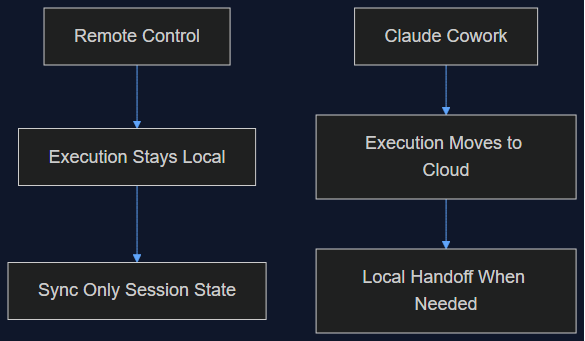
Claude Cowork vừa làm đúng cái mình từng nói Remote Control không làm
Tháng 8 mình viết rằng Remote Control của Claude Code chỉ là một lớp đồng bộ, không phải di chuyển lên cloud, và việc giữ execution ở local chính là điểm cốt lõi. Tuần này Anthropic chuyển hẳn execution của Cowork lên cloud làm mặc định. Đây là lý do cả hai quyết định đều đúng — cho hai sản phẩm khác nhau.
Đọc tiếp
03 Oct 2026 · 5 phút đọc
agents
SIFT: Chi Phí Thật Để Một Coding Agent Tự Cải Thiện Bản Thân
Framework SIFT của MIT và Sakana AI vượt qua SOTA cũ của agent tự cải thiện bằng cách dùng một judge Bradley-Terry thay vì sinh thêm patch. Mình tính luôn chi phí thật — khoảng $150 và chưa tới 5 giờ wall-clock cho một bước nhảy 4.4 điểm trên Polyglot.
Đọc tiếp
03 Oct 2026 · 5 phút đọc
agents
950 Agent, 21 Giờ, 210 Triệu Token: Cuộc Tìm CRISPR Của Anthropic Thực Sự Chứng Minh Điều Gì Về Fan-Out
Lab khoa học sự sống của Anthropic chạy 950 agent song song để tìm ra một hệ enzyme giống CRISPR có thể là mới. Toán học của cái funnel là một pattern fan-out thật sự hữu ích — nhưng phần phản ứng của giới khoa học mới là đoạn đáng đọc kỹ.
Đọc tiếp
Thảo luận
Bình luận được duyệt trước khi công khai. Email của bạn được giữ riêng tư.