The Client Who Wanted $20/Month Hosting (And the One Who Needed 99.99% SLA)
I had two client conversations in the same week that perfectly illustrated why MarketingOS needs to run anywhere.
Monday morning. A bakery owner named Lisa sat across from me. She had a marketing site with a hero section, a menu page, a catering inquiry form, and a blog where she posted seasonal specials. Traffic was maybe 2,000 visits a month, all local. She was paying $180/month for managed WordPress hosting because her previous developer told her she “needed enterprise-grade security.” She looked at me and said, “I just need it to work. Can we get the hosting under $30?” Absolutely we can.
Thursday afternoon. A VP of Marketing at a fintech SaaS sat across from me (well, across a Zoom call). They needed the marketing site to handle product launch days with 500K+ concurrent visitors, serve content from CDN edges in 14 countries, maintain 99.99% uptime because marketing downtime meant lost revenue during ad campaigns, and pass a SOC 2 audit. Their budget for infrastructure was $3,000/month, and they considered it cheap compared to the cost of a single hour of downtime during a product launch.
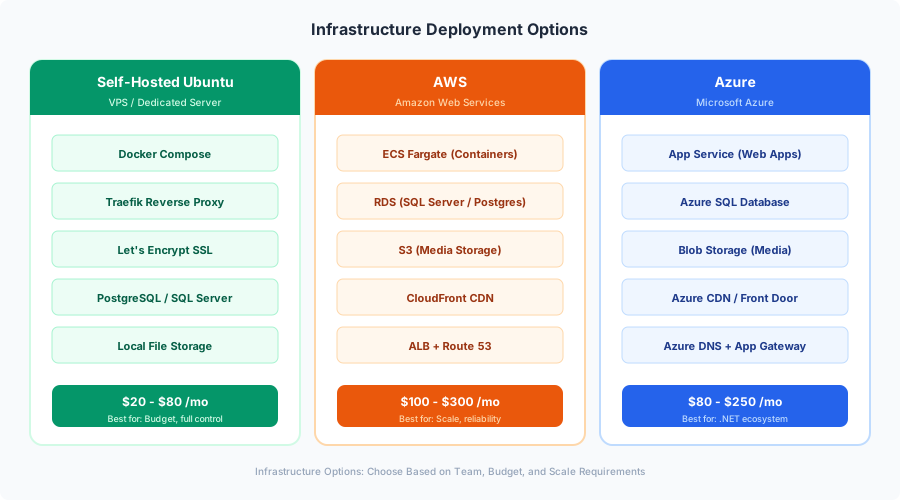
Same template. Same codebase. Same Docker images built by the CI/CD pipeline we set up in Part 7. But the infrastructure underneath those images needs to be radically different.
This is the part of MarketingOS that I spent the most time on and rewrote twice. The first version was AWS-only with Terraform. The second was “deploy anywhere” with a 2,000-line shell script that tried to detect the environment and configure itself. Both were bad. What I landed on is three distinct deployment paths, each with its own Terraform module, each optimized for a different cost/complexity/reliability trade-off.
Let’s walk through all three.
The Infrastructure Decision Framework
Before diving into Terraform files, here’s the decision tree I give clients:
Choose Self-Hosted Ubuntu if:
- Monthly budget is under $50
- Traffic is under 50K visits/month
- A few minutes of downtime during deployment is acceptable
- You (or your agency) can SSH into a server to debug issues
- You don’t need geographic redundancy
Choose AWS if:
- You need auto-scaling for traffic spikes
- You need multi-region availability
- You’re already in the AWS ecosystem
- Compliance requirements mandate specific certifications (SOC 2, HIPAA BAA)
- Budget is $100-500/month
Choose Azure if:
- You need native .NET hosting optimization (App Service is hard to beat for .NET)
- You’re in the Microsoft ecosystem (Azure AD, Office 365)
- You want deployment slots for zero-downtime swaps out of the box
- Application Insights APM matters to you
- Budget is $80-400/month
Now let’s build all three.
Option 1: Self-Hosted Ubuntu with Docker Compose
This is the Lisa option. One VPS, Docker Compose, Traefik for reverse proxy and automatic SSL, and automated backups. It handles far more traffic than people expect — I’ve run sites with 30K monthly visitors on a $20/month Hetzner box without breaking a sweat.
Server Setup
We start with a fresh Ubuntu 24.04 LTS server. I use Hetzner (CPX21: 3 vCPUs, 4GB RAM, 80GB SSD, $7.50/month) or DigitalOcean ($24/month for a comparable droplet). Here’s the initial setup script:
#!/bin/bash
# server-setup.sh — Initial Ubuntu 24.04 server configuration
# Run as root on a fresh server

set -euo pipefail

echo "=== MarketingOS Server Setup ==="

# Update system
apt update && apt upgrade -y

# Install essential packages
apt install -y \
  curl \
  wget \
  git \
  ufw \
  fail2ban \
  unattended-upgrades \
  apt-transport-https \
  ca-certificates \
  gnupg \
  lsb-release \
  htop \
  ncdu

# Configure automatic security updates
cat > /etc/apt/apt.conf.d/20auto-upgrades << 'EOF'
APT::Periodic::Update-Package-Lists "1";
APT::Periodic::Unattended-Upgrade "1";
APT::Periodic::AutocleanInterval "7";
EOF

# Install Docker (official repository)
install -m 0755 -d /etc/apt/keyrings
curl -fsSL https://download.docker.com/linux/ubuntu/gpg \
  -o /etc/apt/keyrings/docker.asc
chmod a+r /etc/apt/keyrings/docker.asc

echo \
  "deb [arch=$(dpkg --print-architecture) signed-by=/etc/apt/keyrings/docker.asc] \
  https://download.docker.com/linux/ubuntu \
  $(. /etc/os-release && echo "$VERSION_CODENAME") stable" | \
  tee /etc/apt/sources.list.d/docker.list > /dev/null

apt update
apt install -y docker-ce docker-ce-cli containerd.io \
  docker-buildx-plugin docker-compose-plugin

# Enable Docker service
systemctl enable docker
systemctl start docker

# Configure UFW firewall
ufw default deny incoming
ufw default allow outgoing
ufw allow 22/tcp    # SSH
ufw allow 80/tcp    # HTTP (Traefik)
ufw allow 443/tcp   # HTTPS (Traefik)
ufw --force enable

# Configure Fail2ban for SSH protection
cat > /etc/fail2ban/jail.local << 'EOF'
[sshd]
enabled = true
port = ssh
filter = sshd
logpath = /var/log/auth.log
maxretry = 3
bantime = 3600
findtime = 600

[sshd-ddos]
enabled = true
port = ssh
filter = sshd-ddos
logpath = /var/log/auth.log
maxretry = 6
bantime = 86400
findtime = 600
EOF

systemctl enable fail2ban
systemctl restart fail2ban

# Create deploy user
adduser --disabled-password --gecos "" deploy
usermod -aG docker deploy
mkdir -p /home/deploy/.ssh
cp /root/.ssh/authorized_keys /home/deploy/.ssh/
chown -R deploy:deploy /home/deploy/.ssh
chmod 700 /home/deploy/.ssh
chmod 600 /home/deploy/.ssh/authorized_keys

# Create application directory
mkdir -p /opt/marketingos
chown deploy:deploy /opt/marketingos

# Configure Docker logging to prevent disk fill
cat > /etc/docker/daemon.json << 'EOF'
{
  "log-driver": "json-file",
  "log-opts": {
    "max-size": "10m",
    "max-file": "3"
  }
}
EOF

systemctl restart docker

echo "=== Server setup complete ==="
echo "SSH as 'deploy' user for application deployment"
A few notes on this script. The fail2ban configuration bans IP addresses after 3 failed SSH attempts for one hour, and bans DDoS-style rapid attempts for 24 hours. The Docker logging configuration caps log files at 10MB with 3 rotations — without this, I’ve seen SQL Server containers generate 20GB of logs in a month and fill the disk. The deploy user has Docker permissions but no sudo — deployments happen through this restricted account.
Production Docker Compose with Traefik
In Part 7, we built Docker images and pushed them to GitHub Container Registry. Now we pull those images and run them with Traefik handling SSL and reverse proxying. This is the docker-compose.prod.yml that lives on the server:
# /opt/marketingos/docker-compose.prod.yml
version: "3.8"

services:
  traefik:
    image: traefik:v3.2
    container_name: marketingos-traefik
    restart: unless-stopped
    ports:
      - "80:80"
      - "443:443"
    volumes:
      - /var/run/docker.sock:/var/run/docker.sock:ro
      - ./traefik/acme.json:/acme.json
      - ./traefik/traefik.yml:/etc/traefik/traefik.yml:ro
      - ./traefik/dynamic:/etc/traefik/dynamic:ro
    networks:
      - web
      - internal
    labels:
      - "traefik.enable=true"
      # Dashboard (optional, remove in production if not needed)
      - "traefik.http.routers.dashboard.rule=Host(`traefik.${DOMAIN}`)"
      - "traefik.http.routers.dashboard.tls.certresolver=letsencrypt"
      - "traefik.http.routers.dashboard.service=api@internal"
      - "traefik.http.routers.dashboard.middlewares=auth"
      - "traefik.http.middlewares.auth.basicauth.users=${TRAEFIK_AUTH}"

  umbraco:
    image: ghcr.io/${GITHUB_ORG}/marketingos-backend:${IMAGE_TAG:-latest}
    container_name: marketingos-umbraco
    restart: unless-stopped
    environment:
      - ASPNETCORE_ENVIRONMENT=Production
      - ASPNETCORE_URLS=http://+:5000
      - ConnectionStrings__umbracoDbDSN=Server=sqlserver;Database=MarketingOS;User Id=sa;Password=${SQL_PASSWORD};TrustServerCertificate=true
      - Umbraco__CMS__DeliveryApi__Enabled=true
      - Umbraco__CMS__DeliveryApi__ApiKey=${DELIVERY_API_KEY}
      - Redis__ConnectionString=redis:6379
    depends_on:
      sqlserver:
        condition: service_healthy
      redis:
        condition: service_healthy
    networks:
      - web
      - internal
    labels:
      - "traefik.enable=true"
      - "traefik.http.routers.umbraco.rule=Host(`cms.${DOMAIN}`)"
      - "traefik.http.routers.umbraco.tls.certresolver=letsencrypt"
      - "traefik.http.services.umbraco.loadbalancer.server.port=5000"
      - "traefik.http.routers.umbraco.middlewares=umbraco-headers"
      - "traefik.http.middlewares.umbraco-headers.headers.stsSeconds=31536000"
      - "traefik.http.middlewares.umbraco-headers.headers.stsIncludeSubdomains=true"
      - "traefik.http.middlewares.umbraco-headers.headers.contentTypeNosniff=true"
      - "traefik.http.middlewares.umbraco-headers.headers.frameDeny=true"
    healthcheck:
      test: ["CMD", "curl", "-f", "http://localhost:5000/umbraco/ping"]
      interval: 30s
      timeout: 10s
      retries: 3
      start_period: 60s

  nextjs:
    image: ghcr.io/${GITHUB_ORG}/marketingos-frontend:${IMAGE_TAG:-latest}
    container_name: marketingos-nextjs
    restart: unless-stopped
    environment:
      - NODE_ENV=production
      - UMBRACO_API_URL=http://umbraco:5000
      - UMBRACO_API_KEY=${DELIVERY_API_KEY}
      - REDIS_URL=redis://redis:6379
      - REVALIDATION_SECRET=${REVALIDATION_SECRET}
    depends_on:
      umbraco:
        condition: service_healthy
    networks:
      - web
      - internal
    labels:
      - "traefik.enable=true"
      - "traefik.http.routers.nextjs.rule=Host(`${DOMAIN}`) || Host(`www.${DOMAIN}`)"
      - "traefik.http.routers.nextjs.tls.certresolver=letsencrypt"
      - "traefik.http.services.nextjs.loadbalancer.server.port=3000"
      # Redirect www to non-www
      - "traefik.http.routers.www-redirect.rule=Host(`www.${DOMAIN}`)"
      - "traefik.http.routers.www-redirect.middlewares=www-to-nonwww"
      - "traefik.http.middlewares.www-to-nonwww.redirectregex.regex=^https?://www\\.(.+)"
      - "traefik.http.middlewares.www-to-nonwww.redirectregex.replacement=https://$${1}"
      - "traefik.http.middlewares.www-to-nonwww.redirectregex.permanent=true"
    healthcheck:
      test: ["CMD", "curl", "-f", "http://localhost:3000/api/health"]
      interval: 30s
      timeout: 10s
      retries: 3

  sqlserver:
    image: mcr.microsoft.com/mssql/server:2022-latest
    container_name: marketingos-sql
    restart: unless-stopped
    environment:
      - ACCEPT_EULA=Y
      - SA_PASSWORD=${SQL_PASSWORD}
      - MSSQL_PID=Express
    volumes:
      - sqldata:/var/opt/mssql
    networks:
      - internal
    healthcheck:
      test: /opt/mssql-tools18/bin/sqlcmd -S localhost -U sa -P "$${SA_PASSWORD}" -C -Q "SELECT 1" || exit 1
      interval: 15s
      timeout: 10s
      retries: 5
      start_period: 30s

  redis:
    image: redis:7-alpine
    container_name: marketingos-redis
    restart: unless-stopped
    command: redis-server --appendonly yes --maxmemory 256mb --maxmemory-policy allkeys-lru
    volumes:
      - redisdata:/data
    networks:
      - internal
    healthcheck:
      test: ["CMD", "redis-cli", "ping"]
      interval: 10s
      timeout: 5s
      retries: 3

volumes:
  sqldata:
  redisdata:

networks:
  web:
    external: true
  internal:
    driver: bridge
And the Traefik static configuration:
# /opt/marketingos/traefik/traefik.yml
api:
  dashboard: true

entryPoints:
  web:
    address: ":80"
    http:
      redirections:
        entryPoint:
          to: websecure
          scheme: https
  websecure:
    address: ":443"
    http:
      tls:
        certResolver: letsencrypt

certificatesResolvers:
  letsencrypt:
    acme:
      email: admin@yourdomain.com
      storage: /acme.json
      httpChallenge:
        entryPoint: web

providers:
  docker:
    endpoint: "unix:///var/run/docker.sock"
    exposedByDefault: false
    network: web
  file:
    directory: /etc/traefik/dynamic
    watch: true

log:
  level: WARN

accessLog:
  filePath: /dev/stdout
  filters:
    statusCodes:
      - "400-599"
Important details: Traefik automatically obtains and renews Let’s Encrypt certificates. The exposedByDefault: false setting means only containers with traefik.enable=true labels are exposed. All HTTP traffic is redirected to HTTPS. The SQL Server and Redis containers are on the internal network only — they’re not accessible from the internet.
Before first deployment, create the acme.json file and the external Docker network:
# On the server, as the deploy user
cd /opt/marketingos
mkdir -p traefik/dynamic
touch traefik/acme.json
chmod 600 traefik/acme.json
docker network create web
Automated Database Backups
This is the part people skip, and it’s the part that matters most when something goes wrong. I’ve had a client’s VPS provider lose a disk. I’ve had a Docker volume get corrupted after a kernel update. Backups are not optional.
#!/bin/bash
# /opt/marketingos/scripts/backup-db.sh
# Automated SQL Server backup to S3-compatible storage
# Run via cron: 0 2 * * * /opt/marketingos/scripts/backup-db.sh

set -euo pipefail

# Configuration
BACKUP_DIR="/opt/marketingos/backups"
S3_BUCKET="s3://marketingos-backups"
S3_ENDPOINT="https://s3.us-east-1.amazonaws.com"  # or Backblaze, Wasabi, etc.
RETENTION_DAILY=7
RETENTION_WEEKLY=4
TIMESTAMP=$(date +%Y%m%d_%H%M%S)
DAY_OF_WEEK=$(date +%u)  # 1=Monday, 7=Sunday

# Load environment variables
source /opt/marketingos/.env

mkdir -p "${BACKUP_DIR}"

echo "[$(date)] Starting database backup..."

# Create backup inside the SQL Server container
docker exec marketingos-sql /opt/mssql-tools18/bin/sqlcmd \
  -S localhost -U sa -P "${SQL_PASSWORD}" -C \
  -Q "BACKUP DATABASE [MarketingOS] TO DISK = N'/var/opt/mssql/backup/MarketingOS_${TIMESTAMP}.bak' WITH FORMAT, COMPRESSION, STATS = 10"

# Copy backup from container to host
docker cp marketingos-sql:/var/opt/mssql/backup/MarketingOS_${TIMESTAMP}.bak \
  "${BACKUP_DIR}/MarketingOS_${TIMESTAMP}.bak"

# Remove backup from inside the container
docker exec marketingos-sql rm -f "/var/opt/mssql/backup/MarketingOS_${TIMESTAMP}.bak"

# Compress the backup
gzip "${BACKUP_DIR}/MarketingOS_${TIMESTAMP}.bak"
BACKUP_FILE="${BACKUP_DIR}/MarketingOS_${TIMESTAMP}.bak.gz"

echo "[$(date)] Backup created: $(du -h ${BACKUP_FILE} | cut -f1)"

# Upload to S3 — daily folder
aws s3 cp "${BACKUP_FILE}" \
  "${S3_BUCKET}/daily/MarketingOS_${TIMESTAMP}.bak.gz" \
  --endpoint-url "${S3_ENDPOINT}" \
  --storage-class STANDARD_IA

# On Sundays, also copy to weekly folder
if [ "${DAY_OF_WEEK}" -eq 7 ]; then
  aws s3 cp "${BACKUP_FILE}" \
    "${S3_BUCKET}/weekly/MarketingOS_${TIMESTAMP}.bak.gz" \
    --endpoint-url "${S3_ENDPOINT}" \
    --storage-class STANDARD_IA
  echo "[$(date)] Weekly backup uploaded"
fi

# Clean up local backups older than 2 days
find "${BACKUP_DIR}" -name "*.bak.gz" -mtime +2 -delete

# Clean up remote daily backups older than RETENTION_DAILY days
CUTOFF_DAILY=$(date -d "-${RETENTION_DAILY} days" +%Y%m%d)
aws s3 ls "${S3_BUCKET}/daily/" --endpoint-url "${S3_ENDPOINT}" | \
  while read -r line; do
    FILE=$(echo "$line" | awk '{print $4}')
    FILE_DATE=$(echo "$FILE" | grep -oP '\d{8}')
    if [ -n "${FILE_DATE}" ] && [ "${FILE_DATE}" -lt "${CUTOFF_DAILY}" ]; then
      aws s3 rm "${S3_BUCKET}/daily/${FILE}" --endpoint-url "${S3_ENDPOINT}"
      echo "[$(date)] Deleted old daily backup: ${FILE}"
    fi
  done

# Clean up remote weekly backups older than RETENTION_WEEKLY weeks
CUTOFF_WEEKLY=$(date -d "-$((RETENTION_WEEKLY * 7)) days" +%Y%m%d)
aws s3 ls "${S3_BUCKET}/weekly/" --endpoint-url "${S3_ENDPOINT}" | \
  while read -r line; do
    FILE=$(echo "$line" | awk '{print $4}')
    FILE_DATE=$(echo "$FILE" | grep -oP '\d{8}')
    if [ -n "${FILE_DATE}" ] && [ "${FILE_DATE}" -lt "${CUTOFF_WEEKLY}" ]; then
      aws s3 rm "${S3_BUCKET}/weekly/${FILE}" --endpoint-url "${S3_ENDPOINT}"
      echo "[$(date)] Deleted old weekly backup: ${FILE}"
    fi
  done

echo "[$(date)] Backup complete"
And a restore testing script, because a backup you’ve never tested restoring is not a backup:
#!/bin/bash
# /opt/marketingos/scripts/test-restore.sh
# Tests that the latest backup can be restored successfully
# Run monthly: 0 4 1 * * /opt/marketingos/scripts/test-restore.sh

set -euo pipefail

source /opt/marketingos/.env

BACKUP_DIR="/opt/marketingos/backups"
LATEST_BACKUP=$(ls -t ${BACKUP_DIR}/*.bak.gz 2>/dev/null | head -1)

if [ -z "${LATEST_BACKUP}" ]; then
  echo "ERROR: No backup files found!"
  exit 1
fi

echo "[$(date)] Testing restore of: ${LATEST_BACKUP}"

# Decompress
TEMP_BAK="/tmp/restore_test.bak"
gunzip -c "${LATEST_BACKUP}" > "${TEMP_BAK}"

# Copy into SQL Server container
docker cp "${TEMP_BAK}" marketingos-sql:/var/opt/mssql/backup/restore_test.bak

# Restore to a test database
docker exec marketingos-sql /opt/mssql-tools18/bin/sqlcmd \
  -S localhost -U sa -P "${SQL_PASSWORD}" -C \
  -Q "RESTORE DATABASE [MarketingOS_RestoreTest] FROM DISK = N'/var/opt/mssql/backup/restore_test.bak' WITH MOVE 'MarketingOS' TO '/var/opt/mssql/data/MarketingOS_RestoreTest.mdf', MOVE 'MarketingOS_log' TO '/var/opt/mssql/data/MarketingOS_RestoreTest_log.ldf', REPLACE"

# Verify the restored database
RESULT=$(docker exec marketingos-sql /opt/mssql-tools18/bin/sqlcmd \
  -S localhost -U sa -P "${SQL_PASSWORD}" -C \
  -Q "SELECT COUNT(*) FROM [MarketingOS_RestoreTest].[dbo].[umbracoNode]" \
  -h -1 -W)

echo "[$(date)] Restore test: ${RESULT} nodes found in restored database"

# Drop test database and clean up
docker exec marketingos-sql /opt/mssql-tools18/bin/sqlcmd \
  -S localhost -U sa -P "${SQL_PASSWORD}" -C \
  -Q "DROP DATABASE [MarketingOS_RestoreTest]"

docker exec marketingos-sql rm -f /var/opt/mssql/backup/restore_test.bak
rm -f "${TEMP_BAK}"

if [ "${RESULT}" -gt 0 ]; then
  echo "[$(date)] RESTORE TEST PASSED"
else
  echo "[$(date)] RESTORE TEST FAILED - database appears empty"
  exit 1
fi
Self-Hosted Monitoring with Uptime Kuma
Paid monitoring services work, but for the self-hosted path we’re optimizing for cost. Uptime Kuma is a self-hosted monitoring tool that does HTTP checks, keyword monitoring, SSL certificate expiry alerts, and sends notifications to Slack, Discord, email, or Telegram.
Add it to the Docker Compose stack:
# Add to docker-compose.prod.yml services section
  uptime-kuma:
    image: louislam/uptime-kuma:1
    container_name: marketingos-monitor
    restart: unless-stopped
    volumes:
      - uptimekuma:/app/data
    networks:
      - web
    labels:
      - "traefik.enable=true"
      - "traefik.http.routers.monitor.rule=Host(`monitor.${DOMAIN}`)"
      - "traefik.http.routers.monitor.tls.certresolver=letsencrypt"
      - "traefik.http.services.monitor.loadbalancer.server.port=3001"

# Add to volumes section
  uptimekuma:
Once deployed, configure monitors for:
- Frontend health —
https://yourdomain.com(expected 200, check every 60s) - CMS health —
https://cms.yourdomain.com/umbraco/ping(expected 200, check every 60s) - API health —
https://cms.yourdomain.com/umbraco/delivery/api/v2/content(expected 200, check every 5 min) - SSL certificate — alert when certificate expires in less than 14 days
- Docker containers — use the Docker socket monitor to check container status
For resource monitoring (disk space, CPU, memory), add a simple script to cron:
#!/bin/bash
# /opt/marketingos/scripts/check-resources.sh
# Alerts if disk or memory usage is high
# Run every 15 minutes: */15 * * * * /opt/marketingos/scripts/check-resources.sh

DISK_THRESHOLD=85
MEMORY_THRESHOLD=90
WEBHOOK_URL="${SLACK_WEBHOOK_URL:-}"

DISK_USAGE=$(df / | tail -1 | awk '{print $5}' | tr -d '%')
MEMORY_USAGE=$(free | awk '/Mem:/ {printf "%.0f", $3/$2 * 100}')

ALERT=""

if [ "${DISK_USAGE}" -gt "${DISK_THRESHOLD}" ]; then
  ALERT="${ALERT}Disk usage: ${DISK_USAGE}% (threshold: ${DISK_THRESHOLD}%)\n"
fi

if [ "${MEMORY_USAGE}" -gt "${MEMORY_THRESHOLD}" ]; then
  ALERT="${ALERT}Memory usage: ${MEMORY_USAGE}% (threshold: ${MEMORY_THRESHOLD}%)\n"
fi

if [ -n "${ALERT}" ] && [ -n "${WEBHOOK_URL}" ]; then
  curl -s -X POST "${WEBHOOK_URL}" \
    -H 'Content-type: application/json' \
    -d "{\"text\": \"[MarketingOS] Resource Alert on $(hostname):\n${ALERT}\"}"
fi
Deployment from GitHub Actions
The CI/CD pipeline from Part 7 builds and pushes Docker images. Now we add a deploy job that SSHs into the server and pulls the new images:
# .github/workflows/deploy-self-hosted.yml
name: Deploy to Self-Hosted

on:
  workflow_dispatch:
    inputs:
      image_tag:
        description: 'Image tag to deploy'
        required: true
        default: 'latest'
  workflow_run:
    workflows: ["Build and Push"]
    types: [completed]
    branches: [main]

jobs:
  deploy:
    runs-on: ubuntu-latest
    if: ${{ github.event_name == 'workflow_dispatch' || github.event.workflow_run.conclusion == 'success' }}
    environment: production-selfhosted

    steps:
      - name: Set image tag
        id: tag
        run: |
          if [ "${{ github.event_name }}" == "workflow_dispatch" ]; then
            echo "tag=${{ github.event.inputs.image_tag }}" >> $GITHUB_OUTPUT
          else
            echo "tag=latest" >> $GITHUB_OUTPUT
          fi

      - name: Deploy via SSH
        uses: appleboy/ssh-action@v1.0.3
        with:
          host: ${{ secrets.SERVER_HOST }}
          username: deploy
          key: ${{ secrets.SERVER_SSH_KEY }}
          script: |
            cd /opt/marketingos

            # Login to GitHub Container Registry
            echo "${{ secrets.GHCR_TOKEN }}" | docker login ghcr.io -u ${{ github.actor }} --password-stdin

            # Set the image tag
            export IMAGE_TAG=${{ steps.tag.outputs.tag }}

            # Pull new images
            docker compose -f docker-compose.prod.yml pull umbraco nextjs

            # Rolling update — restart one service at a time
            docker compose -f docker-compose.prod.yml up -d --no-deps umbraco
            echo "Waiting for Umbraco to be healthy..."
            timeout 120 bash -c 'until docker inspect --format="{{.State.Health.Status}}" marketingos-umbraco | grep -q healthy; do sleep 5; done'

            docker compose -f docker-compose.prod.yml up -d --no-deps nextjs
            echo "Waiting for Next.js to be healthy..."
            timeout 60 bash -c 'until docker inspect --format="{{.State.Health.Status}}" marketingos-nextjs | grep -q healthy; do sleep 5; done'

            # Clean up old images
            docker image prune -f

            echo "Deployment complete"

      - name: Verify deployment
        run: |
          sleep 10
          STATUS=$(curl -s -o /dev/null -w "%{http_code}" https://${{ secrets.SITE_DOMAIN }})
          if [ "$STATUS" != "200" ]; then
            echo "Site returned status $STATUS — deployment may have failed"
            exit 1
          fi
          echo "Site is responding with 200 OK"
The rolling update strategy restarts Umbraco first, waits for its health check to pass, then restarts Next.js. This isn’t true zero-downtime (there’s a brief moment during container restart), but for a marketing site with <50K monthly visits, the 2-3 second gap is invisible.
Self-Hosted Cost Estimate
| Component | Provider | Monthly Cost |
|---|---|---|
| VPS (3 vCPU, 4GB RAM) | Hetzner CPX21 | $7.50 |
| Backup storage (10GB) | Backblaze B2 | $0.50 |
| Domain name | Cloudflare | ~$1 (amortized) |
| Uptime monitoring | Self-hosted (included) | $0 |
| SSL certificates | Let’s Encrypt (free) | $0 |
| Total | ~$10-20/month |
For DigitalOcean or AWS Lightsail, budget $24-40/month for comparable specs. Still well under Lisa’s $30 target.
Option 2: AWS Deployment
When clients need auto-scaling, geographic distribution, or compliance certifications, AWS is my default recommendation. The architecture uses managed services wherever possible — I don’t want to be woken up at 3 AM because a container ran out of memory on a self-managed EC2 instance.
Architecture Overview
Internet
  └─→ CloudFront (CDN + SSL termination)
       ├─→ S3 Bucket (static assets, media files)
       └─→ Application Load Balancer
            ├─→ ECS Fargate — Next.js service (2-10 tasks)
            └─→ ECS Fargate — Umbraco service (2-4 tasks)
                 ├─→ RDS SQL Server (Multi-AZ)
                 ├─→ ElastiCache Redis (cluster mode)
                 └─→ S3 Bucket (media storage via Umbraco)
Next.js runs on Fargate because we need server-side rendering for ISR revalidation and preview mode. If the Next.js site were purely static, I’d use S3 + CloudFront alone. But ISR needs a running server, so Fargate it is. Alternatively, you could deploy Next.js to Vercel and only run Umbraco on AWS — that’s a perfectly valid hybrid approach, and sometimes cheaper.
Terraform Configuration
I structure the Terraform as a module that can be instantiated per client:
# infrastructure/aws/main.tf
terraform {
  required_version = ">= 1.7.0"

  required_providers {
    aws = {
      source  = "hashicorp/aws"
      version = "~> 5.0"
    }
  }

  backend "s3" {
    bucket         = "marketingos-terraform-state"
    key            = "aws/terraform.tfstate"
    region         = "us-east-1"
    dynamodb_table = "terraform-locks"
    encrypt        = true
  }
}

provider "aws" {
  region = var.aws_region

  default_tags {
    tags = {
      Project     = "MarketingOS"
      Environment = var.environment
      ManagedBy   = "Terraform"
      Client      = var.client_name
    }
  }
}

# --- VPC ---
module "vpc" {
  source  = "terraform-aws-modules/vpc/aws"
  version = "~> 5.0"

  name = "${var.project_name}-${var.environment}"
  cidr = "10.0.0.0/16"

  azs             = ["${var.aws_region}a", "${var.aws_region}b"]
  private_subnets = ["10.0.1.0/24", "10.0.2.0/24"]
  public_subnets  = ["10.0.101.0/24", "10.0.102.0/24"]

  enable_nat_gateway   = true
  single_nat_gateway   = var.environment != "production"
  enable_dns_hostnames = true
  enable_dns_support   = true
}

# --- ECS Cluster ---
resource "aws_ecs_cluster" "main" {
  name = "${var.project_name}-${var.environment}"

  setting {
    name  = "containerInsights"
    value = "enabled"
  }

  configuration {
    execute_command_configuration {
      logging = "DEFAULT"
    }
  }
}

# --- ECS Task Definition: Umbraco ---
resource "aws_ecs_task_definition" "umbraco" {
  family                   = "${var.project_name}-umbraco-${var.environment}"
  network_mode             = "awsvpc"
  requires_compatibilities = ["FARGATE"]
  cpu                      = var.umbraco_cpu
  memory                   = var.umbraco_memory
  execution_role_arn       = aws_iam_role.ecs_execution.arn
  task_role_arn            = aws_iam_role.ecs_task.arn

  container_definitions = jsonencode([
    {
      name  = "umbraco"
      image = "${var.ecr_repository_url}:${var.image_tag}"

      portMappings = [
        {
          containerPort = 5000
          protocol      = "tcp"
        }
      ]

      environment = [
        { name = "ASPNETCORE_ENVIRONMENT", value = "Production" },
        { name = "ASPNETCORE_URLS", value = "http://+:5000" },
      ]

      secrets = [
        {
          name      = "ConnectionStrings__umbracoDbDSN"
          valueFrom = aws_ssm_parameter.db_connection_string.arn
        },
        {
          name      = "Umbraco__CMS__DeliveryApi__ApiKey"
          valueFrom = aws_ssm_parameter.delivery_api_key.arn
        },
        {
          name      = "Redis__ConnectionString"
          valueFrom = aws_ssm_parameter.redis_connection_string.arn
        }
      ]

      healthCheck = {
        command     = ["CMD-SHELL", "curl -f http://localhost:5000/umbraco/ping || exit 1"]
        interval    = 30
        timeout     = 10
        retries     = 3
        startPeriod = 90
      }

      logConfiguration = {
        logDriver = "awslogs"
        options = {
          "awslogs-group"         = aws_cloudwatch_log_group.umbraco.name
          "awslogs-region"        = var.aws_region
          "awslogs-stream-prefix" = "umbraco"
        }
      }
    }
  ])
}

# --- ECS Service: Umbraco ---
resource "aws_ecs_service" "umbraco" {
  name            = "umbraco"
  cluster         = aws_ecs_cluster.main.id
  task_definition = aws_ecs_task_definition.umbraco.arn
  desired_count   = var.umbraco_desired_count
  launch_type     = "FARGATE"

  network_configuration {
    subnets          = module.vpc.private_subnets
    security_groups  = [aws_security_group.umbraco.id]
    assign_public_ip = false
  }

  load_balancer {
    target_group_arn = aws_lb_target_group.umbraco.arn
    container_name   = "umbraco"
    container_port   = 5000
  }

  deployment_circuit_breaker {
    enable   = true
    rollback = true
  }

  deployment_minimum_healthy_percent = 100
  deployment_maximum_percent         = 200
}

# --- ECS Task Definition & Service: Next.js ---
resource "aws_ecs_task_definition" "nextjs" {
  family                   = "${var.project_name}-nextjs-${var.environment}"
  network_mode             = "awsvpc"
  requires_compatibilities = ["FARGATE"]
  cpu                      = var.nextjs_cpu
  memory                   = var.nextjs_memory
  execution_role_arn       = aws_iam_role.ecs_execution.arn
  task_role_arn            = aws_iam_role.ecs_task.arn

  container_definitions = jsonencode([
    {
      name  = "nextjs"
      image = "${var.ecr_nextjs_repository_url}:${var.image_tag}"

      portMappings = [
        {
          containerPort = 3000
          protocol      = "tcp"
        }
      ]

      environment = [
        { name = "NODE_ENV", value = "production" },
        { name = "UMBRACO_API_URL", value = "http://umbraco.${var.project_name}.local:5000" },
      ]

      secrets = [
        {
          name      = "UMBRACO_API_KEY"
          valueFrom = aws_ssm_parameter.delivery_api_key.arn
        },
        {
          name      = "REVALIDATION_SECRET"
          valueFrom = aws_ssm_parameter.revalidation_secret.arn
        },
        {
          name      = "REDIS_URL"
          valueFrom = aws_ssm_parameter.redis_url.arn
        }
      ]

      healthCheck = {
        command     = ["CMD-SHELL", "curl -f http://localhost:3000/api/health || exit 1"]
        interval    = 30
        timeout     = 5
        retries     = 3
        startPeriod = 30
      }

      logConfiguration = {
        logDriver = "awslogs"
        options = {
          "awslogs-group"         = aws_cloudwatch_log_group.nextjs.name
          "awslogs-region"        = var.aws_region
          "awslogs-stream-prefix" = "nextjs"
        }
      }
    }
  ])
}

resource "aws_ecs_service" "nextjs" {
  name            = "nextjs"
  cluster         = aws_ecs_cluster.main.id
  task_definition = aws_ecs_task_definition.nextjs.arn
  desired_count   = var.nextjs_desired_count
  launch_type     = "FARGATE"

  network_configuration {
    subnets          = module.vpc.private_subnets
    security_groups  = [aws_security_group.nextjs.id]
    assign_public_ip = false
  }

  load_balancer {
    target_group_arn = aws_lb_target_group.nextjs.arn
    container_name   = "nextjs"
    container_port   = 3000
  }

  deployment_circuit_breaker {
    enable   = true
    rollback = true
  }
}

# --- RDS SQL Server ---
resource "aws_db_instance" "sqlserver" {
  identifier     = "${var.project_name}-${var.environment}"
  engine         = "sqlserver-ex"
  engine_version = "16.00"
  instance_class = var.db_instance_class

  allocated_storage     = 20
  max_allocated_storage = 100
  storage_encrypted     = true

  username = "umbraco_admin"
  password = var.db_password

  db_subnet_group_name   = aws_db_subnet_group.main.name
  vpc_security_group_ids = [aws_security_group.rds.id]

  multi_az            = var.environment == "production"
  skip_final_snapshot = var.environment != "production"

  backup_retention_period = 7
  backup_window           = "03:00-04:00"
  maintenance_window      = "sun:04:00-sun:05:00"

  performance_insights_enabled = true

  tags = {
    Name = "${var.project_name}-sqlserver-${var.environment}"
  }
}

# --- ElastiCache Redis ---
resource "aws_elasticache_replication_group" "redis" {
  replication_group_id = "${var.project_name}-${var.environment}"
  description          = "Redis for MarketingOS ${var.environment}"

  node_type            = var.redis_node_type
  num_cache_clusters   = var.environment == "production" ? 2 : 1
  port                 = 6379
  engine_version       = "7.1"
  parameter_group_name = "default.redis7"

  subnet_group_name  = aws_elasticache_subnet_group.main.name
  security_group_ids = [aws_security_group.redis.id]

  at_rest_encryption_enabled = true
  transit_encryption_enabled = true

  automatic_failover_enabled = var.environment == "production"

  snapshot_retention_limit = 3
  snapshot_window          = "02:00-03:00"
}

# --- S3 for Media ---
resource "aws_s3_bucket" "media" {
  bucket = "${var.project_name}-media-${var.environment}"
}

resource "aws_s3_bucket_versioning" "media" {
  bucket = aws_s3_bucket.media.id
  versioning_configuration {
    status = "Enabled"
  }
}

resource "aws_s3_bucket_lifecycle_configuration" "media" {
  bucket = aws_s3_bucket.media.id

  rule {
    id     = "transition-to-ia"
    status = "Enabled"

    transition {
      days          = 90
      storage_class = "STANDARD_IA"
    }

    noncurrent_version_expiration {
      noncurrent_days = 30
    }
  }
}

# --- CloudFront ---
resource "aws_cloudfront_distribution" "main" {
  enabled             = true
  is_ipv6_enabled     = true
  default_root_object = ""
  aliases             = [var.domain_name, "www.${var.domain_name}"]
  price_class         = var.environment == "production" ? "PriceClass_All" : "PriceClass_100"

  # Origin: Next.js via ALB
  origin {
    domain_name = aws_lb.main.dns_name
    origin_id   = "nextjs-alb"

    custom_origin_config {
      http_port              = 80
      https_port             = 443
      origin_protocol_policy = "https-only"
      origin_ssl_protocols   = ["TLSv1.2"]
    }
  }

  # Origin: S3 for media files
  origin {
    domain_name              = aws_s3_bucket.media.bucket_regional_domain_name
    origin_id                = "media-s3"
    origin_access_control_id = aws_cloudfront_origin_access_control.s3.id
  }

  # Default behavior — Next.js
  default_cache_behavior {
    allowed_methods  = ["DELETE", "GET", "HEAD", "OPTIONS", "PATCH", "POST", "PUT"]
    cached_methods   = ["GET", "HEAD"]
    target_origin_id = "nextjs-alb"

    cache_policy_id          = aws_cloudfront_cache_policy.nextjs.id
    origin_request_policy_id = aws_cloudfront_origin_request_policy.nextjs.id

    viewer_protocol_policy = "redirect-to-https"
    compress               = true
  }

  # Media files behavior — S3
  ordered_cache_behavior {
    path_pattern     = "/media/*"
    allowed_methods  = ["GET", "HEAD"]
    cached_methods   = ["GET", "HEAD"]
    target_origin_id = "media-s3"

    cache_policy_id = aws_cloudfront_cache_policy.media.id

    viewer_protocol_policy = "redirect-to-https"
    compress               = true
  }

  restrictions {
    geo_restriction {
      restriction_type = "none"
    }
  }

  viewer_certificate {
    acm_certificate_arn      = aws_acm_certificate.main.arn
    ssl_support_method       = "sni-only"
    minimum_protocol_version = "TLSv1.2_2021"
  }
}
# infrastructure/aws/variables.tf
variable "project_name" {
description = "Project name used in resource naming"
type = string
default = "marketingos"
}
variable "client_name" {
description = "Client name for tagging"
type = string
}
variable "environment" {
description = "Environment (staging, production)"
type = string
validation {
condition = contains(["staging", "production"], var.environment)
error_message = "Environment must be staging or production."
}
}
variable "aws_region" {
description = "AWS region"
type = string
default = "us-east-1"
}
variable "domain_name" {
description = "Primary domain name"
type = string
}
variable "image_tag" {
description = "Docker image tag to deploy"
type = string
default = "latest"
}
# --- Compute sizing ---
variable "umbraco_cpu" {
description = "Umbraco task CPU units (1024 = 1 vCPU)"
type = number
default = 1024
}
variable "umbraco_memory" {
description = "Umbraco task memory in MB"
type = number
default = 2048
}
variable "umbraco_desired_count" {
description = "Number of Umbraco tasks"
type = number
default = 2
}
variable "nextjs_cpu" {
description = "Next.js task CPU units"
type = number
default = 512
}
variable "nextjs_memory" {
description = "Next.js task memory in MB"
type = number
default = 1024
}
variable "nextjs_desired_count" {
description = "Number of Next.js tasks"
type = number
default = 2
}
variable "db_instance_class" {
description = "RDS instance class"
type = string
default = "db.t3.small"
}
variable "db_password" {
description = "Database password"
type = string
sensitive = true
}
variable "redis_node_type" {
description = "ElastiCache node type"
type = string
default = "cache.t4g.micro"
}
variable "ecr_repository_url" {
description = "ECR repository URL for Umbraco image"
type = string
}
variable "ecr_nextjs_repository_url" {
description = "ECR repository URL for Next.js image"
type = string
}# infrastructure/aws/outputs.tf
output "cloudfront_distribution_id" {
description = "CloudFront distribution ID for cache invalidation"
value = aws_cloudfront_distribution.main.id
}
output "cloudfront_domain" {
description = "CloudFront domain name"
value = aws_cloudfront_distribution.main.domain_name
}
output "alb_dns_name" {
description = "ALB DNS name"
value = aws_lb.main.dns_name
}
output "rds_endpoint" {
description = "RDS endpoint"
value = aws_db_instance.sqlserver.endpoint
sensitive = true
}
output "redis_endpoint" {
description = "Redis primary endpoint"
value = aws_elasticache_replication_group.redis.primary_endpoint_address
sensitive = true
}
output "media_bucket" {
description = "S3 media bucket name"
value = aws_s3_bucket.media.bucket
}
output "ecs_cluster_name" {
description = "ECS cluster name"
value = aws_ecs_cluster.main.name
}AWS-Specific Optimizations
CloudFront cache invalidation on content publish. When a content editor publishes a page in Umbraco, we need CloudFront to serve the fresh version. The webhook from Umbraco triggers Next.js ISR revalidation (covered in Part 3), but CloudFront might still serve a stale cached copy. We handle this with a CloudFront function:
// infrastructure/aws/cloudfront-functions/cache-control.js
// CloudFront Function — runs at the edge, manipulates cache headers

function handler(event) {
  var response = event.response;
  var headers = response.headers;

  // HTML pages: short CDN cache, let ISR handle freshness
  var uri = event.request.uri;
  if (uri.endsWith('/') || uri.endsWith('.html') || !uri.includes('.')) {
    headers['cache-control'] = { value: 's-maxage=60, stale-while-revalidate=86400' };
  }

  // Static assets: long cache with immutable
  if (uri.match(/\.(js|css|woff2|png|jpg|webp|avif|svg|ico)$/)) {
    headers['cache-control'] = { value: 'public, max-age=31536000, immutable' };
  }

  return response;
}
Auto-scaling for traffic spikes. Configure ECS auto-scaling based on CPU and request count:
# infrastructure/aws/autoscaling.tf
resource "aws_appautoscaling_target" "nextjs" {
  max_capacity       = 10
  min_capacity       = var.nextjs_desired_count
  resource_id        = "service/${aws_ecs_cluster.main.name}/${aws_ecs_service.nextjs.name}"
  scalable_dimension = "ecs:service:DesiredCount"
  service_namespace  = "ecs"
}

resource "aws_appautoscaling_policy" "nextjs_cpu" {
  name               = "nextjs-cpu-scaling"
  policy_type        = "TargetTrackingScaling"
  resource_id        = aws_appautoscaling_target.nextjs.resource_id
  scalable_dimension = aws_appautoscaling_target.nextjs.scalable_dimension
  service_namespace  = aws_appautoscaling_target.nextjs.service_namespace

  target_tracking_scaling_policy_configuration {
    predefined_metric_specification {
      predefined_metric_type = "ECSServiceAverageCPUUtilization"
    }
    target_value       = 70.0
    scale_in_cooldown  = 300
    scale_out_cooldown = 60
  }
}

resource "aws_appautoscaling_policy" "nextjs_requests" {
  name               = "nextjs-request-scaling"
  policy_type        = "TargetTrackingScaling"
  resource_id        = aws_appautoscaling_target.nextjs.resource_id
  scalable_dimension = aws_appautoscaling_target.nextjs.scalable_dimension
  service_namespace  = aws_appautoscaling_target.nextjs.service_namespace

  target_tracking_scaling_policy_configuration {
    predefined_metric_specification {
      predefined_metric_type = "ALBRequestCountPerTarget"
      resource_label         = "${aws_lb.main.arn_suffix}/${aws_lb_target_group.nextjs.arn_suffix}"
    }
    target_value       = 1000
    scale_in_cooldown  = 300
    scale_out_cooldown = 60
  }
}
CloudWatch alarms for the things that actually matter:
# infrastructure/aws/monitoring.tf
resource "aws_cloudwatch_metric_alarm" "umbraco_unhealthy" {
  alarm_name          = "${var.project_name}-umbraco-unhealthy-${var.environment}"
  comparison_operator = "GreaterThanThreshold"
  evaluation_periods  = 2
  metric_name         = "UnHealthyHostCount"
  namespace           = "AWS/ApplicationELB"
  period              = 60
  statistic           = "Maximum"
  threshold           = 0
  alarm_description   = "Umbraco has unhealthy targets"

  dimensions = {
    TargetGroup  = aws_lb_target_group.umbraco.arn_suffix
    LoadBalancer = aws_lb.main.arn_suffix
  }

  alarm_actions = [aws_sns_topic.alerts.arn]
  ok_actions    = [aws_sns_topic.alerts.arn]
}

resource "aws_cloudwatch_metric_alarm" "rds_cpu" {
  alarm_name          = "${var.project_name}-rds-cpu-${var.environment}"
  comparison_operator = "GreaterThanThreshold"
  evaluation_periods  = 3
  metric_name         = "CPUUtilization"
  namespace           = "AWS/RDS"
  period              = 300
  statistic           = "Average"
  threshold           = 80
  alarm_description   = "RDS CPU utilization is high"

  dimensions = {
    DBInstanceIdentifier = aws_db_instance.sqlserver.identifier
  }

  alarm_actions = [aws_sns_topic.alerts.arn]
}

resource "aws_cloudwatch_metric_alarm" "rds_storage" {
  alarm_name          = "${var.project_name}-rds-storage-${var.environment}"
  comparison_operator = "LessThanThreshold"
  evaluation_periods  = 1
  metric_name         = "FreeStorageSpace"
  namespace           = "AWS/RDS"
  period              = 300
  statistic           = "Minimum"
  threshold           = 5000000000  # 5 GB
  alarm_description   = "RDS free storage is below 5GB"

  dimensions = {
    DBInstanceIdentifier = aws_db_instance.sqlserver.identifier
  }

  alarm_actions = [aws_sns_topic.alerts.arn]
}

resource "aws_cloudwatch_metric_alarm" "error_rate" {
  alarm_name          = "${var.project_name}-5xx-rate-${var.environment}"
  comparison_operator = "GreaterThanThreshold"
  evaluation_periods  = 2
  threshold           = 5

  metric_query {
    id          = "error_rate"
    expression  = "errors/requests*100"
    label       = "5xx Error Rate"
    return_data = true
  }

  metric_query {
    id = "errors"
    metric {
      metric_name = "HTTPCode_Target_5XX_Count"
      namespace   = "AWS/ApplicationELB"
      period      = 300
      stat        = "Sum"
      dimensions = {
        LoadBalancer = aws_lb.main.arn_suffix
      }
    }
  }

  metric_query {
    id = "requests"
    metric {
      metric_name = "RequestCount"
      namespace   = "AWS/ApplicationELB"
      period      = 300
      stat        = "Sum"
      dimensions = {
        LoadBalancer = aws_lb.main.arn_suffix
      }
    }
  }

  alarm_actions = [aws_sns_topic.alerts.arn]
}
AWS Cost Estimate
| Component | Small Site | Medium Site |
|---|---|---|
| ECS Fargate (2 tasks) | $30 | $60 |
| RDS SQL Server Express (db.t3.small) | $25 | $50 |
| ElastiCache Redis (cache.t4g.micro) | $12 | $24 |
| CloudFront (100GB transfer) | $10 | $25 |
| S3 (10GB media) | $1 | $3 |
| ALB | $18 | $18 |
| NAT Gateway | $32 | $32 |
| CloudWatch | $5 | $10 |
| Total | $133/month | $222/month |
The NAT Gateway is the sneaky cost that catches people off guard. $0.045/hour plus data processing charges adds up to $32+/month just for the gateway. For staging environments, consider using a NAT instance (t3.micro) instead, or placing Fargate tasks in public subnets with assign_public_ip = true (less secure, but $32/month cheaper).
Option 3: Azure Deployment
Azure is the natural home for .NET applications. App Service for Linux provides native .NET 10 hosting with deployment slots, built-in health checks, and Application Insights integration. For MarketingOS, Azure often ends up cheaper than AWS for the same workload because App Service is more cost-effective than ECS Fargate for always-on containers.
Architecture Overview
Internet
  └─→ Azure CDN / Front Door
       ├─→ Azure Blob Storage (media files)
       └─→ App Service — Next.js (Linux, Node 22)
            └─→ App Service — Umbraco (Linux, .NET 10)
                 ├─→ Azure SQL Database
                 ├─→ Azure Cache for Redis
                 └─→ Azure Blob Storage (media via Umbraco)
Terraform Configuration
# infrastructure/azure/main.tf
terraform {
  required_version = ">= 1.7.0"

  required_providers {
    azurerm = {
      source  = "hashicorp/azurerm"
      version = "~> 4.0"
    }
  }

  backend "azurerm" {
    resource_group_name  = "marketingos-tfstate"
    storage_account_name = "marketingostfstate"
    container_name       = "tfstate"
    key                  = "azure.terraform.tfstate"
  }
}

provider "azurerm" {
  features {
    resource_group {
      prevent_deletion_if_contains_resources = true
    }
  }
}

# --- Resource Group ---
resource "azurerm_resource_group" "main" {
  name     = "rg-${var.project_name}-${var.environment}"
  location = var.azure_location

  tags = {
    Project     = "MarketingOS"
    Environment = var.environment
    Client      = var.client_name
    ManagedBy   = "Terraform"
  }
}

# --- App Service Plan ---
resource "azurerm_service_plan" "main" {
  name                = "asp-${var.project_name}-${var.environment}"
  resource_group_name = azurerm_resource_group.main.name
  location            = azurerm_resource_group.main.location
  os_type             = "Linux"
  sku_name            = var.app_service_sku

  tags = azurerm_resource_group.main.tags
}

# --- App Service: Umbraco ---
resource "azurerm_linux_web_app" "umbraco" {
  name                = "app-${var.project_name}-umbraco-${var.environment}"
  resource_group_name = azurerm_resource_group.main.name
  location            = azurerm_resource_group.main.location
  service_plan_id     = azurerm_service_plan.main.id

  site_config {
    always_on = true

    application_stack {
      dotnet_version = "10.0"
    }

    health_check_path                 = "/umbraco/ping"
    health_check_eviction_time_in_min = 5

    ip_restriction_default_action = "Allow"
  }

  app_settings = {
    "ASPNETCORE_ENVIRONMENT"               = "Production"
    "Umbraco__CMS__DeliveryApi__Enabled"   = "true"
    "Umbraco__CMS__DeliveryApi__ApiKey"    = var.delivery_api_key
    "Redis__ConnectionString"              = "${azurerm_redis_cache.main.hostname}:${azurerm_redis_cache.main.ssl_port},password=${azurerm_redis_cache.main.primary_access_key},ssl=True,abortConnect=False"
    "APPLICATIONINSIGHTS_CONNECTION_STRING" = azurerm_application_insights.main.connection_string
  }

  connection_string {
    name  = "umbracoDbDSN"
    type  = "SQLAzure"
    value = "Server=tcp:${azurerm_mssql_server.main.fully_qualified_domain_name},1433;Initial Catalog=${azurerm_mssql_database.main.name};Persist Security Info=False;User ID=${var.sql_admin_username};Password=${var.sql_admin_password};MultipleActiveResultSets=True;Encrypt=True;TrustServerCertificate=False;Connection Timeout=30;"
  }

  identity {
    type = "SystemAssigned"
  }

  tags = azurerm_resource_group.main.tags
}

# --- Deployment Slots for Zero-Downtime ---
resource "azurerm_linux_web_app_slot" "umbraco_staging" {
  name           = "staging"
  app_service_id = azurerm_linux_web_app.umbraco.id

  site_config {
    always_on = true

    application_stack {
      dotnet_version = "10.0"
    }

    health_check_path = "/umbraco/ping"
  }

  app_settings = azurerm_linux_web_app.umbraco.app_settings

  connection_string {
    name  = "umbracoDbDSN"
    type  = "SQLAzure"
    value = "Server=tcp:${azurerm_mssql_server.main.fully_qualified_domain_name},1433;Initial Catalog=${azurerm_mssql_database.main.name};Persist Security Info=False;User ID=${var.sql_admin_username};Password=${var.sql_admin_password};MultipleActiveResultSets=True;Encrypt=True;TrustServerCertificate=False;Connection Timeout=30;"
  }

  tags = azurerm_resource_group.main.tags
}

# --- App Service: Next.js ---
resource "azurerm_linux_web_app" "nextjs" {
  name                = "app-${var.project_name}-nextjs-${var.environment}"
  resource_group_name = azurerm_resource_group.main.name
  location            = azurerm_resource_group.main.location
  service_plan_id     = azurerm_service_plan.main.id

  site_config {
    always_on = true

    application_stack {
      node_version = "22-lts"
    }

    health_check_path = "/api/health"
  }

  app_settings = {
    "NODE_ENV"            = "production"
    "UMBRACO_API_URL"     = "https://${azurerm_linux_web_app.umbraco.default_hostname}"
    "UMBRACO_API_KEY"     = var.delivery_api_key
    "REVALIDATION_SECRET" = var.revalidation_secret
    "REDIS_URL"           = "rediss://:${azurerm_redis_cache.main.primary_access_key}@${azurerm_redis_cache.main.hostname}:${azurerm_redis_cache.main.ssl_port}"
    "APPLICATIONINSIGHTS_CONNECTION_STRING" = azurerm_application_insights.main.connection_string
  }

  identity {
    type = "SystemAssigned"
  }

  tags = azurerm_resource_group.main.tags
}

# --- Azure SQL Database ---
resource "azurerm_mssql_server" "main" {
  name                         = "sql-${var.project_name}-${var.environment}"
  resource_group_name          = azurerm_resource_group.main.name
  location                     = azurerm_resource_group.main.location
  version                      = "12.0"
  administrator_login          = var.sql_admin_username
  administrator_login_password = var.sql_admin_password
  minimum_tls_version          = "1.2"

  tags = azurerm_resource_group.main.tags
}

resource "azurerm_mssql_database" "main" {
  name        = "sqldb-${var.project_name}-${var.environment}"
  server_id   = azurerm_mssql_server.main.id
  sku_name    = var.sql_sku
  max_size_gb = var.sql_max_size_gb

  short_term_retention_policy {
    retention_days = 7
  }

  long_term_retention_policy {
    weekly_retention = "P4W"
  }

  tags = azurerm_resource_group.main.tags
}

# Allow Azure services to access the SQL server
resource "azurerm_mssql_firewall_rule" "azure_services" {
  name             = "AllowAzureServices"
  server_id        = azurerm_mssql_server.main.id
  start_ip_address = "0.0.0.0"
  end_ip_address   = "0.0.0.0"
}

# --- Azure Cache for Redis ---
resource "azurerm_redis_cache" "main" {
  name                = "redis-${var.project_name}-${var.environment}"
  location            = azurerm_resource_group.main.location
  resource_group_name = azurerm_resource_group.main.name
  capacity            = var.redis_capacity
  family              = var.redis_family
  sku_name            = var.redis_sku
  enable_non_ssl_port = false
  minimum_tls_version = "1.2"

  redis_configuration {
    maxmemory_policy = "allkeys-lru"
  }

  tags = azurerm_resource_group.main.tags
}

# --- Blob Storage for Media ---
resource "azurerm_storage_account" "media" {
  name                     = "${replace(var.project_name, "-", "")}media${var.environment}"
  resource_group_name      = azurerm_resource_group.main.name
  location                 = azurerm_resource_group.main.location
  account_tier             = "Standard"
  account_replication_type = var.environment == "production" ? "GRS" : "LRS"
  min_tls_version          = "TLS1_2"

  blob_properties {
    versioning_enabled = true

    delete_retention_policy {
      days = 30
    }
  }

  tags = azurerm_resource_group.main.tags
}

resource "azurerm_storage_container" "media" {
  name                  = "media"
  storage_account_id    = azurerm_storage_account.media.id
  container_access_type = "blob"
}

# --- Azure CDN ---
resource "azurerm_cdn_profile" "main" {
  name                = "cdn-${var.project_name}-${var.environment}"
  location            = "global"
  resource_group_name = azurerm_resource_group.main.name
  sku                 = "Standard_Microsoft"

  tags = azurerm_resource_group.main.tags
}

resource "azurerm_cdn_endpoint" "media" {
  name                = "cdn-media-${var.project_name}-${var.environment}"
  profile_name        = azurerm_cdn_profile.main.name
  location            = "global"
  resource_group_name = azurerm_resource_group.main.name

  origin {
    name      = "media-blob"
    host_name = azurerm_storage_account.media.primary_blob_host
  }

  is_compression_enabled = true
  content_types_to_compress = [
    "text/css",
    "text/javascript",
    "application/javascript",
    "application/json",
    "image/svg+xml",
  ]

  tags = azurerm_resource_group.main.tags
}

# --- Application Insights ---
resource "azurerm_application_insights" "main" {
  name                = "ai-${var.project_name}-${var.environment}"
  location            = azurerm_resource_group.main.location
  resource_group_name = azurerm_resource_group.main.name
  application_type    = "web"
  retention_in_days   = 30

  tags = azurerm_resource_group.main.tags
}
# infrastructure/azure/variables.tf
variable "project_name" {
type = string
default = "marketingos"
}
variable "client_name" {
type = string
}
variable "environment" {
type = string
validation {
condition = contains(["staging", "production"], var.environment)
error_message = "Environment must be staging or production."
}
}
variable "azure_location" {
type = string
default = "East US"
}
variable "app_service_sku" {
description = "App Service plan SKU (B1, S1, P1v3, etc.)"
type = string
default = "B1"
}
variable "sql_admin_username" {
type = string
sensitive = true
}
variable "sql_admin_password" {
type = string
sensitive = true
}
variable "sql_sku" {
description = "Azure SQL Database SKU (Basic, S0, S1, etc.)"
type = string
default = "Basic"
}
variable "sql_max_size_gb" {
type = number
default = 2
}
variable "redis_capacity" {
type = number
default = 0
}
variable "redis_family" {
type = string
default = "C"
}
variable "redis_sku" {
type = string
default = "Basic"
}
variable "delivery_api_key" {
type = string
sensitive = true
}
variable "revalidation_secret" {
type = string
sensitive = true
}Azure-Specific Advantages
Deployment slots are the killer feature for Azure App Service. In the Terraform above, we created a staging slot for the Umbraco app. The deployment workflow is:
- Deploy new code to the staging slot
- Azure warms up the staging slot (runs health checks)
- Swap staging and production slots (instant, no downtime)
- If something is wrong, swap back
This is genuinely zero-downtime deployment, and it’s simpler than the ECS rolling update or Kubernetes blue-green patterns. Here’s the GitHub Actions step:
# Deploy to Azure App Service with slot swap
- name: Deploy to staging slot
  uses: azure/webapps-deploy@v3
  with:
    app-name: app-marketingos-umbraco-production
    slot-name: staging
    images: ghcr.io/${{ github.repository_owner }}/marketingos-backend:${{ github.sha }}

- name: Wait for staging health check
  run: |
    for i in {1..30}; do
      STATUS=$(curl -s -o /dev/null -w "%{http_code}" \
        https://app-marketingos-umbraco-production-staging.azurewebsites.net/umbraco/ping)
      if [ "$STATUS" == "200" ]; then
        echo "Staging slot is healthy"
        break
      fi
      echo "Waiting for staging slot... (attempt $i/30)"
      sleep 10
    done

- name: Swap slots
  uses: azure/CLI@v2
  with:
    inlineScript: |
      az webapp deployment slot swap \
        --resource-group rg-marketingos-production \
        --name app-marketingos-umbraco-production \
        --slot staging \
        --target-slot production
Application Insights gives you distributed tracing, performance monitoring, and failure diagnostics out of the box. For .NET applications, it’s the best APM option — it understands .NET internals, SQL queries, HTTP calls, and dependency chains natively. And it’s included in the Application Insights resource we created in Terraform.
Azure Cost Estimate
| Component | Small Site | Medium Site |
|---|---|---|
| App Service Plan (B1 shared) | $13 | $54 (S1) |
| Azure SQL Database (Basic) | $5 | $15 (S0) |
| Azure Cache for Redis (Basic C0) | $16 | $40 (Standard C1) |
| Azure CDN (Standard) | $3 | $10 |
| Blob Storage (10GB + GRS) | $1 | $3 |
| Application Insights (5GB/mo) | $0 | $0 (free tier) |
| Total | $38/month | $122/month |
Azure is notably cheaper than AWS for this workload, primarily because App Service doesn’t have the NAT Gateway tax, and the Basic tier of Azure SQL is cheaper than the smallest RDS SQL Server instance. The trade-off is less granular auto-scaling — App Service auto-scale requires Standard tier or higher.
Infrastructure as Code Best Practices
After managing Terraform for a dozen client deployments, here are the patterns that saved me.
Module Structure
infrastructure/
├── modules/
│   ├── self-hosted/       # Ubuntu + Docker Compose
│   │   ├── main.tf
│   │   ├── variables.tf
│   │   └── outputs.tf
│   ├── aws/               # ECS + RDS + CloudFront
│   │   ├── main.tf
│   │   ├── variables.tf
│   │   ├── outputs.tf
│   │   ├── autoscaling.tf
│   │   └── monitoring.tf
│   └── azure/             # App Service + SQL + CDN
│       ├── main.tf
│       ├── variables.tf
│       └── outputs.tf
├── environments/
│   ├── client-bakery/
│   │   ├── main.tf        # Uses self-hosted module
│   │   └── terraform.tfvars
│   ├── client-fintech/
│   │   ├── main.tf        # Uses aws module
│   │   ├── staging.tfvars
│   │   └── production.tfvars
│   └── client-startup/
│       ├── main.tf        # Uses azure module
│       ├── staging.tfvars
│       └── production.tfvars
└── shared/
    ├── terraform-state/   # Bootstrap for remote state
    └── dns/               # Cloudflare DNS management
Each client gets a directory in environments/. The main.tf file instantiates the appropriate module:
# infrastructure/environments/client-fintech/main.tf
module "infrastructure" {
  source = "../../modules/aws"

  project_name  = "fintech-marketing"
  client_name   = "FinTech Corp"
  environment   = terraform.workspace  # staging or production
  domain_name   = "marketing.fintechcorp.com"
  aws_region    = "us-east-1"

  umbraco_cpu           = 1024
  umbraco_memory        = 2048
  umbraco_desired_count = 2

  nextjs_cpu           = 512
  nextjs_memory        = 1024
  nextjs_desired_count = 3

  db_instance_class = "db.t3.medium"
  db_password       = var.db_password

  redis_node_type = "cache.t4g.small"

  ecr_repository_url       = "123456789.dkr.ecr.us-east-1.amazonaws.com/marketingos-backend"
  ecr_nextjs_repository_url = "123456789.dkr.ecr.us-east-1.amazonaws.com/marketingos-frontend"
  image_tag                 = var.image_tag
}
Remote State Management
Never store Terraform state locally. For AWS, use S3 + DynamoDB locking. For Azure, use Azure Storage. Here’s the bootstrap:
# infrastructure/shared/terraform-state/aws-backend.tf
resource "aws_s3_bucket" "terraform_state" {
  bucket = "marketingos-terraform-state"

  lifecycle {
    prevent_destroy = true
  }
}

resource "aws_s3_bucket_versioning" "terraform_state" {
  bucket = aws_s3_bucket.terraform_state.id
  versioning_configuration {
    status = "Enabled"
  }
}

resource "aws_s3_bucket_server_side_encryption_configuration" "terraform_state" {
  bucket = aws_s3_bucket.terraform_state.id
  rule {
    apply_server_side_encryption_by_default {
      sse_algorithm = "aws:kms"
    }
  }
}

resource "aws_dynamodb_table" "terraform_locks" {
  name         = "terraform-locks"
  billing_mode = "PAY_PER_REQUEST"
  hash_key     = "LockID"

  attribute {
    name = "LockID"
    type = "S"
  }
}
Environment Management with Workspaces
Use Terraform workspaces to manage staging and production from the same configuration:
# Create and switch workspaces
cd infrastructure/environments/client-fintech
terraform workspace new staging
terraform workspace new production

# Deploy to staging
terraform workspace select staging
terraform apply -var-file="staging.tfvars"

# Deploy to production
terraform workspace select production
terraform apply -var-file="production.tfvars"
The workspace name is available as terraform.workspace in your configuration, which we use for environment-specific settings like Multi-AZ on RDS, CloudFront price class, and auto-scaling minimums.
Monitoring and Observability
Infrastructure is only half the picture. Once the application is running, you need to know when things go wrong before your clients do.
OpenTelemetry in Umbraco
We instrument the .NET backend with OpenTelemetry for distributed tracing and metrics:
// backend/src/MarketingOS.Web/Program.cs
using OpenTelemetry.Logs;
using OpenTelemetry.Metrics;
using OpenTelemetry.Resources;
using OpenTelemetry.Trace;
using Serilog;
using Serilog.Events;

var builder = WebApplication.CreateBuilder(args);

// --- Serilog Configuration ---
Log.Logger = new LoggerConfiguration()
    .MinimumLevel.Information()
    .MinimumLevel.Override("Microsoft", LogEventLevel.Warning)
    .MinimumLevel.Override("Microsoft.EntityFrameworkCore", LogEventLevel.Warning)
    .MinimumLevel.Override("Umbraco", LogEventLevel.Warning)
    .Enrich.FromLogContext()
    .Enrich.WithMachineName()
    .Enrich.WithEnvironmentName()
    .Enrich.WithProperty("Application", "MarketingOS.Backend")
    .WriteTo.Console(outputTemplate:
        "[{Timestamp:HH:mm:ss} {Level:u3}] {SourceContext}: {Message:lj}{NewLine}{Exception}")
    .WriteTo.Seq(
        builder.Configuration["Seq:ServerUrl"] ?? "http://localhost:5341",
        apiKey: builder.Configuration["Seq:ApiKey"])
    .CreateLogger();

builder.Host.UseSerilog();

// --- OpenTelemetry Configuration ---
var serviceName = "MarketingOS.Backend";
var serviceVersion = typeof(Program).Assembly
    .GetCustomAttribute<System.Reflection.AssemblyInformationalVersionAttribute>()?
    .InformationalVersion ?? "1.0.0";

builder.Services.AddOpenTelemetry()
    .ConfigureResource(resource => resource
        .AddService(
            serviceName: serviceName,
            serviceVersion: serviceVersion,
            serviceInstanceId: Environment.MachineName))
    .WithTracing(tracing => tracing
        .AddAspNetCoreInstrumentation(options =>
        {
            // Filter out health check and static file requests
            options.Filter = httpContext =>
                !httpContext.Request.Path.StartsWithSegments("/umbraco/ping") &&
                !httpContext.Request.Path.StartsWithSegments("/umbraco/lib");
        })
        .AddHttpClientInstrumentation()
        .AddSqlClientInstrumentation(options =>
        {
            options.SetDbStatementForText = true;
            options.RecordException = true;
        })
        .AddSource("MarketingOS.*")
        .AddOtlpExporter(options =>
        {
            options.Endpoint = new Uri(
                builder.Configuration["OpenTelemetry:Endpoint"]
                ?? "http://localhost:4317");
        }))
    .WithMetrics(metrics => metrics
        .AddAspNetCoreInstrumentation()
        .AddHttpClientInstrumentation()
        .AddRuntimeInstrumentation()
        .AddProcessInstrumentation()
        .AddMeter("MarketingOS.*")
        .AddOtlpExporter(options =>
        {
            options.Endpoint = new Uri(
                builder.Configuration["OpenTelemetry:Endpoint"]
                ?? "http://localhost:4317");
        }));

// --- Custom Metrics ---
builder.Services.AddSingleton(serviceProvider =>
{
    var meter = new System.Diagnostics.Metrics.Meter("MarketingOS.DeliveryApi");
    return meter;
});

// Add Umbraco and other services
builder.CreateUmbracoBuilder()
    .AddBackOffice()
    .AddWebsite()
    .AddDeliveryApi()
    .AddComposers()
    .Build();

var app = builder.Build();

app.UseSerilogRequestLogging(options =>
{
    options.EnrichDiagnosticContext = (diagnosticContext, httpContext) =>
    {
        diagnosticContext.Set("RequestHost", httpContext.Request.Host.Value);
        diagnosticContext.Set("UserAgent", httpContext.Request.Headers["User-Agent"].ToString());
    };
});

await app.BootUmbracoAsync();
app.UseUmbraco()
    .WithMiddleware(u =>
    {
        u.UseBackOffice();
        u.UseWebsite();
    })
    .WithEndpoints(u =>
    {
        u.UseBackOfficeEndpoints();
        u.UseWebsiteEndpoints();
    });

await app.RunAsync();
Key decisions in this configuration:
-
Serilog for structured logging. Every log entry is a structured event with properties, not a flat string. This makes log searching and dashboards dramatically better. We send logs to Seq (self-hosted) or to the cloud provider’s native logging.
-
SQL Client instrumentation with statement capture.
SetDbStatementForText = truecaptures the actual SQL query text in traces. This is invaluable for debugging slow queries but should be disabled if your queries contain sensitive data. -
Filter health checks from traces. Without this filter, your tracing dashboard is 90% health check noise. The
/umbraco/pingand/umbraco/libexclusions keep traces focused on real user requests. -
Custom metrics. The
MarketingOS.DeliveryApimeter lets us track custom business metrics like content API response times, cache hit rates, and content type request distributions.
Structured Logging Conventions
I enforce a logging convention across the team. Every log statement follows this pattern:
// Good - structured, searchable, useful
_logger.LogInformation(
    "Content published: {ContentType} '{ContentName}' (ID: {ContentId}) by {UserName}",
    content.ContentType.Alias,
    content.Name,
    content.Id,
    currentUser.Name);

// Bad - string interpolation, unsearchable
_logger.LogInformation(
    $"Content published: {content.ContentType.Alias} '{content.Name}'");
The structured approach means you can search for “all publishes of contentType:landingPage” or “all actions by userName:editor@client.com” in your log aggregator. The string interpolation approach gives you a wall of text that only grep can sort through.
Cost Comparison Matrix
Here’s the full comparison across all three options at different traffic levels:
| Factor | Self-Hosted Ubuntu | AWS | Azure |
|---|---|---|---|
| Small site (<10K visits/mo) | |||
| Monthly cost | $10-20 | $100-150 | $40-80 |
| Setup time | 2-3 hours | 4-6 hours | 3-5 hours |
| SSL | Let’s Encrypt (auto) | ACM (free) | App Service managed |
| Medium site (10K-100K visits/mo) | |||
| Monthly cost | $30-50 | $200-400 | $120-250 |
| Auto-scaling | Manual (resize VPS) | Automatic (ECS) | Automatic (App Service S1+) |
| CDN | CloudFlare free tier | CloudFront | Azure CDN |
| Large site (100K+ visits/mo) | |||
| Monthly cost | $50-100* | $400-800 | $250-500 |
| Multi-region | Not practical | Multi-region ECS | App Service multi-region |
| SLA | Best-effort | 99.99% (composite) | 99.95% (App Service) |
| Operational | |||
| Deployment | SSH + docker compose | ECS rolling update | Deployment slot swap |
| Monitoring | Uptime Kuma (self-hosted) | CloudWatch + X-Ray | Application Insights |
| Backups | Cron + S3 | RDS automated | Azure SQL automated |
| Disaster recovery | Manual | Multi-AZ + cross-region | Geo-replication option |
| Team skill required | Linux, Docker | AWS, Terraform | Azure, Terraform |
*Self-hosted at 100K+ visits works but requires careful tuning and accepts risk of single point of failure.
My recommendation for most MarketingOS clients: Start with self-hosted for the first site. When a client needs SLA guarantees, compliance, or global distribution, deploy to Azure if they’re a .NET shop or AWS if they’re already in that ecosystem. The Docker images are identical in all three paths — the only thing that changes is the infrastructure underneath.
What’s Next
We now have three deployment paths, each with Infrastructure as Code, monitoring, backups, and CI/CD integration. The MarketingOS template can serve a $20/month bakery website and a $3,000/month enterprise marketing platform from the same codebase.
In Part 9, we’ll tie it all together: the template onboarding automation that spins up a new client site in under an hour, the real cost analysis from 12 months of running multiple client sites, and the honest retrospective — what worked, what I’d do differently, and the lessons learned from building a reusable marketing website template with Umbraco 17 and Next.js.
The hardest part of this project wasn’t any single technical decision. It was making sure all the pieces — content model, rendering, SEO, AI, testing, CI/CD, and infrastructure — work together as a coherent system. Part 9 is where we see if they do.
This is Part 8 of a 9-part series on building a reusable marketing website template with Umbraco 17 and Next.js. The series follows the development of MarketingOS, a template that reduces marketing website delivery from weeks to under an hour.
Series outline:
- Architecture & Setup — Why this stack, ADRs, solution structure, Docker Compose
- Content Modeling — Document types, compositions, Block List page builder, Content Delivery API
- Next.js Rendering — Server Components, ISR, block renderer, component library, multi-tenant
- SEO & Performance — Metadata, JSON-LD, sitemaps, Core Web Vitals optimization
- AI Content with Gemini — Content generation, translation, SEO optimization, review workflow
- Testing — xUnit, Jest, Playwright, Pact contract tests, visual regression
- Docker & CI/CD — Multi-stage builds, GitHub Actions, environment promotion
- Infrastructure — Self-hosted Ubuntu, AWS, Azure, Terraform, monitoring (this post)
- Template & Retrospective — Onboarding automation, cost analysis, lessons learned