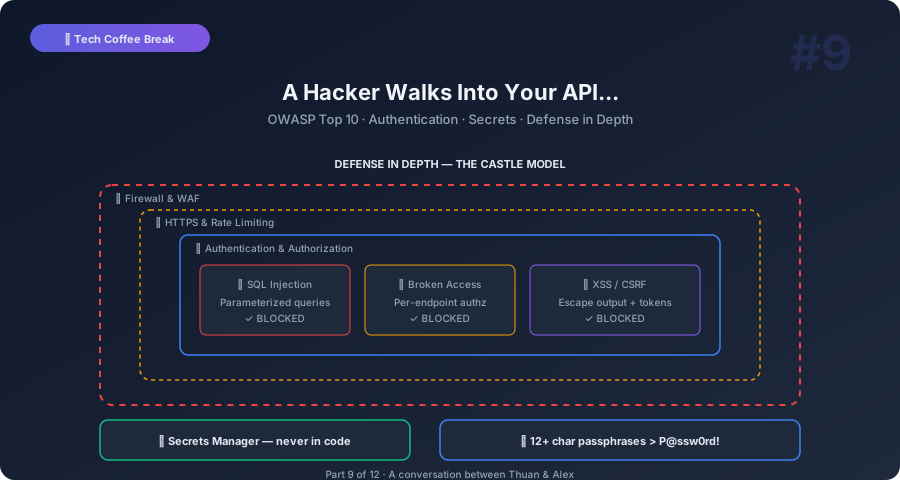
Thuan: Alex, I read another headline this morning. “Company X exposes 50 million user records.” It happens every week. And every time, I think… could that be us?
Alex: Honestly? Probably yes. Not because you’re bad at your job, but because security is hard and attackers only need to find one hole. You need to defend all of them.
Thuan: That’s terrifying.
Alex: It is. But here’s the good news: most breaches aren’t sophisticated. They exploit basic, well-known vulnerabilities. Stuff that’s been on security checklists for years. If you handle the basics, you’re already safer than 90% of applications out there.
Thuan: So what are the basics? Where do I start?
The OWASP Top 10: The Greatest Hits of Getting Hacked
Alex: Start with the OWASP Top 10. OWASP is the Open Web Application Security Project. Their Top 10 list is the most commonly exploited vulnerabilities. Think of it as the “top 10 ways hackers break into your app.” Let me walk you through the ones that matter most.
Number 1: Broken Access Control. This is when users can do things they shouldn’t. A regular user accesses the admin panel. User A can see User B’s data. Someone changes the URL from /user/42/profile to /user/43/profile and sees someone else’s profile.
Thuan: That seems so basic. How does it still happen?
Alex: Because developers check the front door but leave the back door open. They hide the admin button, but they don’t check authorization on the API endpoint. A hacker doesn’t use your website — they call your API directly. If the API doesn’t verify “does this user have permission to do this?” — game over.
Thuan: So every API endpoint needs authorization checks?
Alex: Every single one. Not just “is the user logged in?” but “is this specific user allowed to do this specific action on this specific resource?” That’s the difference between authentication (who are you?) and authorization (what are you allowed to do?).
Injection: The Classic Attack
Alex: Number 2: Injection. The classic is SQL injection. Imagine your login form sends the username and password to a query like: SELECT * FROM users WHERE name = '${username}' AND password = '${password}'
Thuan: I see the problem. If someone types admin' OR '1'='1 as the username…
Alex: The query becomes SELECT * FROM users WHERE name = 'admin' OR '1'='1' AND password = ''. The OR '1'='1' is always true. They’re in. As admin. No password needed.
Thuan: But nobody writes queries like that anymore, right? We use parameterized queries.
Alex: You’d be surprised how many applications still have this vulnerability, especially in legacy code. And injection isn’t limited to SQL. There’s NoSQL injection, command injection (running system commands through user input), and LDAP injection. The principle is the same: never trust user input. Always treat it as potentially malicious.
Thuan: What’s the fix beyond parameterized queries?
Alex: Defense in depth. Parameterized queries or ORMs — never concatenate user input into queries. Input validation — reject unexpected formats. If a field expects a number, reject anything that’s not a number. Least privilege — your database user should only have the permissions it needs. If the app only reads data from a table, don’t give it permission to delete.
Authentication: You’re Probably Doing It Wrong
Thuan: Let’s talk about authentication. Passwords, tokens, OAuth — it’s a mess.
Alex: It is. And most applications get at least part of it wrong. Let’s start with passwords, because I guarantee some of your password rules are actually making things worse.
Thuan: What do you mean? “Must contain uppercase, lowercase, number, and special character” — that’s standard, right?
Alex: Standard, yes. Effective, no. Those rules force users to create passwords like P@ssw0rd! which is predictable and short. Research — and NIST guidelines since 2017 — actually recommend: minimum 12 characters, no complexity requirements. A passphrase like “correct horse battery staple” is far more secure than “P@ssw0rd!” and much easier to remember.
Thuan: Really? No special characters?
Alex: The math is simple. A random 8-character password with all character types has about 6 quadrillion possible combinations. A 4-word passphrase from a 10,000-word dictionary has 10 quadrillion combinations. Longer passwords win. Always. And users don’t write them on sticky notes because they can actually remember them.
Thuan: What about password storage?
Alex: Never store plaintext passwords. I shouldn’t even have to say this, but breaches still reveal plaintext passwords in databases. Use bcrypt, scrypt, or Argon2 — these are password hashing algorithms specifically designed to be slow. Slow is the point. If an attacker steals your database, each guess takes time. With bcrypt, trying a billion passwords takes years instead of seconds.
Thuan: What about JWTs? I see them everywhere.
Alex: JWTs — JSON Web Tokens — are great for stateless authentication. After login, the server gives the user a token containing their identity and permissions. The token is signed by the server. On each request, the user sends the token, and the server verifies the signature without checking a database.
Thuan: What’s the catch?
Alex: You can’t revoke a JWT. Once issued, it’s valid until it expires. If a user’s account is compromised and you want to immediately lock them out, you can’t invalidate their existing JWT. The session-based approach — storing sessions in Redis — lets you delete the session instantly.
The practical solution: use short-lived JWTs (15 minutes) with refresh tokens. The JWT handles most requests without database lookups. When it expires, the client uses the refresh token to get a new JWT. If you need to revoke access, block the refresh token.
Secrets Management: Stop Putting Passwords in Code
Thuan: OK, here’s one I’m guilty of. Where do you store API keys, database passwords, and third-party credentials?
Alex: Not in your code. Not in your Git repository. Not in a .env file committed to Git. Not in a config file on the server. I’ve seen all of these.
Thuan: What’s wrong with .env files?
Alex: Two problems. First, people accidentally commit them to Git. There are bots that scan GitHub for accidentally committed API keys — and they find thousands every day. Second, .env files on servers are just text files. Anyone with server access can read them.
Thuan: So where do secrets go?
Alex: Use a secrets manager. AWS Secrets Manager, HashiCorp Vault, Google Secret Manager, or even simpler solutions like Doppler. These tools encrypt secrets at rest, control who can access them, rotate them automatically, and audit every access.
For development, use .env files — but add .env to .gitignore immediately. For CI/CD, use your platform’s secrets feature — GitHub Actions Secrets, GitLab CI Variables. For production, use a secrets manager.
Thuan: What about environment variables?
Alex: Better than files in code, but not great for production. Environment variables can be leaked through error pages, process listings, or child processes. A secrets manager is always the better choice for production.
HTTPS Everywhere: No Exceptions
Thuan: Do I still need to worry about HTTPS? Isn’t everything HTTPS now?
Alex: Almost everything, but “almost” isn’t good enough. Here’s what HTTPS does: it encrypts the communication between the user’s browser and your server. Without it, anyone on the same network — like a coffee shop Wi-Fi — can read everything: passwords, credit cards, personal data.
Thuan: I’ve heard some developers say “we don’t handle sensitive data, so we don’t need HTTPS.”
Alex: Wrong on multiple levels. First, login forms — that’s sensitive data. Second, even if your site is informational, without HTTPS, attackers can modify the page in transit. They can inject ads, malware, or cryptocurrency miners into your page. Third, browsers now flag HTTP sites as “Not Secure” — that kills user trust.
Just use HTTPS everywhere. Free certificates from Let’s Encrypt. No excuses.
Common Attacks Every Developer Should Know
Thuan: What other attacks should I know about?
Alex: Let me give you the quick hits.
Cross-Site Scripting (XSS). An attacker injects JavaScript into your page. For example, they enter <script>steal(cookie)</script> as their username. If your app renders that without escaping, the script runs in every user’s browser. Fix: escape all user output. Use frameworks that do this by default — React, Vue, and Angular all escape output automatically.
Cross-Site Request Forgery (CSRF). A user is logged into your banking site. They visit a malicious page that has a hidden form submitting a money transfer to your banking site. The browser automatically includes the user’s session cookie, so the bank thinks it’s a legitimate request. Fix: use CSRF tokens — unique random values included in each form that an attacker can’t predict.
Thuan: What about rate limiting? I’ve seen that mentioned everywhere.
Alex: Essential. Without rate limiting, an attacker can try millions of password combinations per second. Or flood your API with requests until it crashes — that’s a denial of service attack. Implement rate limiting on login endpoints (maximum 5 attempts per minute), API endpoints (maximum 100 requests per minute per user), and sensitive operations like password resets.
The Security Mindset
Thuan: This is a lot to think about. How do I even approach security systematically?
Alex: Three principles.
Principle 1: Defense in depth. Don’t rely on one security measure. Use multiple layers. If the firewall fails, the application-level checks catch the attack. If those fail, the database permissions limit the damage. It’s like a castle — moat, walls, drawbridge, and guards inside.
Principle 2: Principle of least privilege. Give everything — users, services, database connections — the minimum permissions needed to do their job. If a service only reads from one table, don’t give it admin access to the entire database. If an attacker compromises that service, the damage is limited.
Principle 3: Assume breach. Don’t build your security assuming you’ll never be hacked. Build it assuming you will be, and limit the damage. Encrypt data at rest. Log everything. Have an incident response plan. Know how to rotate all your credentials quickly.
Thuan: “Assume breach” is sobering. But it makes sense. Plan for the worst.
Key Takeaways You Can Explain to Anyone
Thuan: Takeaway time. Security in five points.
Alex:
-
Check authorization on every API endpoint. Not just “is the user logged in?” — “is this user allowed to do this specific thing?” Front-end checks can be bypassed. The server is the only real gate.
-
Never trust user input. Use parameterized queries, validate input formats, and escape output. Injection attacks are old, well-known, and still everywhere.
-
Use a secrets manager. API keys and passwords don’t belong in code, config files, or environment variables. Use a proper secrets manager with encryption and access control.
-
Longer passwords beat complex passwords. NIST says: 12+ characters, no complexity requirements. Encourage passphrases. Use bcrypt for hashing.
-
Layer your defenses. No single security measure is enough. Defense in depth — multiple layers, each catching what the previous one missed.
Thuan: My favorite takeaway: security isn’t a feature you add at the end. It’s a mindset you bring to every line of code.
Alex: Exactly. The most secure code is written by developers who think “how could an attacker abuse this?” at every step.
Thuan: Next — system design interviews. Because I have one coming up and I’m nervous.
Alex: Perfect. Let’s practice. I’ll play the interviewer.
This is Part 9 of the Tech Coffee Break series — casual conversations about real tech concepts, designed for listening and learning.
Next up: Part 10 — The System Design Interview — Let’s Practice