Thuan: Alex, I have a system design interview next week. I’m terrified. My technical skills are fine, but explaining my thinking clearly — in English — under pressure? That’s a different beast.
Alex: I’ve been on both sides of system design interviews. As the candidate and the interviewer. Want me to walk you through the framework and then we’ll do a practice round?
Thuan: Please. I need all the help I can get.
The Framework: Four Steps, Every Time
Alex: Every system design interview follows roughly the same structure. If you follow these four steps, you’ll do well even if you don’t know the “perfect” answer.
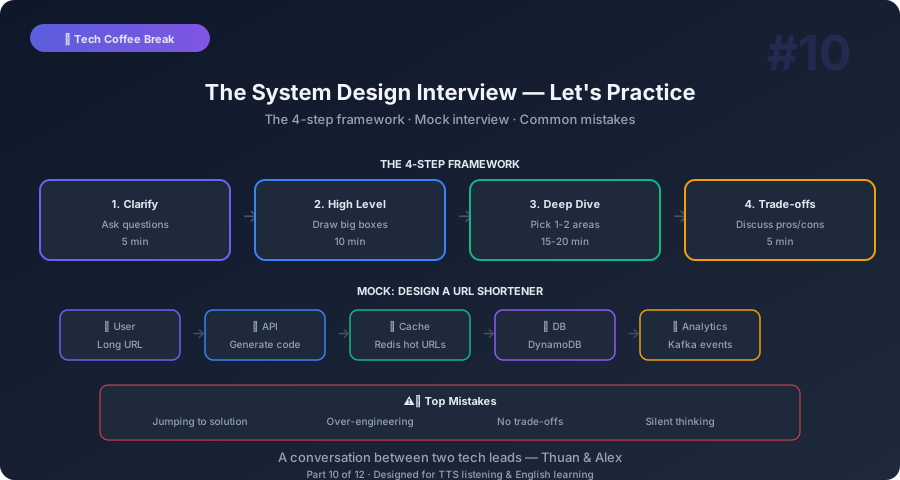
Step 1: Clarify Requirements (5 minutes). Don’t start designing. Start asking questions. What does the system do? How many users? What’s the read-to-write ratio? What are the most important features? What can we skip?
Thuan: Why is this important? Can’t I just start building?
Alex: Because jumping to the solution is the number one mistake. The interviewer wants to see that you think before you build. If someone says, “Design Twitter,” do they mean the feed? The posting system? Search? Direct messages? All of it? Clarifying requirements shows you understand that real engineering starts with understanding the problem.
Thuan: What kind of questions should I ask?
Alex: Two categories. Functional requirements — what the system does. Non-functional requirements — how well it does it.
Functional: “Should users be able to post text, images, and video?” “Do we need real-time notifications?” “Is search a core feature?”
Non-functional: “How many daily active users?” “What’s the expected read-to-write ratio?” “What’s our latency target?” “Do we need strong consistency or is eventual consistency OK?”
Step 2: High-Level Design (10 minutes). Draw the big boxes. Client, API gateway, services, databases, caches. Don’t go deep — just show the overall architecture. This is the map. You’ll fill in details later.
Step 3: Deep Dive (15-20 minutes). The interviewer will pick one or two areas and ask you to go deeper. “How does the feed work?” “How do you handle millions of concurrent users?” This is where your knowledge of caching, databases, message queues, and scaling comes in.
Step 4: Address Trade-offs (5 minutes). Every design decision involves trade-offs. The interviewer wants to hear you discuss them. “We could use a relational database for consistency, but a NoSQL database might handle the write volume better. Here’s how I’d decide…”
Practice Round: Design a URL Shortener
Alex: OK, let’s practice. I’m the interviewer now. Ready?
Thuan: Ready.
Alex: Design a URL shortening service, like bit.ly.
Thuan: OK, let me start by clarifying the requirements. So the core feature is: a user provides a long URL, and we return a short URL. When someone visits the short URL, they get redirected to the original long URL. Is that right?
Alex: Correct. What else do you want to know?
Thuan: Scale. How many URLs are we shortening per day? And how many redirects per day?
Alex: Let’s say 100 million new URLs per day. And 10 billion redirects per day.
Thuan: So the read-to-write ratio is 100 to 1. Reads are dominant. That tells me caching will be crucial. How long do URLs last? Do they expire?
Alex: Let’s say URLs last 5 years by default, with an option for custom expiration.
Thuan: And do we need analytics? Like click counts, geographic data, referrer information?
Alex: Nice question. Yes, basic analytics — click count per URL and click count over time.
Thuan: One more — do we need custom short URLs? Like, can someone choose bit.ly/my-brand?
Alex: Yes, that’s a premium feature. But auto-generated short URLs are the default.
Alex: (Breaking character as interviewer) See what you did there? You asked good questions. You established the scale, the read-write pattern, the features, and the constraints. Now I know you understand the problem. Go ahead and design.
The High-Level Design
Thuan: OK. At a high level, I need three things. A write path for creating short URLs. A read path for redirecting. And an analytics pipeline for tracking clicks.
For the write path: the user calls our API with a long URL. The service generates a unique short code — say, 7 characters. It stores the mapping (short code → long URL) in a database. Returns the short URL to the user.
For the read path: a user visits the short URL. Our service looks up the short code, finds the long URL, and returns a 301 redirect. Since reads are 100x more frequent than writes, I’d put a cache — Redis — in front of the database. Most popular URLs will be served from cache without hitting the database at all.
For analytics: each redirect generates a click event. I wouldn’t write analytics synchronously — that would slow down the redirect. Instead, I’d publish events to a message queue like Kafka. A separate analytics service consumes those events and aggregates them.
Alex: Good. Clean, simple, clear. Now let me ask you some deeper questions.
Deep Dive: The Short Code
Alex: How do you generate the short code? And how do you ensure uniqueness?
Thuan: The short code needs to be unique and short. If it’s 7 characters using lowercase letters, uppercase letters, and digits, that’s 62 possible characters. 62 to the power of 7 is about 3.5 trillion combinations. At 100 million new URLs per day, that lasts about 95 years. Plenty.
For generation, I see three approaches. First, hashing. Take the long URL, hash it with MD5 or SHA-256, and take the first 7 characters. Problem: collisions. Two different URLs can produce the same hash prefix.
Alex: How would you handle collisions?
Thuan: Check the database. If the code already exists, rehash with a salt or append a counter. But at high volume, this creates a lot of database lookups.
Second approach: pre-generated IDs. A separate service generates unique IDs in advance and stores them in a pool. When a new URL comes in, grab one from the pool. No collisions possible because every ID is pre-verified as unique.
Third approach: a counter. Use a distributed counter — like a Snowflake ID generator — that produces a unique number. Convert it to base-62 for the short code. This gives you sequential, unique, collision-free IDs.
Alex: Which would you choose?
Thuan: For this scale, the counter approach. It’s simple, fast, and collision-free. The counter can be a single service or partitioned — one counter range per server to avoid contention.
Alex: Excellent answer. You showed three options, analyzed trade-offs, and made a decision with reasoning. That’s exactly what interviewers want.
Deep Dive: The Database
Alex: What database would you use?
Thuan: The data is simple — short code maps to long URL. The access pattern is almost entirely key-value lookups. At this scale — 100 million writes, 10 billion reads per day — I’d use DynamoDB or Cassandra. Both handle massive key-value workloads with consistent performance.
For the cache layer, Redis. Hot URLs — the most frequently accessed ones — stay in Redis. If a URL is requested 10,000 times per hour, Redis handles it. The database only handles the first request and cache misses.
Alex: What about using PostgreSQL?
Thuan: PostgreSQL could work at a smaller scale. But at 10 billion reads per day — about 115,000 per second — a single PostgreSQL instance would struggle. You’d need many read replicas, and even then, a key-value store is inherently better at this access pattern.
The Interviewer’s Perspective
Alex: (Stepping out of the interviewer role) OK, let me give you feedback from the interviewer’s perspective.
Thuan: Please. Be honest.
Alex: Three things you did well. First, you clarified before designing. You didn’t assume — you asked. That shows product thinking, not just engineering skills.
Second, you communicated your thought process. You didn’t just say “use DynamoDB.” You explained why. “The access pattern is key-value, the scale is massive, DynamoDB handles that.” That’s the difference between a senior engineer and a junior who memorized an answer.
Third, you discussed trade-offs. For the short code, you presented three options and picked one with reasoning. Interviewers love this because it shows you can think critically, not just follow a template.
Thuan: What could I improve?
Alex: Two things. First, draw more. In a real interview, sketch boxes and arrows. Visual communication is powerful and shows organizational thinking.
Second, mention failure cases. What happens when the database is down? What if Redis crashes? What if a short code is generated but the write to the database fails? Discussing failure handling shows you think about production reality, not just happy paths.
Common Mistakes and How to Avoid Them
Thuan: What are the biggest mistakes you see candidates make?
Alex: Mistake 1: Jumping to the solution. The interviewer says “design X” and the candidate immediately starts talking about databases and servers. No questions, no requirements. They’re solving a problem they haven’t understood.
Mistake 2: Over-engineering. Adding Kubernetes, microservices, event sourcing, and CQRS to a system that doesn’t need it. Keep it simple. Add complexity only when you can justify why.
Mistake 3: Not discussing trade-offs. Every decision has pros and cons. If you say “use MongoDB” without explaining why not PostgreSQL, the interviewer thinks you don’t understand the alternatives.
Mistake 4: Silence. The interviewer can’t read your mind. If you’re thinking, say so. “Let me think about this for a moment.” If you’re stuck, say so. “I’m not sure about the best approach here, but let me reason through it.” Silence is the worst thing in an interview.
Thuan: That last one is especially hard for non-native speakers. Sometimes I know the answer but I’m searching for the English words.
Alex: Absolutely. Here’s a tip: buy yourself time with filler phrases. “That’s a great question, let me think about that.” “There are several approaches I’d consider here.” “Let me walk you through my thinking.” These phrases are natural, professional, and give your brain time to organize the answer in English.
Phrases for System Design Interviews
Thuan: Can you give me more phrases? The kind of professional sentences that make you sound like you know what you’re doing?
Alex: Here are the ones I use:
When clarifying: “Before I start designing, I’d like to understand the requirements better.” “What’s the expected scale — in terms of daily active users and requests per second?” “Is this a read-heavy or write-heavy system?”
When designing: “At a high level, the architecture would look like this.” “The key components are…” “The data flow works as follows…”
When going deep: “Let me walk through how this component handles the load.” “The trade-off here is between consistency and availability.” “We could solve this with either approach X or approach Y — here’s why I’d choose X.”
When discussing trade-offs: “The downside of this approach is…” “An alternative would be…” “If requirements change in the future, we could migrate to…”
When stuck: “I’d need to research the exact numbers, but my estimate is…” “I’m thinking through this — give me a moment.” “Let me approach this from a different angle.”
Thuan: These are gold. I’m writing them all down.
Key Takeaways You Can Explain to Anyone
Thuan: Final summary. System design interviews in five points.
Alex:
-
Always clarify first. Ask about scale, features, and constraints before designing. Five minutes of questions saves you from thirty minutes of designing the wrong system.
-
Communicate your thinking. The interviewer is evaluating your thought process, not your final answer. Think out loud. Explain your reasoning.
-
Start simple, then add complexity. Don’t jump to microservices and Kafka. Start with the simplest design that works. Add complexity only when the requirements demand it.
-
Discuss trade-offs explicitly. “I chose X because of A, but the downside is B.” This shows depth of understanding.
-
Practice speaking, not just thinking. As a non-native speaker, practice explaining technical concepts in English. The ideas might be in your head, but they need to come out clearly and confidently.
Thuan: The most important lesson: the interview tests communication as much as knowledge. You can know everything but fail if you can’t explain it.
Alex: Exactly. Technical skill gets you to the interview. Communication skill gets you through it.
Thuan: Next time, I want to understand architecture patterns. Event-driven, CQRS, Saga — I hear these buzzwords everywhere but I’m not sure when they’re actually useful.
Alex: Buzzword demolition! My favorite kind of conversation.
This is Part 10 of the Tech Coffee Break series — casual conversations about real tech concepts, designed for listening and learning.
Next up: Part 11 — Event-Driven, CQRS, Saga — Buzz or Useful?