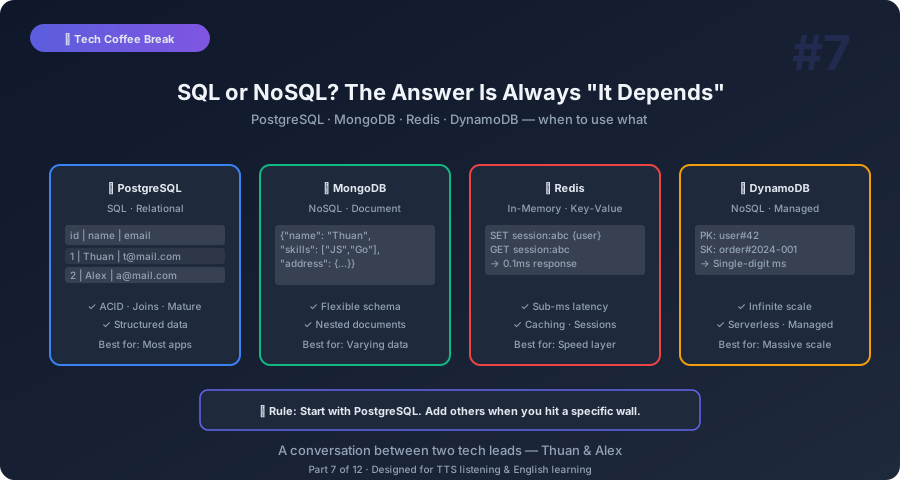
Thuan: Alex, I have a confession. I use PostgreSQL for everything. User data, sessions, logs, analytics, even caching sometimes. And it works. But people keep telling me I should use MongoDB, or Redis, or DynamoDB. Am I doing something wrong?
Alex: Short answer: no. PostgreSQL is one of the best databases ever made. If it works for your use case, keep using it. But let me ask you a question. Do you use a chef’s knife for everything in the kitchen?
Thuan: Pretty much, yes.
Alex: And it works, right? You can chop vegetables, slice bread, cut meat — all with one knife. But a bread knife cuts bread better. A paring knife peels fruit better. A cleaver handles bones better. The chef’s knife is versatile, but specialized tools are better at specific tasks.
Thuan: So PostgreSQL is the chef’s knife of databases?
Alex: Exactly. And for most applications, it’s all you need. But there are situations where a specialized database is significantly better. Let’s talk about when.
SQL Databases: The Filing Cabinet
Thuan: First, let’s make sure I understand the basics. What’s the fundamental difference between SQL and NoSQL?
Alex: Think of a SQL database like a filing cabinet with very structured drawers. Each drawer has labeled folders. Each folder has a specific form inside it. Every form has the same fields — name, age, address, phone number. If you want to add a “favorite color” field, you need to redesign the form, and every existing form gets that new field.
Thuan: That’s a relational schema. Predefined structure.
Alex: Right. The data is structured and consistent. Every row in a table has the same columns. Relationships between tables are explicit — user 42 has orders 101, 102, 103. You can join those tables to answer questions like “what did user 42 order last month?”
Thuan: And NoSQL?
Alex: A NoSQL database is more like a box of folders. Each folder can contain whatever you want. One folder has a resume. Another has a grocery list. Another has a photo. They don’t need to have the same structure. Two “user” documents might have completely different fields.
Thuan: That sounds messy.
Alex: It can be. But it’s also incredibly flexible. When your data doesn’t have a fixed shape, or when different records have different attributes, NoSQL embraces that instead of fighting it.
When PostgreSQL Is the Right Choice
Thuan: OK, so when should I stick with PostgreSQL?
Alex: Most of the time. Seriously. Here’s when SQL databases in general — and PostgreSQL specifically — are the right choice.
Strong relationships between data. Users have orders. Orders have items. Items belong to categories. Categories have parents. This is relational data. SQL databases were literally designed for this. Joins, foreign keys, constraints — they keep your data consistent.
You need transactions. “Transfer $100 from Account A to Account B.” This must be atomic — either both happen or neither happens. SQL databases have ACID transactions. NoSQL databases often sacrifice this for performance.
Thuan: What does ACID stand for? I always forget.
Alex: Atomicity — the whole transaction succeeds or fails, no partial results. Consistency — the database moves from one valid state to another. Isolation — concurrent transactions don’t interfere with each other. Durability — once committed, the data survives crashes.
Complex queries. “Show me the top 10 customers who bought more than 5 products in the last 30 days, grouped by country, ordered by total spend.” SQL handles this in one query. In NoSQL, you’d need to write application code to aggregate this manually.
Thuan: And PostgreSQL specifically? Why not MySQL or SQL Server?
Alex: PostgreSQL has amazing features that others don’t — or didn’t until recently. JSONB columns let you store flexible JSON data inside a relational table. Full-text search built in. PostGIS for geographic data. Extensions like pgvector for AI embeddings. Excellent performance, open source, and free. It’s genuinely the Swiss Army knife of databases.
When to Use MongoDB
Thuan: So when does MongoDB make sense?
Alex: MongoDB is a document database. Think of it like a filing cabinet where each folder contains a complete document — self-contained, no references to other folders.
Content management systems. Blog posts, articles, product listings — these are documents with varying structures. One blog post has a video. Another has an image gallery. Another has a code snippet. MongoDB handles this naturally because each document can have a different shape.
Rapid prototyping. When you don’t know your schema yet. You’re experimenting, adding fields, removing fields, changing the structure frequently. MongoDB doesn’t require schema migrations. Just save a document with the new structure.
Thuan: But I can use JSONB columns in PostgreSQL for flexible data too.
Alex: You can. And for many use cases, that’s the right choice. MongoDB really shines when most of your data is document-shaped, when you need horizontal scaling across many machines, and when you have very high write throughput — like logging millions of events per second.
Redis: The Speed Demon
Thuan: What about Redis? I know it’s fast, but I’ve only used it as a cache.
Alex: Redis is an in-memory data store. Every piece of data lives in RAM. That’s why it’s absurdly fast — microsecond response times. Disk-based databases need milliseconds. Redis needs microseconds. That’s a thousand times faster.
Thuan: But RAM is expensive and limited. You can’t store terabytes in Redis.
Alex: Exactly. Redis is not a primary database for most use cases. It’s a specialized tool. Here’s where it shines.
Caching. The classic use case. Store frequently accessed data — user sessions, product details, API responses — in Redis. Your application checks Redis first. If the data is there (a “cache hit”), return it instantly. If not (a “cache miss”), query the main database and store the result in Redis for next time.
Session storage. When users log in, you need to store their session somewhere. Redis is perfect — fast reads, automatic expiration (sessions expire after 30 minutes), and shared across multiple application servers.
Rate limiting. “This API allows 100 requests per minute per user.” Redis can track request counts with atomic increment operations and automatic expiration. Fast and reliable.
Real-time features. Leaderboards, counters, pub/sub messaging. Redis has built-in data structures — sorted sets, lists, streams — that make these features trivial.
Thuan: So Redis sits in front of the main database as a speed layer?
Alex: Exactly. Your architecture becomes: Application → Redis (fast) → PostgreSQL (reliable). Redis handles the speed-sensitive reads. PostgreSQL is the source of truth.
DynamoDB: The Infinite Shelf
Thuan: And DynamoDB? My AWS friends keep pushing it.
Alex: DynamoDB is Amazon’s fully managed NoSQL database. Its superpower is unlimited scale with consistent performance. Whether you have 10 users or 10 million, every read and write takes the same single-digit millisecond time.
Thuan: How is that even possible?
Alex: By being very opinionated about how you access data. DynamoDB forces you to think about your access patterns upfront. You design your tables around how you’ll query them, not around how the data is related. It’s the opposite of SQL, where you normalize data first and query however you want later.
Thuan: That sounds limiting.
Alex: It is. And that’s the trade-off. DynamoDB is incredible for known access patterns at massive scale. Amazon.com itself runs on DynamoDB. Shopping carts, user profiles, order lookups — simple key-value or key-sort queries at enormous scale.
But if you need flexible queries — ad-hoc analytics, complex joins, “show me all users who did X and Y but not Z” — DynamoDB is a nightmare. Those queries either require expensive table scans or complex secondary indexes.
Thuan: So DynamoDB for operational data at scale, PostgreSQL for analytical data?
Alex: That’s a very common and effective pattern. DynamoDB handles the high-speed transactional workload. PostgreSQL or a data warehouse handles the analytical questions.
The Decision Cheat Sheet
Thuan: Can you give me a quick decision framework? When someone asks “which database?” — what do I ask?
Alex: Five questions:
Question 1: What does your data look like? Tables with relationships → SQL. Documents with varying shapes → MongoDB. Key-value pairs → DynamoDB or Redis.
Question 2: How will you query it? Complex joins and aggregations → SQL. Simple lookups by ID → NoSQL. Full-text search → Elasticsearch (or PostgreSQL with full-text).
Question 3: How much data? Gigabytes → anything works. Terabytes → consider scaling strategy. You need sharding or managed services.
Question 4: How fast does it need to be? Microseconds → Redis. Single-digit milliseconds → DynamoDB. Tens of milliseconds → PostgreSQL with good indexes.
Question 5: How important is consistency? Banking, payments, inventory → SQL with ACID. Social media feeds, analytics → eventual consistency with NoSQL is fine.
The Polyglot Persistence Pattern
Thuan: You mentioned using multiple databases together. Is that common?
Alex: Very common. It’s called polyglot persistence. A typical production setup might use:
- PostgreSQL for user accounts, orders, and financial data (needs ACID)
- Redis for sessions, caching, and rate limiting (needs speed)
- Elasticsearch for full-text search across products (needs search quality)
- S3 for file storage — images, videos, documents (needs cheap bulk storage)
Thuan: Doesn’t that make the system more complex?
Alex: It does. But the complexity is management complexity, not engineering complexity. Each database does what it’s best at. The alternative — forcing PostgreSQL to do full-text search, caching, AND file storage — leads to poor performance in all of them.
The key is: don’t add a new database unless you have a specific problem the current one can’t solve efficiently. Start with PostgreSQL. Add Redis when you need caching. Add Elasticsearch when search quality matters. Grow organically based on actual needs, not hypothetical scale.
Key Takeaways You Can Explain to Anyone
Thuan: Takeaway time. Five things about databases.
Alex:
-
PostgreSQL is the safe default. For most applications, it’s all you need. It handles relational data, JSON, full-text search, and even vector embeddings.
-
MongoDB for flexible documents. When your data doesn’t fit neat tables and you need rapid iteration. But JSONB in PostgreSQL covers many of these cases too.
-
Redis for speed. In-memory storage for caching, sessions, and real-time features. Not a primary database — a speed layer in front of your main database.
-
DynamoDB for unlimited scale with simple queries. Amazing at what it does, painful for everything else. Design around your access patterns.
-
Use multiple databases when each solves a different problem. But start simple. Add complexity only when you have a specific need, not a hypothetical one.
Thuan: My key takeaway: the best database is the one your team knows well, used for the problem it was designed to solve.
Alex: Couldn’t have said it better. Next up — CI/CD. Because we need to talk about how your code actually gets from your laptop to production without breaking everything.
This is Part 7 of the Tech Coffee Break series — casual conversations about real tech concepts, designed for listening and learning.