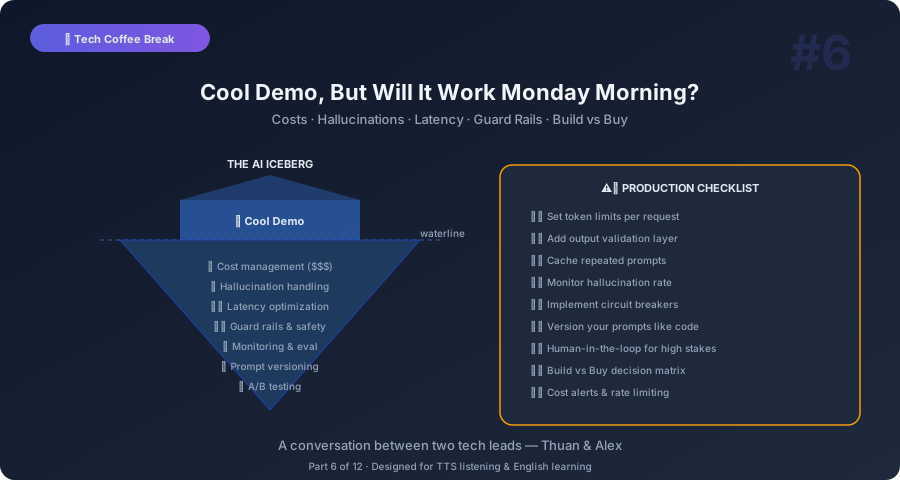
Thuan: Alex, I built something last week. A chatbot that answers questions about our product documentation. The demo was beautiful. My boss loved it. Then I started thinking about putting it in production and realized… I have no idea how.
Alex: Welcome to the valley between demo and production. Everyone lives there for a while. The demo works because you control everything — the questions, the data, the expectations. Production is different. Real users ask weird questions. They try to break things. They need answers fast. And your boss now expects it to work perfectly because the demo looked so good.
Thuan: Exactly. Where do I even start?
The Cost Problem: Your Boss’s Credit Card Will Cry
Alex: Let’s start with money. Because the first surprise is always the bill. How big is your documentation?
Thuan: About 500 pages. Maybe 200,000 words.
Alex: OK. To make your RAG chatbot work, you need to embed all that text. That’s a one-time cost — maybe a few dollars. Not bad. But then every user question triggers an LLM call. If you’re using GPT-4, that’s roughly 3 cents per thousand input tokens and 6 cents per thousand output tokens.
Thuan: That sounds cheap.
Alex: For one question, yes. But think about scale. If your chatbot gets 10,000 questions per day, and each question uses about 2,000 tokens for context plus 500 tokens for the answer… that’s about $750 per day. Over $20,000 per month.
Thuan: Twenty thousand? For a chatbot?
Alex: That’s the GPT-4 price. You can reduce costs with smaller models. GPT-4o mini is about 90% cheaper. Claude Haiku is even cheaper. And open-source models like Llama running on your own hardware can bring costs close to zero — but then you’re managing GPU servers.
Thuan: So the first production decision is: which model balances quality and cost?
Alex: Exactly. And here’s the practical approach: use the smallest model that gives acceptable quality for your specific use case. Don’t default to GPT-4 because it’s the “best.” Test your questions with cheaper models first. Often, GPT-4o mini or Claude Haiku handles straightforward documentation questions perfectly. Save the big models for complex reasoning tasks.
Hallucinations: When AI Confidently Lies to Your Users
Thuan: My biggest fear is hallucinations. In the demo, the chatbot occasionally made up features that don’t exist. If a customer asks “does your product support X?” and the chatbot says “yes” when the answer is “no”… that’s a disaster.
Alex: This is the number one production risk for AI. And here’s the uncomfortable truth: you cannot eliminate hallucinations. You can only reduce them and build guard rails around them.
Thuan: How do you reduce them?
Alex: Several strategies. First, better retrieval. If your RAG system retrieves the wrong documents, the LLM will generate answers based on irrelevant context. Improving your retrieval step is the highest-leverage fix. Use better embeddings, chunk your documents more carefully, and test retrieval quality independently.
Thuan: What does “chunk documents more carefully” mean?
Alex: When you split your 500-page documentation into pieces for embedding, the chunk size matters. Too large — 5,000 words per chunk — and the relevant sentence gets buried in irrelevant context. Too small — 50 words per chunk — and you lose the surrounding context that gives meaning. The sweet spot is usually 200 to 500 words per chunk, with some overlap between chunks.
Second strategy: prompt engineering. Tell the model explicitly: “Only answer based on the provided context. If the answer is not in the context, say ‘I don’t have information about that.’ Never make up features or capabilities.”
Thuan: Does that actually work?
Alex: Surprisingly well. Not perfectly — the model can still hallucinate — but it dramatically reduces the frequency. Think of it as instructions to a new employee: “If you don’t know the answer, say so.” Most of the time they follow it. Sometimes they still guess. But the instruction helps.
Third: citations. Make the model cite which document it used for its answer. This does two things. It helps users verify the answer. And it actually improves accuracy because the model is forced to ground its response in specific sources.
Latency: Nobody Waits 10 Seconds for an Answer
Thuan: In my demo, responses take 3 to 8 seconds. That felt OK for a demo. But for a real product…
Alex: Users expect web responses in under 2 seconds. A chatbot can take a bit longer — people understand AI needs a moment — but more than 5 seconds and they start clicking away.
Thuan: How do you speed it up?
Alex: Streaming. Instead of waiting for the entire response to be generated, stream it word by word. The user sees the answer appearing in real-time. The total time is the same, but the perceived speed is much faster because they’re reading as it generates.
Thuan: That’s what ChatGPT does — the typing effect.
Alex: Exactly. Most LLM APIs support streaming. It’s usually a single parameter — stream: true. Your frontend needs to handle a stream instead of a single response, but it’s not complex.
Other speed tricks: cache frequent questions. If people ask “how do I reset my password?” fifty times a day, cache that answer. Don’t call the LLM every time. Use smaller models for simple questions. Route easy questions to a fast model and complex questions to a powerful model.
Thuan: That routing idea is interesting. How do you decide which model handles which question?
Alex: Simple heuristic to start. If the question is short and matches a FAQ pattern, use the fast model. If it’s complex, multi-part, or requires reasoning, use the powerful model. You can even use a tiny classifier model to make the routing decision. It adds one fast call but saves money on the majority of queries.
Guard Rails: Your AI Needs a Seatbelt
Thuan: What about preventing misuse? Someone asking the chatbot to write code, tell jokes, or generate inappropriate content?
Alex: Guard rails. Every production AI system needs them. Think of guard rails on a highway — they don’t control the car, but they prevent it from going off a cliff.
Input guard rails filter the question before it reaches the LLM. Is this question about our product? If not, reject it politely. “I can only help with questions about our documentation.” You can use simple keyword filters, or a small classifier model to detect off-topic questions.
Output guard rails check the response before sending it to the user. Does the response contain personal information it shouldn’t? Does it recommend a competitor? Does it say something that contradicts company policy? You can use rules, regex patterns, or another LLM call specifically for safety checking.
Thuan: Using an LLM to check another LLM’s output? Isn’t that expensive?
Alex: It can be, but the safety LLM can be a small, fast model. It’s not generating a creative response — it’s doing a binary check: “Is this response safe? Yes or no.” That’s something even a tiny model can handle. And the cost of serving one inappropriate response can be far higher than the cost of running a safety check.
Monitoring: Your AI Will Break at 3 AM
Thuan: My boss thinks once we deploy, we’re done. I keep telling him AI needs ongoing monitoring.
Alex: Your boss needs a reality check. AI systems degrade over time. Here’s why.
Data drift. Your documentation changes. New features are added, old features are deprecated. If your embeddings are based on old docs, the chatbot gives outdated answers. You need to re-embed documents whenever they change.
User behavior changes. When you launch, users ask simple questions. As they get used to the chatbot, they ask harder, more specific questions. Your system needs to handle that evolution.
Model updates. If you’re using an API, the provider might update the model. OpenAI regularly updates GPT-4. Sometimes behavior changes subtly. An answer that was correct last week might be different this week.
Thuan: So what do I monitor?
Alex: Five things. Response quality — sample random responses weekly and grade them. Latency — track response times and alert on spikes. Cost — monitor daily API spend. Retrieval accuracy — check if the right documents are being retrieved. User feedback — add thumbs up/down buttons and track satisfaction over time.
The Architecture That Actually Works
Thuan: Can you draw me the production architecture? The full picture?
Alex: Sure. Here’s the flow for a production RAG chatbot:
Layer 1: Input processing. User question comes in. Input guard rails check it. If it’s off-topic or harmful, return a polite rejection without calling the LLM.
Layer 2: Retrieval. The question is embedded. The embedding is used to search your vector database. Top 3 to 5 relevant document chunks are retrieved.
Layer 3: Prompt construction. Your system prompt, the retrieved context, conversation history, and the user question are assembled into a prompt. This is where prompt engineering matters.
Layer 4: Generation. The prompt is sent to the LLM. The response streams back.
Layer 5: Output processing. Output guard rails check the response. Citations are extracted. The response is formatted and sent to the user.
Layer 6: Logging and monitoring. Everything is logged — the question, retrieved documents, prompt, response, latency, and any user feedback. This data powers your monitoring and improvement cycle.
Thuan: That’s six layers for what looks like a simple chatbot to the user.
Alex: Welcome to production engineering. The iceberg principle — 10% visible, 90% under water.
The Build vs. Buy Decision
Thuan: Should I build all this myself? Or use a platform?
Alex: Depends on your needs. Build if you need full control over the data pipeline, have specific security requirements, or need deep customization. Buy if you want to ship fast and your use case is standard.
Platforms like LangChain, LlamaIndex, or Vercel AI SDK handle a lot of the plumbing for you. Vector databases like Pinecone or Supabase pgvector handle storage. LLM gateways like LiteLLM or Portkey handle model switching and fallbacks.
Thuan: What about managed solutions?
Alex: Companies like OpenAI Assistants, AWS Bedrock, or Google Vertex AI offer managed RAG solutions. You upload your documents, they handle embedding, retrieval, and generation. Less control, but much faster to deploy. For many use cases, especially internal tools, these are perfectly fine.
Key Takeaways You Can Explain to Anyone
Thuan: OK, wrap up. Production AI in five points.
Alex:
-
Demos are easy, production is hard. The gap between a working demo and a reliable production system is months of engineering — cost optimization, guard rails, monitoring, and error handling.
-
Use the smallest model that works. Don’t default to the most powerful model. Test cheaper options first. The cost difference can be 100x.
-
You can’t eliminate hallucinations, only reduce them. Better retrieval, explicit prompts, and citations are your best defenses.
-
Stream responses and cache common questions. Users care about perceived speed. Streaming makes a 5-second response feel instant.
-
Monitor everything. AI systems degrade silently. Quality, latency, cost, retrieval accuracy, and user satisfaction all need ongoing tracking.
Thuan: The most important lesson I’m taking away: AI in production is an engineering problem, not a magic problem.
Alex: Exactly. Apply the same discipline you’d apply to any production system: monitoring, testing, error handling, and gradual rollout. The AI part is actually the easy part. The production part is where the real engineering happens.
Thuan: Next topic — databases. I’ve been using PostgreSQL for everything and I’m starting to wonder if that’s wrong.
Alex: It’s not wrong. But let’s talk about when it’s not enough.
This is Part 6 of the Tech Coffee Break series — casual conversations about real tech concepts, designed for listening and learning.
Next up: Part 7 — SQL or NoSQL? The Answer Is Always “It Depends”