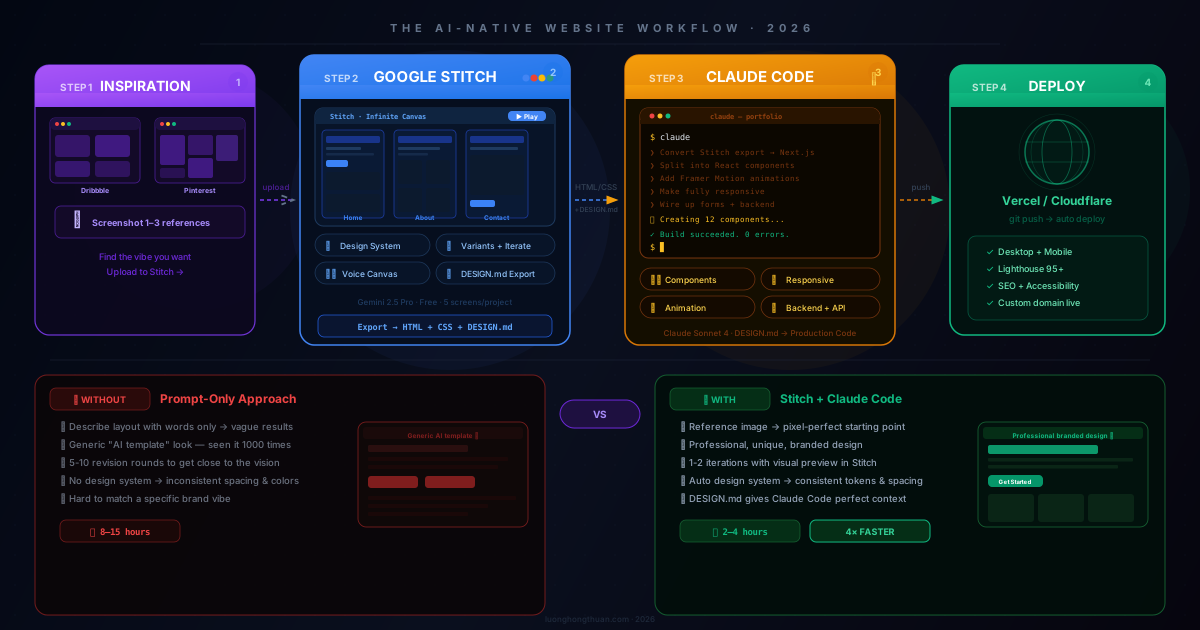
Most AI-generated websites look like AI-generated websites. You know the look — generic hero, cookie-cutter cards, placeholder copy, no real brand identity.
The problem isn’t the AI. It’s the workflow. When you ask Claude Code to “build me a landing page,” you’re asking a coding tool to make design decisions. That’s like asking your accountant to design your office.
The fix is simple: use the right tool for each job.
- Google Stitch → design (visual decisions)
- Claude Code → code (production implementation)
The result: websites that look like a $10K agency project, built in an afternoon, for free.
What Are These Tools?
Google Stitch
Google Stitch is a free AI design tool from Google Labs. Originally launched as Galileo AI in 2022, Google acquired it in May 2025 and rebranded it as Stitch, powered by Gemini 2.5 Pro.
You give it a text prompt or reference screenshot, and it generates high-fidelity UI screens with exportable code.
The March 2026 update changed everything:
- AI-Native Infinite Canvas — drag images, text, code, sketches onto a shared workspace. No more switching between tools.
- Design Agent + Agent Manager — the AI reasons across your entire project’s evolution and tracks progress across parallel ideas.
- Voice Canvas — speak your design changes. The agent listens, asks questions, gives critiques, and makes live updates.
- Manual editing — click any text element and rewrite it. Swap images, adjust spacing, tweak details without re-prompting.
- DESIGN.md export — saves your design system (colors, fonts, spacing, component patterns) as a markdown file. This is the bridge to Claude Code.
- React App export — generates a working React application, not just a prototype.
- MCP Server — connects directly to Claude Code, Cursor, or Gemini CLI for seamless design-to-code transfer.
- Interactive prototyping — generate up to 5 screens, stitch them together, click Play to preview the flow.
Pricing: Completely free. 350 generations/month (Flash) + 50/month (Pro).
For context: Figma’s stock dropped 8.8% the day the March 2026 Stitch update was announced.
Claude Code
Claude Code is Anthropic’s terminal-based AI coding assistant. It reads your entire codebase, implements features from natural language, manages Git workflows, and handles full-stack development.
What makes it different from Copilot or Cursor:
- Agentic — it doesn’t just suggest code. It plans, executes across multiple files, runs tests, and verifies.
- Plan mode — you iterate on the approach with Claude before it writes a single line of code. When the plan is solid, switch to auto-accept and it usually one-shots the implementation.
- Full-stack — frontend components, API routes, database queries, deployment scripts — all from the terminal.
- Parallel sessions — Claude Code’s creator, Boris Cherny, runs 5+ sessions in parallel on complex projects.
The key insight: Claude Code produces excellent code but generic designs. Stitch produces excellent designs but no production code. Together, they cover each other’s weakness.
The Workflow
flowchart LR
    subgraph A ["1. Inspiration"]
        A1["Find reference\ndesigns"]
        A2["Screenshot\nthe best one"]
    end

    subgraph B ["2. Google Stitch"]
        B1["Upload reference"]
        B2["Generate UI"]
        B3["Iterate + refine"]
        B4["Export code\n+ DESIGN.md"]
    end

    subgraph C ["3. Claude Code"]
        C1["Paste Stitch export"]
        C2["Convert to\nNext.js components"]
        C3["Add responsive\n+ animations"]
        C4["Wire backend"]
    end

    subgraph D ["4. Deploy"]
        D1["GitHub → Vercel"]
        D2["Final QA"]
    end

    A1 --> A2 --> B1 --> B2 --> B3 --> B4 --> C1 --> C2 --> C3 --> C4 --> D1 --> D2

    style B2 fill:#1e3a5f,stroke:#4285f4,color:#93c5fd
    style C2 fill:#3d2000,stroke:#d97706,color:#fcd34d
    style D1 fill:#052e16,stroke:#10b981,color:#34d399
Total time: 2–4 hours from zero to production.
Step 1: Find Your Reference Design (15 minutes)
This is the most important step. A good reference image eliminates 80% of the “AI template” look.
Go to Dribbble, Godly, Awwwards, or Pinterest. Search for something specific:
ai agency landing page dark mode
saas homepage premium minimal
fintech dashboard modern clean
Pick 1 primary reference. Not 10. Not 5. One design that matches your brand’s vibe — the colors, layout, and feeling you want.
Screenshot it. Crop to the sections you care about most (usually the hero section).
Why this works: Stitch generates dramatically better results when it has a visual reference versus a text-only prompt. You’re giving it a target to match, not asking it to guess.
Step 2: Generate in Google Stitch (30 minutes)
Open stitch.withgoogle.com. Select Web App as your project type and drag your reference screenshot onto the canvas.
Write a focused prompt
Keep it short. Stitch needs direction, not a novel:
Create a landing page for "Chase AI" (AI automation agency)
following the style of the attached reference. Match the hero
layout. Feel: modern, premium, dark. Goal: convert visitors
into demo bookings.
Review and adjust the design system
This is the step most people skip — and it’s the most important for quality.
Open the Design System panel. Check:
- Primary color — is it your brand color?
- Fonts — do they match your industry? (tech = Inter/Space Grotesk, corporate = serif)
- Border radius — sharp = enterprise, rounded = friendly
- Button styles — are CTAs prominent enough?
Fix the design system first. Every screen Stitch generates will inherit these rules.
Generate variants and pick the winner
Use Stitch’s variant tools to create 3–5 alternatives:
Create 3 variants with the same brand feel but different
hero layouts and color treatments.
Evaluate each one:
- Does the hero grab attention in 2 seconds?
- Can a visitor understand who you are in 5 seconds?
- Does it look like a real brand, not a random template?
Pick the best. Don’t chase perfection — Stitch’s job is to get you to 80%. Claude Code handles the last 20%.
Use Voice Canvas for quick refinements
With the March 2026 update, you can speak changes:
“The hero headline is too small. Make it bolder. The CTA button needs more contrast.”
“Add subtle gradient to the background. Keep it elegant.”
Export
Click More → Export → Code to Clipboard. You get:
- HTML/CSS — the visual implementation
- DESIGN.md — your design system rules
Copy both. You need them next.
Step 3: Build with Claude Code (45 minutes)
Open your terminal:
npx create-next-app@latest my-website --typescript --tailwind
cd my-website
claude
Feed the Stitch export with context
Don’t just paste code. Give Claude Code the full picture:
Here is the HTML/CSS exported from Google Stitch for my AI agency
landing page, plus the DESIGN.md with design system rules.

Please:
1. Convert to Next.js 15 + TypeScript + Tailwind CSS
2. Split into components: Hero, Features, Testimonials, Pricing,
   FAQ, Footer
3. Mobile-first responsive design
4. Preserve exact design intent (colors, fonts, spacing)
5. Add smooth scroll animations (IntersectionObserver)
6. Optimize images with next/image

[paste DESIGN.md here]
[paste HTML/CSS here]
Verify the first build
Run npm run dev and compare side-by-side with Stitch’s preview. Check layout, colors, typography, spacing, and mobile.
Polish and enhance
Now tell Claude Code to layer on the interactive parts:
Add these enhancements:
- Sticky navbar that changes on scroll
- Smooth fade-in animations per section
- Testimonial carousel with auto-play
- Pricing toggle (monthly/annual)
- FAQ accordion
- Contact form with validation
- Hover effects on cards
Responsive audit
Audit responsive design across mobile (375px), tablet (768px),
and desktop (1440px). Fix overflow, truncation, broken layouts.
Ensure touch targets are at least 44px.
Clean up
Refactor: consistent naming, extract reusable primitives (Button,
Card, Section), move colors to Tailwind config, remove dead code,
add semantic HTML and alt texts.
Step 4: Deploy (10 minutes)
git add .
git commit -m "feat: launch landing page"
git push origin main

# Vercel auto-deploys on push
# Or manually:
vercel --prod
Test on real devices: desktop Chrome/Safari/Firefox, mobile iOS Safari and Android Chrome.
Why This Beats the Alternatives
| Approach | Design | Code | Speed | Cost |
|---|---|---|---|---|
| Design agency | ★★★★★ | ★★★★★ | Weeks | $5K–$50K |
| Claude Code only | ★★☆☆☆ | ★★★★★ | Hours | ~$5 |
| v0.dev | ★★★☆☆ | ★★★★☆ | Hours | $20/mo |
| Bolt.new / Lovable | ★★★☆☆ | ★★★☆☆ | Hours | Free–$20 |
| Stitch + Claude Code | ★★★★☆ | ★★★★★ | Hours | Free |
The key advantage: you’re feeding real design references into the pipeline. The AI isn’t guessing what looks good — it’s matching a visual target. That’s why the “AI smell” disappears.
Common Mistakes
1. Prompting without a reference image. Always upload one. This single habit eliminates most of the generic look.
2. Trying to make Stitch perfect. Stitch gets you to 80%. Claude Code handles the rest. Don’t spend hours tweaking pixels in a design tool when code gives you more control.
3. Pasting code without context. Always include what the site is for, the framework to use, and the DESIGN.md file. Claude Code makes better decisions with more context.
4. Skipping the design system. If the colors, fonts, and spacing in Stitch’s Design System panel are wrong, every screen it generates will inherit those problems.
Quick Reference Prompts
Stitch — First generation
Create a landing page for [brand] following the attached reference.
Match the hero layout. Feel: [modern/premium/dark/minimal].
Goal: [convert visitors / build trust / showcase products].
Stitch — Variants
Create 3 variants with the same brand identity but different
hero layouts and color emphasis. Keep the premium feeling.
Claude Code — Full conversion
Convert this Stitch HTML/CSS export to Next.js 15 + TypeScript +
Tailwind. Split into components, mobile-first responsive, preserve
design intent. DESIGN.md attached for design system rules.

[paste DESIGN.md]
[paste HTML/CSS]
What’s Next
- Stitch MCP Server — connect Stitch directly to Claude Code for zero-copy design-to-code transfer
- Multi-page sites — use Stitch’s 5-screen generation to design full site flows before coding
- Design tokens — export DESIGN.md and reuse it across projects for consistent branding
- Team workflow — designers explore in Stitch, developers build in Claude Code, handoff via DESIGN.md
The tools are free. The workflow takes an afternoon to learn. Start with one landing page, and you’ll never go back to prompting from scratch.
Built with Google Stitch + Claude Code. Total time for a production landing page: ~2.5 hours. Total cost: $0.