
JOURNAL
$0/Month — Self-Hosting an LLM API Server for Your Entire Team
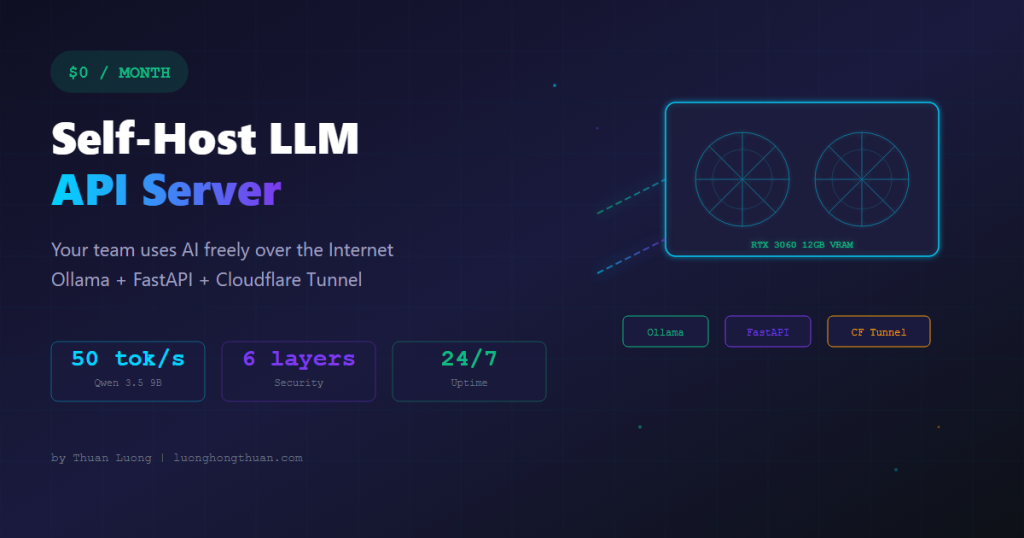
A deep dive into building a local LLM API server on an RTX 3060. Ollama + FastAPI + Cloudflare Tunnel. 6 layers of security, real benchmarks, and hard-won lessons.
On this page
Your whole team uses LLMs freely over the Internet. Zero monthly subscription.
I just finished building an API server running local LLMs on a desktop RTX 3060. This post breaks down the entire setup process and the reasoning behind every technical decision.
The Hardware
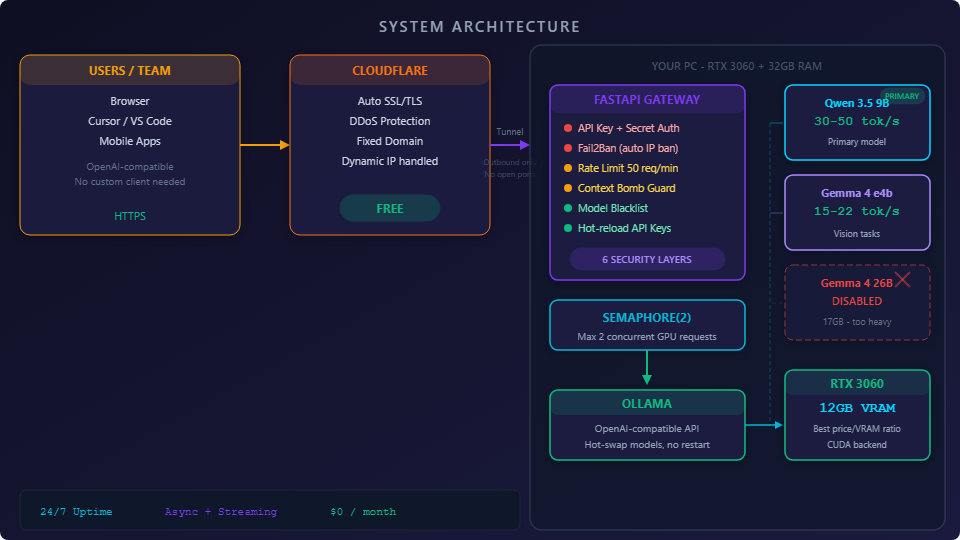
RTX 3060 12GB VRAM, 32GB RAM. A regular desktop PC.
This is essentially the minimum viable configuration for running AI locally. 12GB VRAM is the number that matters most — the RTX 3060 is the best price-to-performance GPU when measured by VRAM.
VRAM determines which models you can run, period.
Why not the RTX 4060? Because it only has 8GB VRAM — faster on gaming benchmarks, but 8GB isn’t enough to comfortably run 9B models. The RTX 3060 with 12GB at $250-300 used is the sweet spot for this purpose.
The RTX 3090 (24GB VRAM, 936 GB/s bandwidth) would be ideal — achieving 100+ tok/s on 8B Q4 models — but at ~$950 used, it’s 3x the price. For a small team, the 3060 is sufficient.
32GB system RAM gives the OS, FastAPI, and auxiliary processes enough breathing room so they don’t compete with GPU resources. 16GB might work, but I wouldn’t bet on it.
The goal: let multiple team members call the API from anywhere, with proper authentication, security, and 24/7 stability.
Choosing a Model — The Most Important Decision
This is the part I tested most thoroughly. Three models on the same hardware:
Gemma 4 26B (Google)
Smart, great multilingual support, vision capable. But 17GB fills almost all VRAM. Two concurrent users cause severe lag. Large contexts crash the machine entirely.
Had to disable it.
Gemma 4 e4b (8B)
Lighter, stable, still supports image analysis. Around 15-22 tokens/second. Kept it for vision-specific tasks.
Qwen 3.5 9B (Alibaba)
The biggest surprise.
About 45% faster than Gemma e4b despite having more parameters. Achieves 30-50 tokens/second (latest benchmarks report up to 50 tok/s with Q4_K_M quantization). Natural Vietnamese output, solid reasoning, good creative writing.
Why is Qwen 3.5 9B faster than the smaller Gemma e4b? The Qwen 3.5 architecture uses Hybrid Gated DeltaNet — 75% of layers use linear attention (3:1 ratio vs standard attention), combined with GQA (Grouped Query Attention), SwiGLU, and RoPE. Linear attention processes significantly faster on long contexts and is particularly well-optimized for consumer GPUs like the RTX 3060.
Additionally, the Q4_K_M quantization format is better optimized for this architecture — both FP8 and AWQ maintain high quality while dramatically reducing VRAM usage.
Real-World Benchmarks
| Model | Tokens/sec | Time for 256 tokens | Notes |
|---|---|---|---|
| Qwen 3.5 9B | 30-50 tok/s | 5-9 seconds | Primary model |
| Gemma 4 e4b | 15-22 tok/s | 12-17 seconds | Vision tasks |
| Gemma 4 26B | 8-12 tok/s | 21-32 seconds | DISABLED — single user only |
Measured on the same hardware, same conditions. Not theoretical benchmarks from papers.
First lesson: A model that fits your hardware always beats the most powerful model. Paper benchmarks are meaningless if the hardware can’t handle the load.
Why Ollama?
There are many ways to serve local models: raw llama.cpp, vLLM, HuggingFace TGI, or LocalAI.
I chose Ollama because:
Dead simple setup. One command to pull a model, one command to run it. No compiling from source, no manual CUDA configuration.
OpenAI-compatible API. Every library and tool built for the OpenAI API works with almost zero modifications. Cursor, Continue, or any IDE extension supporting OpenAI can point directly at Ollama.
Easy multi-model management. Switching between Qwen and Gemma requires only changing the model name in the request. No server restart needed.
Ollama vs vLLM — Real Numbers
| Metric | Ollama | vLLM |
|---|---|---|
| Single request speed | ~62 tok/s | ~71 tok/s |
| 10 concurrent requests | ~41 TPS total | ~485 TPS total |
| P99 latency | 673ms | 80ms |
| VRAM usage | ~20% more than llama.cpp | Similar |
| Setup complexity | 1 command | Complex, needs CUDA toolkit |
| Best for | Small teams, consumer GPUs | Datacenter, high throughput |
vLLM is superior for high-throughput batching, but it’s significantly more complex to set up and is optimized for datacenter GPUs rather than consumer cards. For a small team and an RTX 3060, Ollama is sufficient and rock-solid.
2026 Update: Ollama 0.19 now integrates an MLX backend for Apple Silicon, delivering 2x faster inference on Mac. On CUDA, it still uses the llama.cpp backend — more stable than ever.
FastAPI as a Gateway — Why Not Call Ollama Directly?
I never expose Ollama directly to the Internet. FastAPI sits in between as an API gateway.
Reason: Ollama has zero security features. No auth, no rate limiting, no logging. Exposing it directly to the Internet is asking for trouble.
And this isn’t paranoia. According to reports from January 2026, over 175,000 Ollama servers were found exposed to the Internet across 130 countries — most without any authentication layer. The “Operation Bizarre Bazaar” campaign exploited these servers to sell stolen compute, costing victims tens of thousands of dollars in cloud bills. CVE-2024-37032 provides a proven Remote Code Execution (RCE) chain on unprotected Ollama servers.
Why FastAPI over Flask or Express?
Async native. LLM response streams last tens of seconds. With a synchronous framework like Flask, each request occupies a thread — 5 concurrent users and you’re blocked. FastAPI runs on asyncio, handling many simultaneous connections without thread exhaustion.
Built-in streaming response. FastAPI’s StreamingResponse returns token chunks to the client as Ollama generates them, rather than waiting for the complete response. Much smoother user experience.
Excellent validation. Automatic request payload validation. Need to block context bombs or limit image count? Just define a schema.
Express (Node.js) can also handle async, but the Python ecosystem for AI/ML is more familiar. When debugging or extending, I don’t have to switch languages.
Cloudflare Tunnel — The Best Decision
This is probably the decision that saved the most headaches.
The problem: exposing an API from a home machine to the Internet. The traditional approach involves opening router ports, buying a domain, configuring SSL, and dealing with dynamic IPs.
Cloudflare Tunnel solves everything in one command.
| Problem | Traditional | Cloudflare Tunnel |
|---|---|---|
| Port forwarding | Open router ports | Not needed — outbound only |
| SSL | Buy cert, renew | Automatic HTTPS |
| Dynamic IP | Use DDNS | Auto-reconnect |
| DDoS | Handle yourself | Cloudflare protection |
| Cost | Domain + cert | FREE |
The tunnel creates an outbound connection from your machine to Cloudflare. No ports open from the outside, significantly reducing the attack surface.
Cloudflare Tunnel Performance
A fair concern: does the tunnel slow down the API? Real-world measurements show Cloudflare Tunnel adds approximately 15-45ms latency — completely negligible when a single LLM request takes 5-11 seconds. Throughput reaches 1-10 Gbps, more than enough for any task.
For comparison: Ngrok’s free tier manages only 6.69 Mbps and rotates domains constantly. Tailscale adds 10-80ms but requires a client on every machine. Cloudflare Tunnel provides a fixed domain with no bandwidth limits under normal usage.
6 Layers of Security
When you expose an API to the Internet, security isn’t optional.
1. API Key + Secret Key
Each client gets a unique pair. Uses the Authorization: Bearer header, compatible with the OpenAI standard so clients don’t need any customization.
2. Custom Fail2Ban
Too many failed auth attempts? IP gets banned for a set period. State persists both in-memory and on disk — server restarts don’t clear the ban list. Uses asyncio.Lock() to prevent race conditions when multiple requests fail auth simultaneously.
3. Rate Limiting
50 requests/minute per user. Built with slowapi, a wrapper around the limits library, integrated directly into FastAPI.
4. Context Bomb Protection
Blocks payloads exceeding 50,000 words, 4 images, or 20MB.
This is the layer most tutorials skip. Regular APIs rarely receive enormous payloads. But LLM APIs? Users constantly paste entire documents.
5. Model Blacklist
Gemma 26B is disabled at the gateway level. Prevents clients from requesting a model too heavy for the hardware, which could crash the entire server.
6. Hot-reload Keys
Add or revoke API keys without restarting the server. Essential when team membership changes.
Semaphore and Streaming — The Hardest Part
This is the architecture component I spent the most time on.
The RTX 3060 handles a maximum of 2 concurrent LLM requests well. The third request onwards slows down significantly.
I use asyncio.Semaphore(2) to enforce this limit. But the key question: when do you release the semaphore?
Initial Design (WRONG)
Hold the semaphore throughout the entire streaming response to the client.
Problem: the client might read slowly (weak network or deliberately). An attacker only needs to open 2 slow-reading connections to lock the entire system for 300 seconds.
Corrected Design (RIGHT)
Split into 2 phases:
Phase 1: Hold semaphore, read the complete response from Ollama with a 180-second timeout.
Phase 2: Release semaphore, then stream the response to the client.
Ollama is freed early to accept the next request. Transmitting data to the client doesn’t use the GPU.
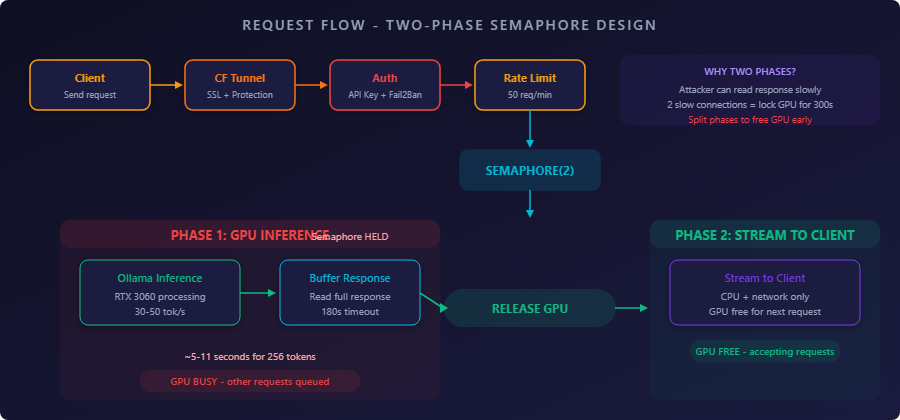
Trade-off: The client doesn’t receive tokens in real-time as Ollama generates them. But with a 256-token response taking about 5-11 seconds, the added latency is negligible compared to the protection gained.
Technical note: The
asyncio.Semaphorepattern works well for small-team, single-GPU setups. Larger production systems use continuous batching (vLLM), or frameworks like APEX (96% throughput improvement over vLLM) and TORTA (spatiotemporal scheduling). For my current scale, the semaphore approach is more than adequate.
Bonus: Mac Mini M4 24GB — What Can It Run?
I also have a Mac Mini M4 with 24GB. Here’s what my research found:
Sweet Spot: 7B — 14B Models
| Model | Quantization | Speed (tok/s) | Notes |
|---|---|---|---|
| Qwen 3.5 9B | Q4_K_M | 40-60 | Primary choice |
| Gemma 4 e4b | Q4_K_M | 24-57 | Vision + text |
| Qwen 3 14B | Q4_K_M | 35-50 | Best quality at this tier |
| Gemma 4 26B MoE | Q4_K_M | 20-30 | Only 3.8B active params/token |
| Gemma 2 27B dense | Q4_K_M | ~2 | Not recommended |
| Qwen 32B | Q4_K_M | ~2-4 | Needs 48GB+ |
Mac Mini M4 vs RTX 3060
| Mac Mini M4 (24GB) | RTX 3060 (12GB) | |
|---|---|---|
| Max model size | 14B dense / 26B MoE | 7-8B (hard 12GB limit) |
| 7B speed | 60-80 tok/s | 40-60 tok/s |
| 14B speed | 35-50 tok/s | Cannot fit in VRAM |
| Inference power | ~30W | 100-120W |
| Noise | Silent | Fan noise |
Mac Mini wins at: larger models (24GB > 12GB VRAM), 3-4x more power efficient, dead silent.
RTX 3060 wins at: raw speed for smaller models, more mature CUDA ecosystem, lower price point.
The Real Cost
“$0/month” is a clickbait title. Here’s the actual cost:
| Item | Cost (VND) | Cost (USD approx) |
|---|---|---|
| RTX 3060 | ~7-8 million | ~$280-320 |
| 32GB RAM | ~5 million | ~$200 |
| CPU, motherboard, PSU, storage | ~6 million | ~$240 |
| Electricity (monthly) | ~500-600k | ~$20-25 |
| Dozens of hours debugging | Priceless | Priceless |
| Total investment | ~18-19 million | ~$720-780 |
Compared to Paying for APIs?
| Service | Input / 1M tokens | Output / 1M tokens |
|---|---|---|
| GPT-4o-mini | $0.15 | $0.60 |
| Gemini Flash | $0.10 | $0.40 |
| Claude 3.5 Haiku | $0.80 | $4.00 |
| Self-hosted (RTX 3060) | $0 | ~$5-15/month electricity |
Break-even point: If your team uses fewer than 10 million tokens/day, paying for APIs is actually cheaper. Self-hosting only wins on cost at high volume — or when you need data sovereignty (all conversations stay on your machine).
RTX 3060 Actual Power Draw During LLM Inference
Something few people realize: the RTX 3060 under LLM inference only draws 100-120W, well below its 170W gaming TDP. This is because inference is primarily memory-bandwidth-bound, not compute-bound.
| State | Power Draw |
|---|---|
| Idle (no model loaded) | ~20W |
| Model loaded, awaiting requests | ~43-50W |
| Active inference | ~100-120W |
| Gaming (reference) | ~170W |
That works out to roughly 72-86 kWh/month running 24/7 — about $12-15 in electricity in the US.
What I Learned
A local 9B model doesn’t replace GPT-4o or Claude Opus for complex tasks. The quality gap is still obvious.
But what I gained:
- Deep understanding of how LLMs work at the infrastructure level
- Understanding why streaming creates a different attack surface
- Understanding the real trade-offs behind each tech stack choice
- Complete data sovereignty — all conversations stay on my machine
- Appreciating the value of defense in depth when exposing services to the Internet
The Bottom Line
Self-hosting is painful. If you can afford managed private models, that’s the better path.
I built this LLM server purely as a backup for our core systems. It’s not intended to replace any existing workflows.
But if you want to try it, the tech stack above is what I believe to be the best option.
This post reflects personal opinions based on real-world experience. Benchmarks may vary depending on configuration and usage conditions.
Related reading
08 Oct 2026 · 4 min read
devops
Kubernetes Just Flipped a Default That Will Refuse to Boot Your Old Nodes
Kubelet's failCgroupV1 field defaulted to true in 1.35. A cgroup v1-only node won't start anymore unless you explicitly override it. Here's how to check today.
Read more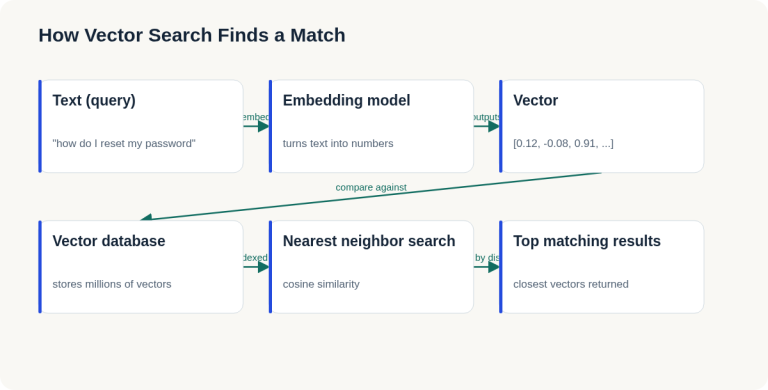
07 Oct 2026 · 4 min read
ai
English Lesson — Tuesday Morning: Embeddings & Vector Search Vocabulary
Daily English practice for tech professionals: embed, vector database, and nearest neighbor search vocabulary with pronunciation and exercises.
Read more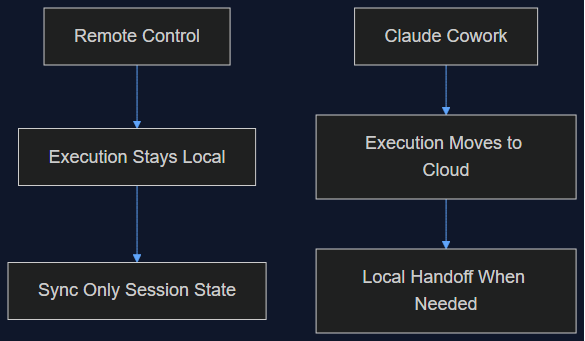
06 Oct 2026 · 5 min read
agentic coding
Claude Cowork Just Did the Thing I Said Remote Control Wasn't Doing
In August I wrote that Claude Code's Remote Control was a sync layer, not a cloud migration, and that keeping execution local was the point. This week Anthropic moved Cowork's execution to the cloud by default. Here's why both were the right call — for different products.
Read more
Discussion
Comments are reviewed before publication. Your email is kept private.