
JOURNAL
Building a Chess Engine for a Screen That Refuses to Refresh: Inside EinkChess
I hosted and reviewed EinkChess, an open-source chess app built for Kindle e-readers. A look at how you write a minimax engine, an offline puzzle trainer, and a client-side app for a screen that punishes every repaint.
On this page
Most web apps treat the screen as an infinitely repaintable canvas — animate it, transition it, redraw it sixty times a second, nobody notices. E-ink displays break that assumption completely. A full refresh takes several hundred milliseconds and leaves a visible flash; a partial refresh that isn’t handled carefully leaves ghosting — faint outlines of the previous frame burned into the next one. EinkChess, an open-source chess app built specifically for Kindle and other e-readers, is a good case study in what happens when you design software around a hardware constraint that most of us never think about. I pulled the source, reviewed the architecture, stood it up on a small server, and want to walk through the parts I found most interesting: the engine, the AI, and the puzzle trainer.
No backend, and that’s the point
EinkChess is a pure client-side app: HTML, CSS, and JavaScript, no server-rendered pages, no API to call during gameplay. The entire chess engine, the AI opponent, and the puzzle-matching logic run inside the browser tab. The only network call in the whole app is an optional, tiny telemetry beacon (a few hundred bytes) that pings an external endpoint to count active users — and even that call degrades silently to a no-op if the endpoint isn’t configured. Everything a player actually interacts with — move validation, check detection, the bot’s move selection, puzzle difficulty adaptation — executes entirely offline, in-memory, on the device.
That’s not a minor implementation detail; it’s the correct architecture for the target device. A Kindle’s browser is a secondary, occasionally-connected feature bolted onto an e-reader — you don’t want a chess game gated on network latency or availability. Once the static assets are cached, the whole thing works on a plane.
The board: a plain 8×8 array, and why that’s the right call
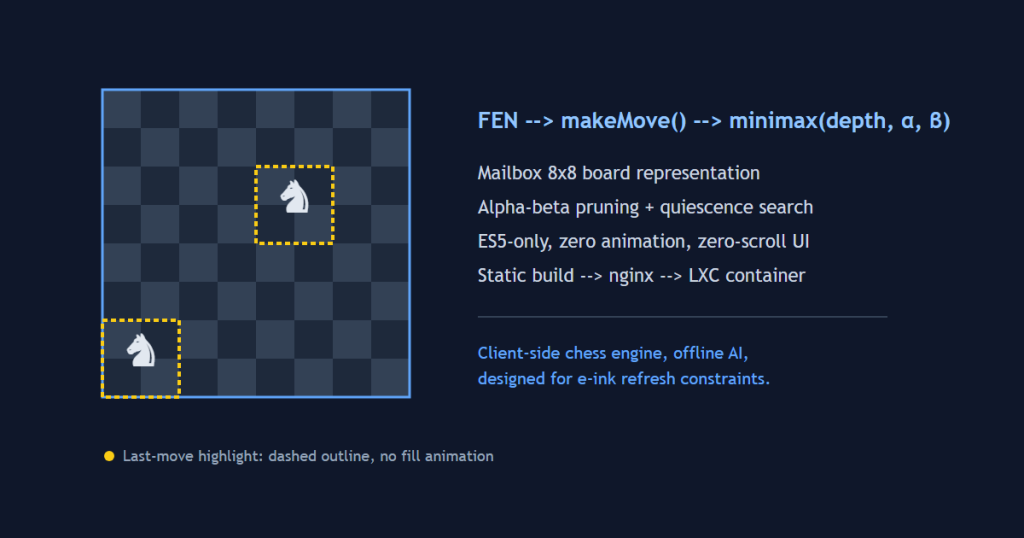
The engine represents the board as a flat mailbox array — one cell per square, not bitboards, not 0x88. For a chess engine whose target device is a Kindle’s aging WebKit browser, that’s the correct trade. Bitboard engines get their speed from 64-bit integer operations and bit-twiddling tricks that the JIT can vectorize; a legacy embedded browser running ES5-only JavaScript isn’t going to reward that complexity, and the readability cost isn’t worth it for a bot that tops out around 1600 ELO. The engine tracks position with FEN (Forsyth-Edwards Notation) import/export, generates pseudo-legal moves per piece, then filters down to legal moves by simulating each candidate and checking whether it leaves the king in check — the standard, simple approach, and entirely adequate at this scale.
Move history isn’t just for undo. The engine keeps a running record of position keys specifically to detect threefold repetition, alongside separate checks for the fifty-move rule and insufficient material — the three “boring draw” conditions that are easy to forget when you’re focused on making checkmate detection work, but that a real opponent will absolutely try to exploit.
The AI: minimax, alpha-beta, and a very deliberate ceiling
The bot is a textbook minimax search with alpha-beta pruning, and it layers in quiescence search at the leaf nodes — extending the search past the nominal depth whenever the position is “noisy” (a capture is available) so the engine doesn’t misjudge a position by stopping mid-exchange. This is a well-known fix for the horizon effect: without it, a fixed-depth search can hang a piece one ply past where its lookahead ends and confidently call it a good move.
What’s more interesting than the algorithm choice is the calibration. Five difficulty levels map to roughly 800 through 1600 ELO, tuned primarily through search depth and evaluation weighting rather than by deliberately injecting blunders. That’s a meaningfully different design decision from “add randomness to make it beatable” — it keeps the bot’s mistakes looking like a weaker player’s mistakes (misjudging material versus positional trades, missing a deeper tactic) rather than looking like arbitrary noise, which matters if the app’s whole pitch is being a real training partner and not a toy.
The puzzle engine: matchmaking against your own rating
The most structurally interesting piece isn’t the AI opponent — it’s the puzzle mode. It’s seeded from the Lichess Open Database, bucketed into 31 ELO ranges from 400 to 3400, and it runs its own proportional ELO system independent of the game-play rating: solve a puzzle and your puzzle rating moves up proportionally to the gap between your rating and the puzzle’s difficulty; fail one and it moves down the same way. That’s the same rating-update shape used by real puzzle trainers (Lichess and chess.com both use variants of it), and it’s what makes “adaptive difficulty” mean something more than a difficulty slider — the next puzzle you’re served is chosen to sit right at the edge of what you can currently solve.
The anti-cheat detail worth calling out: in-progress puzzle state is persisted so a reload doesn’t let you retry a puzzle you’re stuck on with a clean slate, and skipping a puzzle costs rating rather than being free. Small mechanic, but it’s the difference between a rating number that reflects your actual skill and one that reflects how many times you were willing to refresh the page.
Designing for a screen that fights back
The project’s own contributor guidelines are unusually explicit about e-ink constraints, and they shape almost every UI decision: no CSS transitions or opacity animations anywhere, because they cause visible flashing on a refresh-limited display; last-moved-square highlighting done with a dashed outline instead of a background-color fill, since a solid fill is a full-region repaint while an outline is a thin one; a deliberate “zero-scroll” layout where the board, header, and controls all fit one viewport, because scrolling itself forces a repaint cascade on e-ink; and DOM updates that patch only the squares that actually changed on each move instead of re-rendering the board wholesale.
There’s also a hard ES5 ceiling — no const, no arrow functions, no async/await, no WebAssembly — because the target browser is an old embedded WebKit build that doesn’t support any of it. It’s a useful reminder that “the browser” isn’t one target; if your actual users are on a five-year-old embedded runtime, evergreen-browser assumptions quietly become bugs.
Standing it up
Hosting this was refreshingly simple, which is really a consequence of the architecture decision above: since there’s no backend and no database to provision, npm run build produces a static dist/ directory, and the entire deployment is “hand a directory of files to a web server.” I ran it inside a small isolated container so it wouldn’t compete for resources with anything else, pointed nginx at the build output, and that was the whole deploy — no process manager, no runtime, no environment beyond a place to serve static files from.
The takeaway
None of the individual pieces here — mailbox board, alpha-beta minimax, proportional ELO — are novel algorithms. What makes EinkChess worth reading the source of is that every one of those standard choices was filtered through one hard constraint (a screen that punishes redraws) and came out the other side looking different from how you’d write the same app for a normal browser: simpler data structures because the runtime can’t reward complexity, animation-free UI because animation is a bug on this hardware, and a deployment story that’s boring in the best way. It’s a good reminder that “know your target device” isn’t a checkbox — it’s an architectural decision that should show up in your data structures, not just your CSS media queries.
Related reading
08 Oct 2026 · 4 min read
architecture
English Lesson — Wednesday Morning: Failover & High Availability Vocabulary
Wednesday architecture English: failover, pronunciation drills, a vocabulary table, two exercises, and an idiom every on-call engineer should know.
Read more
06 Oct 2026 · 5 min read
agentic coding
My Agent Didn't Forget. It Never Wrote Anything Down.
A Hacker News post about agent memory landed the same week I'd debugged a real dedup failure caused by exactly the problem it describes. I tested the fix against my own incident — here's what held up and what didn't.
Read more
06 Oct 2026 · 5 min read
agentic coding
Claude Cowork Just Did the Thing I Said Remote Control Wasn't Doing
In August I wrote that Claude Code's Remote Control was a sync layer, not a cloud migration, and that keeping execution local was the point. This week Anthropic moved Cowork's execution to the cloud by default. Here's why both were the right call — for different products.
Read more
Discussion
Comments are reviewed before publication. Your email is kept private.