When I launched my portfolio, I figured “it’s a static site, what’s there to secure?” Turns out, quite a lot. Within the first week, I saw bot crawlers probing for WordPress admin pages, SQL injection attempts against URLs that don’t even have a database, and a few thousand requests from scrapers.
Here’s everything I configured on Cloudflare to lock things down. Most of this is on the free tier.
The Basics: SSL/TLS
Full (Strict) Mode
Go to SSL/TLS → Overview and set the mode to Full (strict).
Off         → No encryption (never use this)
Flexible    → Encrypts browser→Cloudflare only (insecure)
Full        → Encrypts end-to-end, but accepts self-signed certs
Full (strict) → Encrypts end-to-end, requires valid cert
If you’re on Cloudflare Pages, Full (strict) works out of the box because Pages provides a valid origin certificate. Never use Flexible — it creates a false sense of security because the connection between Cloudflare and your server is unencrypted.
Always Use HTTPS
SSL/TLS → Edge Certificates → Enable Always Use HTTPS. This redirects all HTTP requests to HTTPS automatically.
HSTS (HTTP Strict Transport Security)
Enable HSTS to tell browsers to always use HTTPS:
SSL/TLS → Edge Certificates → HTTP Strict Transport Security → Enable
Max-Age: 12 months (recommended)
Include subdomains: Yes
Preload: Yes
No-Sniff: Yes
Once enabled, browsers will refuse to connect over HTTP even if someone types http:// in the address bar.
Minimum TLS Version
Set to TLS 1.2 minimum. TLS 1.0 and 1.1 are deprecated and have known vulnerabilities:
SSL/TLS → Edge Certificates → Minimum TLS Version → TLS 1.2
Security Headers
Go to Rules → Transform Rules → Modify Response Header and add these headers:
Content Security Policy (CSP)
Content-Security-Policy:
  default-src 'self';
  script-src 'self' 'unsafe-inline' https://challenges.cloudflare.com https://giscus.app;
  style-src 'self' 'unsafe-inline' https://fonts.googleapis.com;
  font-src 'self' https://fonts.gstatic.com;
  img-src 'self' data: https:;
  frame-src https://giscus.app https://challenges.cloudflare.com;
  connect-src 'self' https://giscus.app;
This tells browsers which sources are allowed to load content. It prevents XSS attacks by blocking inline scripts and unauthorized external resources.
Adjust the policy based on your actual integrations. Mine includes Giscus (comments), Turnstile (CAPTCHA), and Google Fonts.
Other Security Headers
X-Content-Type-Options: nosniff
X-Frame-Options: SAMEORIGIN
Referrer-Policy: strict-origin-when-cross-origin
Permissions-Policy: camera=(), microphone=(), geolocation=()
What each does:
- X-Content-Type-Options: Prevents MIME-type sniffing
- X-Frame-Options: Prevents your site from being embedded in iframes (clickjacking protection)
- Referrer-Policy: Controls how much referrer info is sent with requests
- Permissions-Policy: Disables browser APIs your site doesn’t need
WAF (Web Application Firewall)
Cloudflare’s WAF catches common attacks automatically. On the free tier, you get Managed Rules that block known attack patterns.
Custom WAF Rules
Go to Security → WAF → Custom rules. Here are rules I use:
Block WordPress Probes
If you’re not running WordPress (and a static site definitely isn’t), block the constant probes:
Rule name: Block WordPress probes
Expression:
  (http.request.uri.path contains "/wp-admin") or
  (http.request.uri.path contains "/wp-login") or
  (http.request.uri.path contains "/wp-content") or
  (http.request.uri.path contains "/xmlrpc.php") or
  (http.request.uri.path contains "/wp-includes")
Action: Block
This alone blocked ~200 requests/day on my site.
Block Common Attack Paths
Rule name: Block common attack paths
Expression:
  (http.request.uri.path contains "/phpmyadmin") or
  (http.request.uri.path contains "/.env") or
  (http.request.uri.path contains "/.git") or
  (http.request.uri.path contains "/config.php") or
  (http.request.uri.path contains "/admin/") or
  (http.request.uri.path contains "/cgi-bin")
Action: Block
Rate Limiting for Contact Form
Rule name: Rate limit contact form
Expression:
  (http.request.uri.path eq "/api/contact") and
  (http.request.method eq "POST")
Action: Block
Rate limit: 5 requests per 10 minutes per IP
This prevents someone from spamming your contact form even if they bypass Turnstile.
Bot Protection with Turnstile
Turnstile is Cloudflare’s free CAPTCHA replacement. Unlike reCAPTCHA, it’s privacy-friendly and often invisible — most users never see a challenge.
Setting Up Turnstile
- Go to Turnstile in the Cloudflare dashboard
- Click Add widget
- Enter your domain
- Choose mode:
- Managed — Cloudflare decides when to show a challenge (recommended)
- Non-interactive — Never shows a visual challenge
- Invisible — Completely hidden
You’ll get a Site Key (for the frontend) and a Secret Key (for the backend).
Frontend Integration
<!-- Load Turnstile -->
<script src="https://challenges.cloudflare.com/turnstile/v0/api.js" async defer></script>

<!-- Add the widget where you want it -->
<div class="cf-turnstile" data-sitekey="YOUR_SITE_KEY" data-theme="auto"></div>
Backend Verification
In your Cloudflare Pages Function:
async function verifyTurnstile(token: string, secret: string, ip: string) {
  const response = await fetch(
    'https://challenges.cloudflare.com/turnstile/v0/siteverify',
    {
      method: 'POST',
      headers: { 'Content-Type': 'application/json' },
      body: JSON.stringify({
        secret,
        response: token,
        remoteip: ip,
      }),
    }
  );

  const result = await response.json();
  return result.success;
}
Always verify the token server-side. Client-side checks are trivially bypassable.
DDoS Protection
Cloudflare provides always-on DDoS protection even on the free tier. This is one of the strongest reasons to put your site behind Cloudflare.
What’s Protected Automatically
- L3/L4 attacks (SYN floods, UDP amplification) — absorbed at the edge
- L7 attacks (HTTP floods) — mitigated by rate limiting and challenge pages
- DNS amplification — handled by Cloudflare’s anycast DNS
Under Attack Mode
If you’re actively being DDoSed, enable Under Attack Mode:
Security → Settings → Security Level → I’m Under Attack!
This shows an interstitial challenge page to all visitors for ~5 seconds before allowing access. It’s aggressive but effective. Turn it off once the attack subsides.
DNSSEC
Enable DNSSEC to prevent DNS spoofing:
DNS → Settings → DNSSEC → Enable
This adds cryptographic signatures to your DNS records, ensuring that DNS responses haven’t been tampered with. There’s no performance impact and no reason not to enable it.
Email Security
Even if you don’t host email, you should protect your domain from being used in email spoofing:
SPF Record
Type: TXT
Name: @
Content: v=spf1 -all
The -all means “no servers are authorized to send email from this domain.” If you do send email (via Google Workspace, Fastmail, etc.), include those servers:
v=spf1 include:_spf.google.com -allDKIM
If using an email provider, they’ll give you DKIM records to add. If not sending email, you can skip this.
DMARC
Type: TXT
Name: _dmarc
Content: v=DMARC1; p=reject; rua=mailto:dmarc-reports@yourdomain.com
p=reject tells receiving servers to reject any email that fails SPF/DKIM checks. This prevents anyone from sending email pretending to be from your domain.
Page Rules and Redirects
Redirect www to apex (or vice versa)
Go to Rules → Redirect Rules:
When: hostname equals www.yourdomain.com
Then: Dynamic redirect to https://yourdomain.com/${http.request.uri.path}
Status: 301 (permanent)
Cache Static Assets
When: URI Path matches /images/* or /_astro/*
Then: Cache TTL = 30 days, Browser TTL = 7 days
Astro already includes content hashes in asset filenames (style.D4xK2l.css), so aggressive caching is safe.
Security Audit Checklist
Here’s my checklist for any new site on Cloudflare:
[x] SSL/TLS mode: Full (strict)
[x] Always Use HTTPS: Enabled
[x] HSTS: Enabled with preload
[x] Minimum TLS: 1.2
[x] DNSSEC: Enabled
[x] Security headers configured (CSP, X-Frame-Options, etc.)
[x] WAF custom rules (block WordPress, common attacks)
[x] Bot protection (Turnstile on forms)
[x] Rate limiting on API endpoints
[x] Email security (SPF, DMARC with p=reject)
[x] www redirect configured
[x] Under Attack Mode: know where the button is
Results
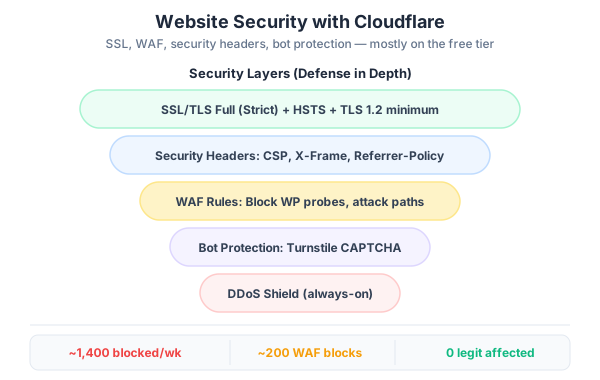
After configuring everything above, here’s what my security dashboard looks like on a typical week:
- Blocked requests: ~1,400/week (mostly WordPress probes and scanners)
- WAF blocks: ~200/week
- Bot score challenges: ~50/week
- Legitimate traffic affected: 0
The best security is the kind you set up once and forget about. Cloudflare handles the heavy lifting at the edge — before malicious traffic ever reaches your origin server. For a static portfolio site, this level of protection is more than enough.
And it’s all free.