I’ve bought domains from GoDaddy, Namecheap, Google Domains (RIP), and a few others. After migrating everything to Cloudflare Registrar, I’m never going back. Here’s why, and how to do it.
Why Cloudflare Registrar
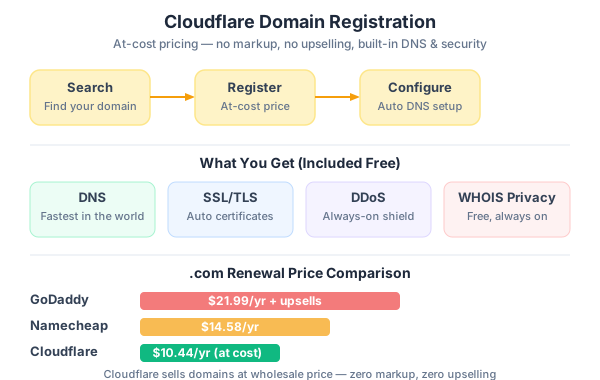
Most registrars make money two ways: the initial purchase (often discounted) and the renewal (where they jack up the price). Cloudflare Registrar charges at cost — the wholesale price from the registry with zero markup. No tricks, no “special renewal pricing.”
For a .com domain, that’s roughly $10.11/year at the time of writing. Compare that to the $18-22/year renewal at other registrars.
But cost isn’t even the main reason. The real win is integration:
- DNS is already there. No configuring nameservers, no waiting for propagation. Your DNS records are managed in the same dashboard.
- Security included. DNSSEC with one click. No extra charge.
- No upselling. Cloudflare doesn’t try to sell you “privacy protection” (WHOIS privacy is free and automatic) or overpriced SSL certificates you don’t need.
Step-by-Step: Register a New Domain
1. Create a Cloudflare Account
Head to dash.cloudflare.com and sign up. Free account works fine — you don’t need a paid plan for domain registration.
2. Search for Your Domain
Navigate to Domain Registration → Register Domains in the left sidebar. Type in the domain you want.
Cloudflare will show available TLDs with their actual cost — no fake discounts, no “was $49.99 now $1.99 for the first year” nonsense.
luonghongthuan.com    → $10.11/year
luonghongthuan.dev    → $12.00/year
luonghongthuan.io     → $33.98/year
3. Purchase
Add to cart, enter your contact info (which will be redacted via WHOIS privacy automatically), and pay. That’s it.
No “would you also like hosting?” No “add email for $5/month?” Just the domain.
4. Configure DNS
Once registered, go to DNS → Records. Your domain is already using Cloudflare’s nameservers (obviously), so DNS changes propagate in seconds rather than the usual 24-48 hours.
For a portfolio site on Cloudflare Pages, you’ll add:
Type    Name    Content                   Proxy
CNAME   @       your-project.pages.dev    Proxied
CNAME   www     your-project.pages.dev    Proxied
Transferring an Existing Domain to Cloudflare
Already own a domain elsewhere? Here’s the transfer process:
1. Add Your Site to Cloudflare First
Before transferring the registration, add your domain to Cloudflare as a site. This sets up DNS management. Go to Websites → Add a site, enter your domain, and follow the prompts to update your nameservers at your current registrar.
2. Wait for DNS Propagation
Give it a few hours (sometimes up to 48 hours) for the nameserver change to propagate. Cloudflare will email you when it’s active.
3. Unlock Your Domain
At your current registrar:
- Turn off domain lock (also called “transfer lock” or “registrar lock”)
- Get your authorization code (also called EPP code or transfer key)
- Make sure the domain isn’t within 60 days of registration (ICANN rule)
4. Initiate Transfer
In Cloudflare: Domain Registration → Transfer Domains. Enter your domain, paste the auth code, and confirm.
The transfer takes anywhere from a few minutes to 5 days, depending on your old registrar. Most complete within a few hours.
5. What Happens to Your Remaining Registration Time?
You don’t lose it. Cloudflare adds one year to your existing expiration date. So if your domain was set to expire in 8 months, after transfer it’ll expire in 1 year and 8 months.
DNS Tips for Developer Portfolios
Here are the DNS records I use for my setup:
# Main site (Cloudflare Pages)
CNAME   @       porfolio-thuan.pages.dev    Proxied

# WWW redirect
CNAME   www     porfolio-thuan.pages.dev    Proxied

# Email (if using a service like Fastmail or Google Workspace)
MX      @       in1-smtp.messagingengine.com    Priority: 10
MX      @       in2-smtp.messagingengine.com    Priority: 20

# SPF record to prevent email spoofing
TXT     @       "v=spf1 include:messagingengine.com -all"

# DMARC policy
TXT     _dmarc  "v=DMARC1; p=reject; rua=mailto:dmarc@luonghongthuan.com"
Enable DNSSEC
One click in DNS → Settings → DNSSEC → Enable. This prevents DNS spoofing attacks. There’s no reason not to enable it.
Cost Comparison
| Registrar | .com First Year | .com Renewal | WHOIS Privacy |
|---|---|---|---|
| Cloudflare | $10.11 | $10.11 | Free |
| GoDaddy | $12.99 | $22.99 | $9.99/year |
| Namecheap | $9.58 | $14.58 | Free |
| Google Domains* | N/A | N/A | Was free |
*Google Domains was acquired by Squarespace. Pricing has changed.
The difference adds up. If you own 5 domains for 5 years, Cloudflare saves you $200-400 over GoDaddy.
The One Downside
Cloudflare Registrar doesn’t support every TLD. If you want something exotic like .pizza or .ninja, you might need to register elsewhere and just point the nameservers to Cloudflare.
Also, Cloudflare doesn’t offer email hosting — but honestly, you shouldn’t be getting email hosting from your domain registrar anyway. Use a dedicated email provider.
My Setup
For this portfolio site, my total cost is:
- Domain: $10.11/year (Cloudflare Registrar)
- Hosting: $0/month (Cloudflare Pages free tier)
- CDN: $0/month (included with Cloudflare)
- SSL: $0/month (automatic)
- DDoS protection: $0/month (included)
Total: ~$10/year for a professional portfolio with global CDN, SSL, and DDoS protection. Try getting that deal anywhere else.
Wrap Up
Domain registration is one of those things that should be boring. Cloudflare makes it boring in the best way — at-cost pricing, no upselling, automatic security features, and instant DNS management. If you’re already using Cloudflare for anything else, there’s no reason to keep your domains elsewhere.