
JOURNAL
Claude Code Remote Control: The Sync Architecture Behind ‘Same Session, Any Device’
Remote Control lets you steer a Claude Code session from your phone while it runs on your laptop. I looked past the demo and into the sync-layer design — session state as the source of truth, local execution as a hard boundary — and what it means for building similar tools.
On this page
Claude Code’s Remote Control feature has been through several rounds of hardening since its research-preview launch earlier this year, and the August 2026 update batch is a good excuse to actually look at the architecture instead of the demo. The pitch is simple: start a Claude Code session on your laptop, then check on it, redirect it, or approve a risky action from your phone or a browser tab, with the conversation staying in sync across every connected surface. What’s interesting to me as a tech lead isn’t the feature itself — it’s the design decision underneath it, because it’s a pattern I’d reuse: local execution stays local; only session state gets synced.
Not a cloud migration — a sync layer
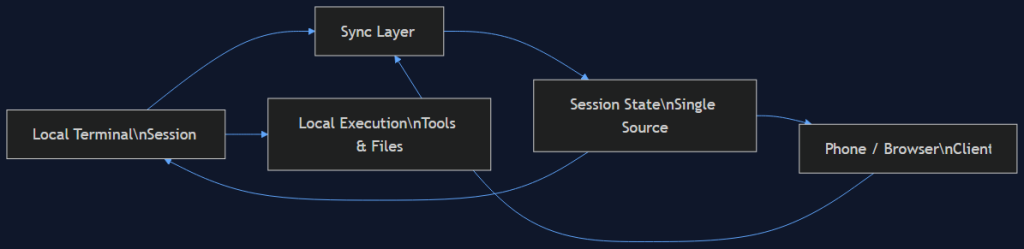
The first thing worth being precise about, because it’s easy to assume otherwise: Remote Control is not moving your coding session into the cloud. The agent process keeps running on your machine, with your filesystem, your credentials, your local tool access. What syncs across devices is the session state — the conversation transcript, tool-call events, pending approvals — through a relay layer that every connected client subscribes to. Type from your phone, and the message shows up in your local terminal’s input stream. Type from your terminal, and your phone sees it appear. Approve a destructive action from your phone while you’re away from your desk, and the local process executes it in place, on your machine, under your existing permissions.
This is a deliberate constraint, not a limitation they haven’t gotten around to fixing. If session state moved with the agent to a cloud executor, you’d inherit an entirely different security model: credentials would need to live somewhere reachable by that executor, file access would need remote mounting or syncing, and the blast radius of a compromised session would expand to wherever the cloud executor has network reach. Keeping execution pinned to the originating machine means the sync layer only ever needs to move conversation and control-plane data — never code execution, never credentials, never file contents beyond what the agent explicitly surfaces in its output.
The architecture, as I’d draw it
Local terminal (source of truth for execution)
        |
        v
   Sync relay  <-->  Phone / browser client
        |
        v
Session state (transcript, tool events, pending approvals)
The part I’d steal for any multi-surface tool we build: the sync relay’s job is narrowly scoped to reconciling a shared, append-only event log — messages, tool calls, approvals — across N connected clients, none of which have execution authority themselves. The phone client can propose an action (send a message, approve a prompt) but the decision about whether that action is safe to execute still gets evaluated by the same local permission model that would apply if you’d typed it in the terminal directly. Remote doesn’t mean “less scrutiny” — it means “same scrutiny, different input surface.”
This matters because the naive version of “let me control my session from my phone” is tempting to build as a thin remote-shell proxy: pipe raw keystrokes to a PTY over a websocket, done in an afternoon. That gets you remote control fast, but it also means anyone who can reach the relay endpoint has effectively the same access as sitting at your terminal, with none of the tool’s own approval gates or audit trail in between. Structuring it as session-state-sync instead of raw-shell-proxy is what lets Anthropic layer real permission checks, and now a Compliance API, on top of the same primitive.
Where it actually breaks — and what that tells you
The August update batch fixed a specific bug worth calling out: /resume while a Remote Control session was connected could leak the resumed conversation’s title or history into the currently-connected session. That’s exactly the class of bug you’d predict from this architecture — when your source of truth is a shared event log with multiple subscribers, session-boundary bugs (which events belong to which session) are the sharp edge. If you’re building anything with a similar sync-relay-plus-local-execution shape — and I think this pattern generalizes well beyond coding agents, to any tool where you want mobile oversight of a process that must stay local for security or resource reasons — budget real test coverage for session-isolation specifically. Not “does sync work,” but “does session A’s state ever leak into session B’s view,” especially across resume/reconnect/multi-device-simultaneous-edit paths. Those are the cases that don’t show up until someone has two sessions open at once, which is exactly the scenario this feature exists to enable.
Where I’d actually use this on a team
The genuinely useful case isn’t “code from my phone on the bus” — typing code on a phone keyboard is still bad regardless of how good the sync is. It’s asynchronous approval of long-running agent work. Kick off a multi-step refactor or a long test-and-fix loop before a meeting, get a push notification when the agent hits a decision point that needs a human (a destructive migration, an ambiguous merge conflict, a design choice the agent flagged), and approve or redirect from your phone without needing to be at your desk. That’s a real workflow improvement — it turns “agent sessions block on approval, so I have to stay near my laptop” into “agent sessions queue approvals, and I clear them opportunistically.” If your team is running longer autonomous agent sessions (and after last week’s incident roundup, I’d hope you’ve also tightened the permission tiers those approvals gate), pairing that with a remote-approval surface is the piece that makes long sessions practical instead of just theoretically possible.
Sources: Claude Code Remote Control, Claude Code Updates — August 2026, Claude Code Remote Control: Advantages, Limits, and When to Use It
Related reading
08 Oct 2026 · 4 min read
architecture
English Lesson — Wednesday Morning: Failover & High Availability Vocabulary
Wednesday architecture English: failover, pronunciation drills, a vocabulary table, two exercises, and an idiom every on-call engineer should know.
Read more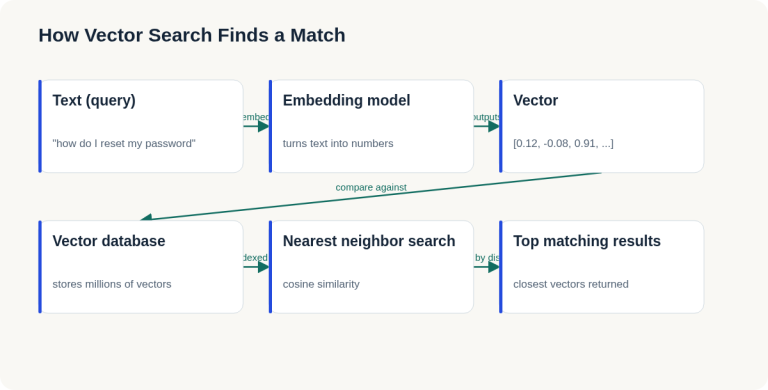
07 Oct 2026 · 4 min read
ai
English Lesson — Tuesday Morning: Embeddings & Vector Search Vocabulary
Daily English practice for tech professionals: embed, vector database, and nearest neighbor search vocabulary with pronunciation and exercises.
Read more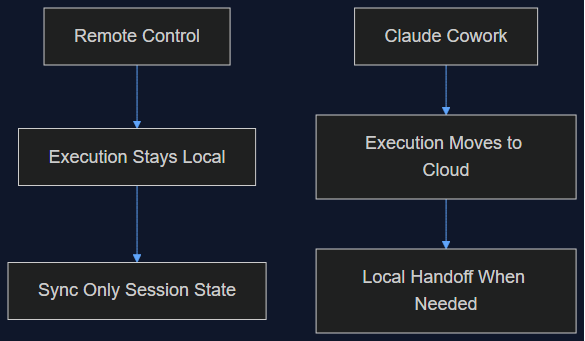
06 Oct 2026 · 5 min read
agentic coding
Claude Cowork Just Did the Thing I Said Remote Control Wasn't Doing
In August I wrote that Claude Code's Remote Control was a sync layer, not a cloud migration, and that keeping execution local was the point. This week Anthropic moved Cowork's execution to the cloud by default. Here's why both were the right call — for different products.
Read more
Discussion
Comments are reviewed before publication. Your email is kept private.