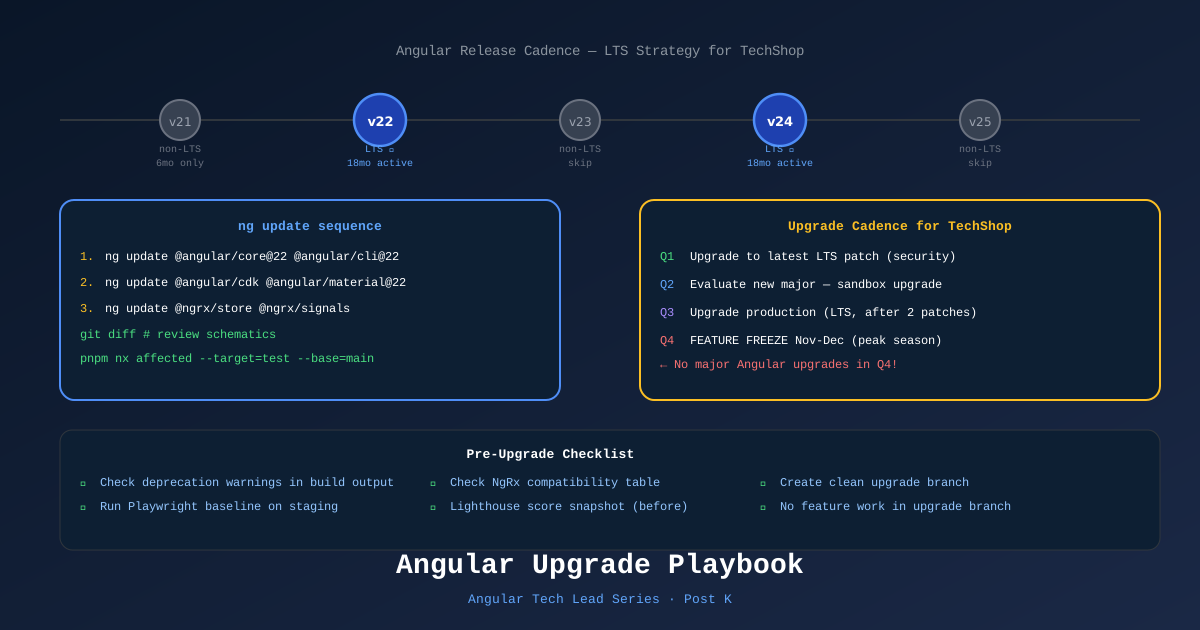
Angular releases a new major version every 6 months — May and November. For a Tech Lead on a production ecommerce project, this is a recurring governance event, not a one-time migration. Handled correctly, upgrades are boring. Handled poorly, they’re multi-week incidents.
The Angular Release Model
| Version | Type | Support window |
|---|---|---|
| Even (22, 24, 26) | LTS | 18 months active + 18 months long-term |
| Odd (21, 23, 25) | non-LTS | 6 months active only |
TechShop Rule: Pin to even (LTS) versions in production. Run on odd versions only in the sandbox/exploratory environment.
This means:
- Angular 20 → 22 → 24 (skip 21, 23)
- Or stay on 22 for up to 18 months before upgrading to 24
When running Angular 21 (as in this series), plan to upgrade to 22 before the 6-month window closes.
What ng update Actually Does
# Step 1: See what needs upgrading
ng update

# Step 2: Update Angular core packages
ng update @angular/core @angular/cli --next

# Step 3: Update Angular CDK + Material (if used)
ng update @angular/cdk @angular/material

# Step 4: Update ecosystem packages
ng update @ngrx/store @angular/ssr
ng update does two things:
- Updates
package.jsonversions - Runs migration schematics — automated code transformations
Migration schematics fix the most common breaking changes automatically (e.g., renaming APIs, updating template syntax). Always review the git diff after running migrations before committing.
The Upgrade Sequence
1. Create upgrade branch from main
2. Run `ng update` — review all automated migrations
3. Fix any remaining manual migration warnings
4. Update NgRx to matching version
5. Run full test suite (Vitest + xUnit + Playwright)
6. Deploy to staging environment
7. Run Playwright full suite against staging
8. Keep branch alive 1–2 weeks for team testing
9. Merge to main with feature flags gating new behavior
Upgrade branch — not a long-lived branch
The upgrade happens in a focused branch with no feature work. Feature branches create merge conflicts with the upgrade’s automated changes.
# Create clean upgrade branch
git checkout main
git checkout -b upgrade/angular-22

# Run update
ng update @angular/core@22 @angular/cli@22

# Review changes
git diff HEAD~1

# Fix any issues, then test
pnpm nx affected --target=test --base=main

# Once passing — merge to main immediately
Handling NgRx + RxJS Breaking Changes
Angular upgrades often require matching NgRx updates. The two projects maintain version compatibility:
| Angular | NgRx | RxJS |
|---|---|---|
| 17 | 17.x | 7.x |
| 18 | 18.x | 7.x |
| 19 | 19.x | 7.x |
| 20 | 20.x | 7.x |
| 21 | 19.x (compatible) | 7.x |
| 22 | 20.x | 7.8+ |
Always check NgRx’s compatibility table before upgrading.
# Upgrade NgRx alongside Angular
ng update @ngrx/store @ngrx/effects @ngrx/signals
Migration example: NgRx Entity to withEntities()
A common Non-backwards-compatible change: NgRx Signals Store introduced withEntities() which replaced some EntityAdapter patterns. The migration schematic handles most of it, but check:
// Before (EntityAdapter)
import { createEntityAdapter } from '@ngrx/entity';
const adapter = createEntityAdapter<Product>();

// After (withEntities - NgRx Signals Store)
import { withEntities } from '@ngrx/signals/entities';
const ProductStore = signalStore(
  withEntities<Product>()
);
Handling Breaking Changes Manually
Some breaking changes aren’t automatable. Check the Angular CHANGELOG for BREAKING CHANGE entries:
# Read the migration guide before starting
open https://angular.dev/update-guide
Common breaking change categories:
1. Compiler strictness increases — TypeScript errors in templates that previously passed:
<!-- Angular 22 might reject this — undefined not assignable to string -->
<app-product-card [name]="product?.name" />
<!--                               ↑ could be undefined but input requires string -->
Fix: use explicit fallback [name]="product?.name ?? ''".
2. Deprecated API removals — APIs that were deprecated in Angular N are removed in Angular N+2:
// Deprecated in 20, removed in 22
import { ɵplatformCoreDynamicTesting } from '@angular/core'; // ❌ gone
Fix: track deprecation warnings in your previous version and fix them before upgrading.
3. DI token changes — rarely, injection tokens rename:
// Angular periodically renames internal tokens
// Run ng update schematics — they handle most of these
ESLint Migration (if on TSLint)
If your project is still using TSLint (deprecated), the Angular upgrade is the right time to migrate:
ng update @angular-eslint/schematics
ng g @angular-eslint/schematics:convert-tslint-to-eslint
When to Skip a Version
Skip a major version when:
- The version introduces heavy API churn but no stability improvements
- Your schedule doesn’t align (mid-feature-freeze or peak sales period)
- Key dependencies (NgRx, third-party) don’t yet have a matching version
Angular supports skipping one major version (v20 → v22 is supported but v20 → v24 requires landing on v22 first).
Never skip an LTS version mid-support-window — you’ll lose security patches.
The Pre-Upgrade Checklist
Run these before every major upgrade:
# Check for existing deprecation warnings
pnpm nx build shell --configuration=production 2>&1 | grep -i "deprecated"

# Check Angular compatibility
ng version  # shows current versions and any mismatches

# Check NgRx compatibility table
open https://ngrx.io/guide/store/install

# Run baseline Playwright suite — this is your "before" snapshot
pnpm nx e2e shell-e2e --configuration=staging

# Document the baseline performance scores (Lighthouse)
# You'll compare after upgrade to confirm no regression
The Post-Upgrade Checklist
# Verify all tests still pass
pnpm nx run-many --target=test --all

# Verify build size didn't regress
pnpm nx build shell --configuration=production --stats-json
# Compare chunk sizes to pre-upgrade baseline

# Run Playwright E2E on staging
playwright test --config=playwright.config.ts

# Check SSR output renders correctly
curl https://staging.techshop.com/products | grep '<title>'

# Run Lighthouse on staging
lighthouse https://staging.techshop.com/products --output=json | jq '.categories.performance.score'
Upgrade Cadence for TechShop
| Quarter | Action |
|---|---|
| Q1 | Upgrade to latest LTS patch (minor security patches) |
| Q2 | Evaluate new major release — upgrade sandbox |
| Q3 | Upgrade production to new major (if LTS; after 2 patch releases) |
| Q4 | Feature freeze Nov–Dec (peak season) — no major upgrades |
Peak ecommerce season (Black Friday, Ramadan, back-to-school) is feature-freeze for infrastructure changes including Angular major upgrades. Schedule upgrades Q2 or Q3 to avoid this window.
References
- Angular Update Guide — angular.dev
- Angular LTS Policy — angular.dev
- NgRx Compatibility Matrix
- Angular CHANGELOG
- RxJS Migration Guide
Part of the Angular Tech Lead Series — Back to main series overview