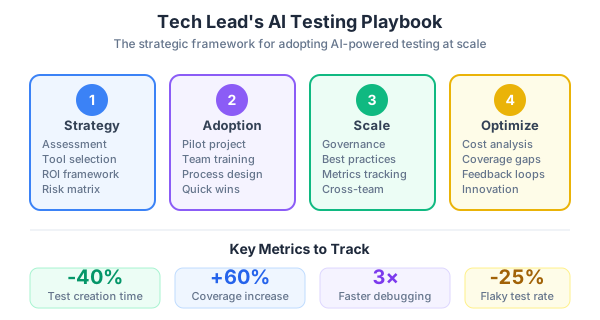
You’ve read Parts 1-3. You know how to set up Playwright MCP, test AI outputs with DeepEval, validate RAG retrieval with Ragas, and build CI/CD quality gates. Now the harder question: how do you actually roll this out to a team?
This final part is the Tech Lead’s playbook — the decisions, trade-offs, and strategies I’ve learned from implementing AI-powered quality engineering on a real product team. No frameworks or code in a vacuum. Just the practical reality of making this work.
Start with the Test Pyramid for AI Apps
The traditional test pyramid (unit > integration > E2E) doesn’t fully apply to AI applications. You need an adapted version:
Level 1: Component Tests (fast, many) Standard unit tests for business logic, utility functions, data transformations. These don’t touch AI or databases. Write them with Jest or Vitest. Target 80% coverage on non-AI code.
Level 2: AI Evaluation Tests (medium speed, focused) DeepEval and Ragas tests for your LLM and RAG pipeline. These call the OpenAI API, so they’re slower and cost money. Keep the evaluation dataset to 20-50 curated test cases. Run on every PR.
Level 3: Integration Tests (medium speed, critical paths) Testcontainers for database testing. API endpoint tests with real PostgreSQL + pgvector. These verify the glue code between components.
Level 4: E2E Tests (slow, few) Playwright browser tests for critical user flows only. Don’t test every page — test the flows that generate revenue or prevent data loss. Login, checkout, AI chat, data export.
Level 5: Production Monitoring (continuous) Checkly synthetic monitors running your Playwright tests from 20+ global locations every 5 minutes. This is your safety net after deployment.
What to Test First
If you’re starting from zero tests, this is the priority order I’d follow:
Week 1: Smoke tests for critical paths. Write 5-10 Playwright E2E tests that cover the happy path of your most important user flows. Use Playwright MCP to generate them quickly. These catch catastrophic regressions — the kind where the login page is broken or the checkout flow errors out.
// The absolute minimum — does the app load and can users log in?
test('critical: app loads', async ({ page }) => {
  await page.goto('/');
  await expect(page).toHaveTitle(/Your App/);
});

test('critical: user can log in', async ({ page }) => {
  await page.goto('/login');
  await page.getByLabel('Email').fill('test@example.com');
  await page.getByLabel('Password').fill('password');
  await page.getByRole('button', { name: 'Sign in' }).click();
  await expect(page).toHaveURL('/dashboard');
});
Week 2: AI quality baseline. Create 20 golden test cases for your AI agent — questions with known correct answers. Run DeepEval with FaithfulnessMetric and AnswerRelevancyMetric. This establishes a baseline. When you change the prompt, embedding model, or retrieval logic, you’ll know if quality degraded.
Week 3: CI pipeline. Set up the GitHub Actions workflow from Part 3. Even if you only have 15 tests, having them run automatically on every PR is infinitely better than 100 tests nobody runs.
Week 4: Visual regression for key pages. Add toHaveScreenshot() tests for your homepage, main product pages, and any page with complex CSS. Generate baselines in CI.
Production Monitoring with Checkly
Tests catch bugs before deployment. Monitoring catches bugs after. Checkly lets you run your existing Playwright tests as scheduled synthetic monitors — no rewrites needed.
npm create checkly
npx checkly login
Configure checkly.config.ts:
import { defineConfig } from 'checkly';

export default defineConfig({
  projectName: 'My AI App',
  logicalId: 'my-ai-app',
  checks: {
    playwrightConfigPath: './playwright.config.ts',
    playwrightChecks: [
      {
        name: 'production-monitors',
        logicalId: 'prod-monitors',
        testMatch: 'tests/monitors/**/*.spec.ts',
        frequency: 5,
        locations: ['us-east-1', 'eu-west-1', 'ap-southeast-1'],
      },
    ],
  },
  cli: {
    runLocation: 'us-east-1',
  },
});
Write monitor-specific tests that check production health:
// tests/monitors/api-health.spec.ts
import { test, expect } from '@playwright/test';

test('AI chat endpoint responds', async ({ request }) => {
  const response = await request.post('/api/chat', {
    data: { query: 'Hello' },
  });
  expect(response.status()).toBe(200);

  const body = await response.json();
  expect(body.answer).toBeTruthy();
});

test('vector search returns results', async ({ request }) => {
  const response = await request.post('/api/search', {
    data: { query: 'pricing', limit: 5 },
  });
  expect(response.status()).toBe(200);

  const body = await response.json();
  expect(body.results.length).toBeGreaterThan(0);
});
Deploy to Checkly:
npx checkly test     # dry-run against Checkly infrastructure
npx checkly deploy   # deploy to production monitoring
Checkly runs these tests every 5 minutes from multiple regions. If your AI endpoint goes down at 3am, you get an alert — not a customer complaint.
Tracking Knowledge Base Quality Over Time
For RAG applications, your knowledge base is a living thing. Documents get added, updated, and deleted. Embedding quality can drift. I track these metrics weekly:
# scripts/eval_knowledge_base.py
"""
Weekly knowledge base quality evaluation.
Run via: python scripts/eval_knowledge_base.py
Results appended to evaluation_history.jsonl
"""
import json
from datetime import datetime
from deepeval.metrics import (
    FaithfulnessMetric,
    AnswerRelevancyMetric,
    HallucinationMetric,
)
from deepeval.test_case import LLMTestCase
from deepeval import evaluate

# Load golden evaluation set
with open('tests/ai/golden_dataset.json') as f:
    golden = json.load(f)

test_cases = []
for item in golden:
    # Call your actual RAG pipeline
    result = rag_pipeline.query(item['question'])

    test_cases.append(LLMTestCase(
        input=item['question'],
        actual_output=result['answer'],
        expected_output=item['expected_answer'],
        retrieval_context=result['contexts'],
    ))

results = evaluate(
    test_cases,
    metrics=[
        FaithfulnessMetric(threshold=0.7),
        AnswerRelevancyMetric(threshold=0.7),
        HallucinationMetric(threshold=0.5),
    ],
)

# Append to history for trend tracking
entry = {
    'date': datetime.now().isoformat(),
    'num_cases': len(test_cases),
    'faithfulness': results.metrics_scores['Faithfulness'],
    'relevancy': results.metrics_scores['Answer Relevancy'],
    'hallucination': results.metrics_scores['Hallucination'],
}

with open('evaluation_history.jsonl', 'a') as f:
    f.write(json.dumps(entry) + '\n')

print(f"Faithfulness: {entry['faithfulness']:.3f}")
print(f"Relevancy:    {entry['relevancy']:.3f}")
print(f"Hallucination: {entry['hallucination']:.3f}")
Schedule this as a weekly cron job in GitHub Actions:
on:
  schedule:
    - cron: '0 9 * * 1'  # Every Monday at 9am UTC
When faithfulness drops after a knowledge base update, you know immediately which change caused the regression.
LangSmith for Observability
DeepEval and Ragas test offline. LangSmith gives you runtime observability — you can see every LLM call, every retrieval, every token in production:
import os
os.environ["LANGCHAIN_TRACING_V2"] = "true"
os.environ["LANGCHAIN_API_KEY"] = "your-api-key"
os.environ["LANGCHAIN_PROJECT"] = "my-ai-app-prod"
Once enabled, every LangChain/LangGraph call is automatically traced. You can:
- See which documents were retrieved for each query
- Identify slow retrieval calls
- Track token usage and costs per user
- Build evaluation datasets from real production queries
The free tier gives you 5,000 traces per month — enough for development and low-traffic production.
Getting Your Team to Adopt This
The biggest challenge isn’t technical — it’s cultural. Here’s what worked for my team:
1. Make it invisible. The CI pipeline runs automatically. Developers don’t need to remember to run tests — the pipeline catches issues before code review. The less friction, the higher adoption.
2. Start with AI-generated tests. Use Playwright MCP in a team demo. Show the AI exploring your app and writing a test in 30 seconds. The “wow” factor gets people interested. Then teach them to prompt effectively.
3. Own the evaluation dataset. Assign one person (usually me, as Tech Lead) to maintain the golden dataset for AI quality tests. If everyone adds test cases ad-hoc, the dataset becomes inconsistent. Curate it like production data.
4. Celebrate catches, not failures. When the pipeline catches a real bug, share it in Slack. “Visual regression caught a CSS overflow on mobile that would have shipped to 40% of our users.” This builds trust in the system.
5. Don’t enforce 100% coverage. Coverage thresholds are useful for non-AI code (I use 80%). For AI evaluation tests, focus on coverage of scenarios, not lines of code. 20 well-chosen test cases beat 200 random ones.
The Full Tool Stack
Here’s every tool mentioned in this series and how they fit together:
| Tool | Layer | Purpose | Cost |
|---|---|---|---|
| Playwright | E2E | Browser testing | Free |
| Playwright MCP | E2E | AI-assisted test generation | Free |
| DeepEval | AI Quality | LLM output testing (hallucination, faithfulness) | Free + API costs |
| Ragas | AI Quality | RAG retrieval evaluation | Free + API costs |
| Testcontainers | Database | Real PostgreSQL in Docker for tests | Free |
| playwright-lighthouse | Performance | Lighthouse scores as quality gates | Free |
| k6 | Load | Load testing AI endpoints | Free |
| Checkly | Monitoring | Production synthetic monitoring | Free tier |
| LangSmith | Observability | LLM tracing and debugging | Free tier |
| GitHub Actions | CI/CD | Pipeline orchestration | ~$50/month |
| Allure Report | Reporting | Rich test reports with history | Free |
Total monthly cost for a team of 5: approximately $80-120/month. That’s less than one hour of debugging a production incident.
What I’d Do Differently
If I were starting over:
- Write smoke tests first, AI quality tests second. I started with AI evaluation and ignored basic E2E tests. A broken login page is worse than a slightly unfaithful AI response.
- Use Playwright MCP from day one. I manually wrote the first 30 tests before discovering MCP. The AI generates 80% of the boilerplate correctly, and I review and adjust the remaining 20%.
- Track evaluation metrics weekly, not daily. Daily runs are expensive and noisy. Weekly is enough to catch trends without burning through API credits.
- Invest in the golden dataset early. The quality of your AI tests is bounded by the quality of your evaluation data. Spend time curating 20-30 excellent test cases rather than generating 200 mediocre ones.
Wrapping Up the Series
This four-part series covered the full stack of AI-powered quality engineering:
- Part 1: Setting up Playwright MCP and building the automation framework with best practices
- Part 2: Testing AI agents, LLM outputs, and vector search with DeepEval and Ragas
- Part 3: CI/CD quality gates with GitHub Actions — coverage, visual regression, performance budgets
- Part 4: The strategy layer — what to test first, production monitoring, team adoption (you are here)
The tools are mature enough to use in production today. The harder part is the discipline — maintaining evaluation datasets, reviewing AI-generated tests, and building the habit of quality into every sprint. But that’s always been the hardest part of quality engineering, AI or not.